lock TOYOTA RAV4 PHEV 2021 Owners Manual
[x] Cancel search | Manufacturer: TOYOTA, Model Year: 2021, Model line: RAV4 PHEV, Model: TOYOTA RAV4 PHEV 2021Pages: 666, PDF Size: 161.28 MB
Page 343 of 666
341
5
5-3. Operating the lights and wipers
Driving
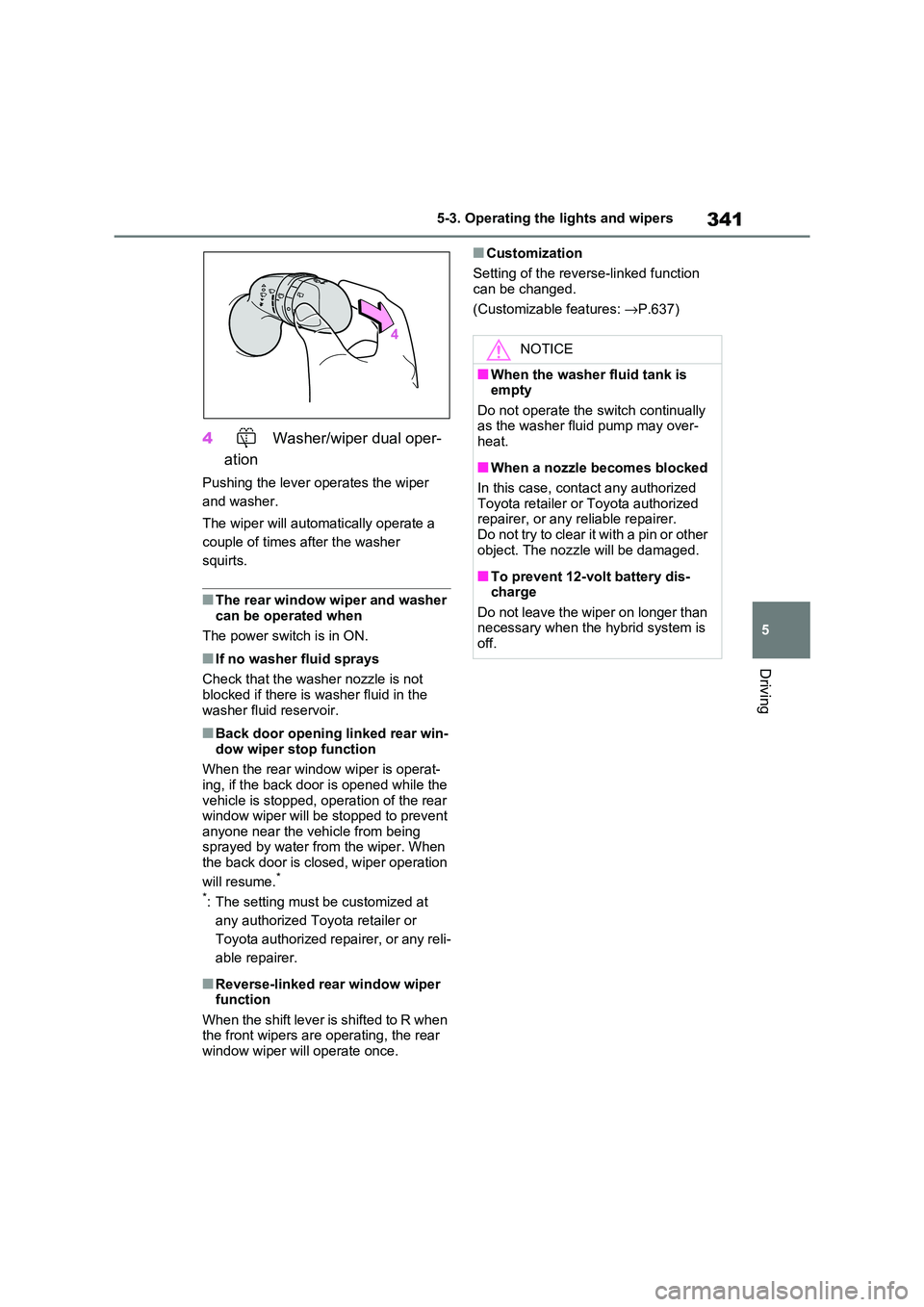
4 Washer/wiper dual oper-
ation
Pushing the lever operates the wiper
and washer.
The wiper will automatically operate a
couple of times after the washer
squirts.
■The rear window wiper and washer
can be operated when
The power switch is in ON.
■If no washer fluid sprays
Check that the wash er nozzle is not
blocked if there is washer fluid in the
washer fluid reservoir.
■Back door opening linked rear win - dow wiper stop function
When the rear window wiper is operat -
ing, if the back door is opened while the vehicle is stopped, o peration of the rear
window wiper will be stopped to prevent
anyone near the vehicle from being sprayed by water f rom the wiper. When
the back door is closed, wiper operation
will resume.*
*: The setting must be customized at
any authorized Toy ota retailer or
Toyota authorized repairer, or any reli -
able repairer.
■Reverse-linked rear window wiper function
When the shift lever is shifted to R when
the front wipers are operating, the rear window wiper will operate once.
■Customization
Setting of the reverse-linked function can be changed.
(Customizable features: →P.637)
NOTICE
■When the washer fluid tank is empty
Do not operate the switch continually
as the washer fluid pump may over -
heat.
■When a nozzle becomes blocked
In this case, contact any authorized Toyota retailer or Toyota authorized
repairer, or any reliable repairer.
Do not try to clear it with a pin or other object. The nozzle will be damaged.
■To prevent 12-volt battery dis - charge
Do not leave the wiper on longer than
necessary when the hybrid system is off.
Page 363 of 666
361
5
5-5. Using the driving support systems
Driving
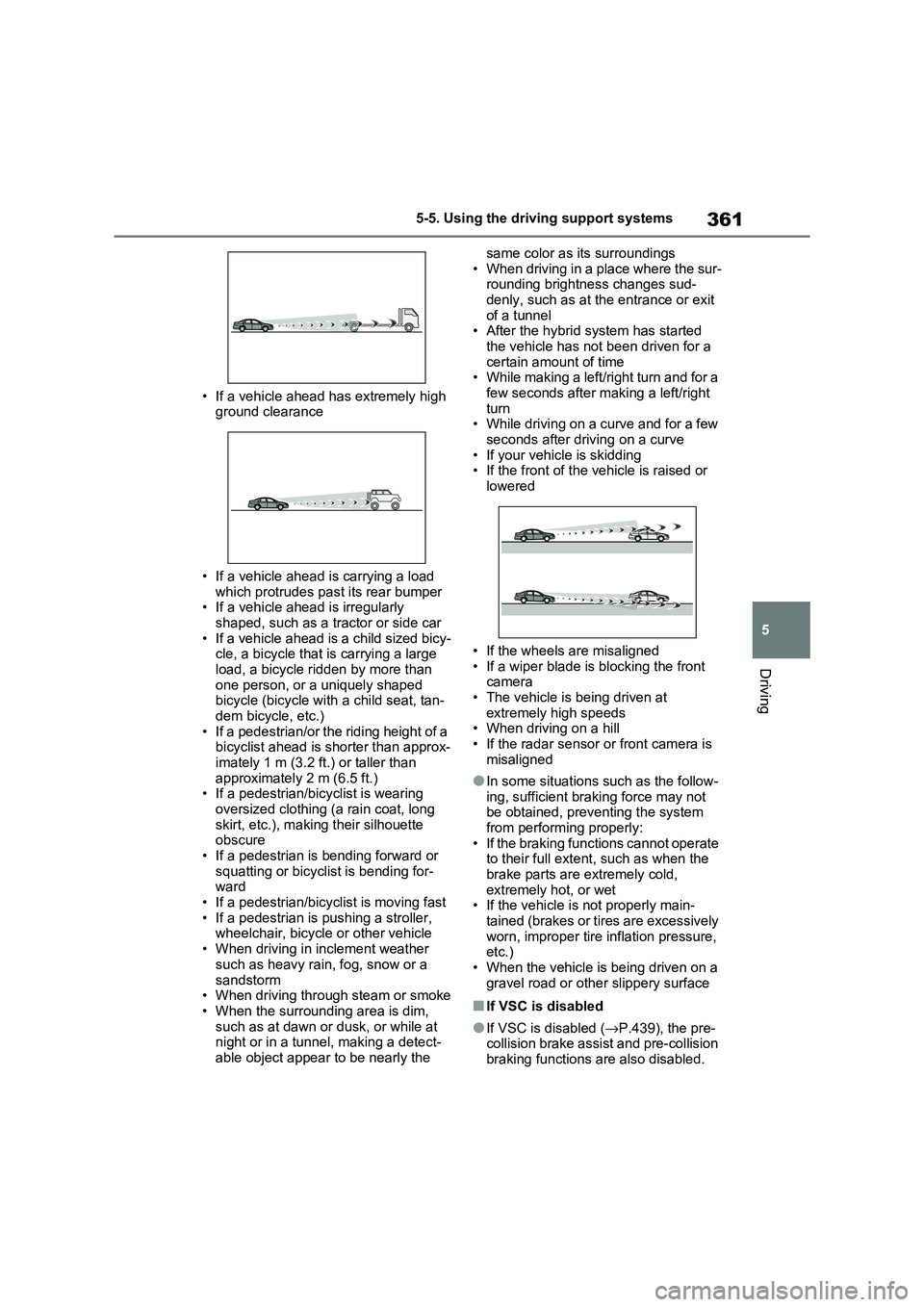
• If a vehicle ahead has extremely high
ground clearance
• If a vehicle ahead is carrying a load
which protrudes pa st its rear bumper • If a vehicle ahead is irregularly
shaped, such as a tractor or side car
• If a vehicle ahead is a child sized bicy - cle, a bicycle that is carrying a large
load, a bicycle ridden by more than
one person, or a uniquely shaped bicycle (bicycle with a child seat, tan-
dem bicycle, etc.)
• If a pedestrian/or the riding height of a bicyclist ahead is shorter than approx -
imately 1 m (3.2 ft.) or taller than
approximately 2 m (6.5 ft.) • If a pedestrian/bi cyclist is wearing
oversized clothing (a rain coat, long
skirt, etc.), maki ng their silhouette obscure
• If a pedestrian is bending forward or
squatting or bicyclist is bending for - ward
• If a pedestrian/bicy clist is moving fast
• If a pedestrian is pushing a stroller, wheelchair, bicycle or other vehicle
• When driving in inclement weather
such as heavy rain , fog, snow or a
sandstorm • When driving through steam or smoke
• When the surrounding area is dim,
such as at dawn or dusk, or while at night or in a tunnel, making a detect -
able object appear to be nearly the
same color as its surroundings
• When driving in a place where the sur - rounding brightness changes sud -
denly, such as at the entrance or exit
of a tunnel • After the hybrid system has started
the vehicle has not been driven for a
certain amount of time • While making a left/right turn and for a
few seconds after making a left/right
turn • While driving on a curve and for a few
seconds after driving on a curve
• If your vehicle is skidding • If the front of the v ehicle is raised or
lowered
• If the wheels are misaligned
• If a wiper blade is blocking the front
camera • The vehicle is being driven at
extremely high speeds
• When driving on a hill • If the radar sensor or front camera is
misaligned
●In some situations such as the follow -
ing, sufficient braking force may not
be obtained, preventing the system from performing properly:
• If the braking functions cannot operate
to their full extent, such as when the brake parts are extremely cold,
extremely hot, or wet
• If the vehicle is not properly main - tained (brakes or ti res are excessively
worn, improper tire i nflation pressure,
etc.)
• When the vehicle is being driven on a gravel road or other slippery surface
■If VSC is disabled
●If VSC is disabled (→P.439), the pre- collision brake assist and pre-collision
braking functions are also disabled.
Page 440 of 666
4385-5. Using the driving support systems
■ECB (Electronically Con-
trolled Brake System)
The electronically controlled sys -
tem generates braking force corre -
sponding to the brake operation
■ABS (Anti-lock Brake System)
Helps to prevent wheel lock when
the brakes are applied suddenly, or
if the brakes are applied while driv -
ing on a slippery road surface
■Brake assist
Generates an increased level of
braking force after the brake pedal
is depressed when the system
detects a panic stop situation
■VSC (Vehicle Stability Control)
Helps the driver to control skidding
when swerving suddenly or turning
on slippery road surfaces.
■VSC+ (Vehicle Stability Con -
trol+)
Provides cooperative control of the
ABS, TRC, VSC and EPS.
Helps to maintain directional stabil -
ity when swerving on slippery road
surfaces by controlling steering per -
formance.
■Trailer Sway Control
Helps the driver t o control trailer
sway by selectively applying brake
pressure for individual wheels and
reducing driving torque when trailer
sway is detected.
■TRC (Traction Control)
Helps to maintain drive power and
prevent the drive wheels from spin -
ning when starting the vehicle or
accelerating on slippery roads
■Active Cornering Assist (ACA)
Helps to prevent t he vehicle from
drifting to the outer side by perform -
ing inner wheel brake control when
attempting to acc elerate while turn-
ing
■Hill-start assist control
Helps to reduce the backward
movement of the vehicle when
starting on an uphill
■EPS (Electric Po wer Steering)
Employs an electric motor to
reduce the amount of effort needed
to turn the steering wheel
Driving assist systems
To keep driving safety and per -
formance, the following sys -
tems operate aut omatically in
response to various driving sit -
uations. Be aware, however,
that these sys tems are supple-
mentary and should not be
relied upon too heavily when
operating the vehicle.
Summary of the driving
assist systems
Page 448 of 666
4465-6. Driving tips
Perform the following according to
the driving conditions:
Do not try to forcibly open a win-
dow or move a wiper that is fro -
zen. Pour warm water over the
frozen area to melt the ice. Wipe
away the water immediately to
prevent it from freezing.
To ensure proper operation of
the climate control system fan,
remove any sno w that has accu-
mulated on the air inlet vents in
front of the windshield.
Check for and remove any
excess ice or snow that may
have accumulated on the exte -
rior lights, vehicle’s roof, chassis,
around the tires or on the brakes.
Remove any snow or mud from
the bottom of your shoes before
getting in the vehicle.
Accelerate the veh icle slowly, keep
a safe distance between you and
the vehicle ahead, and drive at a
reduced speed suitable to road
conditions.
Park the vehicle and move the
s hif t le ve r to P w itho u t se tt ing th e
parking brake. The parking brake
may freeze up, preventing it from
being released. If the vehicle is
parked without setting the park -
ing brake, make sure to block the
wheels.
Failure to do so may be danger -
ous because it may cause the
vehicle to move unexpectedly,
possibly leading to an accident.
When the parking brake is in automatic
mode, release the parking brake after
shifting the shift lever to P. ( →P.326)
If the vehicle is left parked with
the brakes damp in cold tem -
peratures, there is a possibility of
the brakes freezing.
If the vehicle is parked without
setting the parking brake, con -
firm that the shift lever cannot be
moved out of P*.
*: The shift lever will be locked if it is
attempted to be shifted from P to any
other position with out depressing the
brake pedal. If the shift lever can be
shifted from P, t here may be a prob-
lem with the shift lock system. Have
the vehicle inspected by any autho -
rized Toyota retailer or Toyota autho -
rized repairer, or any reliable repairer
immediately.
Before driving the vehicle
When driving the vehicle
When parking the vehicle
WARNING
■When parking the vehicle
When parking the vehicle without
applying the parki ng brake, make
sure to chock the wheels. If you do
not chock the wheels, the vehicle may move unexpectedly, possibly result-
ing in an accident.
Page 455 of 666
453
6
6-1. Using the air conditi oning system and defogger
Interior features
■Adjusting the temperature set-
ting
Turn driver’s side temperature con -
trol dial clockwise to increases the
temperature and turn the dial coun -
terclockwise to decreases the tem -
perature.
The air conditioni ng system switches
between individual and simultaneous
modes each time the “DUAL” switch is
pressed.
Simultaneous mode (the indicator on
the “DUAL” switch is off):
The driver’s side te mperature control
dial can be used to adjust the tempera -
ture for the driver’s and passenger’s
side. At this time, operate the passen -
ger’s side temperature control dial to
enter individual mode.
Individual mode (the indicator on the
“DUAL” switch is on):
The temperature for the driver’s and
passenger’s side can be adjusted sepa -
rately.
■Setting the fan speed
Press the fan speed increase
switch to increase the fan speed
and the fan speed decrease switch
to decrease the fan speed.
Pressing the “OFF” s witch to turns off
the fan.
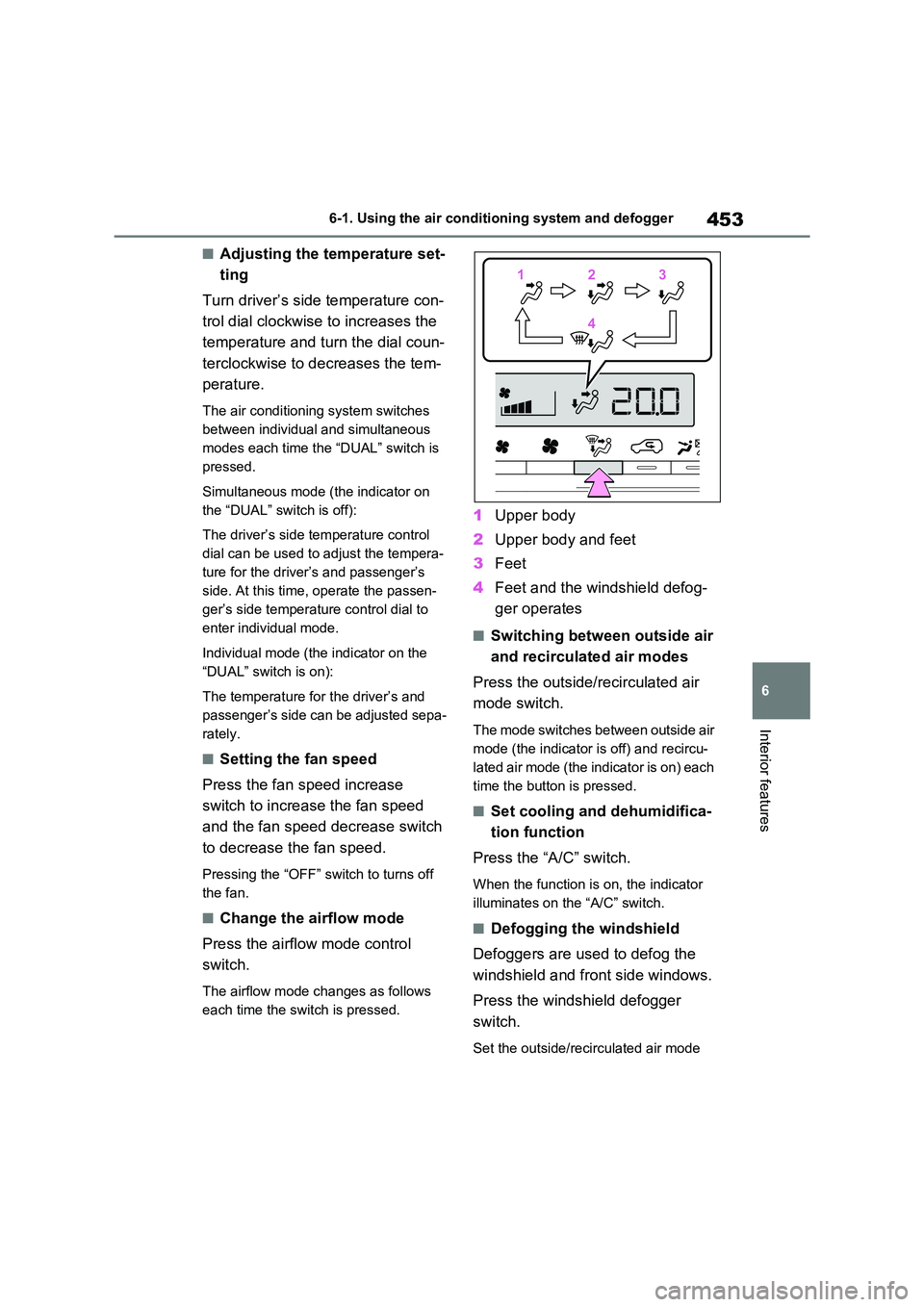
■Change the airflow mode
Press the airflow mode control
switch.
The airflow mode changes as follows
each time the sw itch is pressed.
1Upper body
2 Upper body and feet
3 Feet
4 Feet and the windshield defog-
ger operates
■Switching between outside air
and recirculated air modes
Press the outside/ recirculated air
mode switch.
The mode switches between outside air
mode (the indicator is off) and recircu-
lated air mode (the indicator is on) each
time the button is pressed.
■Set cooling and dehumidifica -
tion function
Press the “A/C” switch.
When the function is on, the indicator
illuminates on the “A/C” switch.
■Defogging the windshield
Defoggers are used to defog the
windshield and front side windows.
Press the windshi eld defogger
switch.
Set the outside/recirculated air mode
1 12233
4 4
Page 458 of 666
4566-1. Using the air conditioning system and defogger
●During use, various odors from inside
and outside the vehicle may enter into and accumulate in the air conditioning
system. This may t hen cause odor to
be emitted from the vents.
●To reduce potential odors from occur -
ring: • It is recommended that the air condi-
tioning system be se t to outside air
mode prior to turning the vehicle off. • The start timing o f the blower may be
delayed for a short period of time
immediately after t he air conditioning system is started in automatic mode.
●When parking, the system automati- cally switches to outside air mode to
encourage better air circulation
throughout the vehicle, helping to reduce odors that occur when starting
the vehicle.
■Air conditioning filter
→ P.532
■Noise from air conditioning system
Approximately 90 seconds after the
power switch turned to OFF, you may
hear sound coming from air conditioning system. This is the sound of a air condi -
tioning system initial ize and, it does not
indicate a malfunction.
■Customization
Settings (e.g. A/C Auto switch opera-
tion) can be changed.
(Customizable features: →P.640)
1Press the “AUTO” switch.
The dehumidification function begins to
operate. Air outlets and fan speed are automatically adjusted according to the
temperature setting and humidity.
2 Adjust the temperature setting.
3 To stop the operation, press the
“OFF” switch.
If the fan speed se tting or air flow
modes are operated, the automatic
mode indicator goes off. However,
automatic mode for functions other
than that operated is maintained.
■Using automatic mode
Fan speed is adjusted automatically
according to the temperature setting and
the ambient conditions.
WARNING
■Cautions for using “My Room Mode”
Do not leave children, people who
need assistance, or pets inside the vehicle. The system may turn off
automatically and the interior tem-
perature may become high or low, resulting in heat stroke, dehydration
or hypothermia. Fa ilure to do so may
result in death or serious injury.
■To prevent the windshield from fogging up
Do not use the wi ndshield defogger
switch during cool air operation in extremely humid weather.
The difference bet ween the tempera-
ture of the outside air and that of the windshield can cause the outer sur -
face of the windshield to fog up,
blocking your vision.
■When the outside rear view mir -
ror defoggers are operating
Do not touch the rear view mirror sur -
faces when the out side rear view mir-
ror defoggers are on.
NOTICE
■To prevent 12-volt battery dis - charge
Do not leave the ai r conditioning sys-
tem on longer than necessary when the hybrid system is off.
Using automatic mode
Page 463 of 666
461
6
6-1. Using the air conditi oning system and defogger
Interior features
●The outside temperature is extremely
low
●When the hybrid syst em is cool (for
example, after being left for a long time in low temperatures)
■Windshield defogger
When defogging the windshield using
the Remote Air Conditioning System, defogging may be insufficient due to the
power being restricted more than during
normal air conditioning operation. Also, the outside of the windshield may fog up
due to the outside temperature, humidity
or air conditioning set temperature.
■Using the heater via the Remote Air Conditioning System
●When the outside te mperature is low, heating may feel insufficient due to
restricted operation of the air condi -
tioning.
●When the outside heat exchanger
becomes frosted ov er, heating perfor- mance may decline due to automati -
cally switchi ng to the frost removal
operation. ( →P.452)
■Security feature
Any unlocked doors will be automatically
locked when the system is operating.
The emergency flashers flash to indicate that the doors have been locked or the
system has been turned off.
■Conditions affecting operation
→ P.225
■While the Remote Air Conditioning System is operating
●Depending on the operating condition of the Remote Air Conditioning Sys -
tem, the air condit ioning compressor
or cooling fan may spin and an operat -
ing noise may be heard. However, this does not indicate a mal -
function.
●The air conditi oning operation
switches, etc. will not operate while
the Remote Air Conditioning System is operating.
■Electronic key battery depletion
→ P.202
■When the electronic key battery is fully depleted
→ P.543
■Customization
Setting (e.g. Operation using “A/C” on the wireless remote control) can be
changed. (Customizable features:
→ P.629)
WARNING
■Precautions for the Remote Air Conditioning System
●Do not use the system if people are
in the vehicle. Even when the system is in use, the
internal temperature may still reach
a high or low level due to features such as the automatic shut-off.
Children and pets left inside the
vehicle may suffer heatstroke dehy - dration or hypothermia, or could
result in death or serious injury.
●Depending on the surrounding envi -
ronment, signals from the wireless
switch may transmit further than expected. Pay appropriate attention
to the vehicle’s surroundings and
use the switch only when neces- sary.
●Do not operate “A/C” on the wire - less remote contro l if the hood is
open. The air conditioning may
operate unintentionally and objects may be drawn into the electrical
cooling fan.
NOTICE
■To prevent the hybrid battery (traction battery ) from being dis-
charged
Use “A/C” on the wireless remote control only when necessary.
Page 467 of 666
465
6
6-2. Using the interior lights
Interior features
6-2.Using the interior lights
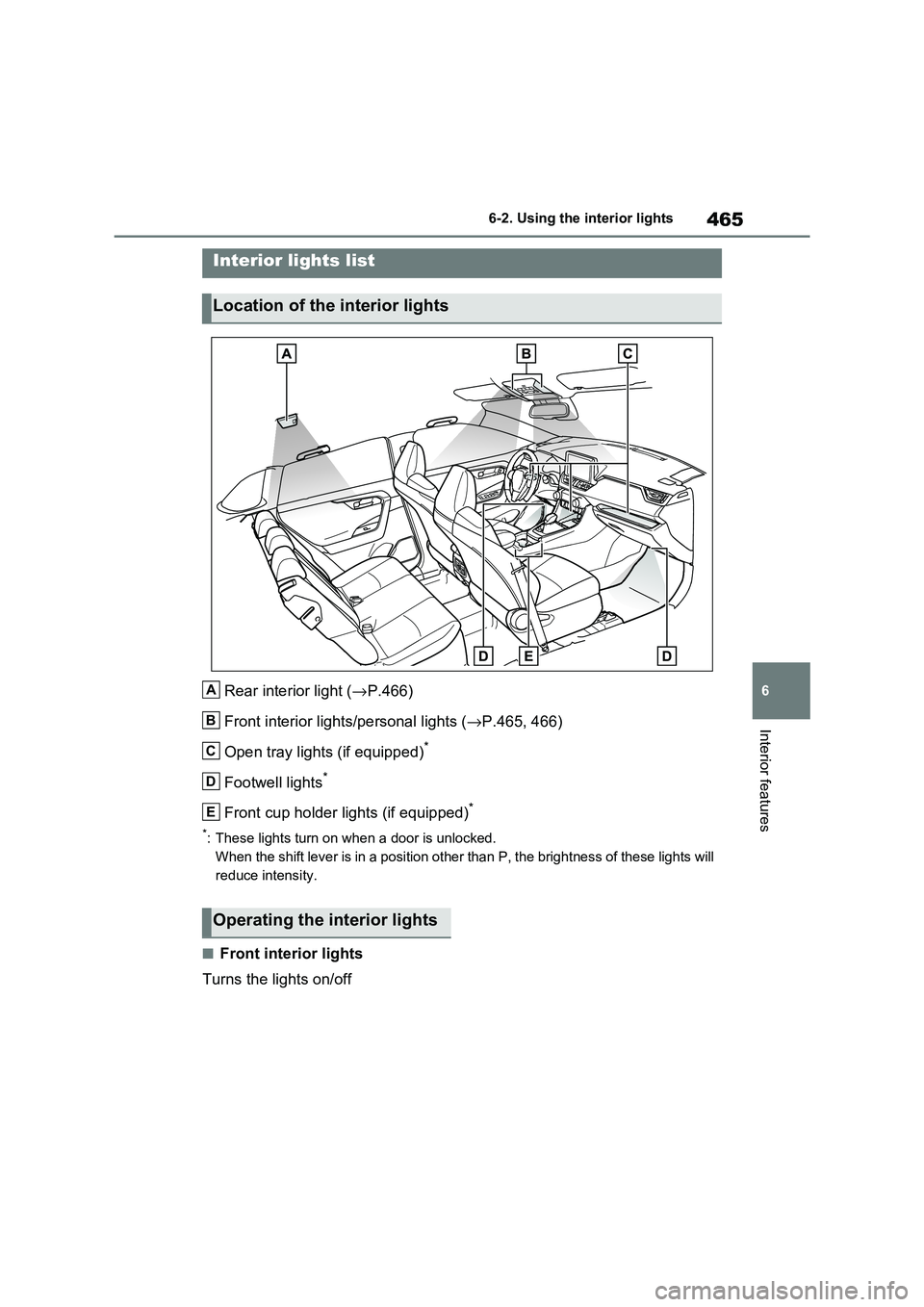
Rear interior light ( →P.466)
Front interior lights/personal lights ( →P.465, 466)
Open tray lights (if equipped)*
Footwell lights*
Front cup holder lights (if equipped)*
*: These lights turn on when a door is unlocked.
When the shift lever is in a position other than P, the brightn ess of these lights will
reduce intensity.
■Front interior lights
Turns the lights on/off
Interior lights list
Location of the interior lights
A
B
C
D
E
Operating the interior lights
Page 468 of 666
4666-2. Using the interior lights
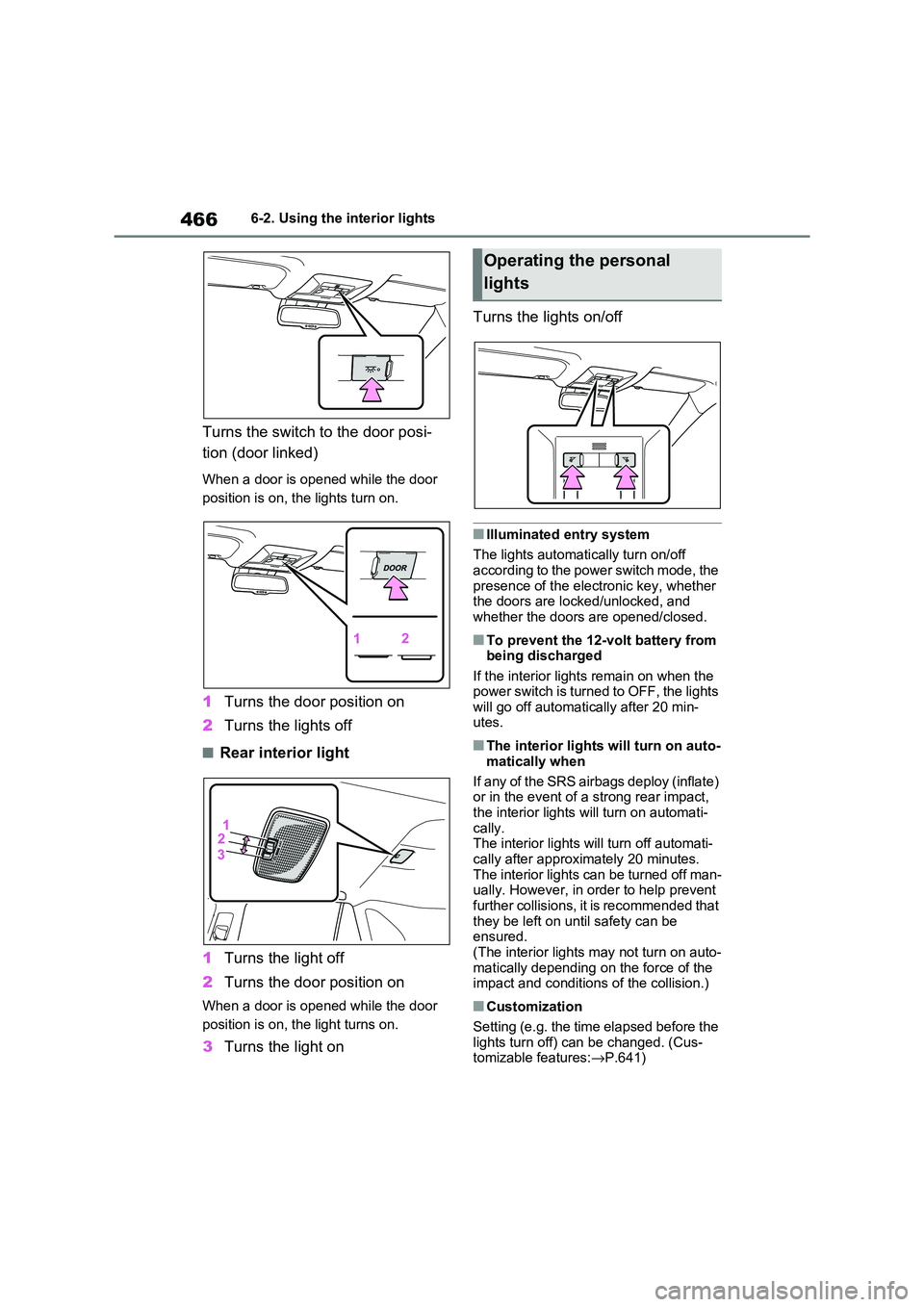
Turns the switch to the door posi-
tion (door linked)
When a door is opened while the door
position is on, the lights turn on.
1 Turns the door position on
2 Turns the lights off
■Rear interior light
1 Turns the light off
2 Turns the door position on
When a door is opened while the door
position is on, t he light turns on.
3Turns the light on
Turns the lights on/off
■Illuminated entry system
The lights automati cally turn on/off
according to the power switch mode, the presence of the electronic key, whether
the doors are locked/unlocked, and
whether the doors are opened/closed.
■To prevent the 12-volt battery from being discharged
If the interior lights remain on when the
power switch is turned to OFF, the lights will go off automati cally after 20 min-
utes.
■The interior lights will turn on auto -
matically when
If any of the SRS airbags deploy (inflate)
or in the event of a strong rear impact,
the interior lights will turn on automati- cally.
The interior lights w ill turn off automati-
cally after approximately 20 minutes. The interior lights can be turned off man -
ually. However, in order to help prevent
further collisions, it is recommended that
they be left on un til safety can be ensured.
(The interior lights may not turn on auto -
matically depending on the force of the impact and conditions of the collision.)
■Customization
Setting (e.g. the time elapsed before the
lights turn off) can be changed. (Cus - tomizable features: →P.641)
Operating the personal
lights
Page 471 of 666
469
6
6-3. Using the storage features
Interior features
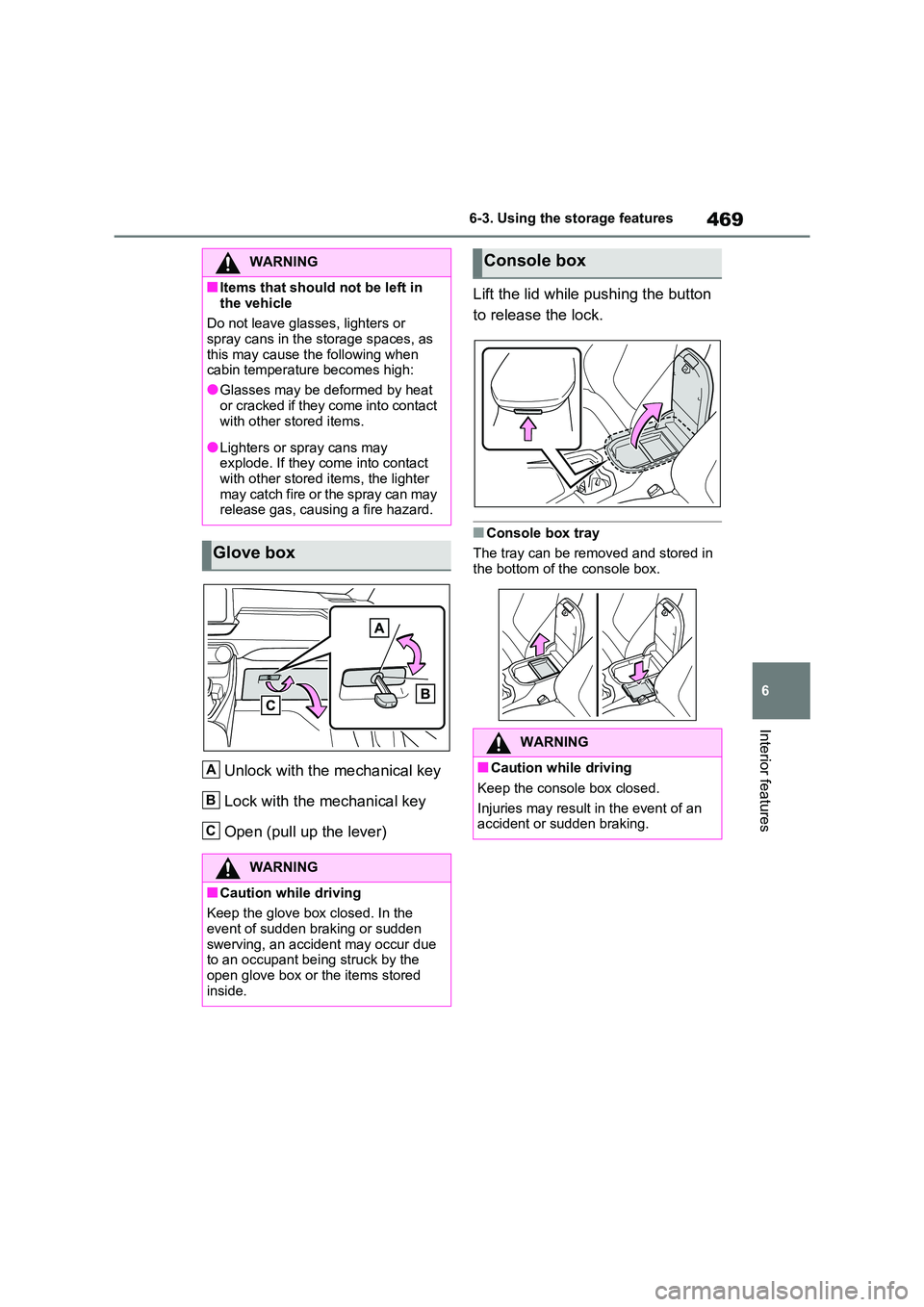
Unlock with the mechanical key
Lock with the mechanical key
Open (pull up the lever)
Lift the lid while pushing the button
to release the lock.
■Console box tray
The tray can be removed and stored in
the bottom of the console box.
WARNING
■Items that should not be left in
the vehicle
Do not leave glasses, lighters or spray cans in the storage spaces, as
this may cause the following when
cabin temperature becomes high:
●Glasses may be deformed by heat
or cracked if they come into contact
with other stored items.
●Lighters or spray cans may
explode. If they come into contact
with other stored items, the lighter may catch fire or the spray can may
release gas, causing a fire hazard.
Glove box
WARNING
■Caution while driving
Keep the glove box closed. In the
event of sudden braking or sudden swerving, an accident may occur due
to an occupant be ing struck by the
open glove box or t he items stored inside.
A
B
C
Console box
WARNING
■Caution while driving
Keep the console box closed.
Injuries may result in the event of an
accident or sudden braking.