ECU TOYOTA RAV4 PHEV 2021 Repair Manual
[x] Cancel search | Manufacturer: TOYOTA, Model Year: 2021, Model line: RAV4 PHEV, Model: TOYOTA RAV4 PHEV 2021Pages: 666, PDF Size: 161.28 MB
Page 310 of 666
3085-1. Before driving
■Tire information
●Increase the tire inflation pressure to
20.0 kPa (0.2 kgf/cm2 or bar, 3 psi) greater than the recommended value
when towing. ( →P.624)
●Increase the air pressure of the trailer
tires in accordance with the total
trailer weight and according to the val - ues recommended by the manufac -
turer of your trailer.
■Safety checks before towing
●Check that the maximum load limit for
the towing hitch/bracket and hitch ball
is not exceeded. Bear in mind that the coupling weight of the trailer will add
to the load exerted on the vehicle.
Also make sure tha t the total load exerted on the vehi cle is within the
range of the weight limits. ( →P.309)
●Ensure that the trailer load is secure.
●Supplementary outside rear view mir- rors should be added to the vehicle if
the traffic behind c annot be clearly
seen with standard mirrors. Adjust the extending arms of these mirrors on
both sides of the vehicle so that they
always provide maxi mum visibility of the road behind.
Trailer towing
Your vehicle is designed pri -
marily as a passenger carry -
ing vehicle. Towing a trailer
will have an adverse effect on
handling, performance, brak -
ing, durability, and fuel con -
sumption. Your safety and
satisfaction depend on the
proper use of correct equip -
ment and cautious driving hab -
its. For your safety and the
safety of others, do not over -
load the vehicle or trailer.
To tow a trailer safely, use
extreme care and drive the
vehicle in accordance with the
trailer’s characteristics and
operating conditions.
Toyota warranties do not apply
to damage or malfunction
caused by towing a trailer for
commercial purposes.
Ask your local authorized
Toyota retailer or Toyota
authorized repairer, or any reli -
able repairer for further details
before towing, as there are
additional legal requirements
in some countries.
WARNING
Follow all the instructions described in
this section.
Failure to do so could cause an acci - dent resulting in death or serious
injury.
■Trailer towing precautions
When towing, make sure that none of
the weight limits are exceeded.
( →P.309)
■To avoid accident or injury
●Vehicles with compact spare tire: Do not tow a trailer when the com -
pact spare tire is installed on your
vehicle.
●Vehicles with emergency tire punc -
ture repair kit: Do not tow a traile r when the tire
installed is repa ired with the emer-
gency tire puncture repair kit.
Page 317 of 666
315
5
5-1. Before driving
Driving
■Sudden acceleration/steering
input/cornering
Executing sharp turns when towing
may result in the trailer colliding
with your vehicle. D ecelerate well in
advance when approaching turns
and take them slowly and carefully
to avoid sudden braking.
■Important points regarding
turning
The wheels of the tr ailer will travel
closer to the inside of the curve
than the wheels of the vehicle. To
make allowance for this, take the
turns wider than you would nor -
mally do.
■Important points regarding
stability
Vehicle movement resulting from
uneven road surfaces and strong
crosswinds will affect handling. The
vehicle may also be rocked by
passing buses or large trucks. Fre -
quently check behind when moving
alongside such vehicles. As soon
as such vehicle movement occurs,
immediately start to decelerate
smoothly by slowly applying the
brakes. Always steer the vehicle
straight ahead while braking.
■Passing other vehicles
Consider the total combined length
of your vehicle and trailer and
ensure that the vehicle-to-vehicle
distance is sufficient before execut -
ing lane changes.
■Transmission information
To maintain engine braking effi -
ciency, when using engine braking,
do not use the transmission in D.
( →P.321)
■If the hybrid system overheats
Towing a loaded trailer up a long,
steep incline in temperatures
exceeding 30°C (85°F) may result
in the hybrid system overheating. If
the high coolant temperature warn -
ing light indicates that the hybrid
system is overheating, turn the air
conditioning off immediately, leave
the road and stop the vehicle in a
safe place. ( →P.611)
■When parking the vehicle
Always place wheel chocks under
the wheels of both the vehicle and
trailer. Firmly set the parking brake
and shift the shift lever to P.
■Break-in schedule
Toyota recommends that vehicles fitted
with new power train components
should not be used for towing trailers for the first 800 km (500 miles).
■Maintenance
●Maintenance must be performed more frequently when using the vehicle for
towing due to the greater weight bur -
den placed on the vehicle compared to normal driving.
●Retighten all bolts securing the hitch - ing ball and bracket after towing for
approximately 1000 km (600 miles).
■If trailer sway occurs
One or more factor s (crosswinds, pass- ing vehicles, rough roads, etc.) can
adversely affect handling of your vehicle
and trailer, causing instability.
Page 344 of 666
3425-4. Refueling
5-4.Refueling
Close all the doors and windows,
and turn the power switch to
OFF.
Confirm the type of fuel.
■Fuel types
→ P.627
■Fuel tank opening for unleaded
gasoline
To help prevent inco rrect fueling, your vehicle has a fuel tank opening that only
accommodates the special nozzle on
unleaded fuel pumps.
Opening the fuel tank
cap
Perform the foll owing steps to
open the fuel tank cap:
Before refueling the vehicle
WARNING
■When refueling the vehicle
Observe the following precautions
while refueling the vehicle. Failure to
do so may result in death or serious injury.
●After exiting the vehicle and before
opening the fuel door, touch an unpainted metal surface to dis -
charge any static e lectricity. It is
important to discha rge static elec- tricity before re fueling because
sparks resulting fr om static electric-
ity can cause fuel vapors to ignite while refueling.
●Always hold the gr ips on the fuel tank cap and turn it slowly to
remove it.
A whooshing sound may be heard when the fuel tank cap is loosened.
Wait until the sound cannot be
heard before fully removing the cap. In hot weather, pressurized
fuel may spray out of the filler neck
and cause injury.
●Do not allow anyone that has not
discharged static electricity from their body to come close to an open
fuel tank.
●Do not inhale vaporized fuel.
Fuel contains substances that are
harmful if inhaled.
●Do not smoke while refueling the
vehicle. Doing so may cause the fuel to
ignite and cause a fire.
●Do not return to the vehicle or touch
any person or objec t that is stati-
cally charged. T his may cause static electricity t o build up, result-
ing in a possible ignition hazard.
■When refueling
Observe the following precautions to
prevent fuel overflowing from the fuel tank:
●Securely insert the fuel nozzle into
the fuel filler neck.
●Stop filling the tank after the fuel
nozzle automatically clicks off.
●Do not top off the fuel tank.
NOTICE
■Refueling
Do not spill fuel during refueling. Doing so may damage the vehicle,
such as causing the emission control
system to operate abnormally or dam - aging fuel system components or the
vehicle’s pain ted surface.
Page 412 of 666
4105-5. Using the driving support systems
■The BSM function is operational when
The BSM function is operational when
all of the following conditions are met:
●The BSM function is on.
●The shift lever is in a position other
than R.
●The vehicle speed is greater than
approximately 16 km/h (10 mph).
■The BSM function will detect a
vehicle when
The BSM function will detect a vehicle
present in the detection area in the fol -
lowing situations:
●A vehicle in an adjacent lane over -
takes your vehicle.
●You overtake a vehicle in an adjacent
lane slowly.
●Another vehicle enters the detection
area when it changes lanes.
■Conditions under which the BSM function will not detect a vehicle
The BSM function is not designed to
detect the following types of vehicles and/or objects:
●Small motorcycles, bicycles, pedestri -
ans, etc.*
●Vehicles traveling in the opposite
direction
●Guardrails, walls, signs, parked vehi -
cles and similar stationary objects*
●Following vehicles that are in the
same lane*
●Vehicles traveling 2 lanes away from
your vehicle*
●Vehicles which are being overtaken
rapidly by your vehicle*: Depending on the conditions, detec -
tion of a vehicle and/or object may
occur.
■Conditions under which the BSM
function may not function correctly
●The BSM function may not detect
vehicles correctly in the following situ - ations:
• When the sensor is misaligned due to
a strong impact to the sensor or its surrounding area
• When mud, snow, ice, a sticker, etc. is
covering the sensor or surrounding area on the rear bumper
• When driving on a road surface that is
wet with standing water during bad weather, such as heavy rain, snow, or
fog
• When multiple veh icles are approach- ing with only a small gap between
each vehicle
• When the distance between your vehi - cle and a following vehicle is short
• When there is a significant difference
in speed between your vehicle and the vehicle that enters the detection
area
• When the difference in speed between your vehicle and another
vehicle is changing
• When a vehicle enters a detection area traveling at about the same
speed as your vehicle
• As your vehicle starts from a stop, a vehicle remains in the detection area
• When driving up and down consecu-
tive steep inclines, such as hills, dips in the road, etc.
• When driving on roads with sharp
bends, consecutive curves, or uneven surfaces
• When vehicle lanes are wide, or when
driving on the edge of a lane, and the vehicle in an adjacent lane is far away
from your vehicle
• When an accessory (such as a bicycle
carrier) is installed to the rear of the vehicle
• When there is a significant difference
in height between your vehicle and the vehicle that enters the detection
area
• Immediately afte r the BSM func- tion/RCTA function are turned on
• When towing a trailer
Page 413 of 666
411
5
5-5. Using the driving support systems
Driving
●Instances of the BSM function unnec -
essarily detecting a vehicle and/or object may increase in the following
situations:
• When the sensor is misaligned due to a strong impact to the sensor or its
surrounding area
• When the distance between your vehi - cle and a guardrail, wall, etc. that
enters the detect ion area is short
• When driving up and down consecu - tive steep inclines, such as hills, dips
in the road, etc.
• When vehicle lanes are narrow, or when driving on the edge of a lane,
and a vehicle travel ing in a lane other
than the adjacent lanes enters the detection area
• When driving on roads with sharp
bends, consecutive curves, or uneven surfaces
• When the tires are slipping or spinning
• When the distance between your vehi - cle and a following vehicle is short
• When an accessory (such as a bicycle
carrier) is installed to the rear of the vehicle
• When the vehicle th rows up water or
snow behind.
■Operation of the RCTA func -
tion
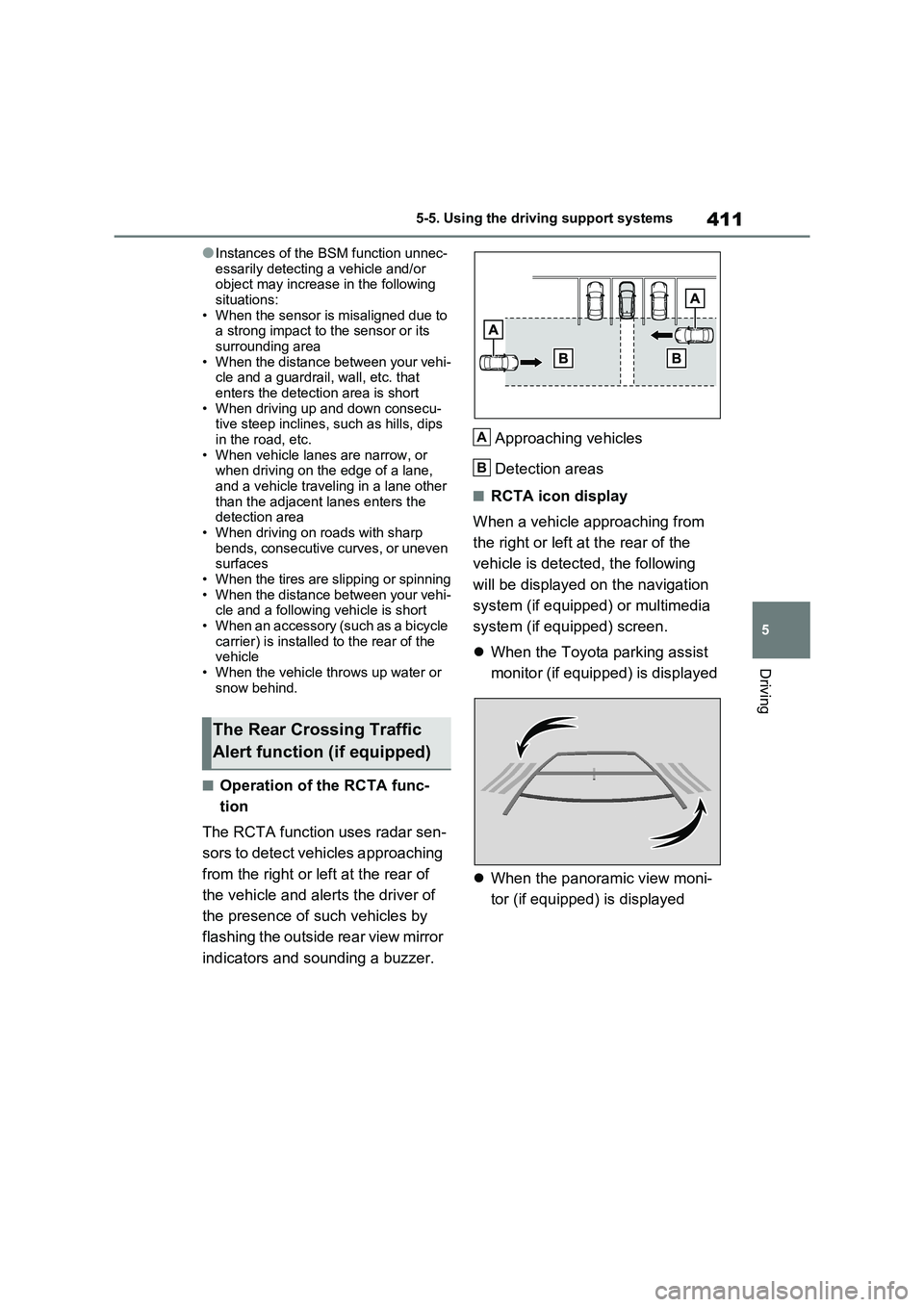
The RCTA function uses radar sen -
sors to detect vehicles approaching
from the right or left at the rear of
the vehicle and aler ts the driver of
the presence of s uch vehicles by
flashing the outside rear view mirror
indicators and sounding a buzzer.
Approaching vehicles
Detection areas
■RCTA icon display
When a vehicle approaching from
the right or left at the rear of the
vehicle is detected, the following
will be displayed on the navigation
system (if equipped) or multimedia
system (if equipped) screen.
When the Toyota parking assist
monitor (if equipped) is displayed
When the panoramic view moni-
tor (if equipped) is displayed
The Rear Crossing Traffic
Alert function (if equipped)
A
B
Page 463 of 666
461
6
6-1. Using the air conditi oning system and defogger
Interior features
●The outside temperature is extremely
low
●When the hybrid syst em is cool (for
example, after being left for a long time in low temperatures)
■Windshield defogger
When defogging the windshield using
the Remote Air Conditioning System, defogging may be insufficient due to the
power being restricted more than during
normal air conditioning operation. Also, the outside of the windshield may fog up
due to the outside temperature, humidity
or air conditioning set temperature.
■Using the heater via the Remote Air Conditioning System
●When the outside te mperature is low, heating may feel insufficient due to
restricted operation of the air condi -
tioning.
●When the outside heat exchanger
becomes frosted ov er, heating perfor- mance may decline due to automati -
cally switchi ng to the frost removal
operation. ( →P.452)
■Security feature
Any unlocked doors will be automatically
locked when the system is operating.
The emergency flashers flash to indicate that the doors have been locked or the
system has been turned off.
■Conditions affecting operation
→ P.225
■While the Remote Air Conditioning System is operating
●Depending on the operating condition of the Remote Air Conditioning Sys -
tem, the air condit ioning compressor
or cooling fan may spin and an operat -
ing noise may be heard. However, this does not indicate a mal -
function.
●The air conditi oning operation
switches, etc. will not operate while
the Remote Air Conditioning System is operating.
■Electronic key battery depletion
→ P.202
■When the electronic key battery is fully depleted
→ P.543
■Customization
Setting (e.g. Operation using “A/C” on the wireless remote control) can be
changed. (Customizable features:
→ P.629)
WARNING
■Precautions for the Remote Air Conditioning System
●Do not use the system if people are
in the vehicle. Even when the system is in use, the
internal temperature may still reach
a high or low level due to features such as the automatic shut-off.
Children and pets left inside the
vehicle may suffer heatstroke dehy - dration or hypothermia, or could
result in death or serious injury.
●Depending on the surrounding envi -
ronment, signals from the wireless
switch may transmit further than expected. Pay appropriate attention
to the vehicle’s surroundings and
use the switch only when neces- sary.
●Do not operate “A/C” on the wire - less remote contro l if the hood is
open. The air conditioning may
operate unintentionally and objects may be drawn into the electrical
cooling fan.
NOTICE
■To prevent the hybrid battery (traction battery ) from being dis-
charged
Use “A/C” on the wireless remote control only when necessary.
Page 474 of 666
4726-3. Using the storage features
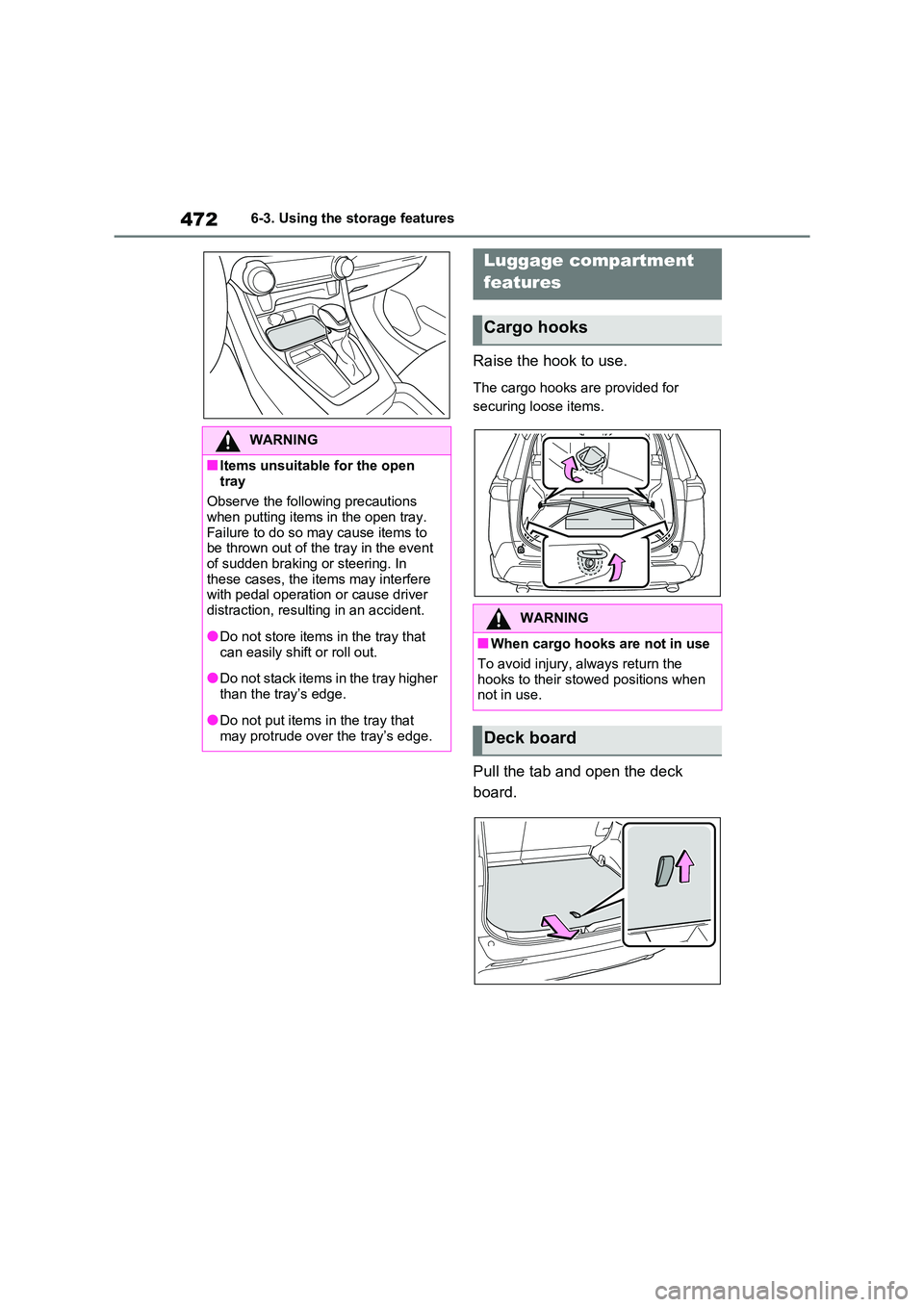
Raise the hook to use.
The cargo hooks are provided for
securing loose items.
Pull the tab and open the deck
board.
WARNING
■Items unsuitable for the open
tray
Observe the following precautions when putting items in the open tray.
Failure to do so m ay cause items to
be thrown out of the tray in the event
of sudden braking or steering. In these cases, the items may interfere
with pedal operation or cause driver
distraction, resulting in an accident.
●Do not store items in the tray that
can easily shift or roll out.
●Do not stack items in the tray higher
than the tray’s edge.
●Do not put items i n the tray that
may protrude over the tray’s edge.
Luggage compartment
features
Cargo hooks
WARNING
■When cargo hooks are not in use
To avoid injury, always return the hooks to their stowed positions when
not in use.
Deck board
Page 476 of 666
4746-3. Using the storage features
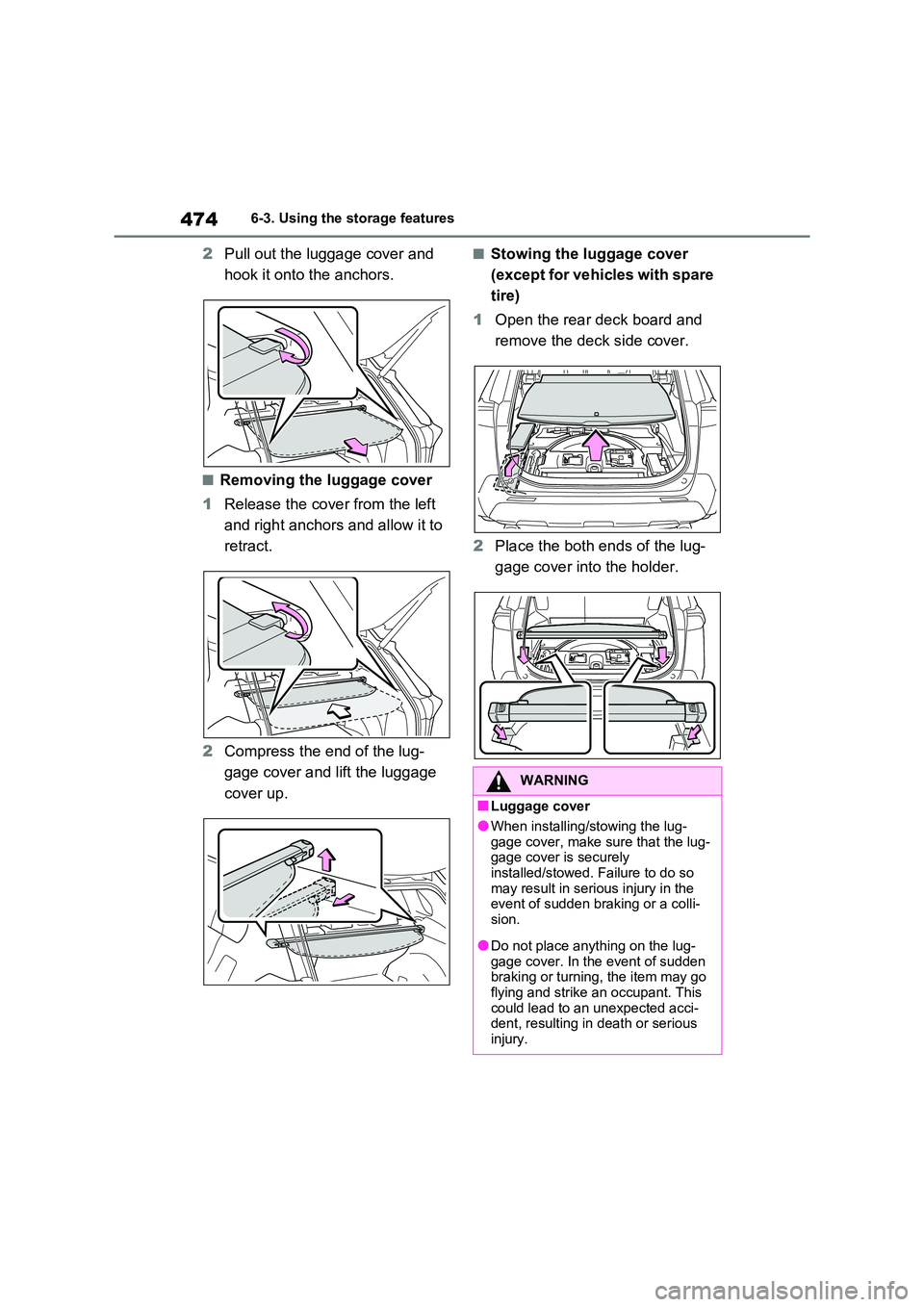
2Pull out the luggage cover and
hook it onto the anchors.
■Removing the luggage cover
1 Release the cover from the left
and right anchors and allow it to
retract.
2 Compress the end of the lug-
gage cover and lift the luggage
cover up.
■Stowing the luggage cover
(except for vehicles with spare
tire)
1 Open the rear deck board and
remove the deck side cover.
2 Place the both ends of the lug-
gage cover into the holder.
WARNING
■Luggage cover
●When installing/st owing the lug-
gage cover, make sure that the lug - gage cover is securely
installed/stowed. Failure to do so
may result in seri ous injury in the event of sudden braking or a colli -
sion.
●Do not place anything on the lug -
gage cover. In the event of sudden
braking or turning, the item may go flying and strike an occupant. This
could lead to an unexpected acci-
dent, resulting in death or serious injury.
Page 500 of 666
4987-3. Do-it-yourself maintenance
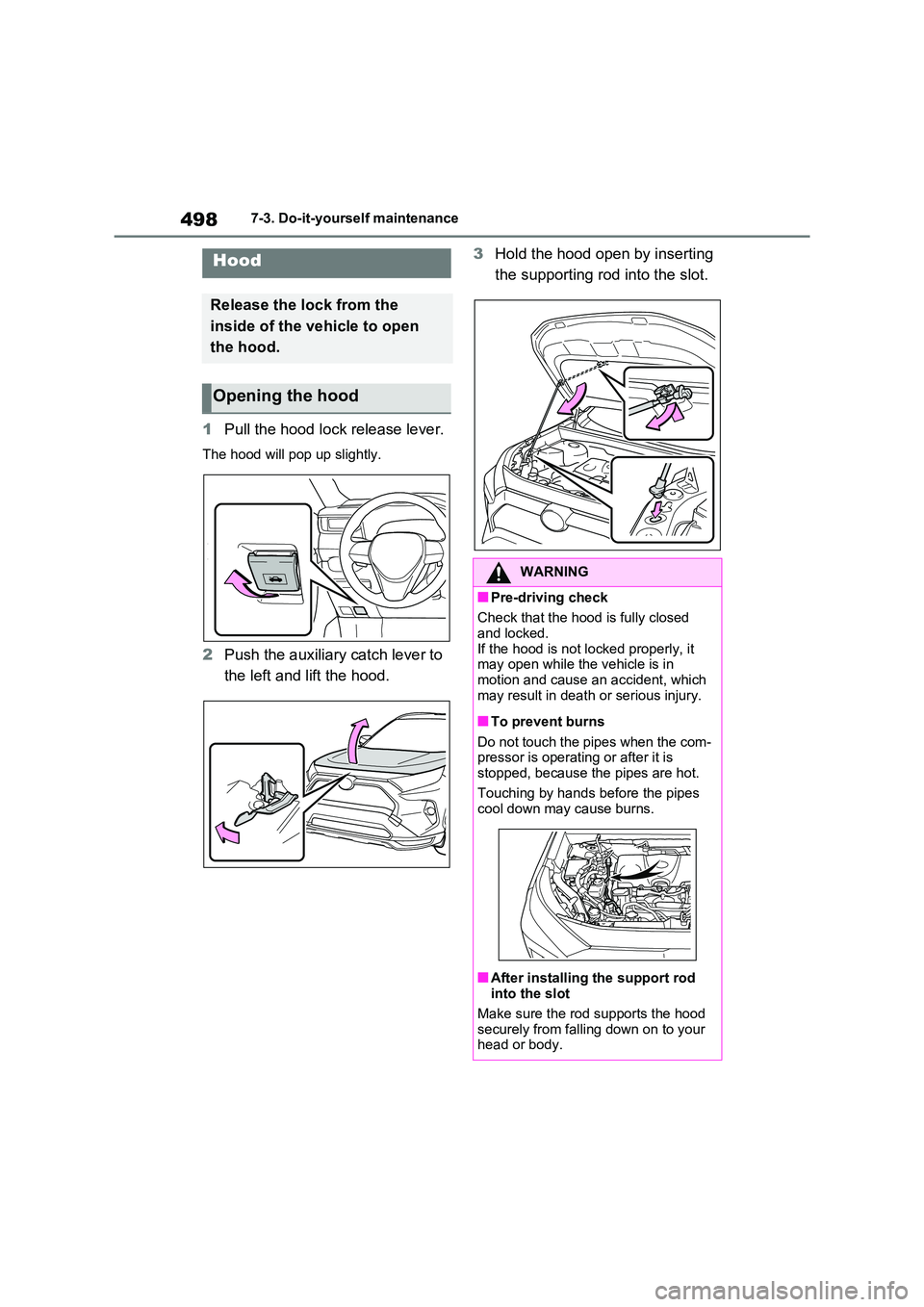
1Pull the hood lock release lever.
The hood will pop up slightly.
2Push the auxiliary catch lever to
the left and lift the hood.
3 Hold the hood open by inserting
the supporting rod into the slot.Hood
Release the lock from the
inside of the vehicle to open
the hood.
Opening the hood
WARNING
■Pre-driving check
Check that the hood is fully closed
and locked.
If the hood is not lo cked properly, it
may open while the vehicle is in motion and cause an accident, which
may result in death or serious injury.
■To prevent burns
Do not touch the pipes when the com -
pressor is operati ng or after it is stopped, because the pipes are hot.
Touching by hands before the pipes
cool down may cause burns.
■After installing the support rod
into the slot
Make sure the rod supports the hood
securely from falli ng down on to your
head or body.
Page 510 of 666
5087-3. Do-it-yourself maintenance
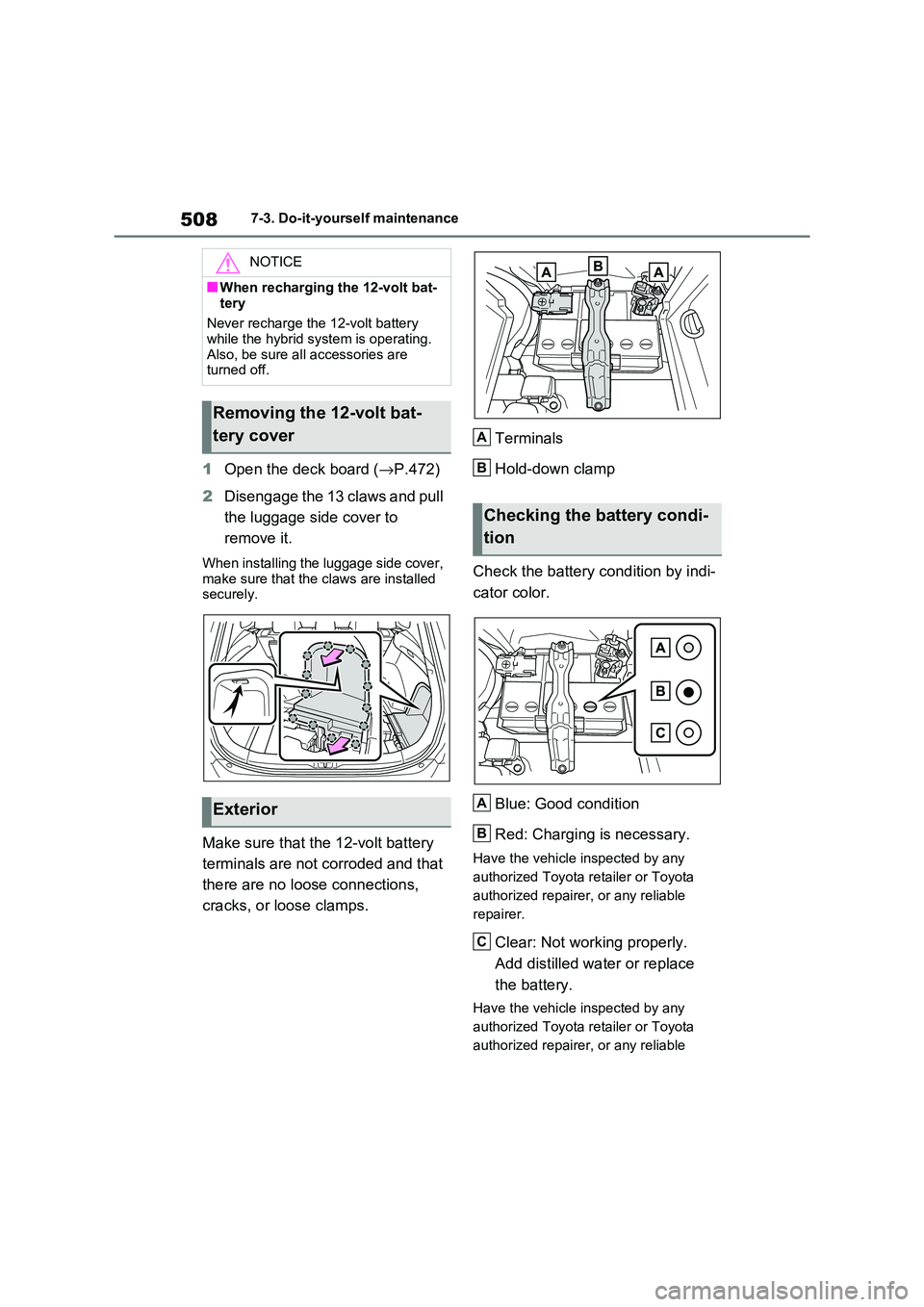
1Open the deck board (→P.472)
2 Disengage the 13 claws and pull
the luggage side cover to
remove it.
When installing the luggage side cover,
make sure that the c laws are installed securely.
Make sure that the 12-volt battery
terminals are not corroded and that
there are no loose connections,
cracks, or loose clamps.
Terminals
Hold-down clamp
Check the battery condition by indi -
cator color.
Blue: Good condition
Red: Charging is necessary.
Have the vehicle inspected by any
authorized Toyota r etailer or Toyota
authorized repairer, or any reliable
repairer.
Clear: Not working properly.
Add distilled wate r or replace
the battery.
Have the vehicle inspected by any
authorized Toyota r etailer or Toyota
authorized repairer, or any reliable
NOTICE
■When recharging the 12-volt bat -
tery
Never recharge the 12-volt battery while the hybrid system is operating.
Also, be sure all accessories are
turned off.
Removing the 12-volt bat -
tery cover
Exterior
Checking the battery condi -
tion
A
B
A
B
C