steering TOYOTA RAV4 PHEV 2021 Repair Manual
[x] Cancel search | Manufacturer: TOYOTA, Model Year: 2021, Model line: RAV4 PHEV, Model: TOYOTA RAV4 PHEV 2021Pages: 666, PDF Size: 161.28 MB
Page 438 of 666
4365-5. Using the driving support systems
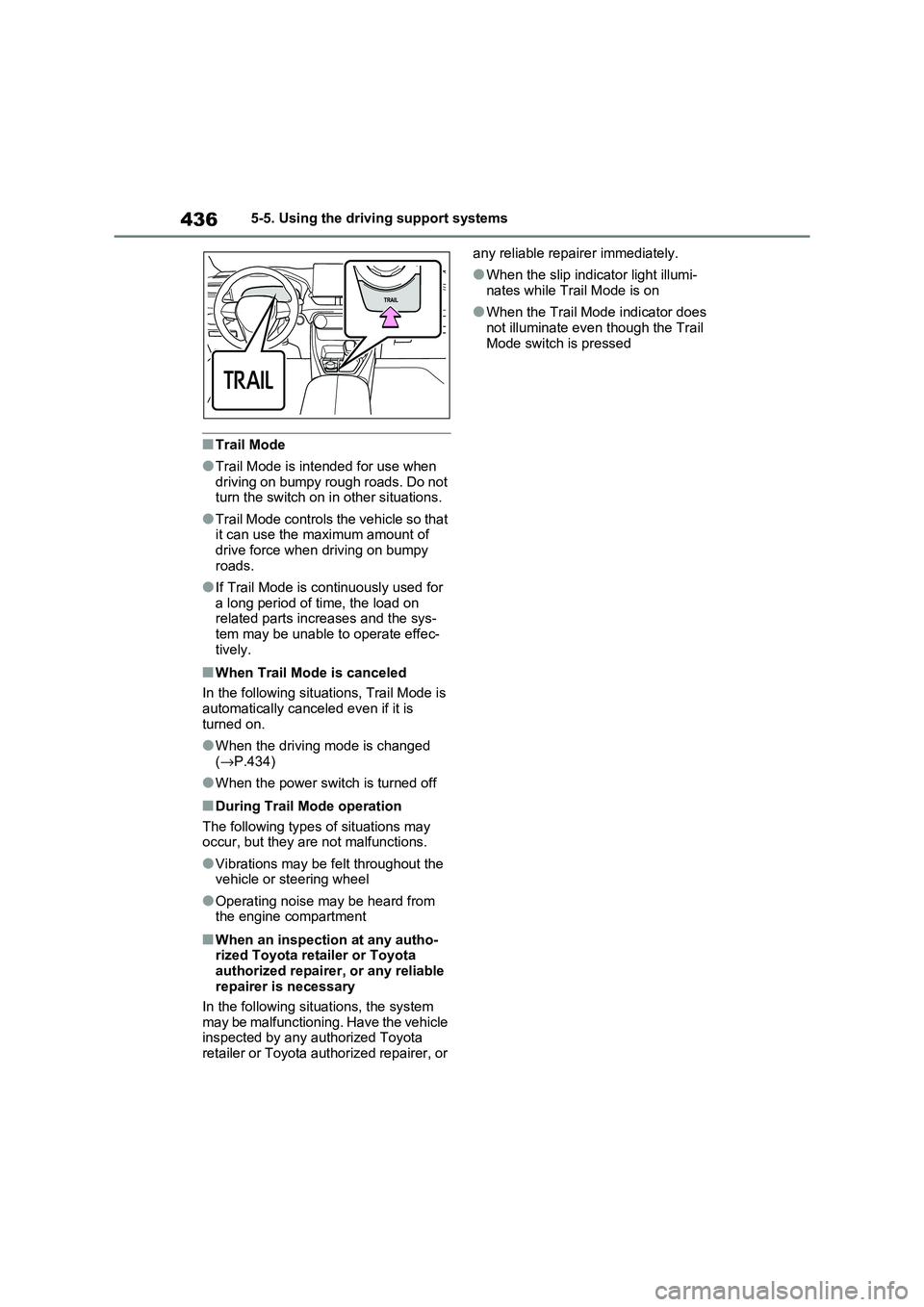
■Trail Mode
●Trail Mode is intended for use when
driving on bumpy rough roads. Do not turn the switch on in other situations.
●Trail Mode controls the vehicle so that it can use the maximum amount of
drive force when driving on bumpy
roads.
●If Trail Mode is continuously used for
a long period of t ime, the load on related parts increases and the sys -
tem may be unable t o operate effec-
tively.
■When Trail Mode is canceled
In the following situations, Trail Mode is
automatically canc eled even if it is
turned on.
●When the drivi ng mode is changed
( →P.434)
●When the power switch is turned off
■During Trail Mode operation
The following types of situations may occur, but they are not malfunctions.
●Vibrations may be felt throughout the vehicle or steering wheel
●Operating noise may be heard from
the engine compartment
■When an inspection at any autho - rized Toyota retailer or Toyota
authorized repairer, or any reliable
repairer is necessary
In the following situ ations, the system
may be malfunctioning. Have the vehicle
inspected by any authorized Toyota retailer or Toyota authorized repairer, or
any reliable repairer immediately.
●When the slip indicator light illumi -
nates while Trail Mode is on
●When the Trail Mode indicator does
not illuminate even though the Trail
Mode switch is pressed
Page 440 of 666
4385-5. Using the driving support systems
■ECB (Electronically Con-
trolled Brake System)
The electronically controlled sys -
tem generates braking force corre -
sponding to the brake operation
■ABS (Anti-lock Brake System)
Helps to prevent wheel lock when
the brakes are applied suddenly, or
if the brakes are applied while driv -
ing on a slippery road surface
■Brake assist
Generates an increased level of
braking force after the brake pedal
is depressed when the system
detects a panic stop situation
■VSC (Vehicle Stability Control)
Helps the driver to control skidding
when swerving suddenly or turning
on slippery road surfaces.
■VSC+ (Vehicle Stability Con -
trol+)
Provides cooperative control of the
ABS, TRC, VSC and EPS.
Helps to maintain directional stabil -
ity when swerving on slippery road
surfaces by controlling steering per -
formance.
■Trailer Sway Control
Helps the driver t o control trailer
sway by selectively applying brake
pressure for individual wheels and
reducing driving torque when trailer
sway is detected.
■TRC (Traction Control)
Helps to maintain drive power and
prevent the drive wheels from spin -
ning when starting the vehicle or
accelerating on slippery roads
■Active Cornering Assist (ACA)
Helps to prevent t he vehicle from
drifting to the outer side by perform -
ing inner wheel brake control when
attempting to acc elerate while turn-
ing
■Hill-start assist control
Helps to reduce the backward
movement of the vehicle when
starting on an uphill
■EPS (Electric Po wer Steering)
Employs an electric motor to
reduce the amount of effort needed
to turn the steering wheel
Driving assist systems
To keep driving safety and per -
formance, the following sys -
tems operate aut omatically in
response to various driving sit -
uations. Be aware, however,
that these sys tems are supple-
mentary and should not be
relied upon too heavily when
operating the vehicle.
Summary of the driving
assist systems
Page 442 of 666
4405-5. Using the driving support systems
System), PCS will also be disabled
(only Pre-Collision warning is avail -
able). The PCS warning light will
come on and a message will be dis -
played on the multi-information dis -
play. ( →P.361)
■When the message is displayed on
the multi-information display show -
ing that TRC has been disabled
even if has not been pressed
TRC is temporary deactivated. If the information continues to show, contact
any authorized Toyota retailer or Toyota
authorized repairer, or any reliable repairer.
■Operating conditions of hill-start
assist control
When the following four conditions are met, the hill-start as sist control will oper-
ate:
●The shift lever is in a position other
than P or N (when starting off for-
ward/backward on an upward incline).
●The vehicle is stopped.
●The accelerator pedal is not
depressed.
●The parking brake is not engaged.
■Automatic system cancelation of
hill-start assist control
The hill-start assist control will turn off in any of the following situations:
●The shift lever is shifted to P or N.
●The accelerator pedal is depressed.
●The parking brak e is engaged.
●No more than 2 seconds have elapsed after the brake pedal is
released.
■Sounds and vibrations caused by
the ABS, brake assist, VSC, Trailer Sway Control, TRC and hill-start
assist control systems
●A sound may be heard from the
engine compartment when the brake
pedal is depressed repeatedly, when
the hybrid system i s started or just
after the vehicle beg ins to move. This sound does not indicate that a mal -
function has occurred in any of these
systems.
●Any of the followin g conditions may
occur when the a bove systems are operating. None of these indicates
that a malfunction has occurred.
• Vibrations may be felt through the vehicle body and steering.
• A motor sound may be heard also
after the vehicle comes to a stop.
■ECB operating sound
ECB operating sound may be heard in
the following cases, but it does not indi-
cate that a malfun ction has occurred.
●Operating sound heard from the
engine compartment when the brake pedal is operated.
●Motor sound of the brake system heard from the front part of the vehicle
when the driver’ door is opened.
●Operating sound heard from the
engine compartment when one or two
minutes passed after the stop of the hybrid system.
■Active Cornering Assist operation
sounds and vibrations
When the Active Cornering Assist is operated, operation sounds and vibra -
tions may be generat ed from the brake
system, but thi s is not a malfunction.
■EPS operation sound
When the steering wheel is operated, a
motor sound (whirring sound) may be
heard. This does not indicate a malfunc - tion.
■Automatic reacti vation of TRC,
Trailer Sway Control and VSC sys -
tems
After turning the TRC, Trailer Sway Control and VSC systems off, the sys -
tems will be automati cally re-enabled in
the following situations:
●When the power switch is turned off.
●If only the TRC syst em is turned off,
Page 443 of 666
441
5
5-5. Using the driving support systems
Driving
the TRC will turn on when vehicle
speed increases. If both the TRC and VSC systems are
turned off, automa tic re-enabling will
not occur when vehicle speed increases.
■Operating conditions of Active Cor -
nering Assist
The system operates when the following occurs.
●TRC/VSC can operate
●The driver is attempting to accelerate
while turning
●The system detects that the vehicle is
drifting to the outer side
●The brake pedal is released
■Reduced effectiveness of the EPS
system
The effectiveness o f the EPS system is
reduced to prevent the system from
overheating when there is frequent steering input over an extended period
of time. The steering wheel may feel
heavy as a result. Should this occur, refrain from excessive steering input or
stop the vehicle and t urn the hybrid sys-
tem off. The EPS sys tem should return to normal within 10 minutes.
■Operating conditions of emergency
brake signal
When the following co nditions are met, the emergency brake signal will operate:
●The emergency fl ashers are off.
●Actual vehicle speed is over 55 km/h
(35 mph).
●The system judges from the vehicle
deceleration that it is a sudden brak -
ing operation.
■Automatic system cancelation of emergency brake signal
The emergency brake signal will be can -
celed in any of the following situations:
●The emergency flashers are turned
on.
●The system judges from the vehicle
deceleration that is not a sudden brak - ing operation.
■Secondary Collision Brake operat -
ing conditions (if equipped)
The system operates when the SRS air - bag sensor detects a collision while the
vehicle is in moti on. However, the sys-
tem does not operate in any of the fol - lowing situations.
●The vehicle speed is below 10 km/h (6 mph)
●Components are damaged
■Secondary Collision Brake auto - matic cancellation (if equipped)
The system is automa tically canceled in
any of the following situations.
●The vehicle speed drops below
approximately 10 km/h (6 mph)
●A certain amount of time elapses
during operation
●The accelerator pedal is depressed a
large amount
■If a message about AWD is shown on the multi-information displa y
Perform the following actions.
Page 446 of 666
4445-5. Using the driving support systems
WARNING
■If trailer sway occurs
Observe the following precautions.
Failing to do so may cause death or serious injury.
●Firmly grip the steering wheel.
Steer straight ahead. Do not try to control trailer sw aying by turning
the steering wheel.
●Begin releasing the accelerator pedal immediately but very gradu -
ally to reduce speed.
Do not increase speed. Do not apply vehicle brakes.
If you make no extreme correction
with the steering or brakes, your vehi-
cle and trailer should stabilize.
( →P.308)
■Secondary Collision Brake (if
equipped)
Do not rely solely upon the Secondary Collision Brake. This system is
designed to help re duce the possibil-
ity of further damage due to a second - ary collision, however, that effect
changes according to various condi -
tions. Overly relyi ng on the system may result in death or serious injury.
Page 447 of 666
445
5
5-6. Driving tips
Driving
5-6.Driving tips
Use fluids that are appropriate to
the prevailing outside tempera-
tures.
• Engine oil
• Engine coolant
• Power control unit coolant
• Washer fluid
Have a service technician
inspect the condition of the 12-
volt battery.
Have the vehicle fitted with four
snow tires or purchase a set of
tire chains for the front tires.
Ensure that all tires are the same size
and brand, and that chains match the
size of the tires.*
*: Tire chains cannot be mounted on
vehicles with 235/55R19 tires.
Winter driving tips
Carry out the necessary prepa -
rations and inspections before
driving the vehicle in winter.
Always drive the vehicle in a
manner appropriate to the pre -
vailing weather conditions.
Pre-winter preparations
WARNING
■Driving with snow tires
Observe the following precautions to reduce the risk of accidents.
Failure to do so may result in a loss of
vehicle control and cause death or serious injury.
●Use tires of the specified size.
●Maintain the recommended level of air pressure.
●Do not drive at speeds in excess of the speed limit or the speed limit
specified for the snow tires being
used.
●Use snow tires on all, not just some
wheels.
■Driving with tire chains (except
235/55R19 tires)
Observe the following precautions to
reduce the risk of accidents.
Failure to do so may result in the vehi - cle being unable to be driven safely,
and may cause death or serious
injury.
●Do not drive in excess of the speed
limit specified for the tire chains being used, or 50 km/h (30 mph),
whichever is lower.
●Avoid driving on bumpy road sur -
faces or over potholes.
●Avoid sudden acceleration, abrupt
steering, sudden br aking and shift-
ing operations that cause sudden engine braking.
●Slow down sufficiently before enter - ing a curve to ensure that vehicle
control is maintained.
●Do not use LTA (Lane Tracing
Assist) system (if equipped).
NOTICE
■Repairing or replacing snow tires
Request repairs or replacement of snow tires from any authorized
Toyota retailer or Toyota authorized
repairer, or any reliable repairer or legitimate tire retailers.
This is because the removal and
attachment of snow tires affects the operation of the tire pressure warning
valves and transmitters.
Page 451 of 666
449
5
5-6. Driving tips
Driving
cautions to ensure your driving
enjoyment and to help prevent the
closure of areas to off-road vehi -
cles:
Drive your vehicle only in areas
where off-road vehicles are per -
mitted to travel.
Respect private property. Get
owner’s permission before enter -
ing private property.
Do not enter areas that are
closed. Honor gates, barriers
and signs that restrict travel.
Stay on established roads. When
conditions are wet, driving tech -
niques should be changed or
travel delayed to prevent dam -
age to roads.
WARNING
■Off-road drivin g precautions
Always observe the following precau -
tions to minimize the risk of death, serious injury or damage to your vehi -
cle:
●Drive carefully when off the road. Do not take unnecessary risks by
driving in dangerous places.
●Do not grip the steering wheel
spokes when driving off-road. A
bad bump could jerk the wheel and injure your hands. Keep both hands
and especially your thumbs on the
outside of the rim.
●Always check your b rakes for effec-
tiveness immediately after driving in sand, mud, water or snow.
●After driving through tall grass, mud, rock, sand, ri vers, etc., check
that there is no g rass, bush, paper,
rags, stone, sand, etc. adhering or trapped on the underbody. Clear off
any such matter from the under -
body. If the vehi cle is used with these materials trapped or adhering
to the underbody, a breakdown or
fire could occur.
●When driving off-road or in rugged
terrain, do not drive at excessive speeds, jump, make sharp turns,
strike objects, etc. This may cause
loss of control or vehicle rollover causing death or serious injury. You
are also risking expensive damage
to your vehicle’s suspension and chassis.
NOTICE
■To prevent the water damage
Take all necessary safety measures
to ensure that wat er damage to the hybrid battery (tr action battery),
hybrid system or other components
does not occur.
●Water entering the engine compart -
ment may cause severe damage to
the hybrid system.
●Water entering the hybrid transmis -
sion will cause deterioration in transmission quality. The malfunc -
tion indicator may come on, and the
vehicle may no t be drivable.
●Water can wash the grease from
wheel bearings, causing rusting and premature fa ilure, and may
also enter the h ybrid transaxle
case, reducing the gear oil’s lubri - cating qualities.
Page 453 of 666
6
451
6
Interior features
Interior features
6-1. Using the air conditioning
system and defogger
Automatic air conditioning sys -
tem ................................. 452
Remote Air Conditioning Sys -
tem ................................. 460
Heated steering wheel/Front
seat heaters/Front seat heat -
ers and ventilators/Rear seat
heaters ........................... 462
6-2. Using the interior lights
Interior lights list................ 465
6-3. Using the storage features
List of storage features ..... 468
Luggage compartment features
....................................... 472
6-4. Using the other interior fea -
tures
Other interior features ....... 476
Page 464 of 666
4626-1. Using the air conditioning system and defogger
*: If equipped
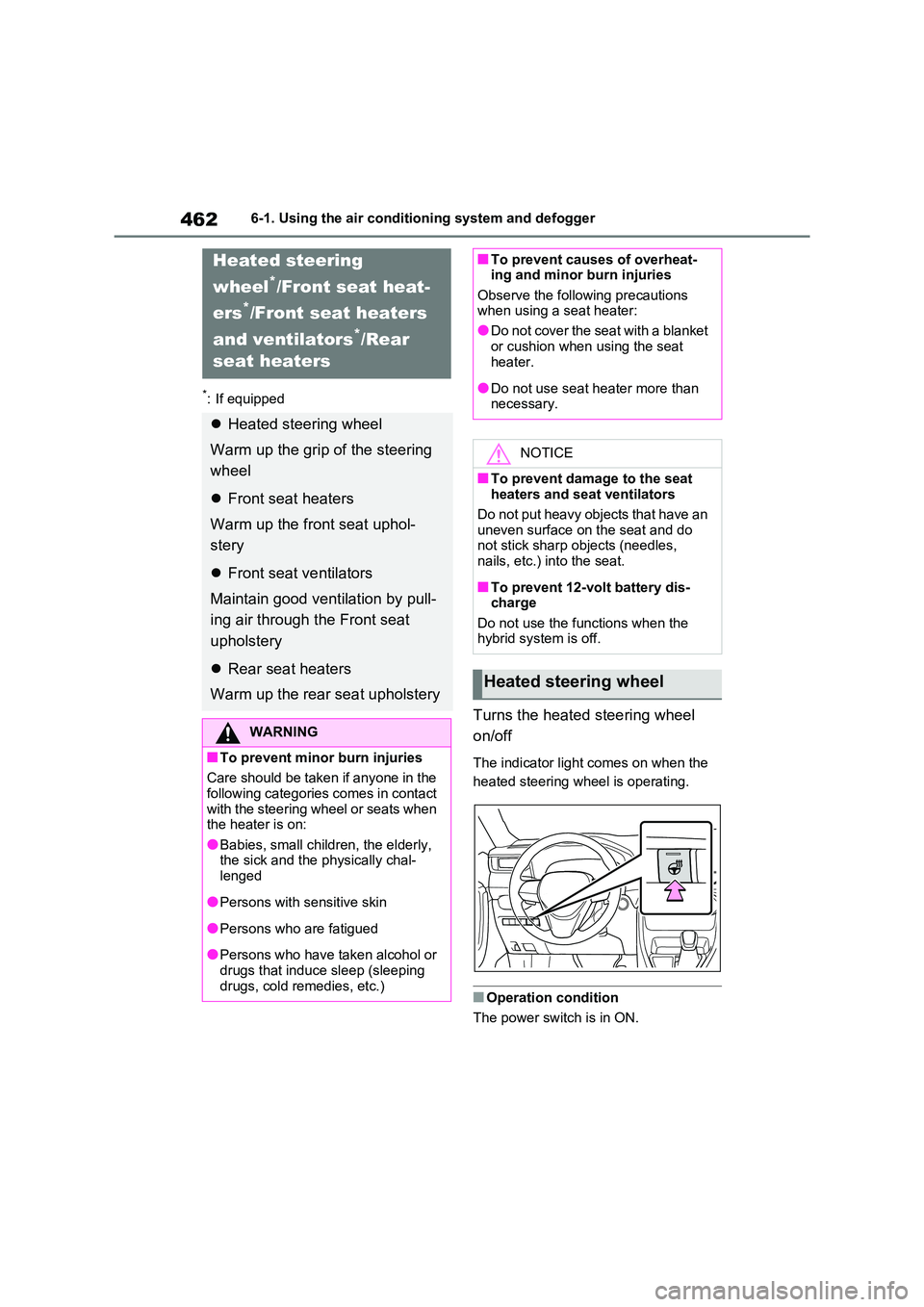
Turns the heated steering wheel
on/off
The indicator light comes on when the
heated steering wheel is operating.
■Operation condition
The power switch is in ON.
Heated steering
wheel*/Front seat heat-
ers*/Front seat heaters
and ventilators*/Rear
seat heaters
Heated steering wheel
Warm up the grip of the steering
wheel
Front seat heaters
Warm up the fr ont seat uphol-
stery
Front seat ventilators
Maintain good ventilation by pull -
ing air through the Front seat
upholstery
Rear seat heaters
Warm up the rear seat upholstery
WARNING
■To prevent minor burn injuries
Care should be taken if anyone in the
following categories comes in contact with the steering wheel or seats when
the heater is on:
●Babies, small children, the elderly, the sick and the p hysically chal-
lenged
●Persons with sensitive skin
●Persons who are fatigued
●Persons who have taken alcohol or
drugs that induce sleep (sleeping drugs, cold remedies, etc.)
■To prevent causes of overheat - ing and minor burn injuries
Observe the following precautions
when using a seat heater:
●Do not cover the seat with a blanket
or cushion when using the seat
heater.
●Do not use seat heater more than
necessary.
NOTICE
■To prevent damage to the seat heaters and seat ventilators
Do not put heavy objects that have an
uneven surface on the seat and do not stick sharp objects (needles,
nails, etc.) into the seat.
■To prevent 12-volt battery dis -
charge
Do not use the functions when the hybrid system is off.
Heated steering wheel
Page 474 of 666
4726-3. Using the storage features
Raise the hook to use.
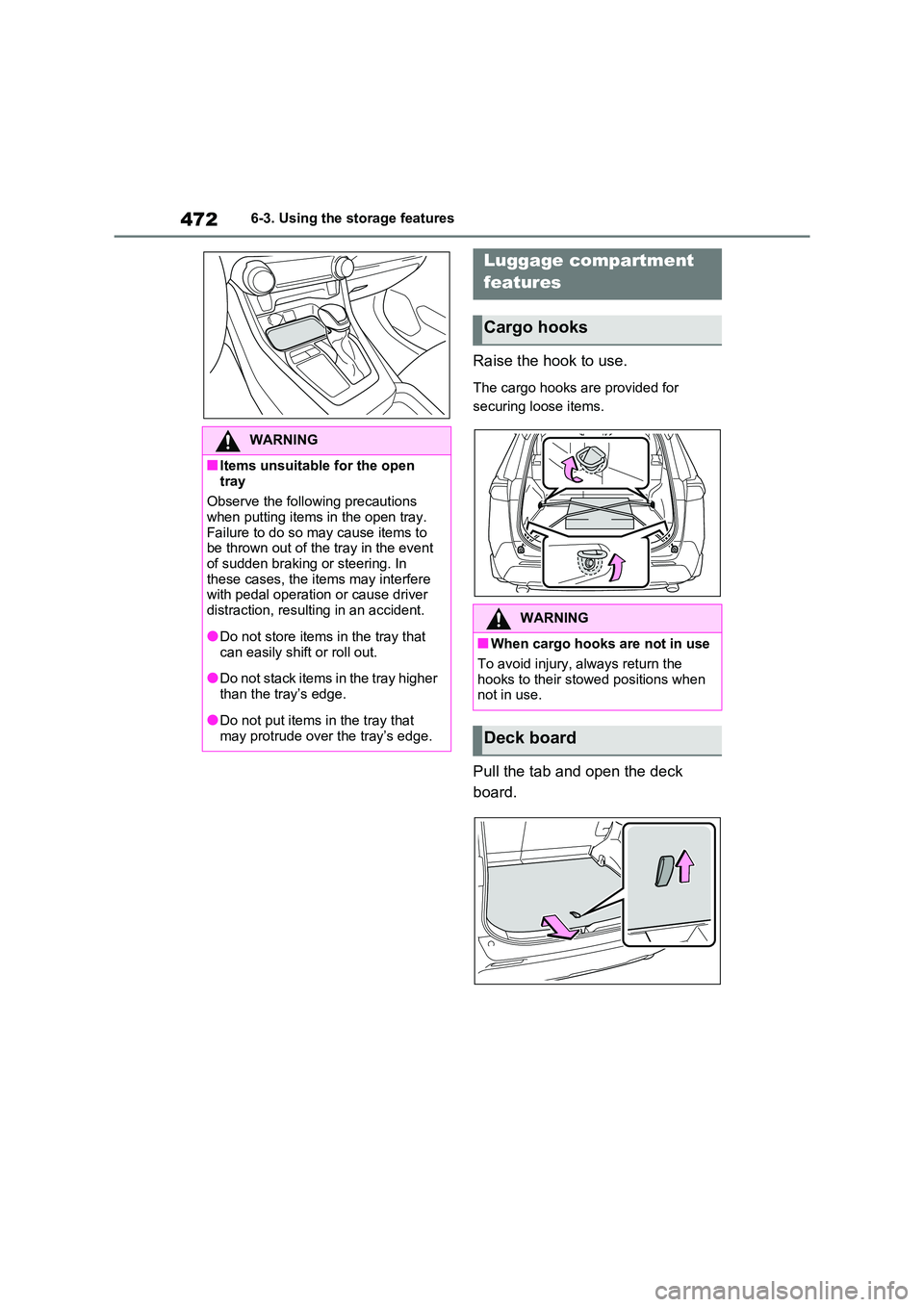
The cargo hooks are provided for
securing loose items.
Pull the tab and open the deck
board.
WARNING
■Items unsuitable for the open
tray
Observe the following precautions when putting items in the open tray.
Failure to do so m ay cause items to
be thrown out of the tray in the event
of sudden braking or steering. In these cases, the items may interfere
with pedal operation or cause driver
distraction, resulting in an accident.
●Do not store items in the tray that
can easily shift or roll out.
●Do not stack items in the tray higher
than the tray’s edge.
●Do not put items i n the tray that
may protrude over the tray’s edge.
Luggage compartment
features
Cargo hooks
WARNING
■When cargo hooks are not in use
To avoid injury, always return the hooks to their stowed positions when
not in use.
Deck board