roof TOYOTA RAV4 PLUG-IN HYBRID 2021 User Guide
[x] Cancel search | Manufacturer: TOYOTA, Model Year: 2021, Model line: RAV4 PLUG-IN HYBRID, Model: TOYOTA RAV4 PLUG-IN HYBRID 2021Pages: 666, PDF Size: 161.28 MB
Page 80 of 666
781-4. Theft deterrent system
*: If equipped
■Items to check before locking
the vehicle
To prevent unexpected triggering of
the alarm and vehicle theft, make
sure of the following:
Nobody is in the vehicle.
The side windows and pan-
oramic moon roof (if equipped)
are closed before the alarm is
set.
No valuables or other personal
items are left in the vehicle.
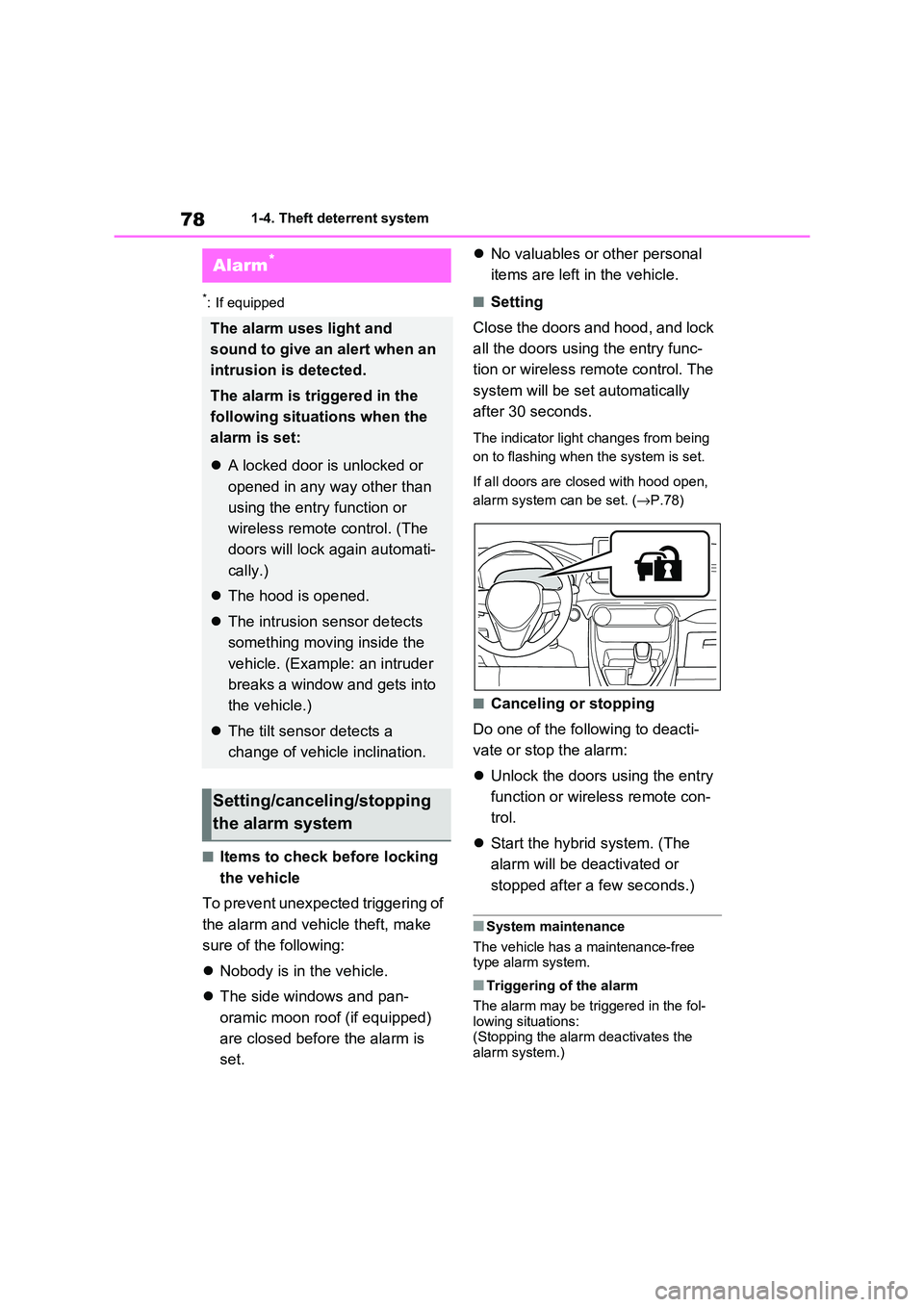
■Setting
Close the doors and hood, and lock
all the doors using the entry func -
tion or wireless remote control. The
system will be set automatically
after 30 seconds.
The indicator light changes from being
on to flashing when the system is set.
If all doors are closed with hood open,
alarm system can be set. ( →P.78)
■Canceling or stopping
Do one of the fo llowing to deacti-
vate or stop the alarm:
Unlock the doors using the entry
function or wirel ess remote con-
trol.
Start the hybrid system. (The
alarm will be de activated or
stopped after a few seconds.)
■System maintenance
The vehicle has a maintenance-free type alarm system.
■Triggering of the alarm
The alarm may be tr iggered in the fol-
lowing situations: (Stopping the alar m deactivates the
alarm system.)
Alarm*
The alarm uses light and
sound to give an alert when an
intrusion is detected.
The alarm is triggered in the
following situat ions when the
alarm is set:
A locked door is unlocked or
opened in any way other than
using the entry function or
wireless remote control. (The
doors will lock again automati -
cally.)
The hood is opened.
The intrusion sensor detects
something moving inside the
vehicle. (Example: an intruder
breaks a window and gets into
the vehicle.)
The tilt sensor detects a
change of vehicle inclination.
Setting/canceling/stopping
the alarm system
Page 82 of 666
801-4. Theft deterrent system
the alarm, as they will respond to
movement inside the vehicle.
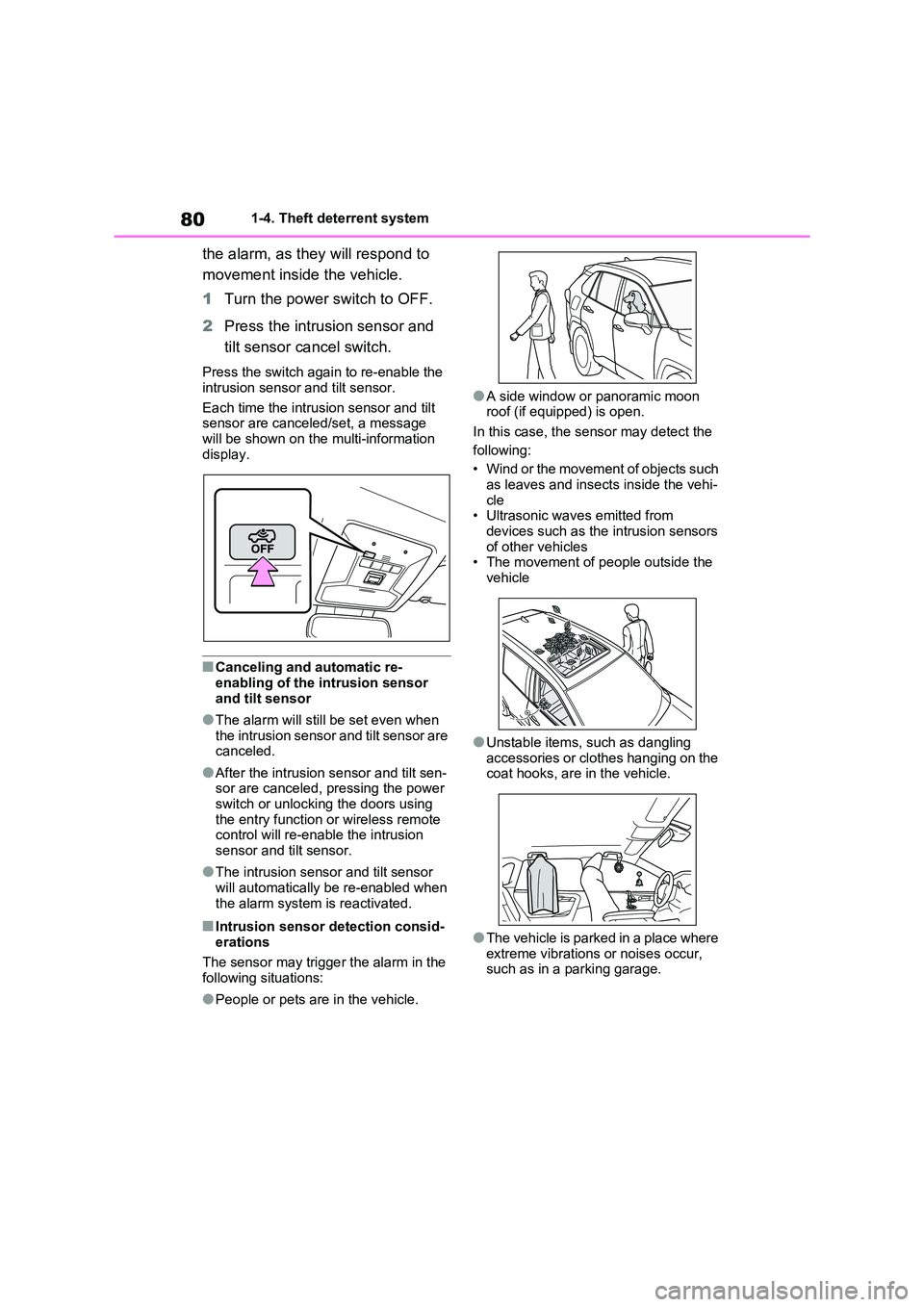
1 Turn the power switch to OFF.
2 Press the intrusion sensor and
tilt sensor cancel switch.
Press the switch again to re-enable the
intrusion sensor and tilt sensor.
Each time the intrus ion sensor and tilt
sensor are canceled/set, a message
will be shown on the multi-information display.
■Canceling and automatic re-
enabling of the intrusion sensor
and tilt sensor
●The alarm will still be set even when
the intrusion sensor and tilt sensor are canceled.
●After the intrusion sensor and tilt sen- sor are canceled, pressing the power
switch or unlocking the doors using
the entry func tion or wireless remote control will re-enable the intrusion
sensor and tilt sensor.
●The intrusion sens or and tilt sensor
will automatically be re-enabled when
the alarm system is reactivated.
■Intrusion sensor detection consid -
erations
The sensor may trigge r the alarm in the
following situations:
●People or pets are in the vehicle.
●A side window or panoramic moon
roof (if equipped) is open.
In this case, the sensor may detect the
following:
• Wind or the movement of objects such
as leaves and insects inside the vehi -
cle • Ultrasonic wave s emitted from
devices such as the intrusion sensors
of other vehicles • The movement of people outside the
vehicle
●Unstable items, such as dangling
accessories or clothes hanging on the
coat hooks, are in the vehicle.
●The vehicle is parked in a place where
extreme vibrations or noises occur, such as in a parking garage.
Page 103 of 666
101
2
2-1. Plug-in hybrid system
Plug-in hybrid system
to EV mode or AUTO EV/HV
mode after leaving the freeway.
( →P.86)
Turn the “A/C” switch off when it
is not needed. Doing so can help
reduce excessive e lectricity and
fuel consumption.
In summer: When the ambient tem -
perature is high, use the recirculated air
mode. Doing so will help to reduce the
burden on the air co nditioning system
and reduce electricity and fuel con -
sumption as well.
In winter: Avoid excessive and unnec-
essary use of the heater. Usage of the
heated steering w heel (if equipped)
( →P.462) and seat heaters (→P.463)
are effective.
Using the Remote Air Condition-
ing System ( →P.460) while the
AC charging cable is connected
to the vehicle can reduce elec -
tricity consumption immediately
after starting off by operating air
conditioning mainly using elec -
tricity from an external power
source.
When setting the charging
schedule, setting the charging
mode to “Departure” and “Cli -
mate Prep” to on can reduce
electricity consumption immedi -
ately after starting off by operat -
ing air conditioning before
charging is completed. ( →P.144)
Make sure to check the tire inflation
pressure frequen tly. If there is
improper tire inflation pressure in
the tires, the EV driving range will
become shorter, and fuel consump-
tion when in HV mode will increase.
Also, as snow tires can cause large
amounts of friction, their use on dry
roads can lead to increased fuel
and electricity consumption.
Carrying heavy luggage will lead to
poor fuel economy. Avoid carrying
unnecessary lugga ge. Installing a
large roof rack will also cause poor
fuel economy.
Since the gasoline engine starts up
and cuts out automatically, warm -
ing up is not necessary.
Air conditioning
Checking tire inflation pres -
sure
Luggage
Warming up before driving
Page 106 of 666
1042-1. Plug-in hybrid system
A pressure level 50 kPa (0.5 kgf/cm2 or
bar, 7 psi) lower than the specified
value will cause a worsening of several
percentage points.
■When driving on highways,
use the EV/HV mode selection
switch to drive in HV mode
The power consumption will
increase significantly if the vehicle
is driven in EV mode on highways.
■Do not load unnecessary
objects in the vehicle
Driving with objects weighing 100
kg (220 lb.) in the vehicle will
worsen the electrical and fuel effi -
ciency by approximately 3%.
Air resistance also greatly affects
electrical and fuel efficiency.
Remove any exterior accessories
such as a roof luggage carrier when
they are not being used.
The running resistance of snow
tires is high and they will worsen
electrical and fuel efficiency.
Replace them with standard tires
as soon as they are no longer
needed.
■Know your vehicle’s electrical
and fuel efficiency
If you know your vehicle’s daily
electrical and fuel efficiency, you
will understa nd the benefits of Eco
drive.
Use the Power Consumption/Fuel
Economy, ECO Accelerator Guid -
ance/“Eco Score” and other data
displayed on the multi-information
display.
The following indicate that charging
has been carried out properly.
The charging indicator of the
charging port turns off
“Charging Complete” is dis-
played on the multi-information
display when a door is opened
with the power switch off
( →P.131)
Regardless of the type of power
source or whether the charging
schedule function is used, charging
is completed if the above can be
confirmed.
Charging-related messages: →P.160
Display when charging is
completed
Page 127 of 666
125
2
2-2. Charging
Plug-in hybrid system
equipped with a Residual Cur -
rent Circuit-Breaker (RCCB). If it
is not, have one installed by a
duly qualified professional.
When charging outdoors, make
sure to connect to a rain-tight
socket that is certified for outdoor
use. Checking Residual Current
Circuit-Breaker (RCCB) opera -
tion before its use is recom -
mended.
Check whether there are any
local EV-charging regulations in
place, and adhere to them.
*: For detailed informa tion, consult an
electrician.
■The charging environment
For safe charging, the following charging equipment and settings are
recommended.
●Rain-tight socket
When charging outdoors, connect the
plug to a rain-tight socket, and ensure
that the plug remains waterproof while
the plug is connected.
●Dedicated circuit
• To reduce the risk of fire, connect only to an at least 13A branch circuit with
an over-current protection.
• To reduce the risk of electric shock when working with the plug, connect
to a socket that has a Residual Cur-
rent Circuit-Breaker (RCCB) installed.
●Remote switch
Allows the electricity from the socket to
be interrupted by operating a switch,
thus allowing safe removal and insertion
of the plug on rainy days.
■When your circuit breaker trips
during charging
The upper limit of the charging current
can be changed in “Vehicle Settings” on
the multi-information display.
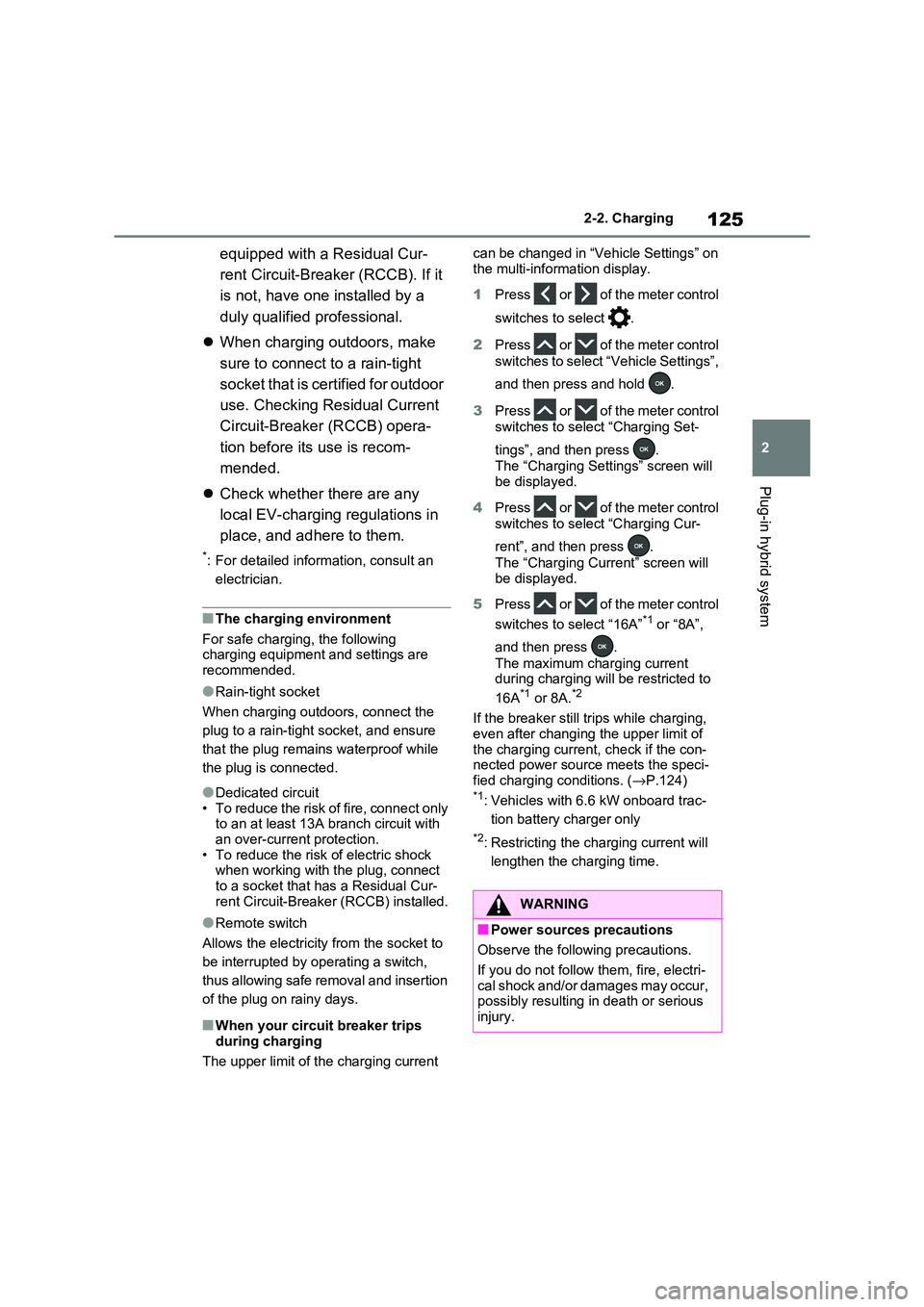
1 Press or of the meter control
switches to select .
2 Press or of the meter control
switches to select “ Vehicle Settings”,
and then press and hold .
3 Press or of the meter control
switches to select “Charging Set -
tings”, and then press .
The “Charging Settings” screen will
be displayed.
4 Press or of the meter control
switches to select “Charging Cur -
rent”, and then press .
The “Charging Current” screen will
be displayed.
5 Press or of the meter control
switches to select “16A”*1 or “8A”,
and then press .
The maximum charging current
during charging will be restricted to
16A*1 or 8A.*2
If the breaker still tri ps while charging,
even after changing the upper limit of
the charging current , check if the con- nected power sourc e meets the speci-
fied charging conditions. ( →P.124)*1: Vehicles with 6.6 kW onboard trac-
tion battery charger only
*2: Restricting the charging current will
lengthen the charging time.
WARNING
■Power sources precautions
Observe the following precautions.
If you do not follow them, fire, electri-
cal shock and/or damages may occur,
possibly resulting in death or serious injury.
Page 203 of 666
4
201
4
Before driving
Before driving
4-1. Key information
Keys.................................. 202
4-2. Opening, closing and locking
the doors
Side doors ........................ 205
Back door ......................... 210
Smart entry & start system 223
4-3. Adjusting the seats
Front seats........................ 270
Rear seats ........................ 271
Driving position memory ... 273
Head restraints ................. 276
4-4. Adjusting the steering wheel
and mirrors
Steering wheel .................. 278
Inside rear view mirror ...... 279
Digital Rear-view Mirror .... 280
Outside rear view mirrors . 289
4-5. Opening, closing the win -
dows and moon roof
Power windows................. 291
Panoramic moon roof ....... 294
Page 206 of 666
2044-1. Key information
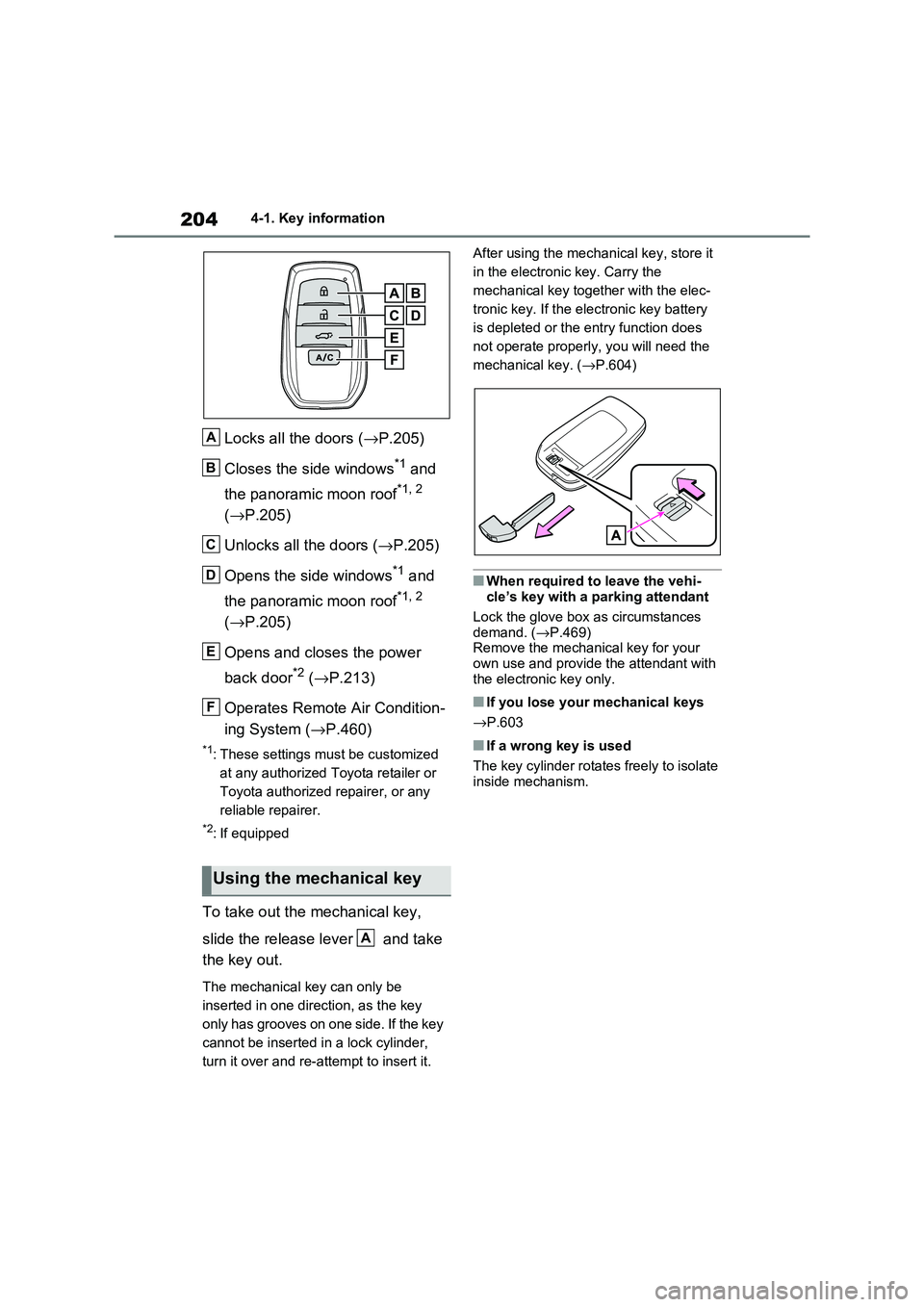
Locks all the doors (→P.205)
Closes the side windows*1 and
the panoramic moon roof*1, 2
( →P.205)
Unlocks all the doors ( →P.205)
Opens the side windows*1 and
the panoramic moon roof*1, 2
( →P.205)
Opens and closes the power
back door*2 ( →P.213)
Operates Remote Air Condition -
ing System ( →P.460)
*1: These settings must be customized
at any authorized Toyota retailer or
Toyota authorized repairer, or any
reliable repairer.
*2: If equipped
To take out the mechanical key,
slide the release lever and take
the key out.
The mechanical key can only be
inserted in one direction, as the key
only has grooves on one side. If the key
cannot be inserted i n a lock cylinder,
turn it over and re-at tempt to insert it.
After using the mec hanical key, store it
in the electronic key. Carry the
mechanical key together with the elec -
tronic key. If the elec tronic key battery
is depleted or the ent ry function does
not operate properly, you will need the
mechanical key. ( →P.604)
■When required to leave the vehi-
cle’s key with a parking attendant
Lock the glove box a s circumstances demand. ( →P.469)
Remove the mechani cal key for your
own use and provide the attendant with the electronic key only.
■If you lose your mechanical keys
→ P.603
■If a wrong key is used
The key cylinder rotate s freely to isolate inside mechanism.
Using the mechanical key
A
B
C
D
E
F
A
Page 207 of 666
205
4
4-2. Opening, closing and locking the doors
Before driving
4-2.Opening, closing and locking the doors
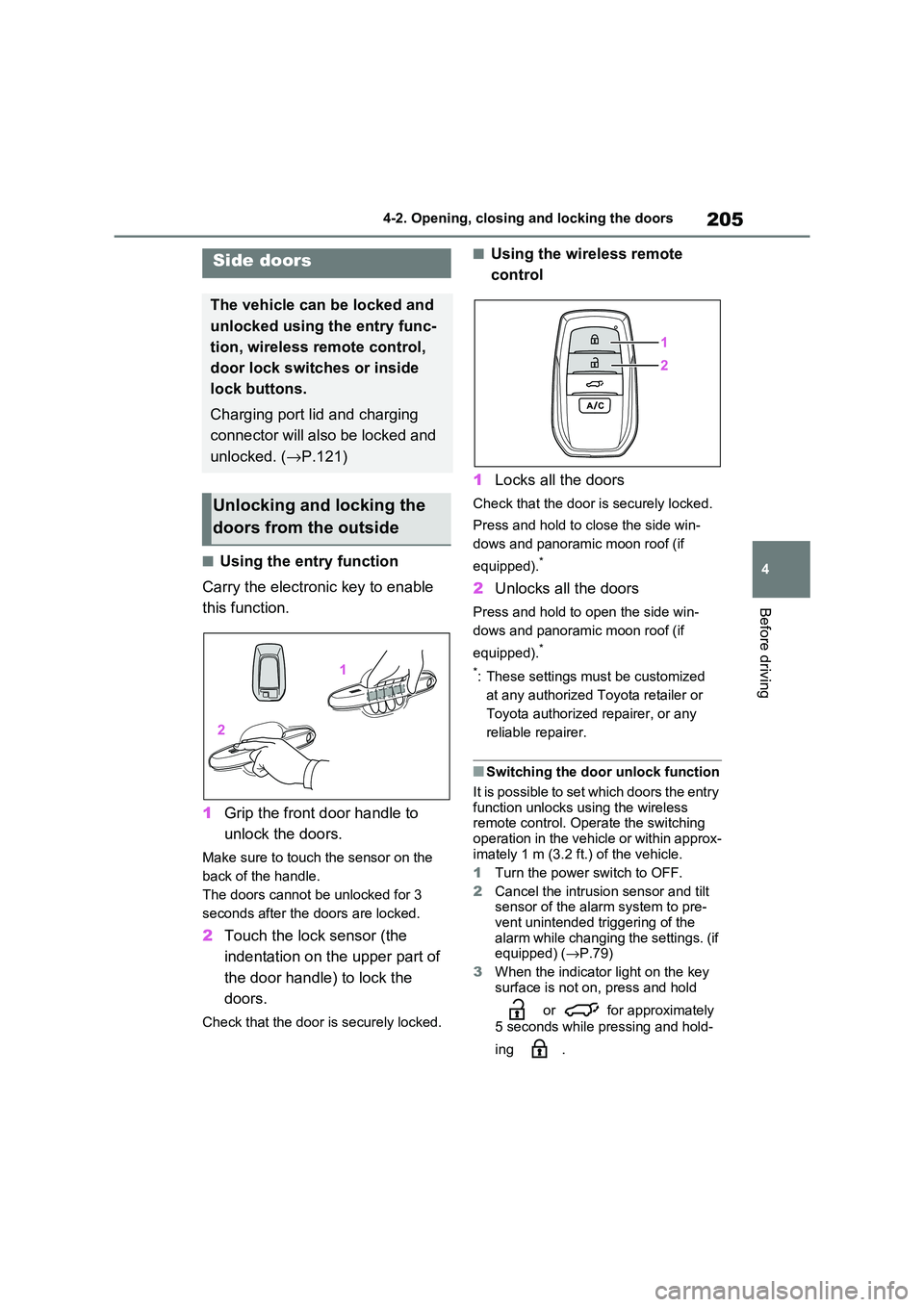
■Using the entry function
Carry the electronic key to enable
this function.
1 Grip the front door handle to
unlock the doors.
Make sure to touch the sensor on the
back of the handle.
The doors cannot be unlocked for 3
seconds after the doors are locked.
2 Touch the lock sensor (the
indentation on the upper part of
the door handl e) to lock the
doors.
Check that the door is securely locked.
■Using the wireless remote
control
1 Locks all the doors
Check that the door is securely locked.
Press and hold to close the side win-
dows and panoram ic moon roof (if
equipped).*
2 Unlocks all the doors
Press and hold to open the side win-
dows and panoram ic moon roof (if
equipped).*
*: These settings must be customized
at any authorized Toyota retailer or
Toyota authorized repairer, or any
reliable repairer.
■Switching the door unlock function
It is possible to set which doors the entry function unlocks us ing the wireless
remote control. Ope rate the switching
operation in the vehicle or within approx - imately 1 m (3.2 f t.) of the vehicle.
1 Turn the power switch to OFF.
2 Cancel the intrusion sensor and tilt
sensor of the alarm system to pre -
vent unintended triggering of the
alarm while changing the settings. (if equipped) ( →P.79)
3 When the indicator light on the key
surface is not on, press and hold
or for approximately
5 seconds while pressing and hold -
ing .
Side doors
The vehicle can be locked and
unlocked using the entry func -
tion, wireless remote control,
door lock switches or inside
lock buttons.
Charging port lid and charging
connector will also be locked and
unlocked. ( →P.121)
Unlocking and locking the
doors from the outside
Page 208 of 666
2064-2. Opening, closing and locking the doors
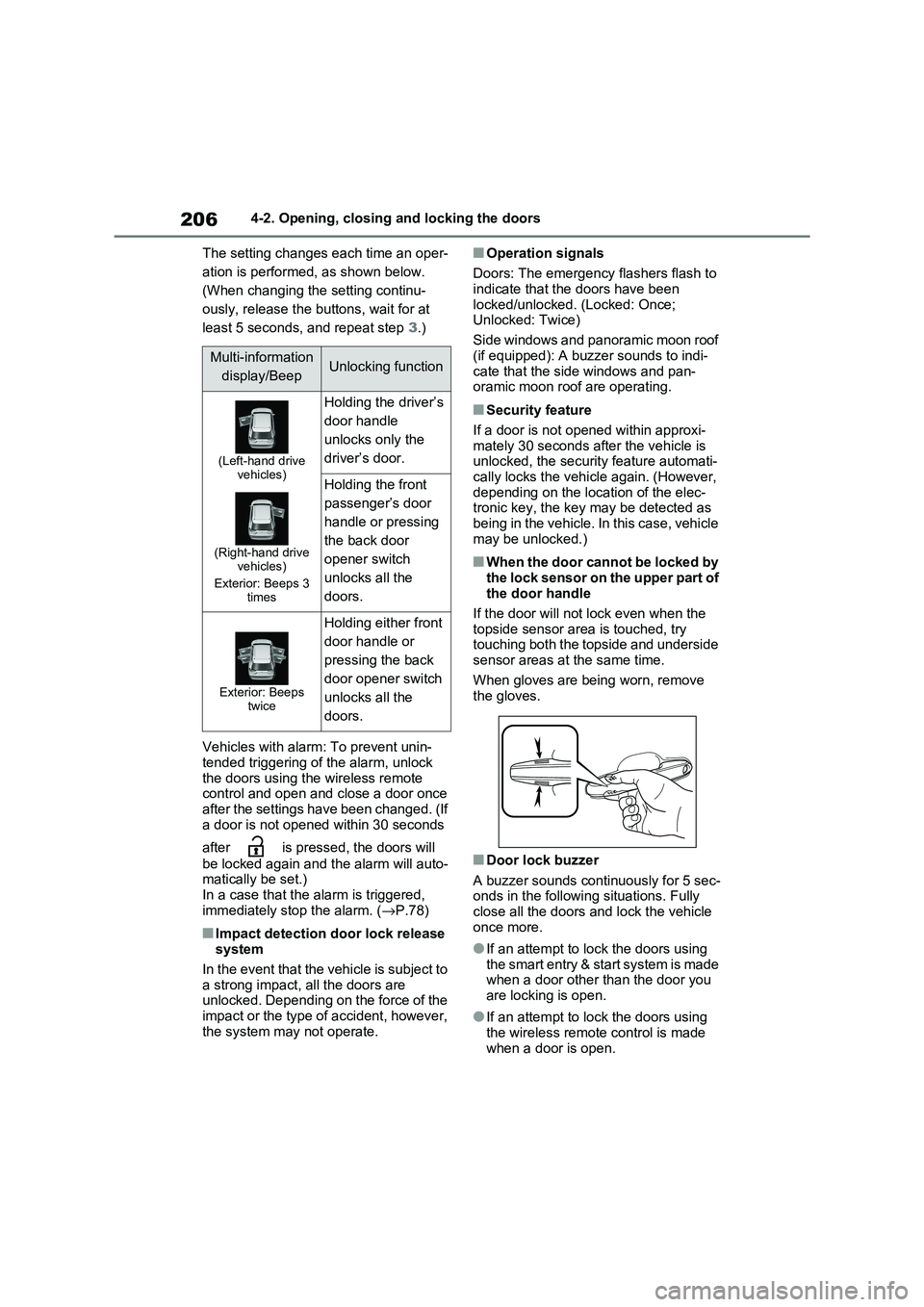
The setting changes each time an oper -
ation is performed, as shown below.
(When changing the setting continu-
ously, release the buttons, wait for at
least 5 seconds, and repeat step 3.)
Vehicles with alarm: To prevent unin - tended triggering of the alarm, unlock
the doors using the wireless remote
control and open and close a door once after the settings have been changed. (If
a door is not opened within 30 seconds
after is pressed, the doors will
be locked again and the alarm will auto - matically be set.)
In a case that the a larm is triggered,
immediately st op the alarm. (→P.78)
■Impact detection door lock release system
In the event that the vehicle is subject to
a strong impact, all the doors are unlocked. Depending on the force of the
impact or the type of accident, however,
the system may not operate.
■Operation signals
Doors: The emergency flashers flash to indicate that the doors have been
locked/unlocked. (Locked: Once;
Unlocked: Twice)
Side windows and panoramic moon roof
(if equipped): A buzzer sounds to indi -
cate that the side windows and pan- oramic moon roof are operating.
■Security feature
If a door is not opened within approxi -
mately 30 seconds af ter the vehicle is unlocked, the security feature automati -
cally locks the vehicl e again. (However,
depending on the location of the elec - tronic key, the key m ay be detected as
being in the vehicle. In this case, vehicle
may be unlocked.)
■When the door cannot be locked by the lock sensor on the upper part of
the door handle
If the door will not lock even when the topside sensor are a is touched, try
touching both the topside and underside
sensor areas at the same time.
When gloves are being worn, remove
the gloves.
■Door lock buzzer
A buzzer sounds continuously for 5 sec -
onds in the followi ng situations. Fully close all the doors and lock the vehicle
once more.
●If an attempt to lo ck the doors using the smart entry & start system is made
when a door other than the door you
are locking is open.
●If an attempt to lo ck the doors using
the wireless remote control is made when a door is open.
Multi-information
display/BeepUnlocking function
(Left-hand drive vehicles)
(Right-hand drive vehicles)
Exterior: Beeps 3 times
Holding the driver’s
door handle
unlocks only the
driver’s door.
Holding the front
passenger’s door
handle or pressing
the back door
opener switch
unlocks all the
doors.
Exterior: Beeps twice
Holding either front
door handle or
pressing the back
door opener switch
unlocks all the
doors.
Page 210 of 666
2084-2. Opening, closing and locking the doors
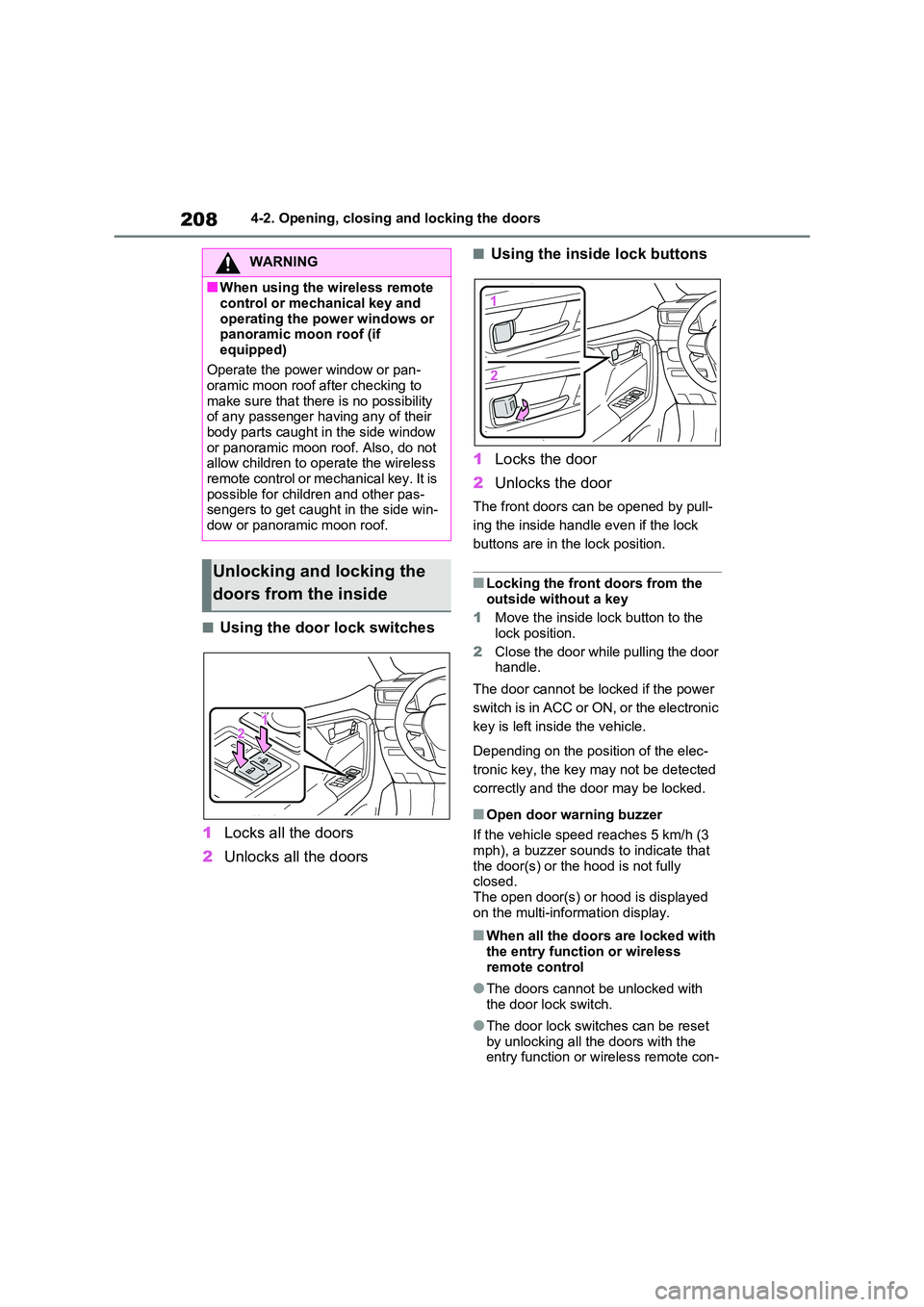
■Using the door lock switches
1 Locks all the doors
2 Unlocks all the doors
■Using the inside lock buttons
1 Locks the door
2 Unlocks the door
The front doors can be opened by pull-
ing the inside handle even if the lock
buttons are in the lock position.
■Locking the front doors from the
outside without a key
1 Move the inside lock button to the
lock position.
2 Close the door while pulling the door handle.
The door cannot be locked if the power
switch is in ACC or ON, or the electronic
key is left insi de the vehicle.
Depending on the position of the elec -
tronic key, the key m ay not be detected
correctly and the door may be locked.
■Open door warning buzzer
If the vehicle speed r eaches 5 km/h (3
mph), a buzzer sounds to indicate that
the door(s) or the hood is not fully closed.
The open door(s) or hood is displayed
on the multi-information display.
■When all the doors are locked with
the entry functi on or wireless remote control
●The doors cannot b e unlocked with the door lock switch.
●The door lock switc hes can be reset by unlocking all th e doors with the
entry function or w ireless remote con-
WARNING
■When using the wireless remote
control or mechanical key and
operating the power windows or panoramic moon roof (if
equipped)
Operate the power window or pan - oramic moon roof a fter checking to
make sure that there is no possibility
of any passenger having any of their
body parts caught in the side window or panoramic moon r oof. Also, do not
allow children to o perate the wireless
remote control or me chanical key. It is possible for chil dren and other pas-
sengers to get caugh t in the side win-
dow or panoramic moon roof.
Unlocking and locking the
doors from the inside