fuel TOYOTA RAV4 PLUG-IN HYBRID 2021 Owner's Manual
[x] Cancel search | Manufacturer: TOYOTA, Model Year: 2021, Model line: RAV4 PLUG-IN HYBRID, Model: TOYOTA RAV4 PLUG-IN HYBRID 2021Pages: 666, PDF Size: 161.28 MB
Page 172 of 666
1703-1. Instrument cluster
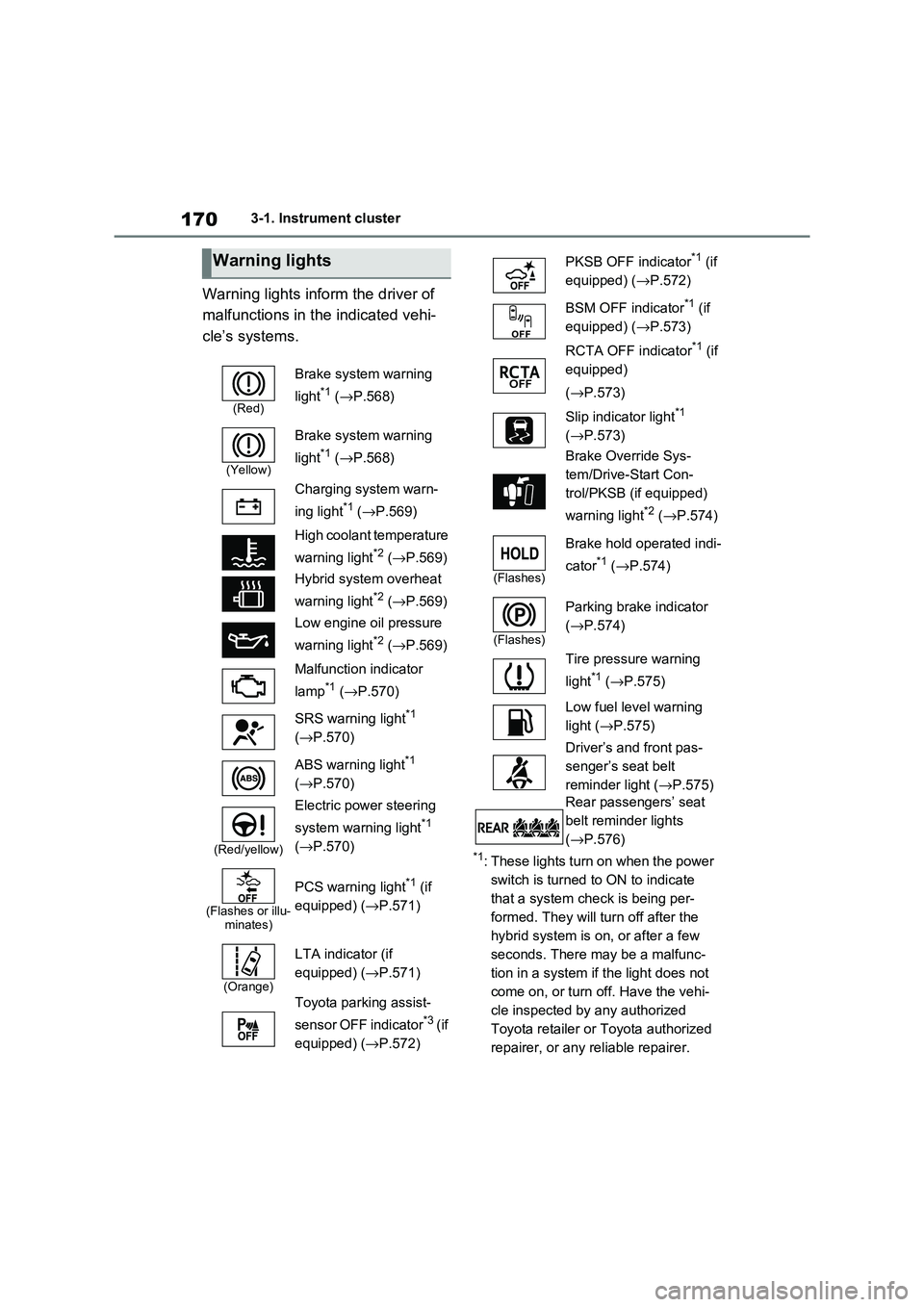
Warning lights inform the driver of
malfunctions in the indicated vehi -
cle’s systems.
*1: These lights turn on when the power
switch is turned to ON to indicate
that a system check is being per -
formed. They will turn off after the
hybrid system is on , or after a few
seconds. There may be a malfunc-
tion in a system if the light does not
come on, or turn off. Have the vehi -
cle inspected by any authorized
Toyota retailer or Toyota authorized
repairer, or any reliable repairer.
Warning lights
(Red)
Brake system warning
light*1 ( →P.568)
(Yellow)
Brake system warning
light*1 ( →P.568)
Charging system warn -
ing light*1 ( →P.569)
High coolant temperature
warning light*2 ( →P.569)
Hybrid system overheat
warning light*2 ( →P.569)
Low engine oil pressure
warning light*2 ( →P.569)
Malfunction indicator
lamp*1 ( →P.570)
SRS warning light*1
( →P.570)
ABS warning light*1
( →P.570)
(Red/yellow)
Electric power steering
system warning light*1
( →P.570)
(Flashes or illu- minates)
PCS warning light*1 (if
equipped) ( →P.571)
(Orange)
LTA indicator (if
equipped) ( →P.571)
Toyota parking assist-
sensor OFF indicator*3 ( i f
equipped) ( →P.572)
PKSB OFF indicator*1 (if
equipped) ( →P.572)
BSM OFF indicator*1 (if
equipped) ( →P.573)
RCTA OFF indicator*1 (if
equipped)
( →P.573)
Slip indicator light*1
( →P.573)
Brake Override Sys -
tem/Drive-Start Con -
trol/PKSB (if equipped)
warning light*2 ( →P.574)
(Flashes)
Brake hold operated indi-
cator*1 ( →P.574)
(Flashes)
Parking brake indicator
( →P.574)
Tire pressure warning
light*1 ( →P.575)
Low fuel level warning
light ( →P.575)
Driver’s and front pas -
senger’s seat belt
reminder light ( →P.575)
Rear passengers’ seat
belt reminder lights
( →P.576)
Page 176 of 666
1743-1. Instrument cluster
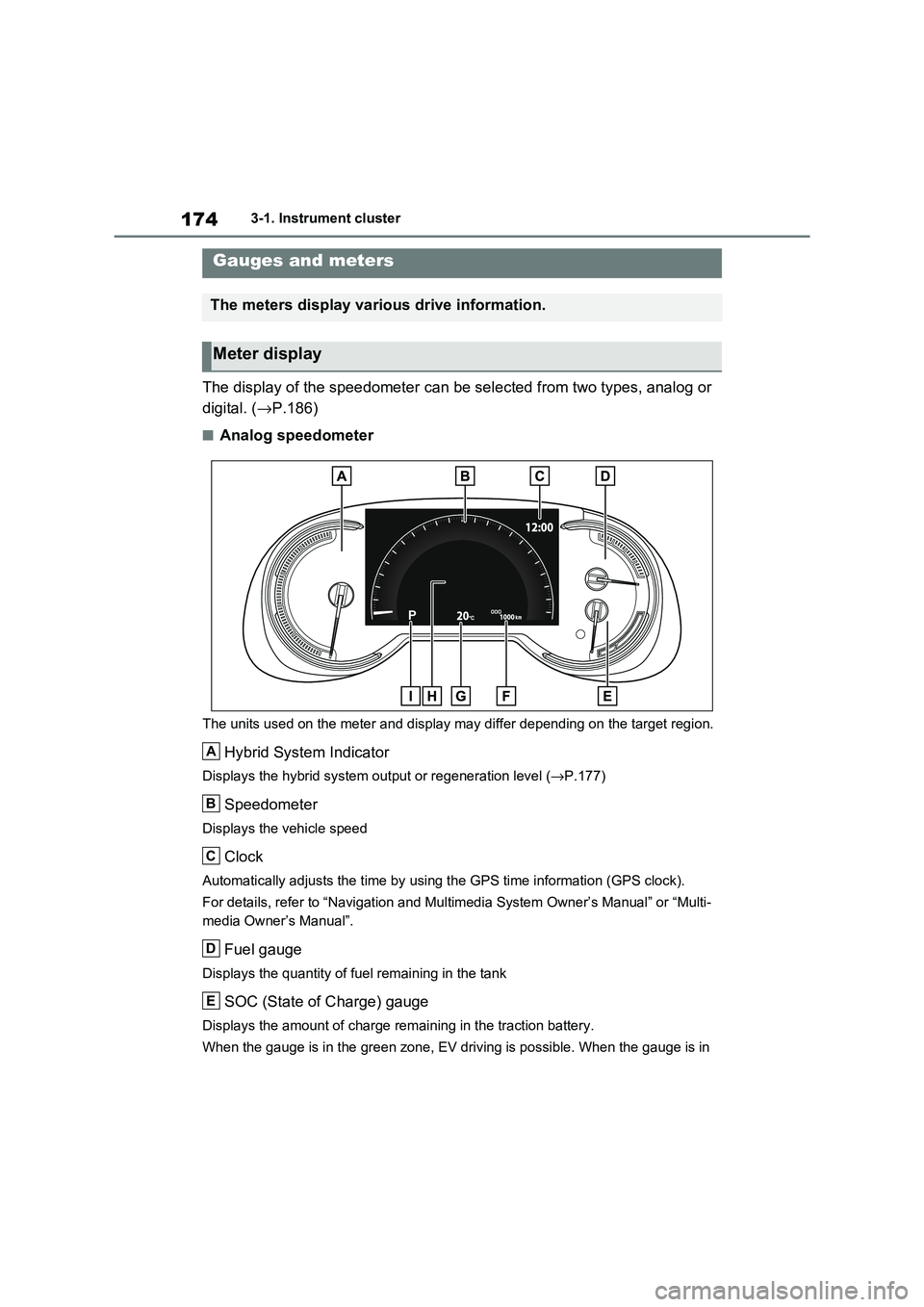
The display of the speedometer can be selected from two types, analog or
digital. ( →P.186)
■Analog speedometer
The units used on the meter and display may differ depending on the target region.
Hybrid System Indicator
Displays the hybrid system output or regeneration level (→P.177)
Speedometer
Displays the vehicle speed
Clock
Automatically adjusts the time by using the GPS time information (GPS clock).
For details, refer to “Navigation and Multimedia System Owner’s Manual” or “Multi-
media Owner’s Manual”.
Fuel gauge
Displays the quantity of f uel remaining in the tank
SOC (State of Charge) gauge
Displays the amount of charge remaining in the traction battery.
When the gauge is in t he green zone, EV driving is possible. When the gauge is in
Gauges and meters
The meters display various drive information.
Meter display
A
B
C
D
E
Page 178 of 666
1763-1. Instrument cluster
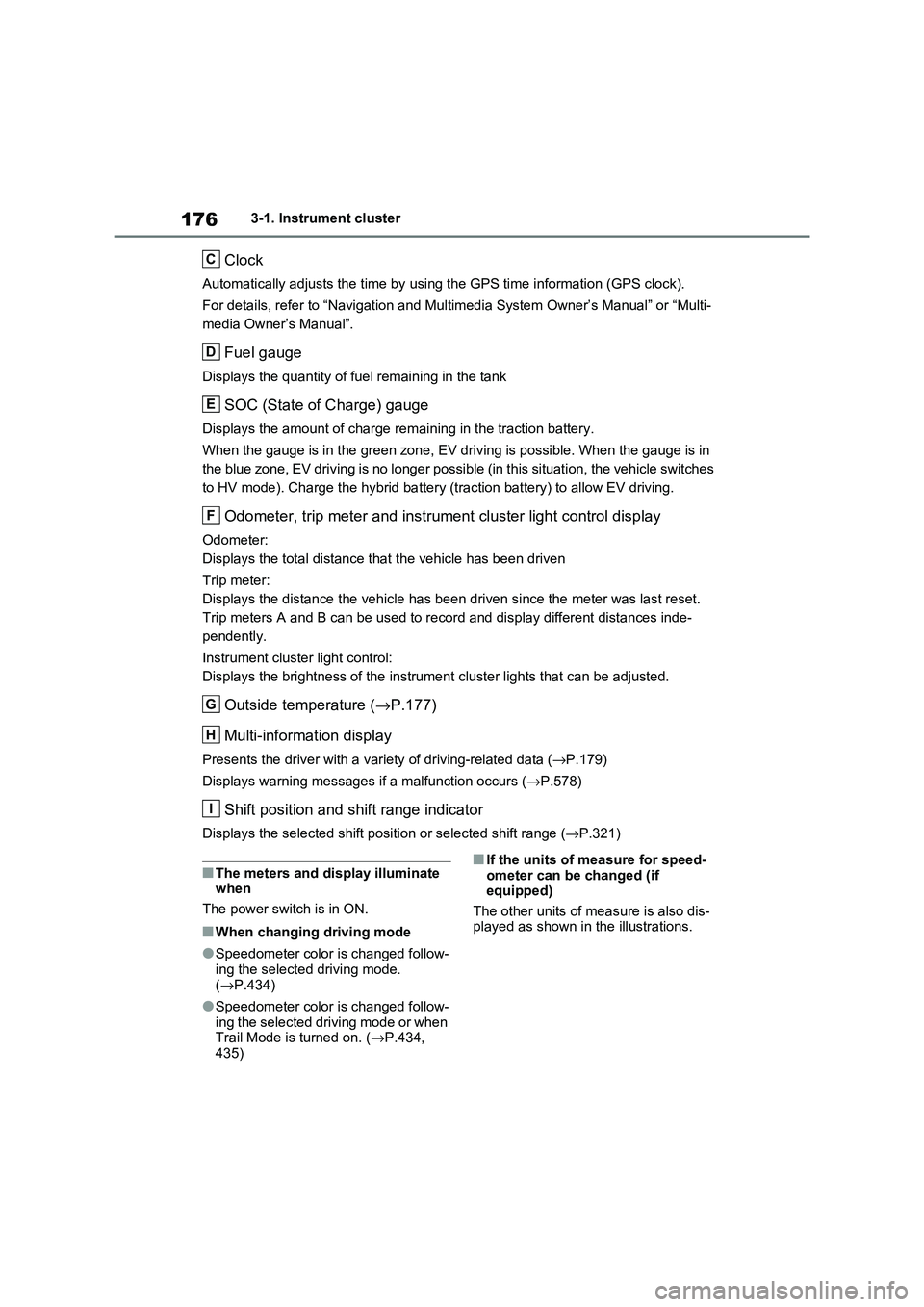
Clock
Automatically adjusts the time by using the GPS time information (GPS clock).
For details, refer to “Navigation and Multimedia System Owner’s Manual” or “Multi-
media Owner’s Manual”.
Fuel gauge
Displays the quantity of f uel remaining in the tank
SOC (State of Charge) gauge
Displays the amount of charge remaining in the traction battery.
When the gauge is in t he green zone, EV driving is possible. When the gauge is in
the blue zone, EV driving is no longer possible (in this situat ion, the vehicle switches
to HV mode). Charge the hybrid ba ttery (traction battery) to allow EV driving.
Odometer, trip meter and instrument cluster light control display
Odometer:
Displays the total distance tha t the vehicle has been driven
Trip meter:
Displays the distance t he vehicle has been driven since the meter was last reset.
Trip meters A and B can be us ed to record and display different distances inde-
pendently.
Instrument cluster light control:
Displays the brightne ss of the instrument cluster lights that can be adjusted.
Outside temperature (→P.177)
Multi-information display
Presents the driver with a variety of driving-related data ( →P.179)
Displays warning messages if a malfunction occurs ( →P.578)
Shift position and shift range indicator
Displays the selected shift position or selected shift range (→P.321)
■The meters and display illuminate when
The power switch is in ON.
■When changing driving mode
●Speedometer color is changed follow -
ing the selected driving mode.
( →P.434)
●Speedometer color is changed follow-
ing the selected driving mode or when Trail Mode is turned on. ( →P.434,
435)
■If the units of measure for speed -
ometer can be changed (if equipped)
The other units of me asure is also dis-
played as shown in the illustrations.
C
D
E
F
G
H
I
Page 181 of 666
179
3
3-1. Instrument cluster
Vehicle status information and indicators
adjusted individually. However, when
the surroundings are bright (daytime, etc.), turning on the tail lights will not
change the instrument cluster bright -
ness.
The clock can be adjusted on the
navigation/multimedia system.
Refer to “Navigation and multime -
dia system Owner’s manual” or
“Multimedia Owner’s Manual”.
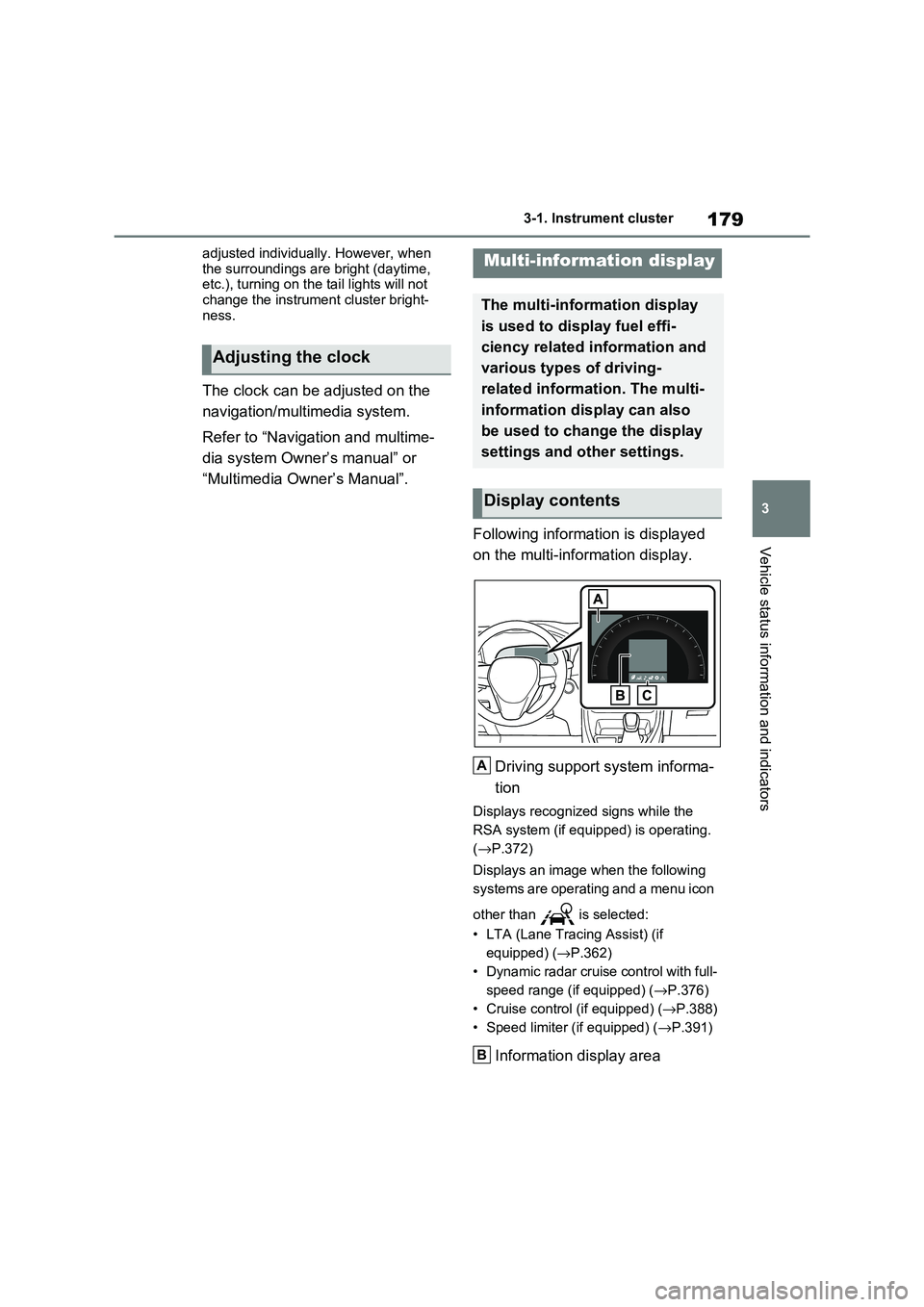
Following information is displayed
on the multi-information display.
Driving support system informa -
tion
Displays recognized signs while the
RSA system (if equ ipped) is operating.
( →P.372)
Displays an image when the following
systems are operating and a menu icon
other than is selected:
• LTA (Lane Tracing Assist) (if
equipped) ( →P.362)
• Dynamic radar cruise control with full-
speed range (if equipped) ( →P.376)
• Cruise control (if equipped) (→P.388)
• Speed limiter (if equipped) ( →P.391)
Information display area
Adjusting the clock
Multi-information display
The multi-information display
is used to display fuel effi -
ciency related information and
various types of driving-
related informat ion. The multi-
information display can also
be used to change the display
settings and other settings.
Display contents
A
B
Page 183 of 666
181
3
3-1. Instrument cluster
Vehicle status information and indicators
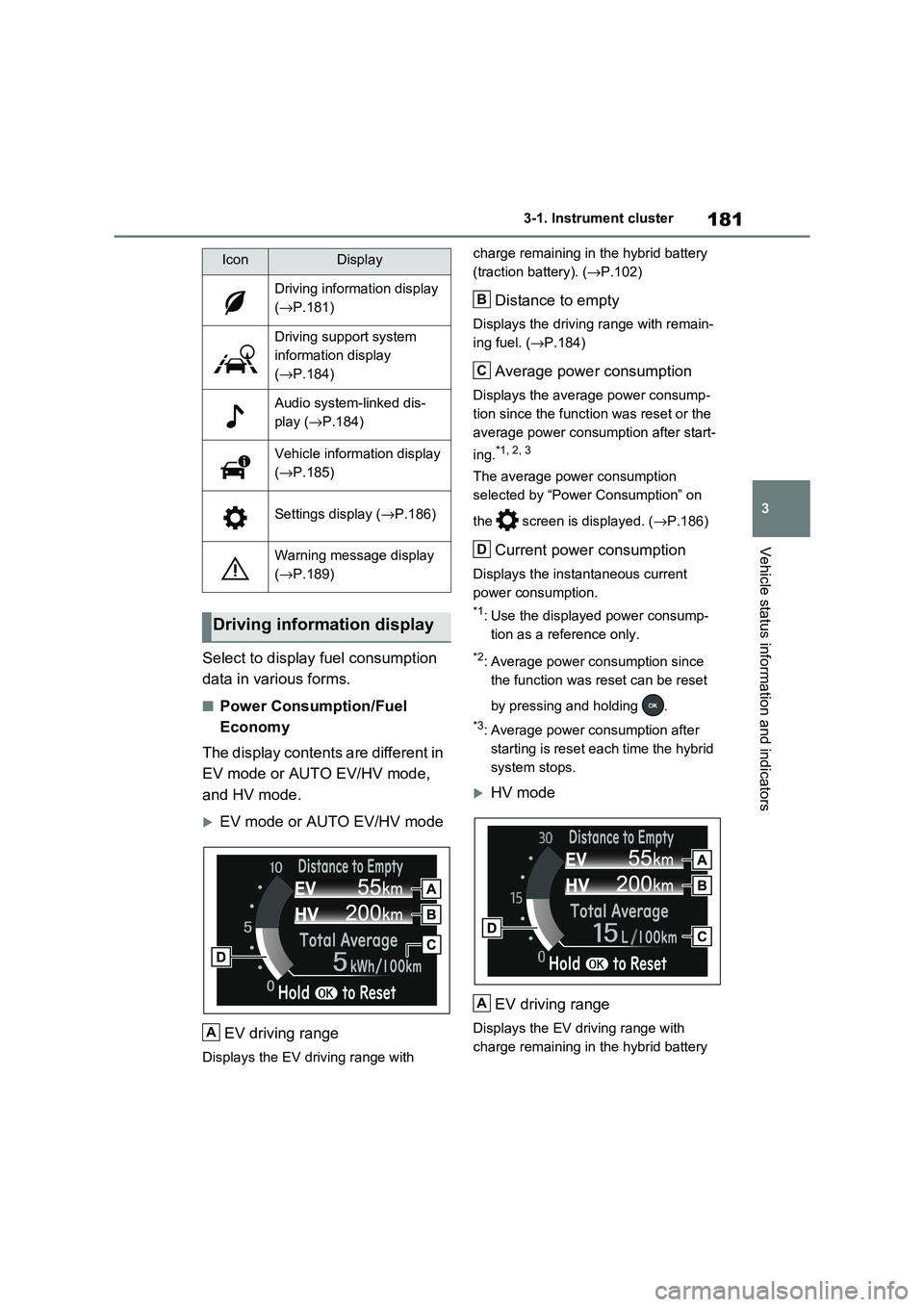
Select to display fuel consumption
data in various forms.
■Power Consumption/Fuel
Economy
The display contents are different in
EV mode or AUTO EV/HV mode,
and HV mode.
EV mode or AUTO EV/HV mode
EV driving range
Displays the EV driving range with
charge remaining in t he hybrid battery
(traction battery). ( →P.102)
Distance to empty
Displays the driving range with remain-
ing fuel. ( →P.184)
Average power consumption
Displays the average power consump-
tion since the funct ion was reset or the
average power consumption after start -
ing.*1, 2, 3
The average power consumption
selected by “Power Consumption” on
the screen is displayed. ( →P.186)
Current power consumption
Displays the instantaneous current
power consumption.
*1: Use the displayed power consump -
tion as a reference only.
*2: Average power consumption since
the function was reset can be reset
by pressing and holding .
*3: Average power consumption after
starting is reset each time the hybrid
system stops.
HV mode
EV driving range
Displays the EV driving range with
charge remaining in t he hybrid battery
IconDisplay
Driving information display
( →P.181)
Driving support system
information display
( →P.184)
Audio system-linked dis-
play ( →P.184)
Vehicle information display
( →P.185)
Settings display (→P.186)
Warning message display
( →P.189)
Driving information display
A
B
C
D
A
Page 184 of 666
1823-1. Instrument cluster
(traction battery). ( →P.90)
Distance to empty
Displays the driving range with remain-
ing fuel. ( →P.184)
Average fuel economy
Displays the average fuel economy
since the function was reset or the
average fuel economy after starting or
refueling.*1, 2, 3
The average fuel economy selected by
“Fuel Economy” on the screen is
displayed. ( →P.186)
Current fuel economy
Displays the instantaneous current fuel
Economy.
*1: Use the displayed fuel consumption
as a reference only.
*2: Average fuel eco nomy since the
function was reset can be reset by
pressing and holding .
*3: Average fuel economy after starting
is reset each time the hybrid system
stops.
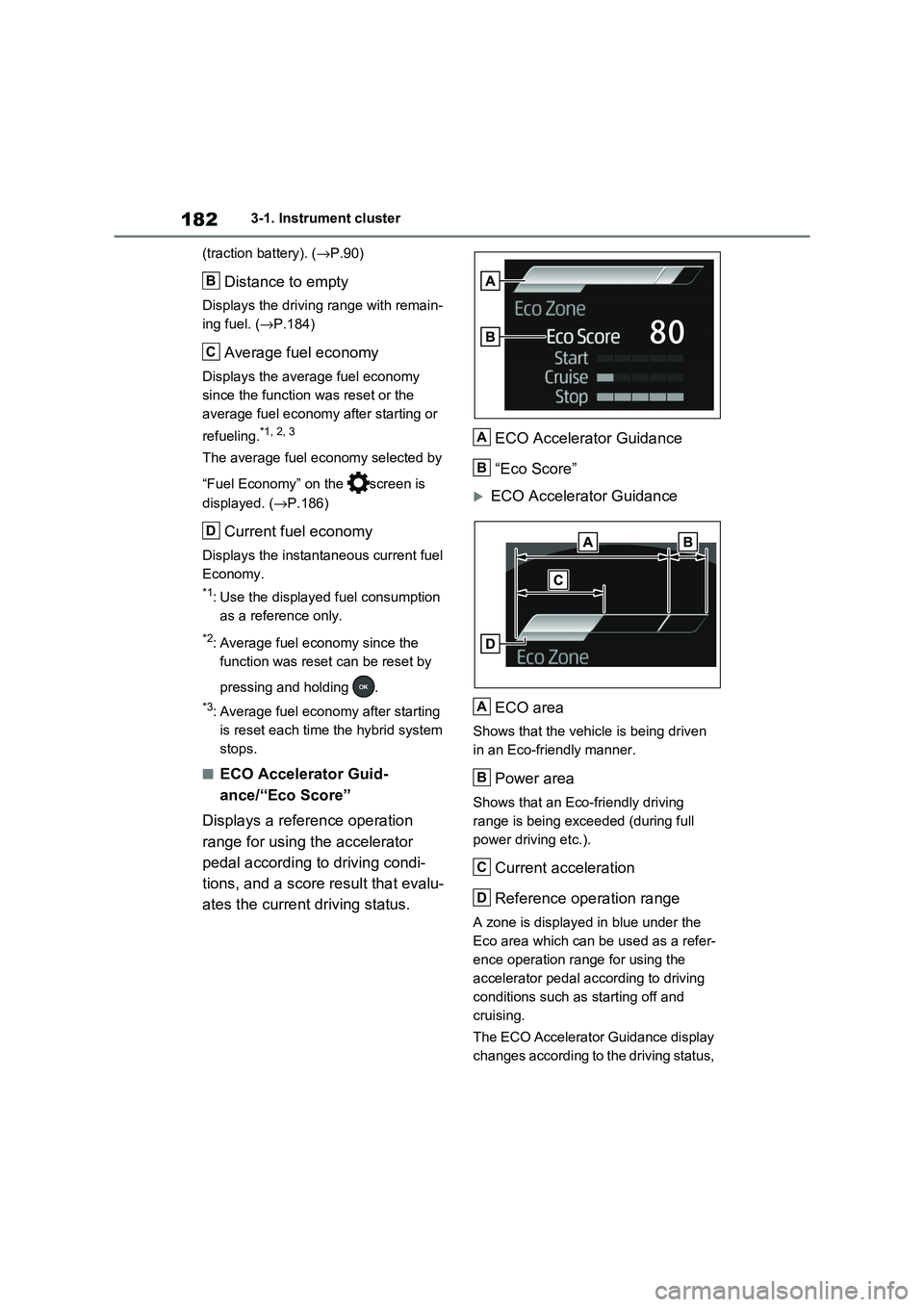
■ECO Accelerator Guid -
ance/“Eco Score”
Displays a refer ence operation
range for using the accelerator
pedal according to driving condi -
tions, and a score result that evalu-
ates the current driving status.
ECO Accelerator Guidance
“Eco Score”
ECO Accelerator Guidance
ECO area
Shows that the vehicle is being driven
in an Eco-friendly manner.
Power area
Shows that an Eco-friendly driving
range is being exceeded (during full
power driving etc.).
Current acceleration
Reference operation range
A zone is displayed in blue under the
Eco area which can be used as a refer -
ence operation range for using the
accelerator pedal according to driving
conditions such as starting off and
cruising.
The ECO Accelerator Guidance display
changes according to the driving status,
B
C
D
A
B
A
B
C
D
Page 186 of 666
1843-1. Instrument cluster
Electricity consumption is the consump -
tion rate of the electricity when EV driv - ing is performed and equivalent to the
fuel consumption for the gasoline vehi -
cles. For this vehic le, electricity con- sumed per 100 km (“kWh/100 km”) is
displayed as electri city consumption on
each screen.
When the unit is set to “MPH” (if
equipped):
Electricity consumption is the consump - tion rate of the electricity when EV driv -
ing is performed and equivalent to the
fuel consumption for the gasoline vehi - cles. For this vehicle, driven distance
per kWh of electricity consumed
(“miles/kWh”) is displ ayed as electricity consumption on each screen.
■EV driving range
●When the air cond itioning system is
operating, is displayed next to
the EV driving range and the EV driv - ing range with the air conditioning sys -
tem on is displayed.
●The EV driving range may shorten
even when not driving due to power
consumption by the system.
●For details, refer to “EV driving range”
( →P.102)
■Distance to empty
●This distance is computed based on
your average fuel consumption. As a result, the actual di stance that can be
driven may differ from that displayed.
●When only a small amount of fuel is
added to the tank, the display may not
be updated. When refueling, turn the power switch off. If the vehicle is refu -
eled without turning the power switch
off, the display may not be updated.
●When “Refuel” is displayed, the
remaining fuel amount is low and the distance that can be driven with the
remaining fuel cannot be calculated.
Refuel immediately.
■ECO Accelerator G uidance/“Eco Score” will not operate when
The ECO Acce lerator Guidance/“Eco
Score” will not operate in the following
situations:
●The Hybrid System I ndicator is not
operating.
●The vehicle is being driven using the
dynamic radar cruise control with full- speed range.
■Driving support system infor -
mation display
Select to display the operational
status of the following systems:
LTA (Lane Tracing Assist)*
( →P.362)
Dynamic radar cruise control
with full-speed range* ( →P.376)
Cruise control* (→P.388)
Speed limiter* (→P.391)
*: If equipped
■Navigation system-linked dis-
play (if equipped)
Select to display the following navi-
gation system-linked information.
Route guidance
Compass display
Select to enable selection of an
audio source or track on the dis -
play.
Driving support system
information display
Audio system-linked display
Page 190 of 666
1883-1. Instrument cluster
Select to enable/disable the battery
cooler. ( →P.129)
PBD (Power Back Door) (if
equipped) ( →P.213)
Select to set up the following items.
• System settings
Select to enable/disable the power
back door system.
•“Hands Free”*
Select to enable/disable the Hands
Free Power Back Door.
• “Opening Adjustment”
Select the open posi tion when power
back door is fully open.
•“Volume”
Select to set the vo lume of the buzzer
which sounds when the power back
door system operates.
*: Vehicles with Hands Free Power
Back Door
“TPWS” (Tire Pressure Warning
System) ( →P.511)
• “Setting Pressure”
Select to initialize the tire pressure
warning system.
• “Identifying Each Wheel & Position”
Select to register t he ID codes of the
tire pressure sensors to the tire pres -
sure warning system.
• “Setting Unit”
Select to change t he units of measure
displayed.
“Rear Seat Reminder” (→P.207)
Select to enable/disable the rear seat
reminder.
■ Settings
“Language”
Select to change the language on the
multi-information display.
“Units”
Select to change the units of measure
displayed.
“Meter Type”
Select to change the speedometer dis-
play.
(EV indicator) (→P.90)
Select to enable/disable the EV indica-
tor.
(Driving information display
settings)
Select to set up th e following items.
• “Hybrid System”
Select to enable/disable the ECO
Accelerator Guidance ( →P.182).
• “Fuel Economy”
Select to change th e display on Fuel
Economy ( →P.181).
• “Power Consumption”
Select to change the display on Power
Consumption ( →P.181).
(Audio settings)
Select to enable/disable screen.
(Vehicle information dis-
play settings)
• “Display Contents”
Select to set up th e following items.
“Energy monitor”:
Select to enable/disable the Energy
monitor ( →P.195)
AWD:
Select to enable/disable the AWD sys -
tem display ( →P.185).
Page 200 of 666
1983-1. Instrument cluster
warming up is finished.
Hybrid system output may be restricted when the gasoline engine is displayed in
blue.
■Display
Audio system without navigation
function
1 Press the “MENU” button.
2 Select “Info” on the “Menu”
screen.
3 Select “Trip information” or “His-
tory”.
Audio system with navigation
function
1 Press the “MENU” button.
2 Select “Info” on the “Menu”
screen.
3 Select “ECO” on the “Informa-
tion” screen.
4 Select “Trip information” or “His-
tory”.
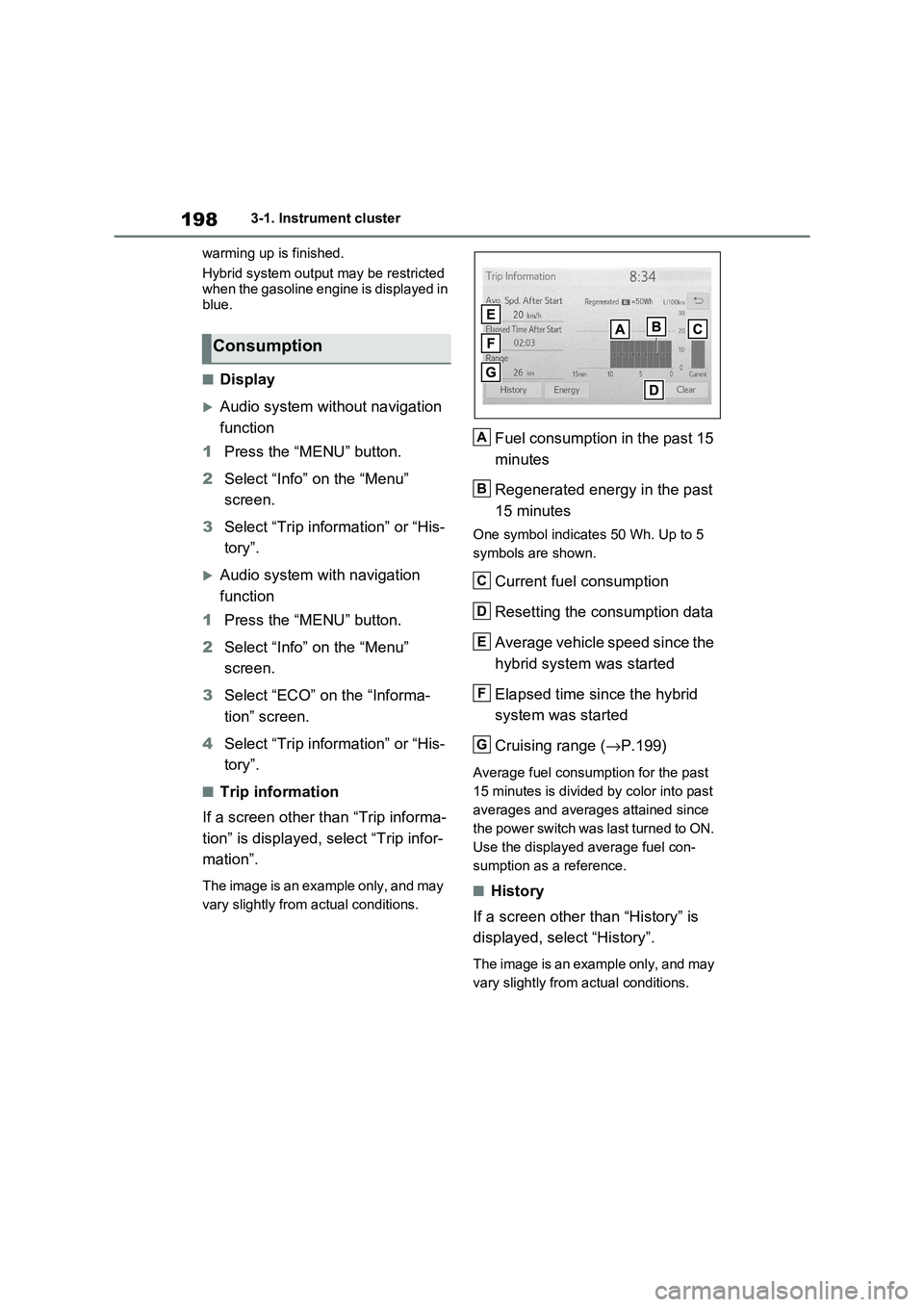
■Trip information
If a screen other than “Trip informa -
tion” is displayed, select “Trip infor -
mation”.
The image is an example only, and may
vary slightly from actual conditions.
Fuel consumption in the past 15
minutes
Regenerated energy in the past
15 minutes
One symbol indicate s 50 Wh. Up to 5
symbols are shown.
Current fuel consumption
Resetting the consumption data
Average vehicle speed since the
hybrid system was started
Elapsed time since the hybrid
system was started
Cruising range ( →P.199)
Average fuel consumption for the past
15 minutes is divided by color into past
averages and averages attained since
the power switch was last turned to ON.
Use the displayed average fuel con -
sumption as a reference.
■History
If a screen other than “History” is
displayed, select “History”.
The image is an example only, and may
vary slightly from actual conditions.
Consumption
A
B
C
D
E
F
G
Page 201 of 666
199
3
3-1. Instrument cluster
Vehicle status information and indicators
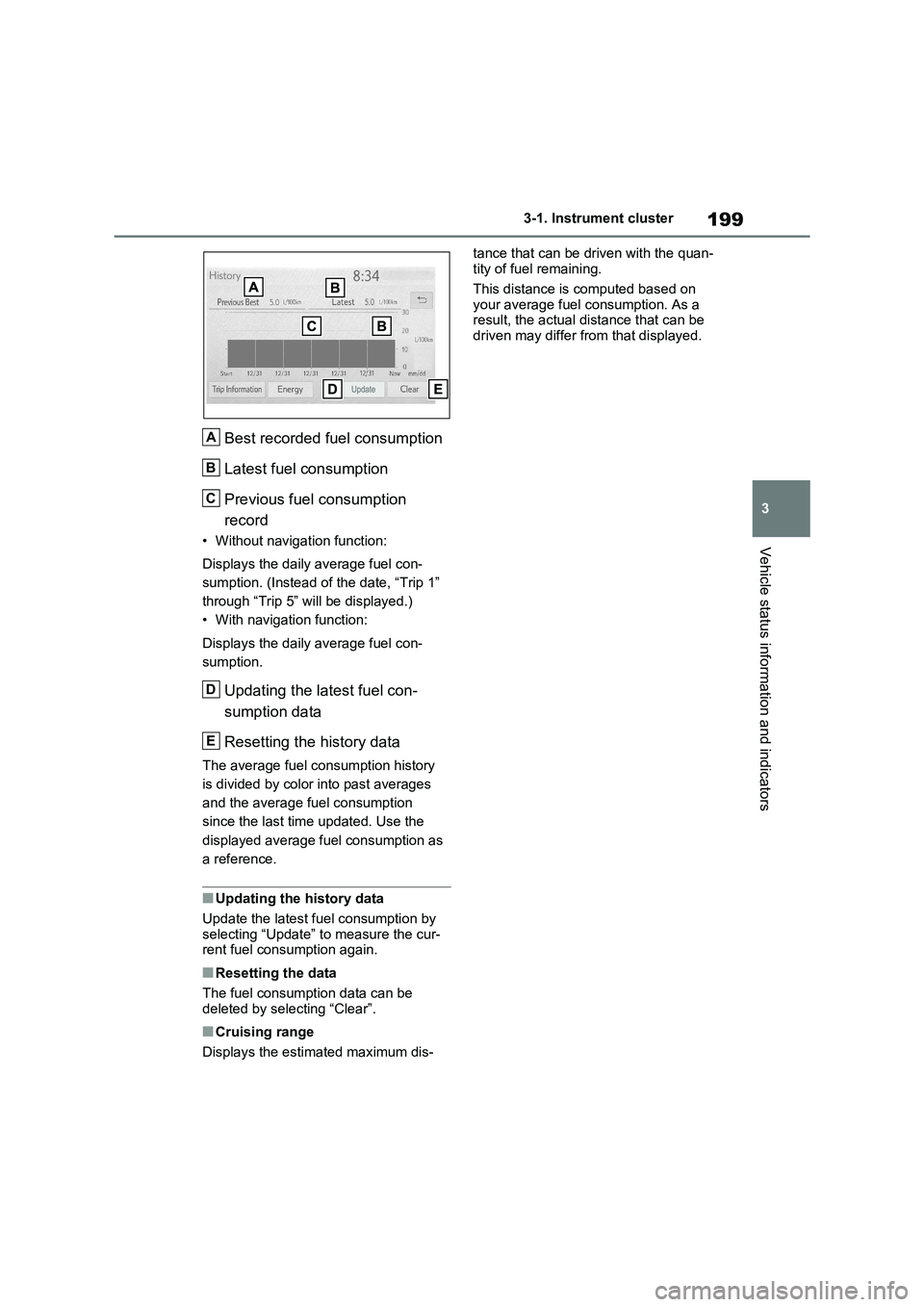
Best recorded fuel consumption
Latest fuel consumption
Previous fuel consumption
record
• Without navigation function:
Displays the daily average fuel con -
sumption. (Instead of the date, “Trip 1”
through “Trip 5” will be displayed.)
• With navigation function:
Displays the daily average fuel con -
sumption.
Updating the latest fuel con -
sumption data
Resetting the history data
The average fuel consumption history
is divided by color into past averages
and the average fuel consumption
since the last tim e updated. Use the
displayed average fuel consumption as
a reference.
■Updating the history data
Update the latest fue l consumption by
selecting “Update” to measure the cur -
rent fuel consumption again.
■Resetting the data
The fuel consumption data can be
deleted by selecting “Clear”.
■Cruising range
Displays the estimated maximum dis -
tance that can be driven with the quan -
tity of fuel remaining.
This distance is computed based on
your average fuel consumption. As a
result, the act ual distance that can be driven may differ from that displayed.
A
B
C
D
E