warning light TOYOTA RAV4 PLUG-IN HYBRID 2021 Owner's Manual
[x] Cancel search | Manufacturer: TOYOTA, Model Year: 2021, Model line: RAV4 PLUG-IN HYBRID, Model: TOYOTA RAV4 PLUG-IN HYBRID 2021Pages: 666, PDF Size: 161.28 MB
Page 169 of 666
3
167
3
Vehicle status information and indicators
Vehicle status informa-
tion and indicators
3-1. Instrument cluster
Warning lights and indicators
....................................... 168
Gauges and meters .......... 174
Multi-information display ... 179
Head-up display................ 191
Energy monitor/consumption
screen ............................. 195
Page 170 of 666
1683-1. Instrument cluster
3-1.Instrument cluster
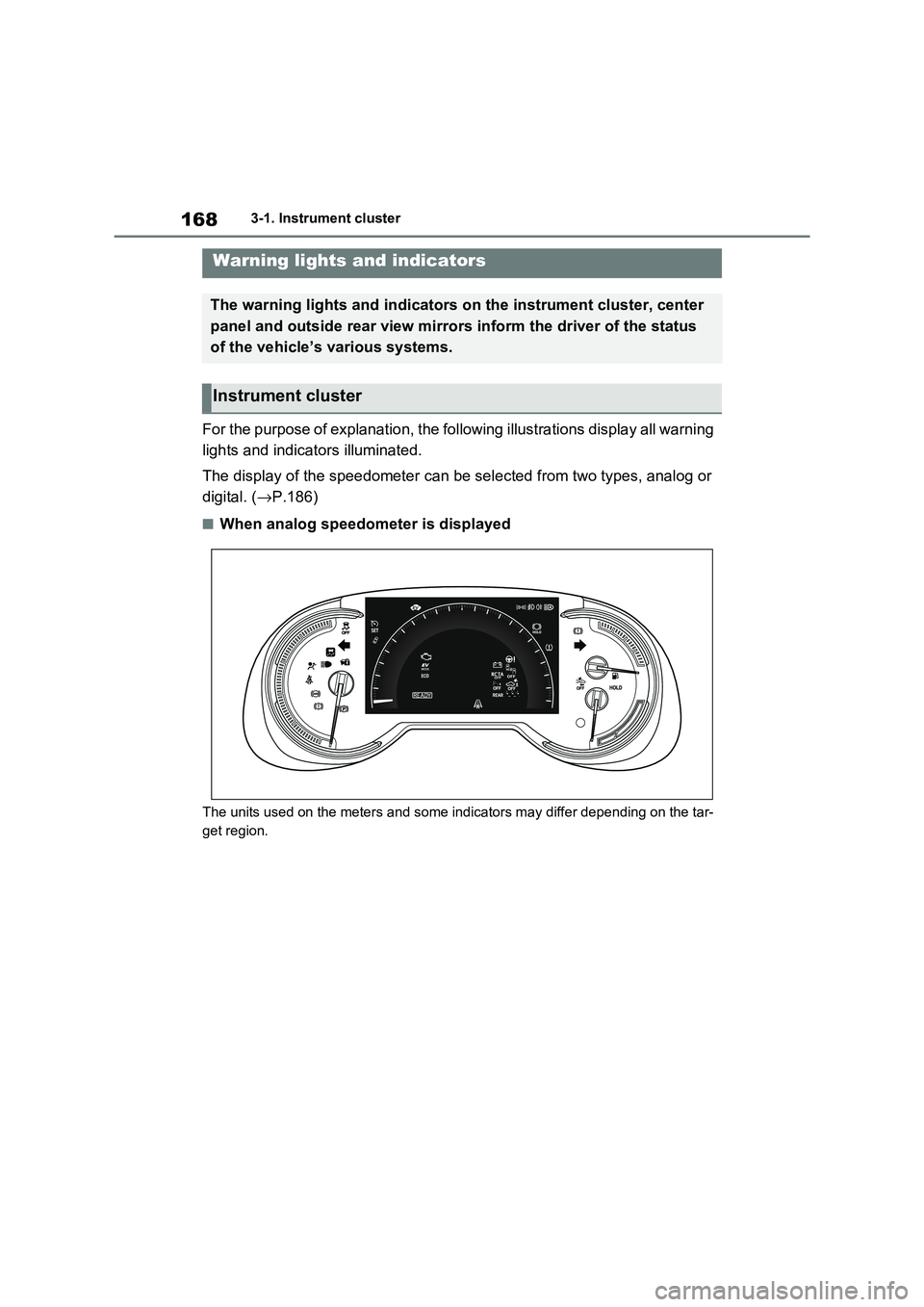
For the purpose of explanation, the following illustrations display all warning
lights and indicators illuminated.
The display of the speedometer c an be selected from two types, analog or
digital. ( →P.186)
■When analog speedometer is displayed
The units used on the meters and some indicators may differ depending on the tar-
get region.
Warning lights and indicators
The warning lights and indicators on the instrument cluster, center
panel and outside rear view mirr ors inform the driver of the status
of the vehicle’s various systems.
Instrument cluster
Page 172 of 666
1703-1. Instrument cluster
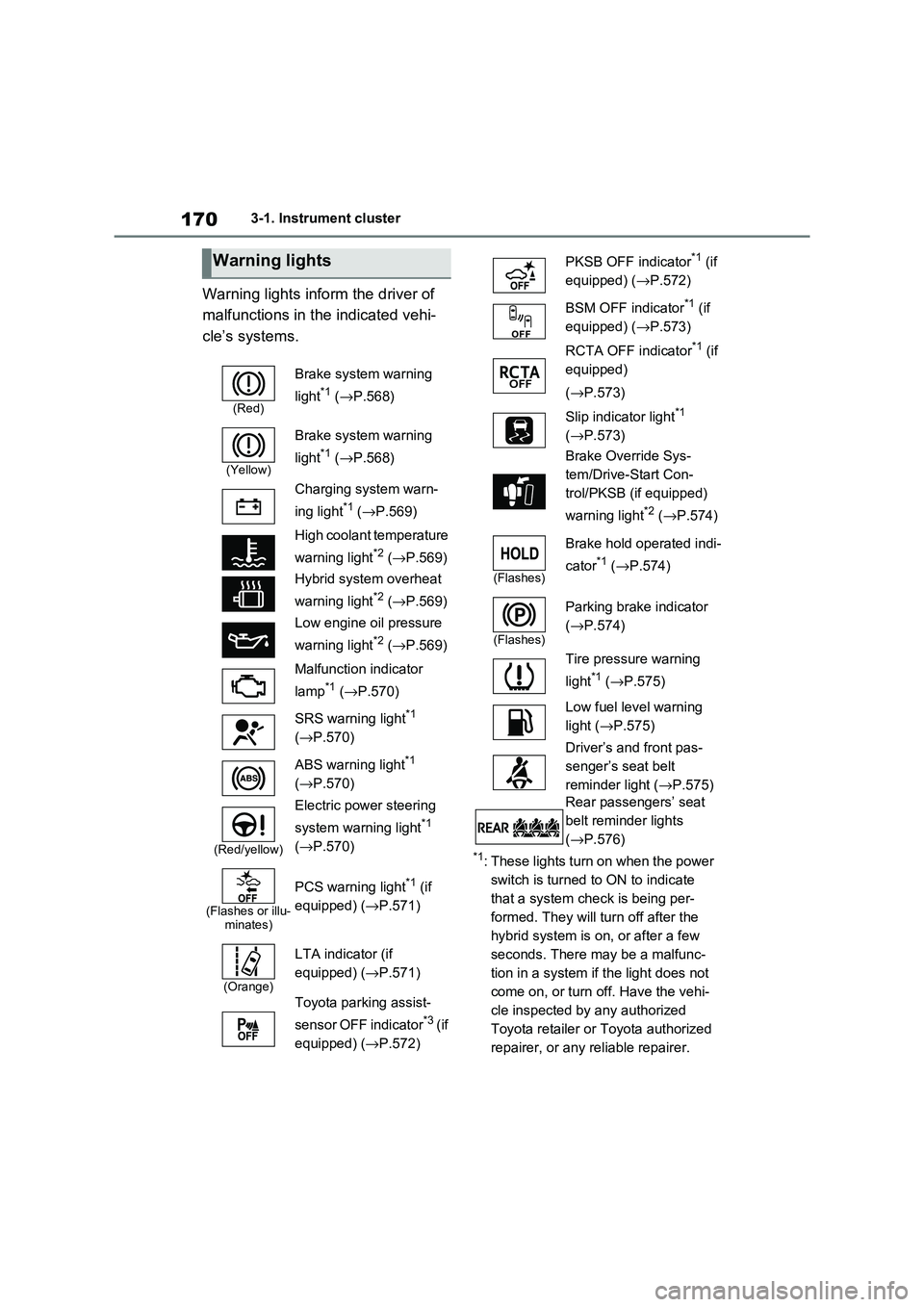
Warning lights inform the driver of
malfunctions in the indicated vehi -
cle’s systems.
*1: These lights turn on when the power
switch is turned to ON to indicate
that a system check is being per -
formed. They will turn off after the
hybrid system is on , or after a few
seconds. There may be a malfunc-
tion in a system if the light does not
come on, or turn off. Have the vehi -
cle inspected by any authorized
Toyota retailer or Toyota authorized
repairer, or any reliable repairer.
Warning lights
(Red)
Brake system warning
light*1 ( →P.568)
(Yellow)
Brake system warning
light*1 ( →P.568)
Charging system warn -
ing light*1 ( →P.569)
High coolant temperature
warning light*2 ( →P.569)
Hybrid system overheat
warning light*2 ( →P.569)
Low engine oil pressure
warning light*2 ( →P.569)
Malfunction indicator
lamp*1 ( →P.570)
SRS warning light*1
( →P.570)
ABS warning light*1
( →P.570)
(Red/yellow)
Electric power steering
system warning light*1
( →P.570)
(Flashes or illu- minates)
PCS warning light*1 (if
equipped) ( →P.571)
(Orange)
LTA indicator (if
equipped) ( →P.571)
Toyota parking assist-
sensor OFF indicator*3 ( i f
equipped) ( →P.572)
PKSB OFF indicator*1 (if
equipped) ( →P.572)
BSM OFF indicator*1 (if
equipped) ( →P.573)
RCTA OFF indicator*1 (if
equipped)
( →P.573)
Slip indicator light*1
( →P.573)
Brake Override Sys -
tem/Drive-Start Con -
trol/PKSB (if equipped)
warning light*2 ( →P.574)
(Flashes)
Brake hold operated indi-
cator*1 ( →P.574)
(Flashes)
Parking brake indicator
( →P.574)
Tire pressure warning
light*1 ( →P.575)
Low fuel level warning
light ( →P.575)
Driver’s and front pas -
senger’s seat belt
reminder light ( →P.575)
Rear passengers’ seat
belt reminder lights
( →P.576)
Page 173 of 666
171
3
3-1. Instrument cluster
Vehicle status information and indicators
*2: This light illumina tes on the multi-
information displa y with a message.
*3: Toyota parking assist-sensor OFF
indicator turns on when the power
switch is turned to ON while the
Toyota parking a ssist-sensor func-
tion is on. It will turn off after a few
seconds.
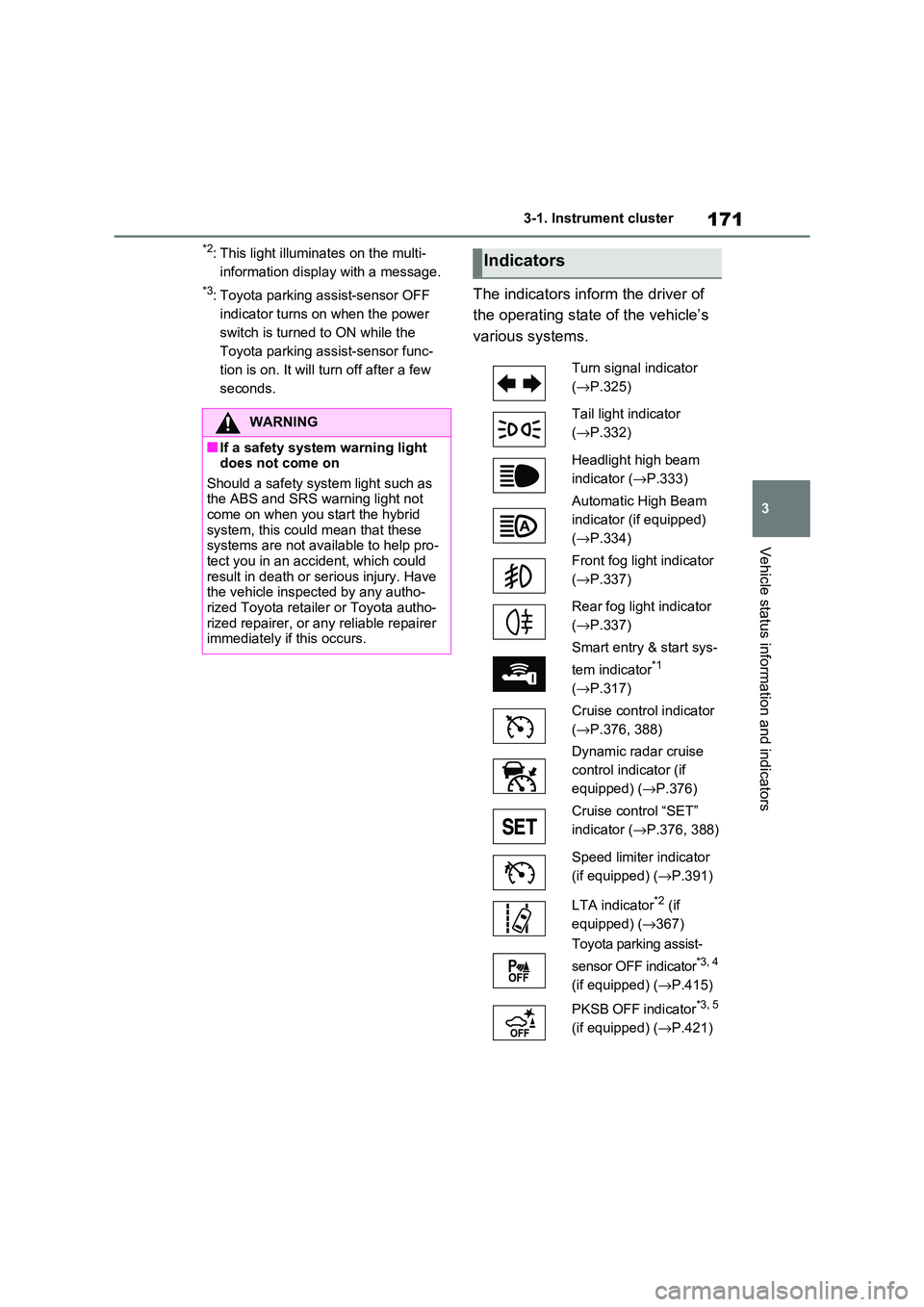
The indicators inform the driver of
the operating state of the vehicle’s
various systems.
WARNING
■If a safety system warning light
does not come on
Should a safety syst em light such as the ABS and SRS wa rning light not
come on when you start the hybrid
system, this could mean that these systems are not ava ilable to help pro-
tect you in an accident, which could
result in death or serious injury. Have the vehicle inspected by any autho -
rized Toyota retailer or Toyota autho -
rized repairer, or any reliable repairer immediately if this occurs.
Indicators
Turn signal indicator
( →P.325)
Tail light indicator
( →P.332)
Headlight high beam
indicator ( →P.333)
Automatic High Beam
indicator (if equipped)
( →P.334)
Front fog light indicator
( →P.337)
Rear fog light indicator
( →P.337)
Smart entry & start sys -
tem indicator*1
( →P.317)
Cruise control indicator
( →P.376, 388)
Dynamic radar cruise
control indicator (if
equipped) ( →P.376)
Cruise control “SET”
indicator ( →P.376, 388)
Speed limiter indicator
(if equipped) ( →P.391)
LTA indicator*2 (if
equipped) ( →367)
Toyota parking assist-
sensor OFF indicator*3, 4
(if equipped) ( →P.415)
PKSB OFF indicator*3, 5
(if equipped) ( →P.421)
Page 174 of 666
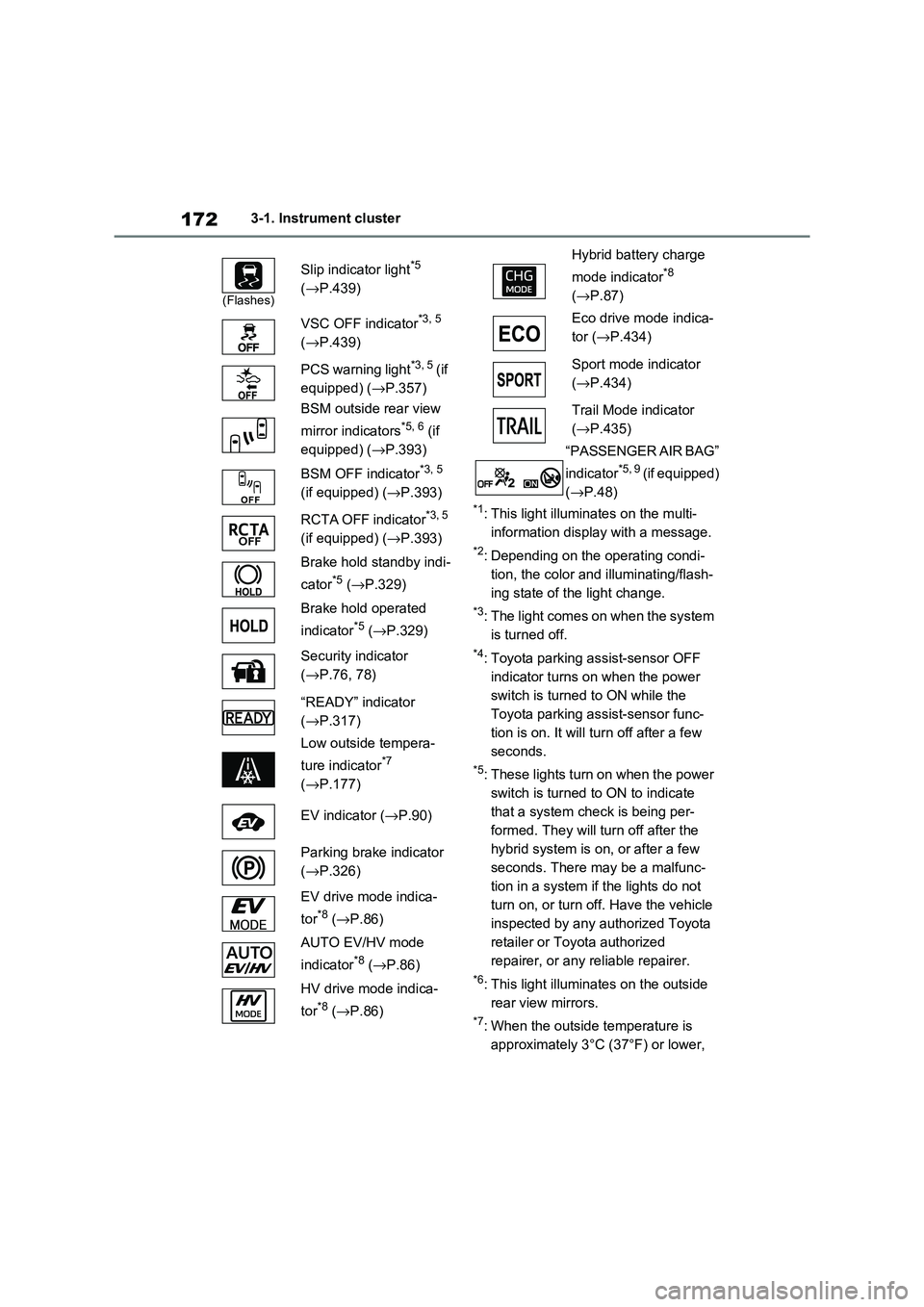
1723-1. Instrument cluster
*1: This light illuminates on the multi-
information display with a message.
*2: Depending on the operating condi -
tion, the color and illuminating/flash -
ing state of t he light change.
*3: The light comes on when the system
is turned off.
*4: Toyota parking assist-sensor OFF
indicator turns on when the power
switch is turned to ON while the
Toyota parking a ssist-sensor func-
tion is on. It will t urn off after a few
seconds.
*5: These lights turn on when the power
switch is turned to ON to indicate
that a system check is being per -
formed. They will turn off after the
hybrid system is on , or after a few
seconds. There may be a malfunc-
tion in a system if the lights do not
turn on, or turn off. Have the vehicle
inspected by any authorized Toyota
retailer or Toyota authorized
repairer, or any reliable repairer.
*6: This light illuminates on the outside
rear view mirrors.
*7: When the outside temperature is
approximately 3°C (37°F) or lower,
(Flashes)
Slip indicator light*5
( →P.439)
VSC OFF indicator*3, 5
( →P.439)
PCS warning light*3, 5 ( i f
equipped) ( →P.357)
BSM outside rear view
mirror indicators*5, 6 (if
equipped) ( →P.393)
BSM OFF indicator*3, 5
(if equipped) ( →P.393)
RCTA OFF indicator*3, 5
(if equipped) ( →P.393)
Brake hold standby indi -
cator*5 ( →P.329)
Brake hold operated
indicator*5 ( →P.329)
Security indicator
( →P.76, 78)
“READY” indicator
( →P.317)
Low outside tempera -
ture indicator*7
( →P.177)
EV indicator ( →P.90)
Parking brake indicator
( →P.326)
EV drive mode indica -
tor*8 ( →P.86)
AUTO EV/HV mode
indicator*8 ( →P.86)
HV drive mode indica -
tor*8 ( →P.86)
Hybrid battery charge
mode indicator*8
( →P.87)
Eco drive mode indica -
tor ( →P.434)
Sport mode indicator
( →P.434)
Trail Mode indicator
( →P.435)
“PASSENGER AIR BAG”
indicator*5, 9 ( i f e q u i p p e d )
( →P.48)
Page 177 of 666
175
3
3-1. Instrument cluster
Vehicle status information and indicators
the blue zone, EV driving is no longer possible (in this situat ion, the vehicle switches
to HV mode). Charge the hybrid ba ttery (traction battery) to allow EV driving.
Odometer, trip meter and instrument cluster light control display
Odometer:
Displays the total distance tha t the vehicle has been driven
Trip meter:
Displays the distance t he vehicle has been driven since the meter was last reset.
Trip meters “A” and “B” can be us ed to record and display different distances inde-
pendently.
Instrument cluster light control:
Displays the brightne ss of the instrument cluster lights that can be adjusted.
Outside temperature (→P.177)
Multi-information display
Presents the driver with a variety of driving-related data ( →P.179)
Displays warning messages if a malfunction occurs ( →P.578)
Shift position and shift range indicator
Displays the selected shift position or selected shift range (→P.321)
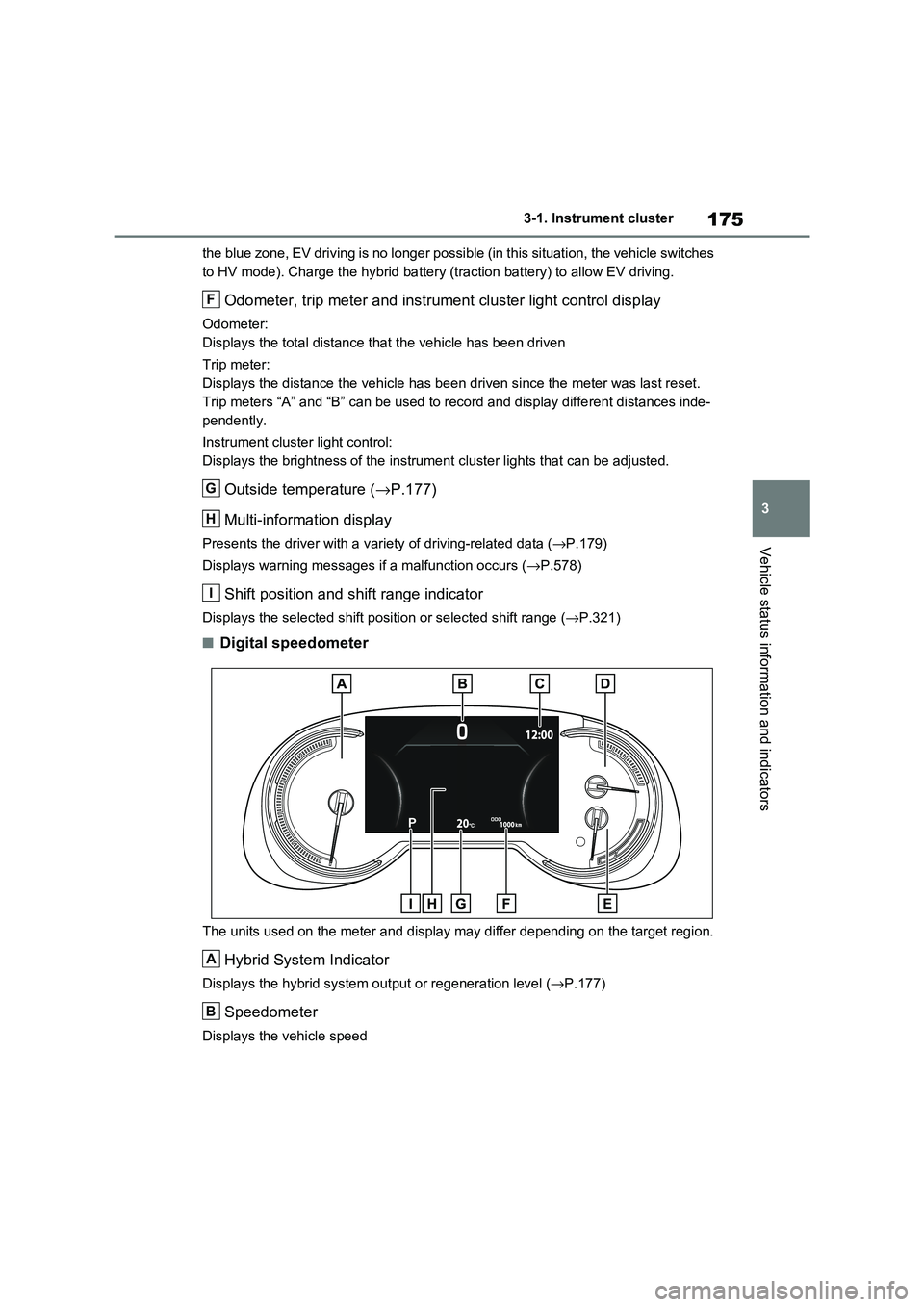
■Digital speedometer
The units used on the meter and display may differ depending on the target region.
Hybrid System Indicator
Displays the hybrid system output or regeneration level (→P.177)
Speedometer
Displays the vehicle speed
F
G
H
I
A
B
Page 178 of 666
1763-1. Instrument cluster
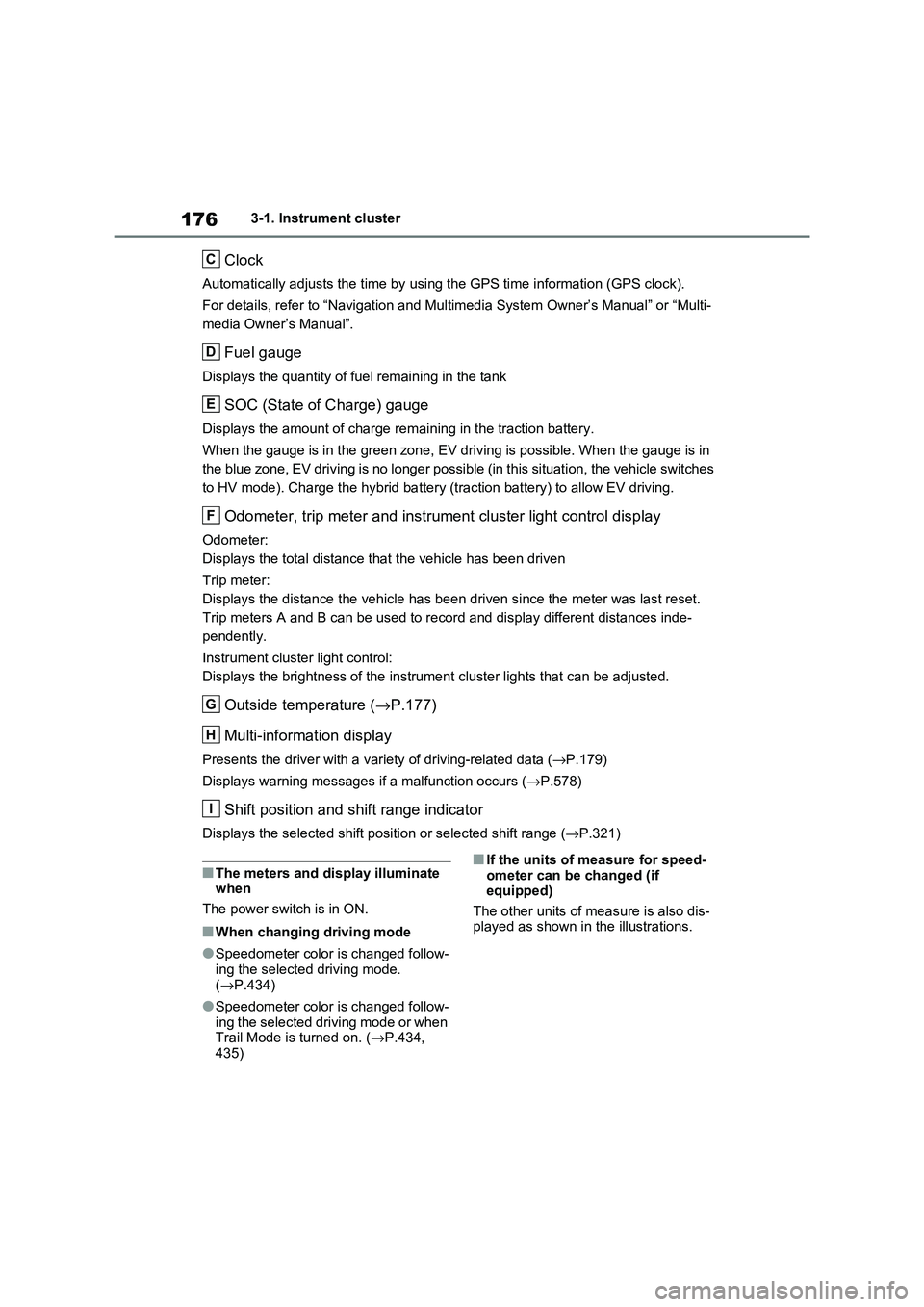
Clock
Automatically adjusts the time by using the GPS time information (GPS clock).
For details, refer to “Navigation and Multimedia System Owner’s Manual” or “Multi-
media Owner’s Manual”.
Fuel gauge
Displays the quantity of f uel remaining in the tank
SOC (State of Charge) gauge
Displays the amount of charge remaining in the traction battery.
When the gauge is in t he green zone, EV driving is possible. When the gauge is in
the blue zone, EV driving is no longer possible (in this situat ion, the vehicle switches
to HV mode). Charge the hybrid ba ttery (traction battery) to allow EV driving.
Odometer, trip meter and instrument cluster light control display
Odometer:
Displays the total distance tha t the vehicle has been driven
Trip meter:
Displays the distance t he vehicle has been driven since the meter was last reset.
Trip meters A and B can be us ed to record and display different distances inde-
pendently.
Instrument cluster light control:
Displays the brightne ss of the instrument cluster lights that can be adjusted.
Outside temperature (→P.177)
Multi-information display
Presents the driver with a variety of driving-related data ( →P.179)
Displays warning messages if a malfunction occurs ( →P.578)
Shift position and shift range indicator
Displays the selected shift position or selected shift range (→P.321)
■The meters and display illuminate when
The power switch is in ON.
■When changing driving mode
●Speedometer color is changed follow -
ing the selected driving mode.
( →P.434)
●Speedometer color is changed follow-
ing the selected driving mode or when Trail Mode is turned on. ( →P.434,
435)
■If the units of measure for speed -
ometer can be changed (if equipped)
The other units of me asure is also dis-
played as shown in the illustrations.
C
D
E
F
G
H
I
Page 180 of 666
1783-1. Instrument cluster
changed suddenly (at the
entrance/exit of a garage, tunnel, etc.)
●When “--” or “E” is displayed, the sys -
tem may be malfunctioning. Take your vehicle to any authorized
Toyota retailer or Toyota authorized
repairer, or any reliable repairer.
●Displays the outsi de temperature
within the range o f -40°C (-40°F) to 50°C (122°F).
●When the outside temperature is
approximately 3°C (37°F) or lower,
the indicator will flash for approxi-
mately 10 seconds, then stay on.
■Liquid crystal display
→ P.180
■Customization
Settings (e. g. mete r display) can be
changed on the scre en of the multi-
information display. ( →P.186)
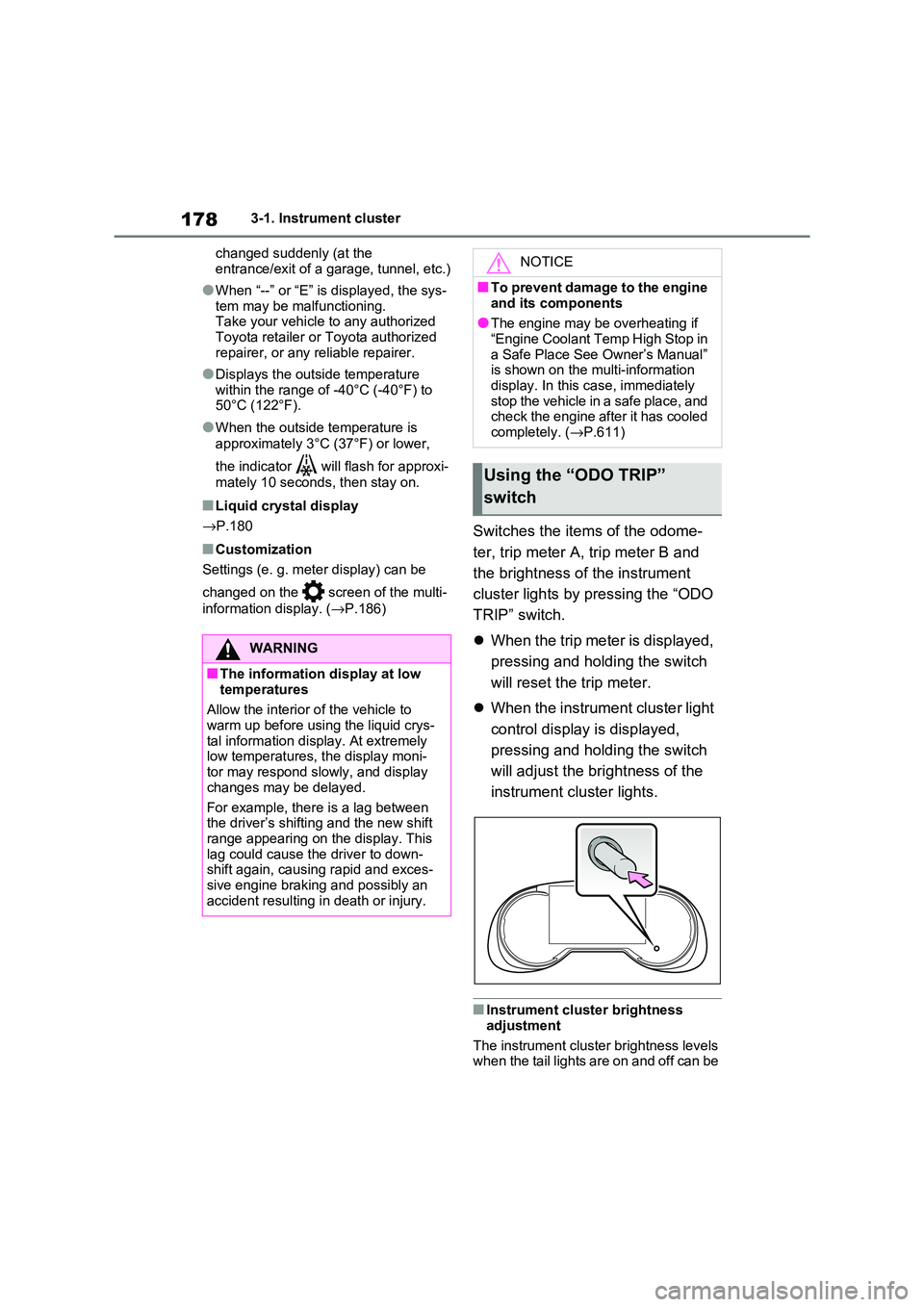
Switches the items of the odome-
ter, trip meter A, trip meter B and
the brightness of the instrument
cluster lights by pressing the “ODO
TRIP” switch.
When the trip meter is displayed,
pressing and holding the switch
will reset the tr ip meter.
When the instrument cluster light
control display is displayed,
pressing and holding the switch
will adjust the brightness of the
instrument cluster lights.
■Instrument cluster brightness
adjustment
The instrument cluster brightness levels when the tail lights are on and off can be
WARNING
■The information display at low
temperatures
Allow the interior o f the vehicle to
warm up before usin g the liquid crys-
tal information display. At extremely low temperatures, the display moni -
tor may respond slowly, and display
changes may be delayed.
For example, there is a lag between
the driver’s shifting and the new shift
range appearing on the display. This lag could cause the driver to down -
shift again, causing rapid and exces -
sive engine braking and possibly an accident resulting in death or injury.
NOTICE
■To prevent damage to the engine
and its components
●The engine may be overheating if “Engine Coolant Temp High Stop in
a Safe Place See Owner’s Manual”
is shown on the multi-information display. In this case, immediately
stop the vehicle in a safe place, and
check the engine after it has cooled
completely. ( →P.611)
Using the “ODO TRIP”
switch
Page 182 of 666
1803-1. Instrument cluster
A variety of infor mation can be dis-
played by selecting a menu icon.
Additionally, warning or sugges -
tion/advice pop-up displays will be dis-
played in some situations.
Menu icons ( →P.180)
■The multi-information display is
displayed when
The power switch is in ON.
■When changing driving mode
●Background color of the multi-informa -
tion display is changed following the selected driving mode. ( →P.434)
●Background color of the multi-informa- tion display is changed following the
selected driving mode or when Trail
Mode is turned on. ( →P.434, 435)
■Liquid crystal display
Small spots or light spots may appear
on the display. This phenomenon is
characteristic of liqui d crystal displays, and there is no prob lem continuing to
use the display.
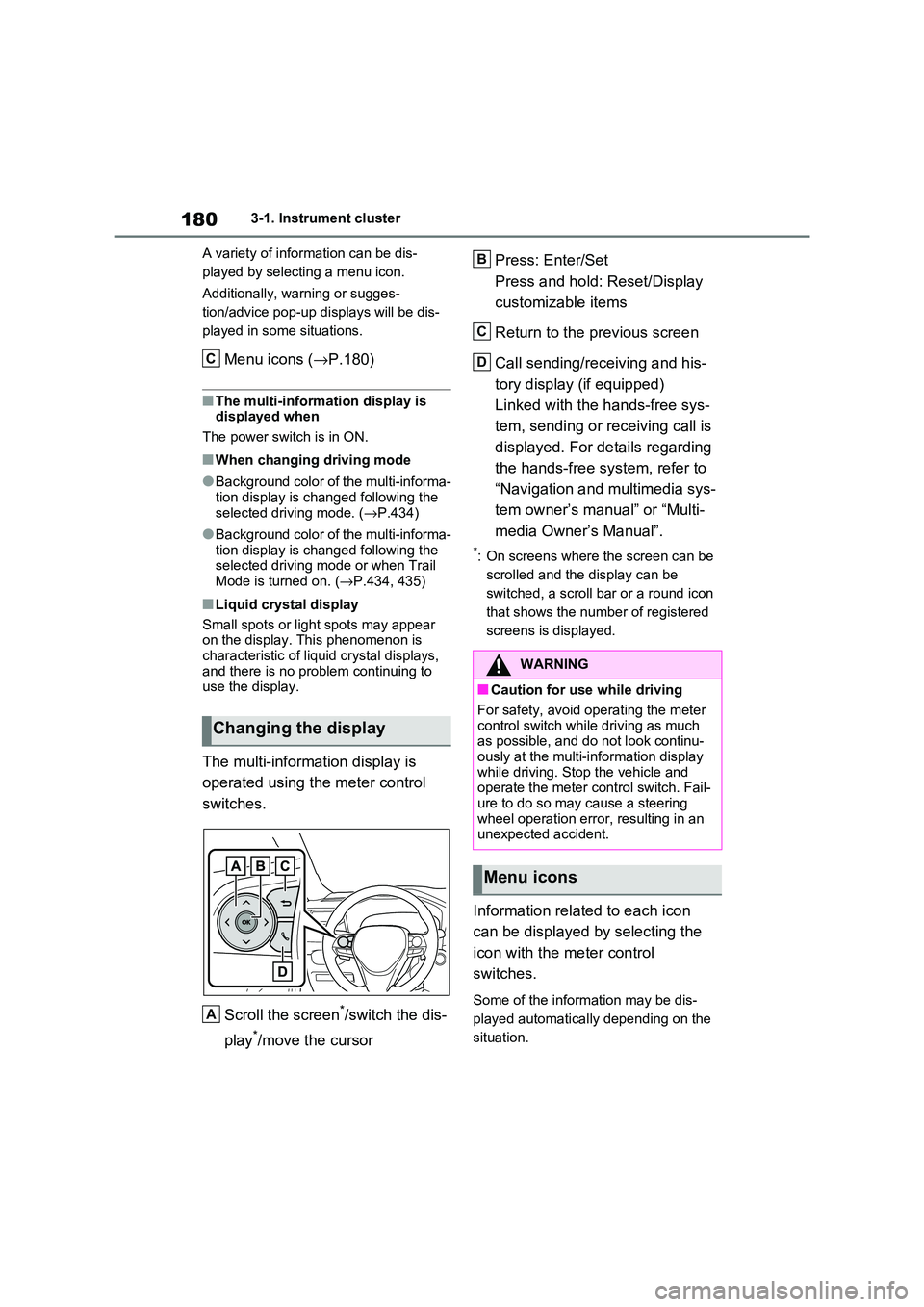
The multi-information display is
operated using the meter control
switches.
Scroll the screen*/switch the dis -
play*/move the cursor
Press: Enter/Set
Press and hold: Reset/Display
customizable items
Return to the previous screen
Call sending/receiving and his -
tory display (if equipped)
Linked with the hands-free sys -
tem, sending or re ceiving call is
displayed. For details regarding
the hands-free system, refer to
“Navigation and multimedia sys -
tem owner’s manual” or “Multi -
media Owner’s Manual”.
*: On screens where the screen can be
scrolled and the display can be
switched, a scroll bar or a round icon
that shows the num ber of registered
screens is displayed.
Information related to each icon
can be displayed by selecting the
icon with the meter control
switches.
Some of the information may be dis -
played automatically depending on the
situation.
Changing the display
C
A
:$51,1*
■Caution for use while driving
For safety, avoid o perating the meter
control switch while driving as much
as possible, and do not look continu - ously at the multi-in formation display
while driving. Stop the vehicle and
operate the meter control switch. Fail - ure to do so may cause a steering
wheel operation error, resulting in an
unexpected accident.
Menu icons
B
C
D
Page 221 of 666
219
4
4-2. Opening, closing and locking the doors
Before driving
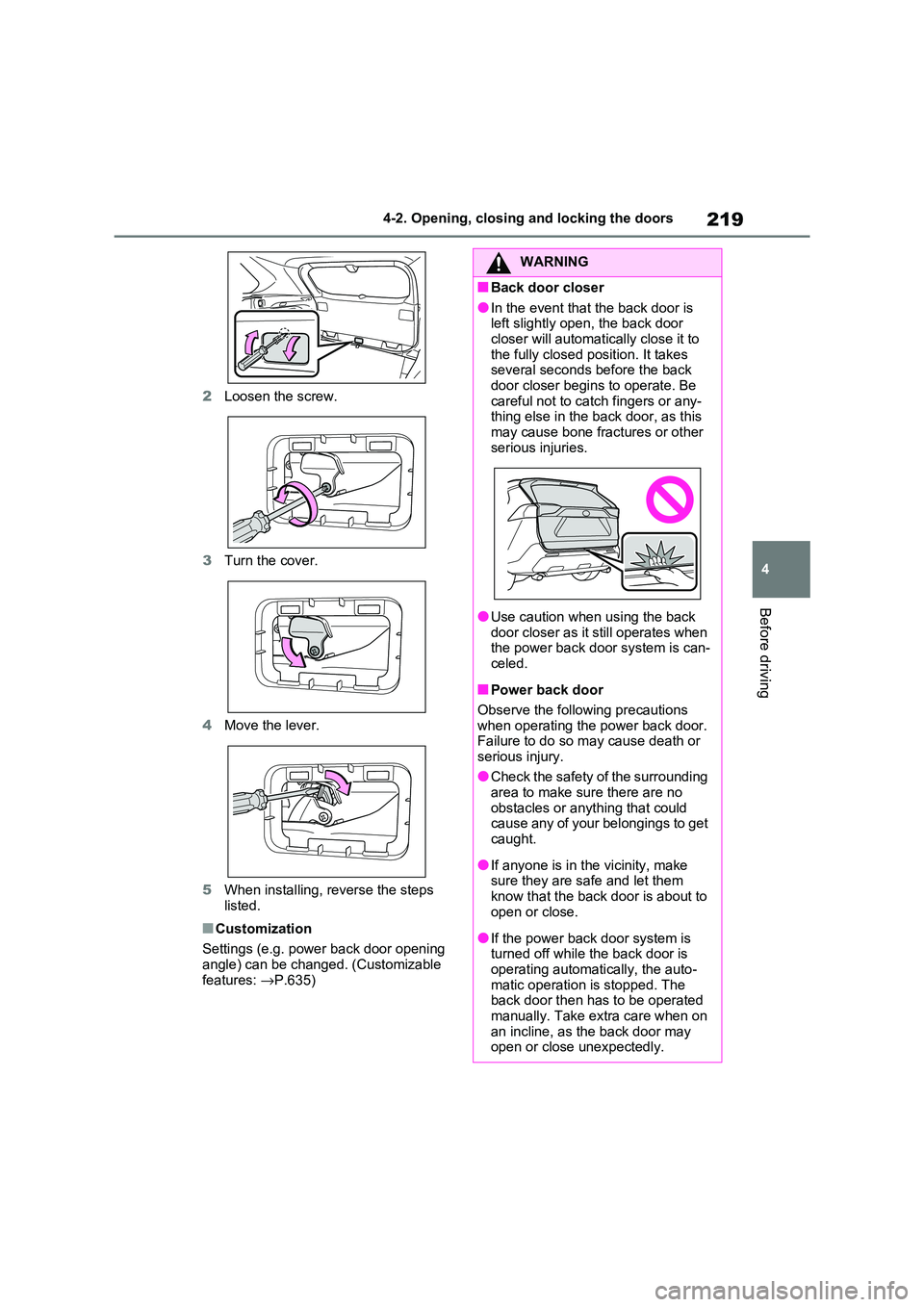
2 Loosen the screw.
3 Turn the cover.
4 Move the lever.
5 When installing, reverse the steps
listed.
■Customization
Settings (e.g. power back door opening
angle) can be changed. (Customizable
features: →P.635)
WARNING
■Back door closer
●In the event that the back door is
left slightly open, the back door closer will automatically close it to
the fully closed po sition. It takes
several seconds before the back door closer begins to operate. Be
careful not to catch fingers or any -
thing else in the back door, as this
may cause bone frac tures or other serious injuries.
●Use caution when using the back door closer as it still operates when
the power back d oor system is can-
celed.
■Power back door
Observe the following precautions when operating the power back door.
Failure to do so m ay cause death or
serious injury.
●Check the safety of the surrounding
area to make sur e there are no
obstacles or anything that could cause any of your belongings to get
caught.
●If anyone is in the vicinity, make
sure they are safe and let them
know that the back door is about to open or close.
●If the power back door system is turned off while the back door is
operating automatically, the auto -
matic operation is stopped. The back door then has to be operated
manually. Take extra care when on
an incline, as the back door may open or close unexpectedly.