warning light TOYOTA RAV4 PLUG-IN HYBRID 2021 User Guide
[x] Cancel search | Manufacturer: TOYOTA, Model Year: 2021, Model line: RAV4 PLUG-IN HYBRID, Model: TOYOTA RAV4 PLUG-IN HYBRID 2021Pages: 666, PDF Size: 161.28 MB
Page 46 of 666
441-1. For safe use
WARNING
●The SRS driver airbag deploys with
considerable force, and can cause
death or serious injury especially if the driver is very close to the air-
bag.
Since the risk zone for the driver’s air -
bag is the first 50 - 75 mm (2 - 3 in.) of
inflation, placing yourself 250 mm (10
in.) from your drive r airbag provides
you with a clear margin of safety. This
distance is measured from the center
of the steering whee l to your breast-
bone. If you sit less than 250 mm (10
in.) away now, you can change your
driving position in several ways:
• Move your seat to the rear as far as
you can while still reaching the ped -
als comfortably.
• Slightly recline the back of the seat.
Although vehicle designs vary, many drivers can achieve the 250
mm (10 in.) distanc e, even with the
driver seat all th e way forward, sim- ply by reclining the back of the seat
somewhat. If reclin ing the back of
your seat makes i t hard to see the road, raise yourself by using a firm,
non-slippery cushion, or raise the
seat if your vehicle has that feature.
• If your steering wheel is adjustable,
tilt it downwa rd. This points the air- bag toward your chest instead of
your head and neck.
The seat should be adjusted as rec - ommended above, while still main -
taining control of the foot pedals,
steering wheel, and your view of the instrument panel controls.
●The SRS front passenger airbag also deploys with considerable
force, and can caus e death or seri-
ous injury especially if the front pas - senger is very clo se to the airbag.
The front passenger seat should be
as far from the airbag as possible with the seatback adjusted, so the
front passenger sits upright.
●Improperly seated and/or restrained
infants and children can be killed or
seriously injured by a deploying air - bag. An infant or child who is too
small to use a seat belt should be
properly secured using a child restraint system. Toyota strongly
recommends that all infants and
children be placed in the rear seats of the vehicle and properly
restrained. The rear seats are safer
for infants and children than the front passenger seat. ( →P.50)
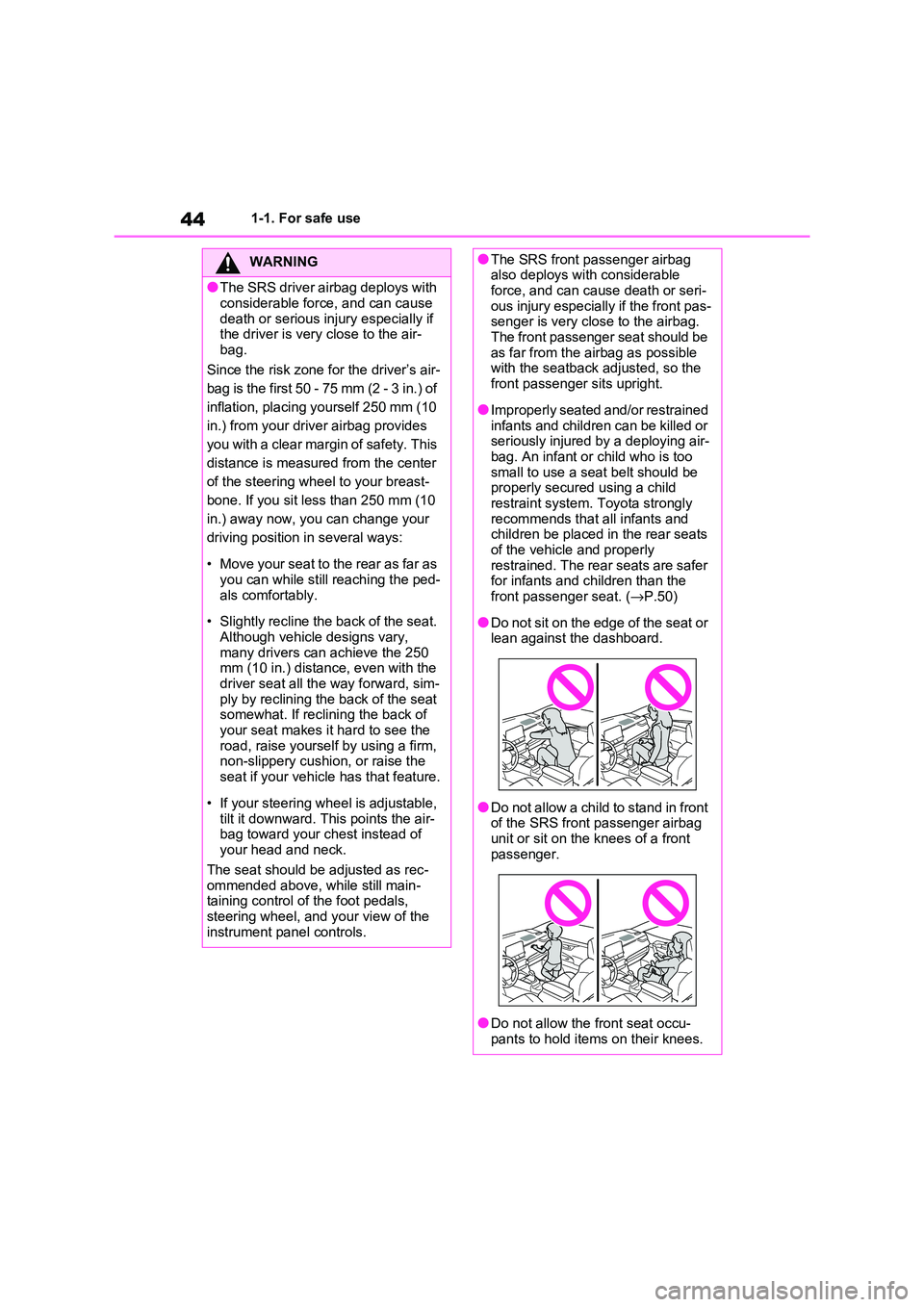
●Do not sit on the edge of the seat or lean against the dashboard.
●Do not allow a child to stand in front of the SRS front passenger airbag
unit or sit on the knees of a front
passenger.
●Do not allow the front seat occu-
pants to hold items on their knees.
Page 49 of 666
47
1
1-1. For safe use
For safety and security
Exhaust gas precautions
Harmful substance to the
human body is included in
exhaust gases if inhaled.
WARNING
Exhaust gases contain harmful car -
bon monoxide (CO), which is color -
less and odorless. Observe the following precautions.
Failure to do so may cause exhaust
gases to enter the vehicle and may lead to an acciden t caused by light-
headedness, or may lead to death or
a serious health hazard.
■Important points while driving
●Keep the back door closed.
●If you smell exhaust gases in the
vehicle even when the back door is
closed, open the side windows and have the vehicle inspected at any
authorized Toyota retailer or Toyota
authorized repairer, or any reliable repairer as soon as possible.
■When parking
●If the vehicle is in a poorly venti -
lated area or a closed area, such as
a garage, stop t he hybrid system.
●Do not leave the vehicle with the
hybrid system opera ting for a long time.
If such a situation cannot be
avoided, park the vehicle in an open space and ensure that
exhaust fumes do not enter the
vehicle interior.
●Do not leave the hybrid system
operating in an area with snow build-up, or where it is snowing. If
snowbanks build up around the
vehicle while the hybrid system is operating, exhaust gases may col -
lect and enter the vehicle.
■Exhaust pipe
The exhaust system needs to be
checked periodically. If there is a hole
or crack caused b y corrosion, dam- age to a joint or abnormal exhaust
noise, be sure to have the vehicle
inspected and repai red by any autho- rized Toyota retaile r or Toyota autho-
rized repairer, or any reliable repairer.
Page 69 of 666
67
1
1-3. Emergency assistance
For safety and security
at the following URL.
http://www.opensourceautomotive.com/dcm/toyota/
WARNING
■When the Emergency Call may
not be made
●It may not be possible to make
Emergency Calls in any of the fol-
lowing situations. In such cases,
report to emergen cy services pro- vider (112 system etc.) by other
means such as nearby public
phones.
• Even when the vehicle is in the cel -
lular phone service area, it may be
difficult to connec t to the eCall con- trol center if the reception is poor or
the line is busy. In such cases,
even though the system attempts to connect to the eCall control center,
you may not be able to connect to
the eCall control center to make Emergency Calls and contact emer -
gency services.
• When the vehicle is out of the cellu -
lar phone service area, the Emer -
gency Calls cannot be made.
• When any related equipment (such
as the “SOS” button panel, indicator lights, microphone, speaker, DCM,
antenna, or any wires connecting
the equipment) is malfunctioning, damaged or broken, the Emer -
gency Call cannot be made.
• During an Emergency Call, the sys -
tem makes repeated attempts to
connect to the eCall control center. However, if it cannot connect to the
eCall control center due to poor
radio wave reception, the system may not be able to connect to the
cellular network and the call may
finish without connecting. The red indicator light will blink for approxi -
mately 30 seconds to indicate this
disconnection.
●If the 12-volt battery’s voltage decreases or there is a disconnec -
tion, the system may not be able to
connect to the eCa ll control center.
■When the Emergency Call sys-
tem is replaced with a new one
The Emergency Call system should
be registered. Contact any authorized
Toyota retailer or Toyota authorized repairer, or any reliable repairer.
■For your safety
●Please drive safely.
The function of t his system is to
assist you in making the Emer - gency Call in case of accidents
such as traffic a ccidents or sudden
medical emergenc ies, and it does not protect the driver or passengers
in any way. Please drive safely and
fasten your seatbelts at all times for your safety.
●In case of an emergency, make lives the top priority.
●If you smell anything burning or other unusual smells, leave the
vehicle and evacuate to a safe area
immediately.
●If the airbags dep loy when the sys-
tem is operating normally, the sys- tem makes emerge ncy call. The
system also makes emergency call
when the vehicle is struck from the rear or rolls over , even if the air-
bags do not deploy.
●For safety, do not make the Emer -
gency Call while driving.
Making calls during driving may cause mishandling of the steering
wheel, which may lead to unex -
pected accidents.
Stop the vehicle and confirm the safety of your su rroundings before
making the Emergency Call.
Page 97 of 666
95
2
2-1. Plug-in hybrid system
Plug-in hybrid system
Hybrid battery (traction battery)
Front electric motor (traction motor)
Air conditioning compressor
Junction box
■Running out of fuel
When the vehicle has run out of fuel and
the hybrid system c annot be started, refuel the vehicle with at least enough
gasoline to make the low fuel level warn -
ing light ( →P.575) go off. If there is only a small amount of fuel, the hybrid sys -
tem may not be able to start. (The stan -
dard amount of fuel is about 8.8 L [2.3 gal., 1.9 Imp.gal.], w hen the vehicle is
on a level surface. This value may vary
when the vehicle is on a slope. Add extra fuel when the vehicle is inclined.)
■Electromagnetic waves
●High voltage parts and cables on the hybrid vehicles incorporate electro -
magnetic shielding, and therefore emit
approximately the same amount of electromagnetic waves as conven -
tional gasoline powered vehicles or
home electronic appliances.
●Your vehicle may cause sound inter -
ference in some third party-produced radio parts.
■Effect of magnetic forces
If objects that generate strong magnetic
forces, such as large speakers, are placed inside the luggage compartment
or installed nearby, the generated mag -
netic forces may negatively affect the hybrid system.
■Hybrid battery (tr action battery)
(lithium-ion battery)
The hybrid battery (traction battery) has a limited service life.
The hybrid battery (traction battery)
capacity (the ability to hold a charge) reduces with time a nd use in the same
way as other rechargeable batteries.
The extent at which capacity reduces
changes drastically depending on the
environment (ambient temperature, etc.)
and usage conditions, such as how the
vehicle is driven and how the hybrid bat - tery (traction battery) is charged. This is
a natural characteristic of lithium-ion
batteries, and is not a malfunction. Also, even though the EV driving range
becomes shorter when the hybrid bat -
tery (traction batter y) capacity reduces, vehicle performance does not signifi -
cantly become worse.
In order to reduce th e possibility of the capacity reducing, follow the directions
listed on P.134, “Capacity reduction of
the hybrid battery ( traction battery)”.
■Starting the hybrid system in an extremely cold environment
When the hybrid battery (traction bat -
tery) is extremely c old (below approxi- mately -30°C [-22°F]) under the
influence of the outsi de temperature, it
may not be possible to start the hybrid system. In this case , try to start the
hybrid system again after the tempera -
ture of the hy brid battery increases due to the outside temperature increase etc.
■Declaration of conformity
This model conform s to hydrogen emis-
sions according to regulation ECE100 (Battery electric vehicle safety).
I
J
K
L
WARNING
■High voltage precautions
The vehicle has high voltage DC and
AC systems as well as a 12-volt sys- tem. DC and AC high voltage is very
dangerous and can cause severe
burns and electric shock that may result in death or serious injury.
Page 101 of 666
99
2
2-1. Plug-in hybrid system
Plug-in hybrid system
stops the fuel pump to minimize the
risk of electrocuti on and fuel leak-
age.
If the emergency shut off system
activates, your vehicle will not
restart. To restart the hybrid sys -
tem, contact any authorized Toyota
retailer or Toyota authorized
repairer, or any reliable repairer.
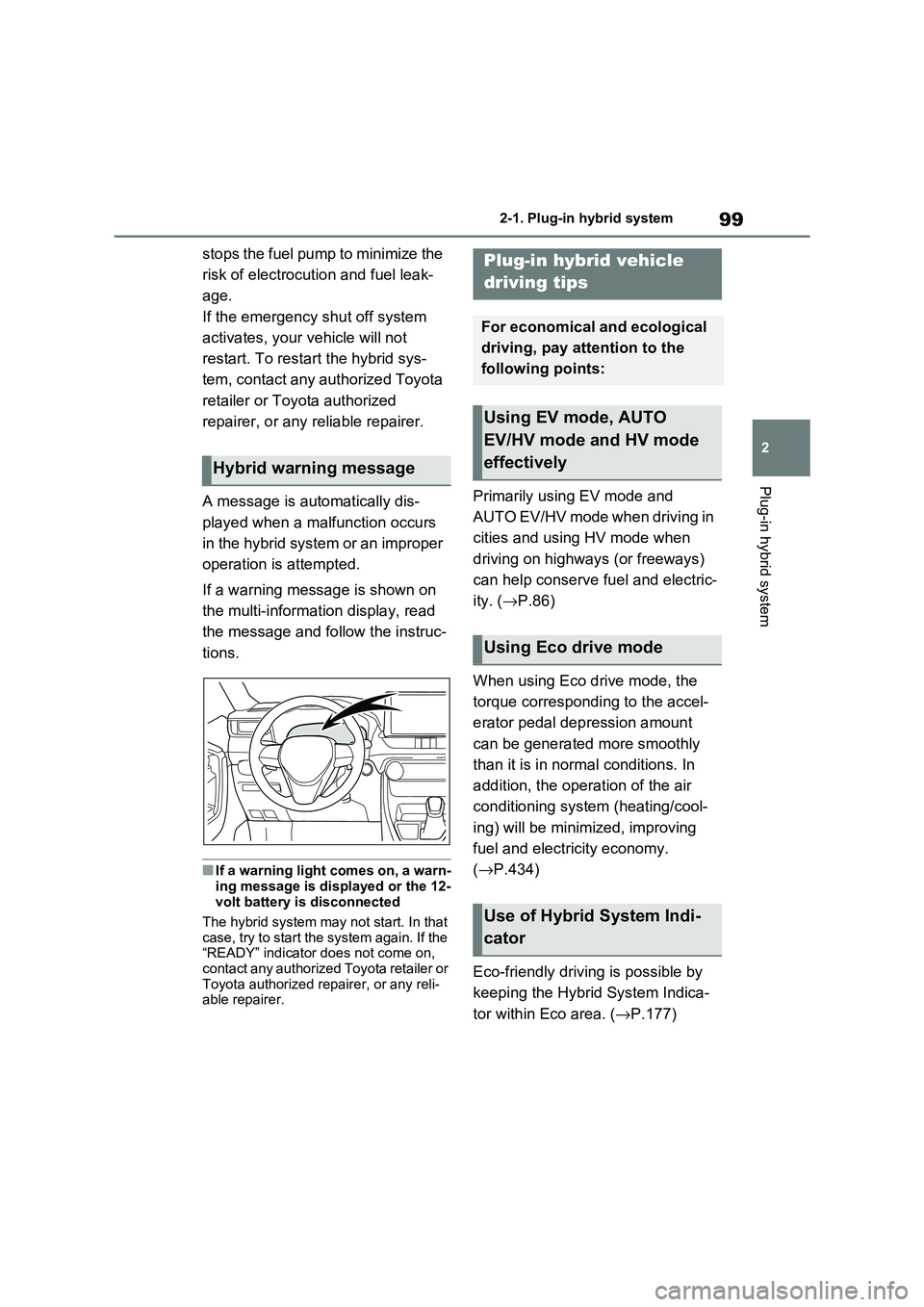
A message is automatically dis -
played when a malfunction occurs
in the hybrid system or an improper
operation is attempted.
If a warning message is shown on
the multi-informat ion display, read
the message and follow the instruc -
tions.
■If a warning light comes on, a warn - ing message is displayed or the 12-
volt battery is disconnected
The hybrid system may not start. In that
case, try to start the system again. If the “READY” indicator does not come on,
contact any authorized Toyota retailer or
Toyota authorized repairer, or any reli - able repairer.
Primarily using EV mode and
AUTO EV/HV mode when driving in
cities and using HV mode when
driving on highways (or freeways)
can help conserve fuel and electric -
ity. ( →P.86)
When using Eco drive mode, the
torque corresponding to the accel -
erator pedal depression amount
can be generated more smoothly
than it is in normal conditions. In
addition, the operation of the air
conditioning system (heating/cool -
ing) will be minim ized, improving
fuel and electricity economy.
( →P.434)
Eco-friendly driving is possible by
keeping the Hybrid System Indica -
tor within Eco area. ( →P.177)
Hybrid warning message
Plug-in hybrid vehicle
driving tips
For economical and ecological
driving, pay attention to the
following points:
Using EV mode, AUTO
EV/HV mode and HV mode
effectively
Using Eco drive mode
Use of Hybrid System Indi -
cator
Page 135 of 666
133
2
2-2. Charging
Plug-in hybrid system
This vehicle has been designed to
allow charging from an external
power source using a AC charging
cable for exclusive use with stan -
dard household AC sockets.
However, the vehicle differs greatly
from standard household electrical
goods in the following ways, and
incorrect usage could cause fire or
electric shock, possibly leading to
death or serious injury.
The charging operation is
designed to ope rate at 8A-10A
continuously for the charge dura -
tion (approximately 9 hours).
( →P.127)
Charging can be conducted out-
doors.
To charge properly, follow the pro -
cedure after reading the explana -
tion below. Charging is intended to
be carried out by licensed drivers
only who properly understand the
charging procedure.
Do not allow children to use the
AC charging cable without
supervision. Also, keep the AC
charging cable out of reach of
infants.
When charging with a charger,
follow the procedures for using
each charger.
When charging using a public
charging facility, check the set -
ting of the charging schedule
function.
• When the charging schedule is regis -
tered, temporarily turn off the function
or turn “Charge Now” on. ( →P.145)
• When the charging schedule is set to
on, charging will not start even if the
AC charging cable is connected.
Also, charging fee may occur due to
connection of the A C charging cable.
Before charging, always check the
following items.
The parking brake is applied.
( →P.326)
Lights such as the headlights,
emergency flashers and interior
lights etc. are turned off.
If these light switche s are turned on,
then these features will consume elec-
tricity, and charging time will increase.
The power switch is turned to
OFF. ( →P.320)
Before charging, make sure that
WARNING
■When the AC charging cable is
connected to the vehicle
Do not operate the shift lever.
In the unlikely event that the AC
charging cable ha s been damaged,
the shift position may change from P to another positio n and the vehicle
could move, possibly leading to an
accident.
Charging precautions
Confirm the following before
charging
Inspecting the AC charging
cable
Page 141 of 666
139
2
2-2. Charging
Plug-in hybrid system
charging is displayed ( →P.195).
■Charging at a public charging sta-
tion with authenti cation function
When a door is unlocked during
charging, the charging connector is
unlocked and chargi ng will be stopped. In this case, the charging station
authentication is canceled and charging
may not be able to restart. Reconnect the charging connector and perform
authentication for the charging station.
■Protection function of AC charging
inlet overheating (vehicles with 6.6 kW onboard traction battery char -
ger)
By installing a temperature sensor to the AC charging inlet, prevents parts from
melting when the temperature rises due
to foreign matter ent ering the charging connector. When a certain temperature
increase is detected, charging is
stopped immediately and a message is displayed on the multi-information dis -
play. After the temperature has
decreased, charging resumes by per - forming the operation to start charging
again.
WARNING
■When charging
Observe the following precautions.
Failure to do so may cause an unex -
pected accident, resulting in death or
serious injury.
●Connect to a power source suitable
for charging. ( →P.124)
●Check that the AC charging cable,
plug and socket are free of foreign
matter.
●Before charging, check that the AC
charging inlet is not deformed, damaged or corroded, and check
that the inlet is fr ee of foreign mat-
ter such as dirt , snow and ice. If there is dirt or dust in these areas,
remove completely before inserting
the charging connector.
●Before inserting the charging plug into the charger, make sure there is
no dirt or dust on the terminal
areas. If there is dirt or dust in these areas, remove completely before
inserting the charging plug.
●Do not get the terminals of the AC
charging inlet wet.
●Only use sockets where the plug
can be securely inserted.
●Do not bundle or wind the AC
charging cable while charging, as
doing so may result in overheating.
●Do not touch the te rminals of the
charging connector and AC charging inlet with a sharp metal
objects (needles etc.) or hands, or
short them with foreign objects.
●When charging ou tdoors, make
sure to connect to a rain-tight socket for outdoor u se. Ensure the
rain-tight cover closes completely. If
the rain-tight cover cannot be closed, install a rain-tight cover that
will close.
●In order to stop charging at the
charging station, f ollow the instruc-
tions of the charger.
●If any heat, smoke , odors, noise or
other abnormaliti es are noticed during charging, stop charging
immediately.
●Do not insert the plug if the socket
is submerged in water or snow.
●When charging while it is raining or
snowing, do not connect or discon -
nect the plug if your hands are wet.
Also, do not get the plug or outlet wet.
●Do not charge the vehicle during a lightning storm.
●Prevent the AC charging cable from being caught in the door or back
door.
Page 143 of 666
141
2
2-2. Charging
Plug-in hybrid system
To prevent electrical shock, be sure
to remove by following the proce -
dures below.
1 Unlock the doors to unlock the
charging connector. ( →P.122)
The charging connector will be
unlocked and the AC charging inlet light will illuminate when the doors are
unlocked.
NOTICE
■When charging
Do not insert the plug into the AC
charging inlet.
The AC charging inlet may be dam -
aged.
■Using private power generator
Do not use private power generators
as a power source for charging.
Doing so may mak e charging unsta- ble, the voltage may be insufficient,
and the error warning indicator on the
CCID (Charging Circuit Interrupting Device) of the AC charging cable may
flash.
■Charging station
Due to the environment in which the
power equipment is located, charging may be unstable due to noise, the
voltage may be insu fficient, and the
error warning indi cator on the CCID (Charging Circuit Interrupting Device)
of the AC charging cable may flash.
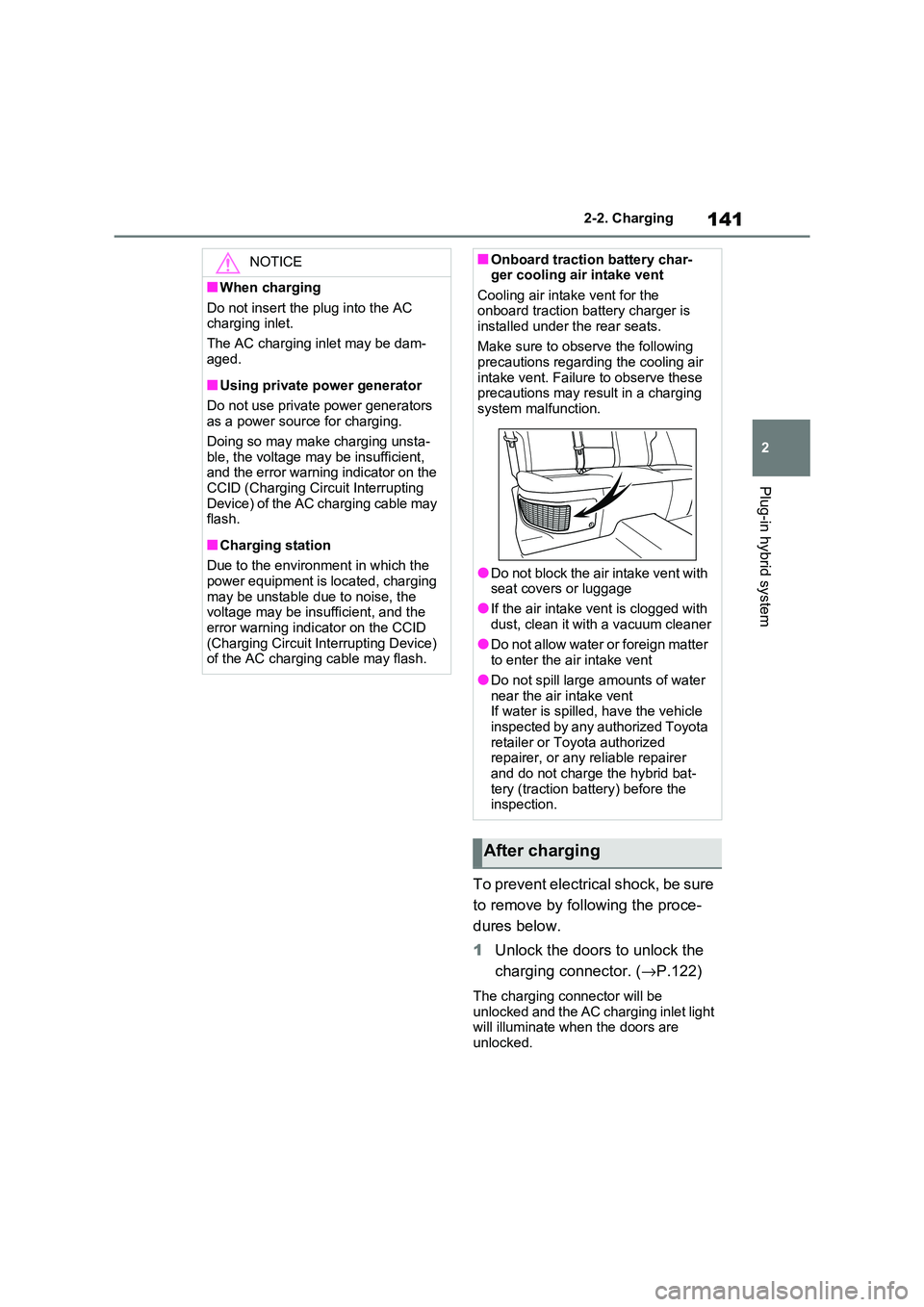
■Onboard traction battery char- ger cooling air intake vent
Cooling air inta ke vent for the
onboard traction battery charger is installed under the rear seats.
Make sure to observe the following
precautions regarding the cooling air intake vent. Failure to observe these
precautions may result in a charging
system mal function.
●Do not block the air intake vent with
seat covers or luggage
●If the air intake v ent is clogged with
dust, clean it with a vacuum cleaner
●Do not allow water or foreign matter to enter the air intake vent
●Do not spill large amounts of water
near the air intake vent If water is spilled, have the vehicle
inspected by any authorized Toyota
retailer or Toyota authorized repairer, or any reliable repairer
and do not charge the hybrid bat -
tery (traction batt ery) before the inspection.
After charging
Page 145 of 666
143
2
2-2. Charging
Plug-in hybrid system
■When the outside temperature is low or high
The level shown on the SOC (State of
Charge) gauge ( →P.174) may drop slightly when the power switch is turned
to ON, even if charging has been com -
pleted and the hybrid battery (traction battery) is fully charged. However, this
does not indicate a malfunction.
■When removing the charging con -
nector
Unlock the doors using the smart entry
& start system or wir eless remote con-
trol to unlock the ch arging connector, check that the lock is released, and then
pull the charging connector towards you.
( →P.121)
■If the charging connector cannot be unlocked
→ P.123
WARNING
■After charging
Remove the plug if it will not be used for a long time.
Dirt and dust may accumulate plug or
socket, which could cause a malfunc - tion or fire, possibly leading to death
or serious injury.
NOTICE
■After charging
●Store the AC charging cable out of
reach from infants and children.
●After disconnecting the charging
connector from the AC charging
inlet, make sure t o put on the AC charging inlet cap and close the
charging port lid. If the AC charging
inlet cap is not put on, water or for- eign objects may enter the AC
charging inlet, which could lead to
vehicle damage.
●After removing the plug from the socket, keep it in a safe place free
from moisture and dust. The AC
charging cable or plug may be dam - aged if the cable i s stepped on or
ridden over by the vehicle.
Page 156 of 666
1542-2. Charging
■When a door is unlocked while using “My Room Mode”
The charging connector unlocks,
charging stops and “My Room Mode” stops. In order to use “My Room Mode”
again, reconnect the AC charging cable
and start “My Room Mode” ( →P.153). When using “My Room Mode” with pub -
lic charging station, operation to start
charging using the charger may be required again before starting “My Room
Mode”.
■Meter display during charging
If “My Room Mode” is not turned on for approximately 100 seconds after the
power switch is turned on during
charging, the power switch will automat- ically turn off.
■While using “My Room Mode”
Any of the follo wing may occur.
●When the remaining charge of the
hybrid battery (traction battery)
reaches the lower l imit, the air condi- tioning system automat ically turns off.
In this situation, the air conditioning
system cannot be us ed until the remaining charge of the hybrid battery
(traction battery) increases. Turn the
power switch off and use “My Room Mode” after the remaining charge of
the hybrid battery ( traction battery) is
restored.
●When the outside te mperature is low,
the heater o utput may be limited due
to the air conditioning system opera - tion being restricted.
●Warning lights and indicators such as electric power steering system warn -
ing light (yellow) and malfunction indi -
cator lamp may turn on, but this is not a malfunction.
Also, when the surrounding area is
dark, the headlight s are turned on. ( →P.332)
■When a charging schedule is regis-
tered
When “My Room Mode” starts while the charging schedule is on standby,
charging schedules are ignored and
charging starts.
■When “My Room Mode” is used while the hybrid battery (traction
battery) is fully charged
When the power switch is turned on while the hybrid battery (traction battery)
is fully charged and the charging con -
nector that supplies power is connected, “Charging Port Lid i s Open” is displayed
on the multi-informati on display. In this
case, press of th e meter control
switches to display the setting screen of “My Room Mode”, and then select “My
Room Mode”.
When “My Room Mode ” is used while the hybrid battery ( traction battery) is
fully charged, the ele ctric power of the
hybrid battery (trac tion battery) may be consumed. In this case, charging may
be performed again.
■When a message related to “My
Room Mode” is displayed
When a message is displayed on the
multi-information display while using or
attempting to start “My Room Mode”, take the following correction proce -
dures.
●“Traction battery is too low for “My
Room Mode””
There is insufficient remaining charge in
the hybrid battery ( traction battery) for
starting “My Room Mode”.
Wait until the charge of the hybrid bat-
tery (traction batter y) increases, then
start “My Room Mode”.
●““My Room Mode” has stopped due to
low traction battery”
The remaining charge in the hybrid bat -
tery (traction battery) is insufficient.
Stop using “My Room Mode” and
charge the hybrid battery (traction bat -
tery).
●““My Room Mode” will stop when trac -
tion battery is too low Reduce power
usage to continue using “My Room