window TOYOTA RAV4 PLUG-IN HYBRID 2021 Owner's Manual
[x] Cancel search | Manufacturer: TOYOTA, Model Year: 2021, Model line: RAV4 PLUG-IN HYBRID, Model: TOYOTA RAV4 PLUG-IN HYBRID 2021Pages: 666, PDF Size: 161.28 MB
Page 210 of 666
2084-2. Opening, closing and locking the doors
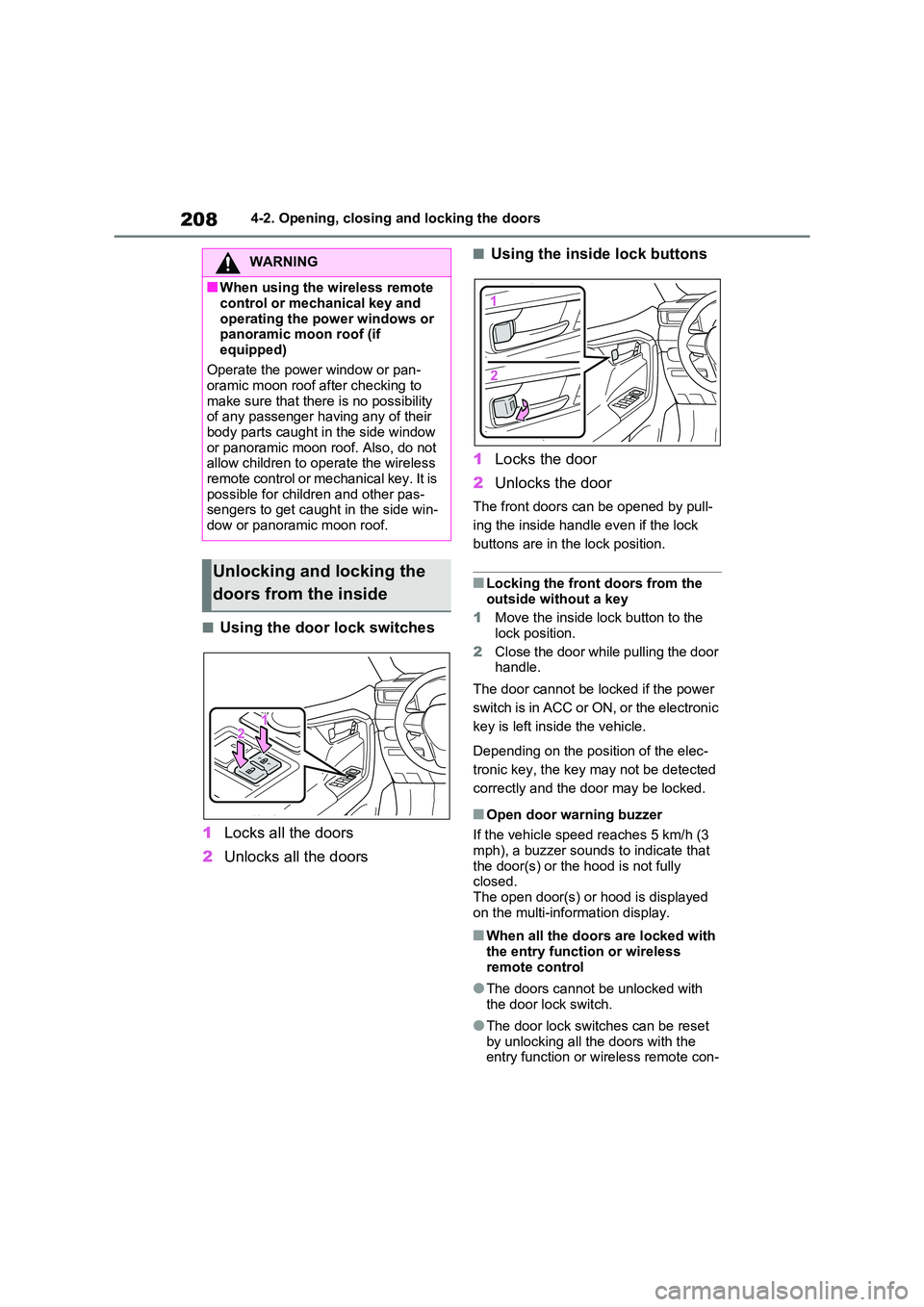
■Using the door lock switches
1 Locks all the doors
2 Unlocks all the doors
■Using the inside lock buttons
1 Locks the door
2 Unlocks the door
The front doors can be opened by pull-
ing the inside handle even if the lock
buttons are in the lock position.
■Locking the front doors from the
outside without a key
1 Move the inside lock button to the
lock position.
2 Close the door while pulling the door handle.
The door cannot be locked if the power
switch is in ACC or ON, or the electronic
key is left insi de the vehicle.
Depending on the position of the elec -
tronic key, the key m ay not be detected
correctly and the door may be locked.
■Open door warning buzzer
If the vehicle speed r eaches 5 km/h (3
mph), a buzzer sounds to indicate that
the door(s) or the hood is not fully closed.
The open door(s) or hood is displayed
on the multi-information display.
■When all the doors are locked with
the entry functi on or wireless remote control
●The doors cannot b e unlocked with the door lock switch.
●The door lock switc hes can be reset by unlocking all th e doors with the
entry function or w ireless remote con-
WARNING
■When using the wireless remote
control or mechanical key and
operating the power windows or panoramic moon roof (if
equipped)
Operate the power window or pan - oramic moon roof a fter checking to
make sure that there is no possibility
of any passenger having any of their
body parts caught in the side window or panoramic moon r oof. Also, do not
allow children to o perate the wireless
remote control or me chanical key. It is possible for chil dren and other pas-
sengers to get caugh t in the side win-
dow or panoramic moon roof.
Unlocking and locking the
doors from the inside
Page 227 of 666
225
4
4-2. Opening, closing and locking the doors
Before driving
■Turning an electronic key to bat -
tery-saving mode
●When battery-saving mode is set, bat -
tery depletion is minimized by stop - ping the electronic key from receiving
radio waves.
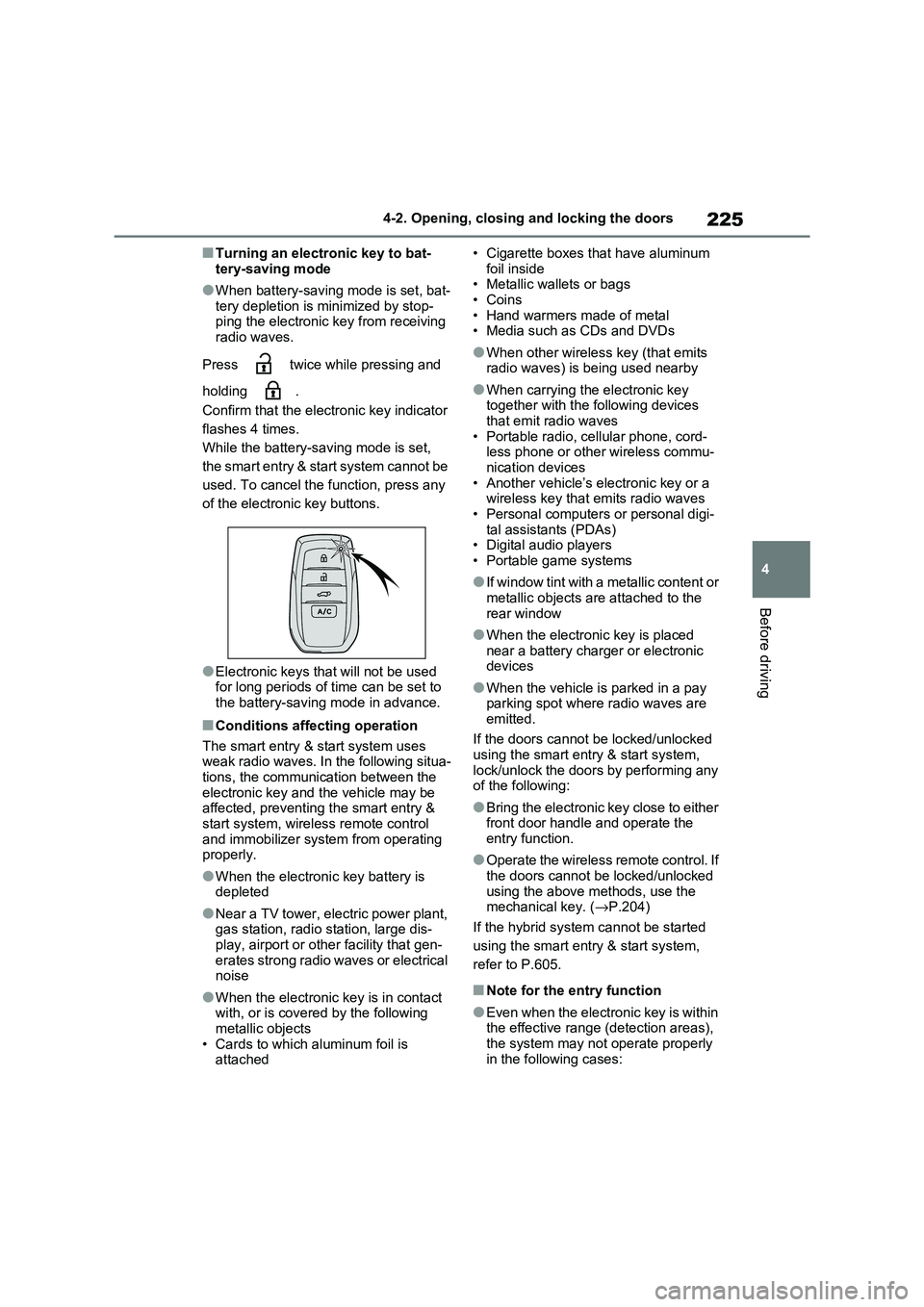
Press twice while pressing and
holding .
Confirm that the electronic key indicator
flashes 4 times.
While the battery- saving mode is set,
the smart entry & start system cannot be
used. To cancel the f unction, press any
of the electronic key buttons.
●Electronic keys t hat will not be used for long periods of time can be set to
the battery-saving mode in advance.
■Conditions affecting operation
The smart entry & start system uses
weak radio waves. In the following situa - tions, the communication between the
electronic key and t he vehicle may be
affected, preventing the smart entry & start system, wireless remote control
and immobilizer system from operating
properly.
●When the electronic key battery is
depleted
●Near a TV tower, electric power plant,
gas station, radio station, large dis- play, airport or oth er facility that gen-
erates strong radio waves or electrical
noise
●When the electronic key is in contact
with, or is covered by the following metallic objects
• Cards to which aluminum foil is
attached
• Cigarette boxes that have aluminum
foil inside • Metallic wallets or bags
•Coins
• Hand warmers made of metal • Media such as CDs and DVDs
●When other wirele ss key (that emits radio waves) is being used nearby
●When carrying the electronic key together with the following devices
that emit radio waves
• Portable radio, cellular phone, cord - less phone or other wireless commu -
nication devices
• Another vehicle’s el ectronic key or a wireless key that emits radio waves
• Personal computer s or personal digi-
tal assistants (PDAs) • Digital audio players
• Portable game systems
●If window tint with a metallic content or
metallic objects are attached to the
rear window
●When the electroni c key is placed
near a battery charger or electronic devices
●When the vehicle is parked in a pay parking spot where radio waves are
emitted.
If the doors cannot be locked/unlocked using the smart entry & start system,
lock/unlock the doors by performing any
of the following:
●Bring the electronic key close to either
front door handle and operate the entry function.
●Operate the wireless remote control. If the doors cannot be locked/unlocked
using the above methods, use the
mechanical key. ( →P.204)
If the hybrid system cannot be started
using the smart entry & start system,
refer to P.605.
■Note for the entry function
●Even when the electronic key is within
the effective range (detection areas),
the system may not operate properly in the following cases:
Page 228 of 666
2264-2. Opening, closing and locking the doors
• The electronic key is too close to the
window or outside door handle, near the ground, or in a high place when
the doors are lo cked or unlocked.
• The electronic key is on the instru- ment panel, luggage co ver or floor, or
in the door pockets or glove box when
the hybrid system is started or power switch modes are changed.
●Do not leave the electronic key on top of the instrument panel or near the
door pockets when exiting the vehicle.
Depending on the radio wave recep - tion conditions, it m ay be detected by
the antenna outside the cabin and the
door will become lockable from the outside, possibly trapping the elec -
tronic key inside the vehicle.
●As long as the electronic key is within
the effective range , the doors may be
locked or unlocke d by anyone. How- ever, only the door s detecting the
electronic key can be used to lock or
unlock the vehicle.
●Even if the electronic key is not inside
the vehicle, it may be possible to start the hybrid system if the electronic key
is near the window.
●The doors may unlock if a large
amount of water splashes on the door
handle, such as in t he rain or in a car wash when the electronic key is within
the effective range . (The doors will
automatically be locked after approxi - mately 30 seconds if the doors are not
opened and closed.)
●If the wireless remote control is used
to lock the doors when the electronic
key is near the vehi cle, there is a pos- sibility that the door may not be
unlocked by the entry function. (Use
the wireless remote control to unlock
the doors.)
●Touching the door lock sensor while
wearing gloves may delay or prevent lock operation. Remove the gloves
and touch the lo ck sensor again.
●When the lock operation is performed
using the lock sens or, recognition sig-
nals will be shown up to two consecu -
tive times. After this, no recognition
signals will be given.
●If the door handle becomes wet while
the electronic key is within the effec - tive range, the door may lock and
unlock repeatedly. In that case, follow
the following correction procedures to wash the vehicle:
• Place the electronic key in a location 2
m (6 ft.) or more away from the vehi - cle. (Take care to ensure that the key
is not stolen.)
• Set the electronic key to battery-sav - ing mode to disable the smart entry &
start system. ( →P.225)
●If the electronic key is inside the vehi-
cle and a door handle becomes wet
during a car wash, a message may be shown on the multi-information dis -
play and a buzzer will sound outside
the vehicle. To turn off the alarm, lock all the doors.
●The lock sensor m ay not work prop- erly if it comes int o contact with ice,
snow, mud, etc. Clean the lock sensor
and attempt to operate it again, or use the lock sensor on the lower part of
the door handle.
●A sudden approach to the effective
range or door handle may prevent the
doors from being unlocked. In this case, return the door handle to the
original position and check that the
doors unlock before pulling the door handle again.
●If there is another electronic key in the detection area, it may take slightly lon -
ger to unlock the doors after the door
handle is gripped.
■When the vehicle is not driven for extended periods
●To prevent theft of the vehicle, do not
leave the electronic key within 2 m (6 ft.) of the vehicle.
●The smart entry & start system can be deactivated in advance. ( →P.633)
●Battery-saving mode can reduce the power consumption of electronic keys.
( →P.225)
Page 286 of 666
2844-4. Adjusting the steering wheel and mirrors
■Cleaning the mirror surface
If the mirror surface is dirty, the
image on the display may be diffi -
cult to see.
Clean the mirror surface gently
using a soft dry cloth.
■Cleaning the camera
If the camera lens is dirty, the dis -
played image may not be clear. In
this case, clean i t with a soft cloth
dampened with water or a swab.
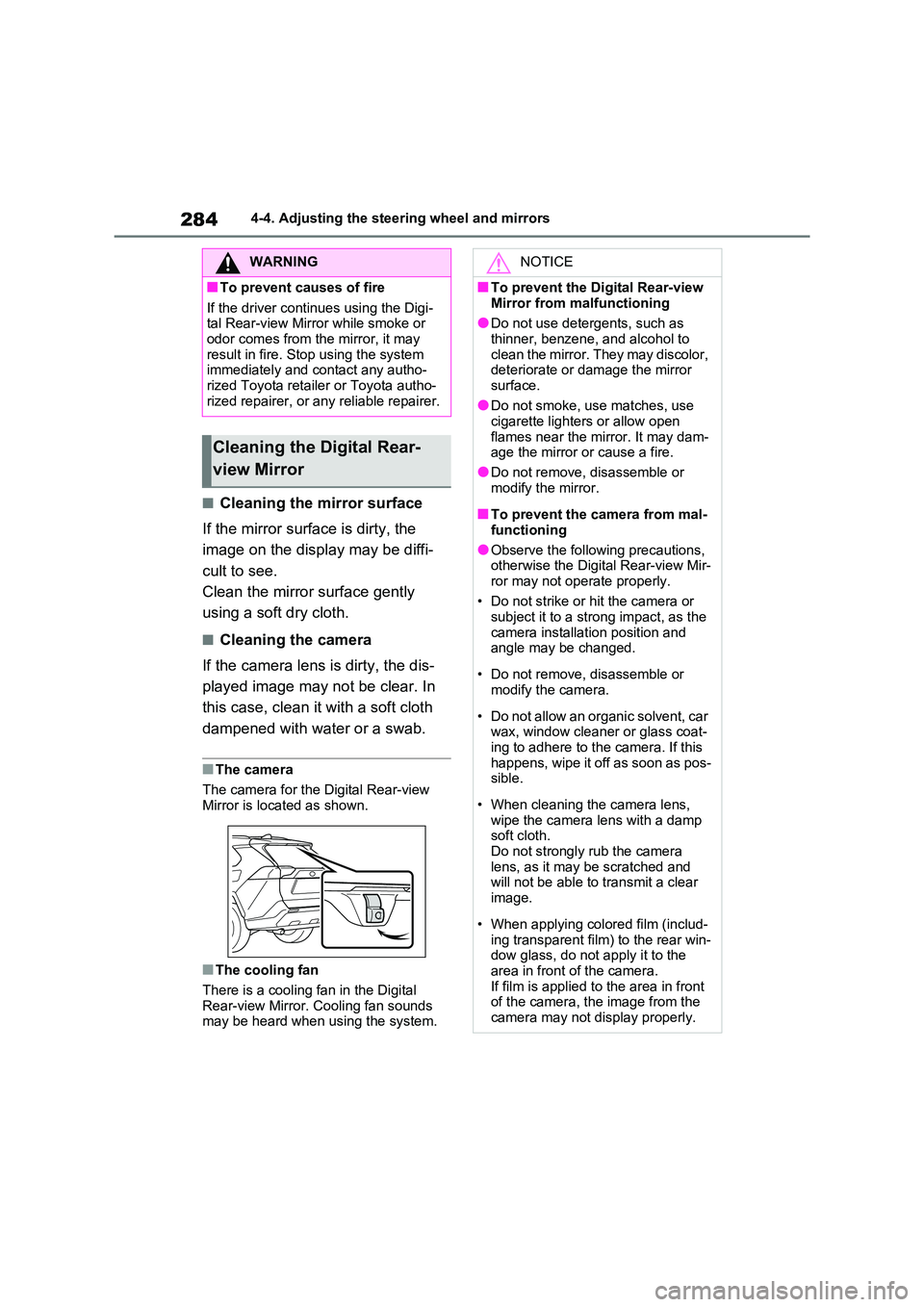
■The camera
The camera for the Digital Rear-view
Mirror is located as shown.
■The cooling fan
There is a cooling fan in the Digital
Rear-view Mirror. Cooling fan sounds may be heard when using the system.
WARNING
■To prevent causes of fire
If the driver continues using the Digi -
tal Rear-view Mirror while smoke or odor comes from the mirror, it may
result in fire. St op using the system
immediately and contact any autho - rized Toyota retailer or Toyota autho -
rized repairer, or any reliable repairer.
Cleaning the Digital Rear-
view Mirror
NOTICE
■To prevent the Digital Rear-view
Mirror from malfunctioning
●Do not use detergents, such as thinner, benzene, and alcohol to
clean the mirror. They may discolor,
deteriorate or damage the mirror surface.
●Do not smoke, use matches, use
cigarette lighters or allow open
flames near the mi rror. It may dam- age the mirror or cause a fire.
●Do not remove, disassemble or
modify the mirror.
■To prevent the camera from mal -
functioning
●Observe the following precautions,
otherwise the Digit al Rear-view Mir-
ror may not operate properly.
• Do not strike or hit the camera or
subject it to a strong impact, as the
camera installation position and angle may be changed.
• Do not remove, disassemble or modify the camera.
• Do not allow an organic solvent, car wax, window cleaner or glass coat -
ing to adhere to the camera. If this
happens, wipe it off as soon as pos - sible.
• When cleaning the camera lens, wipe the camera l ens with a damp
soft cloth.
Do not strongly rub the camera lens, as it may be scratched and
will not be able to transmit a clear
image.
• When applying colored film (includ -
ing transparent fi lm) to the rear win- dow glass, do not apply it to the
area in front of the camera.
If film is applied to the area in front of the camera, the image from the
camera may not display properly.
Page 289 of 666
287
4
4-4. Adjusting the steering wheel and mirrors
Before driving
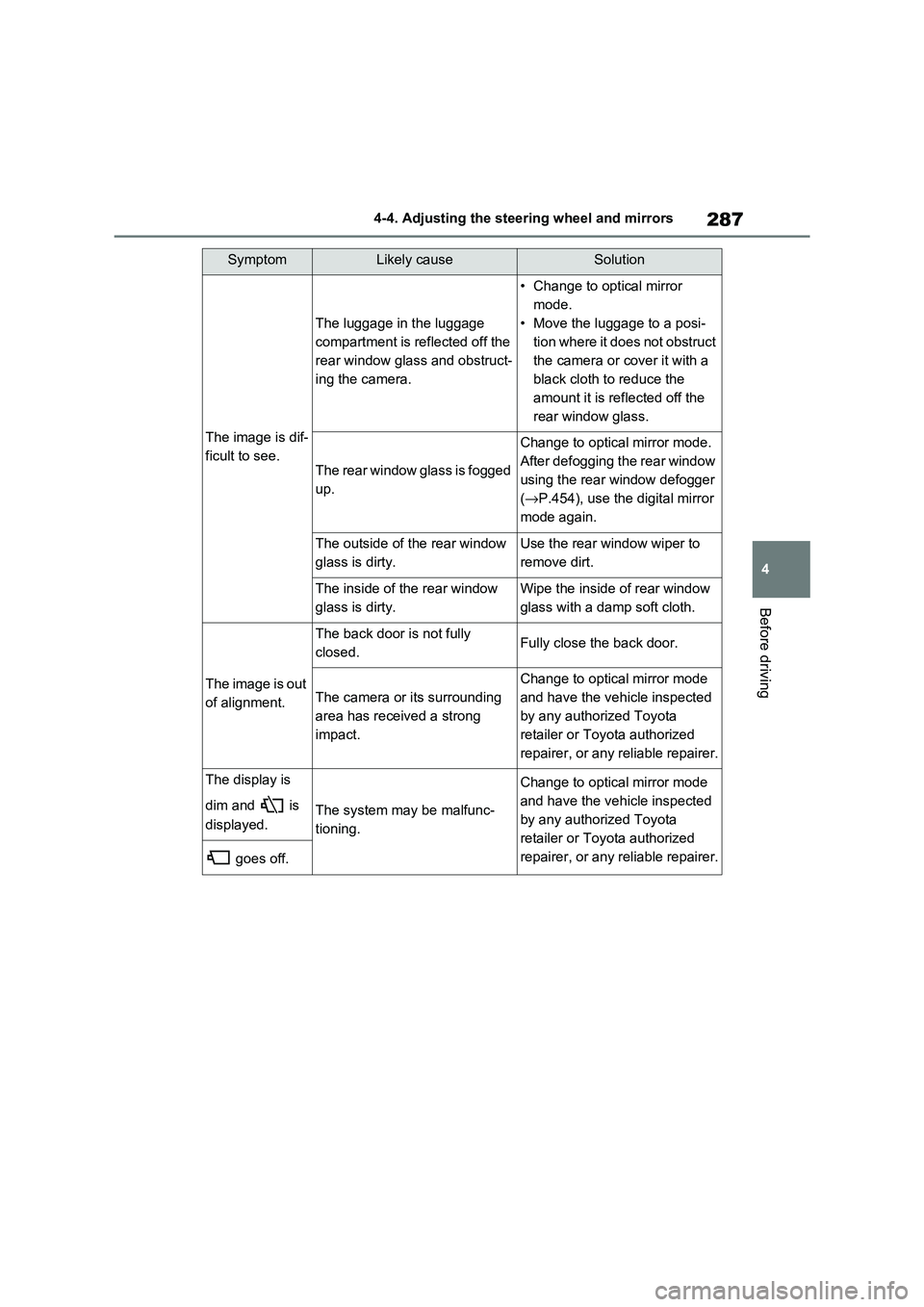
The image is dif -
ficult to see.
The luggage in the luggage
compartment is reflected off the
rear window glass and obstruct -
ing the camera.
• Change to optical mirror
mode.
• Move the luggage to a posi -
tion where it does not obstruct
the camera or co ver it with a
black cloth to reduce the
amount it is ref lected off the
rear window glass.
The rear window glass is fogged
up.
Change to optical mirror mode.
After defogging the rear window
using the rear window defogger
( →P.454), use the digital mirror
mode again.
The outside of t he rear window
glass is dirty.
Use the rear window wiper to
remove dirt.
The inside of the rear window
glass is dirty.
Wipe the inside of rear window
glass with a damp soft cloth.
The image is out
of alignment.
The back door is not fully
closed.Fully close the back door.
The camera or it s surrounding
area has received a strong
impact.
Change to optical mirror mode
and have the vehicle inspected
by any authorized Toyota
retailer or Toyota authorized
repairer, or any reliable repairer.
The display is
dim and is
displayed.The system may be malfunc -
tioning.
Change to optical mirror mode
and have the vehicle inspected
by any authorized Toyota
retailer or Toyota authorized
repairer, or any reliable repairer. goes off.
SymptomLikely causeSolution
Page 291 of 666
289
4
4-4. Adjusting the steering wheel and mirrors
Before driving
■Defogging the mirrors
The outside rear view mirrors can be
cleared using the mirror defoggers. Turn on the rear window defogger to turn on
the outside rear view mirror defoggers.
( →P.454)
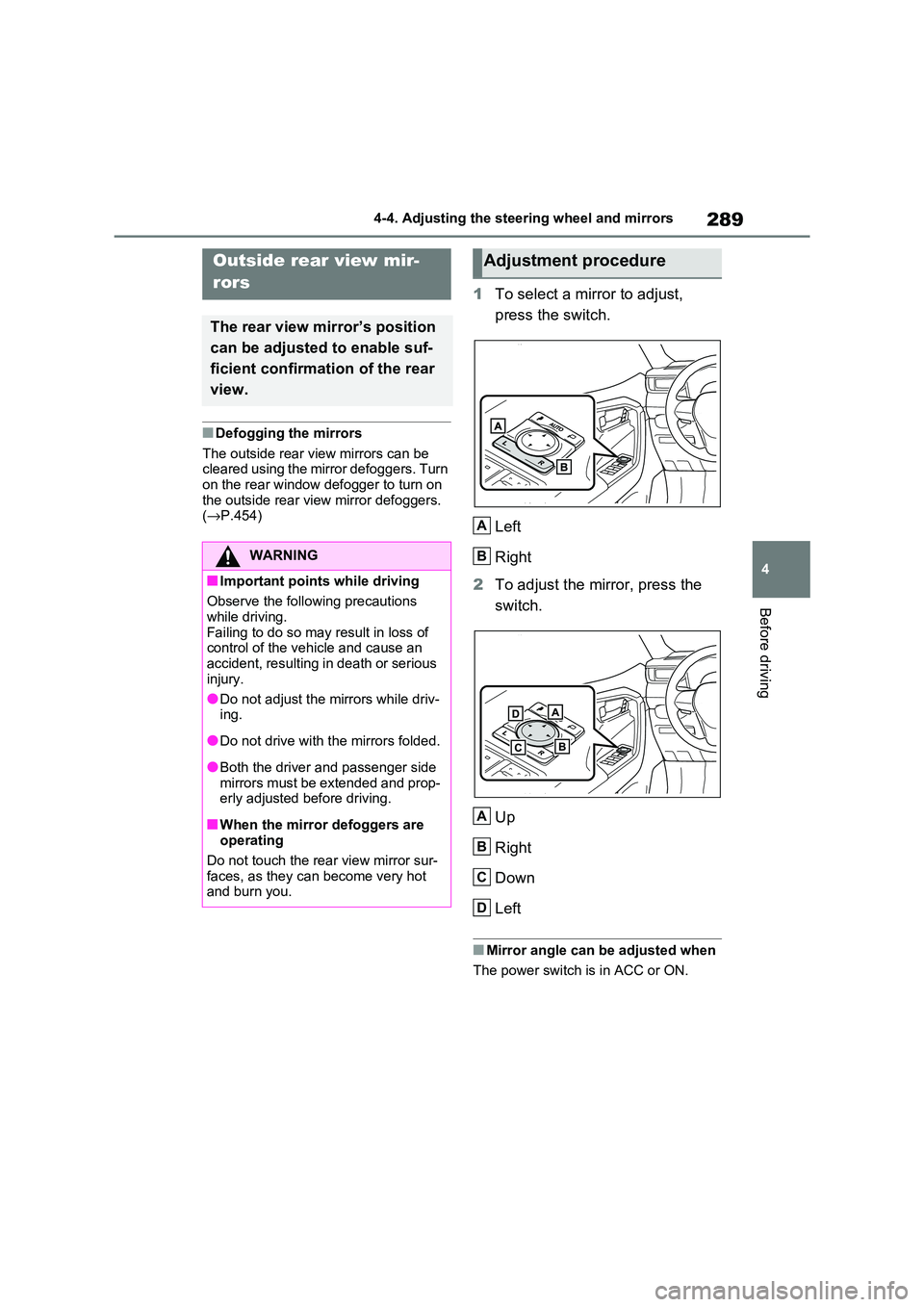
1To select a mirror to adjust,
press the switch.
Left
Right
2 To adjust the mirror, press the
switch.
Up
Right
Down
Left
■Mirror angle can be adjusted when
The power switch is in ACC or ON.
Outside rear view mir-
rors
The rear view mirror’s position
can be adjusted to enable suf -
ficient confirmation of the rear
view.
WARNING
■Important points while driving
Observe the following precautions
while driving.
Failing to do so may result in loss of control of the veh icle and cause an
accident, resulting in death or serious
injury.
●Do not adjust the m irrors while driv-
ing.
●Do not drive with the mirrors folded.
●Both the driver and passenger side mirrors must be extended and prop -
erly adjusted before driving.
■When the mirror defoggers are
operating
Do not touch the rea r view mirror sur- faces, as they can become very hot
and burn you.
Adjustment procedure
A
B
A
B
C
D
Page 293 of 666
291
4
4-5. Opening, closing the windows and moon roof
Before driving
4-5.Opening, closing the windows and moon roof
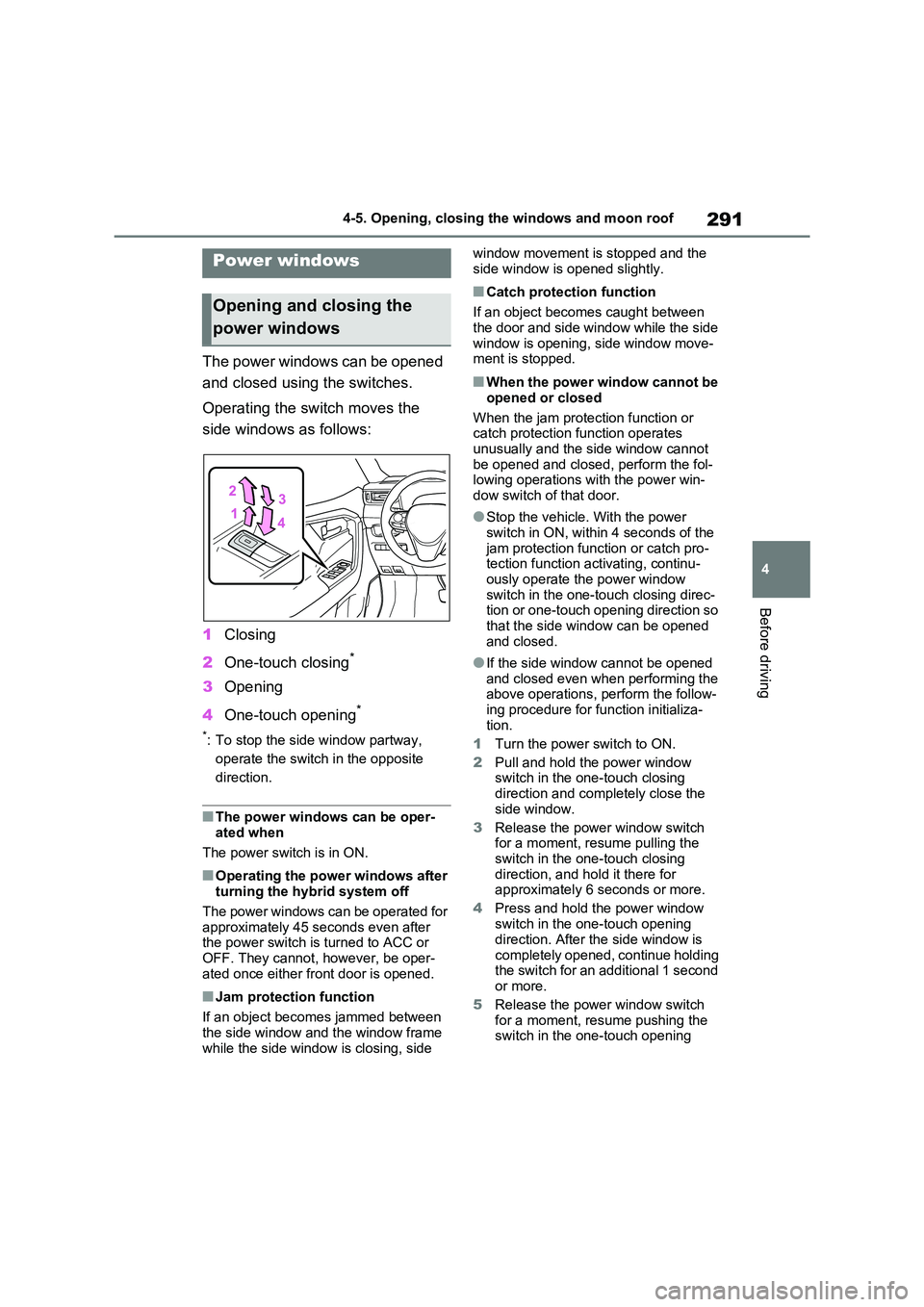
The power windows can be opened
and closed using the switches.
Operating the switch moves the
side windows as follows:
1 Closing
2 One-touch closing*
3Opening
4 One-touch opening*
*: To stop the side window partway,
operate the switch in the opposite
direction.
■The power windows can be oper -
ated when
The power switch is in ON.
■Operating the power windows after
turning the hybrid system off
The power windows can be operated for approximately 45 seconds even after
the power switch is turned to ACC or
OFF. They cannot, however, be oper- ated once either fr ont door is opened.
■Jam protection function
If an object becomes jammed between
the side window and the window frame while the side window is closing, side
window movement is stopped and the
side window is opened slightly.
■Catch protection function
If an object becomes caught between
the door and side window while the side
window is opening, side window move - ment is stopped.
■When the power window cannot be
opened or closed
When the jam protection function or catch protection function operates
unusually and the side window cannot
be opened and closed, perform the fol - lowing operations with the power win -
dow switch of that door.
●Stop the vehicle. With the power
switch in ON, within 4 seconds of the
jam protection func tion or catch pro- tection function activating, continu -
ously operate the power window
switch in the one-touch closing direc - tion or one-touch opening direction so
that the side windo w can be opened
and closed.
●If the side window cannot be opened
and closed even when performing the above operations, perform the follow -
ing procedure for function initializa -
tion.
1 Turn the power switch to ON.
2 Pull and hold the power window switch in the one-touch closing
direction and completely close the
side window.
3 Release the power window switch for a moment, resume pulling the
switch in the one-touch closing
direction, and hol d it there for approximately 6 seconds or more.
4 Press and hold the power window
switch in the one-touch opening
direction. After the side window is
completely opened, continue holding the switch for an additional 1 second
or more.
5 Release the power window switch
for a moment, resu me pushing the switch in the one-touch opening
Power windows
Opening and closing the
power windows
Page 294 of 666
2924-5. Opening, closing the windows and moon roof
direction, and hold it there for
approximately 4 seconds or more.
6 Pull and hold the power window switch in the one-touch closing
direction again. After the side win -
dow is completely closed, continue holding the switch for a further 1 sec -
ond or more.
If you release the switch while the side window is moving, start again from the
beginning.
If the side window reverses and cannot be fully closed or opened, have the vehi -
cle inspected by any authorized Toyota
retailer or Toyota authorized repairer, or any reliable repairer.
■Door lock linked power window
operation
●The power windows can be opened
and closed using the mechanical key.*
( →P.605)
●The power windows can be opened
and closed using the wireless remote
control.* ( →P.205)
●Vehicles with alarm: The alarm may
be triggered if the alarm is set and the
power window is c losed using the door lock linked power window opera -
tion function. ( →P.78)*: These settings must be customized at
any authorized Toy ota retailer or
Toyota authorized repairer, or any reli -
able repairer.
■Power window open reminder func -
tion
The buzzer sounds and a message is
shown on the multi-in formation display
when the power switch is turned to OFF and the driver’s doo r is opened with the
power windows open.
■Customization
Settings (e.g. linked door lock operation)
can be changed. (Customizable fea - tures: →P.636)
WARNING
Observe the following precautions.
Failing to do so may result in death or
serious injury.
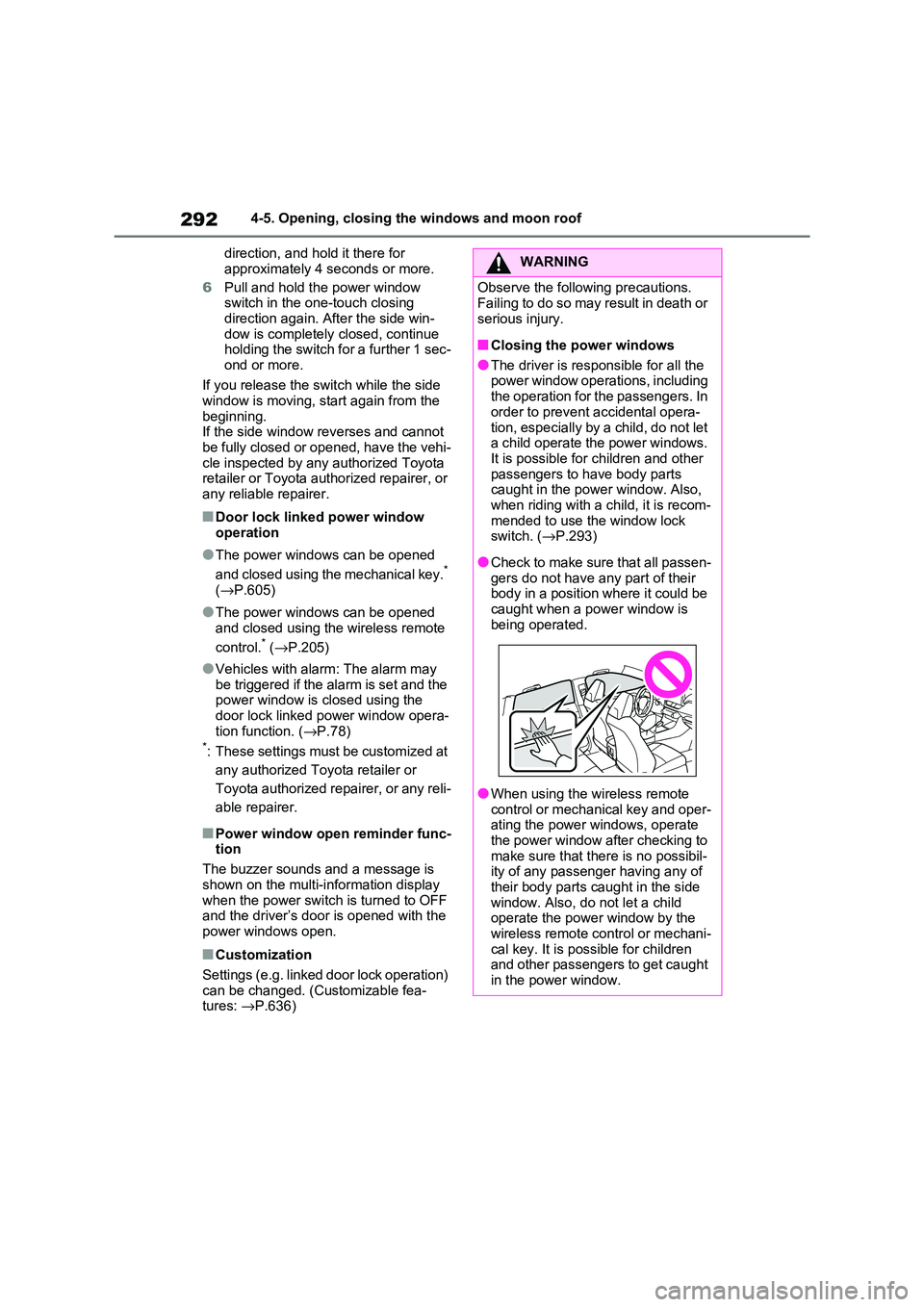
■Closing the power windows
●The driver is responsible for all the power window operations, including
the operation for the passengers. In
order to prevent accidental opera -
tion, especially by a child, do not let a child operate the power windows.
It is possible for children and other
passengers to have body parts caught in the power window. Also,
when riding with a child, it is recom -
mended to use the window lock switch. ( →P.293)
●Check to make sure that all passen- gers do not have any part of their
body in a position where it could be
caught when a po wer window is being operated.
●When using the wi reless remote control or mechanical key and oper -
ating the power windows, operate
the power window after checking to make sure that there is no possibil -
ity of any passenger having any of
their body parts caught in the side window. Also, do not let a child
operate the power window by the
wireless remote control or mechani - cal key. It is po ssible for children
and other passengers to get caught
in the power window.
Page 295 of 666
293
4
4-5. Opening, closing the windows and moon roof
Before driving
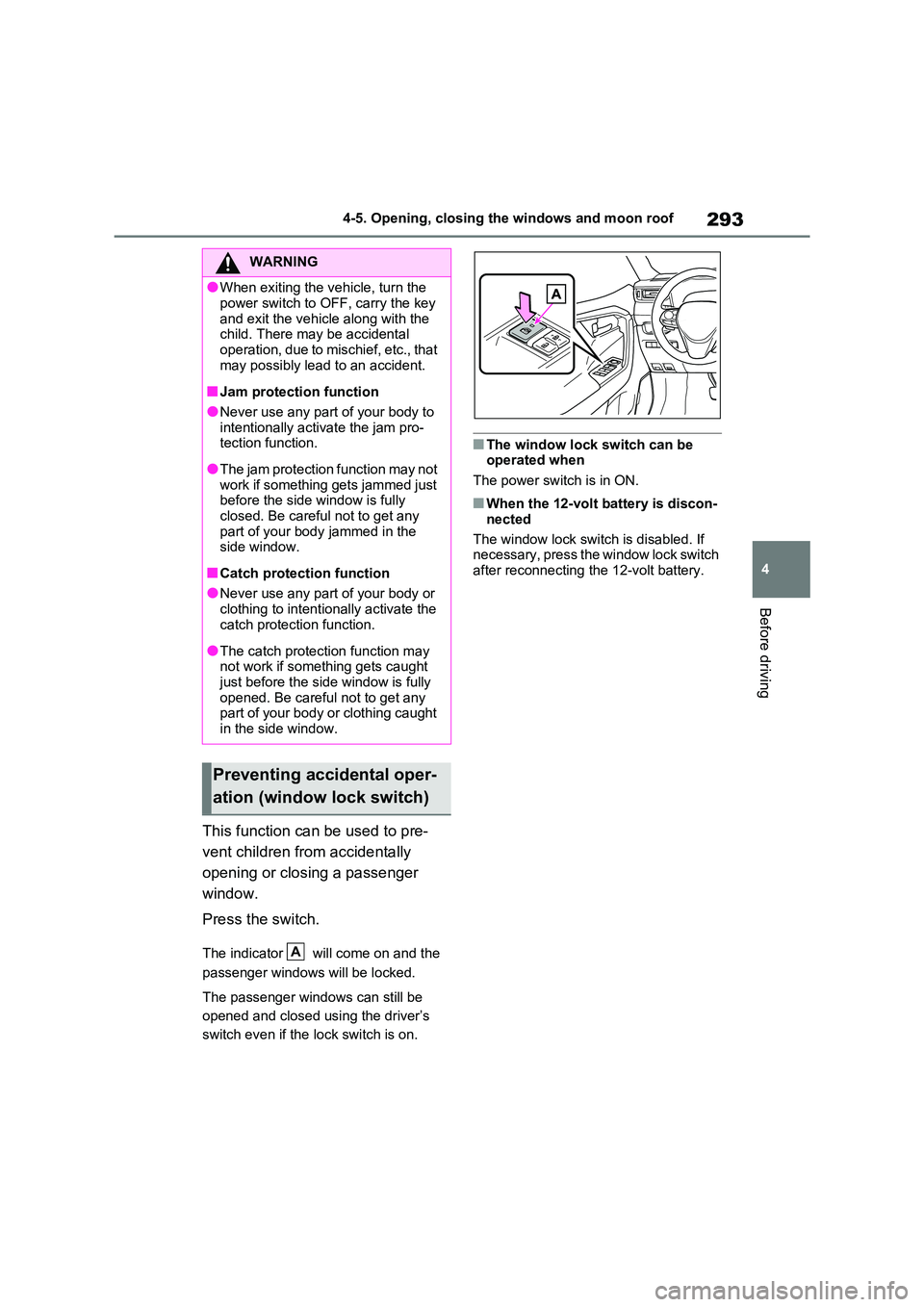
This function can be used to pre -
vent children from accidentally
opening or closing a passenger
window.
Press the switch.
The indicator will come on and the
passenger windows will be locked.
The passenger windows can still be
opened and closed us ing the driver’s
switch even if the lock switch is on.
■The window lock switch can be operated when
The power switch is in ON.
■When the 12-volt battery is discon -
nected
The window lock switch is disabled. If
necessary, press the window lock switch
after reconnecting the 12-volt battery.
WARNING
●When exiting the v ehicle, turn the
power switch to OFF, carry the key
and exit the vehicle along with the child. There may be accidental
operation, due to mischief, etc., that
may possibly lead to an accident.
■Jam protection function
●Never use any part of your body to
intentionally activ ate the jam pro- tection function.
●The jam protection function may not work if something gets jammed just
before the side window is fully
closed. Be careful not to get any part of your body jammed in the
side window.
■Catch protection function
●Never use any part of your body or
clothing to intentionally activate the catch protection function.
●The catch protection function may not work if something gets caught
just before the side window is fully
opened. Be careful not to get any part of your body or clothing caught
in the side window.
Preventing accidental oper -
ation (window lock switch)
A
Page 296 of 666
2944-5. Opening, closing the windows and moon roof
*: If equipped
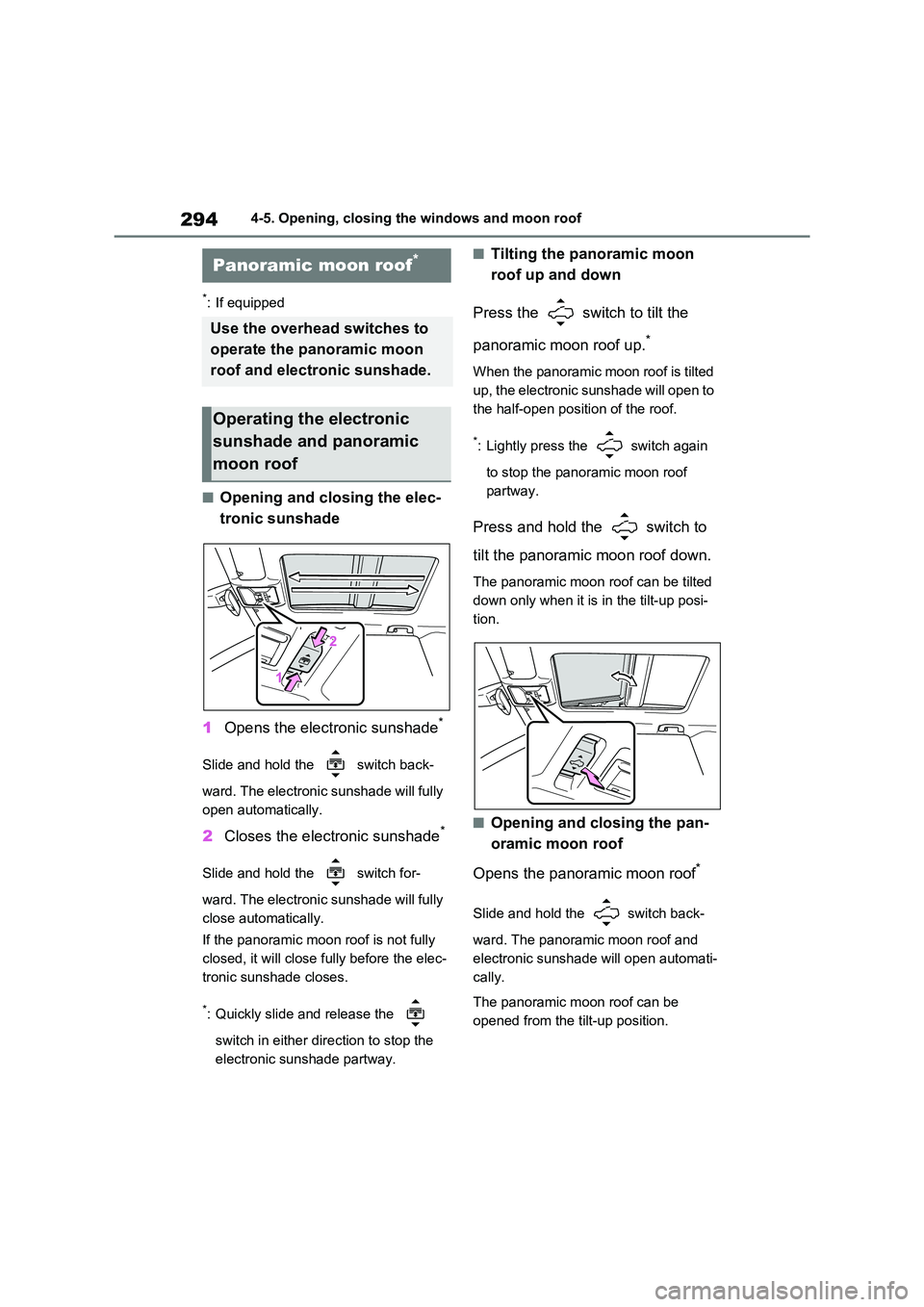
■Opening and closing the elec-
tronic sunshade
1 Opens the electronic sunshade*
Slide and hold the switch back-
ward. The electronic sunshade will fully
open automatically.
2 Closes the electronic sunshade*
Slide and hold the switch for-
ward. The electronic sunshade will fully
close automatically.
If the panoramic moon roof is not fully
closed, it will close fully before the elec -
tronic sunshade closes.
*: Quickly slide and release the
switch in either dir ection to stop the
electronic sunshade partway.
■Tilting the panoramic moon
roof up and down
Press the switch to tilt the
panoramic moon roof up.*
When the panoramic moon roof is tilted
up, the electronic sunshade will open to
the half-open posit ion of the roof.
*: Lightly press the switch again
to stop the panor amic moon roof
partway.
Press and hold the switch to
tilt the panoramic moon roof down.
The panoramic moon roof can be tilted
down only when it is in the tilt-up posi-
tion.
■Opening and closing the pan -
oramic moon roof
Opens the panoramic moon roof*
Slide and hold the switch back -
ward. The panoramic moon roof and
electronic sunshad e will open automati-
cally.
The panoramic moon roof can be
opened from the tilt-up position.
Panoramic moon roof*
Use the overhead switches to
operate the panoramic moon
roof and electronic sunshade.
Operating the electronic
sunshade and panoramic
moon roof