lock TOYOTA RAV4 PLUG-IN HYBRID 2021 Owner's Guide
[x] Cancel search | Manufacturer: TOYOTA, Model Year: 2021, Model line: RAV4 PLUG-IN HYBRID, Model: TOYOTA RAV4 PLUG-IN HYBRID 2021Pages: 666, PDF Size: 161.28 MB
Page 126 of 666
1242-2. Charging
Connect to an AC 220 V - 240 V
socket with a Residual Current
Circuit-Breaker (RCCB) and a
circuit breaker. Use of a 13A
individual circuit is strongly rec -
ommended to ensure AC
charging cable will operate prop-
erly.
We strongly recommend that you
use an exclusive connection
from the junction box for
charging. If you connect on a
socket that is on a shared circuit,
and other electrical appliances
are used on other sockets on the
same circuit, then the circuit
breaker might trip.*
Ensure that the junction box is
NOTICE
●Do not apply excessive force to the
charging connector after the
charging connector is inserted. When removing the charging con -
nector, make sure to unlock the
charging connector.
Power sources that can
be used
An external power source that
fulfills the follow ing criteria is
necessary for charging this
vehicle. Confirm this before
charging.
WARNING
■Warnings for electrical faults
Make sure to observe the precautions
in this Owner’s Manual when
charging the vehicle.
Failure to use a power source that ful -
fills the requirements, or failure to
observe regulations while charging could lead to an accident, possibly
resulting in death or serious injury.
Power sources
Page 128 of 666
1262-2. Charging
WARNING
●Connect to an AC 220 V - 240 V
socket with a Residual Current Cir -
cuit-Breaker (RCCB) and supplied by a circuit breaker in line with local
regulations. Use of an individual cir -
cuit provided with at least 13A is strongly recommended.
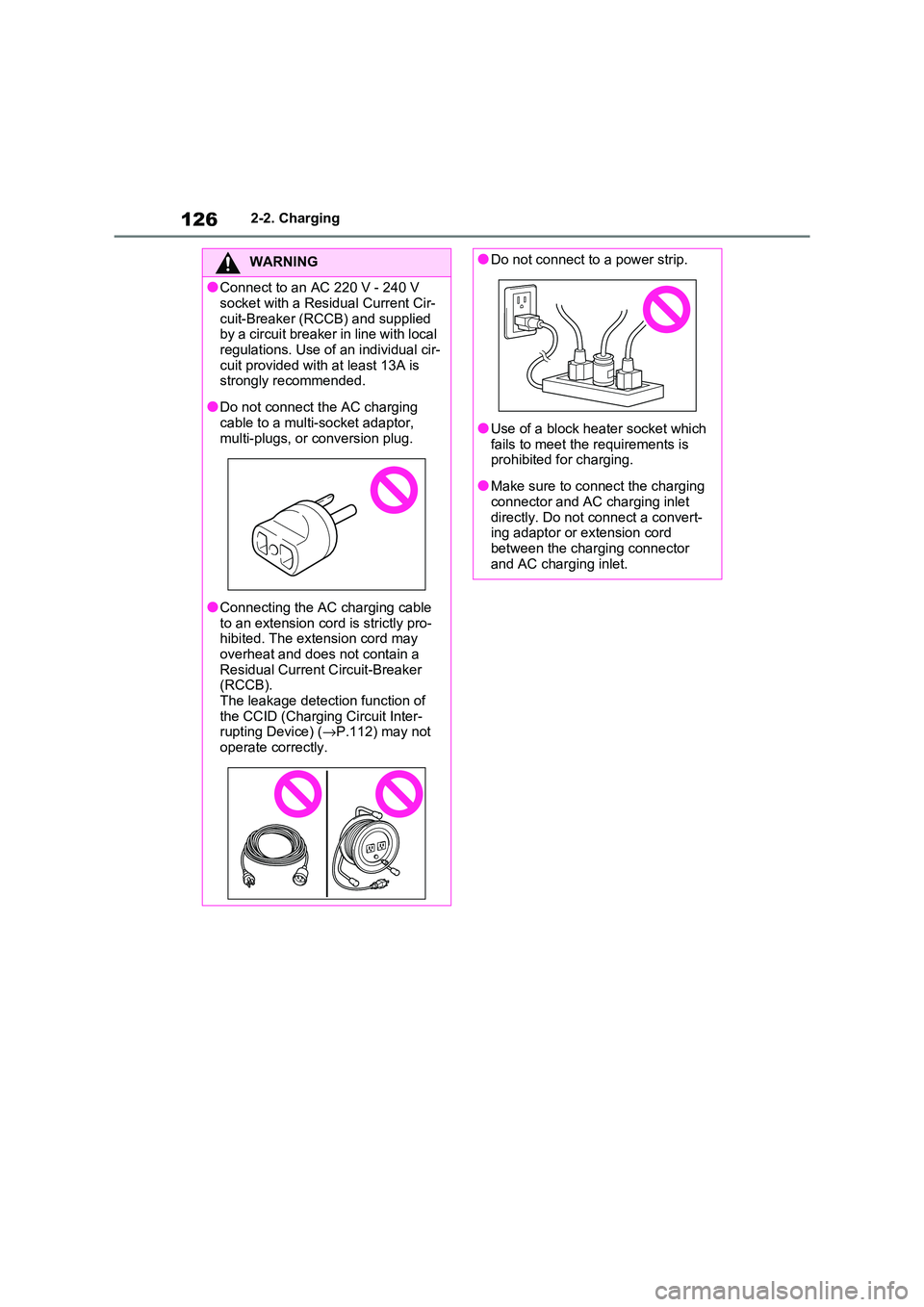
●Do not connect the AC charging
cable to a multi -socket adaptor, multi-plugs, or conversion plug.
●Connecting the AC charging cable to an extension co rd is strictly pro-
hibited. The extension cord may
overheat and does not contain a Residual Current Circuit-Breaker
(RCCB).
The leakage detection function of the CCID (Charging Circuit Inter -
rupting Device) ( →P.112) may not
operate correctly.
●Do not connect to a power strip.
●Use of a block heater socket which
fails to meet the requirements is prohibited for charging.
●Make sure to connect the charging connector and AC charging inlet
directly. Do not connect a convert -
ing adaptor or extension cord between the charging connector
and AC charging inlet.
Page 137 of 666
135
2
2-2. Charging
Plug-in hybrid system
fully charged, the remaining charge
rapidly decreases faster than normal.
■When the charging amount sent to
the hybrid battery (traction battery)
decreases
When the amount of power supplied by
the charger is low or operation of the
“Battery Heater”, etc., reduces the charging power sen t to the hybrid bat-
tery (traction battery), the charging
amount sent to the hy brid battery (trac- tion battery) may decrease.
How to charge
This section explains the pro -
cedure for charging the hybrid
battery (traction battery) with
the equipped AC charging
cable.
When using a charging station,
make sure to check the opera -
tion instructions on the
charging station.
When the charging schedule is
registered, make sure “Charge
Now” is turned on before
charging. ( →P.150)
WARNING
■AC charging inlet
Do not disassemble, repair or modify
the AC charging inlet. Doing so may lead to unforeseen accidents or seri -
ous injury. When the AC charging
inlet needs to be repaired, consult any authorized Toyota retailer or Toyota
authorized repairer, or any reliable
repairer.
NOTICE
■When using the AC charging
cable and related parts
To prevent damage to the AC charging cable and related parts,
observe the following precautions.
●When interrupting or canceling charging, remove the charging con -
nector before removing the plug.
●When removing the AC charging
cable, check that the charging con -
nector is unlocked.
Page 139 of 666
137
2
2-2. Charging
Plug-in hybrid system
information of the charger.
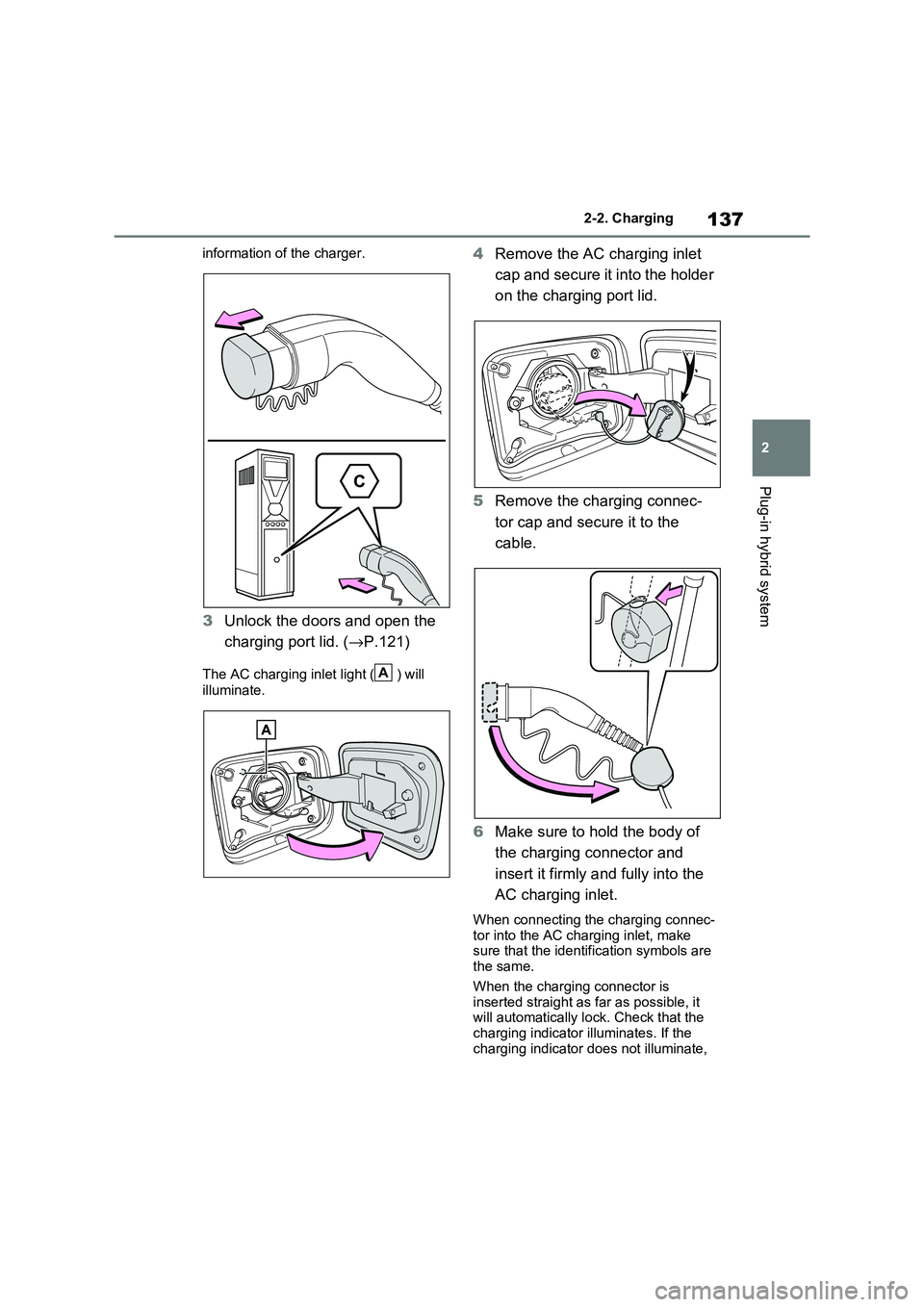
3 Unlock the doors and open the
charging port lid. ( →P.121)
The AC charging inlet light ( ) will
illuminate.
4 Remove the AC charging inlet
cap and secure it into the holder
on the charging port lid.
5 Remove the charging connec-
tor cap and secure it to the
cable.
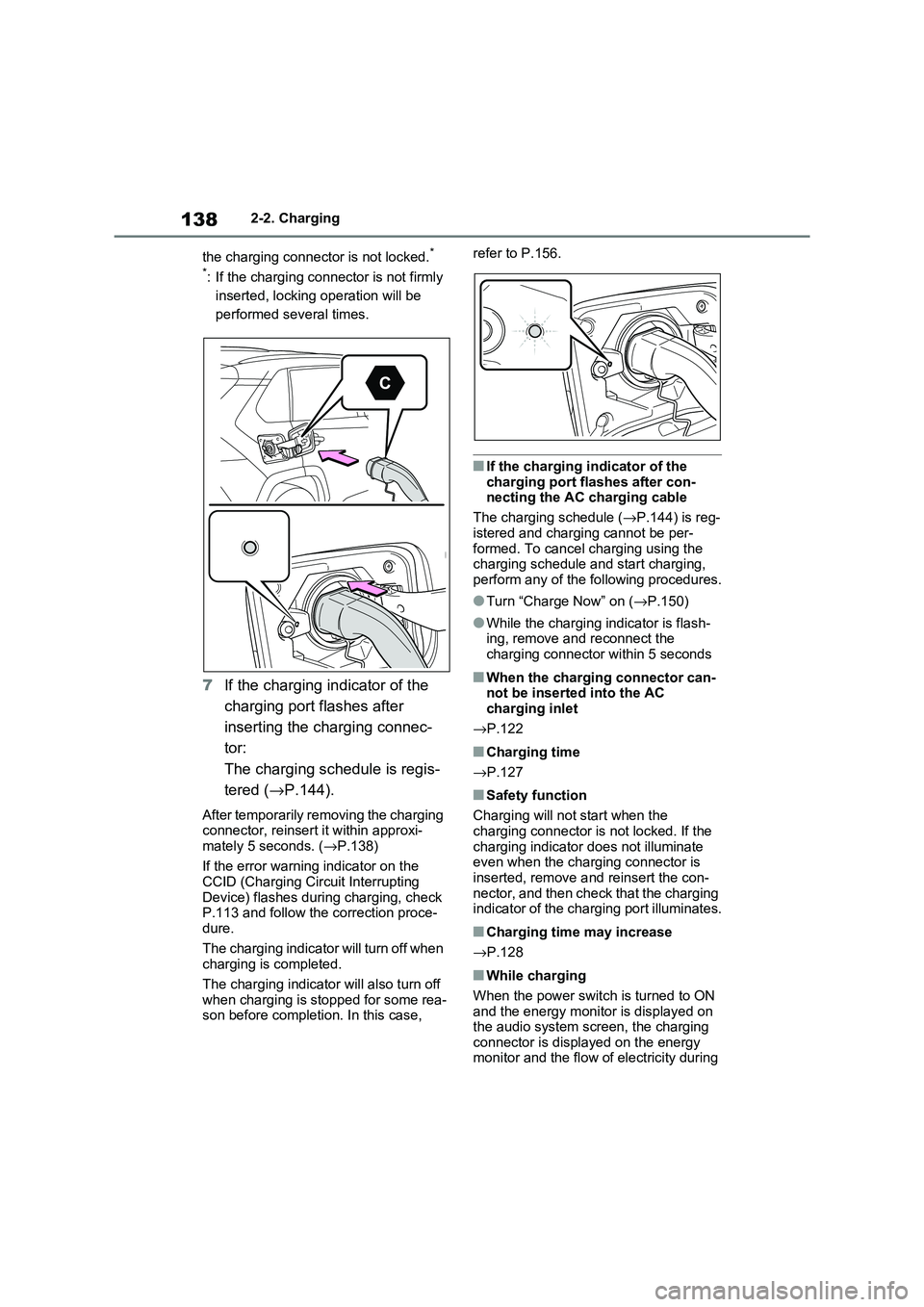
6 Make sure to hold the body of
the charging connector and
insert it firmly and fully into the
AC charging inlet.
When connecting the charging connec -
tor into the AC char ging inlet, make sure that the identifi cation symbols are
the same.
When the charging connector is inserted straight as far as possible, it
will automatically lock. Check that the
charging indicator illuminates. If the charging indicator does not illuminate,
A
Page 140 of 666
1382-2. Charging
the charging connector is not locked.*
*: If the charging connector is not firmly
inserted, locking operation will be
performed se veral times.
7If the charging indicator of the
charging port flashes after
inserting the charging connec -
tor:
The charging schedule is regis -
tered ( →P.144).
After temporarily removing the charging connector, reinsert it within approxi -
mately 5 seconds. ( →P.138)
If the error warning indicator on the CCID (Charging Circuit Interrupting
Device) flashes during charging, check
P.113 and follow the correction proce - dure.
The charging indicator will turn off when
charging is completed.
The charging indicator will also turn off
when charging is stopped for some rea -
son before completi on. In this case,
refer to P.156.
■If the charging indicator of the
charging port flashes after con - necting the AC charging cable
The charging schedule ( →P.144) is reg-
istered and charging cannot be per - formed. To cancel charging using the
charging schedule and start charging,
perform any of the following procedures.
●Turn “Charge Now” on ( →P.150)
●While the charging indicator is flash-
ing, remove and reconnect the
charging connector within 5 seconds
■When the charging connector can - not be inserted into the AC
charging inlet
→ P.122
■Charging time
→ P.127
■Safety function
Charging will not start when the
charging connector is not locked. If the charging indicator does not illuminate
even when the charging connector is
inserted, remove a nd reinsert the con- nector, and then check that the charging
indicator of the charging port illuminates.
■Charging time may increase
→ P.128
■While charging
When the power switch is turned to ON and the energy monitor is displayed on
the audio system scr een, the charging
connector is displayed on the energy monitor and the flow of electricity during
Page 141 of 666
139
2
2-2. Charging
Plug-in hybrid system
charging is displayed ( →P.195).
■Charging at a public charging sta-
tion with authenti cation function
When a door is unlocked during
charging, the charging connector is
unlocked and chargi ng will be stopped. In this case, the charging station
authentication is canceled and charging
may not be able to restart. Reconnect the charging connector and perform
authentication for the charging station.
■Protection function of AC charging
inlet overheating (vehicles with 6.6 kW onboard traction battery char -
ger)
By installing a temperature sensor to the AC charging inlet, prevents parts from
melting when the temperature rises due
to foreign matter ent ering the charging connector. When a certain temperature
increase is detected, charging is
stopped immediately and a message is displayed on the multi-information dis -
play. After the temperature has
decreased, charging resumes by per - forming the operation to start charging
again.
WARNING
■When charging
Observe the following precautions.
Failure to do so may cause an unex -
pected accident, resulting in death or
serious injury.
●Connect to a power source suitable
for charging. ( →P.124)
●Check that the AC charging cable,
plug and socket are free of foreign
matter.
●Before charging, check that the AC
charging inlet is not deformed, damaged or corroded, and check
that the inlet is fr ee of foreign mat-
ter such as dirt , snow and ice. If there is dirt or dust in these areas,
remove completely before inserting
the charging connector.
●Before inserting the charging plug into the charger, make sure there is
no dirt or dust on the terminal
areas. If there is dirt or dust in these areas, remove completely before
inserting the charging plug.
●Do not get the terminals of the AC
charging inlet wet.
●Only use sockets where the plug
can be securely inserted.
●Do not bundle or wind the AC
charging cable while charging, as
doing so may result in overheating.
●Do not touch the te rminals of the
charging connector and AC charging inlet with a sharp metal
objects (needles etc.) or hands, or
short them with foreign objects.
●When charging ou tdoors, make
sure to connect to a rain-tight socket for outdoor u se. Ensure the
rain-tight cover closes completely. If
the rain-tight cover cannot be closed, install a rain-tight cover that
will close.
●In order to stop charging at the
charging station, f ollow the instruc-
tions of the charger.
●If any heat, smoke , odors, noise or
other abnormaliti es are noticed during charging, stop charging
immediately.
●Do not insert the plug if the socket
is submerged in water or snow.
●When charging while it is raining or
snowing, do not connect or discon -
nect the plug if your hands are wet.
Also, do not get the plug or outlet wet.
●Do not charge the vehicle during a lightning storm.
●Prevent the AC charging cable from being caught in the door or back
door.
Page 143 of 666
141
2
2-2. Charging
Plug-in hybrid system
To prevent electrical shock, be sure
to remove by following the proce -
dures below.
1 Unlock the doors to unlock the
charging connector. ( →P.122)
The charging connector will be
unlocked and the AC charging inlet light will illuminate when the doors are
unlocked.
NOTICE
■When charging
Do not insert the plug into the AC
charging inlet.
The AC charging inlet may be dam -
aged.
■Using private power generator
Do not use private power generators
as a power source for charging.
Doing so may mak e charging unsta- ble, the voltage may be insufficient,
and the error warning indicator on the
CCID (Charging Circuit Interrupting Device) of the AC charging cable may
flash.
■Charging station
Due to the environment in which the
power equipment is located, charging may be unstable due to noise, the
voltage may be insu fficient, and the
error warning indi cator on the CCID (Charging Circuit Interrupting Device)
of the AC charging cable may flash.
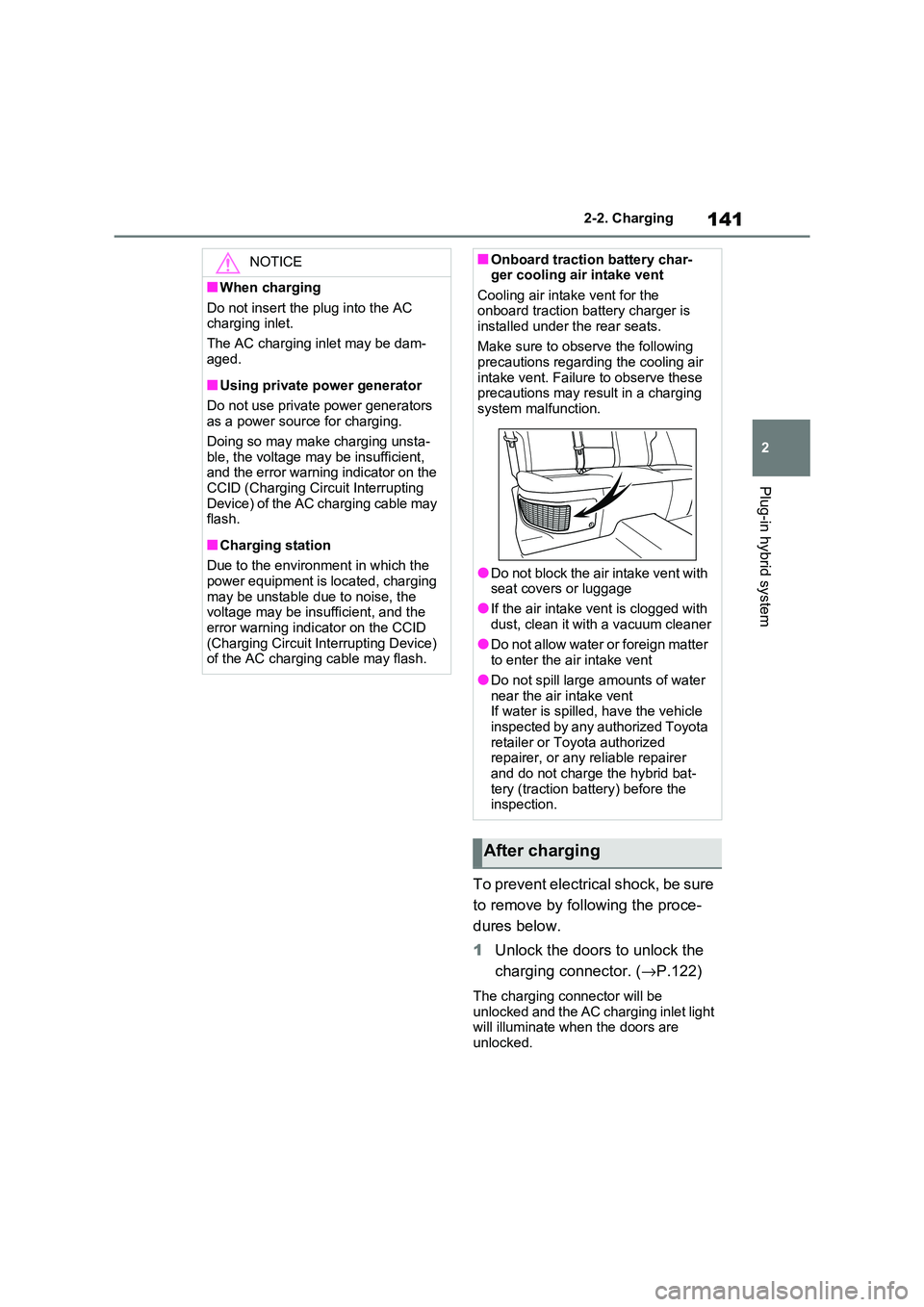
■Onboard traction battery char- ger cooling air intake vent
Cooling air inta ke vent for the
onboard traction battery charger is installed under the rear seats.
Make sure to observe the following
precautions regarding the cooling air intake vent. Failure to observe these
precautions may result in a charging
system mal function.
●Do not block the air intake vent with
seat covers or luggage
●If the air intake v ent is clogged with
dust, clean it with a vacuum cleaner
●Do not allow water or foreign matter to enter the air intake vent
●Do not spill large amounts of water
near the air intake vent If water is spilled, have the vehicle
inspected by any authorized Toyota
retailer or Toyota authorized repairer, or any reliable repairer
and do not charge the hybrid bat -
tery (traction batt ery) before the inspection.
After charging
Page 144 of 666
1422-2. Charging
If the charging connector is unlocked
during charging (while the charging indicator is illuminated), charging will be
interrupted.
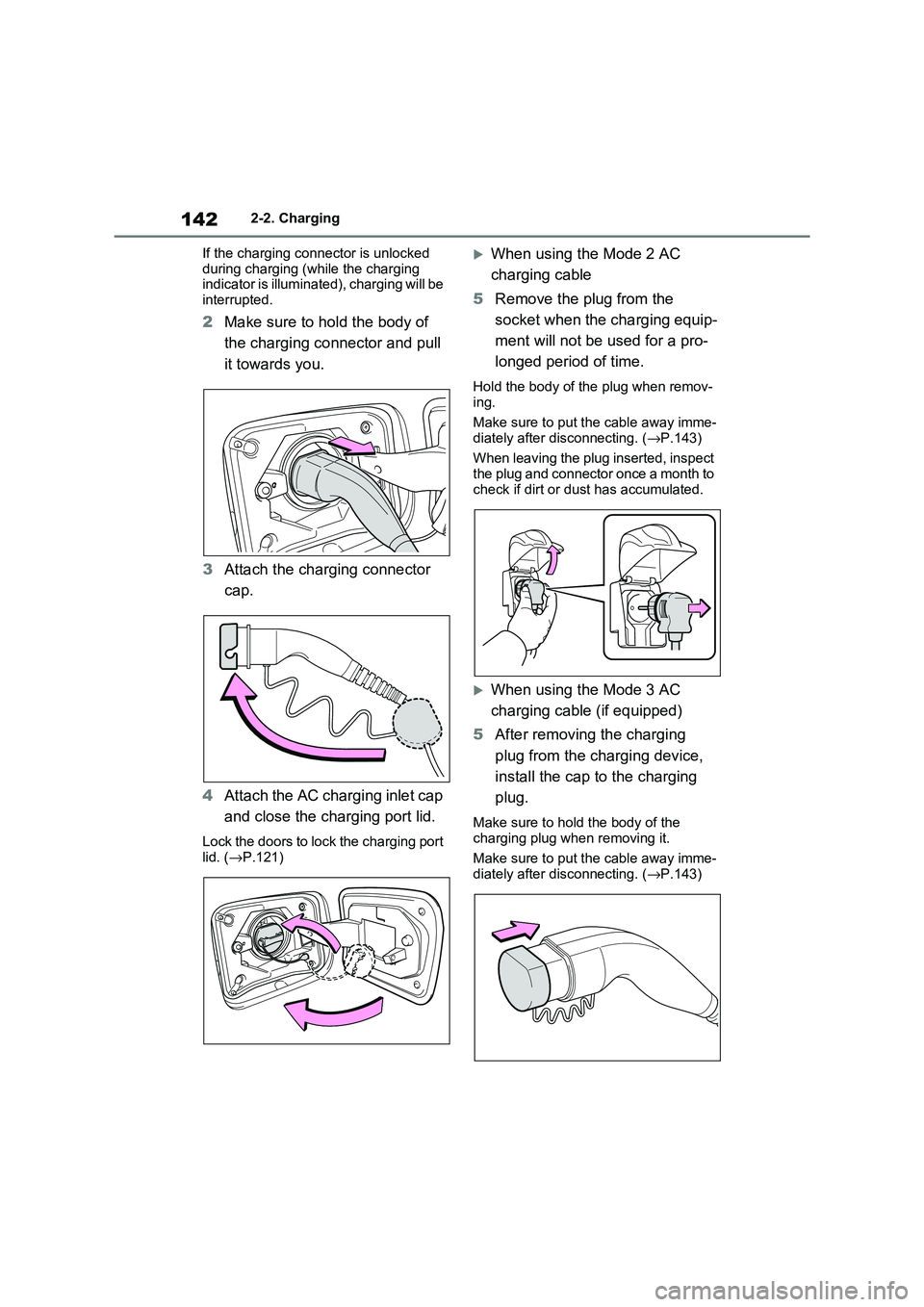
2 Make sure to hold the body of
the charging connector and pull
it towards you.
3 Attach the charging connector
cap.
4 Attach the AC charging inlet cap
and close the charging port lid.
Lock the doors to lock the charging port lid. ( →P.121)
When using the Mode 2 AC
charging cable
5 Remove the plug from the
socket when the charging equip -
ment will not be used for a pro -
longed period of time.
Hold the body of the plug when remov -
ing.
Make sure to put the cable away imme - diately after disconnecting. ( →P.143)
When leaving the plug inserted, inspect
the plug and connector once a month to check if dirt or d ust has accumulated.
When using the Mode 3 AC
charging cable (if equipped)
5 After removing the charging
plug from the charging device,
install the cap to the charging
plug.
Make sure to hold the body of the
charging plug when removing it.
Make sure to put the cable away imme -
diately after disconnecting. ( →P.143)
Page 145 of 666
143
2
2-2. Charging
Plug-in hybrid system
■When the outside temperature is low or high
The level shown on the SOC (State of
Charge) gauge ( →P.174) may drop slightly when the power switch is turned
to ON, even if charging has been com -
pleted and the hybrid battery (traction battery) is fully charged. However, this
does not indicate a malfunction.
■When removing the charging con -
nector
Unlock the doors using the smart entry
& start system or wir eless remote con-
trol to unlock the ch arging connector, check that the lock is released, and then
pull the charging connector towards you.
( →P.121)
■If the charging connector cannot be unlocked
→ P.123
WARNING
■After charging
Remove the plug if it will not be used for a long time.
Dirt and dust may accumulate plug or
socket, which could cause a malfunc - tion or fire, possibly leading to death
or serious injury.
NOTICE
■After charging
●Store the AC charging cable out of
reach from infants and children.
●After disconnecting the charging
connector from the AC charging
inlet, make sure t o put on the AC charging inlet cap and close the
charging port lid. If the AC charging
inlet cap is not put on, water or for- eign objects may enter the AC
charging inlet, which could lead to
vehicle damage.
●After removing the plug from the socket, keep it in a safe place free
from moisture and dust. The AC
charging cable or plug may be dam - aged if the cable i s stepped on or
ridden over by the vehicle.
Page 146 of 666
1442-2. Charging
■Calendar settings
Current date and tim e information is
automatically set u sing GPS. However, if GPS calibration of clock is turned off in
the multimedia system s ettings, the date
needs to be set on t he multi-information display.
If the calendar settings check screen is
displayed when an attempt was made to register a charge schedule, check that
the correct date is set. If it is incorrect,
be sure to correct it.
If the calendar information is wrong, the
charging schedule function will not oper -
ate normally.
When registering the charging
schedule, the following settings can
be changed.
■Select the charging mode
One of the two following charging
modes can be selected.
“Start”
Starts charging at the set time*1 and fin -
ishes charging when fully charged.*2
“Departure”
Starts charging to finish at the set
time.*3, 4
When this setting is selected, the air
conditioning-linked function can be
used.
*1: Charging schedule function is per -
formed in accordance with the clock
in the multi-information display.
Before registering the charging
schedule, check the clock settings to
the proper time.
*2: There might be a slight error in the
timing when charging starts due to
the state of the hy brid battery (trac-
tion battery).
*3: When the system d etermines that
there is no time to finish charging by
the set scheduled departure time, it
starts charging. Check the charging
schedules.
*4: If sudden changes in temperature or
changes in the condition of the
power source occur while charging,
charging may not end exactly at the
time estimated by the system.
■Repeated setting
The periodic charging schedule can
be set by select ing your desired
day of the week. (If no days are
selected, charging is only carried
out once.)
■Air conditioning-linked set -
ting (“Climate Prep”)
When the charging mode is set to
“Departure”, the vehicle air condi -
tioning system ( →P.452) can be set
to automatically operate* according
Using the charging
schedule function
Charging can be carried out at
the desired time by registering
the charging schedule. Also, it
is possible to set the charging
schedule to one’s prefer -
ences, such as having
charging complete by a certain
departure time or be carried
out at the same time on certain
days.
Settings of the charging
schedule function