steering wheel TOYOTA RAV4 PLUG-IN HYBRID 2021 Owner's Guide
[x] Cancel search | Manufacturer: TOYOTA, Model Year: 2021, Model line: RAV4 PLUG-IN HYBRID, Model: TOYOTA RAV4 PLUG-IN HYBRID 2021Pages: 666, PDF Size: 161.28 MB
Page 292 of 666
2904-4. Adjusting the steering wheel and mirrors
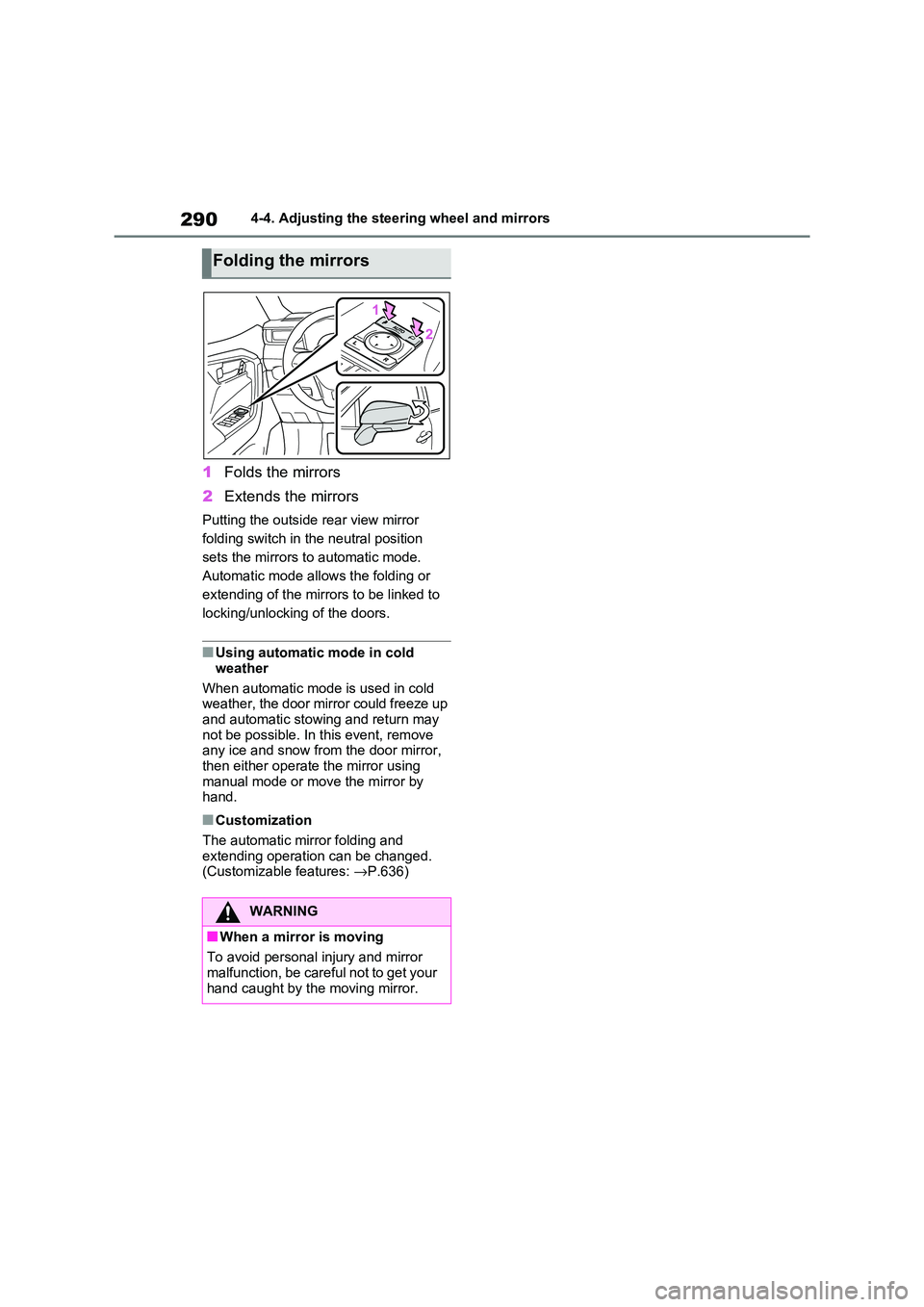
1Folds the mirrors
2 Extends the mirrors
Putting the outside rear view mirror
folding switch in the neutral position
sets the mirrors t o automatic mode.
Automatic mode allows the folding or
extending of the mirrors to be linked to
locking/unlocking of the doors.
■Using automatic mode in cold
weather
When automatic mod e is used in cold
weather, the door mirror could freeze up
and automatic stowing and return may not be possible. In this event, remove
any ice and snow fro m the door mirror,
then either operate the mirror using manual mode or mov e the mirror by
hand.
■Customization
The automatic mirror folding and extending operati on can be changed.
(Customizable features: →P.636)
Folding the mirrors
WARNING
■When a mirror is moving
To avoid personal injury and mirror malfunction, be careful not to get your
hand caught by the moving mirror.
Page 304 of 666
3025-1. Before driving
■Operating your vehicle in a foreign
country
Comply with the rele vant vehicle regis-
tration laws and confi rm the availability
of the correct fuel. ( →P.620)
WARNING
Observe the following precautions.
Failure to do so may result in death or
serious injury.
■When starting the vehicle
Always keep your f oot on the brake
pedal while stopped with the “READY” indicator is illuminated. This
prevents the vehicle from creeping.
■When driving the vehicle
●Do not drive if you are unfamiliar
with the location of the brake and accelerator pe dals to avoid
depressing the wrong pedal.
• Accidentally depressing the accel - erator pedal instead of the brake
pedal will result in sudden accelera -
tion that may lead to an accident.
• When backing up, you may twist
your body around, leading to a diffi -
culty in operating the pedals. Make sure to operate th e pedals properly.
• Make sure to keep a correct driving
posture even when moving the vehicle only slightly. This allows
you to depress the brake and accel -
erator pedals properly.
• Depress the brake pedal using your
right foot. Depressing the brake
pedal using your left foot may delay response in an emergency, result -
ing in an accident.
●The driver should pay extra atten - tion to pedestrians when the vehicle
is powered only b y the electric
motor (traction motor). As there is no engine noise, the pedestrians
may misjudge the vehicle’s move-
ment. Even though the vehicle is equipped with the Acoustic Vehicle
Alerting System, drive with care as
pedestrians in the vicinity may still not notice the ve hicle if the sur-
rounding area is noisy.
●Do not drive the vehicle over or
stop the vehicle near flammable
materials such as leaves, paper or rags.
The exhaust system and exhaust
gases can be extremely hot. These hot parts may cause a fire if there is
any flammable material nearby.
●During normal driving, do not turn
off the hybrid system. Turning the
hybrid system off while driving will not cause loss of steering or brak -
ing control, however, power assist
to the steering will be lost. This will make it more difficult to steer
smoothly, so you should pull over
and stop the vehicle as soon as it is safe to do so.
In the event of an emergency, such
as if it becomes impossible to stop the vehicle in the normal way:
→ P.560
●Use engine braking (downshift) to
maintain a safe speed when driving
down a steep hill. Using the brakes continuously may
cause the brakes to overheat and
lose effectiveness. ( →P.321)
●Do not adjust the position of the
steering wheel, t he seat, or the
inside or outside rear view mirrors while driving.
Doing so may result in a loss of
vehicle control.
Page 307 of 666
305
5
5-1. Before driving
Driving
WARNING
■When braking
●When the brakes are wet, drive
more cautiously. Braking distance increases when
the brakes are wet, and this may
cause one side of the vehicle to brake differently than the other
side. Also, the pa rking brake may
not securely hold the vehicle.
●If the electronically controlled brake
system does not operate, do not fol -
low other vehicles closely and avoid hills or sharp turns that require
braking.
In this case, braking is still possible, but the brake pedal should be
depressed more firmly than usual.
Also, the braking distance will increase. Have yo ur brakes fixed
immediately.
●The brake system c onsists of 2 or
more individual hydraulic systems;
if one of the system s fails, the other will still operate. I n this case, the
brake pedal should be depressed
more firmly than usual and the braking distance will increase. Have
your brakes fixed immediately.
■If the vehicle becomes stuck
Do not spin the wheels excessively
when any of the tires is up in the air, or the vehicle is stuck in sand, mud,
etc. This may damage the driveline
components or propel the vehicle for - ward or backward, causing an acci -
dent.
NOTICE
■When driving the vehicle
●Do not depress the accelerator and brake pedals at the same time
during driving, as t his may restrain
the hybrid system output.
●Do not use the accelerator pedal or depress the accelerator and brake
pedals at the same time to hold the
vehicle on a hill.
■Avoiding damage to vehicle
parts
●Do not turn the ste ering wheel fully
in either directio n and hold it there
for an extended period of time. Doing so may damage the power
steering motor.
●When driving over bumps in the
road, drive as slowly as possible to
avoid damaging the wheels, under - side of the vehicle, etc.
■If you get a flat tire while driving
A flat or damaged t ire may cause the
following situations.
●It may be difficult to control your vehicle.
●The vehicle will make abnormal sounds or vibrations.
●The vehicle will lean abnormally.
Hold the steering wheel firmly and
gradually depress t he brake pedal to
slow down the vehicle.
Information on what to do in case of a
flat tire ( →P.582, 593)
■When encountering flooded
roads
Do not drive on a road that has flooded after heavy rain, etc. Doing so
may cause the following serious dam -
age to the vehicle:
●Engine stalling
●Short in electrical components
●Engine damage caused by water
immersion
Page 316 of 666
3145-1. Before driving
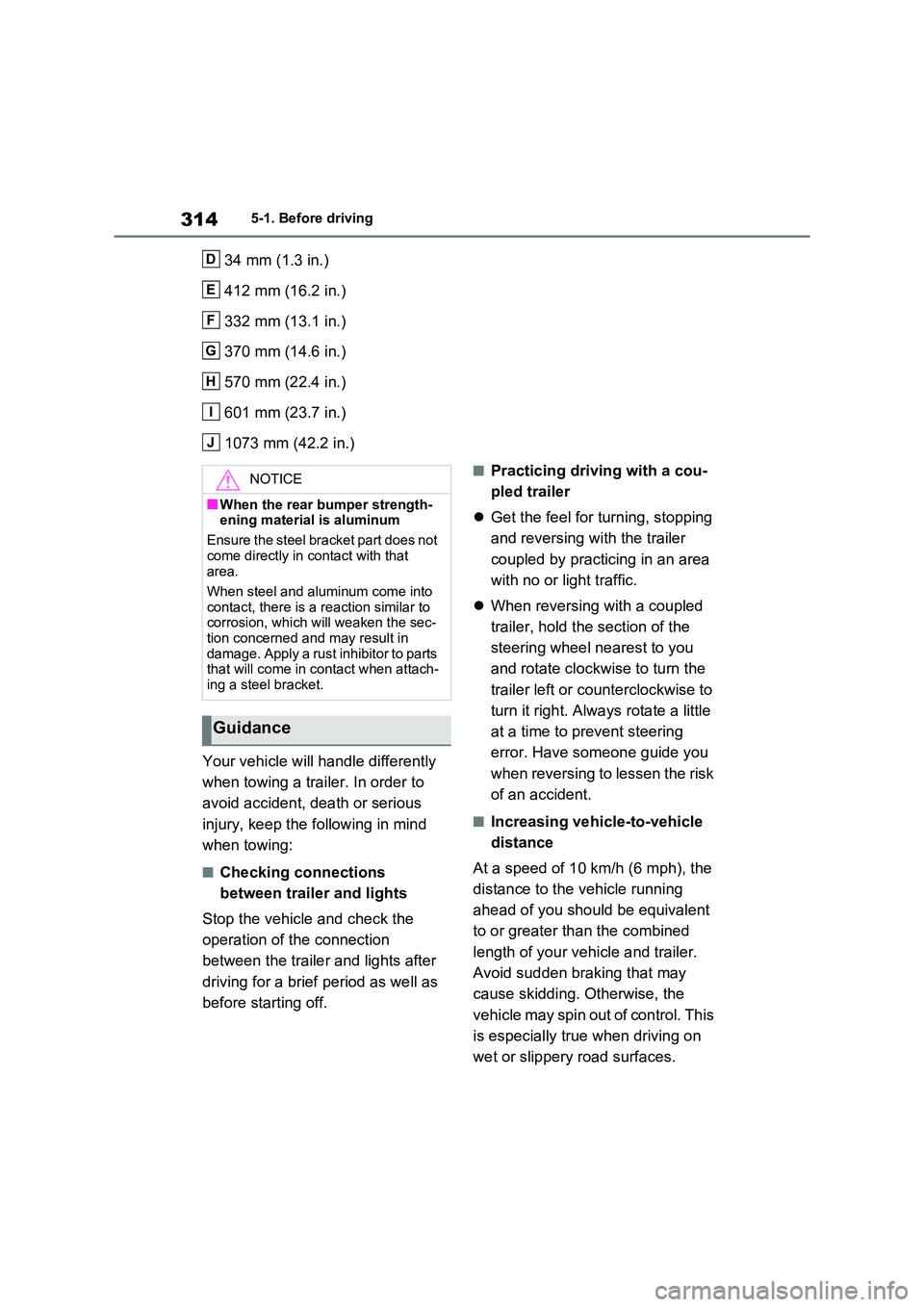
34 mm (1.3 in.)
412 mm (16.2 in.)
332 mm (13.1 in.)
370 mm (14.6 in.)
570 mm (22.4 in.)
601 mm (23.7 in.)
1073 mm (42.2 in.)
Your vehicle will handle differently
when towing a trailer. In order to
avoid accident, d eath or serious
injury, keep the following in mind
when towing:
■Checking connections
between trailer and lights
Stop the vehicle and check the
operation of the connection
between the trailer and lights after
driving for a brief period as well as
before starting off.
■Practicing driving with a cou -
pled trailer
Get the feel for turning, stopping
and reversing with the trailer
coupled by practicing in an area
with no or light traffic.
When reversing with a coupled
trailer, hold the section of the
steering wheel nearest to you
and rotate clockwise to turn the
trailer left or co unterclockwise to
turn it right. Always rotate a little
at a time to prevent steering
error. Have someone guide you
when reversing to lessen the risk
of an accident.
■Increasing vehicle-to-vehicle
distance
At a speed of 10 km/h (6 mph), the
distance to the vehicle running
ahead of you should be equivalent
to or greater th an the combined
length of you r vehicle and trailer.
Avoid sudden braking that may
cause skidding. Otherwise, the
vehicle may spin out of control. This
is especially true when driving on
wet or slippery road surfaces.
D
E
F
G
H
I
J
NOTICE
■When the rear bumper strength -
ening material is aluminum
Ensure the steel bracket part does not
come directly in contact with that
area.
When steel and aluminum come into
contact, there is a reaction similar to
corrosion, which will weaken the sec - tion concerned and may result in
damage. Apply a rust inhibitor to parts
that will come in contact when attach - ing a steel bracket.
Guidance
Page 317 of 666
315
5
5-1. Before driving
Driving
■Sudden acceleration/steering
input/cornering
Executing sharp turns when towing
may result in the trailer colliding
with your vehicle. D ecelerate well in
advance when approaching turns
and take them slowly and carefully
to avoid sudden braking.
■Important points regarding
turning
The wheels of the tr ailer will travel
closer to the inside of the curve
than the wheels of the vehicle. To
make allowance for this, take the
turns wider than you would nor -
mally do.
■Important points regarding
stability
Vehicle movement resulting from
uneven road surfaces and strong
crosswinds will affect handling. The
vehicle may also be rocked by
passing buses or large trucks. Fre -
quently check behind when moving
alongside such vehicles. As soon
as such vehicle movement occurs,
immediately start to decelerate
smoothly by slowly applying the
brakes. Always steer the vehicle
straight ahead while braking.
■Passing other vehicles
Consider the total combined length
of your vehicle and trailer and
ensure that the vehicle-to-vehicle
distance is sufficient before execut -
ing lane changes.
■Transmission information
To maintain engine braking effi -
ciency, when using engine braking,
do not use the transmission in D.
( →P.321)
■If the hybrid system overheats
Towing a loaded trailer up a long,
steep incline in temperatures
exceeding 30°C (85°F) may result
in the hybrid system overheating. If
the high coolant temperature warn -
ing light indicates that the hybrid
system is overheating, turn the air
conditioning off immediately, leave
the road and stop the vehicle in a
safe place. ( →P.611)
■When parking the vehicle
Always place wheel chocks under
the wheels of both the vehicle and
trailer. Firmly set the parking brake
and shift the shift lever to P.
■Break-in schedule
Toyota recommends that vehicles fitted
with new power train components
should not be used for towing trailers for the first 800 km (500 miles).
■Maintenance
●Maintenance must be performed more frequently when using the vehicle for
towing due to the greater weight bur -
den placed on the vehicle compared to normal driving.
●Retighten all bolts securing the hitch - ing ball and bracket after towing for
approximately 1000 km (600 miles).
■If trailer sway occurs
One or more factor s (crosswinds, pass- ing vehicles, rough roads, etc.) can
adversely affect handling of your vehicle
and trailer, causing instability.
Page 318 of 666
3165-1. Before driving
●If trailer swaying occurs:
• Firmly grip the steering wheel. Steer straight ahead.
Do not try to control trailer swaying by
turning the steering wheel. • Begin releasing the accelerator pedal
immediately but very gradually to
reduce speed. Do not increase speed. Do not apply
vehicle brakes.
If you make no extreme correction with
the steering or brakes, your vehicle and
trailer should stabilize (if enabled, Trailer
Sway Control can also help to stabilize
the vehicle and trailer.).
●After the trailer swaying has stopped:
• Stop in a safe place. Get all occupants
out of the vehicle. • Check the tires of t he vehicle and the
trailer.
• Check the load in the trailer. Make sure the load has not shifted.
Make sure the tongue weight is appro -
priate, if possible. • Check the load in the vehicle.
Make sure the vehicle is not overloaded
after occupants get in.
If you cannot find any problems, the
speed at which trailer swaying occurred
is beyond the limit of your particular
vehicle-trailer combination. Drive at a
lower speed to pre vent instability.
Remember that swaying of the towing
vehicle-trailer increases as speed
increases.
Page 320 of 666
3185-2. Driving procedures
■When the ambient temperature is
low, such as during winter driving conditions
●When starting the hy brid system, the flashing time of the “READY” indicator
may be long. Leave the vehicle as it is
until the “READY” indicator is steady on, as steady means the vehicle is
able to move.
●When the hybrid bat tery (traction bat-
tery) is extremely cold (below approxi -
mately -30°C [-22°F]) under the influence of the outside temperature, it
may not be possible to start the hybrid
system. In this case, try to start the hybrid system again after the tem -
perature of the hybrid battery
increases due to t he outside tempera- ture increase etc.
■Sounds and vibrations specific to a
hybrid vehicle
→ P.91
■If the 12-volt battery is discharged
The hybrid system cannot be started
using the smart en try & start system.
Refer to P.606 to res tart the hybrid sys- tem.
■Electronic key battery depletion
→ P.202
■Conditions affecting operation
→ P.225
■Note for the entry function
→ P.225
■Steering lock function
●After turning the power switch to OFF and opening and clos ing the doors,
the steering wheel will be locked due
to the steering lock function. Operat -
ing the power switch again automati- cally cancels the steering lock.
●When the steering lock cannot be released, “Push Power Switch while
Turning Steering Wheel in Either
Direction” will be displayed on the multi-information display.
Check that the shift lever is set in P.
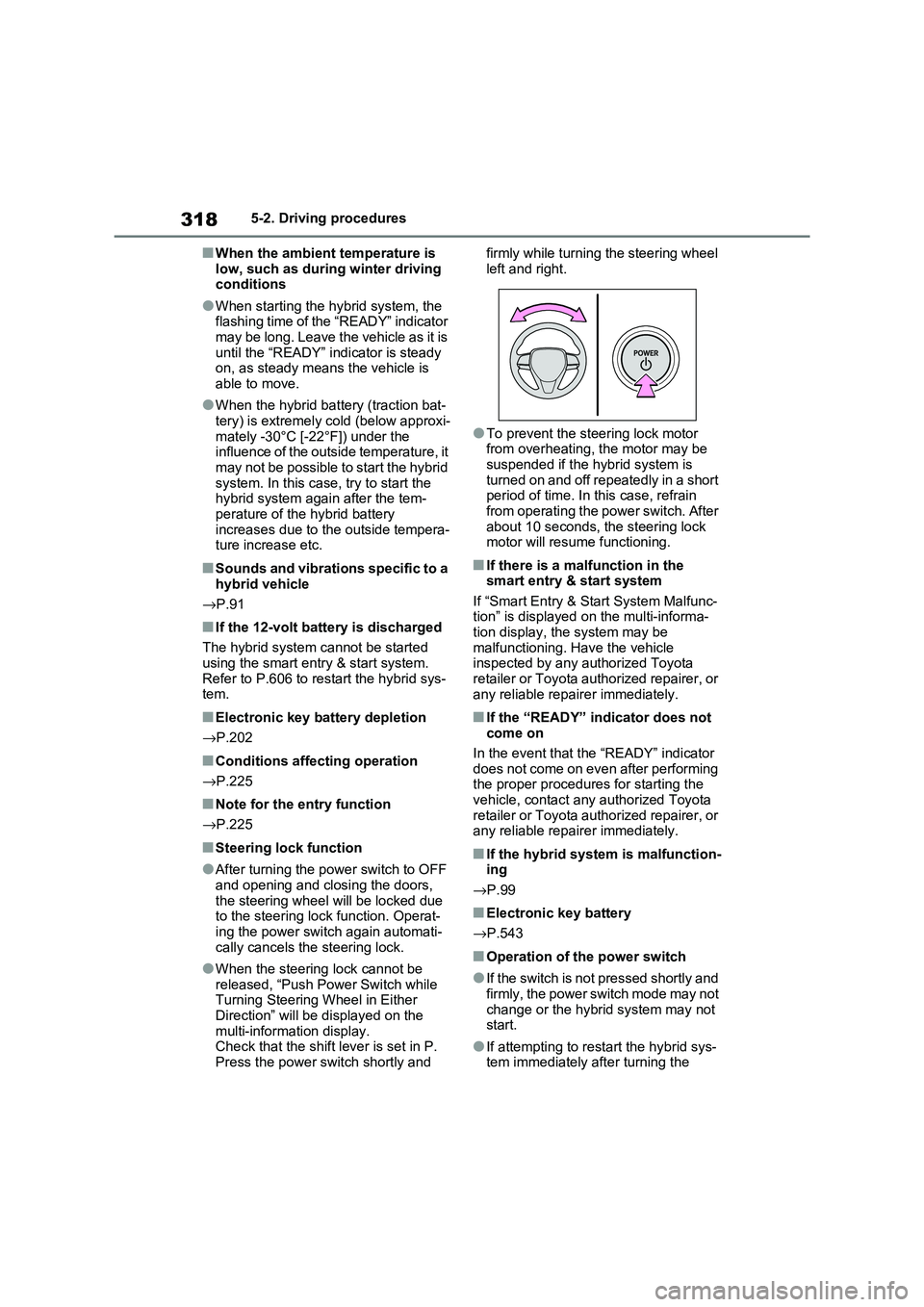
Press the power switch shortly and
firmly while turning the steering wheel
left and right.
●To prevent the st eering lock motor
from overheating, the motor may be suspended if the hybrid system is
turned on and off repeatedly in a short
period of time. In this case, refrain from operating the power switch. After
about 10 seconds, the steering lock
motor will resume functioning.
■If there is a malfunction in the smart entry & start system
If “Smart Entry & St art System Malfunc-
tion” is displayed on the multi-informa - tion display, the system may be
malfunctioning. Have the vehicle
inspected by any a uthorized Toyota retailer or Toyota authorized repairer, or
any reliable repairer immediately.
■If the “READY” indicator does not
come on
In the event that the “READY” indicator
does not come on even after performing
the proper procedures for starting the vehicle, contact any authorized Toyota
retailer or Toyota authorized repairer, or
any reliable repairer immediately.
■If the hybrid system is malfunction - ing
→ P.99
■Electronic key battery
→ P.543
■Operation of the power switch
●If the switch is not pressed shortly and
firmly, the power switch mode may not
change or the hybri d system may not start.
●If attempting to restart the hybrid sys - tem immediately after turning the
Page 321 of 666
319
5
5-2. Driving procedures
Driving
power switch to OF F, the hybrid sys-
tem may not start in some cases. After turning the power switch to OFF,
please wait a few seconds before
restarting the hybrid system.
■Customization
If the smart entry & start system has
been deactivated in a customized set -
ting, refer to P.605.
1 Stop the vehicle completely.
2 If the parking brake is in manual
mode, set the parking brake.
( →P.326)
Check the parking brake indicator is
illuminated.
3 Shift the shift lever to P.
4 Press the power switch shortly
and firmly.
The hybrid system w ill stop, and the meter display will be extinguished.
Release the shift lever when pressing
the power switch.
5 Release the brake pedal and
check that “ACCESSORY” or
“IGNITION ON” is not shown on
the multi-inform ation display.
WARNING
■When starting the hybrid system
Always start the hyb rid system while
sitting in the drive r’s seat. Do not
depress the accelerator pedal while starting the hybri d system under any
circumstances.
Doing so may cause an accident resulting in death or serious injury.
■Caution while driving
If hybrid system fai lure occurs while
the vehicle is moving, do not lock or
open the doors until the vehicle reaches a safe and complete stop.
Activation of the steering lock in this
circumstance may lead to an acci - dent, resulting in death or serious
injury.
NOTICE
■When starting the hybrid system
If the hybrid system becomes difficult
to start, have your vehicle checked by
any authorized Toyo ta retailer or Toyota authorized repairer, or any
reliable repairer immediately.
■Symptoms indicating a malfunc -
tion with the power switch
If the power switch seems to be oper - ating somewhat differently than usual,
such as the switch sticking slightly,
there may be a malfunction. Contact any authorized Toyo ta retailer or
Toyota authorized repairer, or any
reliable repairer immediately.
Stopping the hybrid system
WARNING
■Stopping the hybrid system in an
emergency
●If you want to sto p the hybrid sys- tem in an emergency while driving
the vehicle, press and hold the
power switch for more than 2 sec- onds, or press it b riefly 3 times or
more in succession. ( →P.560)
However, do not touch the power switch while driving except in an
emergency. Turning the hybrid sys -
tem off while driving will not cause a loss of steering or braking control.
However, power assist for the
steering wheel may be lost making it difficult to st eer smoothly before
stopping the vehi cle depending on
the remaining charge in the 12-volt battery or usage co nditions. In this
situation, you should pull over and
stop the vehicle as soon as it is safe to do so.
Page 358 of 666
3565-5. Using the driving support systems
WARNING
■Limitations of the pre-collision
system
●The driver is solely responsible for safe driving. Always drive safely,
taking care to observe your sur -
roundings. Do not use the pre- collision system
instead of normal braking opera -
tions under any circumstances.
This system will not prevent colli - sions or lessen collision damage or
injury in every situation. Do not
overly rely on thi s system. Failure to do so may lead to an accident,
resulting in death or serious injury.
●Although this system is designed to
help avoid a collision or help reduce
the impact of the collision, its effec - tiveness may change according to
various conditions, therefore the
system may not alw ays be able to achieve the same level of perfor -
mance.
Read the following conditions care - fully. Do not over ly rely on this sys-
tem and always drive carefully.
• Conditions under which the system may operate even if there is no pos -
sibility of a collision: →P.359
• Conditions under which the system may not operate properly: →P.360
●Do not attempt to test the operation of the pre-collision system yourself.
Depending on the objects used for
testing (dummies, cardboard objects imitating detectable objects,
etc.), the system m ay not operate
properly, possibly leading to an accident.
■Pre-collision braking
●When the pre-collision braking
function is operating, a large
amount of braking force will be applied.
●If the vehicle is stopped by the operation of the pre-collision brak -
ing function, the p re-collision brak-
ing function operation will be canceled after approximately 2 sec -
onds. Depress the brake pedal as
necessary.
●The pre-collision braking function
may not operate if certain opera - tions are performed by the driver. If
the accelerator pedal is being
depressed strongly or the steering wheel is being turned, the system
may determine that the driver is tak -
ing evasive action and possibly pre - vent the pre-col lision braking
function from operating.
●In some situations, while the pre-
collision braking function is operat -
ing, operation of the function may be canceled if the accelerator pedal
is depressed strongly or the steer -
ing wheel is tur ned and the system determines that the driver is taking
evasive action.
●If the brake pedal is being
depressed, the system may deter -
mine that the driv er is taking eva- sive action and possibly delay the
operation timing of the pre-collision
braking function.
■When to disable the pre-colli -
sion system
In the following situations, disable the
system, as it may not operate prop-
erly, possibly leading to an accident resulting in death or serious injury:
●When the vehicle is being towed
●When your vehicle is towing
another vehicle
●When transporting the vehicle via truck, boat, train or similar means of
transportation
●When the vehicle is raised on a lift
with the hybrid system on and the
tires are allowed to rotate freely
Page 361 of 666
359
5
5-5. Using the driving support systems
Driving
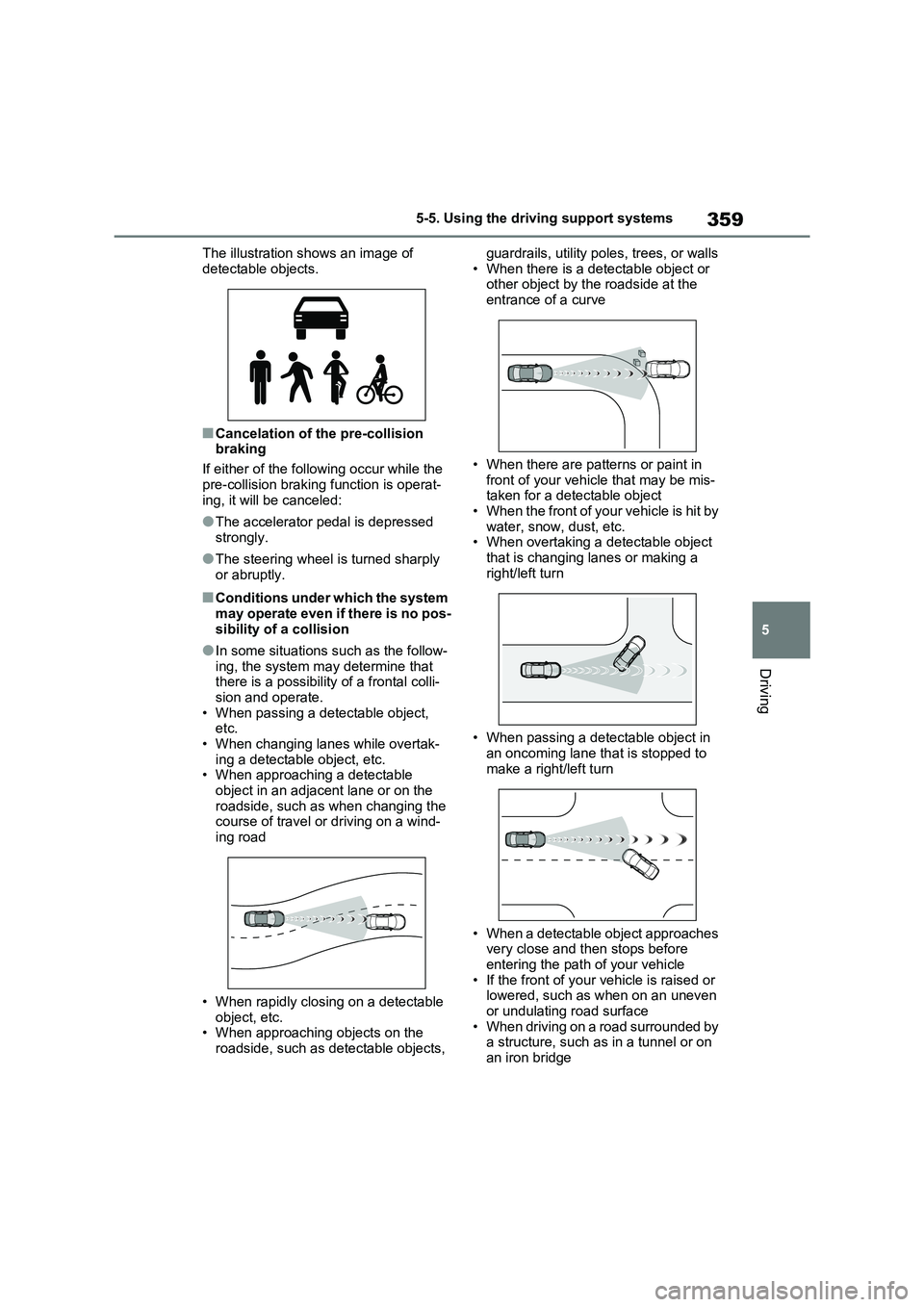
The illustration shows an image of
detectable objects.
■Cancelation of the pre-collision
braking
If either of the foll owing occur while the
pre-collision braking function is operat -
ing, it will be canceled:
●The accelerator pedal is depressed
strongly.
●The steering wheel is turned sharply
or abruptly.
■Conditions under which the system may operate even if there is no pos -
sibility of a collision
●In some situations such as the follow-
ing, the system may determine that
there is a possibility of a frontal colli - sion and operate.
• When passing a det ectable object,
etc. • When changing lanes while overtak -
ing a detectable object, etc.
• When approaching a detectable object in an adjacen t lane or on the
roadside, such as when changing the
course of travel or driving on a wind - ing road
• When rapidly closin g on a detectable
object, etc. • When approaching objects on the
roadside, such as detectable objects,
guardrails, utility pol es, trees, or walls
• When there is a detectable object or other object by the roadside at the
entrance of a curve
• When there are pa tterns or paint in
front of your vehicle that may be mis -
taken for a detectable object • When the front of your vehicle is hit by
water, snow, dust, etc.
• When overtaking a d etectable object that is changing lanes or making a
right/left turn
• When passing a detectable object in
an oncoming lane th at is stopped to
make a right/left turn
• When a detectable object approaches
very close and then stops before entering the path of your vehicle
• If the front of your ve hicle is raised or
lowered, such as when on an uneven
or undulating road surface • When driving on a road surrounded by
a structure, such as in a tunnel or on
an iron bridge