instrument panel TOYOTA RAV4 PLUG-IN HYBRID 2022 User Guide
[x] Cancel search | Manufacturer: TOYOTA, Model Year: 2022, Model line: RAV4 PLUG-IN HYBRID, Model: TOYOTA RAV4 PLUG-IN HYBRID 2022Pages: 662, PDF Size: 163.06 MB
Page 262 of 662
2605-1. Before driving
WARNING
OAvoid revving or racing the engine. Running the engine at high speed
while the vehicle is stopped may cause the exhaust system to over-heat, which could result in a fire if
combustible material is nearby.
QWhen the vehicle is parked
ODo not leave glasses, cigarette lighters, spray cans, or soft drink cans in the vehicle when it is in the
sun. Doing so may result in the follow-ing:
• Gas may leak from a cigarette lighter or spray can, and may lead to a fire.
• The temperature inside the vehicle may cause the plastic lenses and plastic material of glasses to
deform or crack.
• Soft drink cans may fracture, caus- ing the contents to spray over the
interior of the vehicle, and may also cause a short circuit in the vehicle’s electrical components.
ODo not leave cigarette lighters in the vehicle. If a cigarette lighter is in a
place such as the glove box or on the floor, it may be lit accidentally when luggage is loaded or the seat
is adjusted, causing a fire.
ODo not attach adhesive discs to the
windshield or windows. Do not place containers such as air fresh-eners on the instrument panel or
dashboard. Adhesive discs or con- tainers may act as lenses, causing a fire in the vehicle.
ODo not leave a door or window open if the curved glass is coated
with a metallized film such as a sil- ver-colored one. Reflected sunlight may cause the glass to act as a
lens, causing a fire.
OAlways apply the parking brake, shift the shift lever to P, stop the hybrid system and lock the vehicle.
Do not leave the vehicle unat- tended while the “READY” indicator is illuminated.
If the vehicle is parked with the shift lever in P but the parking brake is not set, the vehicle may start to
move, possibly leading to an acci- dent.
ODo not touch the exhaust pipes while the “READY” indicator is illu-minated or immediately after turn-
ing the hybrid system off. Doing so may cause burns.
QWhen taking a nap in the vehicle
Always turn the hybrid system off. Otherwise, if you accidentally move
the shift lever or depress the acceler- ator pedal, this could cause an acci-dent or fire due to hybrid system
overheating. Additionally, if the vehi- cle is parked in a poorly ventilated area, exhaust gases may collect and
enter the vehicle, leading to death or a serious health hazard.
QWhen braking
OWhen the brakes are wet, drive more cautiously.
Braking distance increases when the brakes are wet, and this may cause one side of the vehicle to
brake differently than the other side. Also, the parking brake may not securely hold the vehicle.
OIf the electronically controlled brake system does not operate, do not fol-
low other vehicles closely and avoid hills or sharp turns that require braking.
In this case, braking is still possible, but the brake pedal should be depressed more firmly than usual.
Also, the braking distance will increase. Have your brakes fixed immediately.
Page 265 of 662
263
5
5-1. Before driving
Driving
WARNING
ODo not place cargo or luggage in or on the following locations.
• At the feet of the driver
• On the front passenger or rear seats (when stacking items)
• On the luggage cover (if equipped)
• On the instrument panel
• On the dashboard
OSecure all items in the occupant compartment.
QLoad and distribution
ODo not overload your vehicle.
ODo not apply loads unevenly.
Improper loading may cause deterio-
ration of steering or braking control which may cause death or serious injury.
QWhen loading cargo on the roof luggage carrier (if equipped)
Observe the following precautions:
OPlace the cargo so that its weight is distributed evenly between the front
and rear axles.
OIf loading long or wide cargo, never
exceed the vehicle overall length or width. ( P.558)
OBefore driving, make sure the cargo is securely fastened on the roof lug-gage carrier.
OLoading cargo on the roof luggage carrier will make the center of grav-
ity of the vehicle higher. Avoid high speeds, sudden starts, sharp turns, sudden braking or abrupt maneu-
vers, otherwise it may result in loss of control or vehicle rollover due to failure to operate this vehicle cor-
rectly and result in death or serious injury.
OIf driving for a long distance, on rough roads, or at high speeds, stop the vehicle now and then
during the trip to make sure the cargo remains in its place.
ODo not exceed 80 kg (176.4 lb.) cargo weight on the roof luggage carrier.
NOTICE
QWhen loading cargo on the roof luggage carrier (if equipped)
Be careful not to scratch the surface
of the panoramic moon roof (if equipped).
Page 290 of 662
2885-3. Operating the lights and wipers
5-3.Operating the lights and wipers
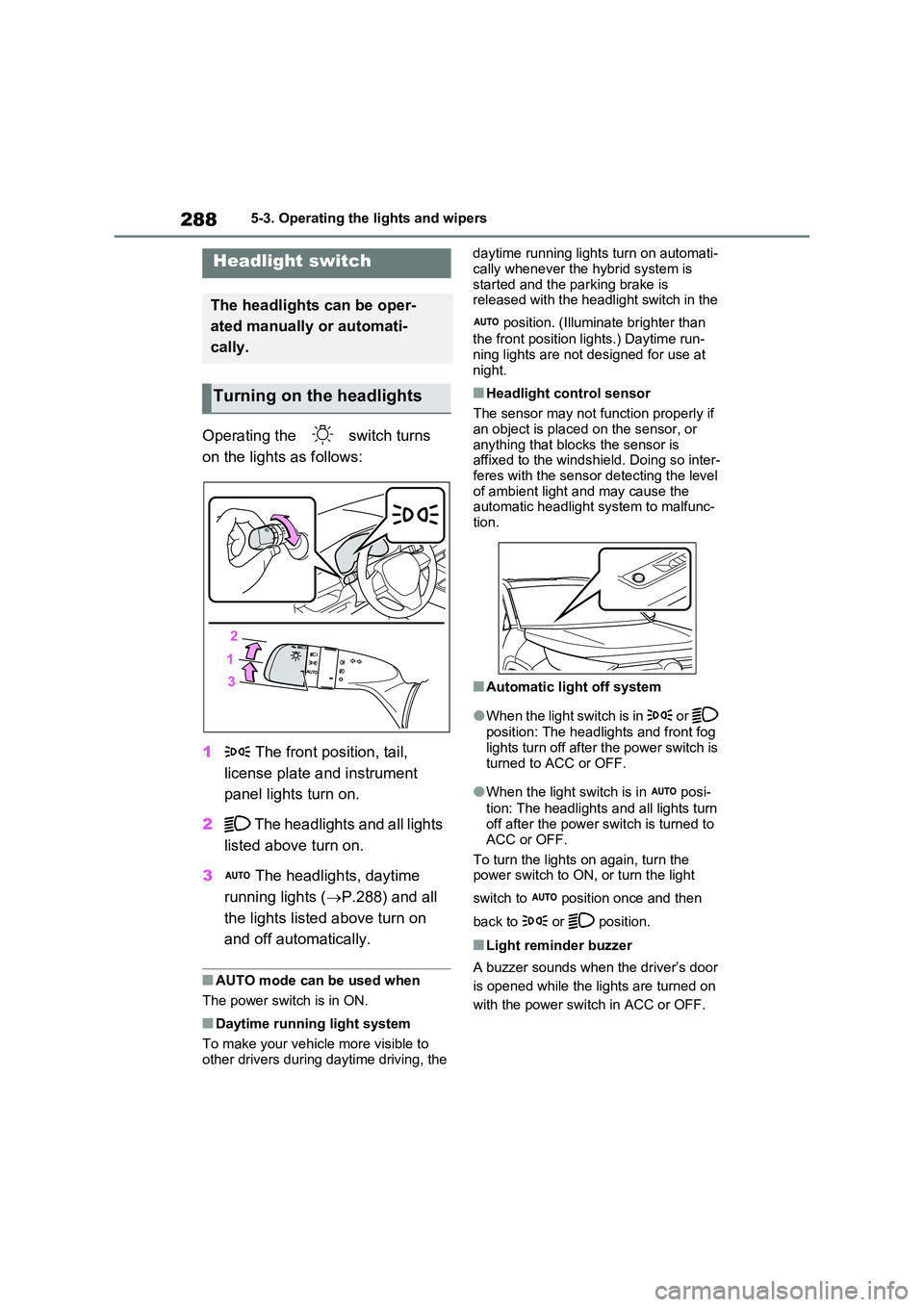
Operating the switch turns
on the lights as follows:
1 The front position, tail,
license plate and instrument
panel lights turn on.
2 The headlights and all lights
listed above turn on.
3 The headlights, daytime
running lights ( P.288) and all
the lights listed above turn on
and off automatically.
QAUTO mode can be used when
The power switch is in ON.
QDaytime running light system
To make your vehicle more visible to
other drivers during daytime driving, the
daytime running lights turn on automati-
cally whenever the hybrid system is started and the parking brake is released with the headlight switch in the
position. (Illuminate brighter than
the front position lights.) Daytime run- ning lights are not designed for use at
night.
QHeadlight control sensor
The sensor may not function properly if an object is placed on the sensor, or
anything that blocks the sensor is affixed to the windshield. Doing so inter-feres with the sensor detecting the level
of ambient light and may cause the automatic headlight system to malfunc-tion.
QAutomatic light off system
OWhen the light switch is in or
position: The headlights and front fog
lights turn off after the power switch is turned to ACC or OFF.
OWhen the light switch is in posi-
tion: The headlights and all lights turn off after the power switch is turned to
ACC or OFF.
To turn the lights on again, turn the power switch to ON, or turn the light
switch to position once and then
back to or position.
QLight reminder buzzer
A buzzer sounds when the driver’s door
is opened while the lights are turned on
with the power switch in ACC or OFF.
Headlight switch
The headlights can be oper-
ated manually or automati-
cally.
Turning on the headlights
Page 448 of 662
4467-1. Maintenance and care
WARNING
QWater in the vehicle
ODo not splash or spill liquid in the
vehicle, such as on the floor, on the rear seats, in the DC/DC Converter air intake vent, junction box or in
the luggage compartment. ( P.98) Doing so may cause the DC/DC Converter, electrical components,
etc. to malfunction or catch fire.
ODo not get any of the SRS compo-
nents or wiring in the vehicle interior wet. ( P.40) An electrical malfunction may
cause the airbags to deploy or not function properly, resulting in death or serious injury.
OVehicles with wireless charger:Do not let the wireless charger
( P.433) get wet. Failure to do so may cause the charger to become hot and cause burns or could cause
electric shock resulting in death or serious injury.
QCleaning the interior (especially instrument panel)
Do not use a polish wax or polish
cleaner. The instrument panel may reflect off the windshield, obstructing the driver’s view and leading to an
accident, resulting in death or serious injury.
NOTICE
QCleaning detergents
ODo not use the following types of
detergent, as they may discolor the vehicle interior or cause streaks or damage to painted surfaces:
• Non-seat portions: Organic sub- stances such as benzene or gaso-line, alkaline or acidic solutions,
dye, and bleach
• Seats: Alkaline or acidic solutions, such as thinner, benzene, and alco-
hol
ODo not use a polish wax or polish cleaner. The instrument panel’s or other interior part’s painted surface
may be damaged.
QPreventing damage to leather
surfaces
Observe the following precautions to avoid damage to and deterioration of
leather surfaces:
ORemove any dust or dirt from leather surfaces immediately.
ODo not expose the vehicle to direct sunlight for extended periods of
time. Park the vehicle in the shade, especially during summer.
ODo not place items made of vinyl, plastic, or containing wax on the upholstery, as they may stick to the
leather surface if the vehicle interior heats up significantly.
QWater on the floor
Do not wash the vehicle floor with water.
Vehicle systems such as the audio system may be damaged if water comes into contact with electrical
components such as the audio sys- tem above or under the floor of the vehicle. Water may also cause the
body to rust.
QWhen cleaning the inside of the
windshield (vehicles with Toyota Safety Sense)
Do not allow glass cleaner to contact
the lens. Also, do not touch the lens. ( P.300)
QCleaning the inside of the rear window
ODo not use a glass cleaner to clean
the rear window, as this may cause damage to the rear window defog-ger heater wires. Use a cloth damp-
ened with lukewarm water to gently wipe the window clean. Wipe the window in strokes running parallel
to the heater wires.
Page 490 of 662
4887-3. Do-it-yourself maintenance
1Turn the power switch off.
Confirm that the charging connector is
not connected. Also, do not use the
Remote Air Conditioning System during
the procedure.
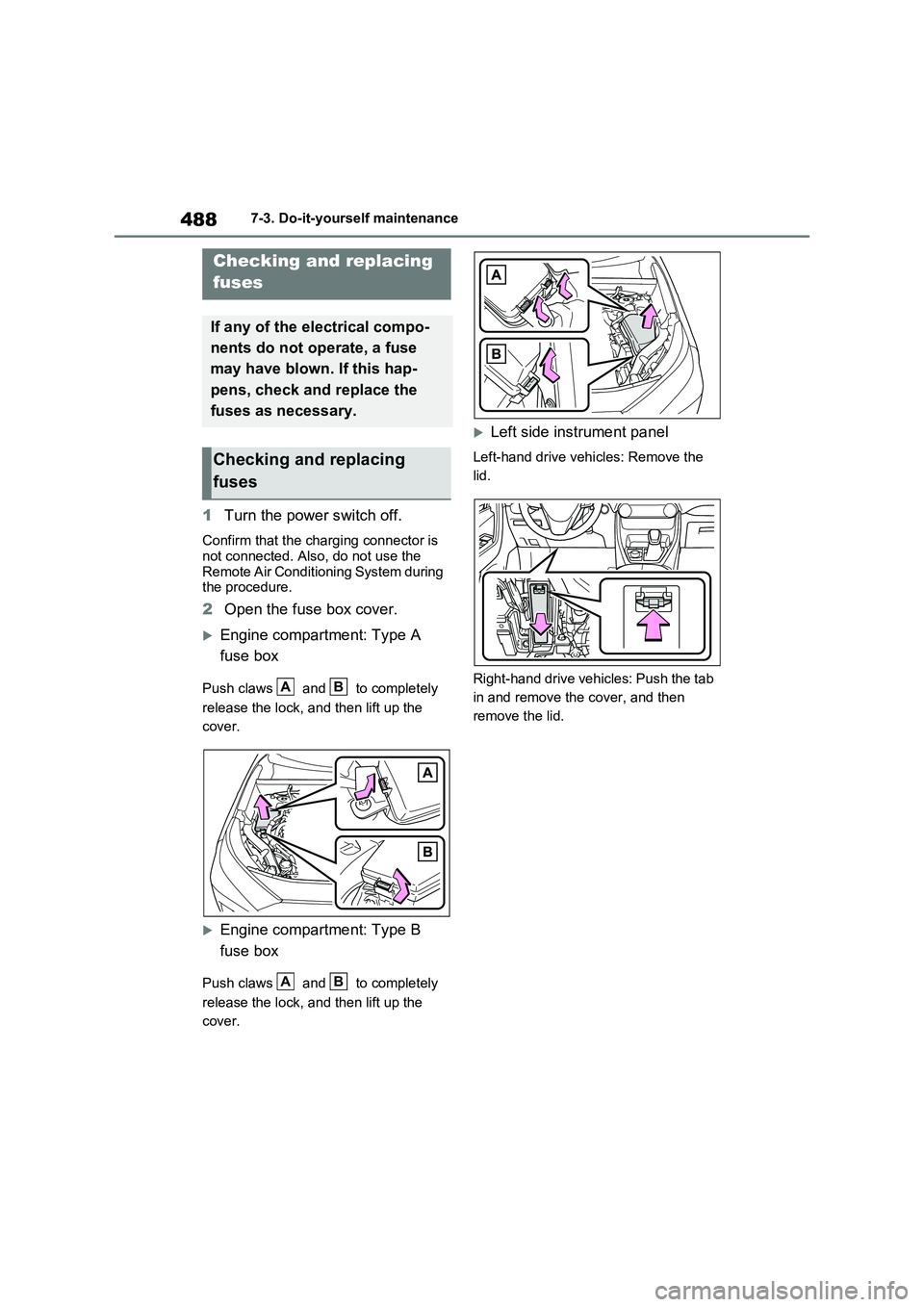
2Open the fuse box cover.
Engine compartment: Type A
fuse box
Push claws and to completely
release the lock, and then lift up the
cover.
Engine compartment: Type B
fuse box
Push claws and to completely
release the lock, and then lift up the
cover.
Left side instrument panel
Left-hand drive vehicles: Remove the
lid.
Right-hand drive vehicles: Push the tab
in and remove the cover, and then
remove the lid.
Checking and replacing
fuses
If any of the electrical compo-
nents do not operate, a fuse
may have blown. If this hap-
pens, check and replace the
fuses as necessary.
Checking and replacing
fuses
AB
AB
Page 560 of 662
5589-1. Specifications
9-1.Spec ific ations
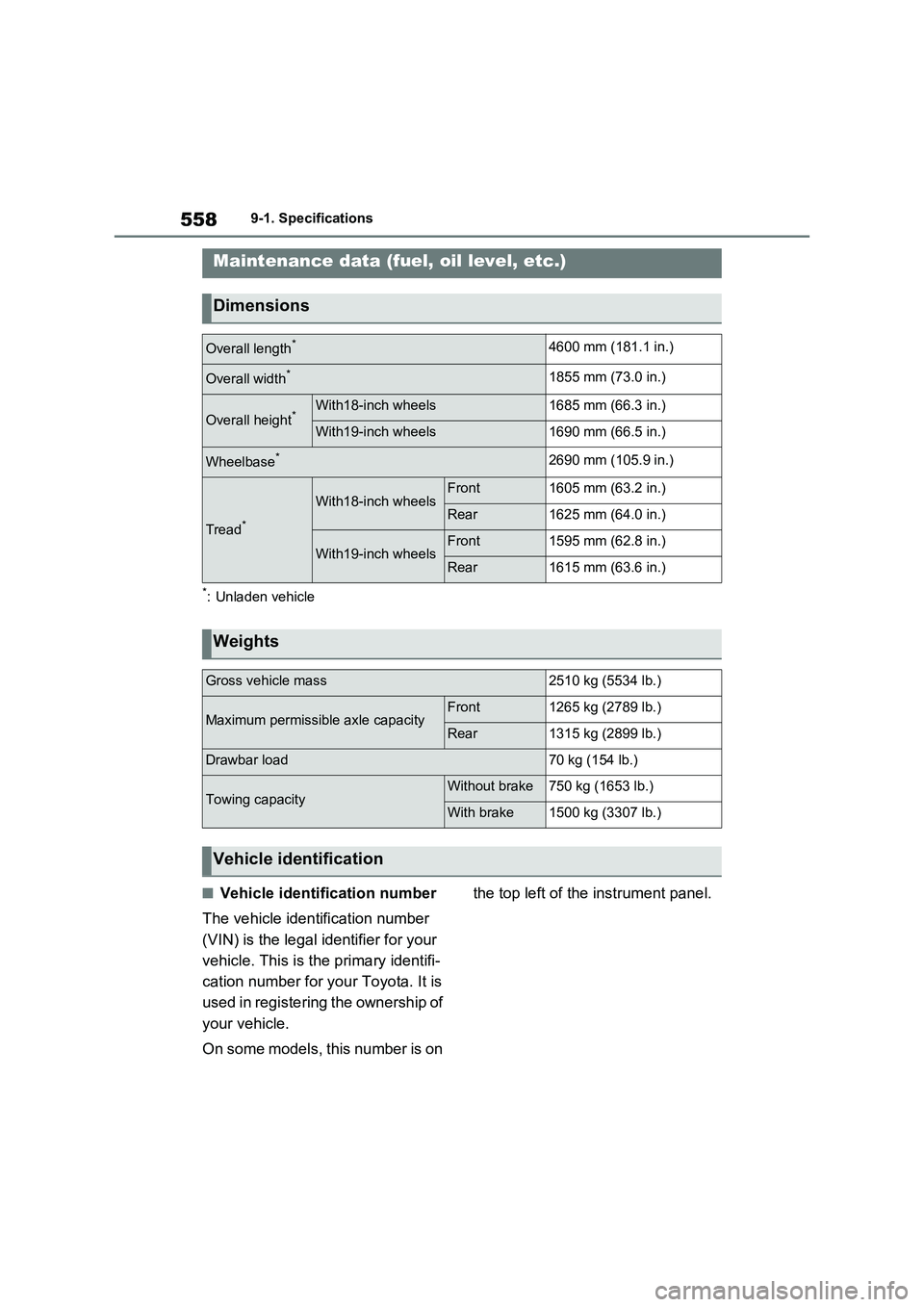
*: Unladen vehicle
QVehicle identification number
The vehicle identification number
(VIN) is the legal identifier for your
vehicle. This is the primary identifi-
cation number for your Toyota. It is
used in registering the ownership of
your vehicle.
On some models, this number is on the top left of the instrument panel.
Maintenance data (fuel, oil level, etc.)
Dimensions
Overall length*4600 mm (181.1 in.)
Overall width*1855 mm (73.0 in.)
Overall height*With18-inch wheels1685 mm (66.3 in.)
With19-inch wheels1690 mm (66.5 in.)
Wheelbase*2690 mm (105.9 in.)
Tread*
With18-inch wheelsFront1605 mm (63.2 in.)
Rear1625 mm (64.0 in.)
With19-inch wheelsFront1595 mm (62.8 in.)
Rear1615 mm (63.6 in.)
Weights
Gross vehicle mass2510 kg (5534 lb.)
Maximum permissible axle capacityFront1265 kg (2789 lb.)
Rear1315 kg (2899 lb.)
Drawbar load70 kg (154 lb.)
Towing capacityWithout brake750 kg (1653 lb.)
With brake1500 kg (3307 lb.)
Vehicle identification
Page 576 of 662
5749-2. Customization
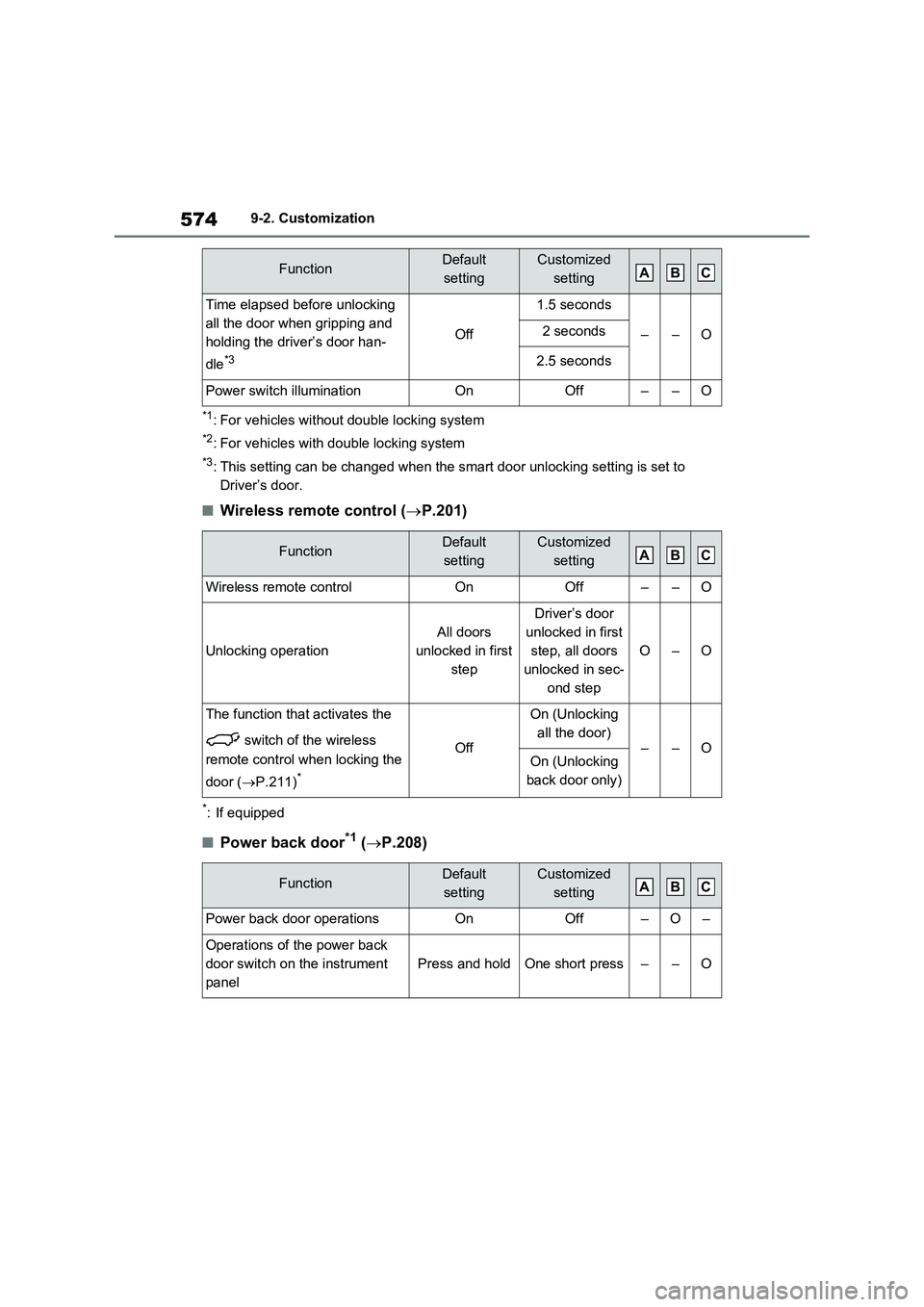
*1: For vehicles without double locking system
*2: For vehicles with double locking system
*3: This setting can be changed when the smart door unlocking setting is set to
Driver’s door.
QWireless remote control (P.201)
*: If equipped
QPower back door*1 (P.208)
Time elapsed before unlocking
all the door when gripping and
holding the driver’s door han-
dle
*3
Off
1.5 seconds
––O2 seconds
2.5 seconds
Power switch illuminationOnOff––O
FunctionDefault
settingCustomized
setting
Wireless remote controlOnOff––O
Unlocking operation
All doors
unlocked in first
step
Driver’s door
unlocked in first
step, all doors
unlocked in sec-
ond step
O–O
The function that activates the
switch of the wireless
remote control when locking the
door (P.211)
*
Off
On (Unlocking
all the door)
––OOn (Unlocking
back door only)
FunctionDefault
settingCustomized
setting
Power back door operationsOnOff–O–
Operations of the power back
door switch on the instrument
panel
Press and holdOne short press––O
FunctionDefault
settingCustomized
settingABC
ABC
ABC