door lock TOYOTA RAV4 PRIME 2021 (in English) User Guide
[x] Cancel search | Manufacturer: TOYOTA, Model Year: 2021, Model line: RAV4 PRIME, Model: TOYOTA RAV4 PRIME 2021Pages: 616, PDF Size: 34.66 MB
Page 108 of 616
1082-2. Charging
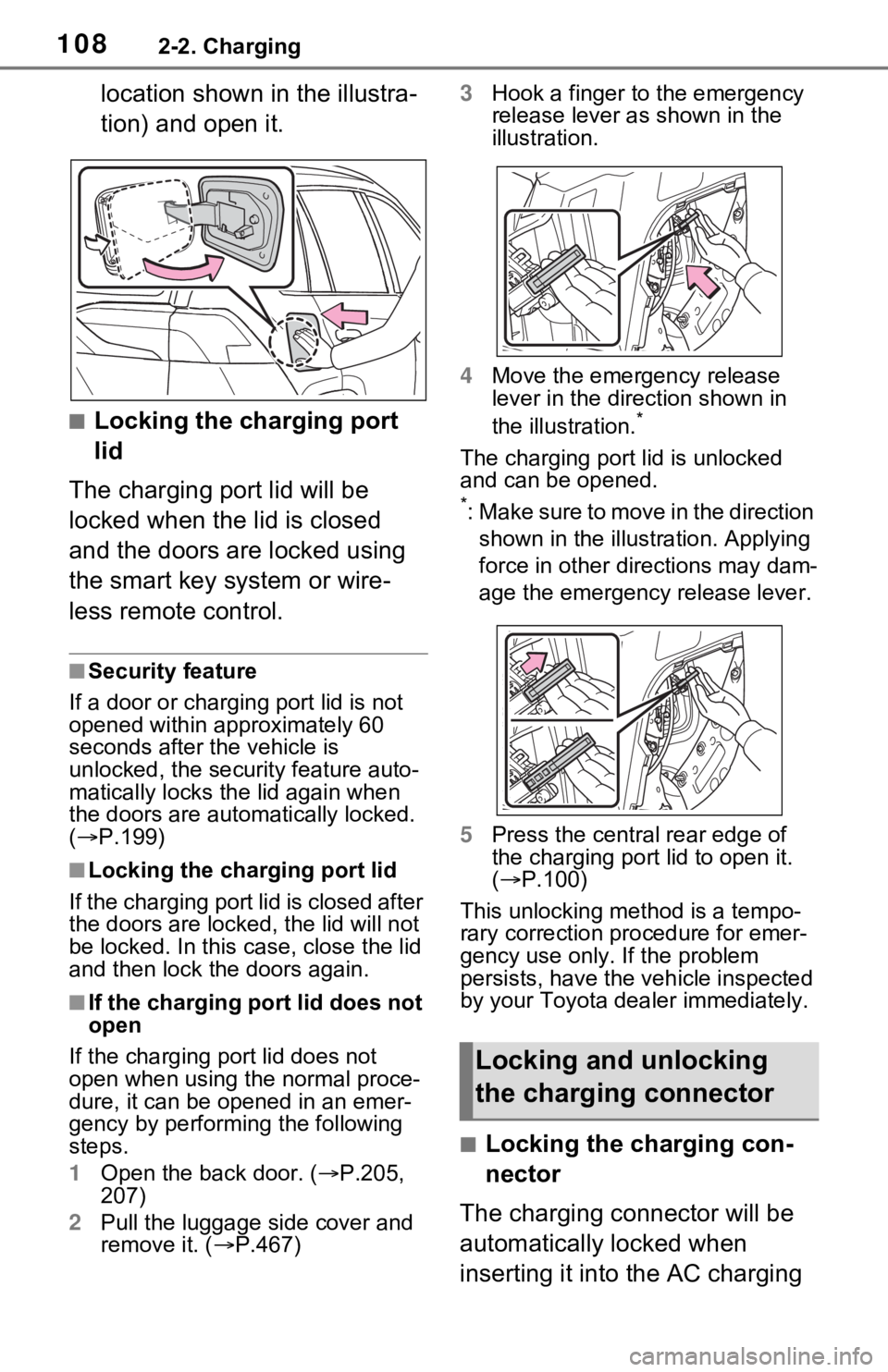
location shown in the illustra-
tion) and open it.
■Locking the charging port
lid
The charging port lid will be
locked when the lid is closed
and the doors are locked using
the smart key system or wire-
less remote control.
■Security feature
If a door or charging port lid is not
opened within approximately 60
seconds after the vehicle is
unlocked, the security feature auto-
matically locks the lid again when
the doors are autom atically locked.
( P.199)
■Locking the char ging port lid
If the charging port lid is closed after
the doors are lock ed, the lid will not
be locked. In this case, close the lid
and then lock the doors again.
■If the charging port lid does not
open
If the charging port lid does not
open when using the normal proce-
dure, it can be ope ned in an emer-
gency by performing the following
steps.
1 Open the back door. ( P.205,
207)
2 Pull the luggage side cover and
remove it. ( P.467) 3
Hook a finger to the emergency
release lever as shown in the
illustration.
4 Move the emergency release
lever in the direction shown in
the illustration.
*
The charging port lid is unlocked
and can be opened.
*: Make sure to move in the direction
shown in the illust ration. Applying
force in other directions may dam-
age the emergency release lever.
5 Press the central rear edge of
the charging port lid to open it.
( P.100)
This unlocking method is a tempo-
rary correction procedure for emer-
gency use only. If the problem
persists, have the vehicle inspected
by your Toyota dea ler immediately.
■Locking the charging con-
nector
The charging connector will be
automatically locked when
inserting it into the AC charging
Locking and unlocking
the charging connector
Page 109 of 616
1092-2. Charging
2
Plug-in hybrid system
inlet. (The setting can be
changed: P.109)
■Unlocking the charging
connector
The charging connector will be
unlocked when the doors are
unlocked using the smart key
system or wireless remote con-
trol.
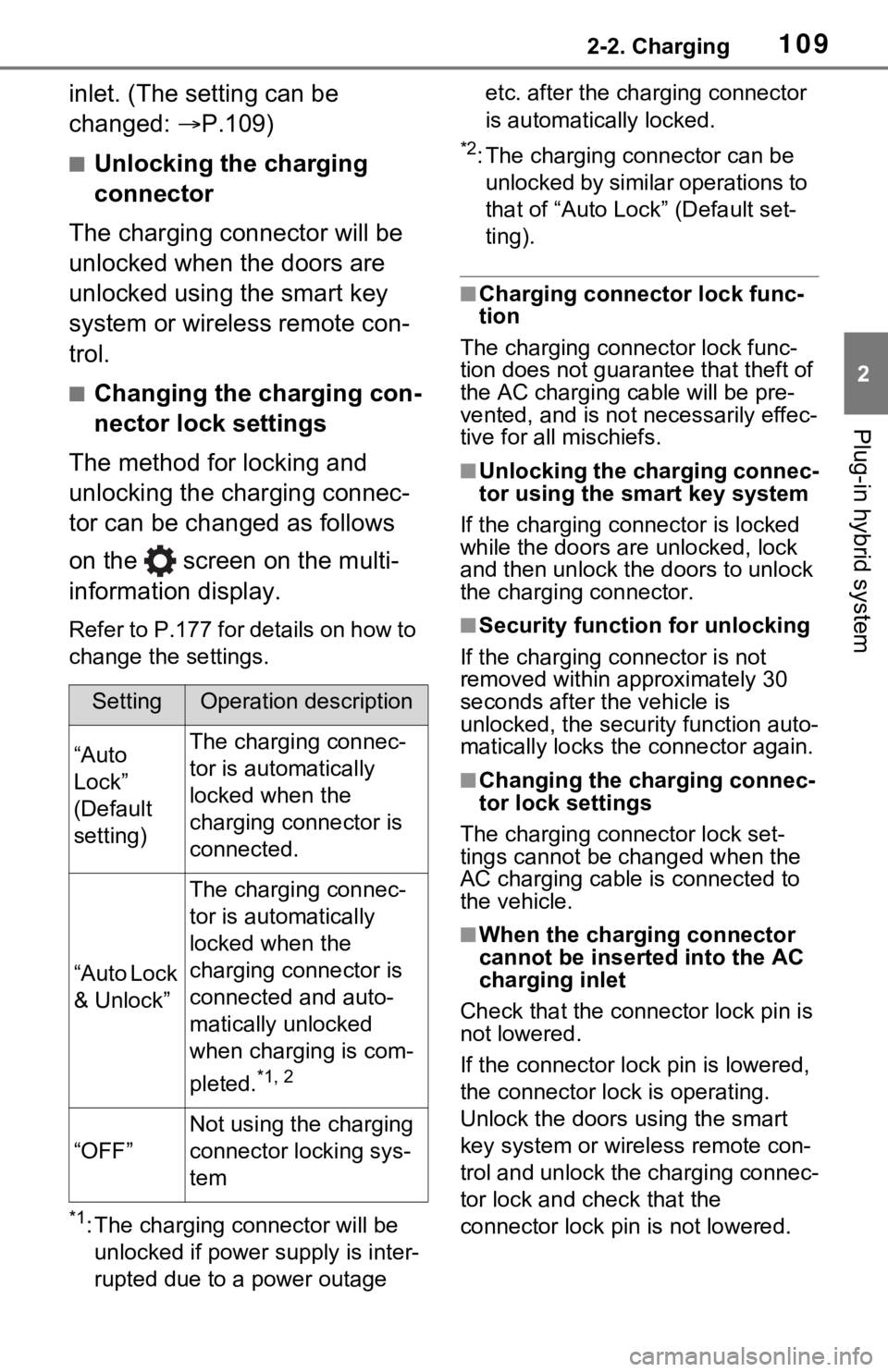
■Changing the charging con-
nector lock settings
The method for locking and
unlocking the charging connec-
tor can be changed as follows
on the screen on the multi-
information display.
Refer to P.177 for details on how to
change the settings.
*1: The charging co nnector will be
unlocked if power supply is inter-
rupted due to a power outage etc. after the charging connector
is automatically locked.
*2: The charging connector can be
unlocked by similar operations to
that of “Auto Loc k” (Default set-
ting).
■Charging connector lock func-
tion
The charging connector lock func-
tion does not guarantee that theft of
the AC charging cable will be pre-
vented, and is not necessarily effec-
tive for all mischiefs.
■Unlocking the charging connec-
tor using the smart key system
If the charging connector is locked
while the doors are unlocked, lock
and then unlock the doors to unlock
the charging connector.
■Security function for unlocking
If the charging connector is not
removed within approximately 30
seconds after the vehicle is
unlocked, the security function auto-
matically locks the connector again.
■Changing the charging connec-
tor lock settings
The charging co nnector lock set-
tings cannot be changed when the
AC charging cable is connected to
the vehicle.
■When the charging connector
cannot be inserted into the AC
charging inlet
Check that the connector lock pin is
not lowered.
If the connector lock pin is lowered,
the connector lock is operating.
Unlock the doors u sing the smart
key system or wirel ess remote con-
trol and unlock the charging connec-
tor lock and check that the
connector lock pin is not lowered.
SettingOperation description
“Auto
Lock”
(Default
setting)The charging connec-
tor is automatically
locked when the
charging connector is
connected.
“Auto Lock
& Unlock”
The charging connec-
tor is automatically
locked when the
charging connector is
connected and auto-
matically unlocked
when charging is com-
pleted.
*1, 2
“OFF”
Not using the charging
connector locking sys-
tem
Page 110 of 616
1102-2. Charging
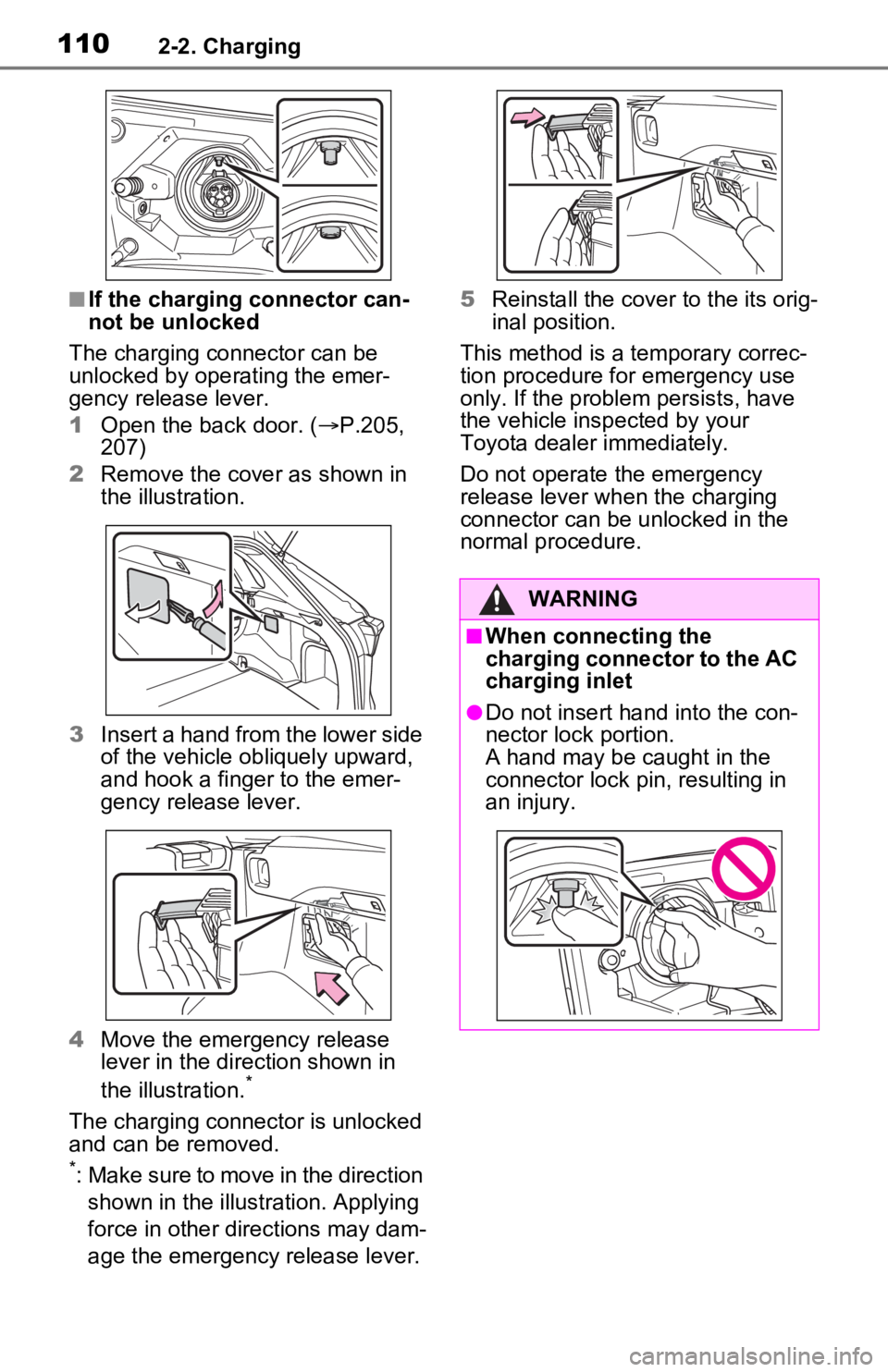
■If the charging connector can-
not be unlocked
The charging connector can be
unlocked by operating the emer-
gency release lever.
1 Open the back door. ( P.205,
207)
2 Remove the cover as shown in
the illustration.
3 Insert a hand from the lower side
of the vehicle obliquely upward,
and hook a finger to the emer-
gency release lever.
4 Move the emergency release
lever in the direction shown in
the illustration.
*
The charging connector is unlocked
and can be removed.
*: Make sure to move in the direction
shown in the illustration. Applying
force in other directions may dam-
age the emergency release lever. 5
Reinstall the cove r to the its orig-
inal position.
This method is a temporary correc-
tion procedure for emergency use
only. If the problem persists, have
the vehicle insp ected by your
Toyota dealer immediately.
Do not operate the emergency
release lever when the charging
connector can be unlocked in the
normal procedure.
WARNING
■When connecting the
charging connector to the AC
charging inlet
●Do not insert h and into the con-
nector lock portion.
A hand may be caught in the
connector lock pin, resulting in
an injury.
Page 111 of 616
1112-2. Charging
2
Plug-in hybrid system
Connect to an AC 120 V out-
let (NEMA 5-15R) with a
Ground-Fault Circuit-Inter-
rupter (GFCI) and a circuit
breaker. Use of a 15A individ-
ual circuit is strongly recom-
mended to ensure AC
charging cable will operate
properly.
When charging outdoors,
make sure to connect to a
weatherproof outlet that is
certified for outdoor use.
Checking Ground-Fault Cir-
cuit-Interrupter (GFCI) opera-
tion before its use is
recommended.
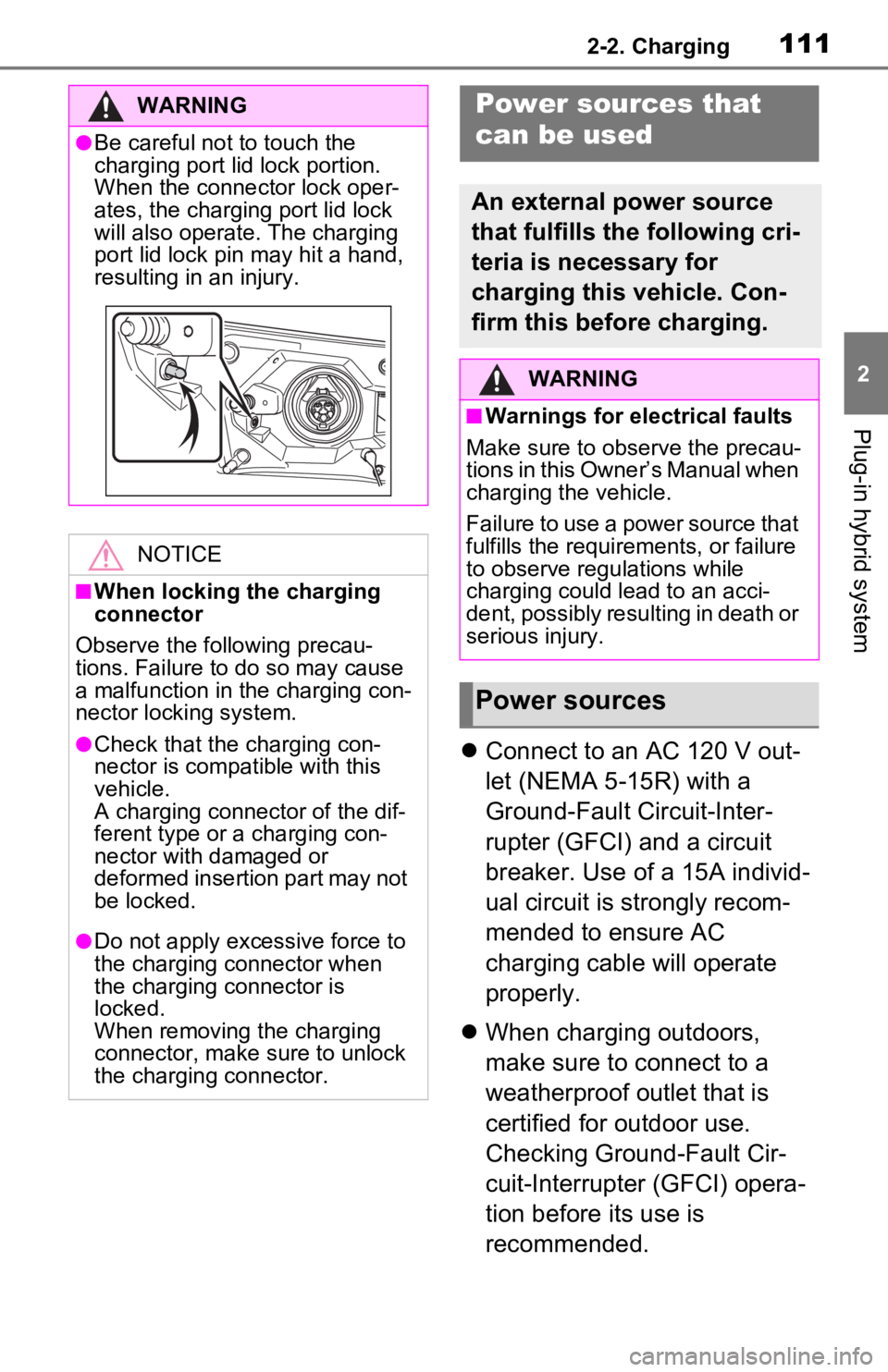
WARNING
●Be careful not to touch the
charging port lid lock portion.
When the connector lock oper-
ates, the charging port lid lock
will also operate. The charging
port lid lock pin may hit a hand,
resulting in an injury.
NOTICE
■When locking the charging
connector
Observe the following precau-
tions. Failure to do so may cause
a malfunction in the charging con-
nector locking system.
●Check that the charging con-
nector is compatible with this
vehicle.
A charging connector of the dif-
ferent type or a charging con-
nector with damaged or
deformed insertion part may not
be locked.
●Do not apply excessive force to
the charging connector when
the charging connector is
locked.
When removing the charging
connector, make sure to unlock
the charging connector.
Power sources that
can be used
An external power source
that fulfills the following cri-
teria is necessary for
charging this vehicle. Con-
firm this before charging.
WARNING
■Warnings for electrical faults
Make sure to observe the precau-
tions in this Owner’s Manual when
charging the vehicle.
Failure to use a power source that
fulfills the requirements, or failure
to observe regulations while
charging could lead to an acci-
dent, possibly resulting in death or
serious injury.
Power sources
Page 124 of 616
1242-2. Charging
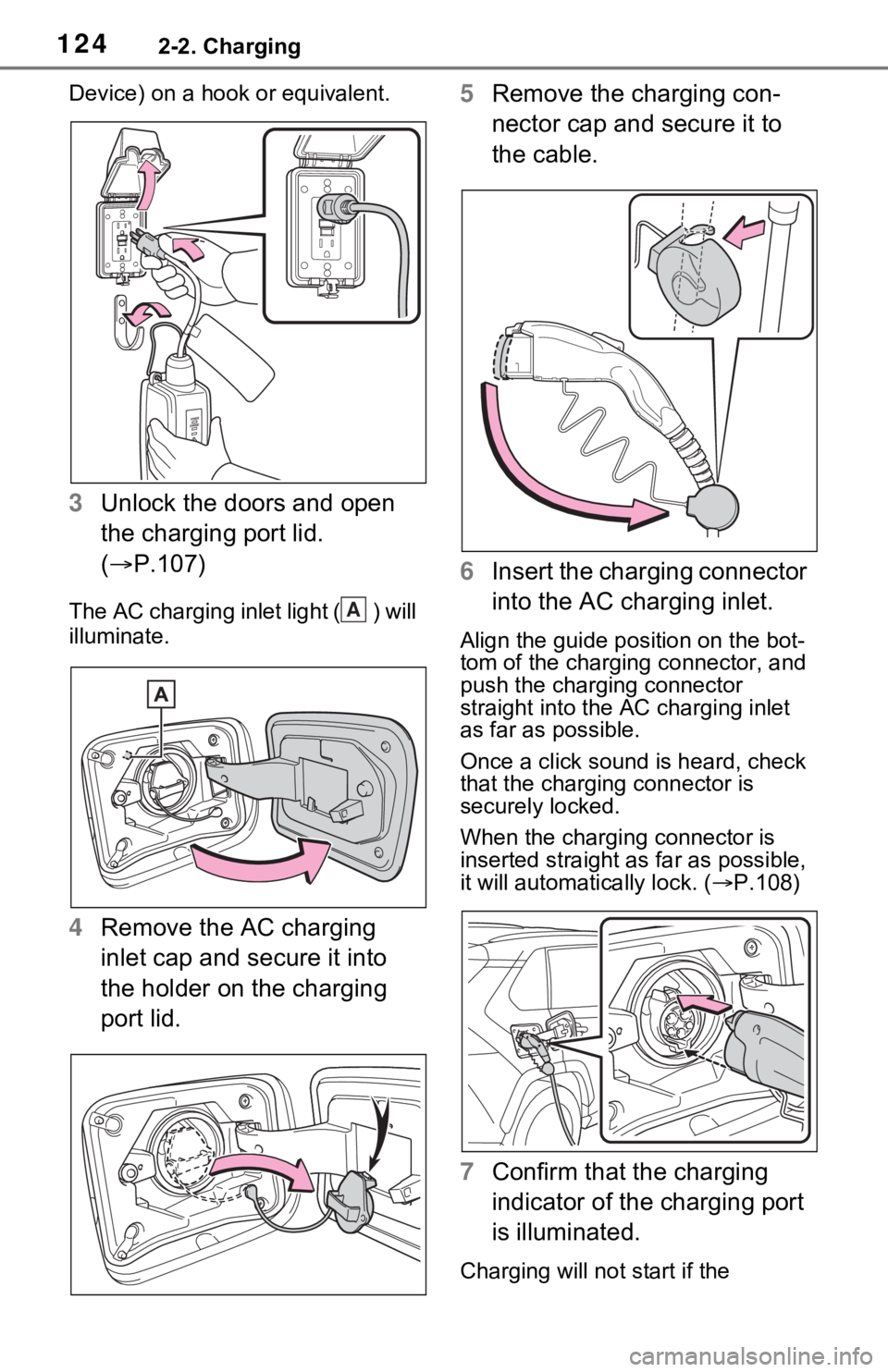
Device) on a hook or equivalent.
3Unlock the doors and open
the charging port lid.
( P.107)
The AC charging inlet light ( ) will
illuminate.
4Remove the AC charging
inlet cap and secure it into
the holder on the charging
port lid. 5
Remove the charging con-
nector cap and secure it to
the cable.
6 Insert the charging connector
into the AC charging inlet.
Align the guide position on the bot-
tom of the charging connector, and
push the charging connector
straight into the AC charging inlet
as far as possible.
Once a click sound is heard, check
that the charging connector is
securely locked.
When the charging connector is
inserted straight as far as possible,
it will automatically lock. ( P.108)
7 Confirm that the charging
indicator of the charging port
is illuminated.
Charging will not start if the
A
Page 128 of 616
1282-2. Charging
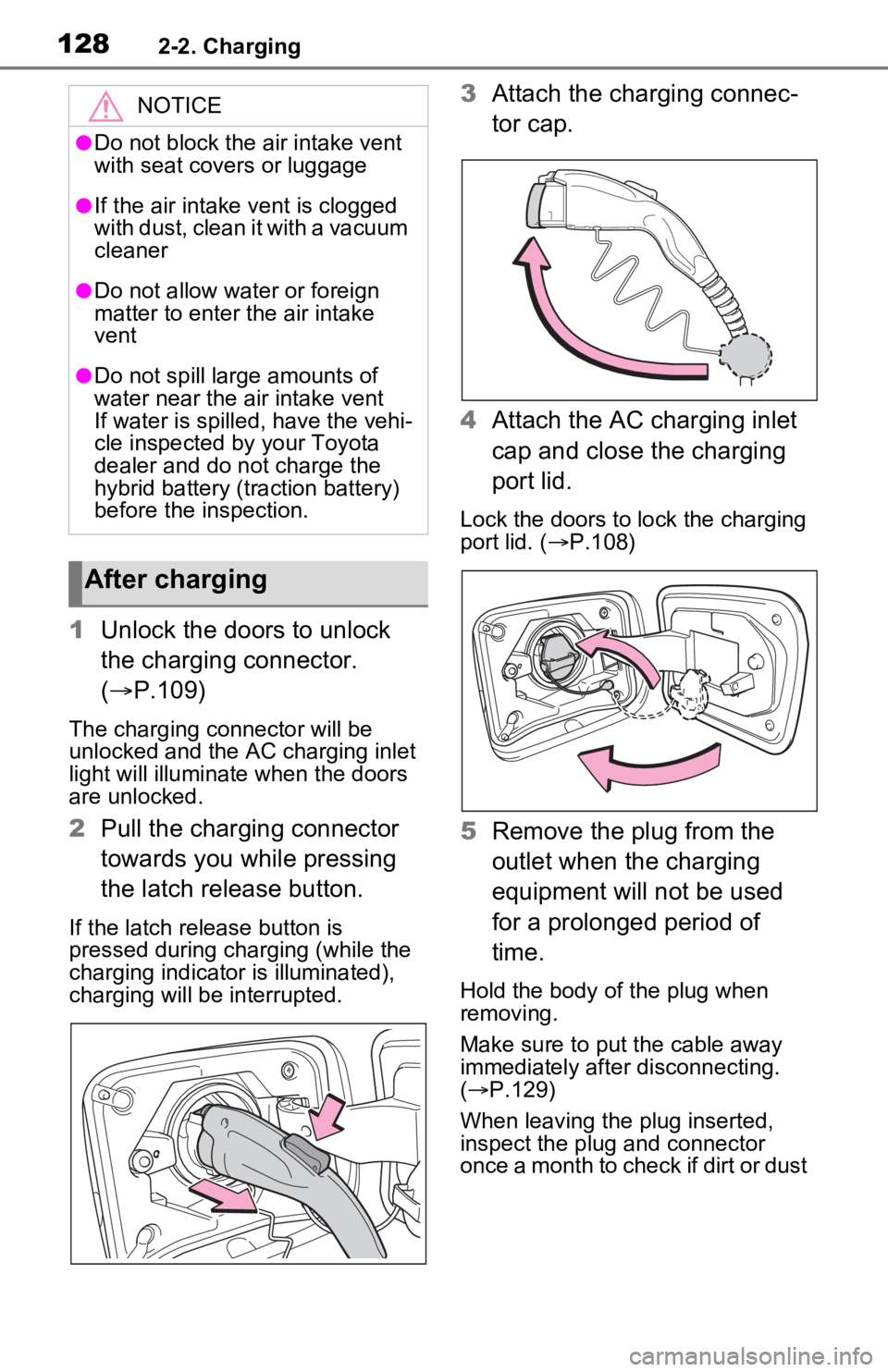
1Unlock the doors to unlock
the charging connector.
( P.109)
The charging co nnector will be
unlocked and the AC charging inlet
light will illuminate when the doors
are unlocked.
2 Pull the charging connector
towards you while pressing
the latch release button.
If the latch release button is
pressed during charging (while the
charging indicator is illuminated),
charging will be interrupted.
3Attach the charging connec-
tor cap.
4 Attach the AC charging inlet
cap and close the charging
port lid.
Lock the doors to lock the charging
port lid. ( P.108)
5 Remove the plug from the
outlet when the charging
equipment will not be used
for a prolonged period of
time.
Hold the body of the plug when
removing.
Make sure to put the cable away
immediately after disconnecting.
( P.129)
When leaving the plug inserted,
inspect the plug and connector
once a month to check if dirt or dust
NOTICE
●Do not block the air intake vent
with seat covers or luggage
●If the air intake vent is clogged
with dust, clean it with a vacuum
cleaner
●Do not allow water or foreign
matter to enter t he air intake
vent
●Do not spill large amounts of
water near the air intake vent
If water is spilled, have the vehi-
cle inspected by your Toyota
dealer and do not charge the
hybrid battery (traction battery)
before the inspection.
After charging
Page 129 of 616
1292-2. Charging
2
Plug-in hybrid system
has accumulated.
■When the outside temperature
is low or high
The level shown on the SOC (State
of Charge) gauge ( P.165) may
drop slightly when the power switch
is turned to ON, e ven if charging
has been completed and the hybrid
battery (traction battery) is fully
charged. However, this does not
indicate a malfunction.
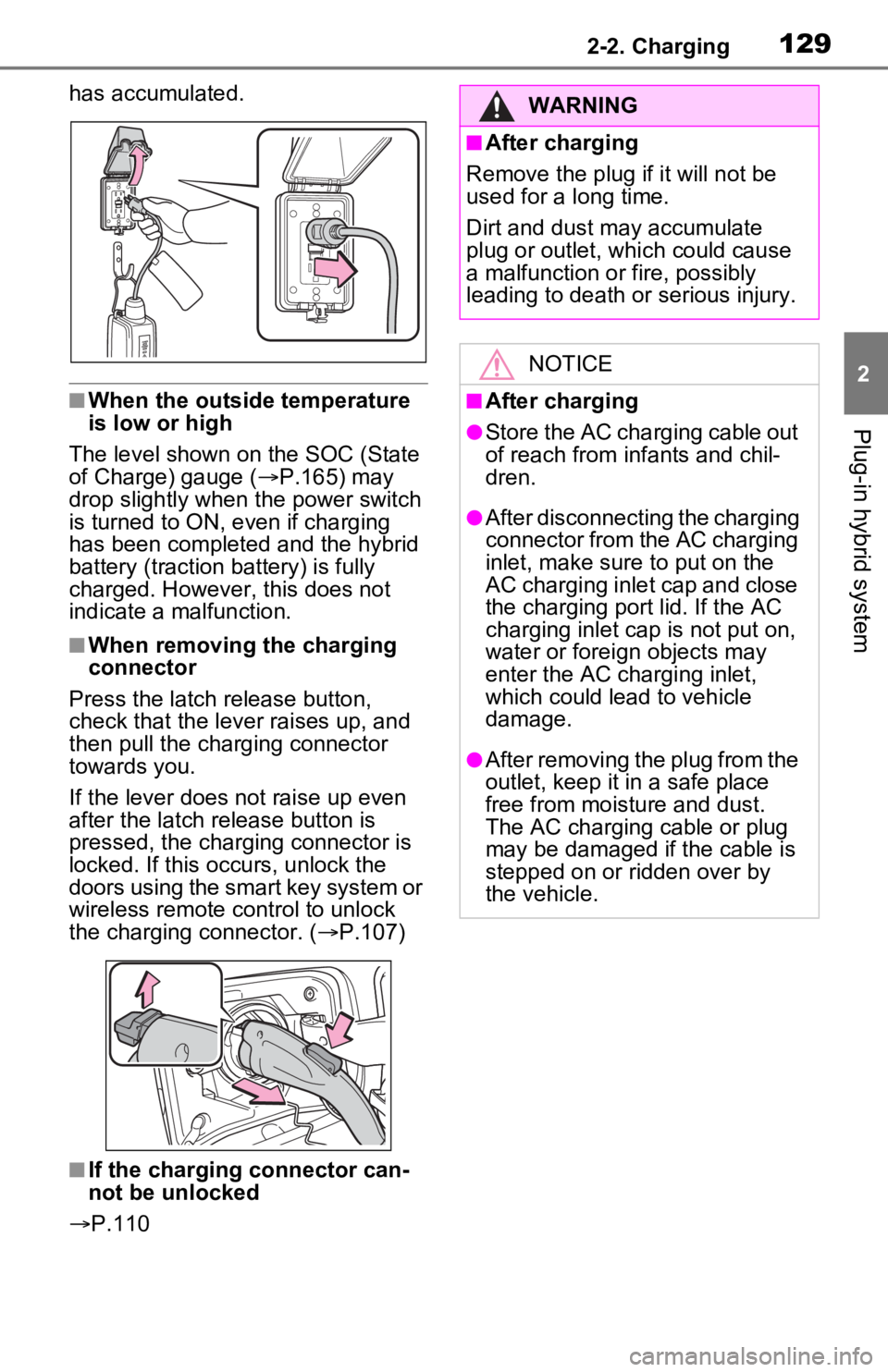
■When removing the charging
connector
Press the latch release button,
check that the lever raises up, and
then pull the charging connector
towards you.
If the lever does not raise up even
after the latch release button is
pressed, the charging connector is
locked. If this occurs, unlock the
doors using the smart key system or
wireless remote control to unlock
the charging connector. ( P.107)
■If the charging connector can-
not be unlocked
P.110
WARNING
■After charging
Remove the plug if it will not be
used for a long time.
Dirt and dust may accumulate
plug or outlet, which could cause
a malfunction or fire, possibly
leading to death or serious injury.
NOTICE
■After charging
●Store the AC charging cable out
of reach from infants and chil-
dren.
●After disconnecting the charging
connector from the AC charging
inlet, make sure to put on the
AC charging inlet cap and close
the charging port lid. If the AC
charging inlet cap is not put on,
water or foreign objects may
enter the AC cha rging inlet,
which could lead to vehicle
damage.
●After removing the plug from the
outlet, keep it in a safe place
free from moisture and dust.
The AC charging cable or plug
may be damaged if the cable is
stepped on or ridden over by
the vehicle.
Page 132 of 616

1322-2. Charging
■To make sure that the charging
schedule function operates cor-
rectly
Check the following items.
●A d j u s t t h e c l o c k t o t h e c o r r e c t t i m e
( P.169)
●The calendar is set to the correct
date ( P.177)
●Check that the power switch is
turned off
●After registering the charging
schedule, connect the AC
charging cable
The charging sta rt time is deter-
mined based on the charging
schedule at the time that the AC
charging cable was connected.
●After connecting the AC charging
cable, check that the charging
indicator of the charging port
flashes ( P.100)
●Do not use an ou tlet that has a
power cut off function (including a
timer function)
Use an outlet that constantly sup-
plies electricity. For outlets where
the power is cut off due to a timer
function, etc., charging may not be
carried out according to plan if the
power is cut off during the set
time.
■When the AC charging cable
remains connected to the vehi-
cle
Even if multiple consecutive
charging schedules are registered,
the next charge will not be carried
out according to the charging
schedule until the AC charging
cable is removed and reconnected
after charging completes. Also,
when the hybrid battery (traction
battery) is fully charged, charging
according to the charging schedule
will not be carried out.
■“Climate Prep”
●When the air conditioning-linked
setting is turned on, the air condi-
tioning operates until the set departure time. Therefore, the air
conditioning will co
nsume electric-
ity and charging may not complete
by the set departure time.
●If the hybrid batte ry (traction bat-
tery) is fully charged, charging will
not be carried o ut, even if the
charging schedule is set. How-
ever, if “Climate Prep” is turned
on, the air conditioning will oper-
ate only once when it nears the
time set in “Departure”. If this
occurs, the air conditioning will
consume electricity and the
remaining charge of the hybrid
battery (traction battery) when
departing may be decreased.
●When the doors are unlocked, the
air conditioning system does not
operate.
■Smartphone-linked operation
(vehicles with Premium Audio)
After applying to Toyota Apps, it is
possible to use the smartphone
application to change charging
schedule settings.
For details about Toyota Apps, refer
to
http://www.toyota.com/connectedse
rvices in the United States and
http://www.toyota.ca/connected
in
Canada.
■When charging schedules are
ignored
When the following operations are
performed while the charging
schedule is on standby, charging
schedule is temporarily canceled
and charging is started.
●When the Remote Air Condition-
ing System ( P.405) is operated
●When turning “My Room Mode”
on ( P.144)
●When turning “Charge Now” on
( P.137, 142)
●When an operation that temporar-
ily cancel charging using the
charging schedule ( P.125)
Page 179 of 616
1793-1. Instrument cluster
3
Vehicle status information and indicators
Select to set up the following items.
• “Charging Schedule”
Select to register or change the
charging schedule. ( P.130)
• “Charging Current”
Select to change the charging cur-
rent. ( P.112)
• “Connector Lock”
Select to change the charging con-
nector lock settings. ( P.109)
• “Battery Heater”
Select to enable/disable the bat-
tery heater. ( P.115)
• “Battery Cooler”
Select to enable/disable the bat-
tery cooler. ( P.116)
PBD (Power Back Door)
(if equipped) ( P.207)
Select to set up the following items.
• System settings
Select to enable/disable the power
back door system.
• “Hands Free”
*
Select to enable/disable the Hands
Free Power Back Door.
• “Opening Adjustment”
Select the open position when
power back door is fully open.
•“Volume”
Select to set the volume of the
buzzer which sounds when the
power back door system operates.
*: Vehicles with Hands Free Power
Back Door
“TPWS” (Tire Pressure Warn-
ing System) ( P.471)
• “Setting Pressure”
Select to initialize the tire pressure
warning system.
• “Identify Wheel”
Select to register the ID codes of
the tire pressure se nsors to the tire
pressure warning system.
• “Setting Unit”
Select to change the units of mea-
sure displayed.
“Scheduled Maintenance”
( P.451)
Select to reset the scheduled main-
tenance information (message indi-
cating maintenance is required and
distance until the next mainte-
nance) after all ma intenance is per-
formed.
“Rear Seat Reminder”
( P.200)
Select to enable/disable the rear
seat reminder.
■ Settings
“Language”
Select to change the language on
the multi-information display.
“Units”
Select to change the units of mea-
sure displayed.
“Meter Type”
Select to change the speedometer
display.
(EV indicator) ( P.82)
Select to enable/disable the EV
indicator.
(Driving information dis-
play settings)
Page 193 of 616
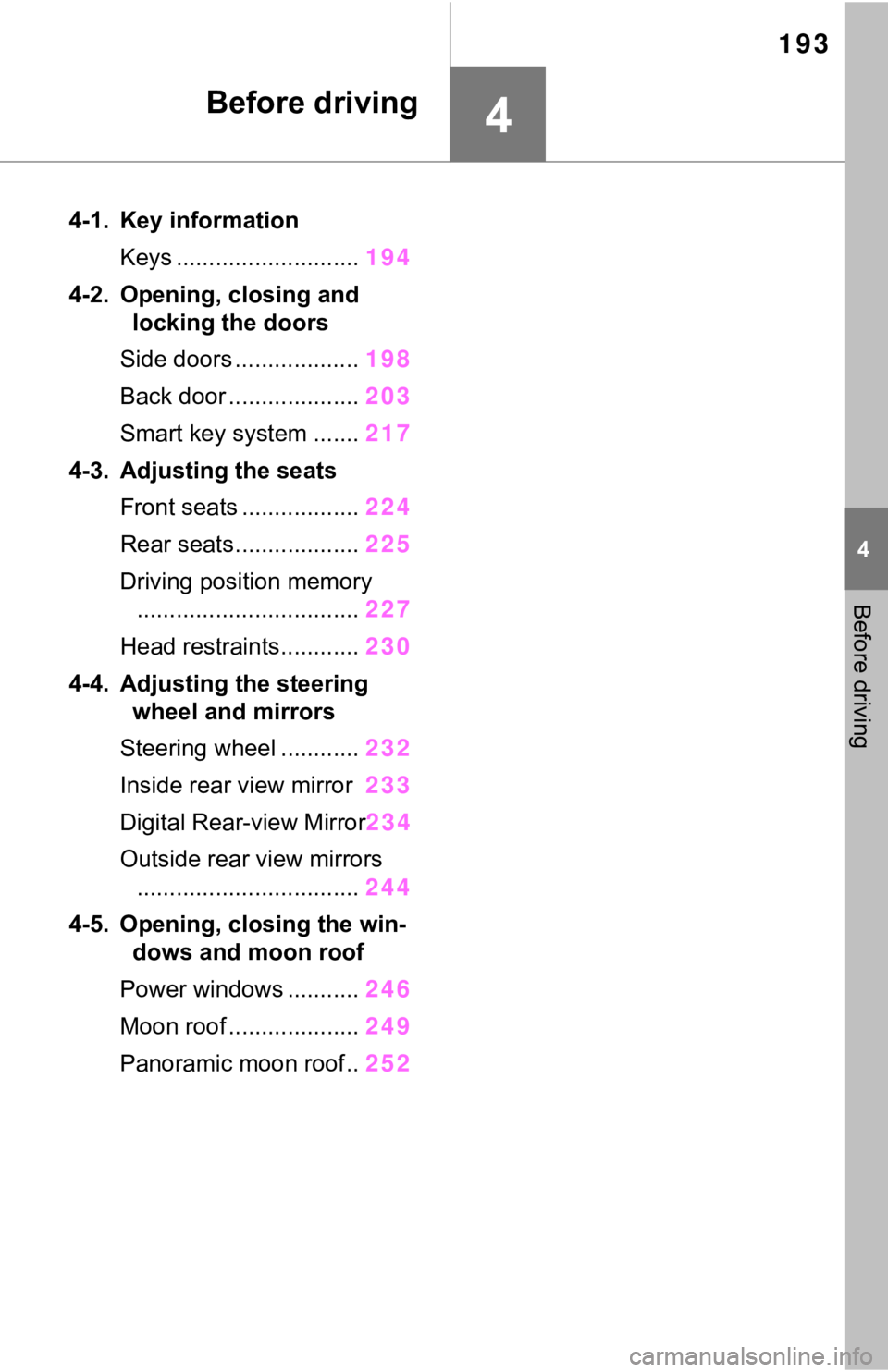
193
4
4
Before driving
Before driving
4-1. Key informationKeys ............................ 194
4-2. Opening, closing and locking the doors
Side doors ................... 198
Back door .................... 203
Smart key system ....... 217
4-3. Adjusting the seats Front seats .................. 224
Rear seats................... 225
Driving position memory .................................. 227
Head restraints............ 230
4-4. Adjusting the steering wheel and mirrors
Steering wheel ............ 232
Inside rear view mirror 233
Digital Rear-view Mirror 234
Outside rear view mirrors .................................. 244
4-5. Opening, closing the win- dows and moon roof
Power windows ........... 246
Moon roof .................... 249
Panoramic moon roof.. 252