turn signal TOYOTA RAV4 PRIME 2021 (in English) User Guide
[x] Cancel search | Manufacturer: TOYOTA, Model Year: 2021, Model line: RAV4 PRIME, Model: TOYOTA RAV4 PRIME 2021Pages: 616, PDF Size: 34.66 MB
Page 299 of 616
2995-3. Operating the lights and wipers
5
Driving
by another vehicle
• When vehicles ahead are hidden from sight due to repeated curves,
road dividers or roadside trees
• When vehicles ahead appear from the faraway lane on a wide road
• When vehicles ahead have no
lights
●The high beams may be turned off
if a vehicle ahead that is using fog
lights without using the headlights
is detected.
●House lights, street lights, traffic
signals, and illumi nated billboards
or signs may cause the high
beams to switch to the low beams,
or the low beams to remain on.
●The following factors may affect
the amount of time taken to turn
the high beams on or off:
• The brightness of headlights, fog lights, and tail lig hts of vehicles
ahead
• The movement and direction of vehicles ahead
• When a vehicle ahead only has
operational lights on one side
• When a vehicle ahead is a two- wheeled vehicle
• The condition of the road (gradi-
ent, curve, condi tion of the road
surface etc.)
• The number of passengers and amount of luggage
●The high beams may be turned on
or off when the driver does not
expect it.
●Bicycles or similar objects may not
be detected.
●In the situations shown below, the
system may not be able to accu-
rately detect surrounding bright-
ness levels. This may cause the
low beams to remain on or the
high beams to cause problems for
pedestrians, vehicles ahead or
other parties. In these cases,
manually switch between the high
and low beams.
• In bad weather (rain, snow, fog,
sandstorms, etc.)
• The windshield is obscured by fog, mist, i
ce, dirt, etc.
• The windshield is cracked or dam- aged
• The front camera is deformed or
dirty
• When the temperature of the front camera is extremely high
• Surrounding brightness levels are equal to those of headlights, tail
lights or fog lights
• When headlights or tail lights of vehicles ahead are turned off,
dirty, changing color, or not aimed
properly
• When the vehicle is hit by water,
snow, dust, etc. from a preceding
vehicle
• When driving through an area of intermittently changing brightness
and darkness
• When frequently and repeatedly driving ascending/descending
roads, or roads with rough, bumpy
or uneven surfaces (such as
stone-paved roads, gravel roads,
etc.)
• When frequently and repeatedly taking curves or driving on a wind-
ing road
• There is a highly reflective object ahead of the vehicle, such as a
sign or mirror
• The back of a vehicle ahead is highly reflective, such as a con-
tainer on a truck
• The vehicle’s headlights are dam- aged or dirty, or are not aimed
properly
• The vehicle is listing or titling due to a flat tire, a trailer being towed,
etc.
• The high beams and low beams are repeatedly being switched
between in an abnormal manner
• The driver believes that the high beams may be causing problems
or distress to other drivers or
pedestrians nearby
■If “Headlight System Malfunc-
tion Visit Your Dealer” is dis-
played on the multi-information
display
The system may be malfunctioning.
Page 326 of 616
3265-5. Using the driving support systems
■Lane departure alert func-
tion
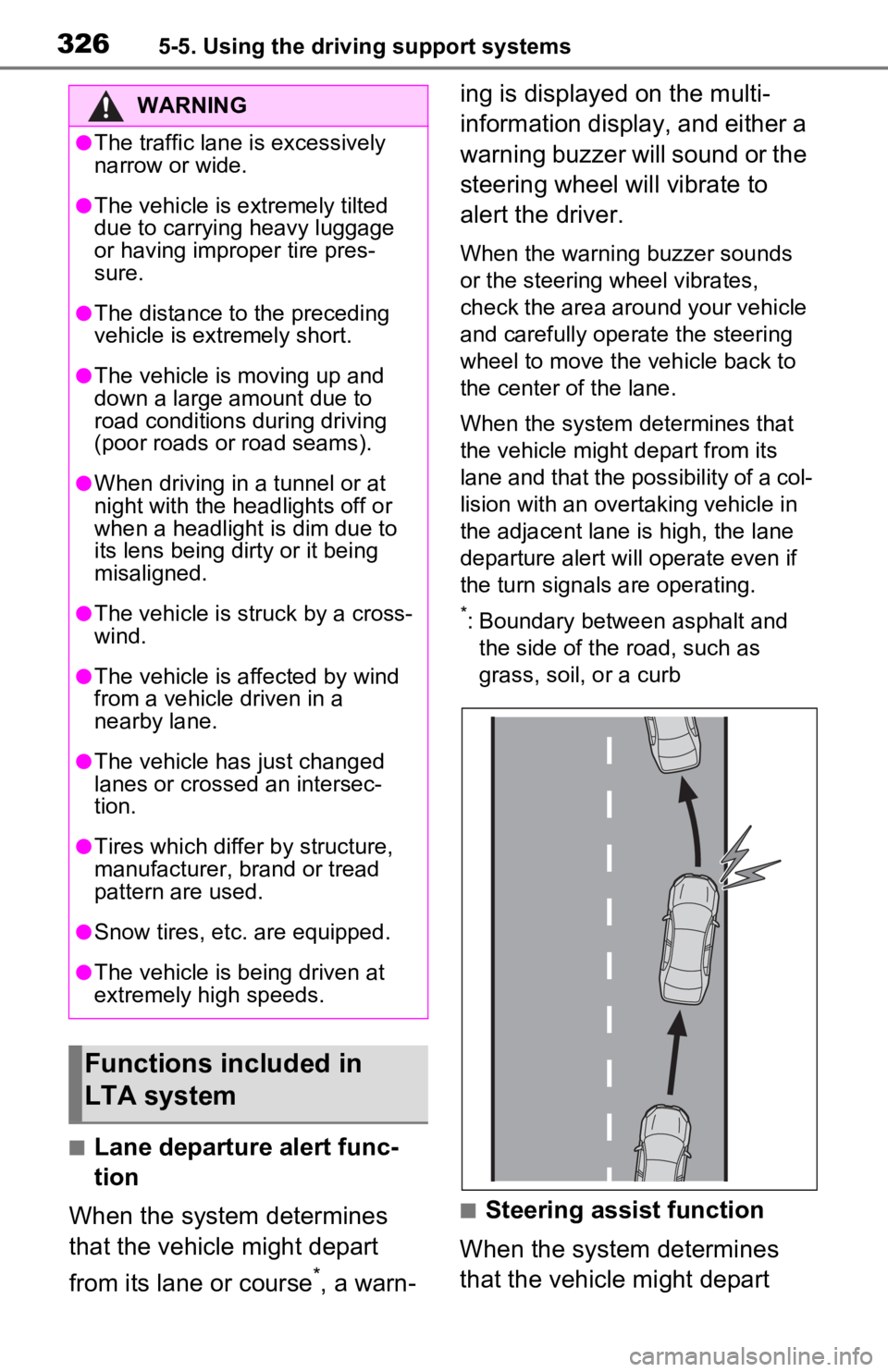
When the system determines
that the vehicle might depart
from its lane or course
*, a warn- ing is displayed on the multi-
information display, and either a
warning buzzer will sound or the
steering wheel will vibrate to
alert the driver.
When the warning buzzer sounds
or the steering wheel vibrates,
check the area around your vehicle
and carefully operate the steering
wheel to move the vehicle back to
the center of the lane.
When the system determines that
the vehicle might depart from its
lane and that the possibility of a col-
lision with an overta
king vehicle in
the adjacent lane is high, the lane
departure alert will operate even if
the turn signals are operating.
*: Boundary between asphalt and the side of the road, such as
grass, soil, or a curb
■Steering assist function
When the system determines
that the vehicle might depart
WARNING
●The traffic lane is excessively
narrow or wide.
●The vehicle is extremely tilted
due to carrying heavy luggage
or having improper tire pres-
sure.
●The distance to the preceding
vehicle is extremely short.
●The vehicle is moving up and
down a large amount due to
road conditions during driving
(poor roads or road seams).
●When driving in a tunnel or at
night with the headlights off or
when a headlight is dim due to
its lens being dirty or it being
misaligned.
●The vehicle is struck by a cross-
wind.
●The vehicle is affected by wind
from a vehicle driven in a
nearby lane.
●The vehicle has just changed
lanes or crossed an intersec-
tion.
●Tires which differ by structure,
manufacturer, b rand or tread
pattern are used.
●Snow tires, etc. are equipped.
●The vehicle is being driven at
extremely high speeds.
Functions included in
LTA system
Page 327 of 616
3275-5. Using the driving support systems
5
Driving
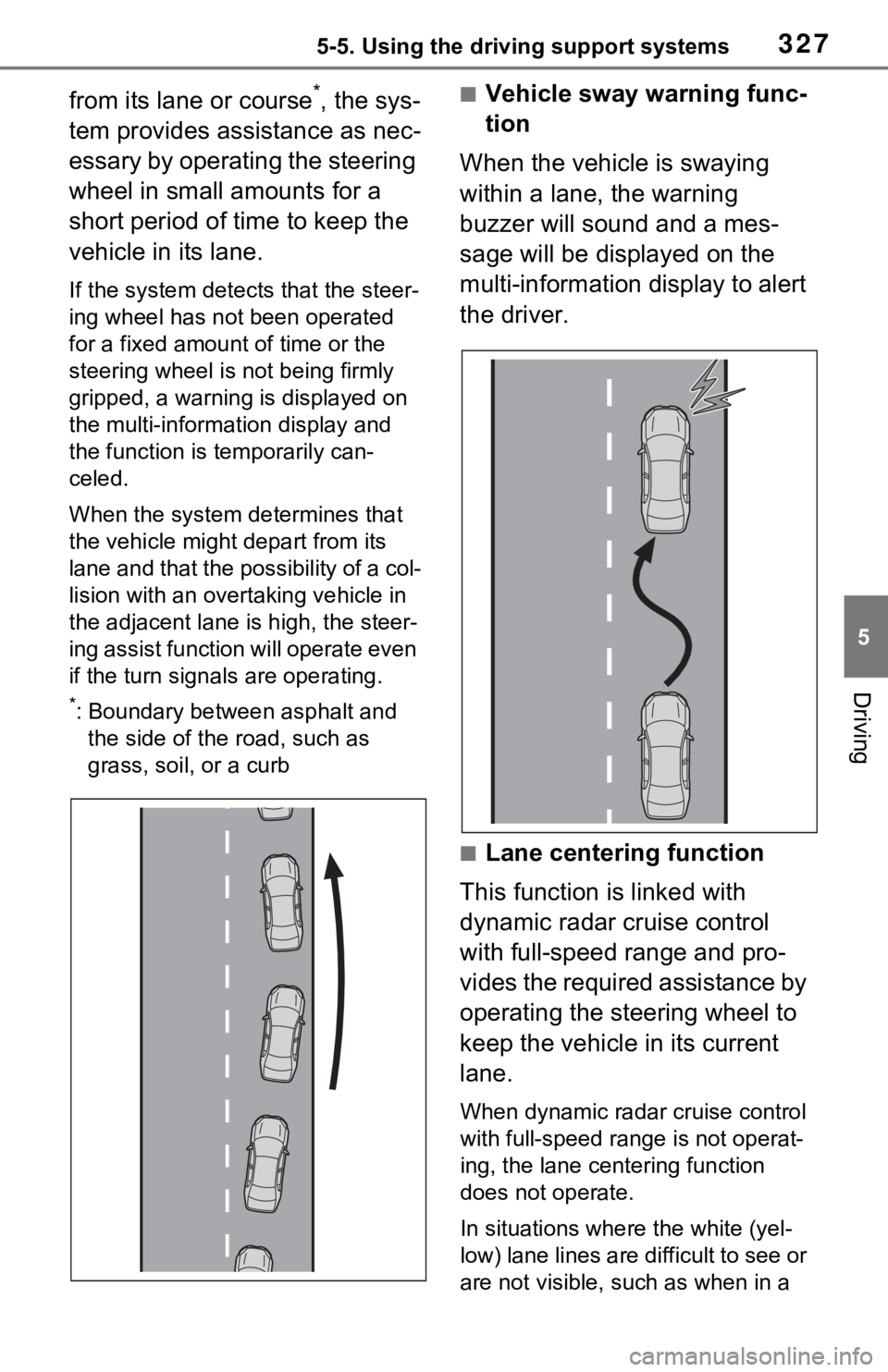
from its lane or course*, the sys-
tem provides assistance as nec-
essary by operating the steering
wheel in small amounts for a
short period of time to keep the
vehicle in its lane.
If the system detects that the steer-
ing wheel has not been operated
for a fixed amount of time or the
steering wheel is not being firmly
gripped, a warning is displayed on
the multi-information display and
the function is t emporarily can-
celed.
When the system de termines that
the vehicle might depart from its
lane and that the possibility of a col-
lision with an over taking vehicle in
the adjacent lane is high, the steer-
ing assist function will operate even
if the turn signals are operating.
*: Boundary between asphalt and
the side of the road, such as
grass, soil, or a curb
■Vehicle sway warning func-
tion
When the vehicle is swaying
within a lane, the warning
buzzer will sound and a mes-
sage will be displayed on the
multi-information display to alert
the driver.
■Lane centering function
This function is linked with
dynamic radar cruise control
with full-speed range and pro-
vides the required assistance by
operating the steering wheel to
keep the vehicle in its current
lane.
When dynamic radar cruise control
with full-speed range is not operat-
ing, the lane centering function
does not operate.
In situations where the white (yel-
low) lane lines are difficult to see or
are not visible, such as when in a
Page 330 of 616
3305-5. Using the driving support systems
• LTA is turned on.
• Vehicle speed is approximately 32 mph (50 km/h) or more.
*1
• System recognizes white (yellow) lane lines or a course*2. (When a
white [yellow] line or course*2 is
recognized on only one side, the
system will operat e only for the
recognized side.)
• Width of traffic lane is approxi- mately 9.8 ft. ( 3 m) or more.
• Turn signal lever is not operated. (Except when another vehicle is in
the lane on the side where the
turn signal was operated)
• Vehicle is not being driven around a sharp curve.
• No system malfunctions are detected. ( P.332)
*1: The function opera tes even if the
vehicle speed is less than
approximately 32 mph (50 km/h)
when the lane centering function
is operating.
*2: Boundary between asphalt and the side of the road, such as
grass, soil, or a curb
●Steering assist function
This function oper ates when all of
the following conditions are met in
addition to the operation conditions
for the lane departure alert function.
• Setting for “Steering Assist” in the
screen of the mu lti-information
display is set to “ON”. ( P.170)
• Vehicle is not a ccelerated or
decelerated by a fixed amount or
more.
• Steering wheel is not operated with a steering force level suitable
for changing lanes.
• ABS, VSC, TRAC and PCS are not operating.
• TRAC or VSC is not turned off.
• Hands off steering wheel warning is not displayed. ( P.331)
●Vehicle sway warning function
This function oper ates when all of the following conditions are met.
• Setting for “Sway Warning” in the
screen of the multi-information
display is set to “ON”. ( P.170)
• Vehicle speed is approximately 32 mph (50 km/h) or more.
• Width of traffic lane is approxi-
mately 9.8 ft. (3 m) or more.
• No system malfunctions are detected. ( P.332)
●Lane centering function
This function operates when all of
the following conditions are met.
• LTA is turned on.
• Setting for “Steering Assist” and
“Lane Center” in the screen of
the multi-information display are
set to “ON”. ( P.170)
• This function recognizes white (yellow) lane lines or the position
of a preceding v ehicle (except
when the preceding vehicle is
small, such as a motorcycle).
• The dynamic radar cruise control with full-speed ran ge is operating
in vehicle-to-vehicle distance con-
trol mode.
• Width of traffic lane is approxi- mately 10 to 13 ft. (3 to 4 m).
• Turn signal lever is not operated.
• Vehicle is not being driven around a sharp curve.
• No system malfunctions are detected. ( P.332)
• Vehicle does not accelerate or
decelerate by a fixed amount or
more.
• Steering wheel is not operated
with a steering force level suitable
for changing lanes.
• ABS, VSC, TRAC and PCS are
not operating.
• TRAC or VSC is not turned off.
• Hands off steering wheel warning is not displayed. ( P.331)
• The vehicle is being driven in the center of a lane.
• Steering assist function is not operating.
Page 340 of 616
3405-5. Using the driving support systems
control continues to keep your vehicle stopped.
When the turn signal lever is operated and your vehicle moves to an over-
taking lane while driving at 50 mph (80 km/h) or more, the vehi cle will accel-
erate to help to overt ake a passing vehicle.
The system’s identifi cation of what is an overtaking lane may be deter-
mined solely based on the location of the steering wheel in the vehicle (left
side driver position versus righ t side driver position.) If the vehicle is driven
to a region where the overtaking lane is on a different side fr om where the
vehicle is normally driven, the v ehicle may accelerate when the turn signal
lever is operated in the opposite direction to the overtaking l ane (e.g., if the
driver normally operates the vehicle in a region where the over taking lane is
to the right but then drives to a region where the overtaking l ane is to the
left, the vehicle may accelerate when the right turn signal is activated).
Example of acceleration
When there are no longer any preceding vehicles driving slower
than the set speed
The system accelerates until the set speed is reached. The system then
returns to constan t speed cruising.
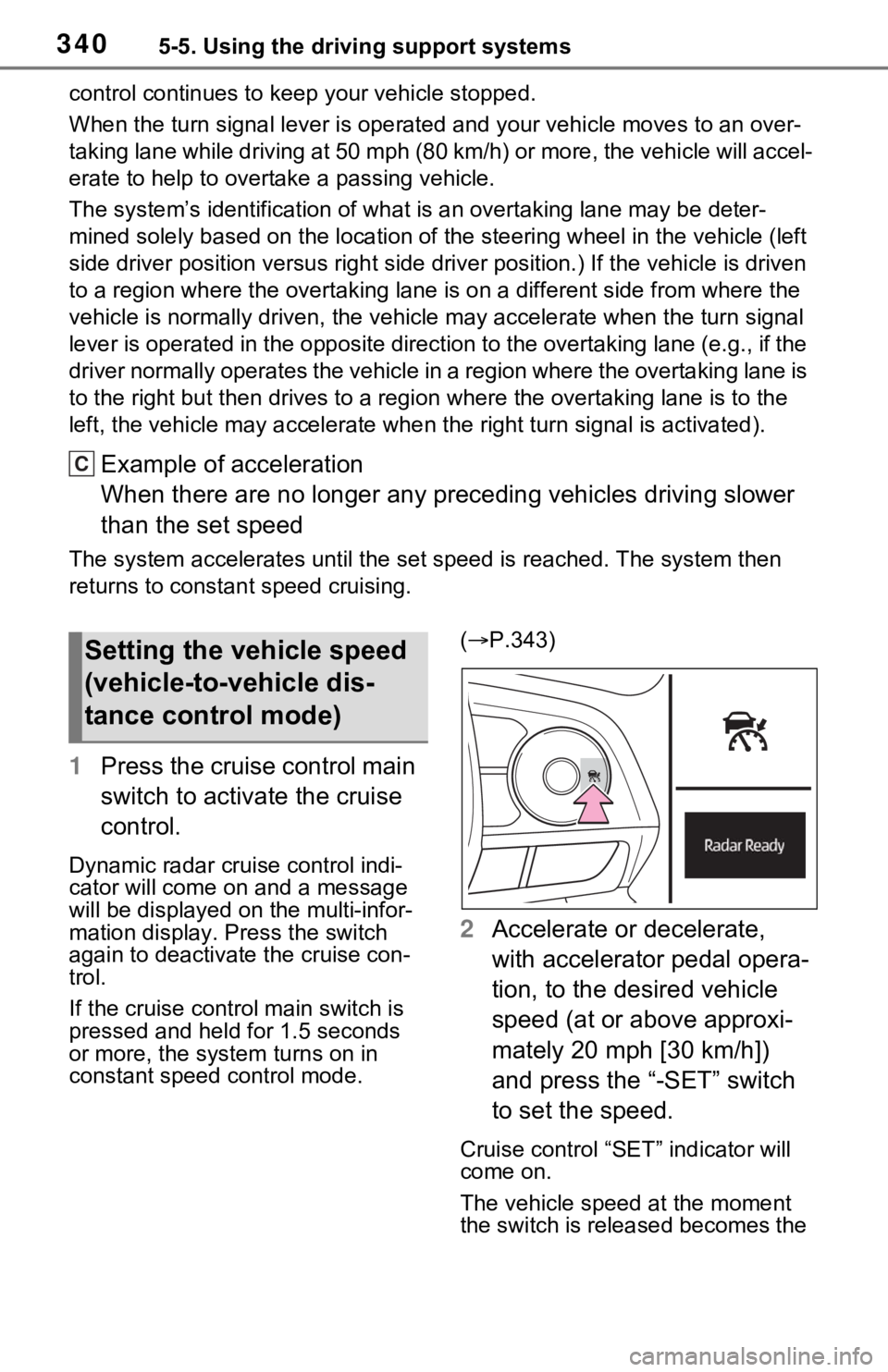
1Press the cruise control main
switch to activate the cruise
control.
Dynamic radar cruise control indi-
cator will come on and a message
will be displayed on the multi-infor-
mation display. Press the switch
again to deactivate the cruise con-
trol.
If the cruise cont rol main switch is
pressed and held for 1.5 seconds
or more, the syste m turns on in
constant speed control mode. (
P.343)
2 Accelerate or decelerate,
with accelerator pedal opera-
tion, to the desired vehicle
speed (at or above approxi-
mately 20 mph [30 km/h])
and press the “-SET” switch
to set the speed.
Cruise control “SET” indicator will
come on.
The vehicle speed at the moment
the switch is released becomes the
C
Setting the vehicle speed
(vehicle-to-vehicle dis-
tance control mode)
Page 348 of 616
3485-5. Using the driving support systems
BSM function:
When a vehicle is detected in a
blind spot of the outside rear view
mirrors or approaching rapidly from
behind into a blind spot, the outside
rear view mirror indicator on the
detected side will illuminate. If the
turn signal lever is operated toward
the detected side, the outside rear
view mirror indicator will flash.
RCTA function:
When a vehicle approaching from
the right or left at the rear of the
vehicle is detected, both outside
rear view mirror i ndicators will flash.
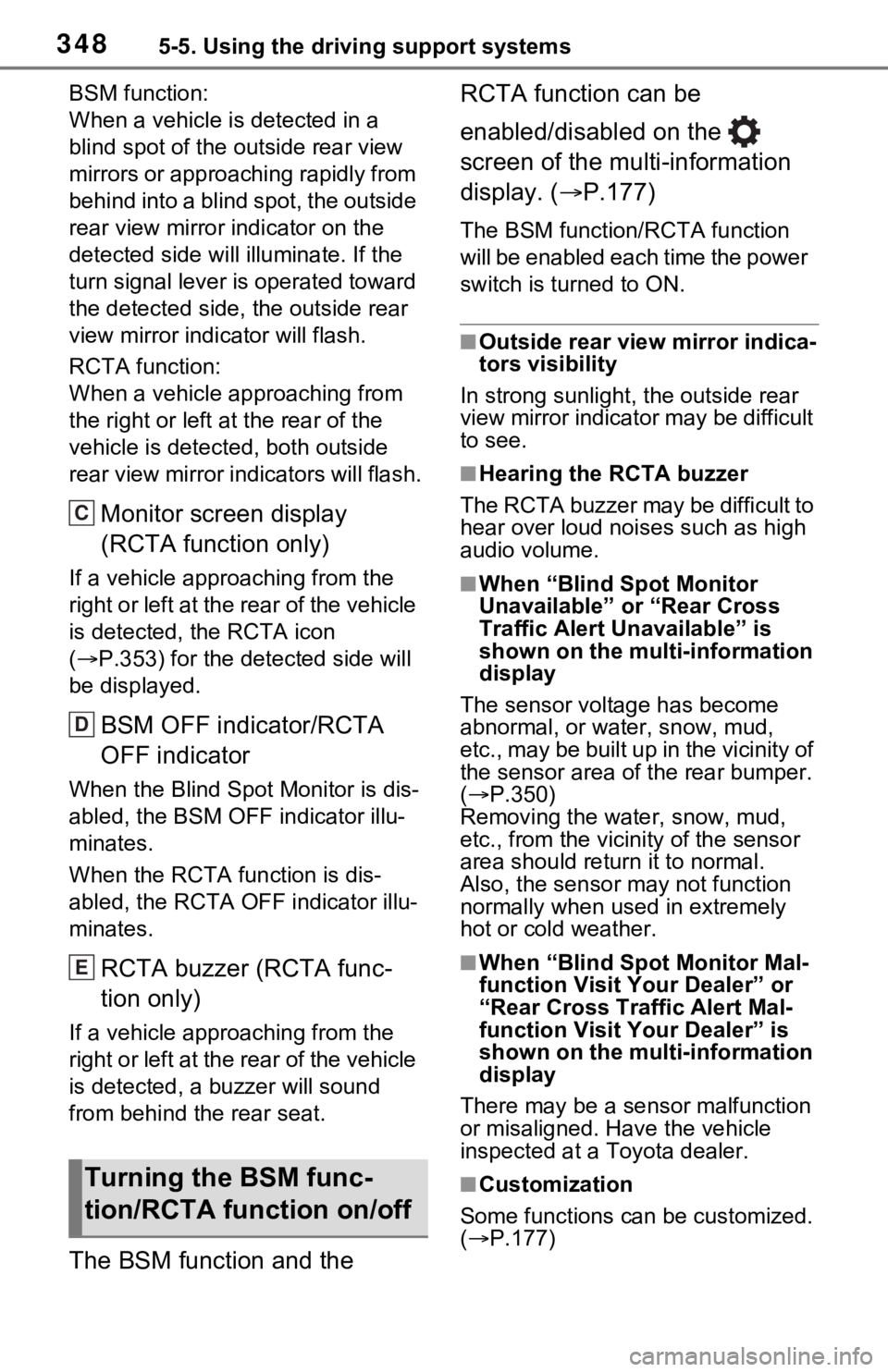
Monitor screen display
(RCTA function only)
If a vehicle approaching from the
right or left at the rear of the vehicle
is detected, the RCTA icon
( P.353) for the de tected side will
be displayed.
BSM OFF indicator/RCTA
OFF indicator
When the Blind Spot Monitor is dis-
abled, the BSM OFF indicator illu-
minates.
When the RCTA function is dis-
abled, the RCTA OFF indicator illu-
minates.
RCTA buzzer (RCTA func-
tion only)
If a vehicle appr oaching from the
right or left at the rear of the vehicle
is detected, a b uzzer will sound
from behind the rear seat.
The BSM function and the RCTA function can be
enabled/disabled on the
screen of the multi-information
display. (
P.177)
The BSM function/RCTA function
will be enabled each time the power
switch is turned to ON.
■Outside rear vie w mirror indica-
tors visibility
In strong sunlight, the outside rear
view mirror indicator may be difficult
to see.
■Hearing the RCTA buzzer
The RCTA buzzer may be difficult to
hear over loud noises such as high
audio volume.
■When “Blind Spot Monitor
Unavailable” or “Rear Cross
Traffic Alert Unavailable” is
shown on the multi-information
display
The sensor voltage has become
abnormal, or water, snow, mud,
etc., may be built up in the vicinity of
the sensor area of the rear bumper.
( P.350)
Removing the water, snow, mud,
etc., from the vicini ty of the sensor
area should return it to normal.
Also, the sensor may not function
normally when used in extremely
hot or cold weather.
■When “Blind Spot Monitor Mal-
function Visit Your Dealer” or
“Rear Cross Traffic Alert Mal-
function Visit Your Dealer” is
shown on the multi-information
display
There may be a sensor malfunction
or misaligned. Have the vehicle
inspected at a Toyota dealer.
■Customization
Some functions can be customized.
( P.177)Turning the BSM func-
tion/RCTA function on/off
C
D
E
Page 406 of 616
4066-1. Using the air conditioning system and defogger
cient due to the power being
restricted more than during normal
air conditioning operation. Also, the
outside of the windshield may fog up
due to the outside temperature,
humidity or air conditioning set tem-
perature.
■Using the heater via the Remote
Air Conditioning System
●When the outside temperature is
low, heating may feel insufficient
due to restricted operation of the
air conditioning.
●When the outside heat exchanger
becomes frosted over, heating
performance may decline due to
automatically switching to the frost
removal operation. ( P.396)
■Security feature
Any unlocked doors will be automat-
ically locked when the system is
operating. The buzzer sounds and
the emergency flashers flash to indi-
cate that the doors have been
locked or the system has been
turned off.
■Conditions affecting operation
P.218
■While the Remote Air Condi-
tioning System is operating
●Depending on the operating con-
dition of the Remote Air Condition-
ing System, the air conditioning
compressor or cooling fan may
spin and an operating noise may
be heard. However, this does not
indicate a malfunction.
●The air conditioning operation
switches, etc. will not operate
while the Remote Air Condition-
ing System is operating.
■Electronic key battery depletion
P.194
■When the electronic key bat-
tery is fully depleted
P.493
■Customization
Setting (e.g. Operation using “A/C”
on the wireless remote control) can
be changed. (Customizable fea-
tures: P.569)
WARNING
■Precautions for the Remote
Air Conditioning System
●Do not use the system if people
are in the vehicle.
Even when the system is in use,
the internal temperature may
still reach a high or low level
due to features such as the
automatic shut-off. Children and
pets left inside the vehicle may
suffer heatstroke dehydration or
hypothermia or could result in
death or serious injury.
●Depending on the surrounding
environment, signals from the
wireless switch may transmit
further than e xpected. Pay
appropriate attention to the
vehicle’s surroundings and use
the switch only when neces-
sary.
●Do not operate “A/C” on the
wireless remote control if the
hood is open. The Remote Air
Conditioning System may oper-
ate unintentionally and objects
may be drawn into the electrical
cooling fan.
NOTICE
■To prevent the hybrid battery
(traction battery) from being
discharged
Use “A/C” on the wireless remote
control only when necessary.
Page 472 of 616
4727-3. Do-it-yourself maintenance
6Press or to select
“Setting Unit”.
7 Press or to select the
desired unit and then press
.
■Routine tire inflation pressure
checks
The tire pressure warning system
does not replace routine tire inflation
pressure checks. Make sure to
check tire inflation pressure as part
of your routine of daily vehicle
checks.
■Tire inflation pressure
●It may take a few minutes to dis-
play the tire inflation pressure
after the power switch is turned to
ON. It may also take a few min-
utes to display the tire inflation
pressure after inflation pressure
has been adjusted.
●Tire inflation p ressure changes
with temperature.
The displayed values may also be
different from th e values mea-
sured using a tire pressure gauge.
■Situations in which the tire
pressure warning system may
not operate properly
●In the following cases, the tire
pressure warning system may not
operate properly.
• If non-genuine Toyota wheels are used.
• A tire has been replaced with a tire that is not an OE (Original
Equipment) tire.
• A tire has been replaced with a tire that is not of the specified size.
• Tire chains, etc. are equipped.
• An auxiliary-supported run-flat tire
is equipped.
• If a window tint that affects the
radio wave signals is installed.
• If there is a lot of snow or ice on the vehicle, particularly around the
wheels or wheel housings. • If the tire inflation pressure is
extremely higher than the speci-
fied level.
• If wheel withou t tire pressure
warning valves and transmitters
are used.
• If the ID code on the tire pressure
warning valves and transmitters is
not registered in the tire pressure
warning computer.
●Performance may be affected in
the following situations.
• Near a TV tower, electric power plant, gas station, radio station,
large display, airpo rt or other facil-
ity that generates strong radio
waves or electrical noise
• When carrying a portable radio,
cellular phone, cordless phone or
other wireless communication
device
If tire position information is not
correctly displayed due to the
radio wave conditions, the display
may be corrected by driving and
changing the radio wave condi-
tions.
●When the vehicle is parked, the
time taken for the warning to start
or go off could be extended.
●When tire inflation pressure
declines rapidly for example when
a tire has burst, the warning may
not function.
■Warning performance of the tire
pressure warning system
The warning of the tire pressure
warning system w ill change in
accordance with the conditions
under which it was initialized. For
this reason, the system may give a
warning even if th e tire pressure
does not reach a low enough level,
or if the pressure is higher than the
pressure that was adjusted to when
the system was initialized.
Page 497 of 616
4977-3. Do-it-yourself maintenance
7
Maintenance and care
Check the wattage of the light
bulb to be replaced. (P.556)
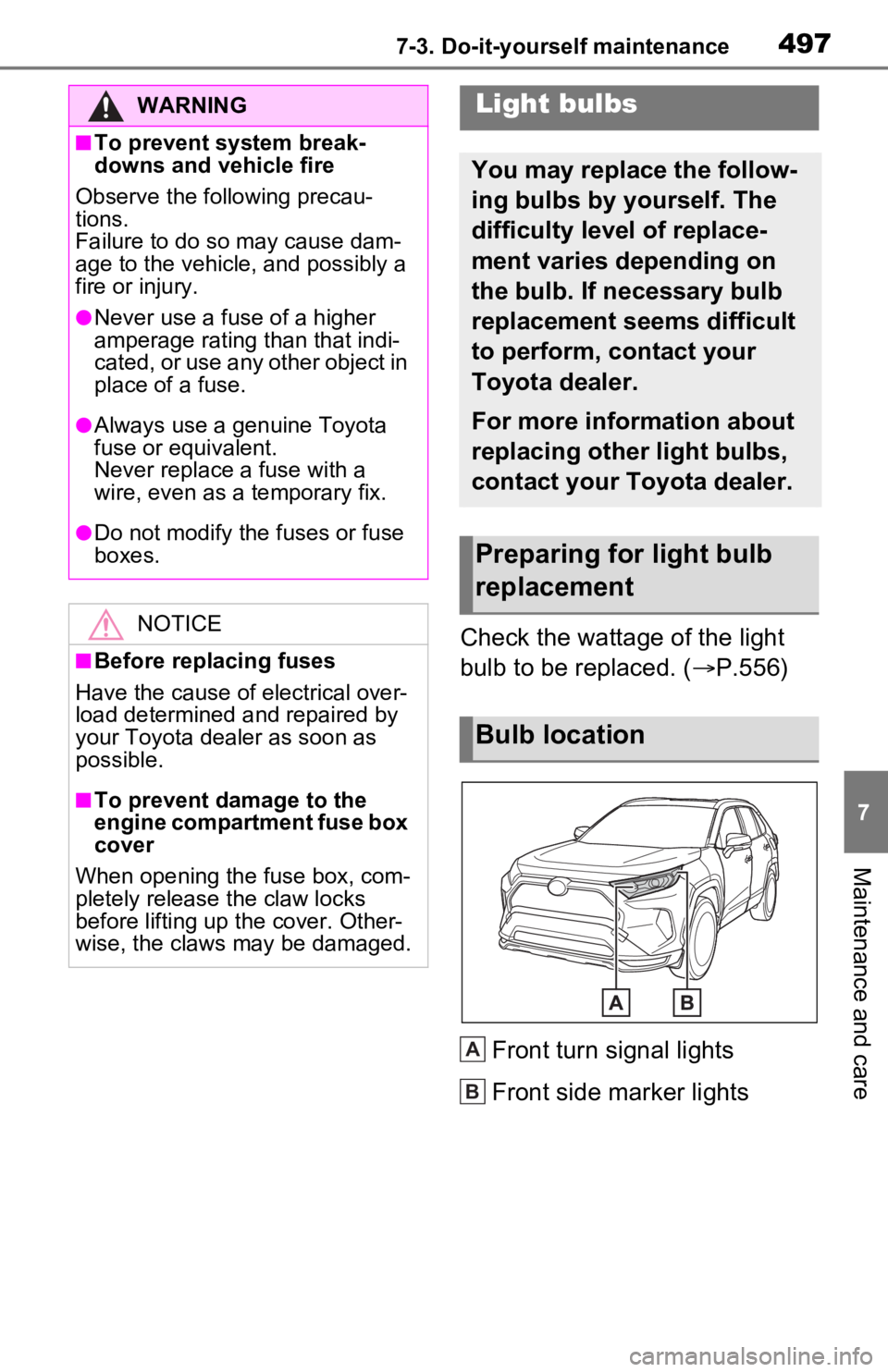
Front turn signal lights
Front side marker lights
WARNING
■To prevent system break-
downs and vehicle fire
Observe the following precau-
tions.
Failure to do so may cause dam-
age to the vehicle, and possibly a
fire or injury.
●Never use a fuse of a higher
amperage rating than that indi-
cated, or use any other object in
place of a fuse.
●Always use a genuine Toyota
fuse or equivalent.
Never replace a fuse with a
wire, even as a temporary fix.
●Do not modify the fuses or fuse
boxes.
NOTICE
■Before replacing fuses
Have the cause of electrical over-
load determined and repaired by
your Toyota dealer as soon as
possible.
■To prevent damage to the
engine compartment fuse box
cover
When opening the fuse box, com-
pletely release the claw locks
before lifting up the cover. Other-
wise, the claws may be damaged.
Light bulbs
You may replace the follow-
ing bulbs by yourself. The
difficulty level of replace-
ment varies depending on
the bulb. If necessary bulb
replacement seems difficult
to perform, contact your
Toyota dealer.
For more information about
replacing other light bulbs,
contact your Toyota dealer.
Preparing for light bulb
replacement
Bulb location
A
B
Page 498 of 616
4987-3. Do-it-yourself maintenance
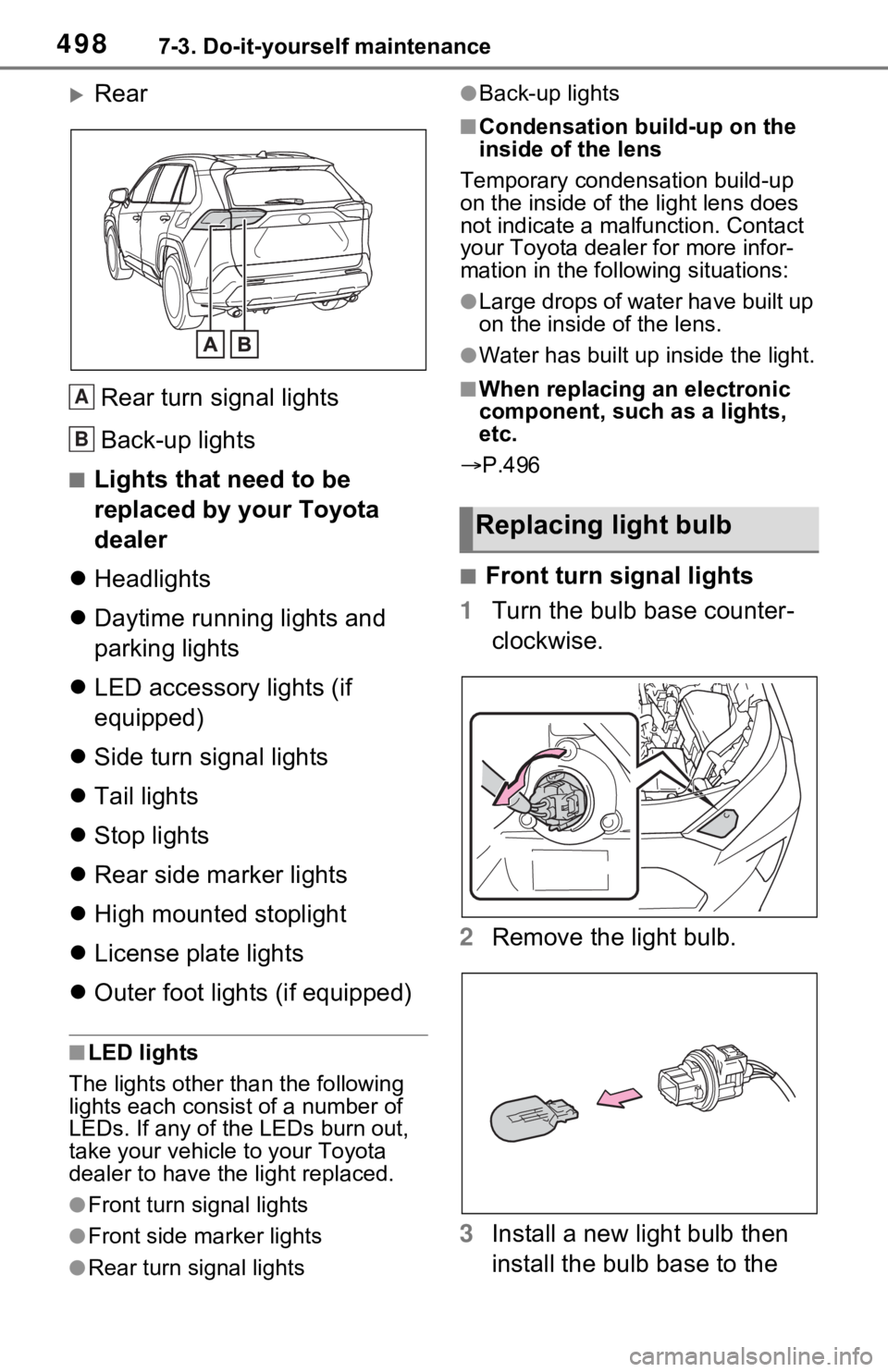
Rear
Rear turn signal lights
Back-up lights
■Lights that need to be
replaced by your Toyota
dealer
Headlights
Daytime running lights and
parking lights
LED accessory lights (if
equipped)
Side turn signal lights
Tail lights
Stop lights
Rear side marker lights
High mounted stoplight
License plate lights
Outer foot lights (if equipped)
■LED lights
The lights other than the following
lights each consist of a number of
LEDs. If any of the LEDs burn out,
take your vehicle to your Toyota
dealer to have the light replaced.
●Front turn signal lights
●Front side marker lights
●Rear turn signal lights
●Back-up lights
■Condensation build-up on the
inside of the lens
Temporary condensation build-up
on the inside of the light lens does
not indicate a mal function. Contact
your Toyota dealer for more infor-
mation in the following situations:
●Large drops of water have built up
on the inside of the lens.
●Water has built up inside the light.
■When replacing an electronic
component, such as a lights,
etc.
P.496
■Front turn signal lights
1 Turn the bulb base counter-
clockwise.
2 Remove the light bulb.
3 Install a new light bulb then
install the bulb base to the
A
B
Replacing light bulb