light TOYOTA RAV4 PRIME 2021 Owner's Guide
[x] Cancel search | Manufacturer: TOYOTA, Model Year: 2021, Model line: RAV4 PRIME, Model: TOYOTA RAV4 PRIME 2021Pages: 618, PDF Size: 24.18 MB
Page 92 of 618
922-1. Plug-in hybrid system
detected by the impact sensor,
the emergency shut off system
blocks off the high voltage cur-
rent and stops the fuel pump to
minimize the risk of electrocu-
tion and fuel leakage.
If the emergency shut off system
activates, your vehicle will not
restart. To restart the hybrid sys-
tem, contact your Toyota dealer.
A message is automatically dis-
played when a malfunction
occurs in the hybrid system or
an improper operation is
attempted.
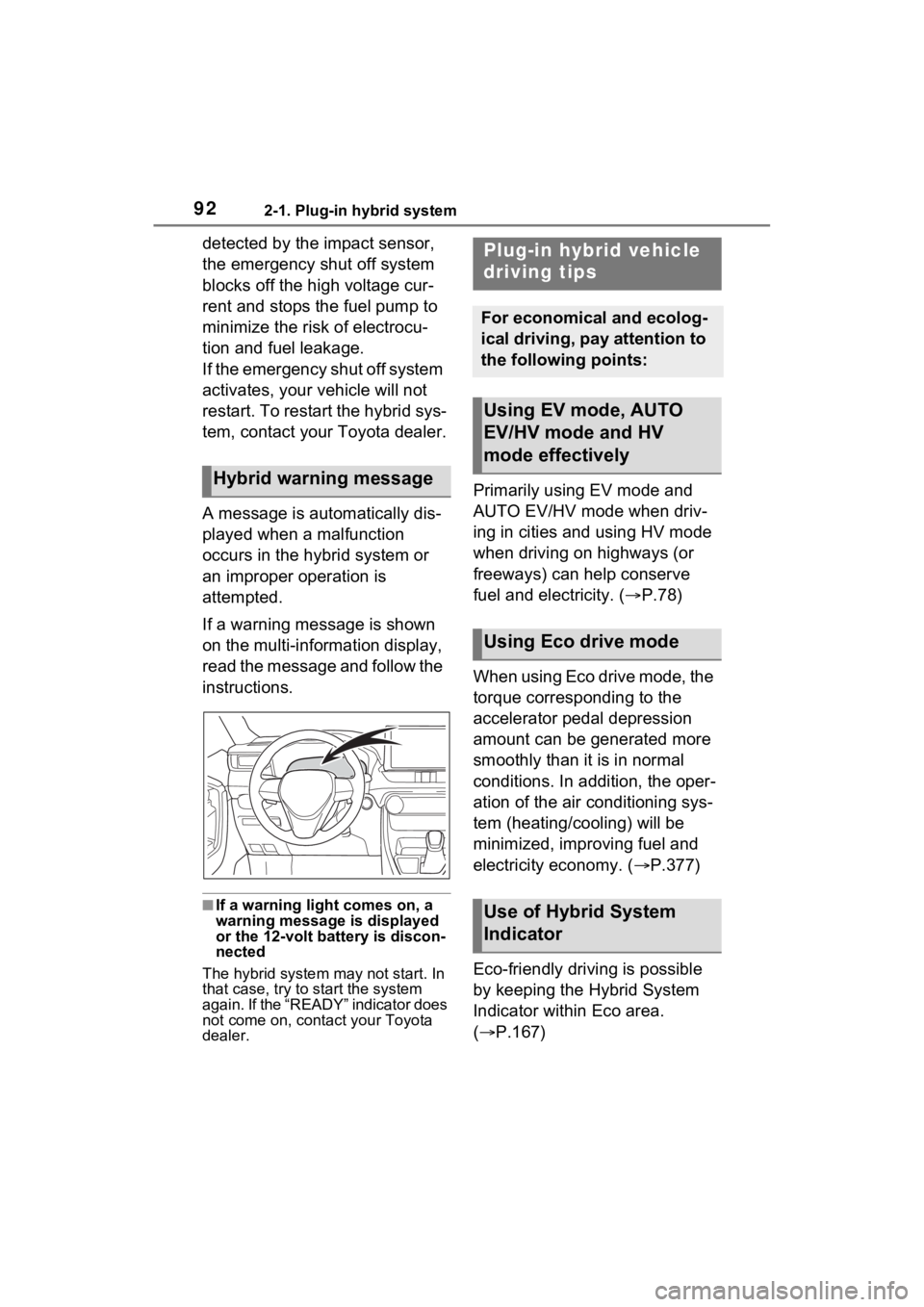
If a warning message is shown
on the multi-information display,
read the message and follow the
instructions.
■If a warning light comes on, a
warning message is displayed
or the 12-volt battery is discon-
nected
The hybrid system may not start. In
that case, try to start the system
again. If the “READY” indicator does
not come on, contact your Toyota
dealer.
Primarily using EV mode and
AUTO EV/HV mode when driv-
ing in cities and using HV mode
when driving on highways (or
freeways) can help conserve
fuel and electricity. ( P.78)
When using Eco drive mode, the
torque corresponding to the
accelerator pedal depression
amount can be generated more
smoothly than it is in normal
conditions. In addition, the oper-
ation of the air conditioning sys-
tem (heating/cooling) will be
minimized, improving fuel and
electricity economy. ( P.377)
Eco-friendly driving is possible
by keeping the Hybrid System
Indicator within Eco area.
( P.167)Hybrid warning message
Plug-in hybrid vehicle
driving tips
For economical and ecolog-
ical driving, pay attention to
the following points:
Using EV mode, AUTO
EV/HV mode and HV
mode effectively
Using Eco drive mode
Use of Hybrid System
Indicator
Page 93 of 618
932-1. Plug-in hybrid system
2
Plug-in hybrid system
Shift the shift lever to D when
stopped at a traffic light, or driv-
ing in heavy traffic etc. Shift the
shift lever to P when parking.
When using the N, there is no
positive effect on fuel consump-
tion. In the N, the gasoline
engine operates but electricity
cannot be generated. Also,
when using the air conditioning
system, etc., the hybrid battery
(traction battery) power is con-
sumed.
Drive your vehicle smoothly.
Avoid abrupt acceleration and
deceleration. Gradual accel-
eration and deceleration will
make more effective use of
the electric motor (traction
motor) without having to use
gasoline engine power.
Avoid repeated acceleration.
Repeated acceleration con-
sumes hybrid battery (trac-
tion battery) power, resulting
in poor fuel consumption. Bat-
tery power can be restored by
driving with the accelerator
pedal slightly released.
Make sure to operate the brakes
gently and a timely manner. A greater amount of electrical
energy can be regenerated
when slowing down.
Repeated acceleration and
deceleration, as well as long
waits at traffic lights, will lead to
high fuel and electricity con-
sumption. Check traffic reports
before leaving and avoid delays
as much as possible. When driv-
ing in a traffic jam, gently
release the brake pedal to allow
the vehicle to move forward
slightly while avoiding overuse
of the accelerator pedal. Doing
so can help control excessive
electricity and fuel consumption.
Control and maintain the vehi-
cle at a constant speed.
Before stopping at a toll booth
or similar, allow plenty of time
to release the accelerator and
gently apply the brakes. A
greater amount of electrical
energy can be regenerated
when slowing down.
Electricity consumption will
increase significantly when
driving at high speeds in EV
mode or AUTO EV/HV mode.
If there will be a long distance
to the next external charging
point after leaving a freeway,
it is recommended to drive in
Shift lever operation
Accelerator pedal/brake
pedal operation
When braking
Delays
Highway driving
Page 96 of 618

962-1. Plug-in hybrid system
of occupants.
The distance that EV driving is
possible can be extended if the
following is performed:
■When starting off, depress
the accelerator pedal
smoothly to accelerate
As a guide, accelerate up to
approximately 12mph (20 km/h)
in the first 5 seconds.
Electrical and fuel efficiency can
be improved just by using the
ECO Accelerator Guidance dis-
played on the multi-information
display and taking care to start
off gently. ( P.173)
When the driving mode is set to
Eco drive mode, depressing the
accelerator pedal generates
smooth torque that makes it easier
to operate the accelerator gently.
At the same time, the air condition-
ing control is switched to eco air
conditioning mode ( P.397) to
reduce the strength of the air condi-
tioning operation.
■Maintain sufficient vehicle-
to-vehicle distance and do
not accelerate or decelerate
unnecessarily
Try to maintain a fixed speed
while driving. Driving at a short
vehicle-to-vehicle distance will
result in repeating wasteful
acceleration and deceleration,
which will worsen the electrical
and fuel efficiency.
■Release the accelerator
pedal early before stopping
the vehicle, such as at a
traffic light
The regenerative brake will
operate to convert the kinetic
energy of the vehicle into electri-
cal energy, which will charge the
hybrid battery (traction battery).
The regeneration status can be
checked from the Hybrid Sys-
tem Indicator. ( P.167)
When the brake pedal is
depressed lightly during decel-
eration, the regeneration
amount increases, enabling
more electrical energy to be
recovered.
If the brake pedal is depressed too
strongly, the recovered amount
indicator will reac h the maximum
level and the upper limit of the
recoverable energy will be
exceeded. Theref ore, be sure to
operate the brak e pedal early.
■Use the air conditioning
system appropriately, and
also utilize the heated steer-
ing wheel (if equipped) and
seat heaters
In EV mode, the vehicle is
cooled and heated by electrical
energy. (Except in extremely
cold temperatures of approxi-
mately 14°F (-10°C) or less.)
Preventing excessive cooling or
heating of the vehicle will reduce
power consumption and
improve electrical efficiency.
Page 99 of 618
992-2. Charging
2
Plug-in hybrid system
2-2.Charging
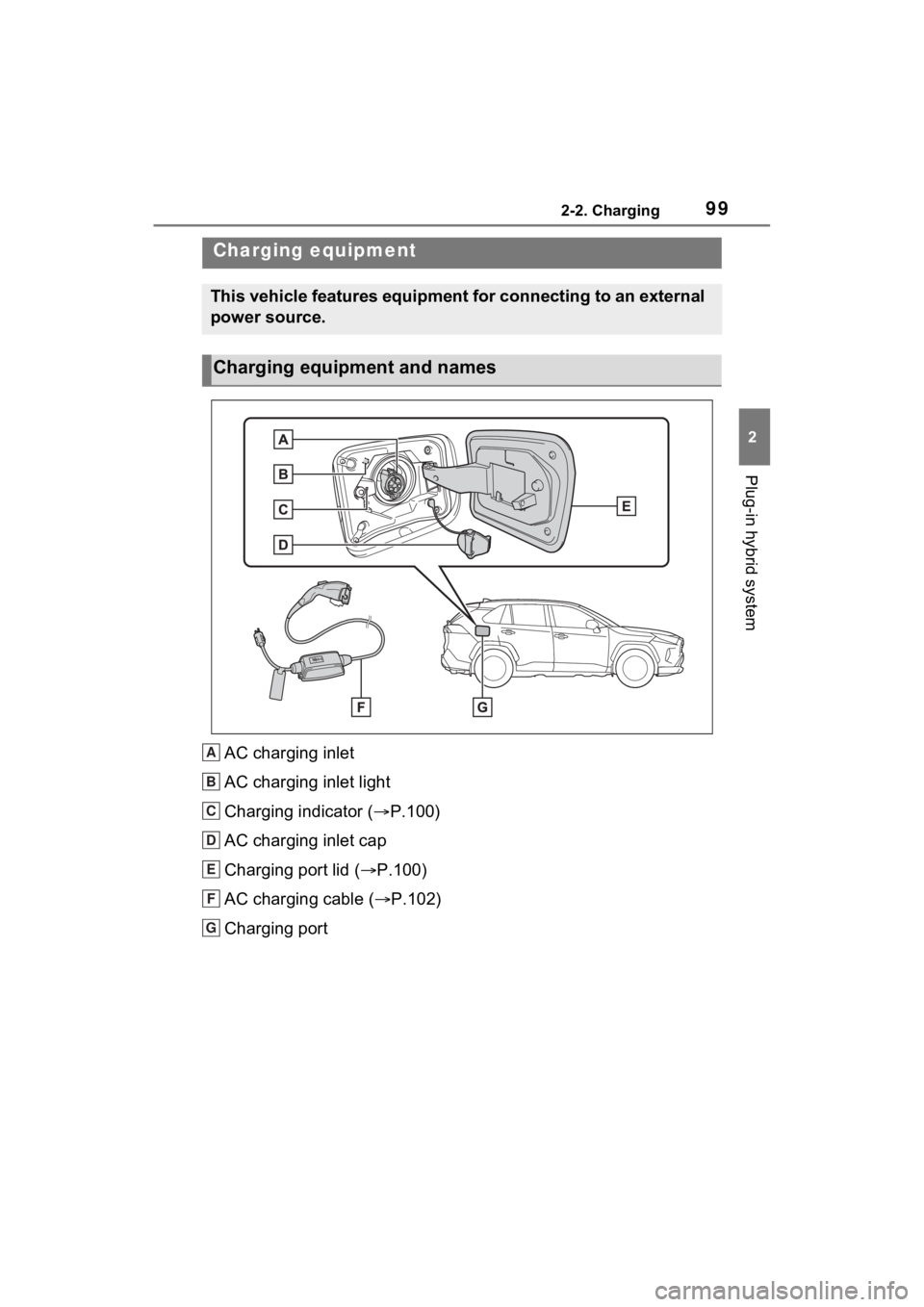
AC charging inlet
AC charging inlet light
Charging indicator (P.100)
AC charging inlet cap
Charging port lid ( P.100)
AC charging cable ( P.102)
Charging port
Charging equipment
This vehicle features equipment for connecting to an external
power source.
Charging equipment and names
A
B
C
D
E
F
G
Page 100 of 618
1002-2. Charging
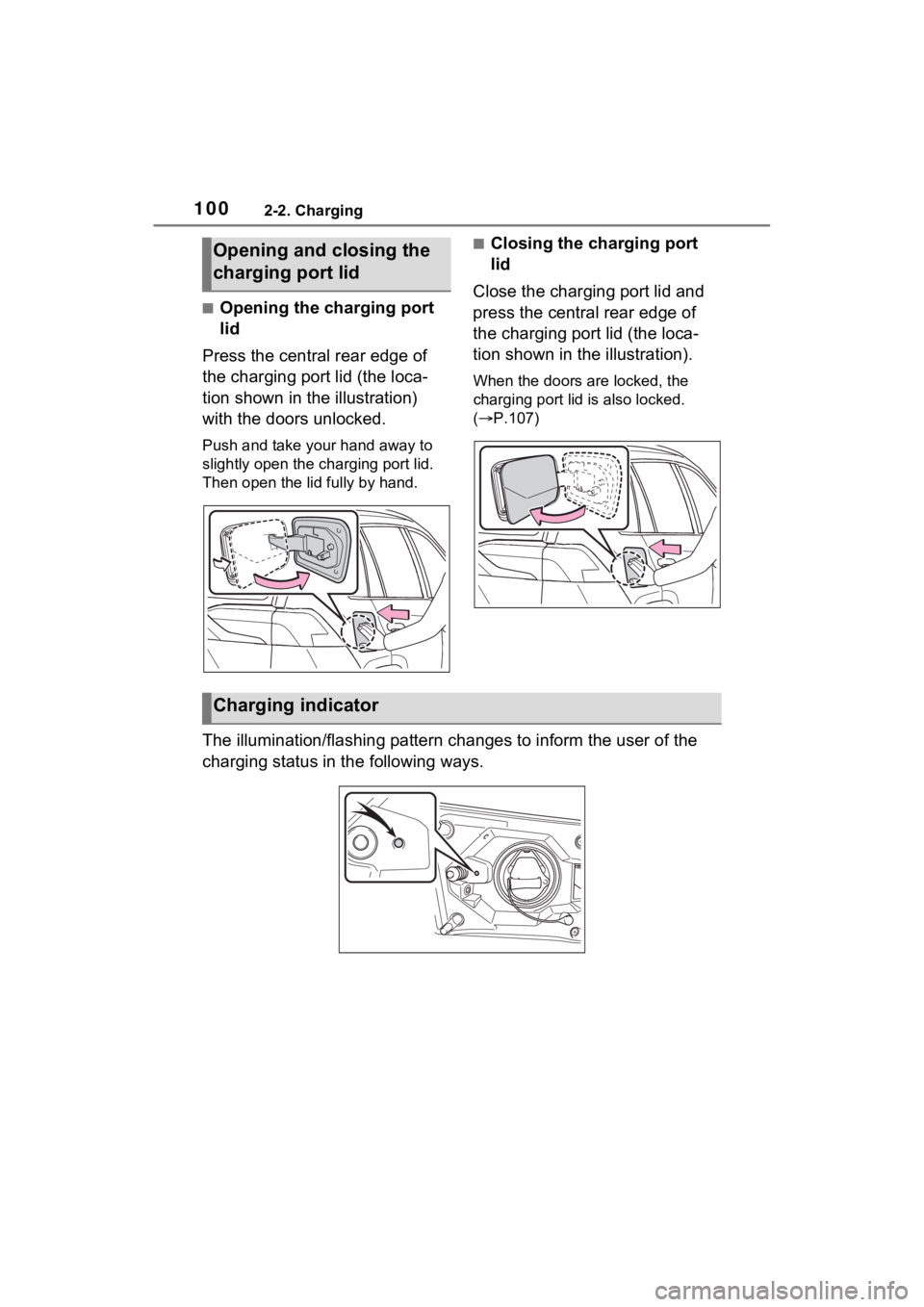
■Opening the charging port
lid
Press the central rear edge of
the charging port lid (the loca-
tion shown in the illustration)
with the doors unlocked.
Push and take your hand away to
slightly open the c harging port lid.
Then open the lid fully by hand.
■Closing the charging port
lid
Close the charging port lid and
press the central rear edge of
the charging port lid (the loca-
tion shown in the illustration).
When the doors are locked, the
charging port lid is also locked.
( P.107)
The illumination/flashing pattern changes to inform the user of the
charging status in the following ways.
Opening and closing the
charging port lid
Charging indicator
Page 115 of 618
1152-2. Charging
2
Plug-in hybrid system
( P.144), the time required for
charging to complete may be
longer or the charging may not
be completed.
*4: If equipped
■Charging time may increase
In the following si tuations, charging
time may become longer than nor-
mal:
●In very hot or very cold tempera-
tures.
●When the hybrid battery (traction
battery) becomes hot, such as
immediately after high-load driv-
ing.
●The vehicle is consuming a lot of
electricity, for example, when the
headlights are on etc.
●When using “My Room Mode”.
( P.144)
●There is a power outage during
charging.
●There is an interruption in the
electrical supply.
●There is a drop in the voltage of
external power source.
●The charge in the 12-volt battery
is low, for examp le due to the
vehicle being left unused for a
long period of time.
●The maximum charging current is
set to 8A or 16A* through “Vehicle
Settings”. ( P.112)
●When the “Battery Heater” oper-
ates. ( P.115)
●When the “Battery Cooler” is oper-
ated before charging. ( P.116)
●When the plug generates heat
due to a loose outlet connection
etc.
*: Vehicles with 6.6 kW onboard
traction battery charger only
■Using a DC Charger
DC Chargers cannot be used with this vehicle.
■Charging electricity
This vehicle can be charged up to
approximately 3. 3 kW or 6.6 kW
*.
However, depending on the used
charger or AC charging cable,
charging electrici ty may be limited.
*: Vehicles with 6.6 kW onboard
traction battery charger only
This vehicle is equipped with
several functions that are linked
with charging.
■“My Room Mode” ( P.144)
When the AC charging cable is
connected to the vehicle, electri-
cal components such as the air
conditioning system or audio
system can be used using the
external power source
*.
*: The power of the hybrid battery
(traction battery) may be used
depending on the situation.
■“Battery Heater”
When the outside temperature
is low and the AC charging
cable is connected to the vehi-
cle, this function automatically
warms the hybrid battery (trac-
tion battery) until it reaches or
exceeds a certain temperature.
“Battery Heater” will operate
when the “Battery Heater” of the
“Charging Settings” on the multi-
information display is on.
( P.178)
Charging-linked functions
Page 121 of 618
1212-2. Charging
2
Plug-in hybrid system
the AC charging cable without
supervision. Also, keep the
AC charging cable out of
reach of infants.
When charging with a char-
ger, follow the procedures for
using each charger.
When charging using a public
charging facility, check the
setting of the charging sched-
ule function.
• When the charging schedule is
registered, temporarily turn off
the function or turn “Charge Now”
on. ( P.137, 142)
• When the charging schedule is set to on, charg ing will not start
even if the AC charging cable is
connected. Also, charging fee
may occur due to connection of
the AC charging cable.
Before charging, always check
the following items.
The parking brake is applied.
( P.290)
Lights such as the head-
lights, emergency flashers
and interior lights etc. are
turned off.
If these light switches are turned
on, then th ese features will con-
sume electricity, and charging time
will increase.
The power switch is turned to
OFF. ( P.283) Before charging, make sure that
each part of the AC charging
cable is in good condition.
(
P.106)
■During charging
●The charging starting time may
differ depending on the state of
the vehicle, but this does not indi-
cate a malfunction.
●Cooling fan sounds may be heard
from near the rear seat. ( P.91)
●During charging, sounds may be
heard from near the hybrid battery
(traction battery) in accordance
with the operation of the air condi-
tioning system or “Battery Cooler”
( P.116).
●During and after charging, the rear
seat and its surrounding area in
which the onboard traction battery
charger is installed may get warm.
●The surface of the CCID
(Charging Circuit Interrupting
Device) may become hot, but this
does not indicate a malfunction.
●Depending on radio wave condi-
tions, interference may be heard
on the radio.
●The current charging condition
and the estimated time until
charging will complete can be
checked on the mu lti-information
display.
■Capacity reduction of the
hybrid battery (traction battery)
The capacity of the hybrid battery
(traction battery) will decline gradu-
ally when the hybrid battery (traction
battery) is in use. The rate at which
it declines will diff er in accordance
with environmental conditions and
the way in which the vehicle is used.
Observing the fo llowing can help
Confirm the following
before charging
Inspecting the AC
charging cable
Page 122 of 618

1222-2. Charging
suppress battery capacity decline.
●Avoid parking the vehicle in areas
with a high temperature under
direct sunlight when the hybrid
battery (traction battery) is fully
charged.
●Avoid accelerating and decelerat-
ing frequently and suddenly when
EV driving.
●Avoid frequent driving near the top
speed for EV driving. (P.82)
●Leave a low level of charge in the
hybrid battery (traction battery)
when leaving the vehicle undriven
for a long period of time.
After confirming that EV mode or
AUTO EV/HV mode has switched
to HV mode, turn the power switch
off.
●Use the charging schedule func-
tion as much as possible in order
to fully charge the hybrid battery
(traction battery) immediately
before starting off. ( P.130)
Also, if the hybrid battery (traction
battery) capacity reduces, the dis-
tance that can be driven in EV mode
or AUTO EV/HV mode decreases.
H ow ev er , ve hic le p er fo rm an ce do e s
not significantly become worse.
■When the remaining charge of
the hybrid battery (traction bat-
tery) is low after charging
In the following situations, the
remaining charge of the hybrid bat-
tery (traction battery) after charging
completes may be less than normal
in order to protect the system (the
EV driving range after the battery is
fully charged may be shorter).
*
●Charging is carried out when the
outside temperature is low or high.
●Charging is carried out immedi-
ately after high-load driving or in
extreme heat.
When none of the above situations
apply and there is a drastic drop in
the remaining charge of the hybrid
battery (traction battery) after charging completes, have the vehi-
cle inspected by your Toyota dealer.
*: When this occurs, even if the
remaining charge display of the
hybrid battery (traction battery)
shows that it is f ully charged, the
remaining charge rapidly
decreases faster than normal.
■When the charging amount sent
to the hybrid battery (traction
battery) decreases
When the amount of power supplied
by the charger is low or operation of
the “Battery Heate r”, etc., reduces
the charging pow er sent to the
hybrid battery (trac tion battery), the
charging amount sent to the hybrid
battery (traction battery) may
decrease.
■Certification
This device complies with Part 15 of
the FCC Rules. Operation is subject
to the following two conditions:
(1) this device may not cause harm-
ful interference, and
(2) this device must accept any
interference received, including
interference that may cause unde-
sired operation.
Page 124 of 618
1242-2. Charging
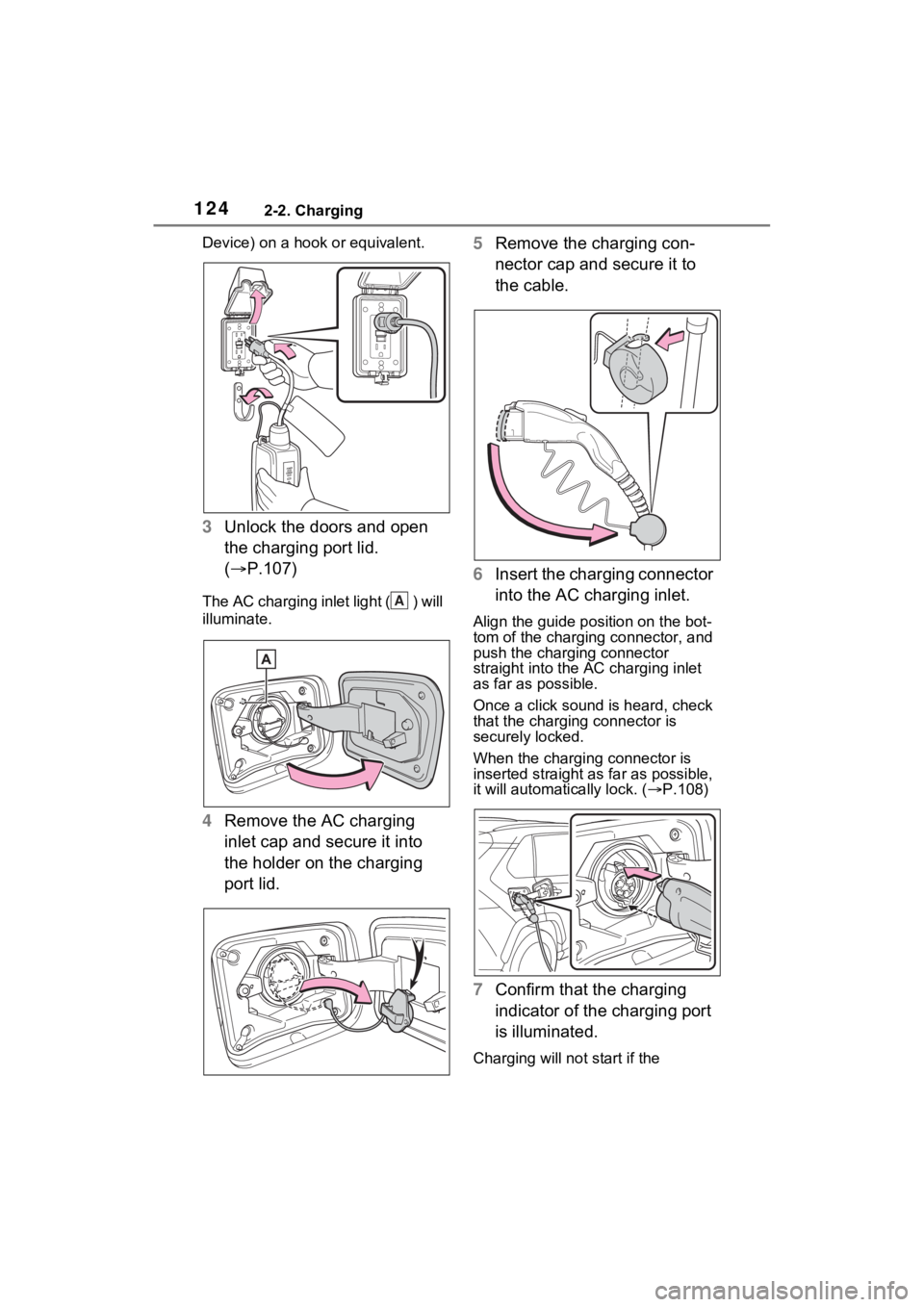
Device) on a hook or equivalent.
3Unlock the doors and open
the charging port lid.
( P.107)
The AC charging inlet light ( ) will
illuminate.
4Remove the AC charging
inlet cap and secure it into
the holder on the charging
port lid. 5
Remove the charging con-
nector cap and secure it to
the cable.
6 Insert the charging connector
into the AC charging inlet.
Align the guide position on the bot-
tom of the charging connector, and
push the charging connector
straight into the AC charging inlet
as far as possible.
Once a click sound is heard, check
that the charging connector is
securely locked.
When the charging connector is
inserted straight as far as possible,
it will automatically lock. ( P.108)
7 Confirm that the charging
indicator of the charging port
is illuminated.
Charging will not start if the
A
Page 126 of 618
1262-2. Charging
WARNING
■When charging
Observe the following precau-
tions.
Failure to do so may cause an
unexpected accident, resulting in
death or serious injury.
●Connect to a power source suit-
able for charging. ( P.111)
●Check that the AC charging
cable, plug and outlet are free of
foreign matter.
●Before charging, check that the
AC charging inlet is not
deformed, damaged or cor-
roded, and check that the inlet
is free of foreign matter such as
dirt, snow and ice.
If there is dirt or dust in these
areas, remove completely
before inserting the charging
connector.
●Do not get the terminals of the
AC charging inlet wet.
●Only use outlets where the plug
can be securely inserted.
●Do not bundle or wind the AC
charging cable while charging,
as doing so may result in over-
heating.
●Do not touch the terminals of
the charging connector and AC
charging inlet with a sharp metal
objects (needles etc.) or hands,
or short them with foreign
objects.
●When charging outdoors, make
sure to connect to a weather-
proof outlet for outdoor use.
Ensure the weatherproof outlet
cover closes completely. If the
weatherproof outlet cover can-
not be closed, install a weather-
proof outlet cover that will close.
●In order to stop charging at the
charging station, follow the
instructions of the charger.
●If any heat, smoke, odors, noise
or other abnormalities are
noticed during charging, stop
charging immediately.
●Do not insert the plug if the out-
let is submerge d in water or
snow.
●When charging while it is raining
or snowing, do not connect or
disconnect the plug if your
hands are wet. Also, do not get
the plug or outlet wet.
●Do not charge the vehicle
during a lightning storm.
●Prevent the AC charging cable
from being caught in the door or
back door.
●Do not let the wheels on the AC
charging cable, plug, charging
connector and CCID (Charging
Circuit Interru pting Device).
●Firmly insert the plug into the
outlet.
●Do not use an ex tension cord
and converting adaptor.
●Close the hood before using the
charging system. The cooling
fan may start operating sud-
denly. Touching or getting close
to rotating parts such as the fan
may cause your hands or
clothes (especially a necktie or
scarf) to becom e caught and
result in a serious injury.
●If the power indicator on the
CCID (Charging Circuit Inter-
rupting Device) does not illumi-
nate after plugging the AC
charging cable into the socket-
outlet, unplug it immediately.