warning TOYOTA RAV4 PRIME 2021 Manual Online
[x] Cancel search | Manufacturer: TOYOTA, Model Year: 2021, Model line: RAV4 PRIME, Model: TOYOTA RAV4 PRIME 2021Pages: 618, PDF Size: 24.18 MB
Page 184 of 618
1843-1. Instrument cluster
Vehicle settings and the content
displayed on the head-up dis-
play can be changed by using
the meter control switches.
1Operate or of the
meter control switches and
select on the multi-infor-
mation display.
2 Operate or of the
meter control switches and
select “HUD Main” to set up
the following items.
■Enabling/disabling the
head-up display
Press to enable/disable the
head-up display.
■Changing the head-up dis-
play settings
Press and hold to display the
setting screen and change the
following settings:
Brightness and vertical posi-
tion of the head-up display
Select to adjust t he brightness or
vertical position of the head-up dis-
play.
Display content
Select to change the display
between the following:
• No content
• Hybrid System Indicator
• Tachometer
Select to enable/d isable the follow-
ing items: • Route guidance to destination (if
equipped)
• Driving support system informa- tion display
• Compass (if equipped)
• Audio system operation status (if equipped)
Display angle
Select to adjus t the angle of the
head-up display.
■Enabling/disabling of the head-
up display
If the head-up display is disabled, it
will remain disabled when the power
switch is turned off then back to ON.
■Display brightness
The brightness of the head-up dis-
play can be adjusted on screen
of the multi-information display.
Also, it is automatically adjusted
according to the ambient brightness.
Using the head-up display
WARNING
■Caution for changing settings
of the head-up display
If the hybrid system is operating
when changing the display set-
tings, ensure that the vehicle is
parked in a place with adequate
ventilation. In a closed area such
as a garage, exhaust gases
including harmful carbon monox-
ide (CO) may collect and enter
the vehicle. This may lead to
death or a serious health hazard.
Page 185 of 618
1853-1. Instrument cluster
3
Vehicle status information and indicators■Driving support system
information display
Displays the operational status
of the following systems:
LTA (Lane Tracing Assist)
( P.323)
Dynamic radar cruise control
with full-speed range
( P.336)
Displayed content is the same as
that displayed on the multi-informa-
tion display. For details, refer to the
explanations of each system.
■Navigation system-linked
display area (if equipped)
Displays the following items
which are linked to the naviga-
tion system:
Street name
Route guidance to destination
Compass
Pop-up displays for the following systems will be displayed when
necessary:
■Driving support systems
Displays a warning/sugges-
tion/advice message or the
operating state of a relevant
system.
PCS (Pre-Colli sion System)
( P.315)
Brake Override System
( P.259)
Drive-Start Control ( P.259)
Parking Support Brake func-
tion (static objects) (if
equipped) ( P.368)
Displayed content is the same as
that displayed on the multi-informa-
tion display. For details, refer to the
explanations of each system.
■ / icons
Displays the following multi-
information display linked icons:
: Master warning icon
Displayed when a warning mes-
sage is displayed on the multi-infor-
mation display.
: Information icon
Displayed when a sugges-
tion/advice pop-up display is dis-
played on the multi-information
display.
■Warning message
Some warning messages are
displayed when necessary,
according to certain conditions.
Displayed content is the same as
NOTICE
■When changing the settings
of the head-up display
To prevent 12-volt battery dis-
charge, ensure t hat the hybrid
system is operating while chang-
ing the settings of the head-up
display.
Driving support system
information/navigation
system-linked display
area (if equipped)
Pop-up display
Page 189 of 618
1893-1. Instrument cluster
3
Vehicle status information and indicators
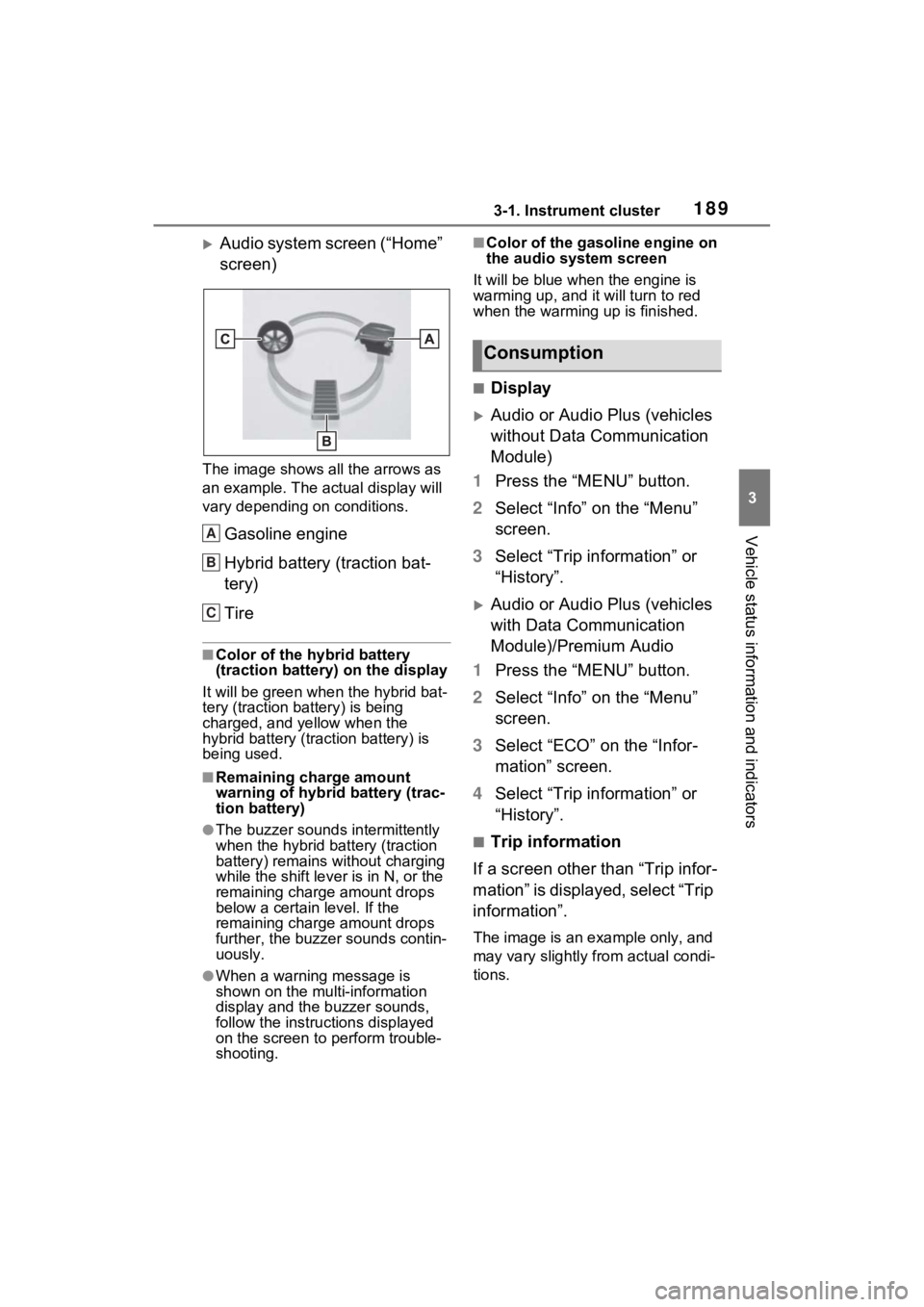
Audio system screen (“Home”
screen)
The image shows all the arrows as
an example. The actual display will
vary depending on conditions.
Gasoline engine
Hybrid battery (traction bat-
tery)
Tire
■Color of the hybrid battery
(traction battery) on the display
It will be green whe n the hybrid bat-
tery (traction battery) is being
charged, and yellow when the
hybrid battery (traction battery) is
being used.
■Remaining charge amount
warning of hybrid battery (trac-
tion battery)
●The buzzer sounds intermittently
when the hybrid battery (traction
battery) remains without charging
while the shift leve r is in N, or the
remaining charge amount drops
below a certain level. If the
remaining charge amount drops
further, the buzzer sounds contin-
uously.
●When a warning message is
shown on the multi-information
display and the buzzer sounds,
follow the instructions displayed
on the screen to p erform trouble-
shooting.
■Color of the gasoline engine on
the audio system screen
It will be blue when the engine is
warming up, and it will turn to red
when the warming up is finished.
■Display
Audio or Audio Plus (vehicles
without Data Communication
Module)
1 Press the “MENU” button.
2 Select “Info” on the “Menu”
screen.
3 Select “Trip information” or
“History”.
Audio or Audio Plus (vehicles
with Data Communication
Module)/Premium Audio
1 Press the “MENU” button.
2 Select “Info” on the “Menu”
screen.
3 Select “ECO” on the “Infor-
mation” screen.
4 Select “Trip information” or
“History”.
■Trip information
If a screen other than “Trip infor-
mation” is displayed, select “Trip
information”.
The image is an example only, and
may vary slightly from actual condi-
tions.
A
B
C
Consumption
Page 200 of 618
2004-2. Opening, closing and locking the doors
■Door lock buzzer
If an attempt to lock the doors using
the smart key system is made when
a door other than the door you are
locking is open, a buzzer sounds
continuously for 5 seconds. Fully
close all the doors, and lock the
vehicle once more.
■Setting the alarm (if equipped)
Locking the doors will set the alarm
system. ( P.73)
■Conditions affect ing the opera-
tion of the smart key system or
wireless remo te control
P.218
■If the smart key system or the
wireless remote control does
not operate properly
●Use the mechanical key to lock
and unlock the doors. ( P.537)
●Replace the key battery with a
new one if it is depleted. ( P.493)
■If the 12-volt battery is dis-
charged
The doors cannot be locked and
unlocked using the smart key sys-
tem or wireless remote control. Lock
or unlock the doors using the
mechanical key. ( P.537)
■Rear seat reminder function
●In order to remind you not to for-
get luggage, etc. in the rear seat,
when the power switch is turned to
OFF after any of the following con-
ditions are met, a buzzer will
sound and a mess age will be dis-
played on the multi-information
display for approximately 6 sec-
onds. • The hybrid system is started
within 10 minutes after opening
and closing a rear door.
• A rear door has been opened and closed after the hybrid system
was started.
However, if a rear door is opened
and then closed within approxi-
mately 2 seconds, the rear seat
reminder function may not operate.
●The rear seat reminder function
determines that luggage, etc. has
been placed in a rear seat based
on opening and closing of a rear
door. Therefore, depending on the
situation, the rear seat reminder
function may not operate and you
may still forget luggage, etc. in the
rear seat, or it may operate unnec-
essarily.
●The rear seat reminder function
can be enabled/disabled.
( P.569)
■Customization
Settings (e.g. unlocking function
using a key) can be changed.
(Customizable features: P.573)
WARNING
■To prevent an accident
Observe the following precautions
while driving the vehicle.
Failure to do so may result in a
door opening and an occupant
could be thrown out of the vehicle,
resulting in dea th or serious
injury.
●Ensure that all doors are prop-
erly closed and locked.
●Do not pull the inside handle of
the doors while driving.
Be especially careful for the
front doors, as the doors may
be opened even if the inside
lock buttons are in locked posi-
tion.
Page 201 of 618
2014-2. Opening, closing and locking the doors
4
Before driving
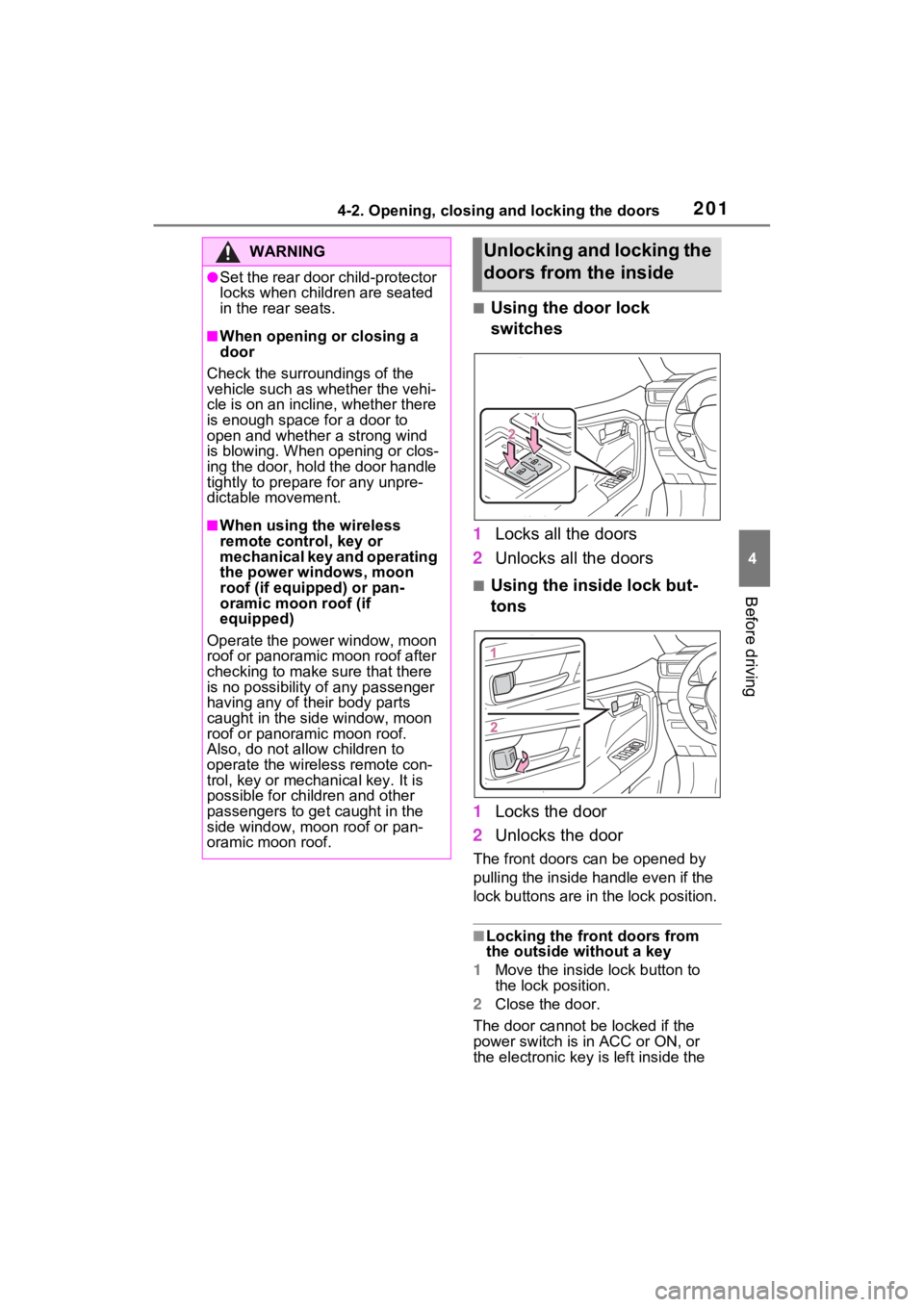
■Using the door lock
switches
1 Locks all the doors
2 Unlocks all the doors
■Using the inside lock but-
tons
1 Locks the door
2 Unlocks the door
The front doors c an be opened by
pulling the inside handle even if the
lock buttons are in the lock position.
■Locking the front doors from
the outside without a key
1 Move the inside l ock button to
the lock position.
2 Close the door.
The door cannot be locked if the
power switch is in ACC or ON, or
the electronic key is left inside the
WARNING
●Set the rear door child-protector
locks when children are seated
in the rear seats.
■When opening or closing a
door
Check the surroundings of the
vehicle such as whether the vehi-
cle is on an incline, whether there
is enough space for a door to
open and whether a strong wind
is blowing. When opening or clos-
ing the door, hold the door handle
tightly to prepare for any unpre-
dictable movement.
■When using the wireless
remote control, key or
mechanical key and operating
the power windows, moon
roof (if equipped) or pan-
oramic moon roof (if
equipped)
Operate the power window, moon
roof or panoramic moon roof after
checking to make sure that there
is no possibility of any passenger
having any of their body parts
caught in the side window, moon
roof or panoramic moon roof.
Also, do not allo w children to
operate the wireless remote con-
trol, key or mechanical key. It is
possible for children and other
passengers to get caught in the
side window, moon roof or pan-
oramic moon roof.
Unlocking and locking the
doors from the inside
Page 202 of 618
2024-2. Opening, closing and locking the doors
vehicle.
Depending on the position of the
electronic key, the key may not be
detected correctly and the door may
be locked.
■Open door warning buzzer
If the vehicle speed reaches 3 mph
(5 km/h), a buzzer sounds to indi-
cate that the door(s) or the hood is
not fully closed.
The open door(s) or hood is dis-
played on the multi-information dis-
play.
■When all the doors are locked
with the entry function or wire-
less remote control
●The doors cannot be unlocked
with the door lock switch.
●The door lock switches can be
reset by unlocking all the doors
with the entry function or wireless
remote control.
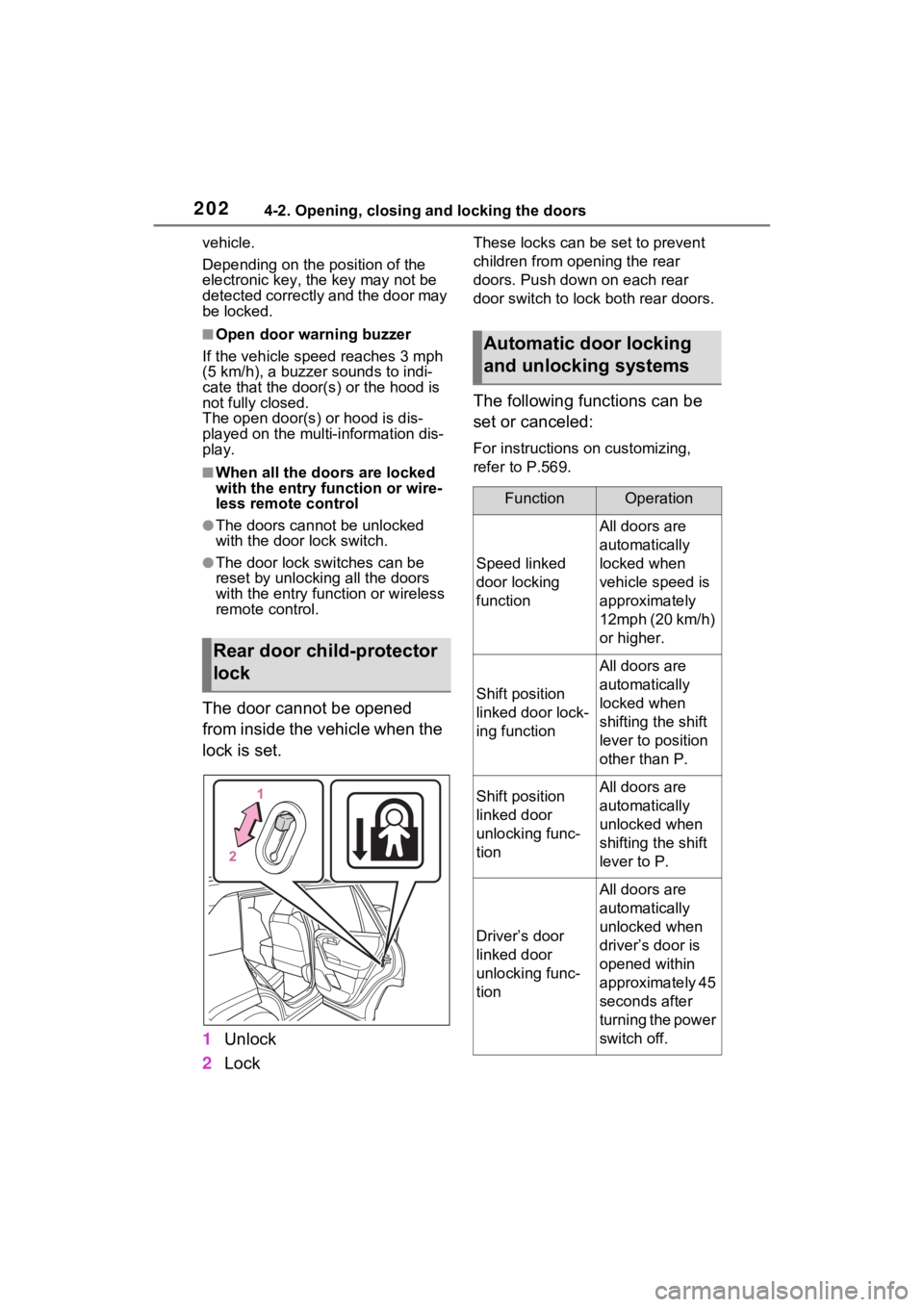
The door cannot be opened
from inside the vehicle when the
lock is set.
1 Unlock
2 Lock
These locks can be set to prevent
children from opening the rear
doors. Push down on each rear
door switch to lock both rear doors.
The following functions can be
set or canceled:
For instructions on customizing,
refer to P.569.
Rear door child-protector
lock
Automatic door locking
and unlocking systems
FunctionOperation
Speed linked
door locking
function
All doors are
automatically
locked when
vehicle speed is
approximately
12mph (20 km/h)
or higher.
Shift position
linked door lock-
ing function
All doors are
automatically
locked when
shifting the shift
lever to position
other than P.
Shift position
linked door
unlocking func-
tionAll doors are
automatically
unlocked when
shifting the shift
lever to P.
Driver’s door
linked door
unlocking func-
tion
All doors are
automatically
unlocked when
driver’s door is
opened within
approximately 45
seconds after
turning the power
switch off.
Page 203 of 618
2034-2. Opening, closing and locking the doors
4
Before driving
Back door
The back door can be
locked/unlocked and
opened/closed by the fol-
lowing procedures.
Charging port lid and charging
connector will also be locked
and unlocked. (P.107)
WARNING
Observe the following precau-
tions.
Failure to do so m ay result in
death or serious injury.
■Before driving
●Make sure that the back door is
fully closed.
If the back door is not fully
closed, it may open unexpect-
edly while driving and hit near-
by objects or luggage in the lug-
gage compartment may be
thrown out, causing an acci-
dent.
●Do not allow child ren to play in
the luggage compartment.
If a child is accidentally locked
in the luggage compartment,
they could get heat exhaustion
or other injuries.
●Do not allow a child to open or
close the back door.
Doing so may cause the back
door to operate unexpectedly,
or cause the child’s hands,
head, or neck to be caught by
the closing back door.
■Important points while driving
●Keep the back door closed
while driving.
If the back door is left open, it
may hit near-by objects or lug-
gage in the luggage compart-
ment may be thrown out,
causing an accident.
●Never let anyone sit in the lug-
gage compartment.
In the event of sudden braking,
sudden swerving or a collision,
they are susceptible to death or
serious injury.
■Back door handles
Do not hang any object to the
back door handles.
If any object is hung, the back
door may suddenly shut, causing
parts of the body to be caught,
resulting in dea th or serious
injury.
■Operating the back door
Observe the following precau-
tions.
Failure to do so may cause parts
of the body to be caught, resulting
in death or se rious injury.
●Remove any heavy loads, such
as snow and ice, from the back
door before opening it. Failure
to do so may cause the back
door to suddenly shut again
after it is opened.
●When opening or closing the
back door, thoroughly check to
make sure the surrounding area
is safe.
●If anyone is in the vicinity, make
sure they are safe and let them
know that the back door is
about to open or close.
●Use caution when opening or
closing the back door in windy
weather as it may move
abruptly in strong wind.
Page 204 of 618
2044-2. Opening, closing and locking the doors
■Using the entry function
Carry the electronic key to
enable this function.
WARNING
●Vehicles without power back
door: The back door may sud-
denly shut if it is not opened
fully. It is more difficult to open
or close the ba ck door on an
incline than on a level surface,
so beware of the back door
unexpectedly opening or closing
by itself. Make sure that the
back door is fully open and
secure before using the luggage
compartment.
●Vehicles with power back door:
The back door may suddenly
shut if it is not opened fully,
while on a steep incline. Make
sure that the back door is
secured before using the lug-
gage compartment.
●When closing the back door,
take extra care to prevent your
fingers, etc. from being caught.
●Vehicles without power back
door: When closing the back
door, make sure to press it
lightly on its outer surface. If the
back door handle is used to fully
close the back door, it may
result in hands or arms being
caught.
●Vehicles without power back
door: Do not pull on the back
door damper stay ( P.206) to
close the back door, and do not
hang on the back door damper
stay.
Doing so may cause hands to
be caught or the back door
damper stay to break, causing
an accident.
●Vehicles with power back door:
Do not pull on the back door
spindle ( P.214) to close the
back door, and do not hang on
the back door spindle.
Doing so may cause hands to
be caught or the back door spin-
dle to break, causing an acci-
dent.
●Vehicles without power back
door: If a bicycle carrier or simi-
lar heavy object is attached to
the back door, it may suddenly
shut again after being opened,
causing someone’s hands,
head or neck to be caught and
injured. When installing an
accessory part to the back door,
using a genuine Toyota part is
recommended.
Unlocking and locking the
back door from the out-
side
Page 206 of 618
2064-2. Opening, closing and locking the doors
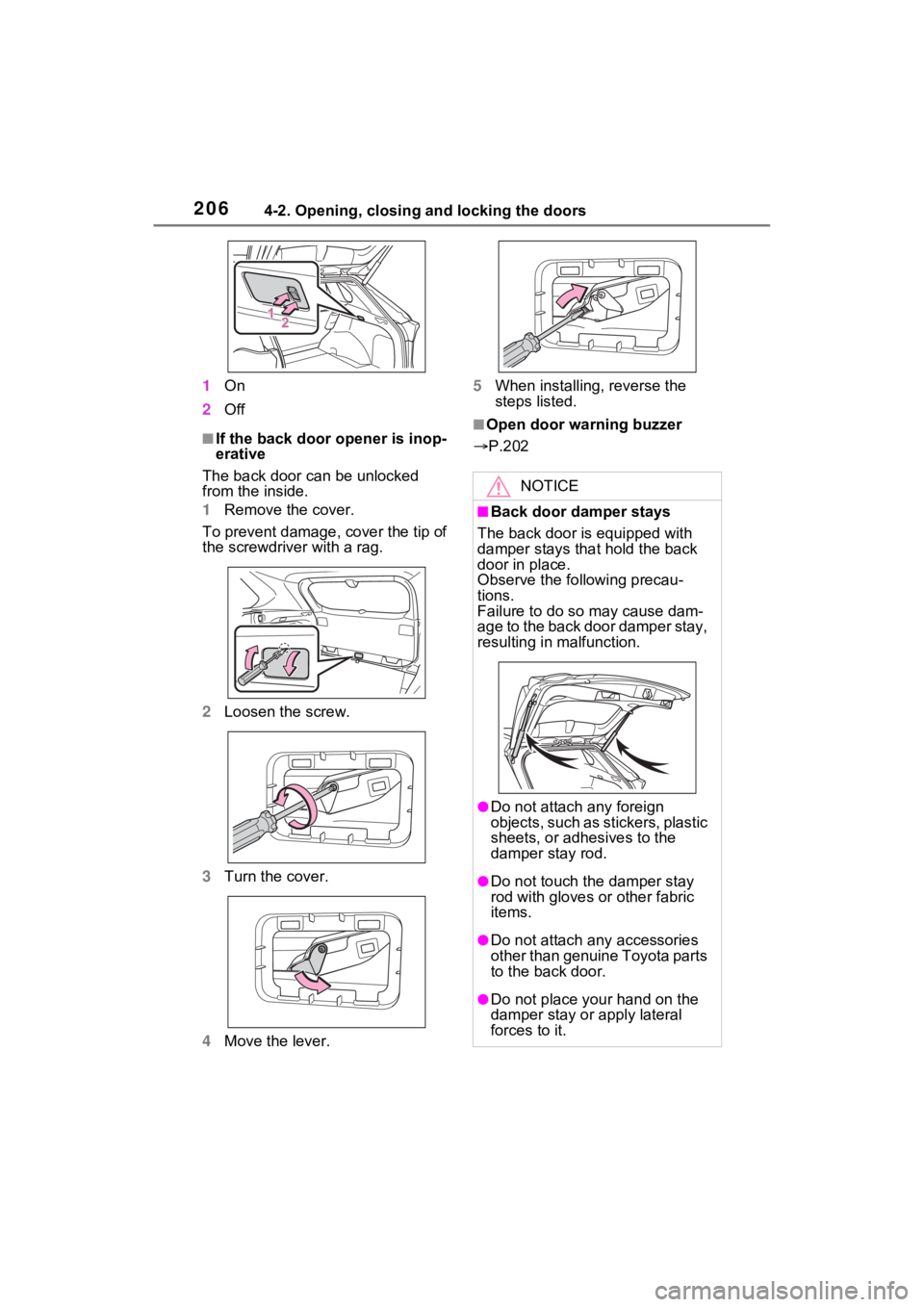
1On
2 Off
■If the back door opener is inop-
erative
The back door can be unlocked
from the inside.
1 Remove the cover.
To prevent damage, cover the tip of
the screwdriver with a rag.
2 Loosen the screw.
3 Turn the cover.
4 Move the lever. 5
When installing, reverse the
steps listed.■Open door warning buzzer
P.202
NOTICE
■Back door damper stays
The back door is equipped with
damper stays that hold the back
door in place.
Observe the following precau-
tions.
Failure to do so may cause dam-
age to the back door damper stay,
resulting in malfunction.
●Do not attach any foreign
objects, such as stickers, plastic
sheets, or adhesives to the
damper stay rod.
●Do not touch the damper stay
rod with gloves or other fabric
items.
●Do not attach a ny accessories
other than genuine Toyota parts
to the back door.
●Do not place your hand on the
damper stay or apply lateral
forces to it.
Page 212 of 618
2124-2. Opening, closing and locking the doors
turn the Hands Free Power Back
Door operation setting off. (P.177)
■When reconnecting the 12-volt
battery
To enable the power back door to
operate properly, close the back
door manually.
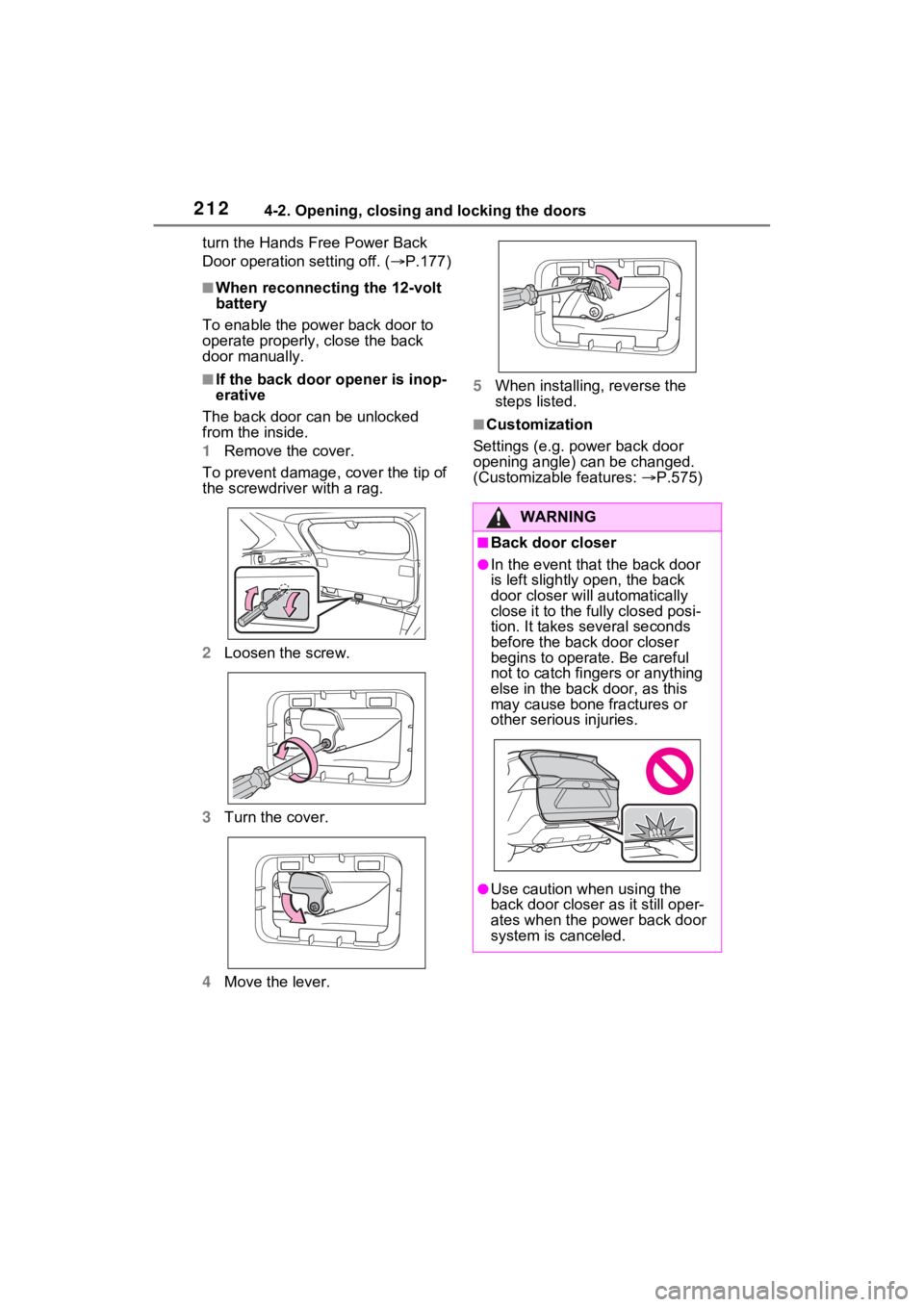
■If the back door opener is inop-
erative
The back door can be unlocked
from the inside.
1 Remove the cover.
To prevent damage, cover the tip of
the screwdriver with a rag.
2 Loosen the screw.
3 Turn the cover.
4 Move the lever. 5
When installing, reverse the
steps listed.
■Customization
Settings (e.g. power back door
opening angle) can be changed.
(Customizable features: P.575)
WARNING
■Back door closer
●In the event that the back door
is left slightly open, the back
door closer will automatically
close it to the fu lly closed posi-
tion. It takes several seconds
before the back door closer
begins to operate. Be careful
not to catch fingers or anything
else in the back door, as this
may cause bone fractures or
other serious injuries.
●Use caution when using the
back door closer as it still oper-
ates when the power back door
system is canceled.