traction control TOYOTA RAV4 PRIME 2022 User Guide
[x] Cancel search | Manufacturer: TOYOTA, Model Year: 2022, Model line: RAV4 PRIME, Model: TOYOTA RAV4 PRIME 2022Pages: 624, PDF Size: 24.01 MB
Page 133 of 624
1332-2. Charging
2
Plug-in hybrid system
●When turning “Charge Now” on
( P.137, 142)
●When an operation that temporar-
ily cancels charg ing using the
charging schedule is performed
( P.125)
■Effects of outside temperature
When the charging mode is set to
“Departure”, charging schedule may
be ignored due to the outside tem-
perature and charging may start.
■“Battery Heater” ( P.115) /
“Battery Cooler” ( P.116)
When charging is c arried out using
the charging schedule, the hybrid
battery (traction battery) heating or
cooling function may operate
according to the te mperature of the
hybrid battery (traction battery).
●When the charging mode is set to
“Start”, the function starts at the
set charging start time.
●“Battery Heater”: When the
charging mode is set to “Depar-
ture”, the function starts automati-
cally to complete heating by the
desired departure time.
●“Battery Cooler”: When the
charging mode is set to “Depar-
ture”, cooling starts approximately
30 minutes before the charging
start time. However, if there is no
time to finish charging by the
charging schedule, the hybrid bat-
tery (traction battery) cooling time
may be shortened and “Battery
Cooler” may not operate.
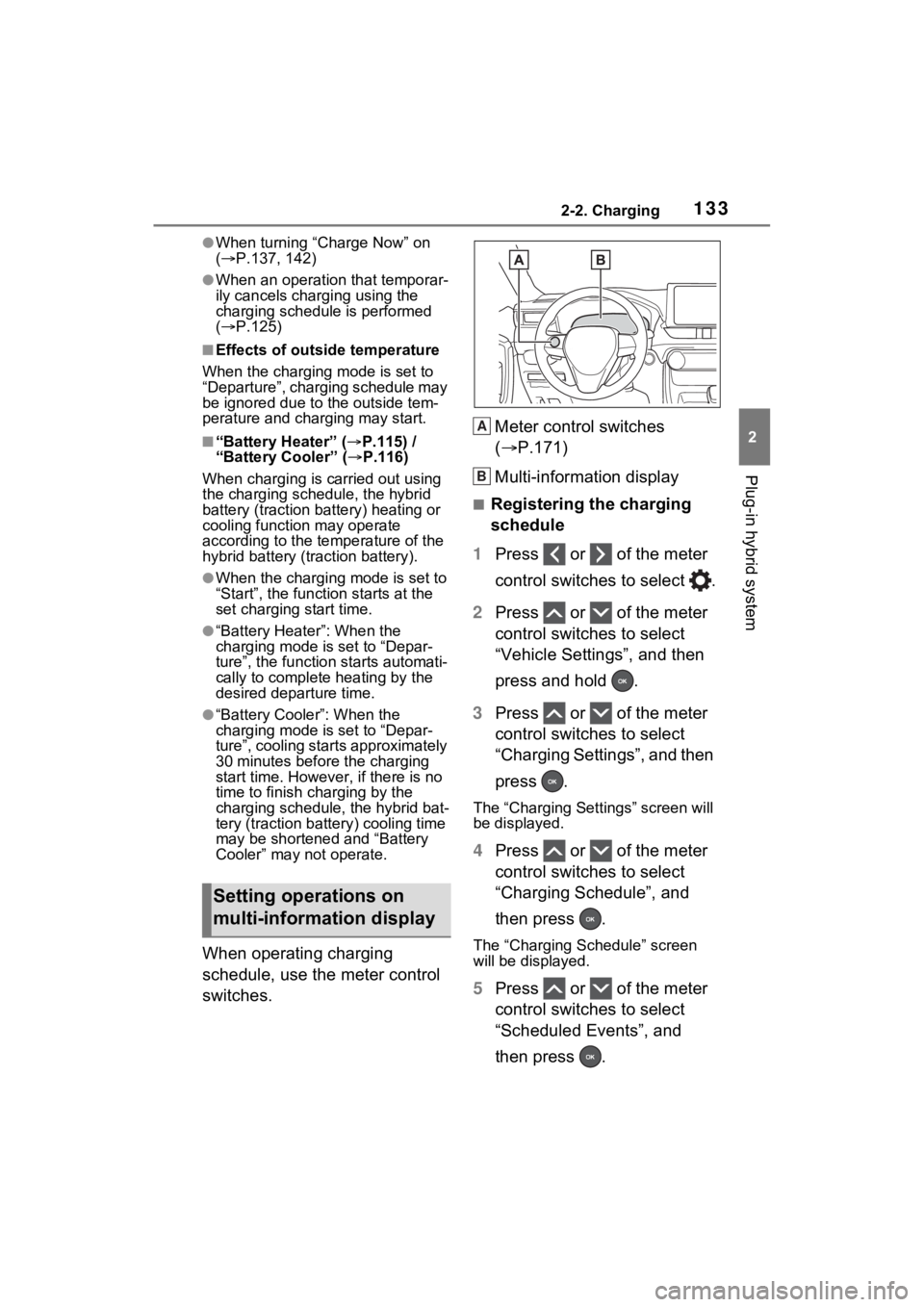
When operating charging
schedule, use the meter control
switches. Meter control switches
(
P.171)
Multi-information display
■Registering the charging
schedule
1 Press or of the meter
control switches to select .
2 Press or of the meter
control switches to select
“Vehicle Settings”, and then
press and hold .
3 Press or of the meter
control switches to select
“Charging Settings”, and then
press .
The “Charging Settings” screen will
be displayed.
4Press or of the meter
control switches to select
“Charging Schedule”, and
then press .
The “Charging Schedule” screen
will be displayed.
5Press or of the meter
control switches to select
“Scheduled Events”, and
then press .
Setting operations on
multi-information display
A
B
Page 146 of 624
1462-2. Charging
■When “My Room Mode” is used
while the hybrid battery (trac-
tion battery) is fully charged
When the power switch is turned on
while the hybrid battery (traction
battery) is fully charged and the
charging connector that supplies
power is connected, “Charging Port
Lid is Open” is displayed on the
multi-information display. In this
case, press on the meter control
switches to display the setting
screen of “My Room Mode”, and
then select “My Room Mode”.
When “My Room Mode” is used
while the hybrid battery (traction
battery) is fully charged, the electric
power of the hybrid battery (traction
battery) may be consumed. In this
case, charging may be performed
again.
■When a message related to “My
Room Mode” is displayed
When a message is displayed on
the multi-informat ion display while
using or attempting to start “My
Room Mode”, take the following cor-
rection procedures.
●“Traction battery is too low for “My
Room Mode””
There is insufficient remaining
charge in the hybrid battery (traction
battery) for starting “My Room
Mode”.
Wait until the char ge of the hybrid
battery (traction battery) increases,
then start “My Room Mode”.
●““My Room Mode” has stopped
due to low traction battery”
The remaining charge in the hybrid
battery (traction battery) is insuffi-
cient.
Stop using “My Room Mode” and
charge the hybrid battery (traction
battery).
●““My Room Mode” will stop when
traction battery is too low Reduce
power usage to continue using
“My Room Mode””
The power consumption inside the
vehicle is greater than the power
being charged to the hybrid battery
(traction battery), and the remaining
charge of the hybrid battery (traction
battery) is low.
*
• “My Room Mode” will end unless the power consumption inside the
vehicle is improved.
• To continue using “My Room Mode”, turn off the power of sys-
tems such as the air conditioning
system and audio system to
increase the remaining charge of
the hybrid battery (traction bat-
tery).
*: The power balance status during
“My Room Mode” can be checked
from the remaining charge dis-
play screen for the hybrid battery
(traction battery) displayed on the
multi-information display.
WARNING
■Cautions for using “My Room
Mode”
Make sure to observe the follow-
ing precautions.
Failure to do so may result in seri-
ous health problems or even
death.
●Do not leave children, people
who need assistance, or pets
inside the vehicle. The system
may turn off aut omatically and
the interior temperature may
become high or low, resulting in
heat stroke, dehydration or
hypothermia. Devices such as
the wipers can also be used,
which may lead to mistaken
operation and an accident.
Page 152 of 624
1522-2. Charging
■Charging ends earlier than time set in “Departure”
AC charging cable was removed and
reinserted while charging indicator of
the charging port was flashing
If the AC charging cable is removed
and reinserted while the charging
indicator is flash ing, the charging
schedule is canceled ( P.125).
Temporarily remove the AC charging
cable, and then reconnect it.
The “My Room Mode” or the Remote
Air Conditioning System was oper-
ated
When the “My Room Mode” or the
Remote Air Conditioning System is
operated, the system will start
charging, even if the charging sched-
ule is registered. To carry out
charging using the charging sched-
ule, stop the “My Room Mode” or the
Remote Air Conditioning System,
and then reconnect the AC charging
cable.
“Battery Heater” ( P.115) operated
When the charging mode is set to
“Departure”, “Battery Heater” may
operate before charging starts.
Check the status of the charging
indicator of the charging port.
( P.100)
Outside temperature is low and
hybrid battery (traction battery)
warming control ( P.116) operated
(Alaska and Canada only)
When hybrid battery (traction bat-
tery) warming control operates, the
charging schedules are ignored and
charging starts. In order to protect
the hybrid battery ( traction battery),
allow charging to continue.
Likely causeCorrection procedure
Charging end time does not match
estimated end time due to condition
of power source or outside tempera-
tureIf sudden changes in temperature or
changes in the condition of the
power source occur while charging,
charging may end earlier than the
time estimated by the system.
Likely causeCorrection procedure
Page 158 of 624
1582-2. Charging
■If “Charging Stopped High Energy Use See Owner’s Manual”
is shown
■If “Charging System Malfunction See Owner’s Manual” is
shown
■If “The Traction Battery Temp is low System put priority on
charging to preserve battery condition” is shown (Alaska and
Canada only)
Likely causeCorrection procedure
Power is being consumed by electri-
cal components of vehicle
Check the following items, and then
carry out charging again.
If the headlights and audio are
turned on, t urn them off.
Turn the power switch off.
If charging cannot be carried out,
even after performing the above, the
auxiliary battery may not be suffi-
ciently charged. Op erate the hybrid
system for approximately 15 minutes
or more to charge the auxiliary bat-
tery.
Likely causeCorrection procedure
Malfunction occurred in charging
systemHave the vehicle inspected by your
Toyota dealer.
Likely causeCorrection procedure
The Hybrid battery ( traction battery)
warming control was operated
( P.116)
When the hybrid battery (traction
battery) warming control operates,
the charging schedule is not used
and charging is performed.
This is a control to protect the hybrid
battery (traction battery), and not a
malfunction.
Page 187 of 624
1873-1. Instrument cluster
3
Vehicle status information and indicators
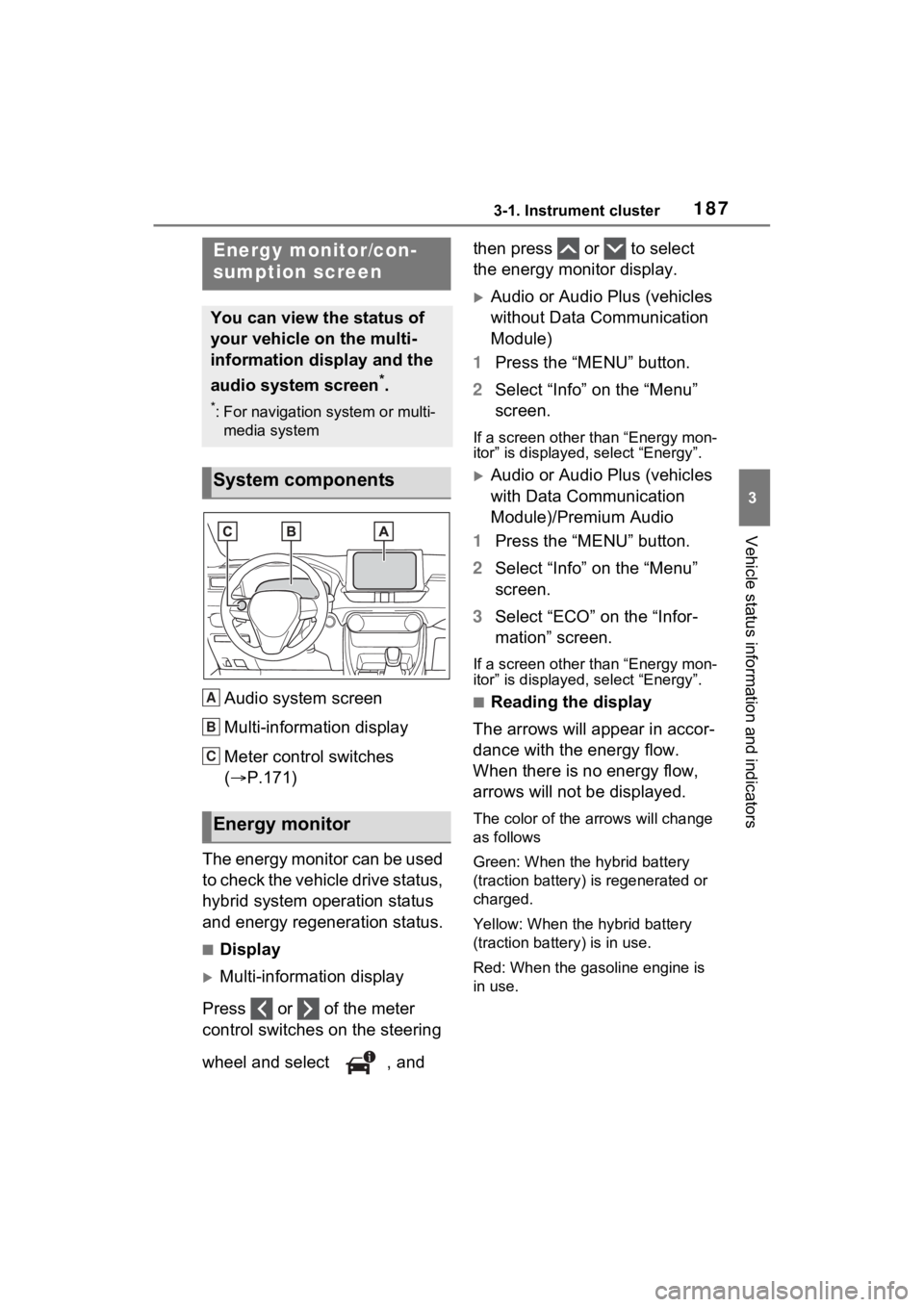
Audio system screen
Multi-information display
Meter control switches
(P.171)
The energy monitor can be used
to check the vehicle drive status,
hybrid system operation status
and energy regeneration status.
■Display
Multi-information display
Press or of the meter
control switches on the steering
wheel and select , and then press or to select
the energy monitor display.
Audio or Audio Plus (vehicles
without Data Communication
Module)
1 Press the “MENU” button.
2 Select “Info” on the “Menu”
screen.
If a screen other than “Energy mon-
itor” is displayed, select “Energy”.
Audio or Audio Plus (vehicles
with Data Communication
Module)/Premium Audio
1 Press the “MENU” button.
2 Select “Info” on the “Menu”
screen.
3 Select “ECO” on the “Infor-
mation” screen.
If a screen other than “Energy mon-
itor” is displayed, select “Energy”.
■Reading the display
The arrows will appear in accor-
dance with the energy flow.
When there is no energy flow,
arrows will not be displayed.
The color of the arrows will change
as follows
Green: When the hybrid battery
(traction battery) is regenerated or
charged.
Yellow: When the hybrid battery
(traction battery) is in use.
Red: When the gasoline engine is
in use.
Energy monitor/con-
sumption screen
You can view the status of
your vehicle on the multi-
information display and the
audio system screen
*.
*: For navigation system or multi-
media system
System components
Energy monitor
A
B
C
Page 258 of 624
2585-1. Before driving
WARNING
■When driving the vehicle
●Do not drive if y ou are unfamil-
iar with the location of the brake
and accelerator pedals to avoid
depressing the wrong pedal.
• Accidentally depressing the accelerator pedal instead of the
brake pedal will result in sudden
acceleration that may lead to an
accident.
• When backing up, you may twist your body around, leading to a
difficulty in operating the pedals.
Make sure to operate the pedals
properly.
• Make sure to keep a correct driving posture even when mov-
ing the vehicle only slightly. This
allows you to depress the brake
and accelerator pedals properly.
• Depress the brake pedal using your right foot. Depressing the
brake pedal using your left foot
may delay respon se in an emer-
gency, resulting in an accident.
●The driver should pay extra
attention to pedestrians when
the vehicle is powered only by
the electric motor (traction
motor). As there is no engine
noise, the pedestrians may mis-
judge the vehicle’s movement.
Even though the vehicle is
equipped with the Acoustic
Vehicle Alerting System, drive
with care as pedestrians in the
vicinity may still not notice the
vehicle if the surrounding area
is noisy.
●Do not drive the vehicle over or
stop the vehicle near flammable
materials such as leaves, paper
or rags.
The exhaust system and
exhaust gases can be
extremely hot. These hot parts
may cause a fire if there is any
flammable material nearby.
●During normal driving, do not
turn off the hybrid system. Turn-
ing the hybrid s ystem off while
driving will not cause loss of
steering or braking control, how-
ever, power assist to the steer-
ing will be lost. This will make it
more difficult to steer smoothly,
so you should pull over and stop
the vehicle as soon as it is safe
to do so.
In the event of a n emergency,
such as if it becomes impossible
to stop the vehicle in the normal
way: P.499
●Use engine braking (downshift)
to maintain a safe speed when
driving down a steep hill.
Using the brakes continuously
may cause the brakes to over-
heat and lose effectiveness.
( P.282)
●Do not adjust the position of the
steering wheel, the seat, or the
inside or outside rear view mir-
rors while driving.
Doing so may result in a loss of
vehicle control.
●Always check that all passen-
gers’ arms, head or other parts
of their body are not outside the
vehicle.
●Do not drive in excess of the
speed limit. Even if the legal
speed limit permits it, do not
drive over 85 mph (140 km/h)
unless your vehicle has high-
speed capability tires. Driving
over 85 mph (140 km/h) may
result in tire fa ilure, loss of con-
trol and possible injury. Be sure
to consult a tire dealer to deter-
mine whether the tires on your
vehicle are high-speed capabil-
ity tires or not before driving at
such speeds.
Page 262 of 624
2625-1. Before driving
When the following unusual
operation is performed with the
accelerator pedal depressed,
the hybrid system output may be
restrained.
• When the shift lever is shifted to R
*.
• When the shift lever is shifted from P or R to forward drive
shift position such as D
*.
When the system op erates, a mes-
sage appears on the multi-informa-
tion display. Read the message and follow the instruction.
*: Depending on the situation, the
shift position may not be
changed.
■Drive-Start Control (DSC)
●When the TRAC is turned off
( P.377), sudden start restraint
control also does not operate. If
your vehicle have trouble escap-
ing from the mud or fresh snow
due to sudden star t restraint con-
trol operation, deactivate TRAC
( P.377) so that the vehicle may
become able to e scape from the
mud or fresh snow.
Also, sudden start restraint control
will not operate in the following con-
ditions:
• When Trail Mode is turned on
NOTICE
In the event that you drive on a
flooded road and the vehicle is
flooded, be sure to have your
Toyota dealer c heck the following:
●Brake function
●Changes in quantity and quality
of oil and fluid used for the
engine, hybrid transaxle (front
and rear), etc.
●Lubricant condition for the bear-
ings and suspension joints
(where possible), and the func-
tion of all joints, bearings, etc.
●Components connected to the
traction battery.
■When parking the vehicle
Always set the parking brake, and
shift the shift lever to P. Failure to
do so may cause the vehicle to
move or the vehi cle may acceler-
ate suddenly if the accelerator
pedal is accidentally depressed.
Sudden start restraint
control (Drive-Start Con-
trol [DSC])
Page 283 of 624
2835-2. Driving procedures
5
Driving
will not be canceled.
●While driving in S mode, down-
shifting to 5 or 4. (P.285)
●When switching the driving mode
to sport mode while driving in D
position. ( P.372)
■Restraining sudden start (Drive-
Start Control)
P.262
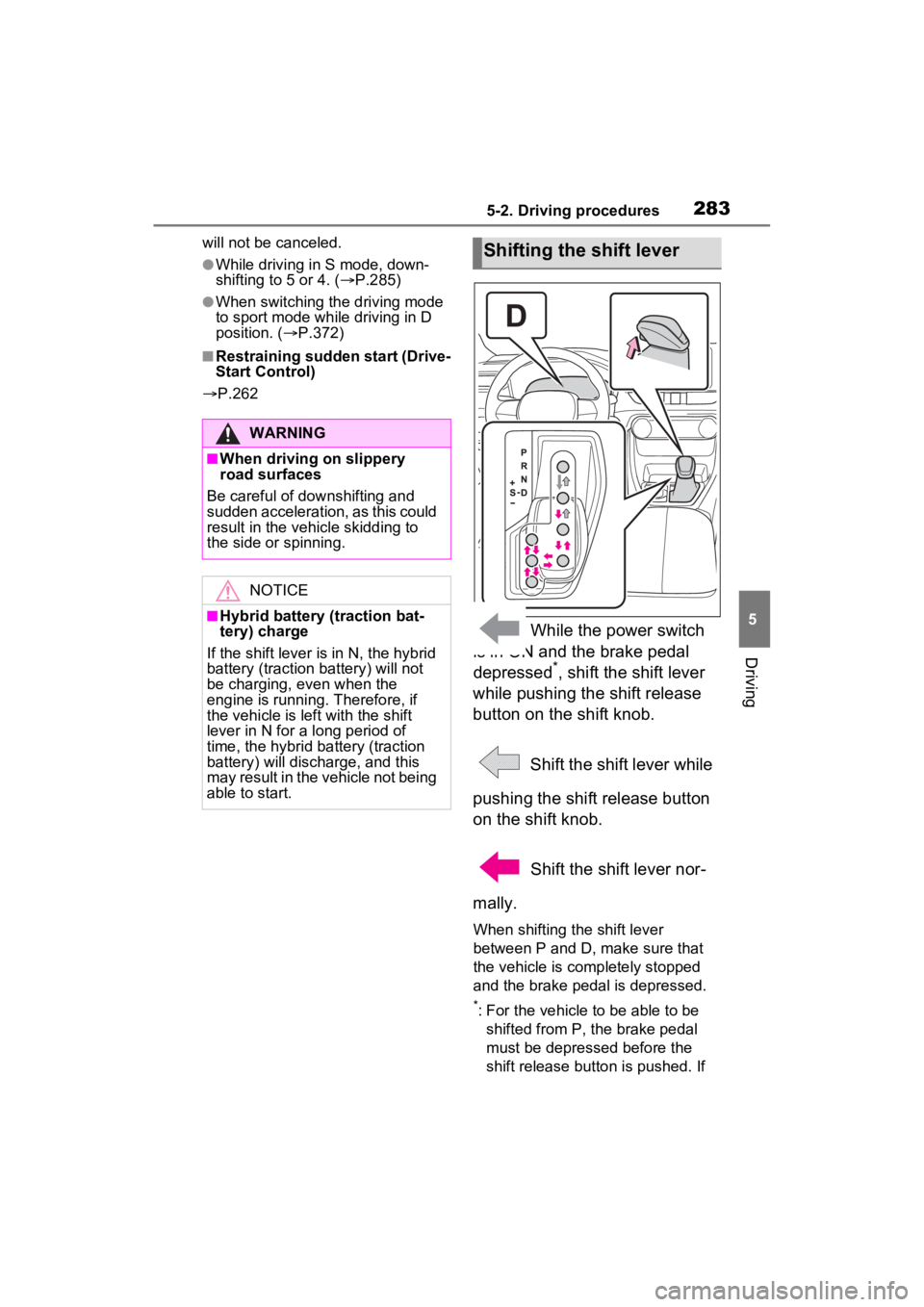
While the power switch
is in ON and the brake pedal
depressed
*, shift the shift lever
while pushing the shift release
button on the shift knob.
Shift the shift lever while
pushing the shift release button
on the shift knob.
Shift the shift lever nor-
mally.
When shifting the shift lever
between P and D, make sure that
the vehicle is completely stopped
and the brake pedal is depressed.
*: For the vehicle to be able to be shifted from P, the brake pedal
must be depressed before the
shift release button is pushed. If
WARNING
■When driving on slippery
road surfaces
Be careful of downshifting and
sudden acceleration, as this could
result in the vehicle skidding to
the side or spinning.
NOTICE
■Hybrid battery (traction bat-
tery) charge
If the shift lever is in N, the hybrid
battery (traction battery) will not
be charging, even when the
engine is running. Therefore, if
the vehicle is left with the shift
lever in N for a long period of
time, the hybrid battery (traction
battery) will discharge, and this
may result in the vehicle not being
able to start.
Shifting the shift lever
Page 374 of 624
3745-5. Using the driving support systems
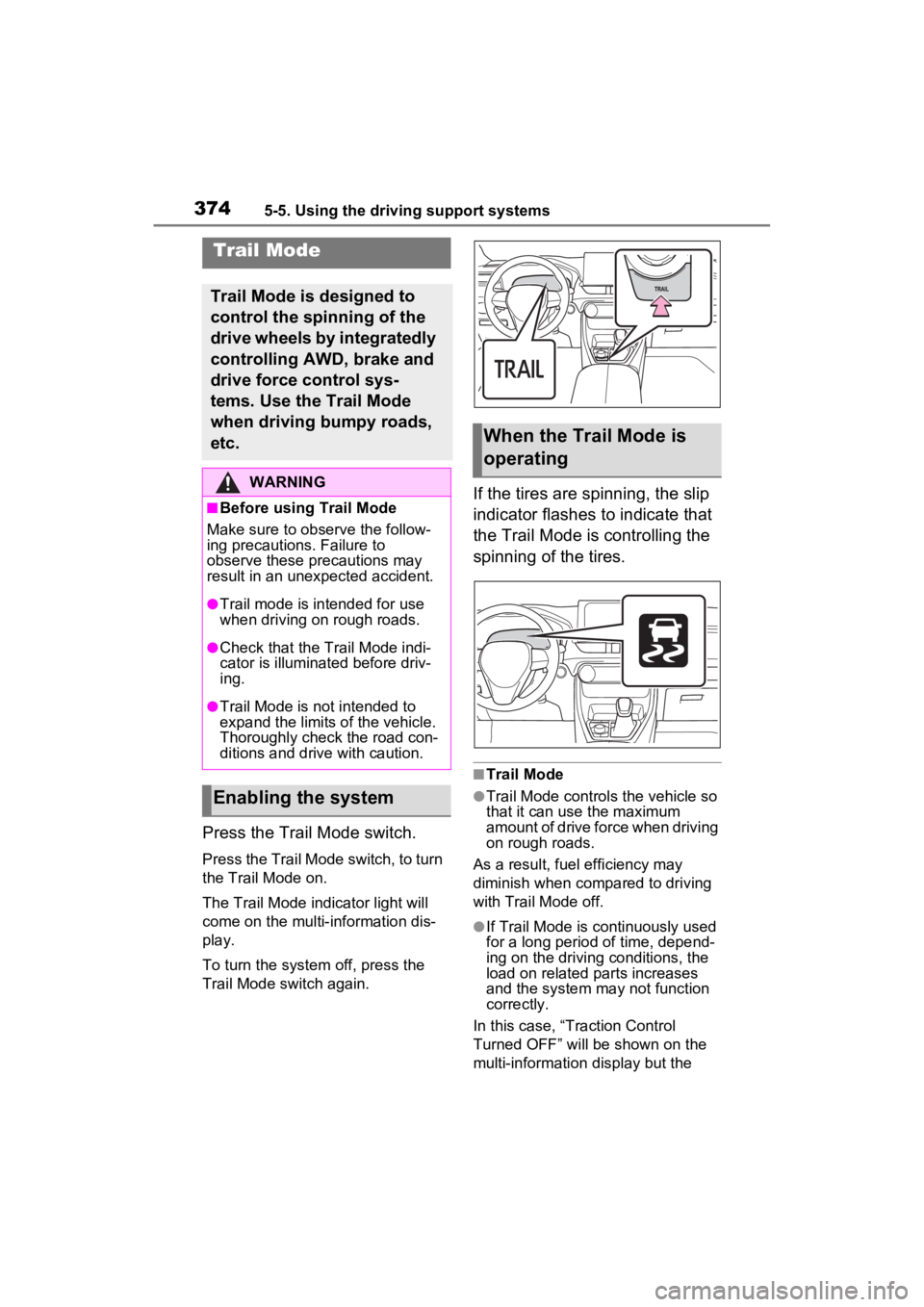
Press the Trail Mode switch.
Press the Trail Mode switch, to turn
the Trail Mode on.
The Trail Mode indicator light will
come on the multi- information dis-
play.
To turn the system off, press the
Trail Mode s witch again.
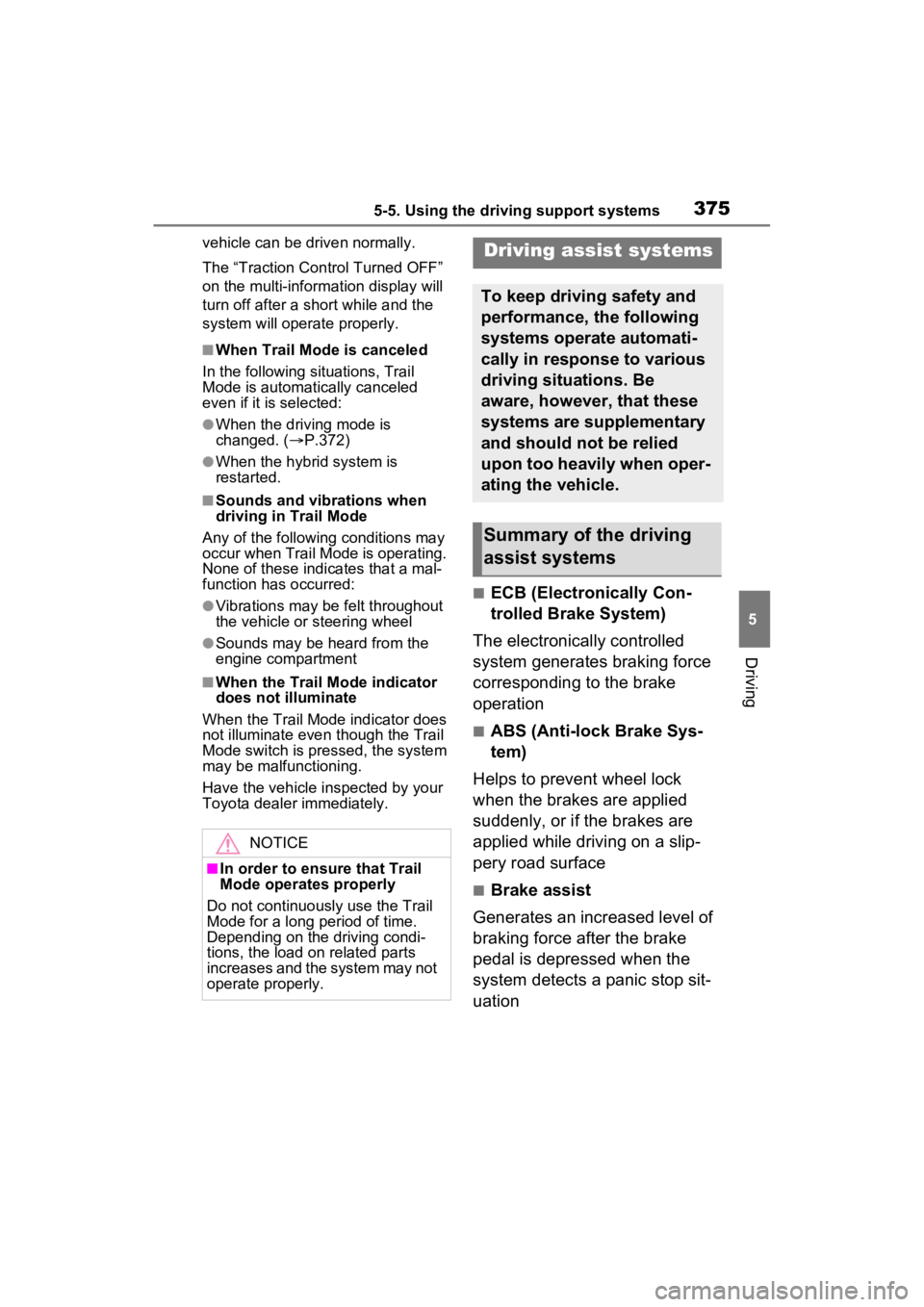
If the tires are spinning, the slip
indicator flashes to indicate that
the Trail Mode is controlling the
spinning of the tires.
■Trail Mode
●Trail Mode controls the vehicle so
that it can use the maximum
amount of drive force when driving
on rough roads.
As a result, fuel efficiency may
diminish when compared to driving
with Trail Mode off.
●If Trail Mode is continuously used
for a long period of time, depend-
ing on the driving conditions, the
load on related parts increases
and the system may not function
correctly.
In this case, “Traction Control
Turned OFF” will be shown on the
multi-information display but the
Trail Mode
Trail Mode is designed to
control the spinning of the
drive wheels by integratedly
controlling AWD, brake and
drive force control sys-
tems. Use the Trail Mode
when driving bumpy roads,
etc.
WARNING
■Before using Trail Mode
Make sure to observe the follow-
ing precautions. Failure to
observe these precautions may
result in an unexpected accident.
●Trail mode is intended for use
when driving on rough roads.
●Check that the Trail Mode indi-
cator is illumina ted before driv-
ing.
●Trail Mode is not intended to
expand the limits of the vehicle.
Thoroughly check the road con-
ditions and drive with caution.
Enabling the system
When the Trail Mode is
operating
Page 375 of 624
3755-5. Using the driving support systems
5
Driving
vehicle can be driven normally.
The “Traction Control Turned OFF”
on the multi-information display will
turn off after a short while and the
system will operate properly.
■When Trail Mode is canceled
In the following situations, Trail
Mode is automatically canceled
even if it is selected:
●When the driving mode is
changed. ( P.372)
●When the hybrid system is
restarted.
■Sounds and vibrations when
driving in Trail Mode
Any of the following conditions may
occur when Trail Mode is operating.
None of these indicates that a mal-
function has occurred:
●Vibrations may be felt throughout
the vehicle or steering wheel
●Sounds may be heard from the
engine compartment
■When the Trail Mode indicator
does not illuminate
When the Trail Mode indicator does
not illuminate even though the Trail
Mode switch is pressed, the system
may be malfunctioning.
Have the vehicle inspected by your
Toyota dealer immediately.
■ECB (Electronically Con-
trolled Brake System)
The electronically controlled
system generates braking force
corresponding to the brake
operation
■ABS (Anti-lock Brake Sys-
tem)
Helps to prevent wheel lock
when the brakes are applied
suddenly, or if the brakes are
applied while driving on a slip-
pery road surface
■Brake assist
Generates an increased level of
braking force after the brake
pedal is depressed when the
system detects a panic stop sit-
uation
NOTICE
■In order to ensure that Trail
Mode operates properly
Do not continuously use the Trail
Mode for a long period of time.
Depending on the driving condi-
tions, the load on related parts
increases and the system may not
operate properly.
Driving assist systems
To keep driving safety and
performance, the following
systems operate automati-
cally in response to various
driving situations. Be
aware, however, that these
systems are supplementary
and should not be relied
upon too heavily when oper-
ating the vehicle.
Summary of the driving
assist systems