ECU TOYOTA RAV4 PRIME 2022 Repair Manual
[x] Cancel search | Manufacturer: TOYOTA, Model Year: 2022, Model line: RAV4 PRIME, Model: TOYOTA RAV4 PRIME 2022Pages: 624, PDF Size: 24.01 MB
Page 265 of 624
2655-1. Before driving
5
Driving
load
As shown in the example above,
if the number of occupants
increases, the cargo and lug-
gage load will be reduced by an
amount that equals the
increased weight due to the
additional occupants. In other
words, if an increase in the num-
ber of occupants causes an
excess of the total load capacity
(combined weight of occupants
plus cargo and luggage load),
you must reduce the cargo and
luggage on your vehicle.
WARNING
■When loading cargo on the
roof luggage carrier (if
equipped)
Observe the following precau-
tions:
●Place the cargo so that its
weight is distributed evenly
between the front and rear
axles.
●If loading long or wide cargo,
never exceed the vehicle overall
length or width. ( P.546)
●Before driving, make sure the
cargo is securel y fastened on
the roof luggage carrier.
●Loading cargo on the roof lug-
gage carrier will make the cen-
ter of gravity of the vehicle
higher. Avoid high speeds, sud-
den starts, sharp turns, sudden
braking or abrupt maneuvers,
otherwise it may result in loss of
control or vehicle rollover due to
failure to operate this vehicle
correctly and resu lt in death or
serious injury.
●If driving for a long distance, on
rough roads, or at high speeds,
stop the vehicle now and then
during the trip to make sure the
cargo remains in its place.
●Do not exceed 176.4 lb. (80 kg)
cargo weight on the roof lug-
gage carrier.
NOTICE
■When loading cargo on the
roof luggage carrier (if
equipped)
Be careful not to scratch the sur-
face of the moon roof (if
equipped) or the panoramic moon
roof (if equipped).
Page 267 of 624
2675-1. Before driving
5
Driving
■Before towing
Check that the fo llowing conditions
are met:
●Ensure that your vehicle’s tires
are properly inflated. ( P.551)
●Trailer tires are inflated according
to the trailer manufacturer’s rec-
ommendation.
●All trailer lights work as required
by law.
●All lights work each time you con-
nect them.
●The trailer ball is set at the proper
height for the coupler on the
trailer.
●The trailer is level when it is
hitched.
Do not drive if th e trailer is not
level, and check for improper
tongue weight, overloading, worn
suspension, or other possible
causes.
●The trailer cargo is securely
loaded.
●The rear view mirr ors conform to
all applicable fede ral, state/provin-
cial or local regulations. If they do
not, install rear view mirrors
appropriate for towing purposes.
Trailer towing
Your vehicle is designed
primarily as a passenger-
and-load-carrying vehicle.
Towing a trailer can have an
adverse impact on handling,
performance, braking, dura-
bility, and fuel consump-
tion. For your safety and the
safety of others, you must
not overload your vehicle or
trailer. You must also
ensure that you are using
appropriate towing equip-
ment, that the towing equip-
ment has been installed
correctly and used properly,
and that you employ the
requisite driving habits.
Vehicle-trailer stability and
braking performance are
affected by trailer stability,
brake performance and set-
ting, trailer brakes, the hitch
and hitch systems (if
equipped).
To tow a trailer safely, use
extreme care and drive the
vehicle in accordance with
your trailer’s characteris-
tics and operating condi-
tions.
Toyota warranties do not
apply to damage or mal-
function caused by towing a
trailer for commercial pur-
poses.
Contact your Toyota dealer for
further information about addi-
tional requirements such as a
towing kit, etc.
Page 269 of 624
2695-1. Before driving
5
Driving
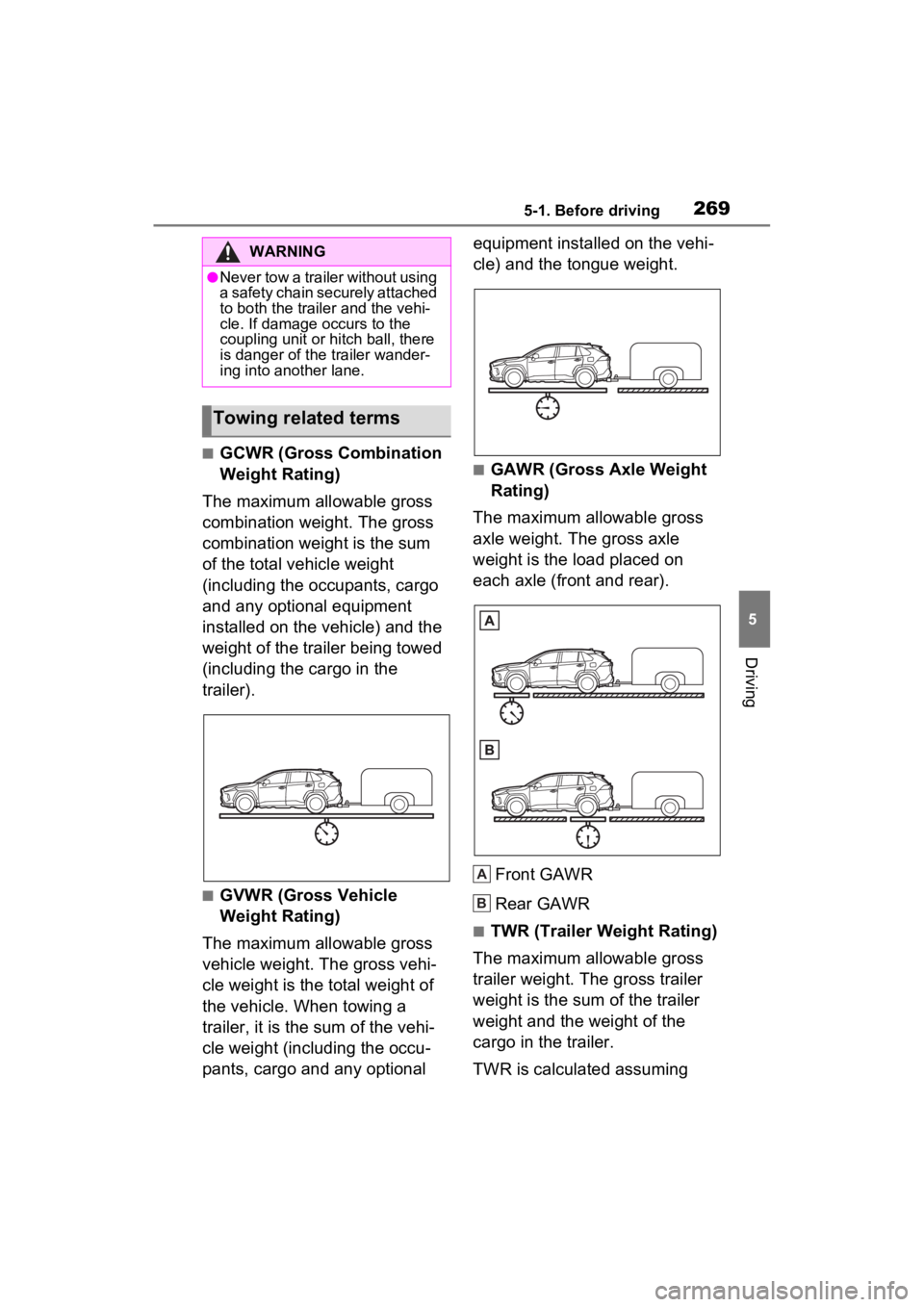
■GCWR (Gross Combination
Weight Rating)
The maximum allowable gross
combination weight. The gross
combination weight is the sum
of the total vehicle weight
(including the occupants, cargo
and any optional equipment
installed on the vehicle) and the
weight of the trailer being towed
(including the cargo in the
trailer).
■GVWR (Gross Vehicle
Weight Rating)
The maximum allowable gross
vehicle weight. The gross vehi-
cle weight is the total weight of
the vehicle. When towing a
trailer, it is the sum of the vehi-
cle weight (including the occu-
pants, cargo and any optional equipment installed on the vehi-
cle) and the tongue weight.
■GAWR (Gross Axle Weight
Rating)
The maximum allowable gross
axle weight. The gross axle
weight is the load placed on
each axle (front and rear).
Front GAWR
Rear GAWR
■TWR (Trailer Weight Rating)
The maximum allowable gross
trailer weight. The gross trailer
weight is the sum of the trailer
weight and the weight of the
cargo in the trailer.
TWR is calculated assuming
WARNING
●Never tow a trailer without using
a safety chain securely attached
to both the traile r and the vehi-
cle. If damage occurs to the
coupling unit or hitch ball, there
is danger of the trailer wander-
ing into another lane.
Towing related terms
A
B
Page 305 of 624
3055-4. Refueling
5
Driving
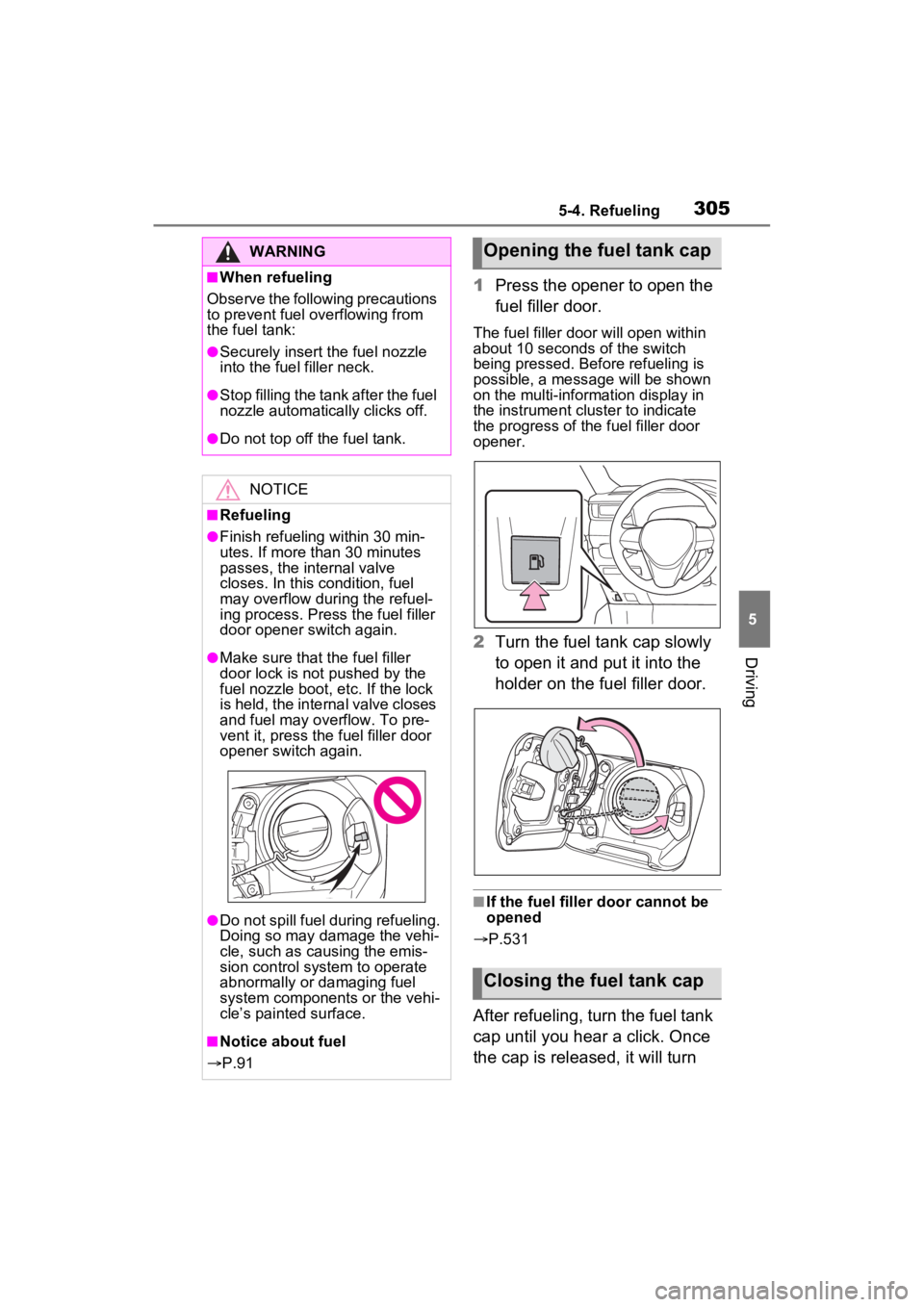
1Press the opener to open the
fuel filler door.
The fuel filler door will open within
about 10 seconds of the switch
being pressed. Before refueling is
possible, a message will be shown
on the multi-information display in
the instrument cluster to indicate
the progress of the fuel filler door
opener.
2Turn the fuel tank cap slowly
to open it and put it into the
holder on the fuel filler door.
■If the fuel filler door cannot be
opened
P.531
After refueling, turn the fuel tank
cap until you hear a click. Once
the cap is released, it will turn
WARNING
■When refueling
Observe the following precautions
to prevent fuel overflowing from
the fuel tank:
●Securely insert the fuel nozzle
into the fuel filler neck.
●Stop filling the tank after the fuel
nozzle automatically clicks off.
●Do not top off the fuel tank.
NOTICE
■Refueling
●Finish refueling within 30 min-
utes. If more than 30 minutes
passes, the internal valve
closes. In this condition, fuel
may overflow during the refuel-
ing process. Press the fuel filler
door opener switch again.
●Make sure that the fuel filler
door lock is not pushed by the
fuel nozzle boot, etc. If the lock
is held, the internal valve closes
and fuel may overflow. To pre-
vent it, press the fuel filler door
opener switch again.
●Do not spill fuel during refueling.
Doing so may damage the vehi-
cle, such as causing the emis-
sion control system to operate
abnormally or damaging fuel
system components or the vehi-
cle’s painted surface.
■Notice about fuel
P.91
Opening the fuel tank cap
Closing the fuel tank cap
Page 306 of 624
3065-4. Refueling
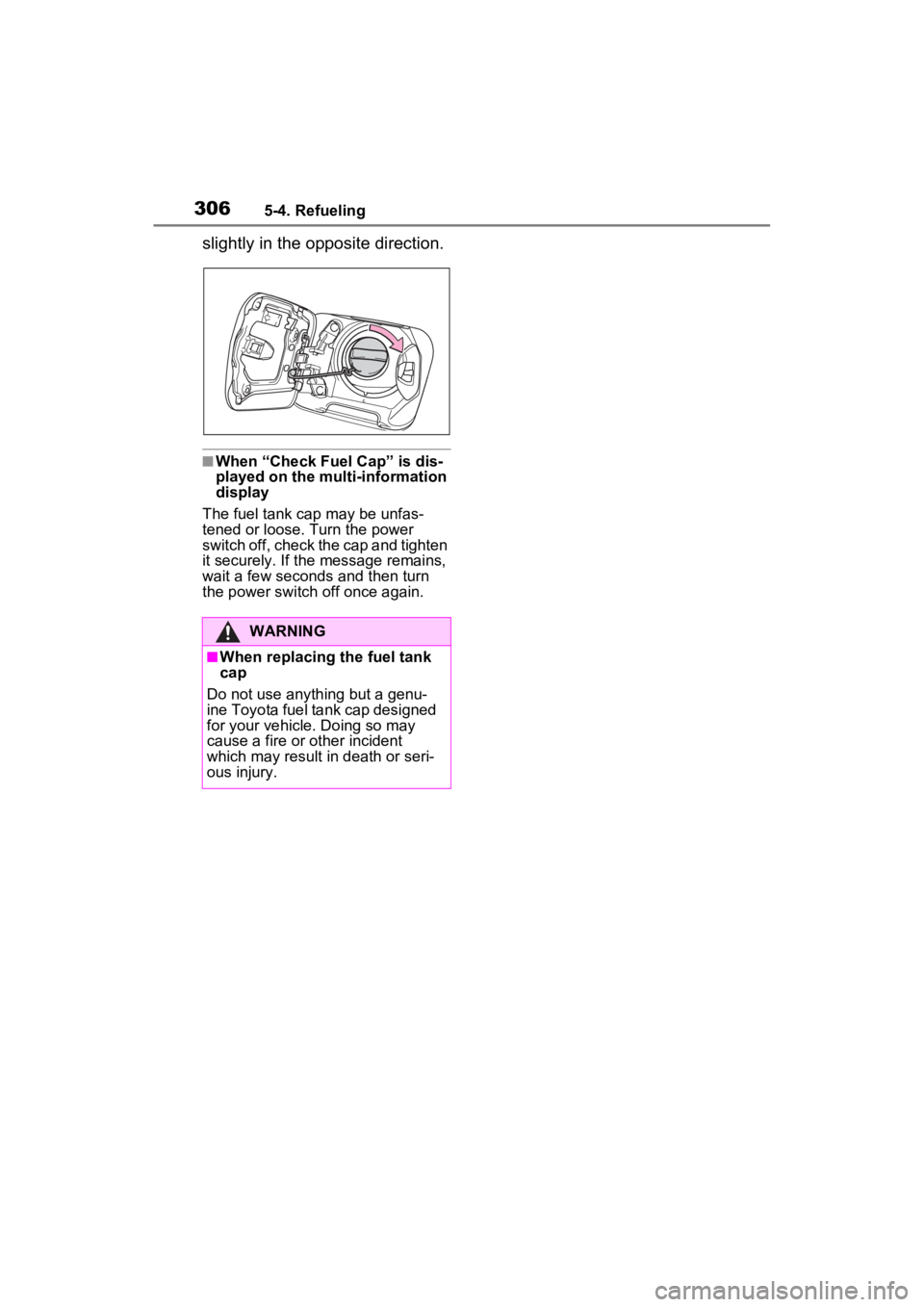
slightly in the opposite direction.
■When “Check Fuel Cap” is dis-
played on the multi-information
display
The fuel tank cap may be unfas-
tened or loose. Turn the power
switch off, check the cap and tighten
it securely. If the message remains,
wait a few seconds and then turn
the power switch off once again.
WARNING
■When replacing the fuel tank
cap
Do not use anything but a genu-
ine Toyota fuel tank cap designed
for your vehicle. Doing so may
cause a fire or other incident
which may result in death or seri-
ous injury.
Page 351 of 624
3515-5. Using the driving support systems
5
Driving
■Conditions under which the
system may not function cor-
rectly
●The BSM function may not detect
vehicles correctly in the following
situations:
• When the sensor is misaligned
due to a strong impact to the sen-
sor or its surrounding area
• When mud, snow, ice, a sticker, etc., is covering the sensor or sur-
rounding area on the rear bumper
• When driving on a road surface that is wet with standing water
during bad weather, such as
heavy rain, snow, or fog
• When multiple vehicles are
approaching with only a small gap
between each vehicle
• When the distanc e between your
vehicle and a following vehicle is
short
• When there is a significant differ-
ence in speed between your vehi-
cle and the vehicle that enters the
detection area
• When the difference in speed between your vehicle and another
vehicle is changing
• When a vehicle enters a detection area traveling at about the same
speed as your vehicle
• As your vehicle starts from a stop, a vehicle remains in the detection
area
• When driving up and down con- secutive steep inclines, such as
hills, dips in the road, etc.
• When driving on roads with sharp bends, consecutive curves, or
uneven surfaces
• When vehicle lanes are wide, or when driving on the edge of a
lane, and the vehicle in an adja-
cent lane is far away from your
vehicle
• When an accessory (such as a bicycle carrier) is installed to the
rear of the vehicle
• When there is a significant differ- ence in height between your vehi-
cle and the vehicle that enters the
detection area
• Immediately after the BSM func- tion/RCTA function are turned on
• When towing a trailer
●Instances of the BSM function
unnecessarily detecting a vehicle
and/or object may increase in the
following situations:
• When the sensor is misaligned due to a strong impact to the sen-
sor or its surrounding area
• When the distance between your vehicle and a guardrail, wall, etc.
that enters the detection area is
short
• When driving up and down con-
secutive steep inclines, such as
hills, dips in the road, etc.
• When vehicle lanes are narrow, or
when driving on the edge of a
lane, and a vehicle traveling in a
lane other than the adjacent lanes
enters the detection area
• When driving on r oads with sharp
bends, consecutive curves, or
uneven surfaces
• When the tires are slipping or spinning
• When the distance between your vehicle and a following vehicle is
short
• When an accessory (such as a bicycle carrier) is installed to the
rear of the vehicle
• When the vehicle throws up water or snow behind.
■Operation of the RCTA
function
The RCTA function uses radar
sensors to detect vehicles
approaching from the right or left
at the rear of the vehicle and
alerts the driver of the presence
of such vehicles by flashing the
outside rear view mirror indica-
tors and sounding a buzzer.
The Rear Cross Traffic
Alert function
Page 400 of 624
4006-1. Using the air conditioning system and defogger
cient due to the power being
restricted more than during normal
air conditioning operation. Also, the
outside of the windshield may fog up
due to the outside temperature,
humidity or air conditioning set tem-
perature.
■Using the heater via the Remote
Air Conditioning System
●When the outside temperature is
low, heating may feel insufficient
due to restricted operation of the
air conditioning.
●When the outside heat exchanger
becomes frosted over, heating
performance may decline due to
automatically switching to the frost
removal operation. ( P.390)
■Security feature
Any unlocked doors will be automat-
ically locked when the system is
operating. The buzzer sounds and
the emergency flashers flash to indi-
cate that the doors have been
locked or the system has been
turned off.
■Conditions affecting operation
P.218
■While the Remote Air Condi-
tioning System is operating
●Depending on the operating con-
dition of the Remote Air Condition-
ing System, the air conditioning
compressor or cooling fan may
spin and an operating noise may
be heard. However, this does not
indicate a malfunction.
●The air conditioning operation
switches, etc. will not operate
while the Remote Air Condition-
ing System is operating.
■Electronic key battery depletion
P.194
■When the electronic key bat-
tery is fully depleted
P.487
■Customization
Setting (e.g. Operation using “A/C”
on the wireless remote control) can
be changed. (Customizable fea-
tures: P.565)
WARNING
■Precautions for the Remote
Air Conditioning System
●Do not use the system if people
are in the vehicle.
Even when the system is in use,
the internal temperature may
still reach a high or low level
due to features such as the
automatic shut-off. Children and
pets left inside the vehicle may
suffer heatstroke dehydration or
hypothermia or could result in
death or serious injury.
●Depending on the surrounding
environment, signals from the
wireless switch may transmit
further than e xpected. Pay
appropriate attention to the
vehicle’s surroundings and use
the switch only when neces-
sary.
●Do not operate “A/C” on the
wireless remote control if the
hood is open. The Remote Air
Conditioning System may oper-
ate unintentionally and objects
may be drawn into the electrical
cooling fan.
NOTICE
■To prevent the hybrid battery
(traction battery) from being
discharged
Use “A/C” on the wireless remote
control only when necessary.
Page 411 of 624
4116-3. Using the storage features
6
Interior features
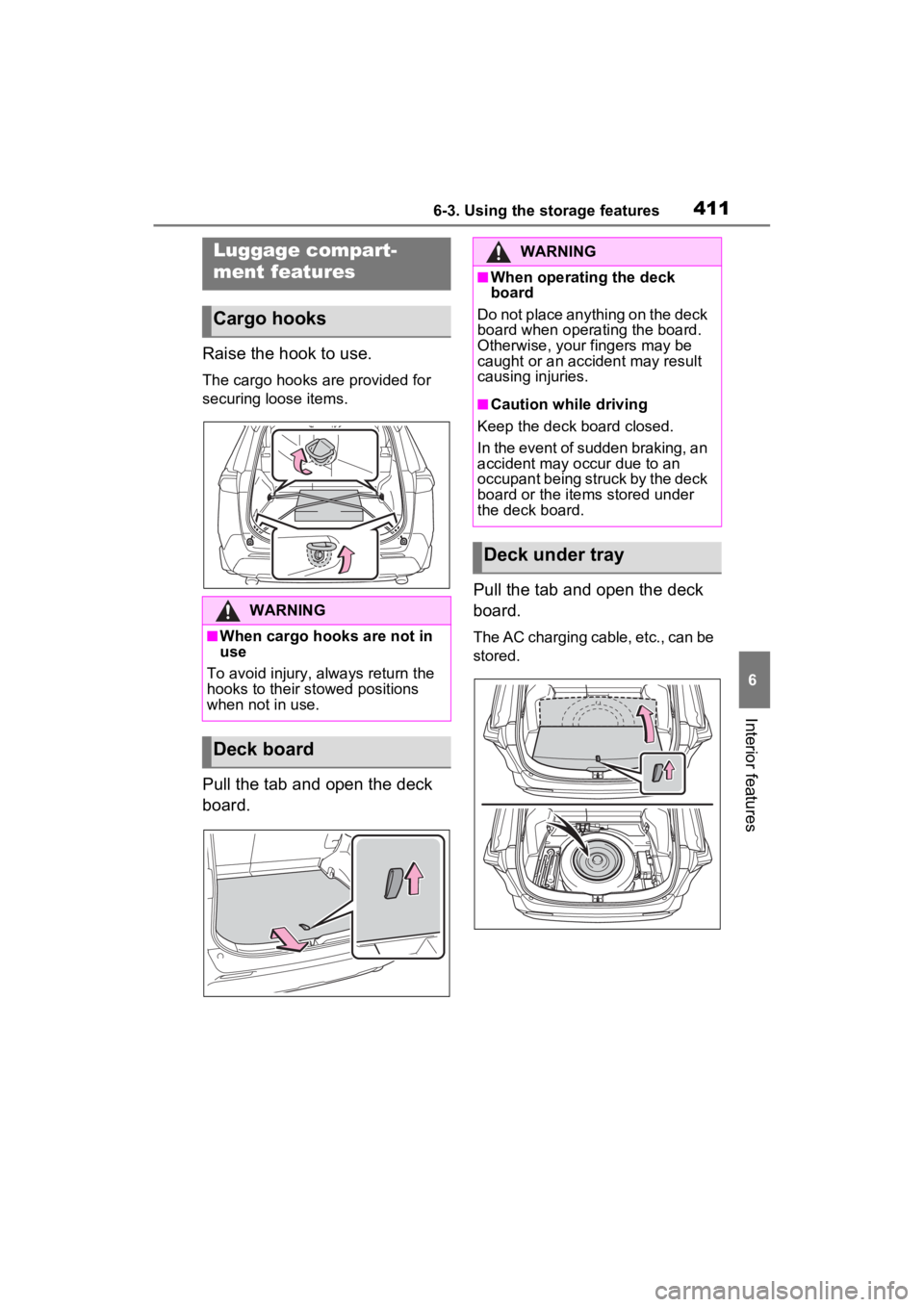
Raise the hook to use.
The cargo hooks are provided for
securing loose items.
Pull the tab and open the deck
board.Pull the tab and open the deck
board.
The AC charging cable, etc., can be
stored.
Luggage compart-
ment features
Cargo hooks
WARNING
■When cargo hooks are not in
use
To avoid injury, always return the
hooks to their stowed positions
when not in use.
Deck board
WARNING
■When operating the deck
board
Do not place anything on the deck
board when operating the board.
Otherwise, your fingers may be
caught or an accident may result
causing injuries.
■Caution while driving
Keep the deck board closed.
In the event of sudden braking, an
accident may occur due to an
occupant being struck by the deck
board or the items stored under
the deck board.
Deck under tray
Page 412 of 624
4126-3. Using the storage features
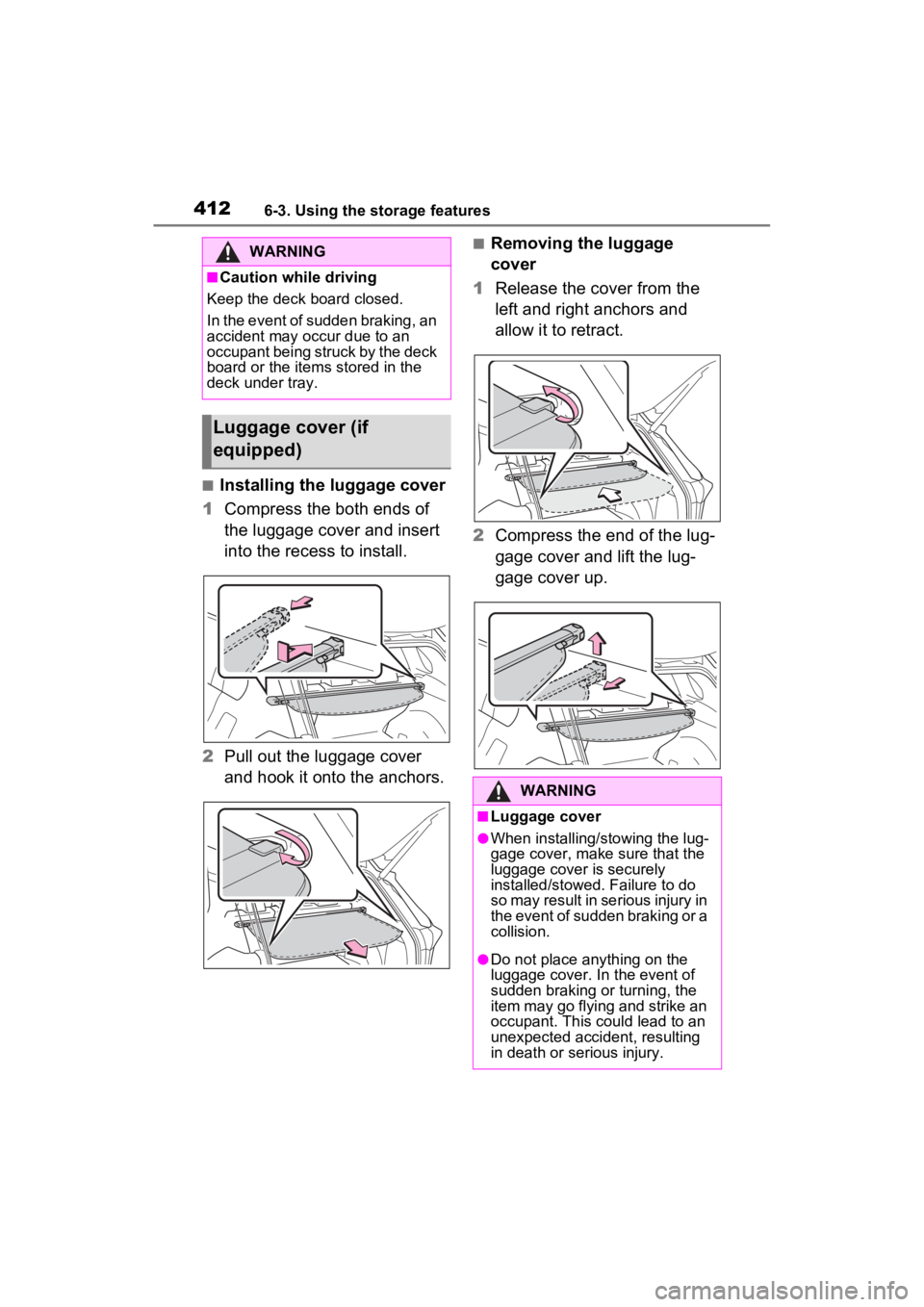
■Installing the luggage cover
1 Compress the both ends of
the luggage cover and insert
into the recess to install.
2 Pull out the luggage cover
and hook it onto the anchors.
■Removing the luggage
cover
1 Release the cover from the
left and right anchors and
allow it to retract.
2 Compress the end of the lug-
gage cover and lift the lug-
gage cover up.WARNING
■Caution while driving
Keep the deck board closed.
In the event of sudden braking, an
accident may occur due to an
occupant being struck by the deck
board or the items stored in the
deck under tray.
Luggage cover (if
equipped)
WARNING
■Luggage cover
●When installing/stowing the lug-
gage cover, make sure that the
luggage cover is securely
installed/stowed. Failure to do
so may result in serious injury in
the event of sudden braking or a
collision.
●Do not place anything on the
luggage cover. In the event of
sudden braking or turning, the
item may go flying and strike an
occupant. This could lead to an
unexpected accident, resulting
in death or serious injury.
Page 424 of 624
4246-4. Using the other interior features
*: If equipped
Make sure to check the follow-
ings before using the power out-
let.
Park the vehicle in a well-ven-
tilated area, avoiding loca-
tions with poor ventilation
such as garages, as the
engine may start while the
system is operating.
Park the vehicle on a hard,
flat surface
Using wheel chocks is recom-
mended.
Wheel chocks can be purchased at
your Toyota dealer.
Close the hood
Set the parking brake
Shift the shift lever to P
Turn the power switch to OFF
Do not leave any valuables in
the vehicle or luggage com-
partment, in order to prevent
theft. The automatic alarm
cannot be set while supplying
power.
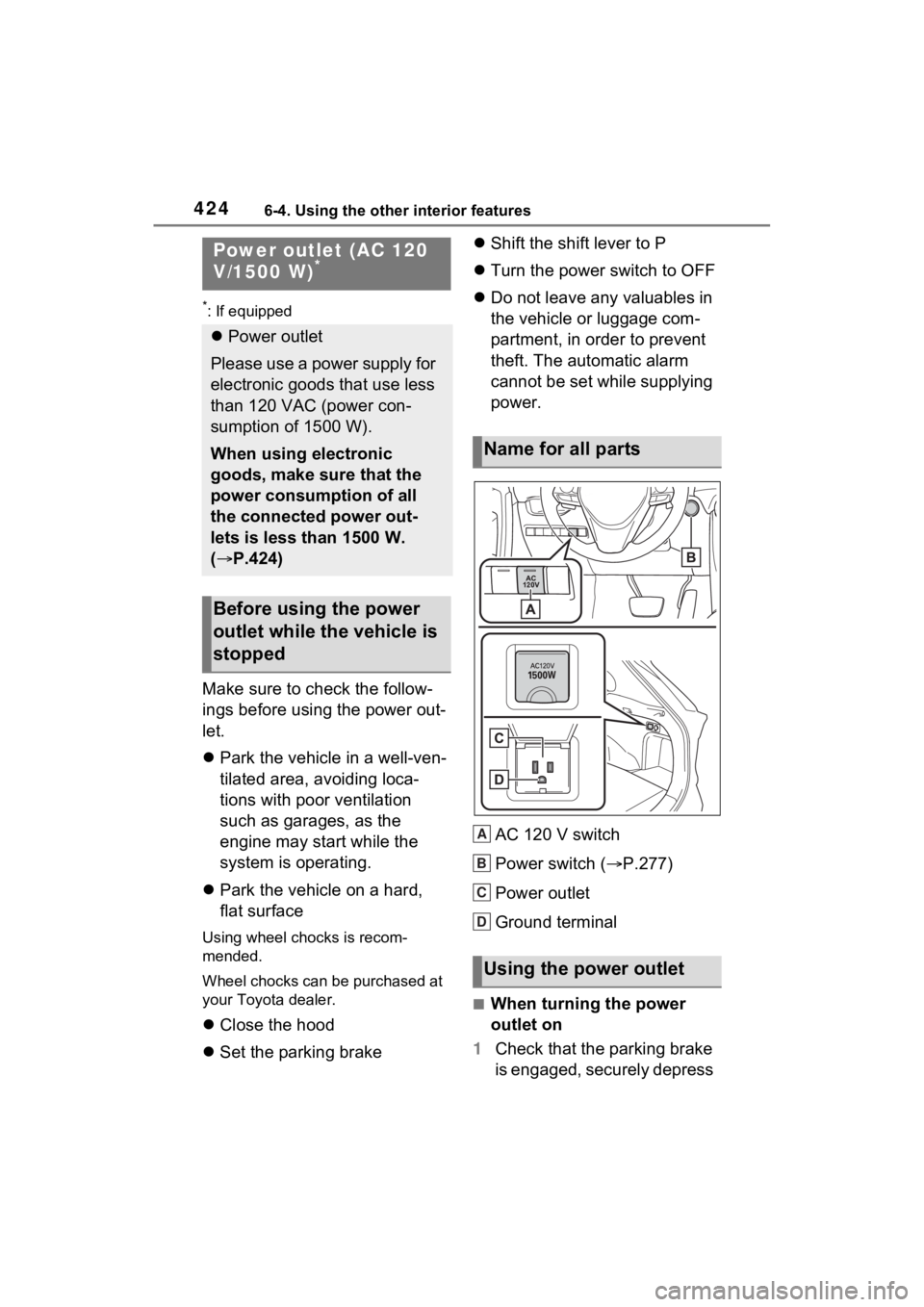
AC 120 V switch
Power switch ( P.277)
Power outlet
Ground terminal
■When turning the power
outlet on
1 Check that the parking brake
is engaged, securely depress
Power outlet (AC 120
V/1500 W)*
Power outlet
Please use a power supply for
electronic goods that use less
than 120 VAC (power con-
sumption of 1500 W).
When using electronic
goods, make sure that the
power consumption of all
the connected power out-
lets is less than 1500 W.
( P.424)
Before using the power
outlet while the vehicle is
stopped
Name for all parts
Using the power outlet
A
B
C
D