ECU TOYOTA RAV4 PRIME 2022 Manual PDF
[x] Cancel search | Manufacturer: TOYOTA, Model Year: 2022, Model line: RAV4 PRIME, Model: TOYOTA RAV4 PRIME 2022Pages: 624, PDF Size: 24.01 MB
Page 425 of 624
4256-4. Using the other interior features
6
Interior features
the brake pedal and press
the power switch (P.277).
2 Check that the READY indi-
cator is illuminated, and
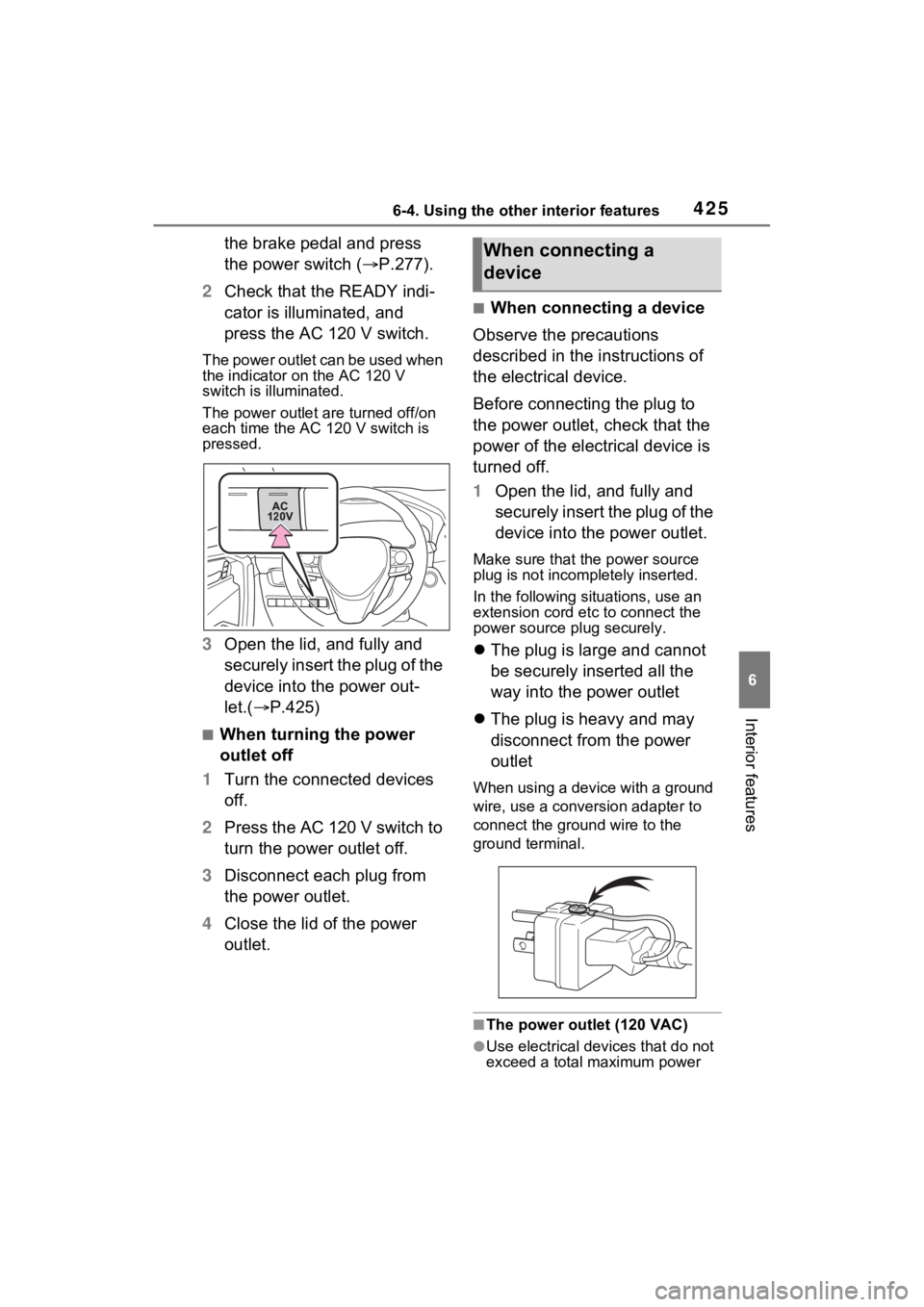
press the AC 120 V switch.
The power outlet can be used when
the indicator on the AC 120 V
switch is illuminated.
The power outlet a re turned off/on
each time the AC 120 V switch is
pressed.
3 Open the lid, and fully and
securely insert the plug of the
device into the power out-
let.( P.425)
■When turning the power
outlet off
1 Turn the connected devices
off.
2 Press the AC 120 V switch to
turn the power outlet off.
3 Disconnect each plug from
the power outlet.
4 Close the lid of the power
outlet.
■When connecting a device
Observe the precautions
described in the instructions of
the electrical device.
Before connecting the plug to
the power outlet, check that the
power of the electrical device is
turned off.
1 Open the lid, and fully and
securely insert the plug of the
device into the power outlet.
Make sure that the power source
plug is not incompletely inserted.
In the following situations, use an
extension cord e tc to connect the
power source plug securely.
The plug is large and cannot
be securely inserted all the
way into the power outlet
The plug is heavy and may
disconnect from the power
outlet
When using a device with a ground
wire, use a conversion adapter to
connect the ground wire to the
ground terminal.
■The power outlet (120 VAC)
●Use electrical dev ices that do not
exceed a total maximum power
When connecting a
device
Page 428 of 624
4286-4. Using the other interior features
WARNING
■Using the power outlet while
parked or stopped
●The power outlets are for use in
directly connecting electrical
devices such as lights. Do not
use the power outlets as gener-
ators to supply power to a
house, etc. To use this as a
power supply system for emer-
gency use (for example, as a
dedicated system that can be
connected to an external power
source, or as a system where
the supply circuit from the exter-
nal power source is separate
from the electric wiring from the
power company) for a house,
etc., consult with the manufac-
turer or dealer of this system.
●While using the power outlet,
make sure to securely engage
the parking brake and not to
shift the shift lever from P. The
vehicle may move unexpect-
edly, possibly resulting in an
accident.
●Do not leave the vehicle unat-
tended while using the power
outlet.
●Do not use the power outlet
during weather with a possibility
of lightning. If you notice light-
ning while using the power out-
let, stop using it.
●Do not use the p ower outlet if
the vehicle has a vehicle cover
installed.
●Be especially careful when
using an electrical device such
as a heater and sleeping in the
vehicle. The device may stop
unexpectedly due to operations
such as an autom atic stop of
the power supply system.
●Do not use while the vehicle is
stopped on a slope or other
slanted location. Do not move or
tilt the vehicle during use.
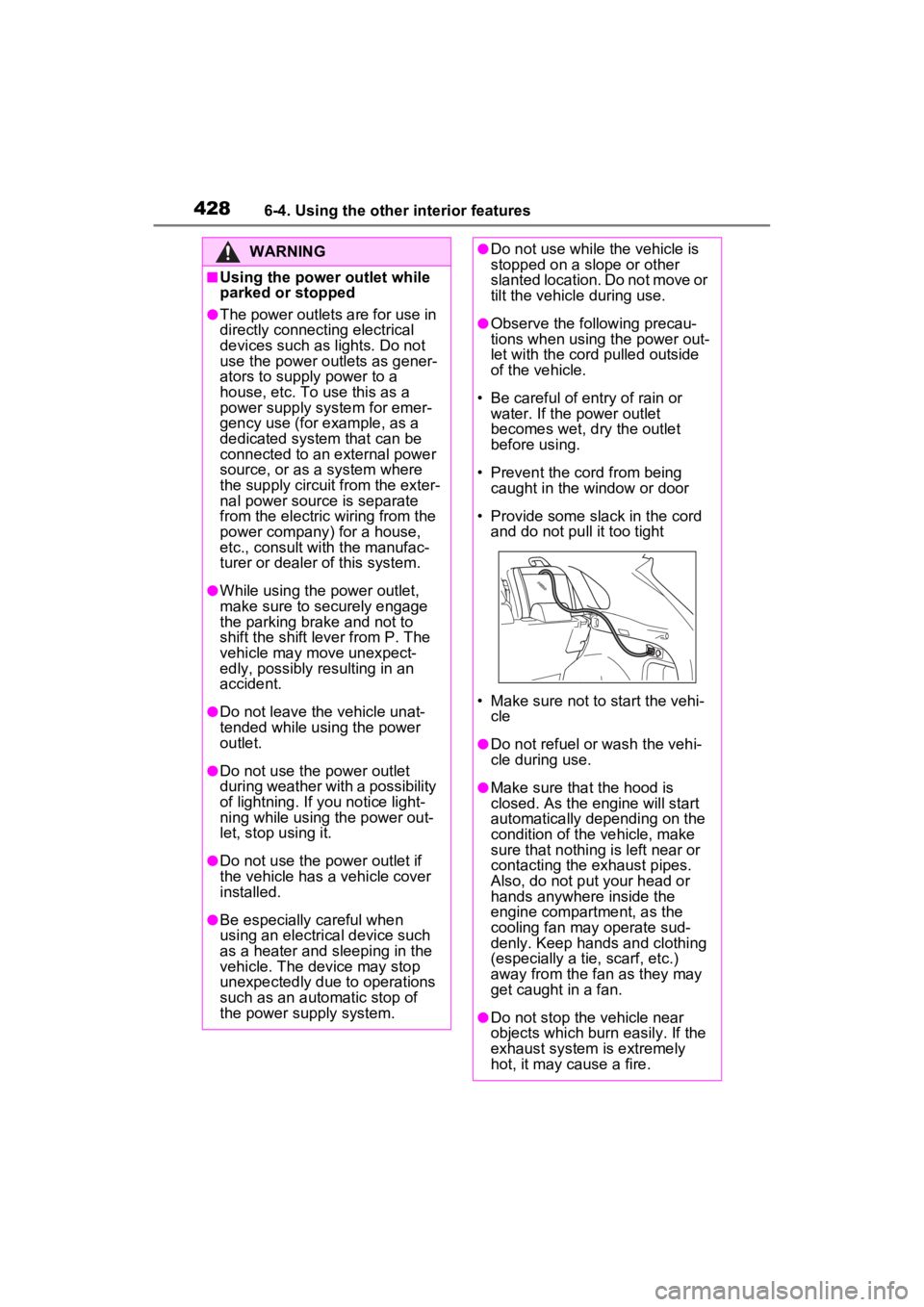
●Observe the fo llowing precau-
tions when using the power out-
let with the cord pulled outside
of the vehicle.
• Be careful of entry of rain or water. If the po wer outlet
becomes wet, dry the outlet
before using.
• Prevent the cord from being caught in the window or door
• Provide some slack in the cord and do not pu ll it too tight
• Make sure not to start the vehi-
cle
●Do not refuel or wash the vehi-
cle during use.
●Make sure that the hood is
closed. As the engine will start
automatically depending on the
condition of the vehicle, make
sure that nothing is left near or
contacting the exhaust pipes.
Also, do not put your head or
hands anywhere inside the
engine compartment, as the
cooling fan ma y operate sud-
denly. Keep hands and clothing
(especially a tie, scarf, etc.)
away from the fan as they may
get caught in a fan.
●Do not stop the vehicle near
objects which burn easily. If the
exhaust system is extremely
hot, it may cause a fire.
Page 429 of 624
4296-4. Using the other interior features
6
Interior features
WARNING
●The gasoline engine starts auto-
matically when the remaining
charge of the hybrid battery
(traction battery) decreases.
When using a power outlet in an
area with poor ventilation or an
enclosed area, such as a
garage or a place where snow
has piled up, properly use an air
intake and exhaust device to
prevent lack of oxygen and full-
ness of exhaust gas. If such
device cannot be used, do not
use the power outlet.
■When using the power outlet
while driving
●Do not use devices such as the
following when driving. Also, do
not use a device if it cannot be
secured within the vehicle.
• Devices which may distract the driver and be a hinderance to
safe driving, such as a TV, DVD
player, etc.
• When the device is not com- pletely secured and may fall
over in the event of sudden
braking or a collision
• When the device may fall result- ing on an accident, or may gen-
erate heat result ing in a fire
• When there is a risk of burns,
etc. (a toaster, microwave, elec-
tric heater, electric kettle, coffee
maker, etc.)
• Devices which may fall under the pedals and prevent the
brake pedal from being
depressed, such as a hair dryer,
AC adaptor, mouse, etc.
●Do not use devices which pro-
duce steam while the windows
are closed. Doing so may cause
the windows to fog up, reducing
visibility and making it difficult to
drive safely. Also, the steam
may damage or negatively
affect other devices. If the
device must be used, stop the
vehicle and open the windows
before use.
NOTICE
■To avoid short circuit or mal-
function
Observe the following precau-
tions. Failure to do so may lead to
the power outlet not operating
correctly or damage to the vehicle
or a connected device.
●Do not set a toaster or other
device which generates heat
near the interior components or
on a seat. Heat may cause
these parts to melt or burn.
●Do not use devices which are
sensitive to vibration or heat in
the vehicle. These devices may
malfunction due to vibration
while driving or heat while the
vehicle is parked in the sun.
●When not using a power outlet,
make sure to close the cover. If
foreign matter or a liquid enters
the power outlet, it may cause a
malfunction or s hort circuit.
■Using the power outlet while
parked or stopped
●Water may le ak from the
exhaust pipe while the engine
running if the power outlet is
used for a long time. However,
this is not a malfunction.
Page 432 of 624
4326-4. Using the other interior features
*: If equipped
■HomeLink® programming pro-
cedure
The programming procedures can
also be found at the following URL.
Website: www.hom elink.com/toyota
For support, contact customer sup-
port at the following.
Help Line: 1-800-355-3515
The HomeLink® wireless control
system in your vehicle has 3
buttons which can be pro-
grammed to operate 3 different
devices. Refer to the program-
ming methods on the following
pages to determine the method
which is appropriate for the
device.
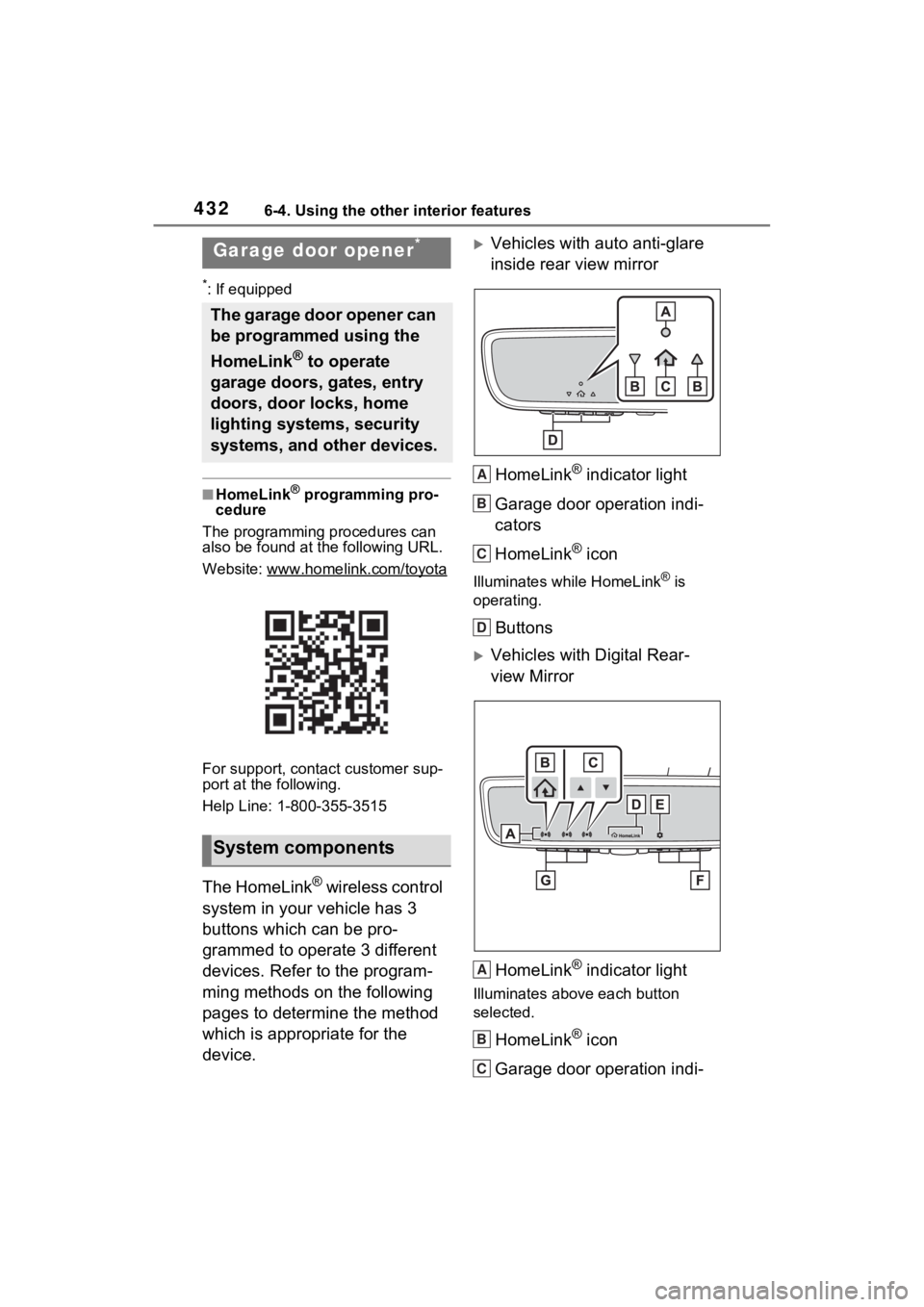
Vehicles with auto anti-glare
inside rear view mirror
HomeLink
® indicator light
Garage door operation indi-
cators
HomeLink
® icon
Illuminates while HomeLink® is
operating.
Buttons
Vehicles with Digital Rear-
view Mirror
HomeLink
® indicator light
Illuminates above each button
selected.
HomeLink® icon
Garage door operation indi-
Garage door opener*
The garage door opener can
be programmed using the
HomeLink
® to operate
garage doors, gates, entry
doors, door locks, home
lighting systems, security
systems, and other devices.
System components
A
B
C
D
A
B
C
Page 448 of 624
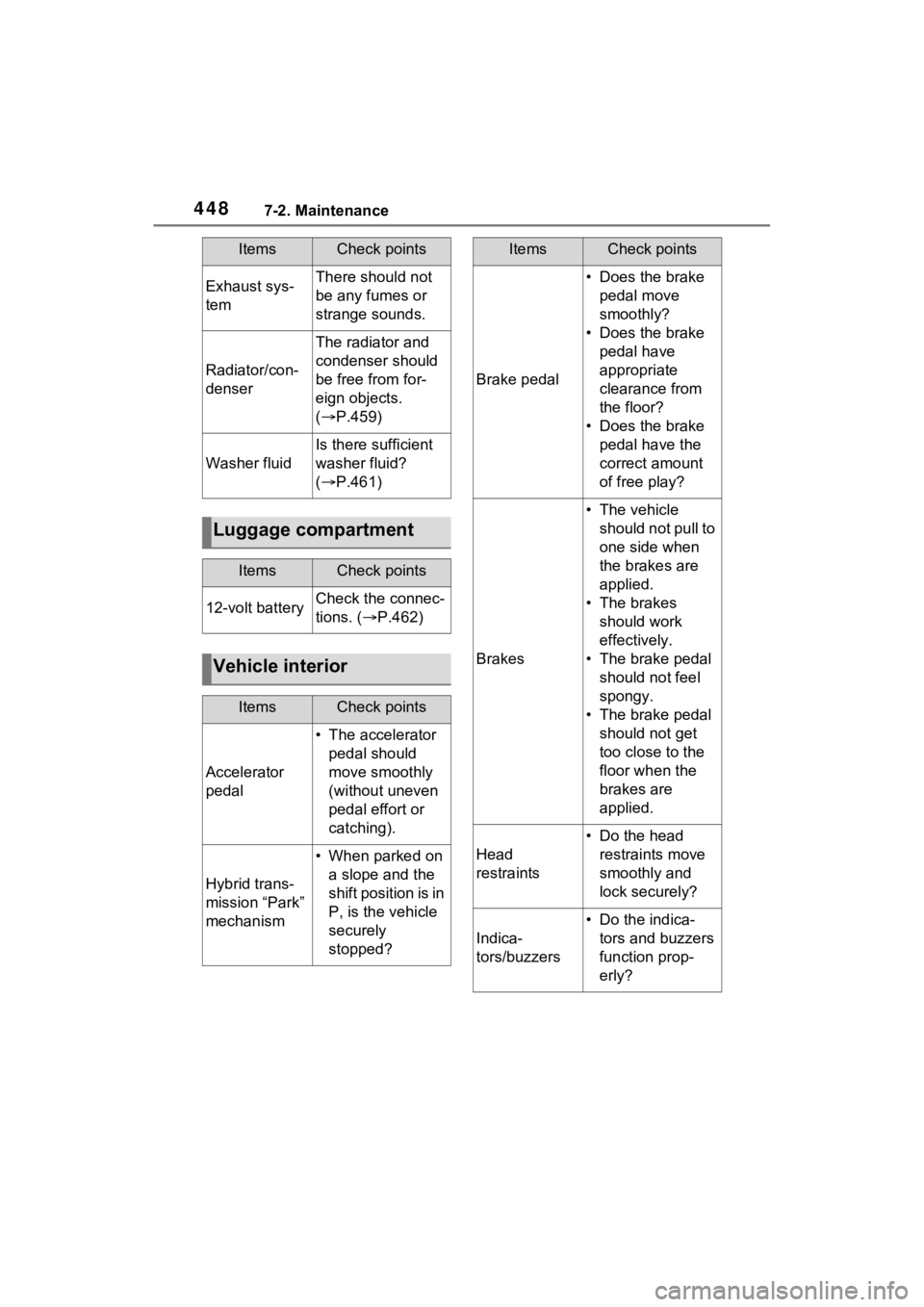
4487-2. Maintenance
Exhaust sys-
temThere should not
be any fumes or
strange sounds.
Radiator/con-
denser
The radiator and
condenser should
be free from for-
eign objects.
( P.459)
Washer fluid
Is there sufficient
washer fluid?
( P.461)
Luggage compartment
ItemsCheck points
12-volt batteryCheck the connec-
tions. ( P.462)
Vehicle interior
ItemsCheck points
Accelerator
pedal
• The accelerator
pedal should
move smoothly
(without uneven
pedal effort or
catching).
Hybrid trans-
mission “Park”
mechanism
• When parked on a slope and the
shift position is in
P, is the vehicle
securely
stopped?
ItemsCheck points
Brake pedal
• Does the brake pedal move
smoothly?
• Does the brake pedal have
appropriate
clearance from
the floor?
• Does the brake pedal have the
correct amount
of free play?
Brakes
• The vehicle should not pull to
one side when
the brakes are
applied.
• The brakes should work
effectively.
• The brake pedal should not feel
spongy.
• The brake pedal should not get
too close to the
floor when the
brakes are
applied.
Head
restraints
• Do the head restraints move
smoothly and
lock securely?
Indica-
tors/buzzers
• Do the indica-tors and buzzers
function prop-
erly?
ItemsCheck points
Page 449 of 624
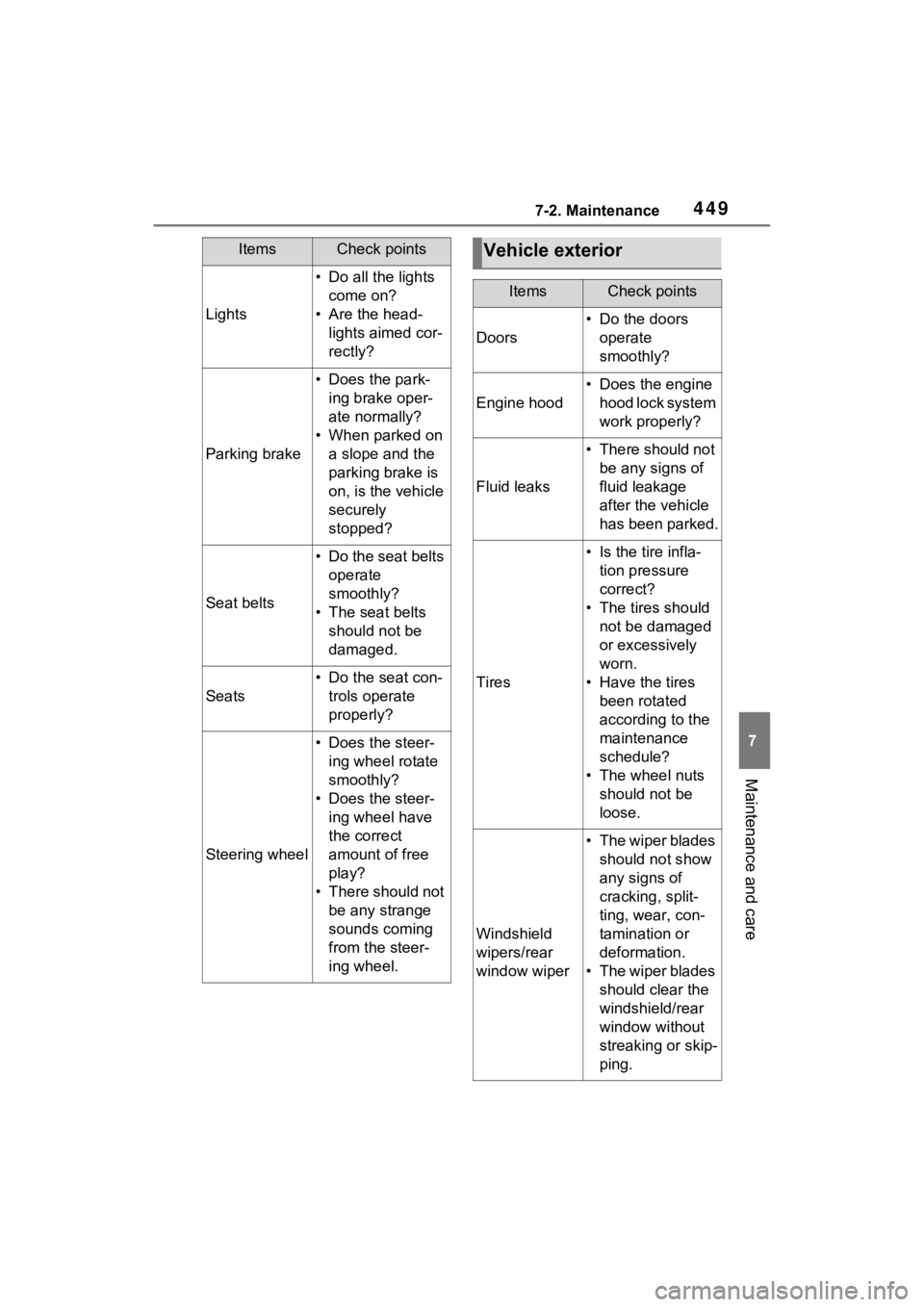
4497-2. Maintenance
7
Maintenance and care
Lights
• Do all the lights come on?
• Are the head- lights aimed cor-
rectly?
Parking brake
• Does the park-ing brake oper-
ate normally?
• When parked on a slope and the
parking brake is
on, is the vehicle
securely
stopped?
Seat belts
• Do the seat belts operate
smoothly?
• The seat belts should not be
damaged.
Seats
• Do the seat con-trols operate
properly?
Steering wheel
• Does the steer-ing wheel rotate
smoothly?
• Does the steer- ing wheel have
the correct
amount of free
play?
• There should not be any strange
sounds coming
from the steer-
ing wheel.
ItemsCheck pointsVehicle exterior
ItemsCheck points
Doors
• Do the doors operate
smoothly?
Engine hood
• Does the engine hood lock system
work properly?
Fluid leaks
• There should not be any signs of
fluid leakage
after the vehicle
has been parked.
Tires
• Is the tire infla-tion pressure
correct?
• The tires should not be damaged
or excessively
worn.
• Have the tires been rotated
according to the
maintenance
schedule?
• The wheel nuts should not be
loose.
Windshield
wipers/rear
window wiper
• The wiper blades should not show
any signs of
cracking, split-
ting, wear, con-
tamination or
deformation.
• The wiper blades should clear the
windshield/rear
window without
streaking or skip-
ping.
Page 454 of 624
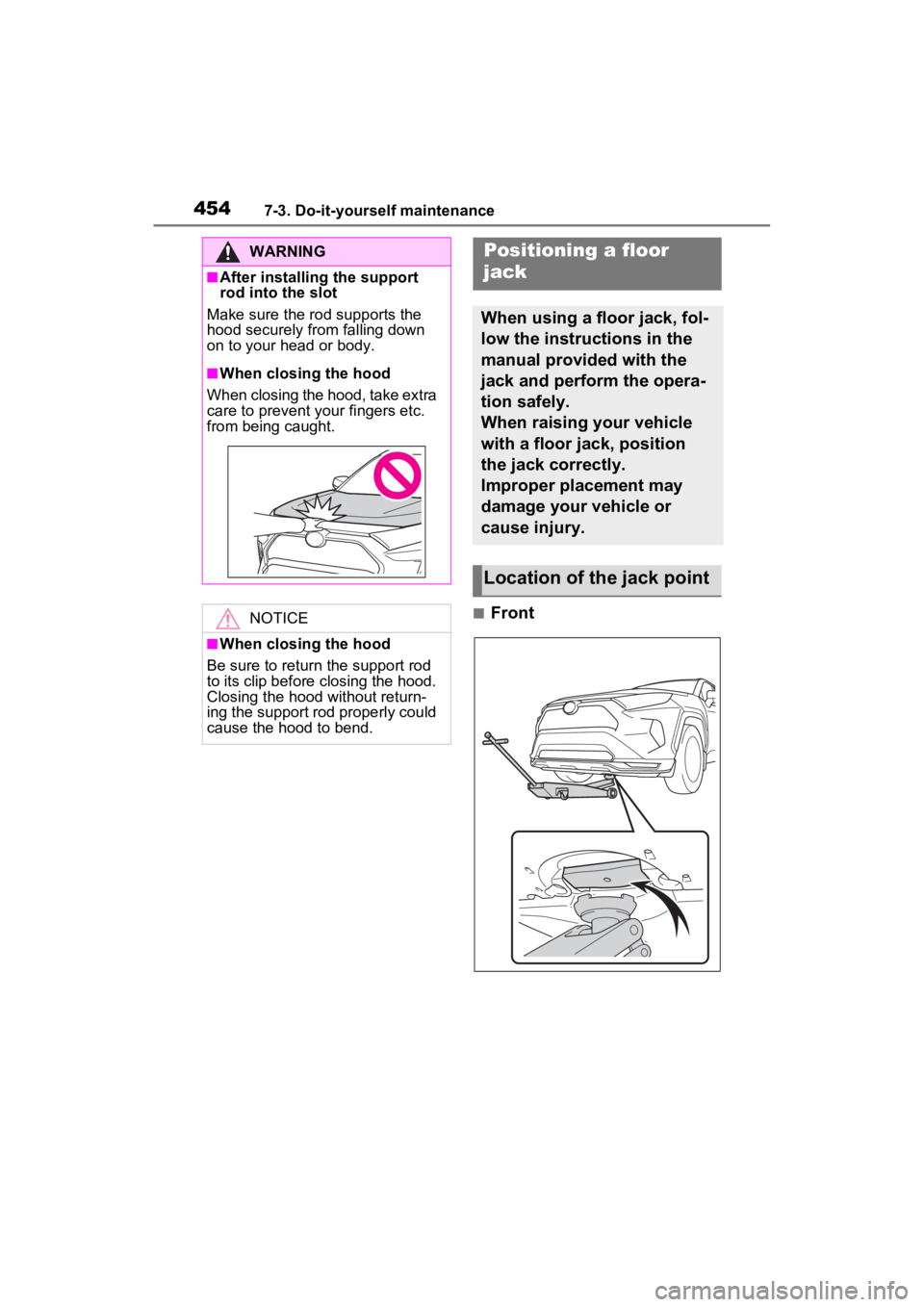
4547-3. Do-it-yourself maintenance
■Front
WARNING
■After installing the support
rod into the slot
Make sure the rod supports the
hood securely from falling down
on to your head or body.
■When closing the hood
When closing the hood, take extra
care to prevent y our fingers etc.
from being caught.
NOTICE
■When closing the hood
Be sure to return the support rod
to its clip before closing the hood.
Closing the hood without return-
ing the support rod properly could
cause the hood to bend.
Positioning a floor
jack
When using a floor jack, fol-
low the instructions in the
manual provided with the
jack and perform the opera-
tion safely.
When raising your vehicle
with a floor jack, position
the jack correctly.
Improper placement may
damage your vehicle or
cause injury.
Location of the jack point
Page 463 of 624
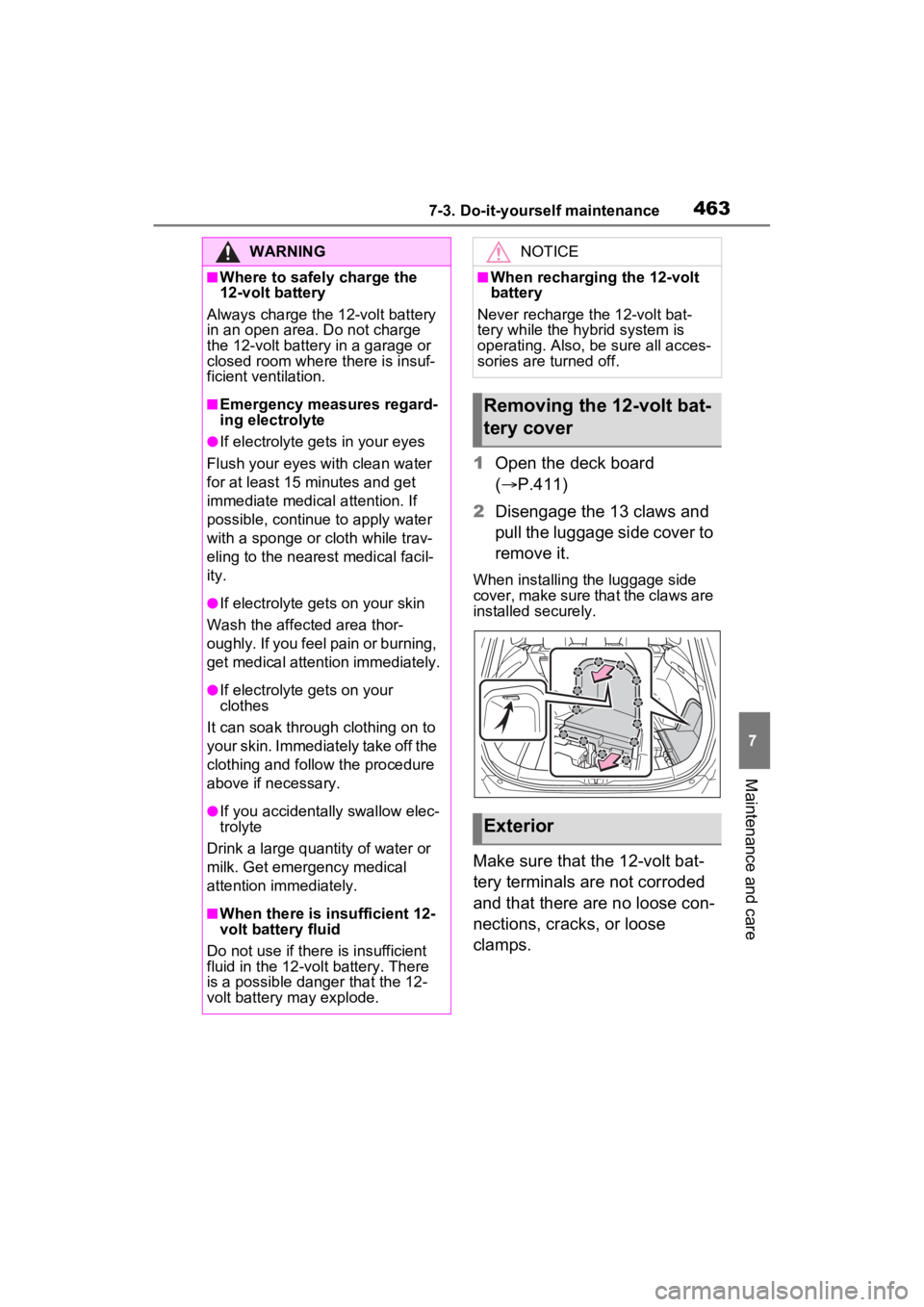
4637-3. Do-it-yourself maintenance
7
Maintenance and care
1Open the deck board
( P.411)
2 Disengage the 13 claws and
pull the luggage side cover to
remove it.
When installing the luggage side
cover, make sure that the claws are
installed securely.
Make sure that the 12-volt bat-
tery terminals are not corroded
and that there are no loose con-
nections, cracks, or loose
clamps.
WARNING
■Where to safely charge the
12-volt battery
Always charge the 12-volt battery
in an open area. Do not charge
the 12-volt battery in a garage or
closed room where there is insuf-
ficient ventilation.
■Emergency measures regard-
ing electrolyte
●If electrolyte gets in your eyes
Flush your eyes with clean water
for at least 15 minutes and get
immediate medical attention. If
possible, continue to apply water
with a sponge or cloth while trav-
eling to the nearest medical facil-
ity.
●If electrolyte gets on your skin
Wash the affected area thor-
oughly. If you feel pain or burning,
get medical attention immediately.
●If electrolyte gets on your
clothes
It can soak through clothing on to
your skin. Immediately take off the
clothing and follow the procedure
above if necessary.
●If you accidentally swallow elec-
trolyte
Drink a large quantity of water or
milk. Get emergency medical
attention immediately.
■When there is insufficient 12-
volt battery fluid
Do not use if there is insufficient
fluid in the 12-volt battery. There
is a possible danger that the 12-
volt battery may explode.
NOTICE
■When recharging the 12-volt
battery
Never recharge t he 12-volt bat-
tery while the hybrid system is
operating. Also, be sure all acces-
sories are turned off.
Removing the 12-volt bat-
tery cover
Exterior
Page 484 of 624
4847-3. Do-it-yourself maintenance
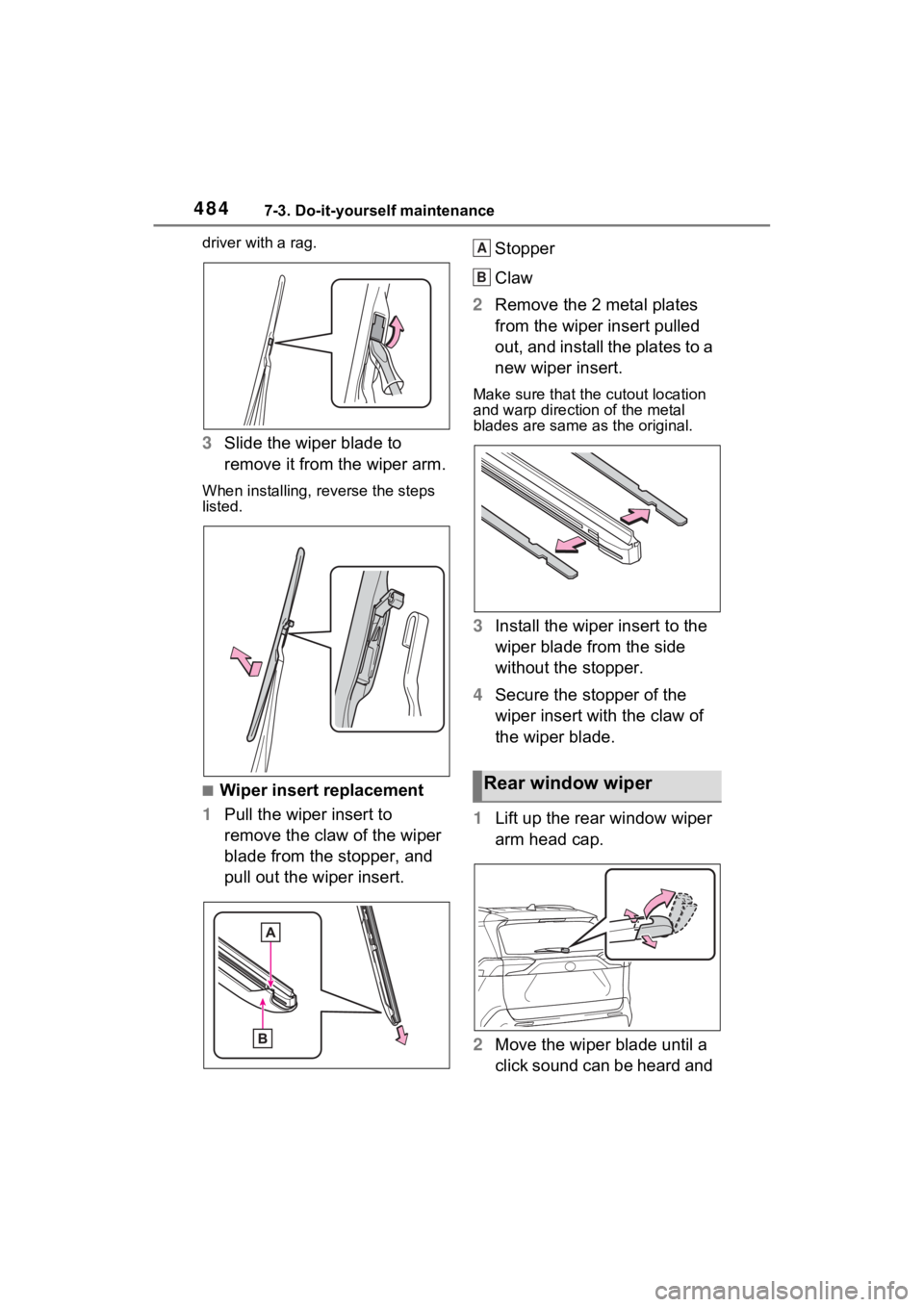
driver with a rag.
3Slide the wiper blade to
remove it from the wiper arm.
When installing, rev erse the steps
listed.
■Wiper insert replacement
1 Pull the wiper insert to
remove the claw of the wiper
blade from the stopper, and
pull out the wiper insert. Stopper
Claw
2 Remove the 2 metal plates
from the wiper insert pulled
out, and install the plates to a
new wiper insert.
Make sure that the cutout location
and warp direction of the metal
blades are same as the original.
3Install the wiper insert to the
wiper blade from the side
without the stopper.
4 Secure the stopper of the
wiper insert with the claw of
the wiper blade.
1 Lift up the rear window wiper
arm head cap.
2 Move the wiper blade until a
click sound can be heard and
Rear window wiper
A
B
Page 490 of 624
4907-3. Do-it-yourself maintenance
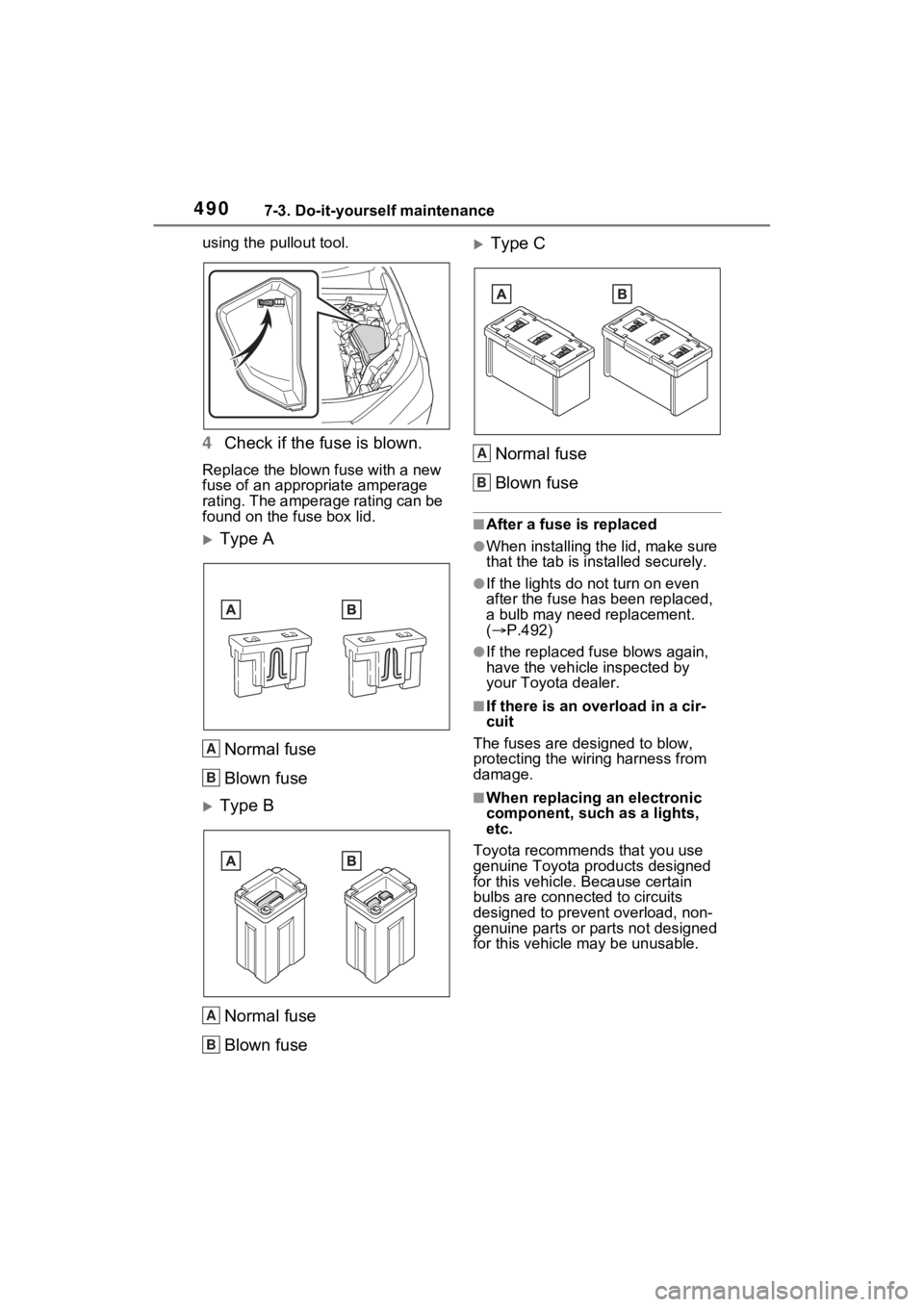
using the pullout tool.
4Check if the fuse is blown.
Replace the blown fuse with a new
fuse of an appropriate amperage
rating. The amperage rating can be
found on the fuse box lid.
Type A
Normal fuse
Blown fuse
Type BNormal fuse
Blown fuse
Type CNormal fuse
Blown fuse
■After a fuse is replaced
●When installing the lid, make sure
that the tab is ins talled securely.
●If the lights do not turn on even
after the fuse has been replaced,
a bulb may need replacement.
( P.492)
●If the replaced fuse blows again,
have the vehicle inspected by
your Toyota dealer.
■If there is an ove rload in a cir-
cuit
The fuses are designed to blow,
protecting the wiring harness from
damage.
■When replacing an electronic
component, such as a lights,
etc.
Toyota recommends that you use
genuine Toyota products designed
for this vehicle. Because certain
bulbs are connected to circuits
designed to prevent overload, non-
genuine parts or parts not designed
for this vehicle may be unusable.
A
B
A
B
A
B