display TOYOTA RAV4 PRIME 2023 User Guide
[x] Cancel search | Manufacturer: TOYOTA, Model Year: 2023, Model line: RAV4 PRIME, Model: TOYOTA RAV4 PRIME 2023Pages: 662, PDF Size: 25.4 MB
Page 83 of 662
832-1. Plug-in hybrid system
2
Plug-in hybrid system
at least once every 2 or 3 months,
and turn the power switch off after
the gasoline engine has stopped
automatically. (If the gasoline
engine does not start up even
after approximately 10 seconds
have passed since the “READY”
indicator came on, the power
switch can be turned to off without
any further action.)
When the 12-volt battery is dis-
charged, refer to P.569, “If the 12-
volt battery is discharged” and
perform the corr ection procedure.
●When the vehicle is left with the
AC charging cable connected, the
electricity consumption amount of
the 12-volt battery increases due
to controls, such as the system
checking, operating. When the AC
charging cable is not needed,
remove it from the vehicle.
When driving with the gasoline
engine stopped, a sound, which
changes in accordance with the
driving speed, will be played in
order to warn people nearby of
the vehicle’s approach. The
sound will stop when the vehicle
speed exceeds approximately
22 mph (35 km/h).
■Acoustic Vehicle Alerting Sys-
tem
In the following cases, the Acoustic
Vehicle Alerting Sy stem may be dif-
ficult for surrounding people to hear.
●In very noisy areas
●In the wind or the rain
Also, as the Acoustic Vehicle Alert-
ing System is installed on the front
of the vehicle, it may be more diffi-
cult to hear from the rear of the vehi- cle compared to the front.
■When “Acoustic V
ehicle Alert-
ing System Malfunction Visit
your Dealer” is displayed on the
multi-information display
The Acoustic Vehicle Alerting Sys-
tem may be malf unctioning. Have
the vehicle inspected by your
Toyota dealer immediately.
*: This function can only be used in
the mainland U.S.A. It cannot be
used in other states and territo-
ries, including Alaska and Hawaii.
This system operates based on
the driving situation and traffic
information to enhance fuel
economy.
For details about Predictive effi-
cient drive, refer to “MULTIME-
DIA OWNER’S MANUAL”.
■Predictive deceleration sup-
port
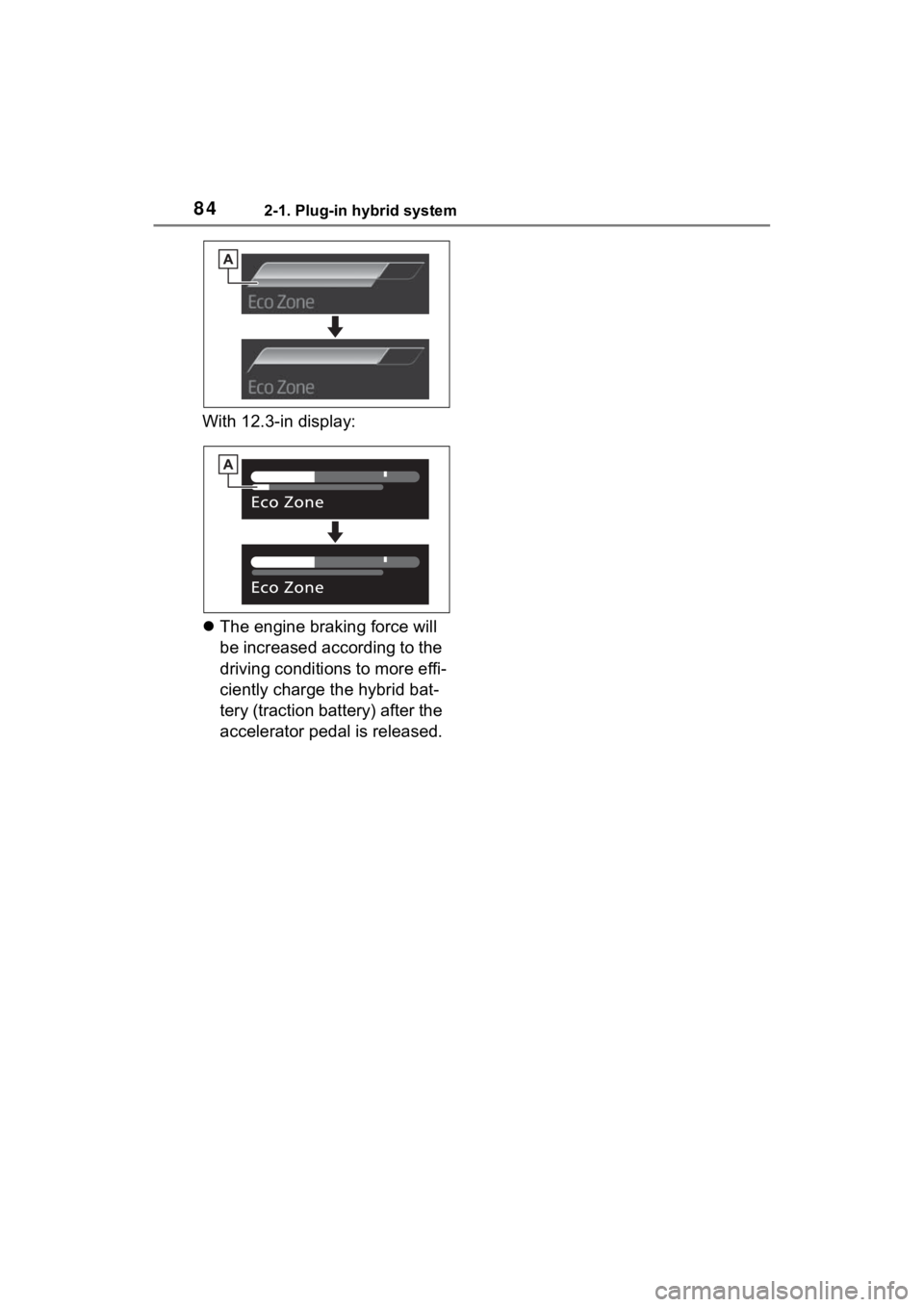
When the vehicle approaches
to predictive deceleration sup-
port points registered in the
navigation system, the refer-
ence operation range ( ) of
the ECO Accelerator Guid-
ance ( P.187) on the multi-
information display will be
turned off to encourage the
driver to reduce excessive
acceleration.
With 7-in display:
Acoustic Vehicle Alerting
System
Predictive efficient drive
(if equipped)*
A
Page 84 of 662
842-1. Plug-in hybrid system
With 12.3-in display:
The engine braking force will
be increased according to the
driving conditions to more effi-
ciently charge the hybrid bat-
tery (traction battery) after the
accelerator pedal is released.
Page 89 of 662
892-1. Plug-in hybrid system
2
Plug-in hybrid system
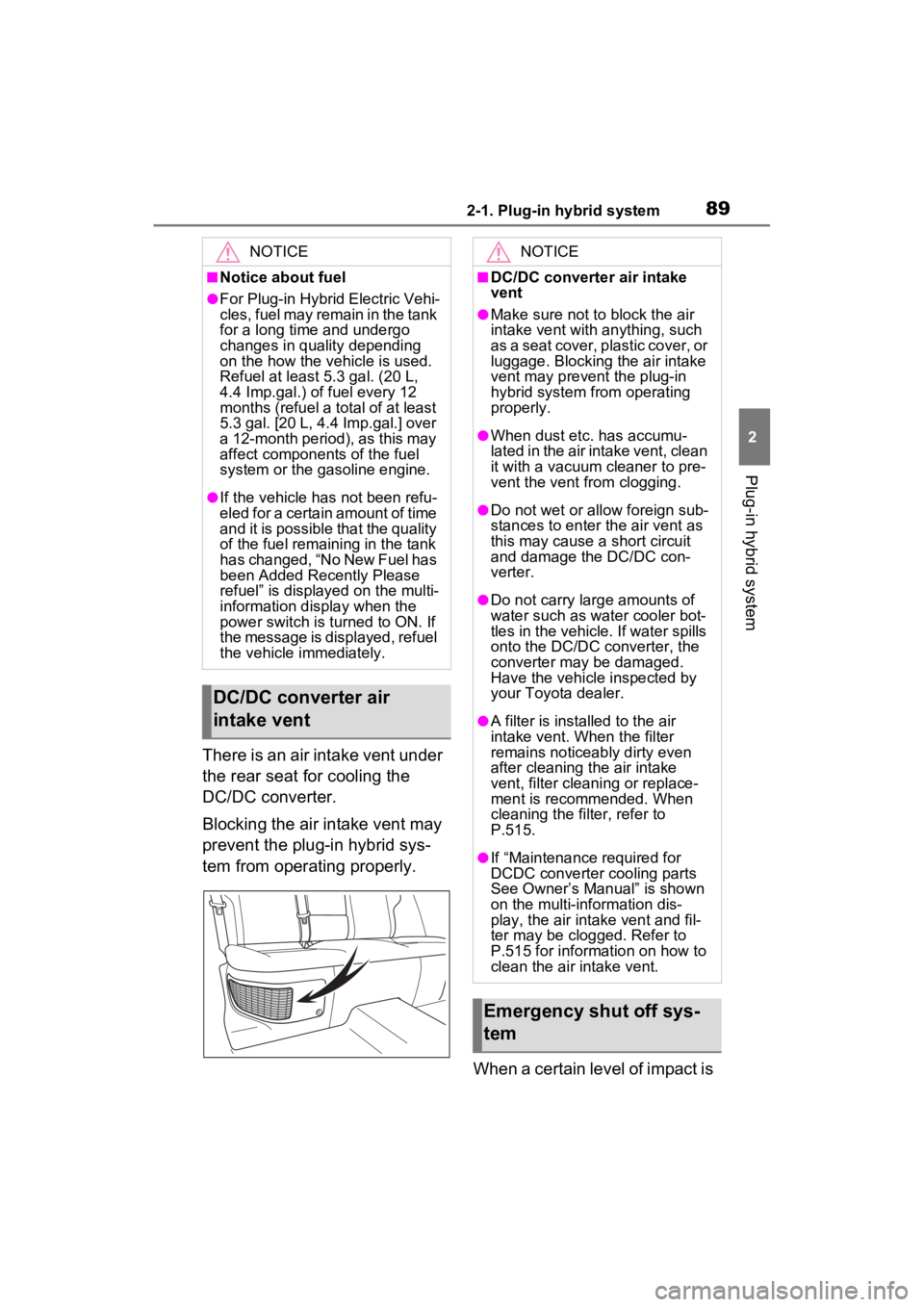
There is an air intake vent under
the rear seat for cooling the
DC/DC converter.
Blocking the air intake vent may
prevent the plug-in hybrid sys-
tem from operating properly.When a certain level of impact is
NOTICE
■Notice about fuel
●For Plug-in Hybrid Electric Vehi-
cles, fuel may remain in the tank
for a long time and undergo
changes in quality depending
on the how the vehicle is used.
Refuel at least 5.3 gal. (20 L,
4.4 Imp.gal.) of fuel every 12
months (refuel a total of at least
5.3 gal. [20 L, 4.4 Imp.gal.] over
a 12-month period), as this may
affect components of the fuel
system or the gasoline engine.
●If the vehicle has not been refu-
eled for a certain amount of time
and it is possible that the quality
of the fuel remaining in the tank
has changed, “No New Fuel has
been Added Recently Please
refuel” is displayed on the multi-
information display when the
power switch is turned to ON. If
the message is displayed, refuel
the vehicle immediately.
DC/DC converter air
intake vent
NOTICE
■DC/DC converter air intake
vent
●Make sure not to block the air
intake vent with anything, such
as a seat cover, plastic cover, or
luggage. Blocking the air intake
vent may prevent the plug-in
hybrid system from operating
properly.
●When dust etc. has accumu-
lated in the air intake vent, clean
it with a vacuum cleaner to pre-
vent the vent from clogging.
●Do not wet or allow foreign sub-
stances to enter the air vent as
this may cause a short circuit
and damage the DC/DC con-
verter.
●Do not carry large amounts of
water such as water cooler bot-
tles in the vehicle. If water spills
onto the DC/DC converter, the
converter may be damaged.
Have the vehicle inspected by
your Toyota dealer.
●A filter is installed to the air
intake vent. When the filter
remains noticeably dirty even
after cleaning the air intake
vent, filter cleaning or replace-
ment is recommended. When
cleaning the filter, refer to
P.515.
●If “Maintenance required for
DCDC converter cooling parts
See Owner’s Manual” is shown
on the multi-information dis-
play, the air intake vent and fil-
ter may be clogged. Refer to
P.515 for information on how to
clean the air intake vent.
Emergency shut off sys-
tem
Page 90 of 662
902-1. Plug-in hybrid system
detected by the impact sensor,
the emergency shut off system
blocks off the high voltage cur-
rent and stops the fuel pump to
minimize the risk of electrocu-
tion and fuel leakage.
If the emergency shut off system
activates, your vehicle will not
restart. To restart the hybrid sys-
tem, contact your Toyota dealer.
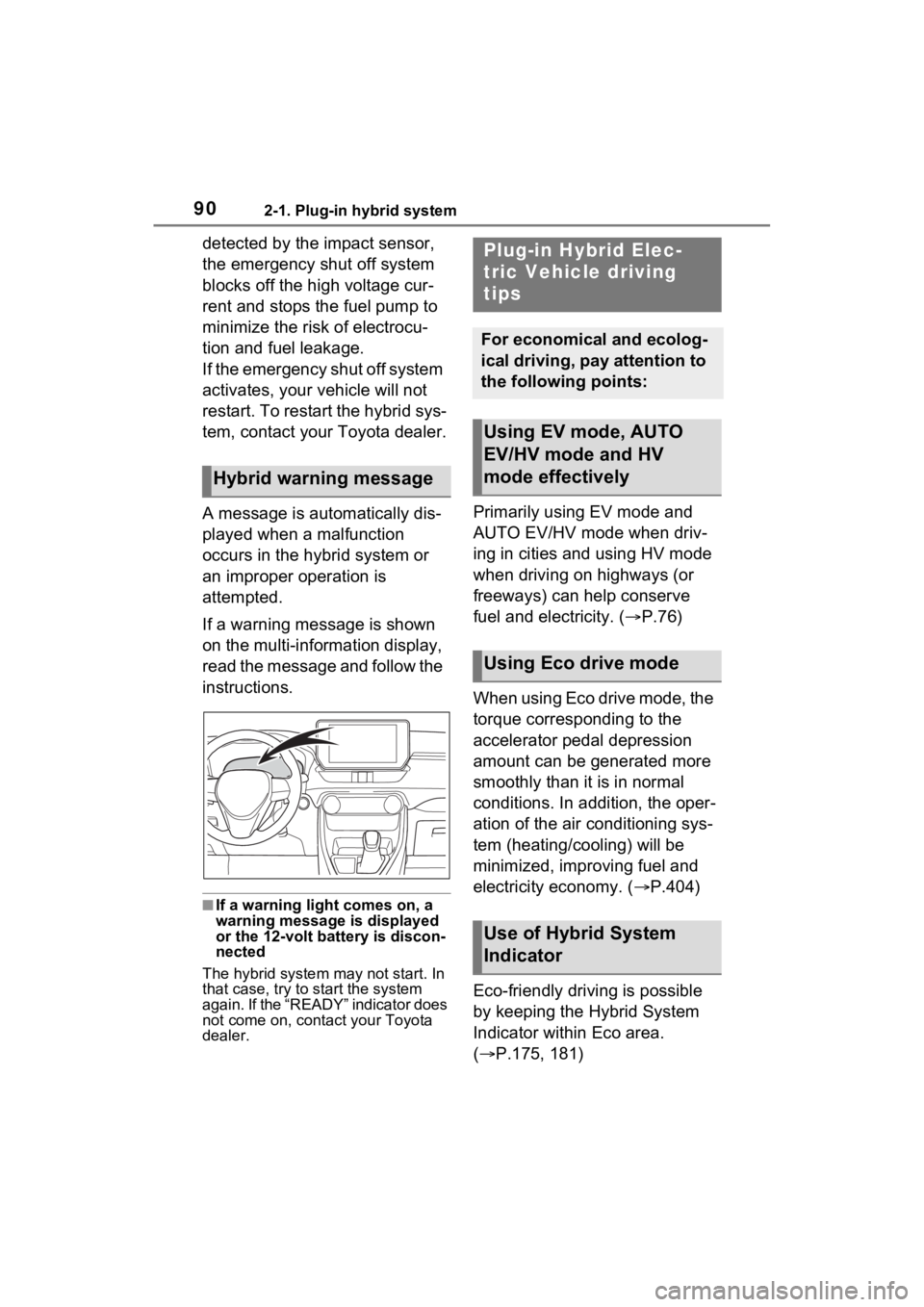
A message is automatically dis-
played when a malfunction
occurs in the hybrid system or
an improper operation is
attempted.
If a warning message is shown
on the multi-information display,
read the message and follow the
instructions.
■If a warning light comes on, a
warning message is displayed
or the 12-volt battery is discon-
nected
The hybrid system may not start. In
that case, try to start the system
again. If the “READY” indicator does
not come on, contact your Toyota
dealer.
Primarily using EV mode and
AUTO EV/HV mode when driv-
ing in cities and using HV mode
when driving on highways (or
freeways) can help conserve
fuel and electricity. ( P.76)
When using Eco drive mode, the
torque corresponding to the
accelerator pedal depression
amount can be generated more
smoothly than it is in normal
conditions. In addition, the oper-
ation of the air conditioning sys-
tem (heating/cooling) will be
minimized, improving fuel and
electricity economy. ( P.404)
Eco-friendly driving is possible
by keeping the Hybrid System
Indicator within Eco area.
( P.175, 181)
Hybrid warning message
Plug-in Hybrid Elec-
tric Vehicle driving
tips
For economical and ecolog-
ical driving, pay attention to
the following points:
Using EV mode, AUTO
EV/HV mode and HV
mode effectively
Using Eco drive mode
Use of Hybrid System
Indicator
Page 93 of 662
932-1. Plug-in hybrid system
2
Plug-in hybrid system
The value displayed on the SOC
(State of Charge) gauge
(P.173, 178) is estimated from
the following information.
The amount of hybrid battery
(traction battery) charge cur-
rently remaining
The electricity consumption
(the estimated distance that
EV driving is possible per unit
of electrical energy) based on
the recorded value
Past air conditioning system
electricity consumption
amount
The electricity consumption var-
ies depending on how the vehi-
cle is driven. The vehicle automatically records the elec-
tricity consumption when being
charged and uses the electricity
consumption for estimating the
EV driving range. Therefore, the
EV driving range displayed
when the hybrid battery (traction
battery) is fully charged may dif-
fer from the previous EV driving
range depending on how the
vehicle was driven.
The EV driving range may
change significantly with each
charging until the electricity con-
sumption based on the recorded
value is stable (for approxi-
mately the first month or two).
However, this does not indicate
a malfunction.
When the air conditioning sys-
tem is turned on, the EV driving
range (with using the air condi-
tioning system) is estimated
based on the past air condition-
ing electricity consumption
amount considering that the
electricity consumption may
become higher.
The distance that EV driving is
possible varies significantly
depending on how the vehicle is
driven, road conditions, the
weather, the outside tempera-
ture, usage conditions of electri-
cal components and the number
EV driving range
The EV driving range dis-
played on the multi-informa-
tion display shows the
reference distance that EV
driving (driving using only
the electric motor) is possi-
ble, and the actual distance
that can be driven may dif-
fer from that displayed.
Even if the EV driving range is
displayed, EV driving may be
canceled and both gasoline
engine and electric motor are
used depending on the situa-
tion. (
P.80)
Displayed value
Tips for extending the EV
driving range
Page 94 of 662

942-1. Plug-in hybrid system
of occupants.
The distance that EV driving is
possible can be extended if the
following is performed:
■When starting off, depress
the accelerator pedal
smoothly to accelerate
As a guide, accelerate up to
approximately 12mph (20 km/h)
in the first 5 seconds.
Electrical and fuel efficiency can
be improved just by using the
ECO Accelerator Guidance dis-
played on the multi-information
display and taking care to start
off gently. ( P.187)
When the driving mode is set to
Eco drive mode, depressing the
accelerator pedal generates
smooth torque that makes it easier
to operate the accelerator gently.
At the same time, the air condition-
ing control is switched to eco air
conditioning mode ( P.423) to
reduce the strength of the air condi-
tioning operation.
■Maintain sufficient vehicle-
to-vehicle distance and do
not accelerate or decelerate
unnecessarily
Try to maintain a fixed speed
while driving. Driving at a short
vehicle-to-vehicle distance will
result in repeating wasteful
acceleration and deceleration,
which will worsen the electrical
and fuel efficiency.
■Release the accelerator
pedal early before stopping
the vehicle, such as at a
traffic light
The regenerative brake will
operate to convert the kinetic
energy of the vehicle into electri-
cal energy, which will charge the
hybrid battery (traction battery).
The regeneration status can be
checked from the Hybrid Sys-
tem Indicator. ( P.175)
When the brake pedal is
depressed lightly during decel-
eration, the regeneration
amount increases, enabling
more electrical energy to be
recovered.
If the brake pedal is depressed too
strongly, the recovered amount
indicator will reac h the maximum
level and the upper limit of the
recoverable energy will be
exceeded. Theref ore, be sure to
operate the brak e pedal early.
■Use the air conditioning
system appropriately, and
also utilize the heated steer-
ing wheel (if equipped) and
seat heaters
In EV mode, the vehicle is
cooled and heated by electrical
energy. (Except in extremely
cold temperatures of approxi-
mately 14°F (-10°C) or less.)
Preventing excessive cooling or
heating of the vehicle will reduce
power consumption and
improve electrical efficiency.
Page 95 of 662

952-1. Plug-in hybrid system
2
Plug-in hybrid system
When eco air conditioning mode
is used, the air conditioning con-
trol is switched automatically to
a lower setting. (P.423)
The heated steering wheel (if
equipped) and seat heaters are
efficient heating device that
directly warm the body using
less electric power.
When used togethe r with the air
conditioning system, a low tem-
perature setting can be used to
improve electrical and fuel effi-
ciency.
■Check the tire pressure
If the tire pressure is lower than
the specified value, it will
worsen the electrical and fuel
efficiency.
A pressure level 7 psi (50 kPa, 0.5
kgf/cm
2 or bar) lower than the spec-
ified value will cause a worsening of
several percentage points.
■When driving on highways,
use the EV/HV mode selec-
tion switch to drive in HV
mode
The power consumption will
increase significantly if the vehi-
cle is driven in EV mode on
highways.
■Do not load unnecessary
objects in the vehicle
Driving with objects weighing
220 lb. (100 kg) in the vehicle
will worsen the electrical and
fuel efficiency by approximately
3%. Air resistance also greatly
affects electrical and fuel effi-
ciency. Remove any exterior
accessories such as a roof lug-
gage carrier when they are not
being used.
The running resistance of snow
tires is high and they will worsen
electrical and fuel efficiency.
Replace them with standard
tires as soon as they are no lon-
ger needed.
■Know your vehicle’s electri-
cal and fuel efficiency
If you know your vehicle’s daily
electrical and fuel efficiency, you
will understand the benefits of
Eco drive.
Use the Power Consump-
tion/Fuel Economy, ECO Accel-
erator Guidance/“Eco Score”
and other data displayed on the
multi-information display.
The following indicate that
charging has been carried out
properly.
The charging indicator of the
charging port turns off
“Charging Complete” is dis-
played on the multi-informa-
tion display when a door is
opened with the power switch
off ( P.117)
Regardless of the type of power
Display when c harging is
completed
Page 99 of 662
992-2. Charging
2
Plug-in hybrid system
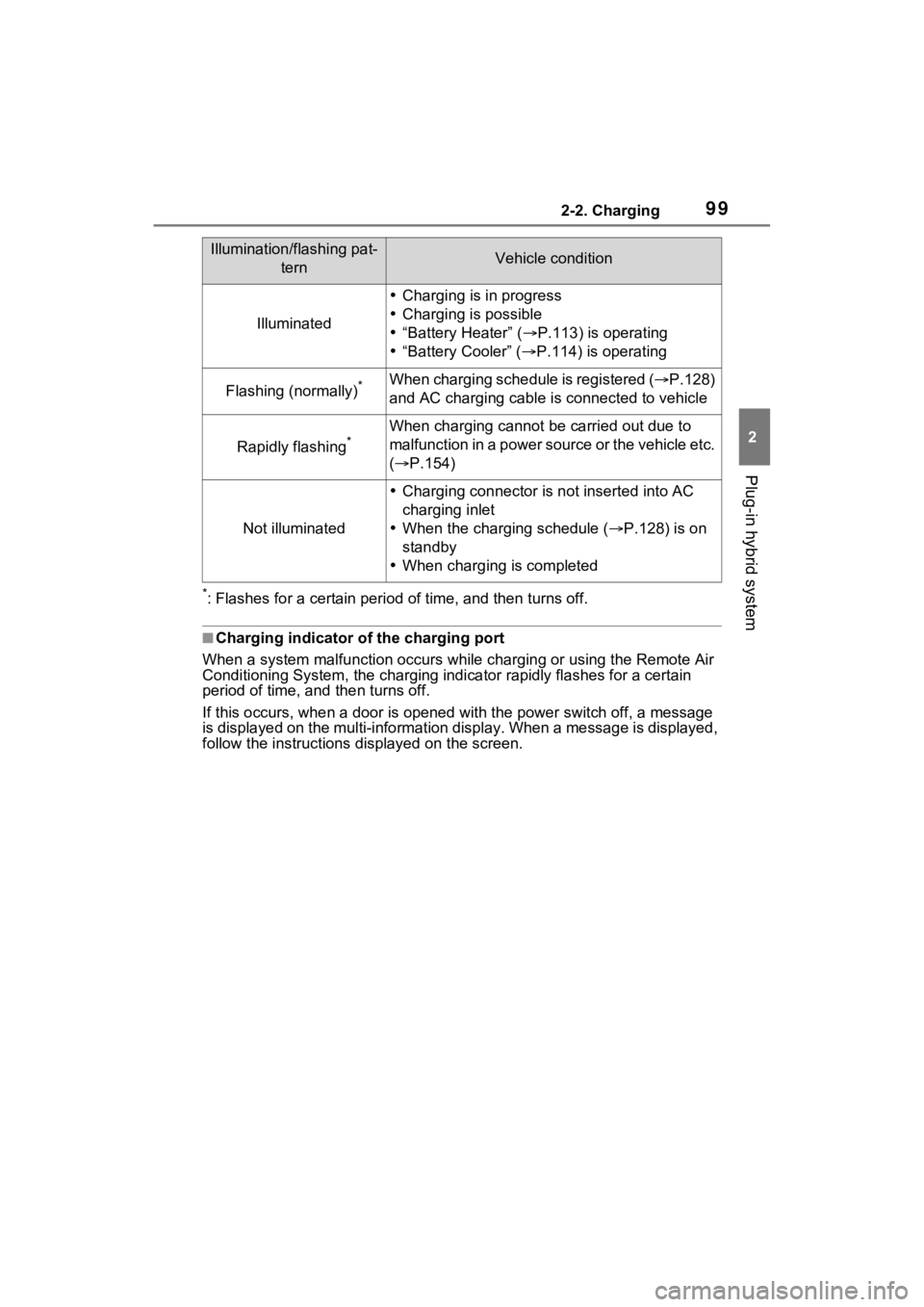
*: Flashes for a certain period of time, and then turns off.
■Charging indicator of the charging port
When a system malfunction occurs while charging or using the Remote Air
Conditioning System, the charging indicator rapidly flashes for a certain
period of time, and then turns off.
If this occurs, when a door is o pened with the power switch off , a message
is displayed on the multi-informa tion display. When a message is displayed,
follow the instructions d isplayed on the screen.
Illumination/flashing pat-
ternVehicle condition
Illuminated
Charging is in progress
Charging is possible
“Battery Heater” ( P.113) is operating
“Battery Cooler” ( P.114) is operating
Flashing (normally)*When charging schedule is registered ( P.128)
and AC charging cable is connected to vehicle
Rapidly flashing*When charging cannot be carried out due to
m a lfu nct ion in a p ow er so ur ce or th e v eh icle et c.
( P.154)
Not illuminated
Charging connector is not inserted into AC
charging inlet
When the charging schedule ( P.128) is on
standby
When charging is completed
Page 107 of 662
1072-2. Charging
2
Plug-in hybrid system
unlocked condition of the
charging connector may not
match the locked or unlocked
condition of the doors.
If the charging connector is
locked while the doors are
unlocked, it can be unlocked
using the following operations.
When using the smart key
system, unlock the doors
again after performing a lock-
ing operation once. ( P.222)
When using the wireless
remote control, perform an
unlock operation by pressing
the unlock button. ( P.222)
■Changing the charging con-
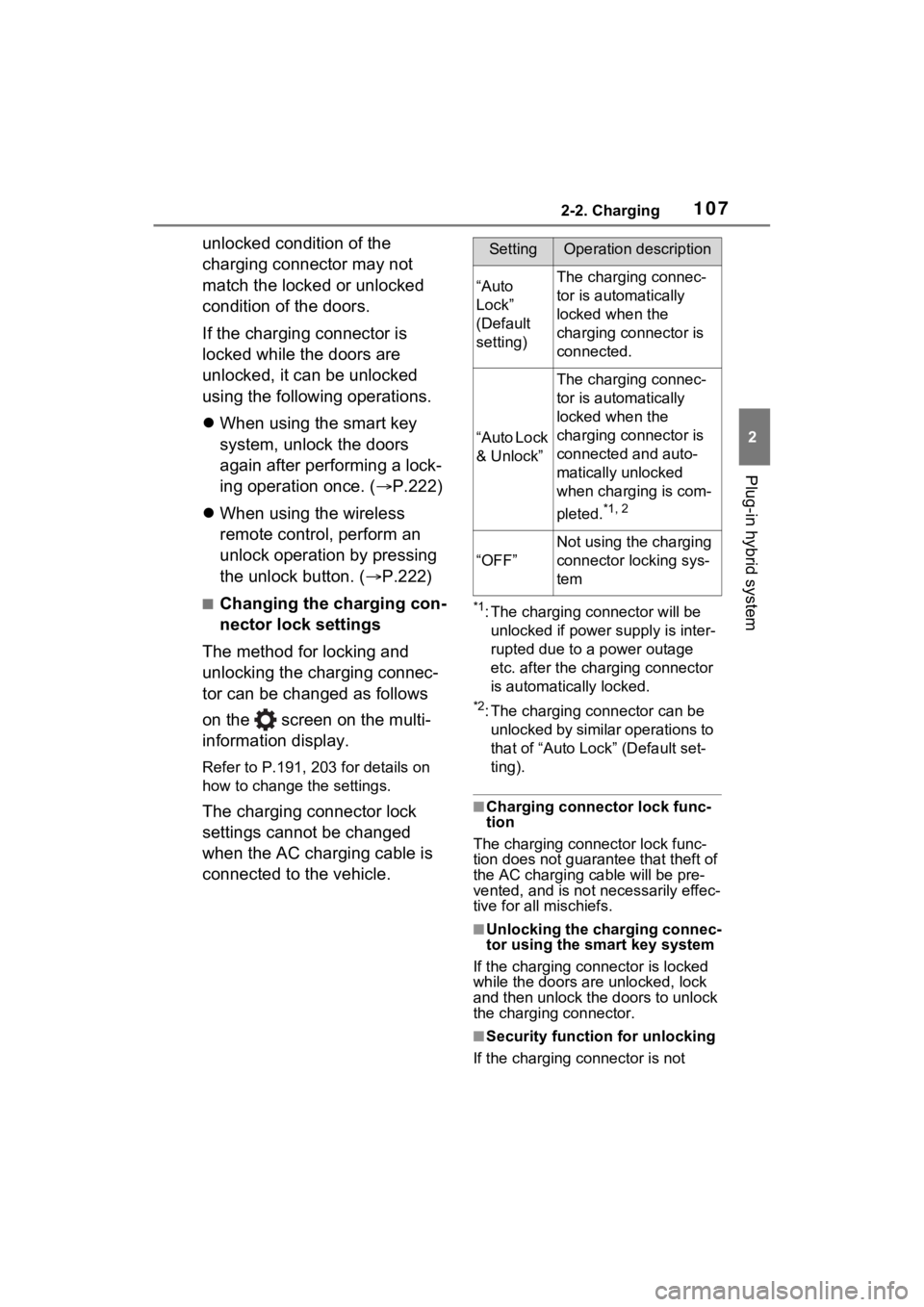
nector lock settings
The method for locking and
unlocking the charging connec-
tor can be changed as follows
on the screen on the multi-
information display.
Refer to P.191, 203 for details on
how to change the settings.
The charging connector lock
settings cannot be changed
when the AC charging cable is
connected to the vehicle.
*1: The charging connector will be unlocked if power supply is inter-
rupted due to a power outage
etc. after the charging connector
is automatically locked.
*2: The charging connector can be unlocked by similar operations to
that of “Auto Loc k” (Default set-
ting).
■Charging connector lock func-
tion
The charging connector lock func-
tion does not guarantee that theft of
the AC charging cable will be pre-
vented, and is not necessarily effec-
tive for all mischiefs.
■Unlocking the charging connec-
tor using the smart key system
If the charging connector is locked
while the doors are unlocked, lock
and then unlock the doors to unlock
the charging connector.
■Security function for unlocking
If the charging connector is not
SettingOperation description
“Auto
Lock”
(Default
setting)The charging connec-
tor is automatically
locked when the
charging connector is
connected.
“Auto Lock
& Unlock”
The charging connec-
tor is automatically
locked when the
charging connector is
connected and auto-
matically unlocked
when charging is com-
pleted.
*1, 2
“OFF”
Not using the charging
connector locking sys-
tem
Page 111 of 662

1112-2. Charging
2
Plug-in hybrid system
■When your circuit breaker trips
during charging (vehicles with
7-inch multi-information dis-
play)
The upper limit of the charging cur-
rent can be changed in “Vehicle Set-
tings” on the multi-information
display.
1 Press or of the meter
control switches to select .
2 Press or of the meter
control switches to select “Vehi-
cle Settings”, and then press and
hold .
3 Press or of the meter
control switches to select
“Charging Settings”, and then
press .
The “Charging Settings” screen
will be displayed.
4 Press or of the meter
control switches to select
“Charging Current”, and then
press .
The “Charging Current” screen
will be displayed.
5 Press or of the meter
control switches to select “16A”
*1
or “8A”, and then press .
During charging, the maximum
charging current will be restricted
to the set curre nt or lower.
*2
If the breaker s till trips while
charging, even after changing the
upper limit of the charging current,
check if the connected power
source meets the specified charging
conditions. ( P.110)
*1: Vehicles with 7 kW onboard trac-
tion battery charger only
*2: Restricting the charging current will lengthen the charging time.
■When your circuit breaker trips
during charging (vehicles with
12.3-inch multi-information dis-
play)
The upper limit of the charging cur-
rent can be changed in “ Vehi-
cle Settings” on the multi-
information display.
1 Press and hold to display the
cursor on the content display
area (center) of the multi-infor-
mation display.
2 Press or of the meter
control switches to select
and then press .
3 Press or of the meter
control switch es and select
“ Vehicle Settings”. Then
press and hold .
4 Press or of the meter
control switches to select
“Charging Settings”, and then
press .
The “Charging Settings” screen
will be displayed.
5 Press or of the meter
control switches to select
“Charging Current”, and then
press .
The “Charging Current” screen
will be displayed.
6 Press or of the meter
control switches to select “16A”
*1
or “8A”, and then press .
During charging, the maximum