display TOYOTA RAV4 PRIME 2023 Workshop Manual
[x] Cancel search | Manufacturer: TOYOTA, Model Year: 2023, Model line: RAV4 PRIME, Model: TOYOTA RAV4 PRIME 2023Pages: 662, PDF Size: 25.4 MB
Page 152 of 662
1522-2. Charging
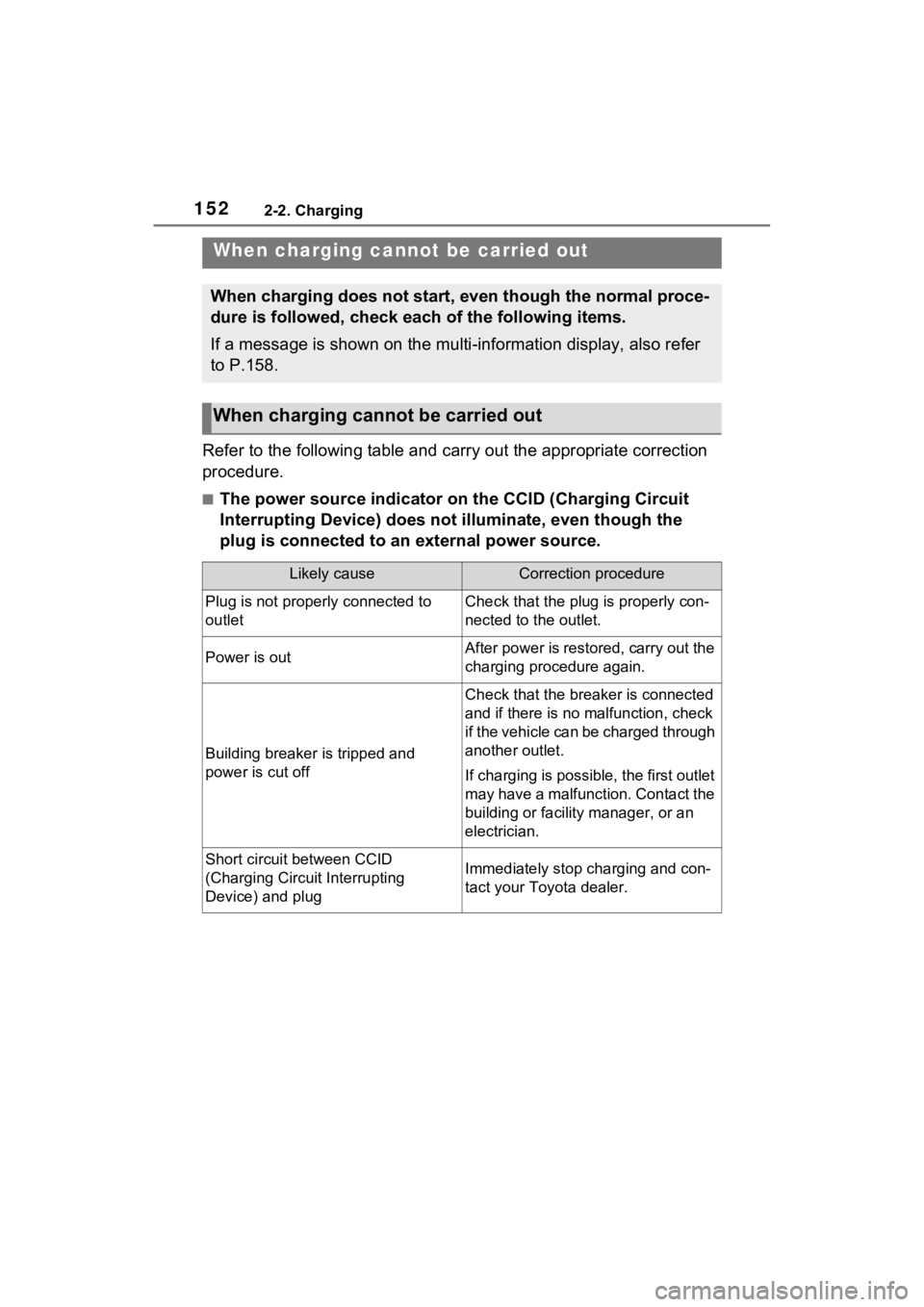
Refer to the following table and carry out the appropriate correction
procedure.
■The power source indicator on the CCID (Charging Circuit
Interrupting Device) does not illuminate, even though the
plug is connected to an external power source.
When charging cannot be carried out
When charging does not start, even though the normal proce-
dure is followed, check each of the following items.
If a message is shown on the multi-information display, also re fer
to P.158.
When charging canno t be carried out
Likely causeCorrection procedure
Plug is not properly connected to
outletCheck that the plug is properly con-
nected to the outlet.
Power is outAfter power is restored, carry out the
charging procedure again.
Building breaker is tripped and
power is cut off
Check that the breaker is connected
and if there is no malfunction, check
if the vehicle can be charged through
another outlet.
If charging is possible, the first outlet
may have a malfunction. Contact the
building or facilit y manager, or an
electrician.
Short circuit between CCID
(Charging Circuit Interrupting
Device) and plugImmediately stop charging and con-
tact your Toyota dealer.
Page 154 of 662
1542-2. Charging
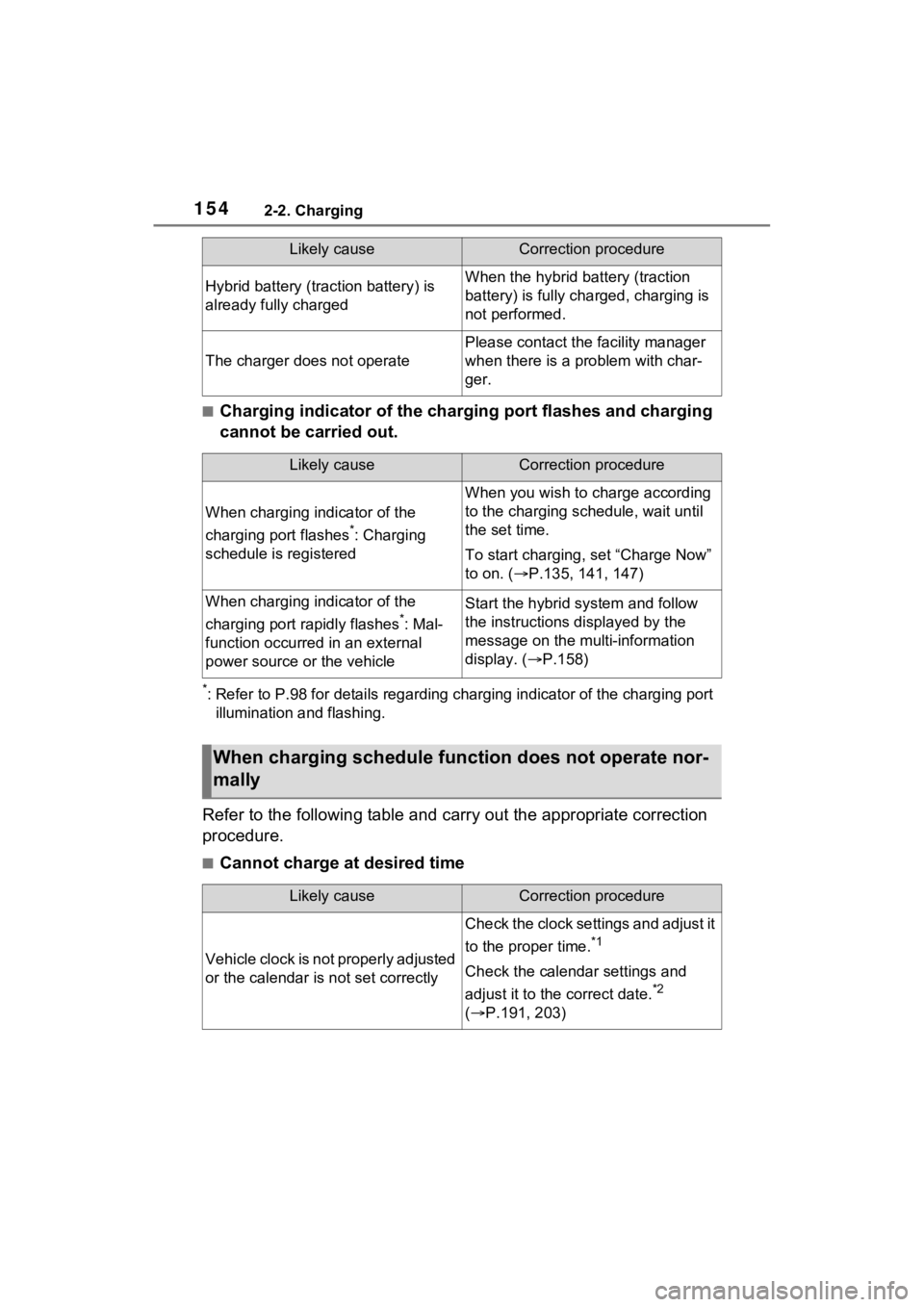
■Charging indicator of the charging port flashes and charging
cannot be carried out.
*: Refer to P.98 for details regarding charging indicator of the charging port
illumination and flashing.
Refer to the following table and carry out the appropriate correction
procedure.
■Cannot charge at desired time
Hybrid battery (traction battery) is
already fully chargedWhen the hybrid battery (traction
battery) is fully char ged, charging is
not performed.
The charger does not operate
Please contact the facility manager
when there is a problem with char-
ger.
Likely causeCorrection procedure
When charging indicator of the
charging port flashes
*: Charging
schedule is registered
When you wish to charge according
to the charging schedule, wait until
the set time.
To start charging, set “Charge Now”
to on. ( P.135, 141, 147)
When charging indicator of the
charging port rapidly flashes
*: Mal-
function occurred in an external
power source or the vehicle
Start the hybrid system and follow
the instructions displayed by the
message on the m ulti-information
display. ( P.158)
When charging schedule func tion does not operate nor-
mally
Likely causeCorrection procedure
Vehicle clock is not properly adjusted
or the calendar is not set correctly
Check the clock settings and adjust it
to the proper time.
*1
Check the calendar settings and
adjust it to the correct date.
*2
( P.191, 203)
Likely causeCorrection procedure
Page 155 of 662
1552-2. Charging
2
Plug-in hybrid system
*1: The automatic adjustment of the clock by GPS is set to on. For details
regarding setting clock, refer t o “MULTIMEDIA OWNER’S MANUAL”.
*2: This can only be set if GPS ca libration of clock is turned off in the Multi-
media Display settings.
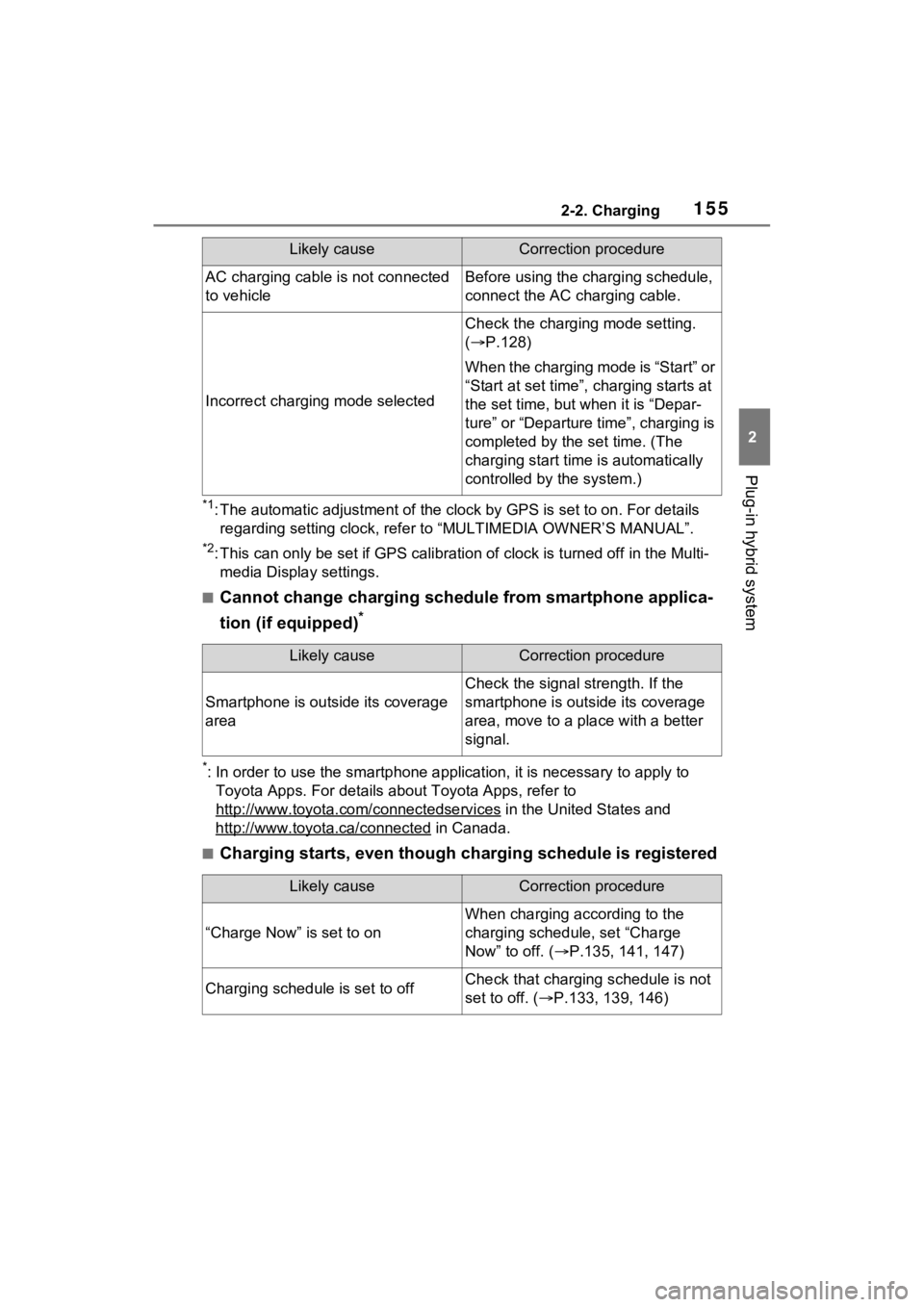
■Cannot change charging schedule from smartphone applica-
tion (if equipped)
*
*: In order to use the smartphon e application, it is necessary to apply to
Toyota Apps. For details about Toyota Apps, refer to
http://www.toyota.com/connectedservices
in the United States and
http://www.toyota.ca/connected
in Canada.
■Charging starts, even though charging schedule is registered
AC charging cable i s not connected
to vehicleBefore using the charging schedule,
connect the AC charging cable.
Incorrect charging mode selected
Check the charging mode setting.
( P.128)
When the charging mode is “Start” or
“Start at set time”, c harging starts at
the set time, but w hen it is “Depar-
ture” or “Departure time”, charging is
completed by the set time. (The
charging start time is automatically
controlled by the system.)
Likely causeCorrection procedure
Smartphone is outsi de its coverage
area
Check the signal strength. If the
smartphone is outside its coverage
area, move to a pl ace with a better
signal.
Likely causeCorrection procedure
“Charge Now” is set to on
When charging according to the
charging schedule, set “Charge
Now” to off. ( P.135, 141, 147)
Charging schedule is set to offCheck that charging schedule is not
set to off. ( P.133, 139, 146)
Likely causeCorrection procedure
Page 158 of 662
1582-2. Charging
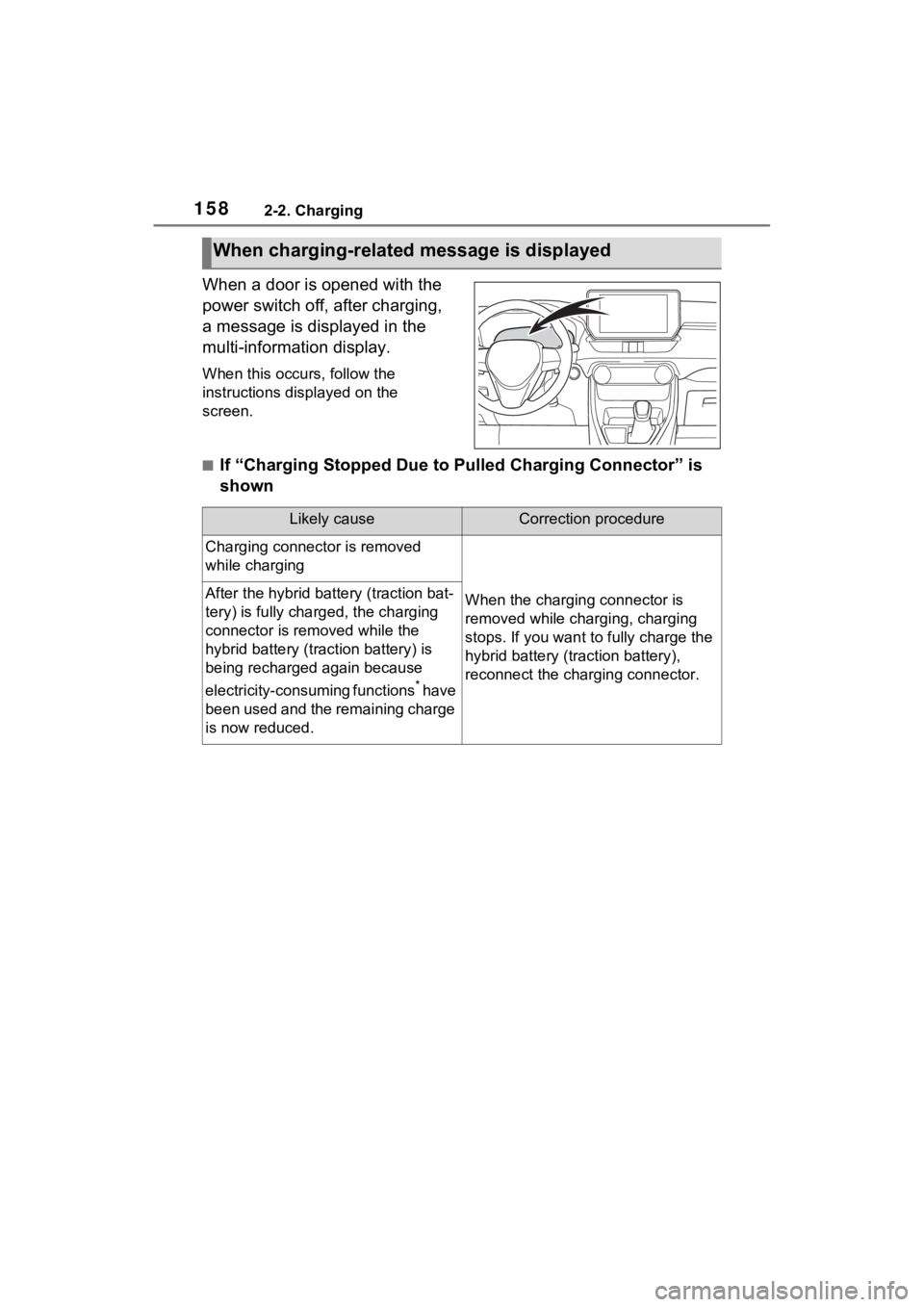
When a door is opened with the
power switch off, after charging,
a message is displayed in the
multi-information display.
When this occurs, follow the
instructions displayed on the
screen.
■If “Charging Stopped Due to Pulled Charging Connector” is
shown
When charging-related message is displayed
Likely causeCorrection procedure
Charging connector is removed
while charging
When the charging connector is
removed while charging, charging
stops. If you want to fully charge the
hybrid battery (traction battery),
reconnect the charging connector.After the hybrid battery (traction bat-
tery) is fully charged, the charging
connector is removed while the
hybrid battery (traction battery) is
being recharged again because
electricity-consuming functions
* have
been used and the remaining charge
is now reduced.
Page 165 of 662
165
3
3
Vehicle status information and indicators
Vehicle status informa-tion and indicators
3-1. Instrument cluster
Warning lights and indica-tors ............................ 166
Gauges and meters (with 7- inch display) .............. 173
Gauges and meters (with 12.3-inch display) ...... 178
Multi-information display (with 7-inch display) .. 185
Multi-information display (with 12.3-inch display).................................. 196
Head-up display .......... 208
Energy monitor/consump- tion screen................. 212
Page 166 of 662
1663-1. Instrument cluster
3-1.Instrument cluster
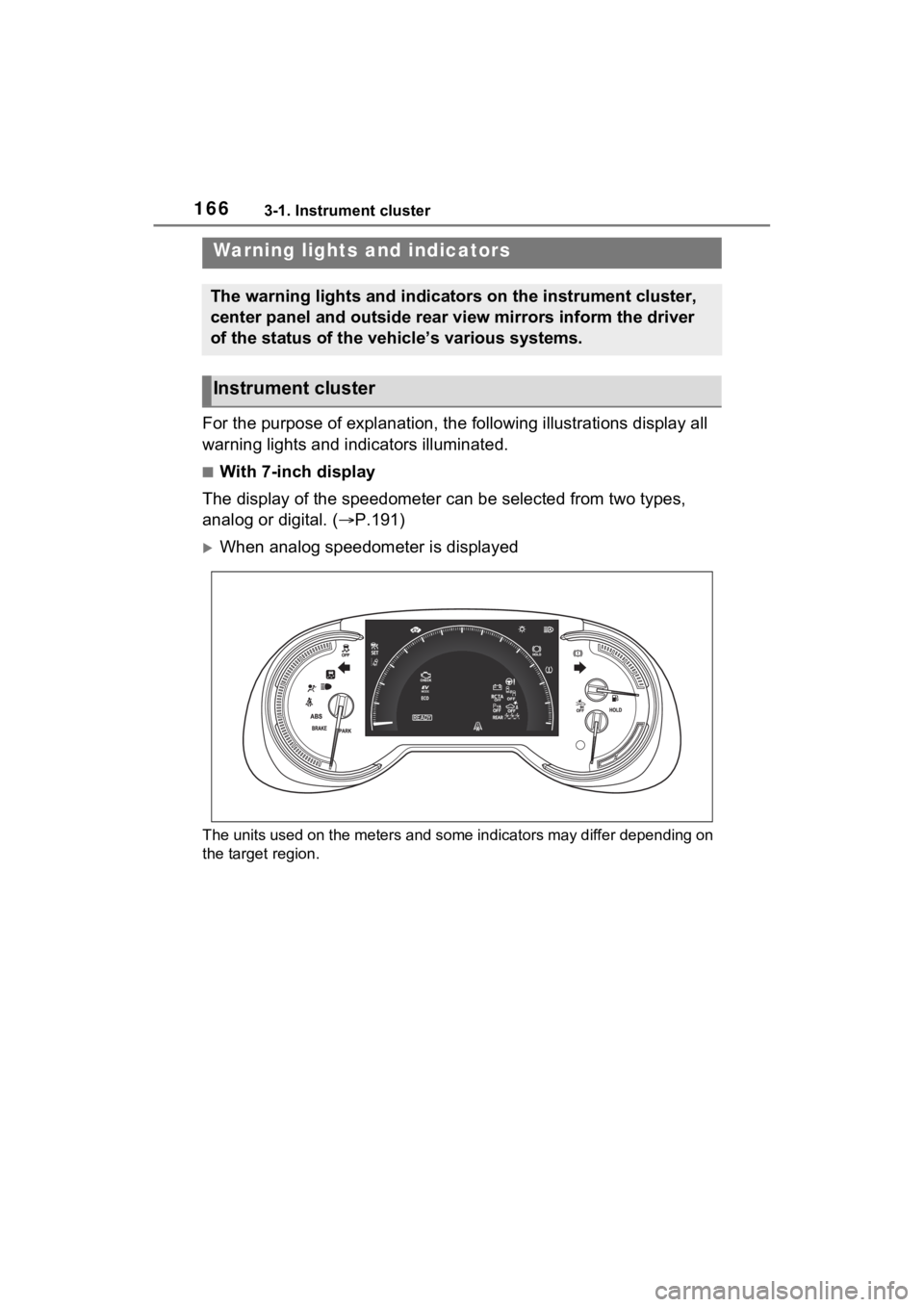
For the purpose of explanation, the following illustrations display all
warning lights and indicators illuminated.
■With 7-inch display
The display of the speedometer can be selected from two types,
analog or digital. ( P.191)
When analog speedometer is displayed
The units used on the meters and some indicators may differ dep ending on
the target region.
Warning lights and indicators
The warning lights and indicators on the instrument cluster,
center panel and outside rear view mirrors inform the driver
of the status of the vehicle’s various systems.
Instrument cluster
Page 167 of 662
1673-1. Instrument cluster
3
Vehicle status information and indicators
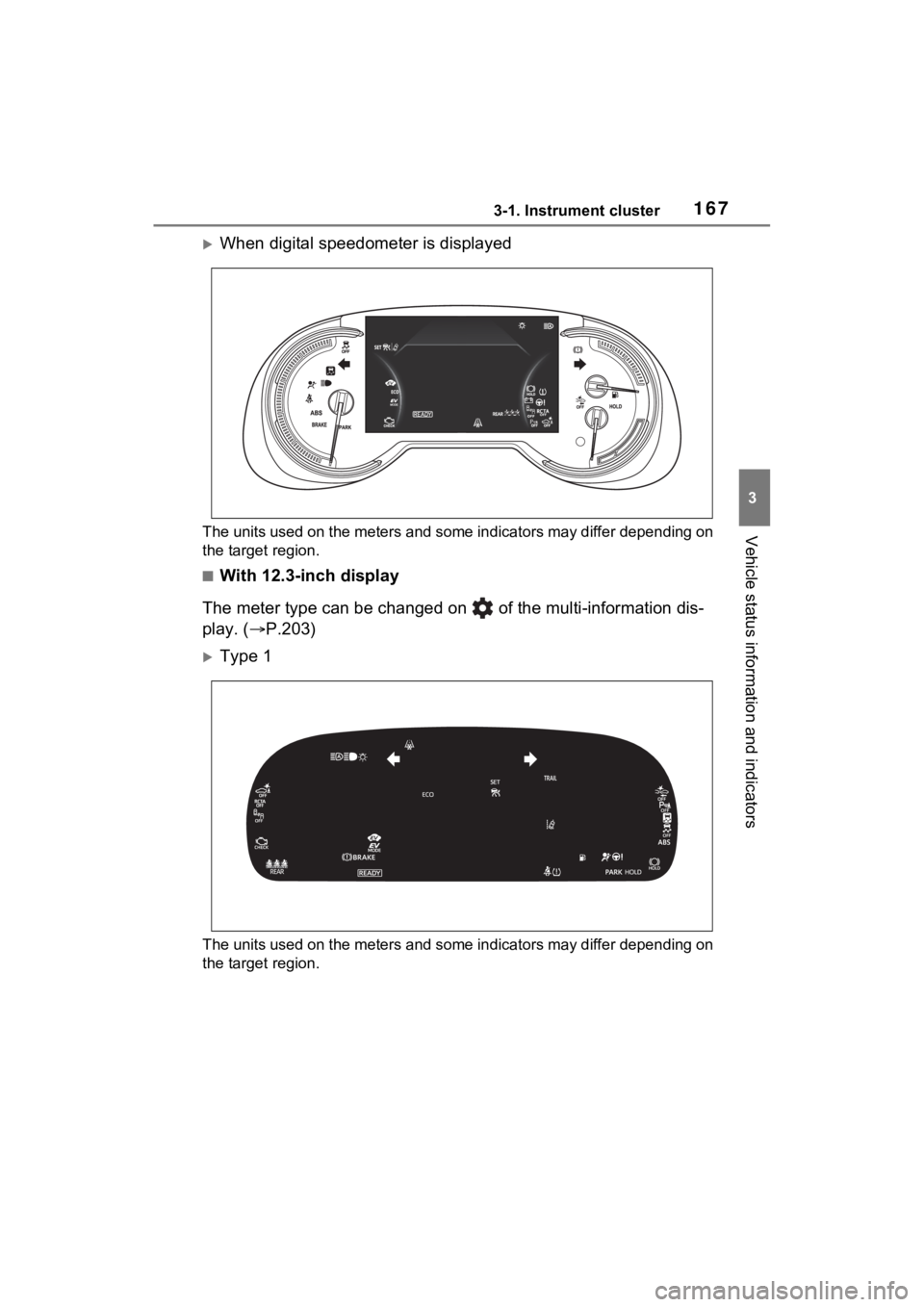
When digital speedometer is displayed
The units used on the meters and some indicators may differ depending on
the target region.
■With 12.3-inch display
The meter type can be changed on of the multi-information dis-
play. ( P.203)
Type 1
The units used on the meters and some indicators may differ dep ending on
the target region.
Page 170 of 662
1703-1. Instrument cluster
indicate that a system check is
being performed. They will turn
off after the hybr id system is on,
or after a few seconds. There
may be a malfunction in a sys-
tem if the light does not come on,
or turn off. Have the vehicle
inspected by your Toyota dealer.
*2: This light illuminates on the multi-informatio n display with a
message.
*3: Intuitive parking assist OFF indi- cator turns on when the power
switch is turned to ON while the
Intuitive parking assist function is
on. It will turn off after a few sec-
onds.
*4: Vehicles with 12.3-inch display
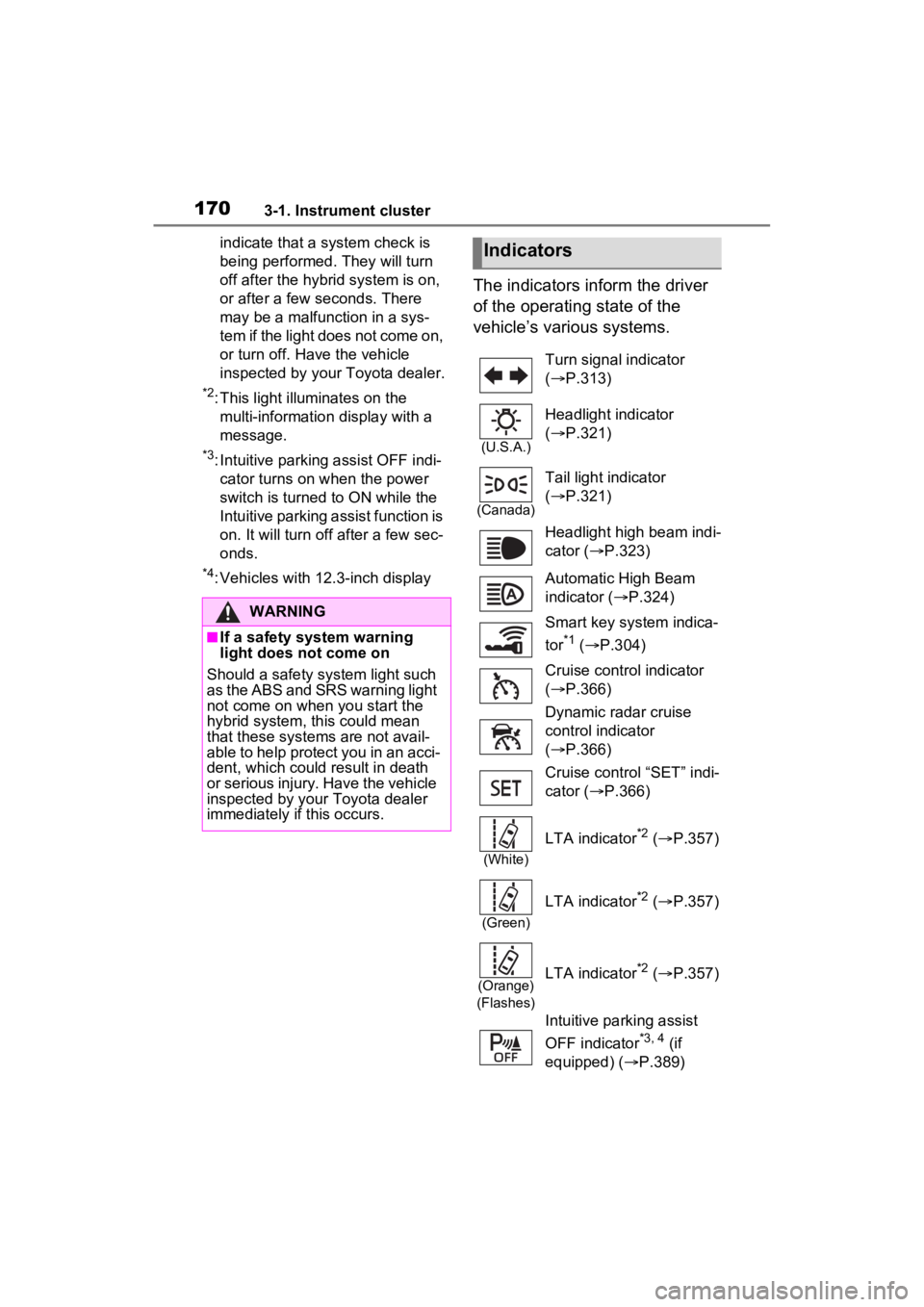
The indicators inform the driver
of the operating state of the
vehicle’s various systems.
WARNING
■If a safety system warning
light does not come on
Should a safety system light such
as the ABS and SR S warning light
not come on when you start the
hybrid system, this could mean
that these systems are not avail-
able to help protect you in an acci-
dent, which could result in death
or serious injury. Have the vehicle
inspected by your Toyota dealer
immediately if this occurs.
Indicators
Turn signal indicator
( P.313)
(U.S.A.)
Headlight indicator
( P.321)
(Canada)
Tail light indicator
( P.321)
Headlight high beam indi-
cator ( P.323)
Automatic High Beam
indicator ( P.324)
Smart key system indica-
tor
*1 ( P.304)
Cruise control indicator
( P.366)
Dynamic radar cruise
control indicator
( P.366)
Cruise control “SET” indi-
cator ( P.366)
(White)
LTA indicator*2 ( P.357)
(Green)
LTA indicator*2 ( P.357)
(Orange)
(Flashes)LTA indicator*2 ( P.357)
Intuitive parking assist
OFF indicator
*3, 4 (if
equipped) ( P.389)
Page 171 of 662
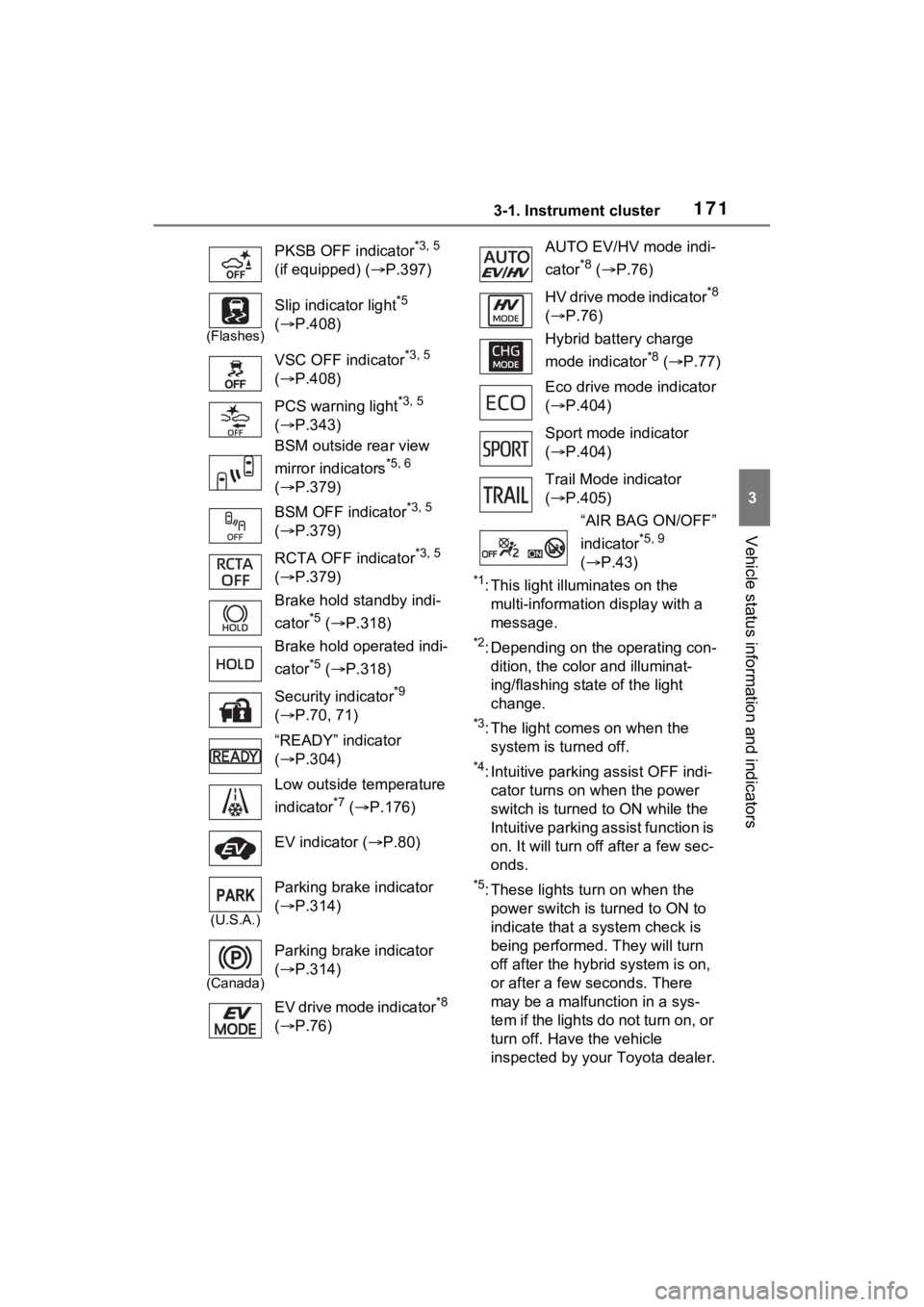
1713-1. Instrument cluster
3
Vehicle status information and indicators
*1: This light illuminates on the multi-information display with a
message.
*2: Depending on the operating con-dition, the color and illuminat-
ing/flashing stat e of the light
change.
*3: The light comes on when the system is turned off.
*4: Intuitive parking assist OFF indi-cator turns on wh en the power
switch is turned t o ON while the
Intuitive parking assist function is
on. It will turn off after a few sec-
onds.
*5: These lights tu rn on when the
power switch is turned to ON to
indicate that a system check is
being performed. They will turn
off after the hybrid system is on,
or after a few seconds. There
may be a malfunction in a sys-
tem if the lights do not turn on, or
turn off. Have the vehicle
inspected by your Toyota dealer.
PKSB OFF indicator
*3, 5
(if equipped) ( P.397)
(Flashes)
Slip indicator light*5
( P.408)
VSC OFF indicator
*3, 5
( P.408)
PCS warning light
*3, 5
( P.343)
BSM outside rear view
mirror indicators
*5, 6
( P.379)
BSM OFF indicator
*3, 5
( P.379)
RCTA OFF indicator
*3, 5
( P.379)
Brake hold standby indi-
cator
*5 ( P.318)
Brake hold operated indi-
cator
*5 ( P.318)
Security indicator
*9
( P.70, 71)
“READY” indicator
( P.304)
Low outside temperature
indicator
*7 ( P.176)
EV indicator ( P.80)
(U.S.A.)
Parking brake indicator
( P.314)
(Canada)
Parking brake indicator
( P.314)
EV drive mode indicator
*8
( P.76)
AUTO EV/HV mode indi-
cator
*8 ( P.76)
HV drive mode indicator
*8
( P.76)
Hybrid battery charge
mode indicator
*8 ( P.77)
Eco drive mode indicator
( P.404)
Sport mode indicator
( P.404)
Trail Mode indicator
( P.405)
“AIR BAG ON/OFF”
indicator
*5, 9
( P.43)
Page 172 of 662

1723-1. Instrument cluster
*6: This light illuminates on the out-
side rear view mirrors.
*7: When the outside temperature is approximately 37°F (3°C) or
lower, the indicator will flash for
approximately 10 seconds, then
stay on.
*8: The displayed indicator changes according to the current plug-in
hybrid system operation mode.
*9: This light illumi nates on the cen-
ter panel.
■BSM (Blind Spot Monitor) out-
side rear view mirror indicators
In order to confirm operation, the
BSM outside rear view mirror indica-
tors illuminate w hen the power
switch is turned to ON, or when the
BSM function/RCTA function is
enabled while the power switch is in
ON.
If the system is functioning correctly,
the BSM outside rear view mirror
indicators will turn off afte r a few
seconds.
If the BSM outside rear view mirror
indicators do not illuminate or do not
turn off, there may be a malfunction
in the system. If this occurs, have
the vehicle insp ected by your
Toyota dealer.