lock TOYOTA SEQUOIA 2008 2.G Workshop Manual
[x] Cancel search | Manufacturer: TOYOTA, Model Year: 2008, Model line: SEQUOIA, Model: TOYOTA SEQUOIA 2008 2.GPages: 596, PDF Size: 12.93 MB
Page 136 of 596
136
2-1. Driving procedures
Driving the vehicle
The following procedures should be observed to ensure safe driv-
ing.
■ Starting the engine ( P. 145)
■ Driving
With the brake pedal depressed, shift the shift lever to D. ( P. 148,152)
Release the parking brake. ( P. 156)
Gradually release the brake pedal and gently depress the
accelerator pedal to accelerate the vehicle.
■ Stopping
With the shift lever in D, depress the brake pedal.
If necessary, set the parking brake.
When the vehicle is stopped for an extended period of time, shift
the shift lever to P or N. ( P. 148,152)
■Parking the vehicle
With the shift lever in D, depress the brake pedal.
Set the parking brake. ( P. 156)
Shift the shift lever to P. ( P. 148,152)
When parking on a hill, if necessary, block the wheels.
Turn the engine switch off to stop the engine.
Lock the door, making sure that you have the key on your
person.
Page 141 of 596
141
2-1. Driving procedures
2
When driving
CAUTION
■
When the vehicle is parked
●Do not leave glasses, cigarette lighters, spray cans, or soft drink cans in
the vehicle when it is in the sun.
Doing so may result in the following.
• Gas may leak from a cigarette lighter or spray can, and may lead to a
fire.
• The temperature inside the vehicle may cause the plastic lenses and plastic material of eye glasses to deform or crack.
• Soft drink cans may fracture, causing the contents to spray over the interior of the vehicle, and may also cause a short circuit in the vehi-
cle’s electrical components.
● Always apply the parking brake, shift the shift lever to P, stop the engine
and lock the vehicle.
Do not leave the vehicle unattended while the engine is running.
● Do not touch the exhaust pipe while the engine is running or immediately
after turning the engine off.
Doing so may cause burns.
● Do not leave the engine running in an area with snow build-up, or where it
is snowing. If snowbanks build up around the vehicle while the engine is
running, exhaust gases may collect and enter the vehicle. This may lead
to death or a serious health hazard.
■ Exhaust gases
Exhaust gases include harmful carbon monoxide (CO) that is colorless and
odorless. Inhaling exhaust gases may lead to death or a serious health haz-
ard.
●If the vehicle is in a poorly ventilated area, stop the engine. In a closed
area, such as a garage, exhaust gases may collect and enter the vehicle.
This may lead to death or a serious health hazard.
● The exhaust should be checked occasionally. If there is a hole or crack
caused by corrosion, damage to a joint or abnormal exhaust noise, be
sure to have the vehicle inspected and repaired by your Toyota dealer.
Failure to do so may allow exhaust gases to enter the vehicle, resulting in
death or a serious health hazard.
Page 145 of 596
145
2-1. Driving procedures
2
When driving
Engine (ignition) switch
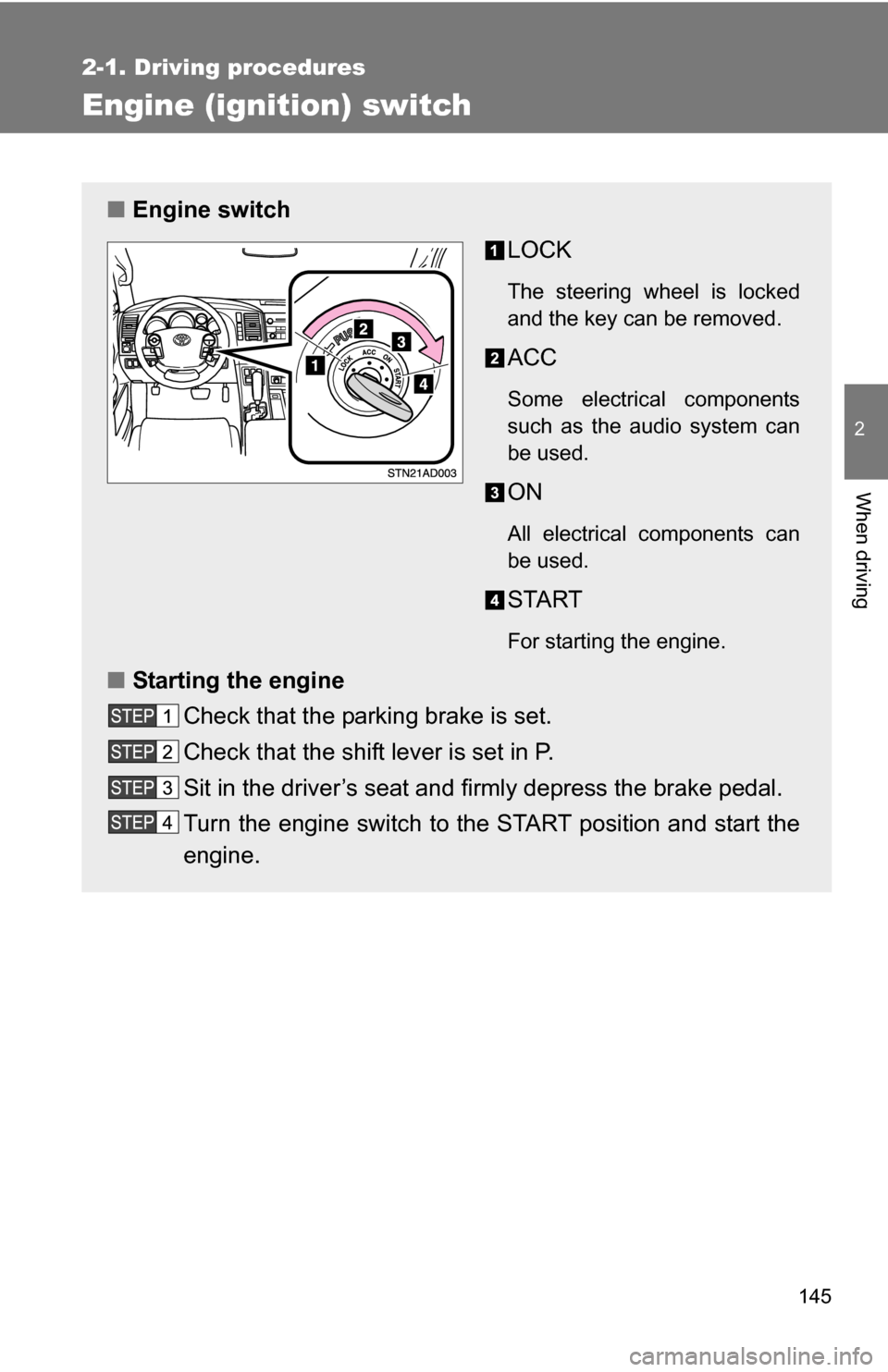
■Engine switch
LOCK
The steering wheel is locked
and the key can be removed.
ACC
Some electrical components
such as the audio system can
be used.
ON
All electrical components can
be used.
START
For starting the engine.
■Starting the engine
Check that the parking brake is set.
Check that the shift lever is set in P.
Sit in the driver’s seat and firmly depress the brake pedal.
Turn the engine switch to the START position and start the
engine.
Page 146 of 596
146 2-1. Driving procedures
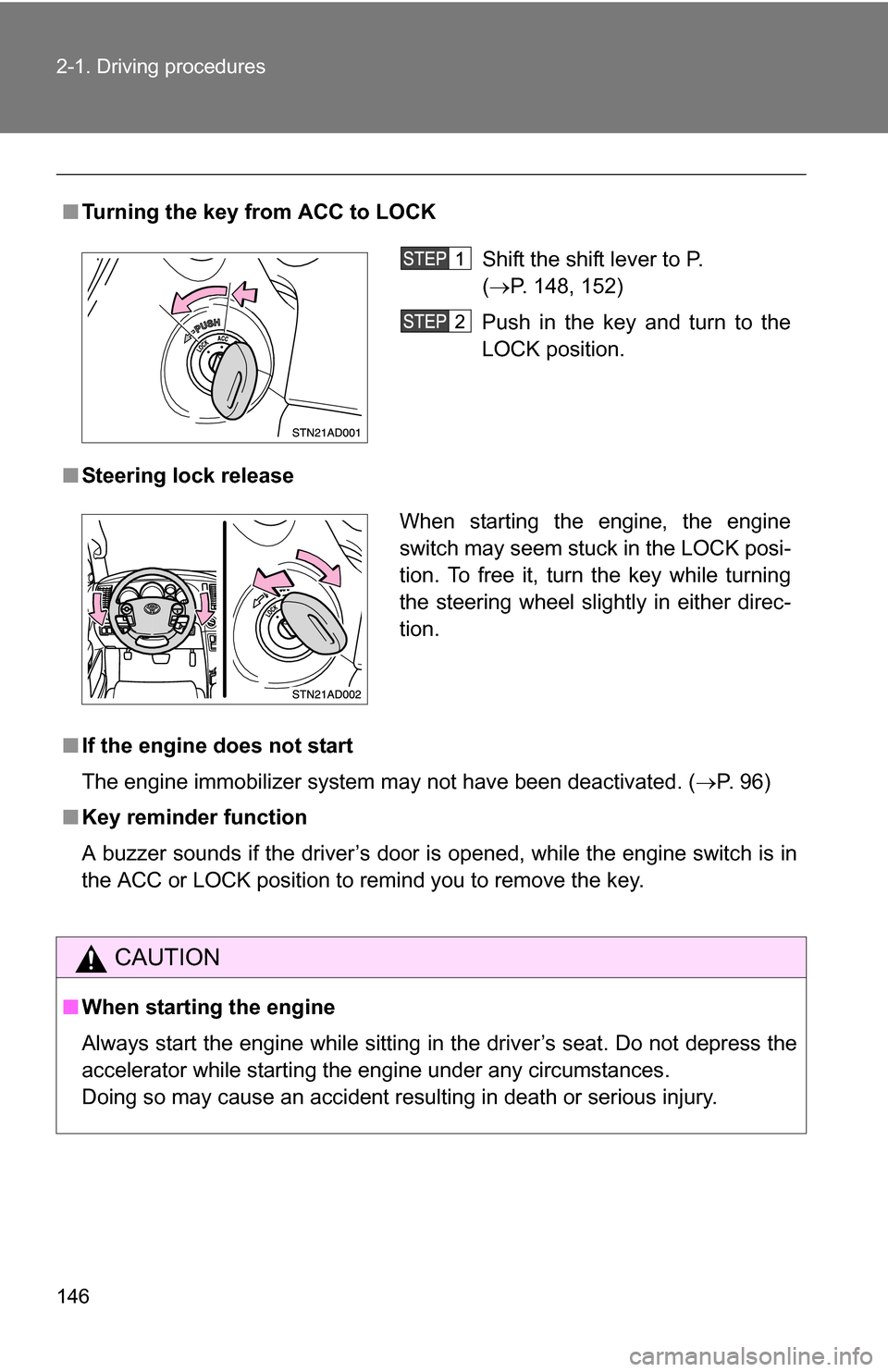
■Turning the key from ACC to LOCK
■ Steering lock release
■ If the engine does not start
The engine immobilizer system may not have been deactivated. ( P. 96)
■ Key reminder function
A buzzer sounds if the driver’s door is opened, while the engine switch is in
the ACC or LOCK position to remind you to remove the key.
CAUTION
■When starting the engine
Always start the engine while sitting in the driver’s seat. Do not depress the
accelerator while starting the engine under any circumstances.
Doing so may cause an accident resulting in death or serious injury.
Shift the shift lever to P.
(P. 148, 152)
Push in the key and turn to the
LOCK position.
When starting the engine, the engine
switch may seem stuck in the LOCK posi-
tion. To free it, turn the key while turning
the steering wheel slightly in either direc-
tion.
Page 147 of 596
147
2-1. Driving procedures
2
When driving
CAUTION
■
Caution while driving
Do not turn the engine switch to the LOCK position.
If in an emergency, you must turn the engine off while the vehicle is moving,
turn the engine switch only to the ACC position.
NOTICE
■To prevent battery discharge
Do not leave the engine switch in the ACC or ON position for long periods if
the engine is not running.
■ When starting the engine
●Do not crank for more than 30 seconds at a time. This may overheat the
starter and wiring systems.
● Do not race a cold engine.
● If the engine becomes difficult to start or stalls frequently, have the engine
checked immediately.
Page 164 of 596
164 2-2. Instrument cluster
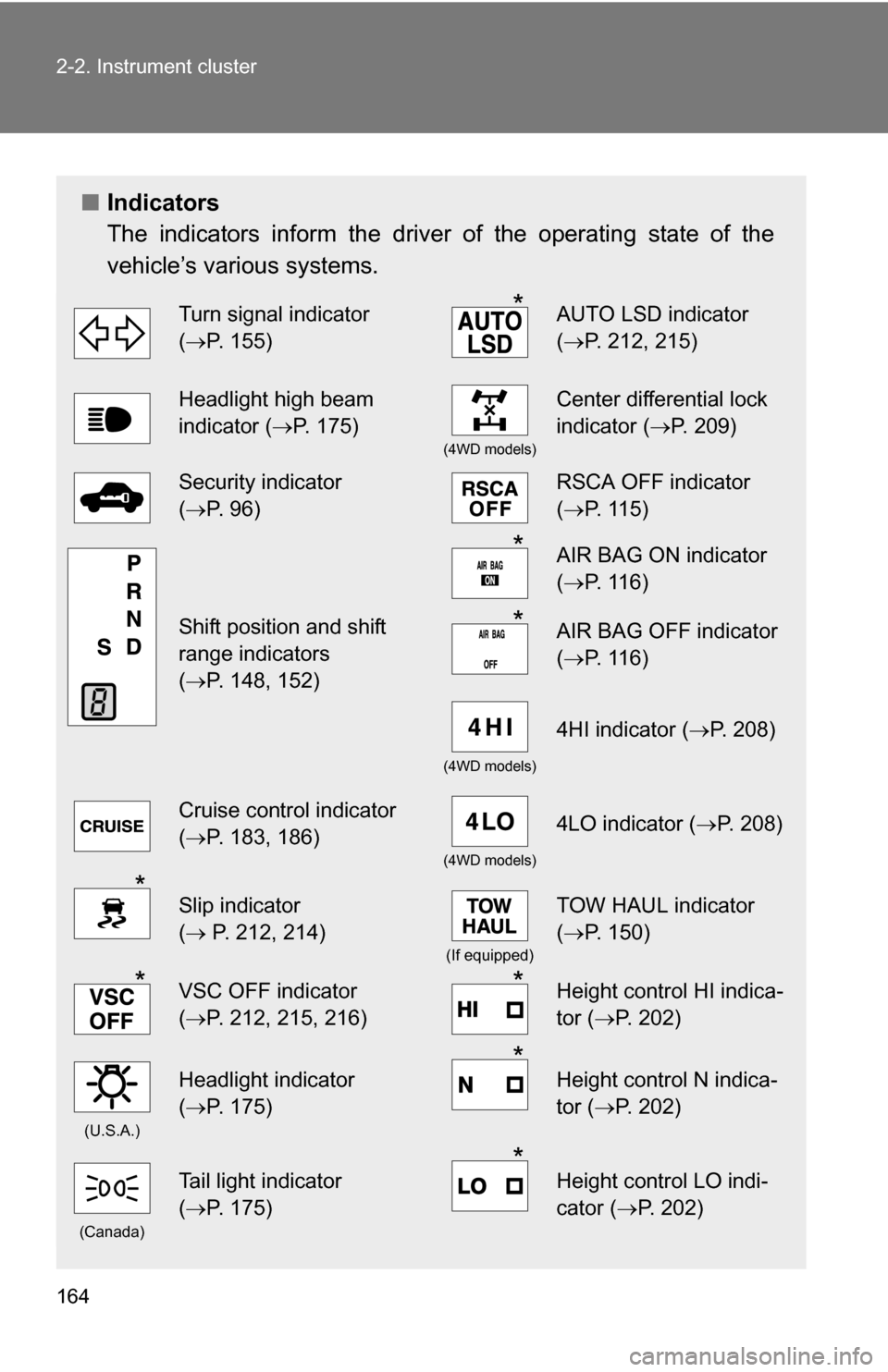
■Indicators
The indicators inform the driver of the operating state of the
vehicle’s various systems.
Turn signal indicator
(P. 155)*AUTO LSD indicator
( P. 212, 215)
Headlight high beam
indicator ( P. 175)
(4WD models)
Center differential lock
indicator ( P. 209)
Security indicator
(P. 96)RSCA OFF indicator
( P. 115)
Shift position and shift
range indicators
(P. 148, 152)
*AIR BAG ON indicator
( P. 116)
*AIR BAG OFF indicator
(P. 116)
(4WD models)
4HI indicator ( P. 208)
Cruise control indicator
(P. 183, 186)
(4WD models)
4LO indicator ( P. 208)
*Slip indicator
( P. 212, 214)
(If equipped)
TOW HAUL indicator
( P. 150)
*VSC OFF indicator
(P. 212, 215, 216)*Height control HI indica-
tor (P. 202)
(U.S.A.)
Headlight indicator
(P. 175)*Height control N indica-
tor (P. 202)
(Canada)
Tail light indicator
(P. 175)*Height control LO indi-
cator (P. 202)
Page 169 of 596
169
2-2. Instrument cluster
2
When driving
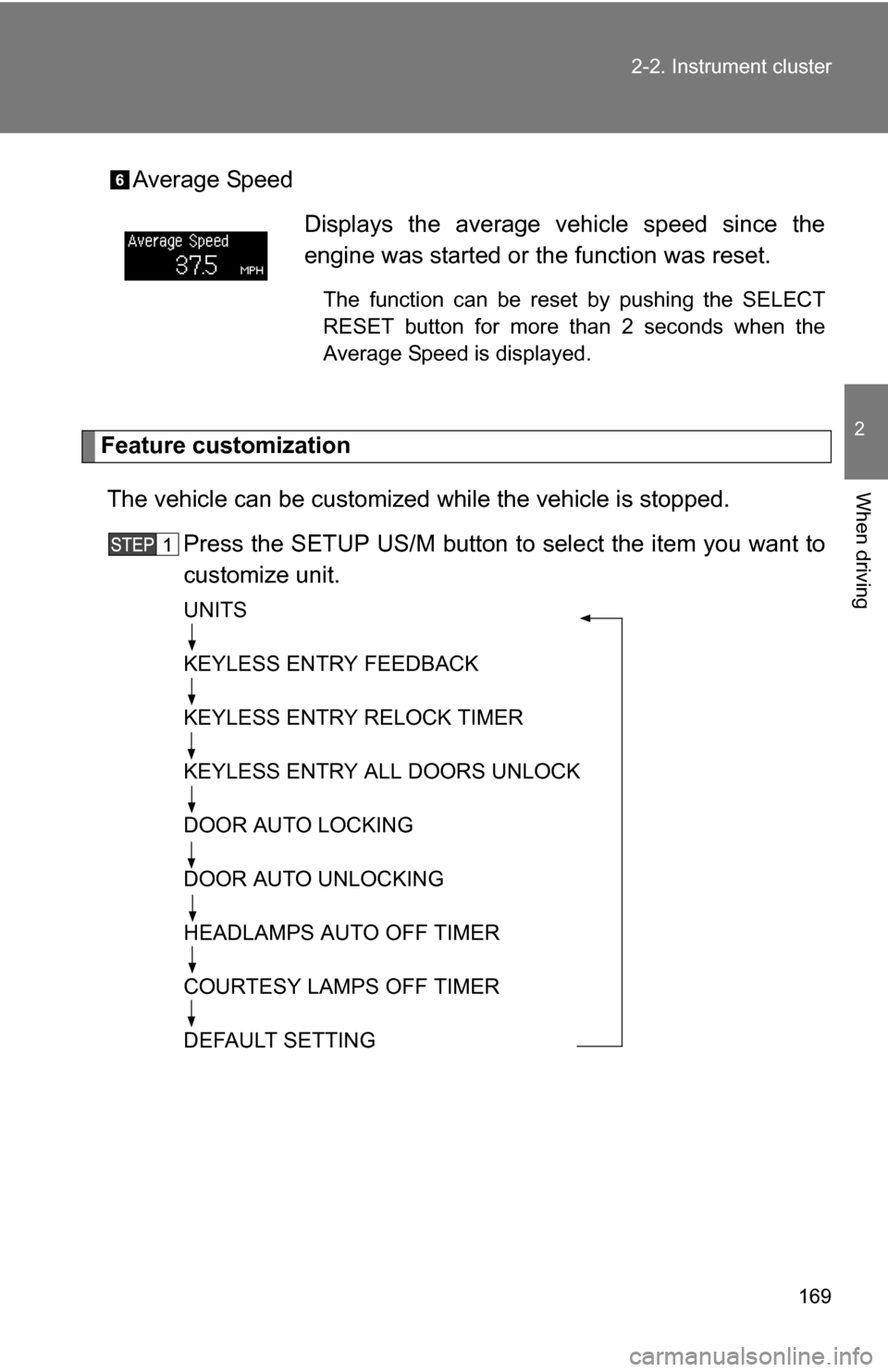
Average Speed
Feature customization
The vehicle can be customized while the vehicle is stopped.
Press the SETUP US/M button to select the item you want to
customize unit.
UNITS
KEYLESS ENTRY FEEDBACK
KEYLESS ENTRY RELOCK TIMER
KEYLESS ENTRY ALL DOORS UNLOCK
DOOR AUTO LOCKING
DOOR AUTO UNLOCKING
HEADLAMPS AUTO OFF TIMER
COURTESY LAMPS OFF TIMER
DEFAULT SETTING
Displays the average vehicle speed since the
engine was started or the function was reset.
The function can be reset by pushing the SELECT
RESET button for more than 2 seconds when the
Average Speed is displayed.
Page 170 of 596
170 2-2. Instrument cluster
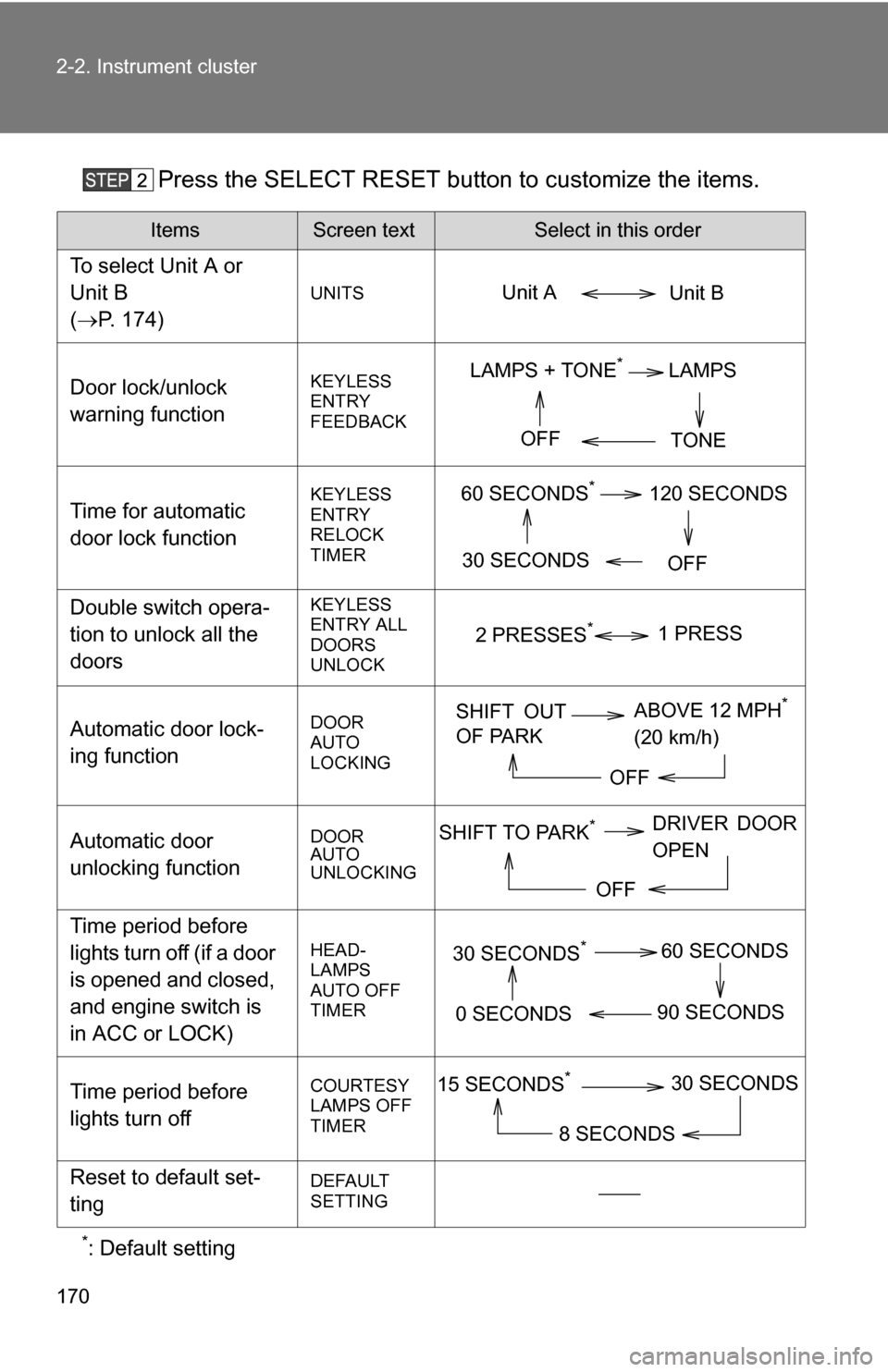
Press the SELECT RESET button to customize the items.
*: Default setting
ItemsScreen textSelect in this order
To select Unit A or
Unit B
(P. 174)
UNITS
Door lock/unlock
warning functionKEYLESS
ENTRY
FEEDBACK
Time for automatic
door lock functionKEYLESS
ENTRY
RELOCK
TIMER
Double switch opera-
tion to unlock all the
doorsKEYLESS
ENTRY ALL
DOORS
UNLOCK
Automatic door lock-
ing functionDOOR
AUTO
LOCKING
Automatic door
unlocking functionDOOR
AUTO
UNLOCKING
Time period before
lights turn off (if a door
is opened and closed,
and engine switch is
in ACC or LOCK)
HEAD-
LAMPS
AUTO OFF
TIMER
Time period before
lights turn offCOURTESY
LAMPS OFF
TIMER
Reset to default set-
tingDEFAULT
SETTING
Unit B
Unit A
LAMPS + TONE*LAMPS
TONE
OFF
60 SECONDS*120 SECONDS
30 SECONDS OFF
2 PRESSES*1 PRESS
SHIFT OUT
OF PARKABOVE 12 MPH*
(20 km/h)
OFF
SHIFT TO PARK*DRIVER DOOR
OPEN
OFF
30 SECONDS*60 SECONDS
90 SECONDS
0 SECONDS
15 SECONDS*30 SECONDS
8 SECONDS
Page 172 of 596
172
2-2. Instrument cluster
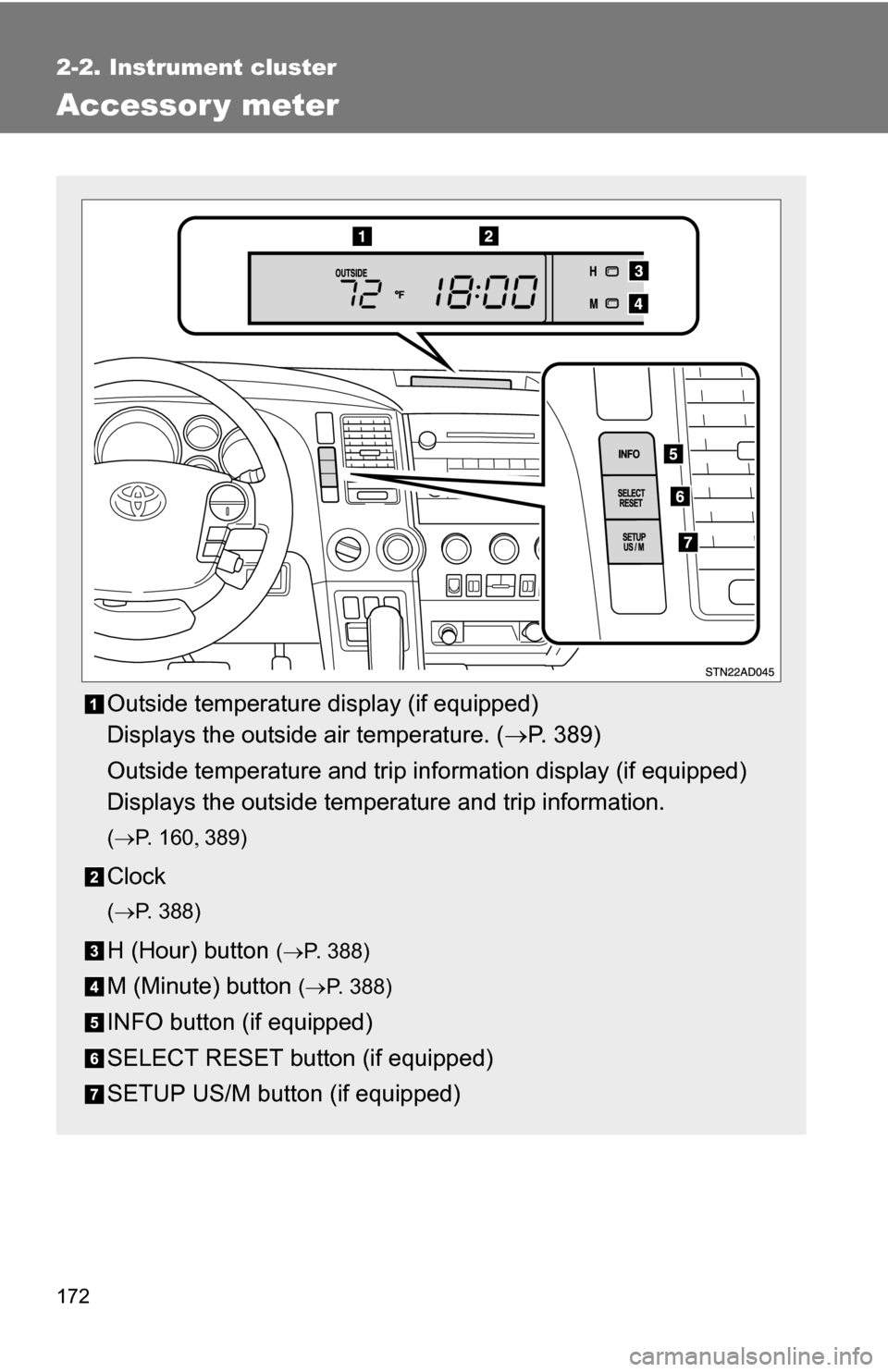
Accessor y meter
Outside temperature display (if equipped)
Displays the outside air temperature. (P. 389)
Outside temperature and trip information display (if equipped)
Displays the outside temperature and trip information.
( P. 1 6 0 389)
Clock
(P. 388)
H (Hour) button (P. 388)
M (Minute) button ( P. 388)
INFO button (if equipped)
SELECT RESET button (if equipped)
SETUP US/M button (if equipped)
Page 176 of 596
176 2-3. Operating the lights and wipers
■Daytime running light system (if equipped)
To make your vehicle more visible to other drivers, the front turn signal lights
turn on automatically whenever the engine is started and the parking brake
is released. Daytime running lights are not designed for use at night.
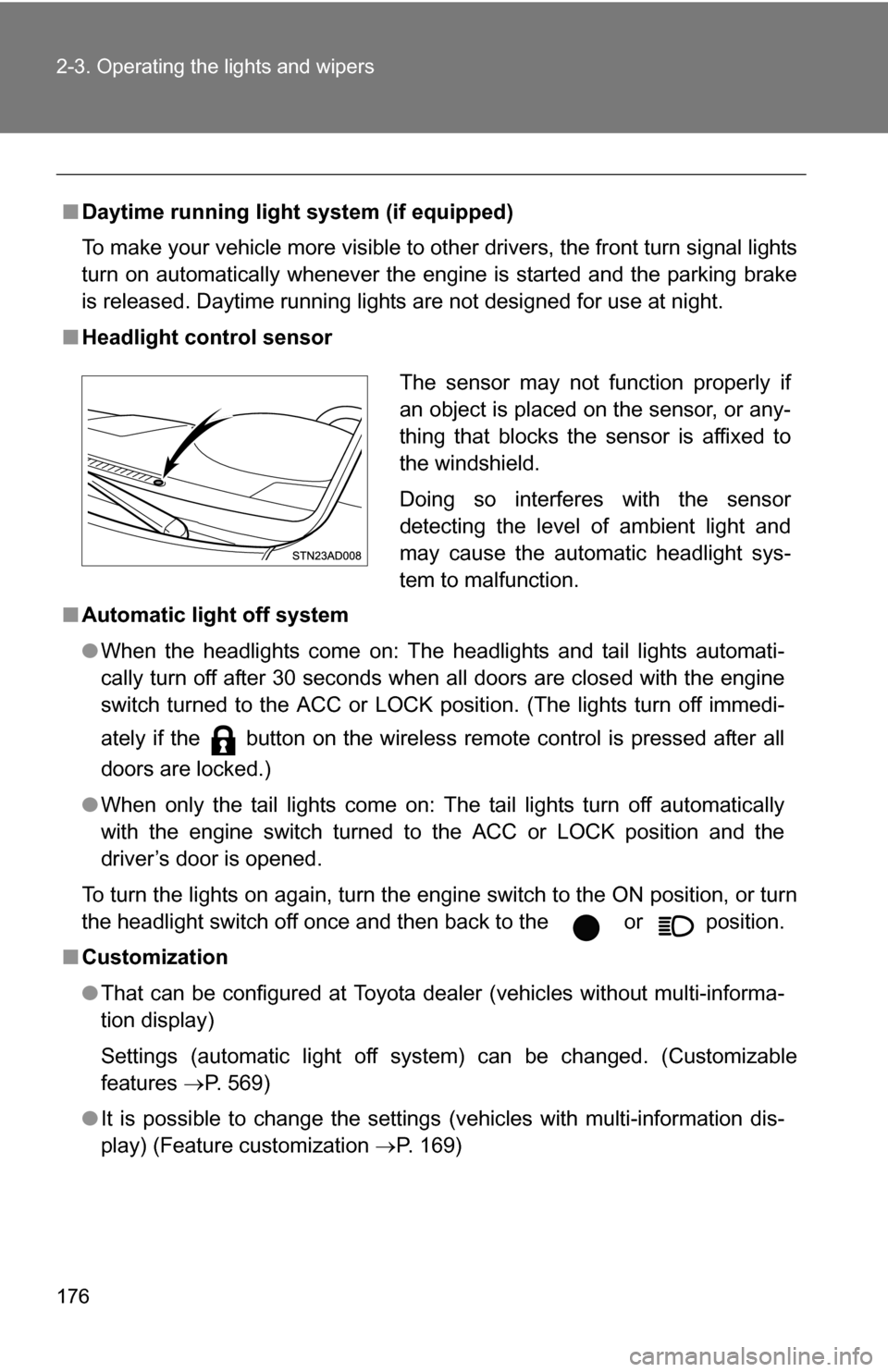
■ Headlight control sensor
■ Automatic light off system
●When the headlights come on: The headlights and tail lights automati-
cally turn off after 30 seconds when all doors are closed with the engine
switch turned to the ACC or LOCK position. (The lights turn off immedi-
ately if the button on the wireless remote control is pressed after all
doors are locked.)
● When only the tail lights come on: The tail lights turn off automatically
with the engine switch turned to the ACC or LOCK position and the
driver’s door is opened.
To turn the lights on again, turn the engine switch to the ON position, or turn
the headlight switch off once and then back to the or position.
■ Customization
●That can be configured at Toyota dealer (vehicles without multi-informa-
tion display)
Settings (automatic light off system) can be changed. (Customizable
features P. 569)
● It is possible to change the settings (vehicles with multi-information dis-
play) (Feature customization P. 169)
The sensor may not function properly if
an object is placed on the sensor, or any-
thing that blocks the sensor is affixed to
the windshield.
Doing so interferes with the sensor
detecting the level of ambient light and
may cause the automatic headlight sys-
tem to malfunction.