lock TOYOTA SEQUOIA 2008 2.G Manual PDF
[x] Cancel search | Manufacturer: TOYOTA, Model Year: 2008, Model line: SEQUOIA, Model: TOYOTA SEQUOIA 2008 2.GPages: 596, PDF Size: 12.93 MB
Page 238 of 596
238 2-5. Driving information
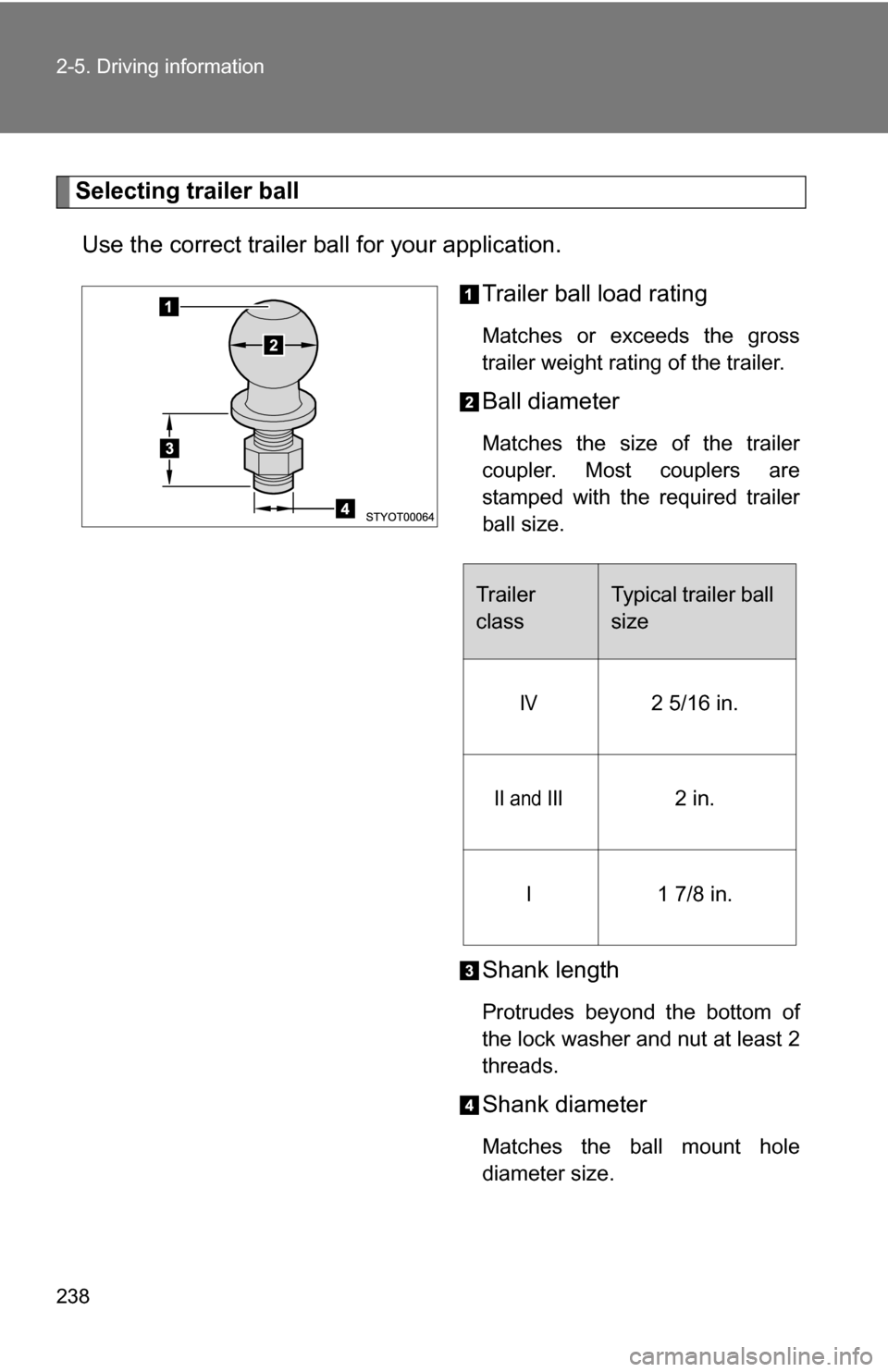
Selecting trailer ballUse the correct trailer ball for your application. Trailer ball load rating
Matches or exceeds the gross
trailer weight rating of the trailer.
Ball diameter
Matches the size of the trailer
coupler. Most couplers are
stamped with the required trailer
ball size.
Shank length
Protrudes beyond the bottom of
the lock washer and nut at least 2
threads.
Shank diameter
Matches the ball mount hole
diameter size.
Trailer
classTypical trailer ball
size
IV2 5/16 in.
II and III2 in.
I1 7/8 in.
Page 242 of 596
242 2-5. Driving information
●Always place wheel blocks under both the vehicle and the trailer
wheels when parking. Apply the parking brake firmly, and put the
transmission in P. Avoid parking on a slope, but if unavoidable, do
so only after performing the following:
Apply the brakes and keep them applied.
Have someone place wheel bloc ks under both the vehicle and
trailer wheels.
When the wheel blocks are in place, release the brakes slowly
until the blocks absorb the load.
Apply the parking brake firmly.
Shift into P and turn off the engine.
● When restarting after parking on a slope:
With the transmission in P, start the engine. Be sure to keep
the brake pedal pressed.
Shift into D or R (if reversing).
Release the parking brake and brake pedal, and slowly pull or
back away from the wheel blocks. Stop and apply the brakes.
Have someone retrieve the blocks.
Page 249 of 596
Interior features3
249
3-5. Using the interior lights ............................. 362
Interior lights list ............... 362
• Personal/interior light main switch .................... 363
• Personal/interior lights ... 364
• Interior light .................... 365
3-6. Using the storage features ......................... 366
List of storage features .... 366
• Glove boxes ................... 367
• Coin holder .................... 368
• Front console box .......... 368
• Card holder .................... 370
• Map holder ..................... 371
• Pen holder ..................... 372
• Tissue pocket................. 373
• Rear console box ........... 373
• Overhead console.......... 376
• Cup holders ................... 377
• Bottle holders ................. 381
• Auxiliary boxes............... 382
• Seatback table ............... 384 3-7. Other interior features ... 386
Sun visors ........................ 386
Vanity mirrors ................... 387
Clock ................................ 388
Outside temperature display............................ 389
Portable ashtray ............... 390
Cigarette lighter................ 391
Conversation mirror ......... 392
Power outlets ................... 393
Seat heaters..................... 397
Seat heaters and ventilators ...................... 400
Armrests........................... 402
Rear side sunshades ....... 403
Floor mat .......................... 405
Luggage compartment features .......................... 406
Garage door opener......... 411
Compass .......................... 416
Page 251 of 596
251
3-1. Using the air conditioning system
and defogger
3
Interior features
Using the automatic mode
Press .
The air conditioning system will begin to operate. Air outlets and fan
speed are automatically adjusted according to the temperature set-
ting.
Turn the temperature control dial clockwise (warm) or coun-
terclockwise (cool).
The temperature for the driver and passenger seat can be set sepa-
rately.
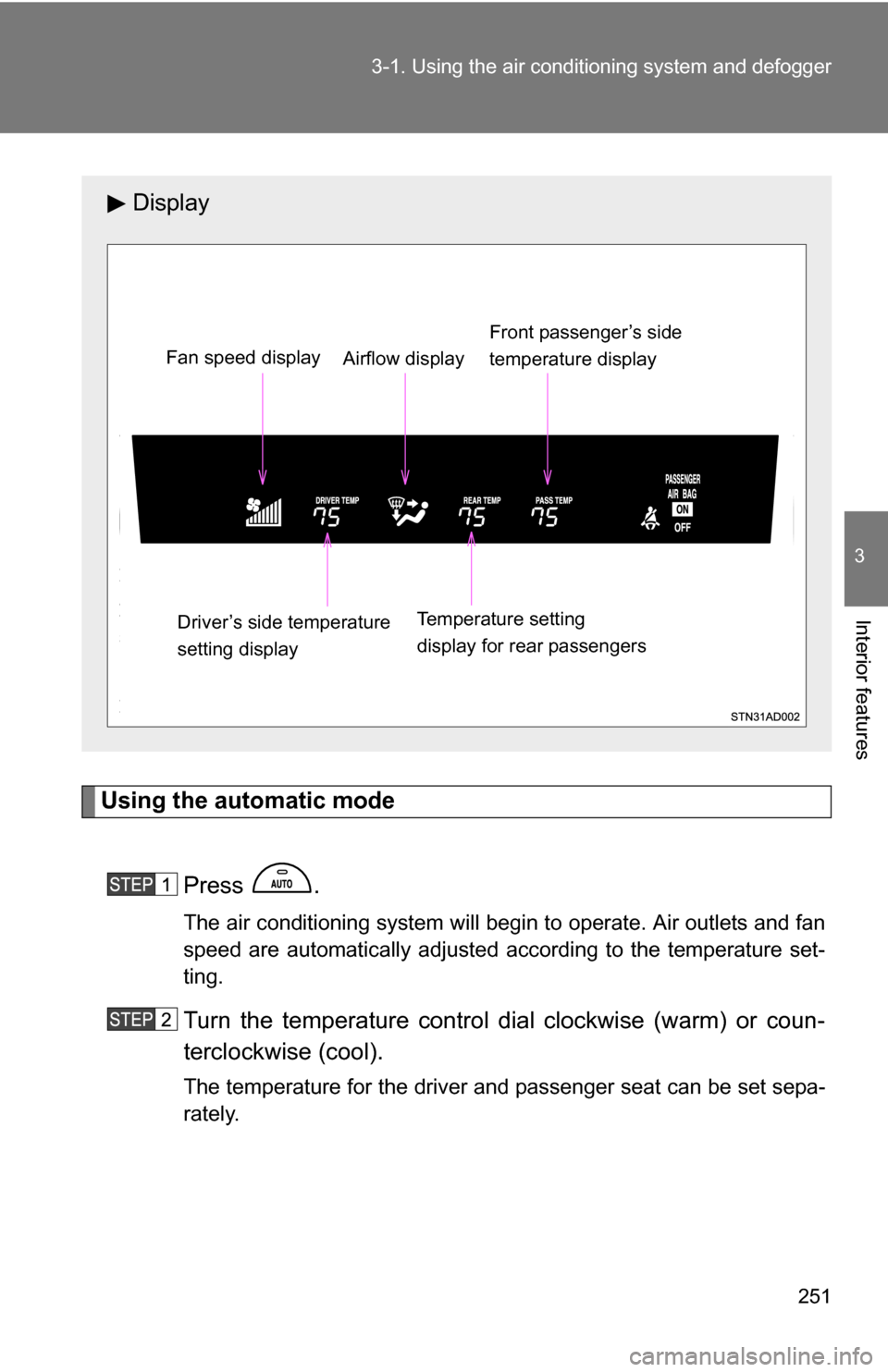
Display
Front passenger’s side
temperature display
Fan speed display
Airflow display
Driver’s side temperature
setting display Temperature setting
display for rear passengers
Page 252 of 596
252 3-1. Using the air conditioning system and defogger
Adjusting the settings
■ Adjusting the temperature setting
Turn the temperature control dial clockwise (warm) or counter-
clockwise (cool).
The air conditioning system sw itches between individual and
simultaneous modes each time is pressed.
● Simultaneous mode (the indicator on is on)
The driver’s side temperature control dial can be used to adjust
the temperature for all seats.
● Individual mode (the indicator on is off)
The temperature for the driver’s, front passenger’s and rear
seats ( P. 258) can be adjusted separately. Operate the pas-
senger’s side or rear temperature controls to enter individual
mode.
■ Adjusting the fan speed
Turn the fan speed control dial clockwise (increase) or counter-
clockwise (decrease).
The fan speed is shown on the display. (7 levels)
Press to turn the fan off.
Page 257 of 596
257
3-1. Using the air conditioning system
and defogger
3
Interior features
■When outside temperature approaches 32 F (0 C)
The air conditioning system may not operate even when is pressed.
■ When the indicator on
flashes
Press
and turn off the air conditioning system before turning it on
once more. There may be a problem in the air conditioning system if the indi-
cator continues to flash. Turn the air conditioning system off and have it
inspected by your Toyota dealer.
CAUTION
■ To prevent the windshield from fogging up
Do not use during cool air operation in extremely humid weather. The
difference between the temperature of the outside air and that of the wind-
shield can cause the outer surface of the windshield to fog up, blocking your
vision.
NOTICE
■To prevent battery discharge
Do not leave the air conditioning system on longer than necessary when the
engine is stopped.
Page 258 of 596
258
3-1. Using the air conditioning system and defogger
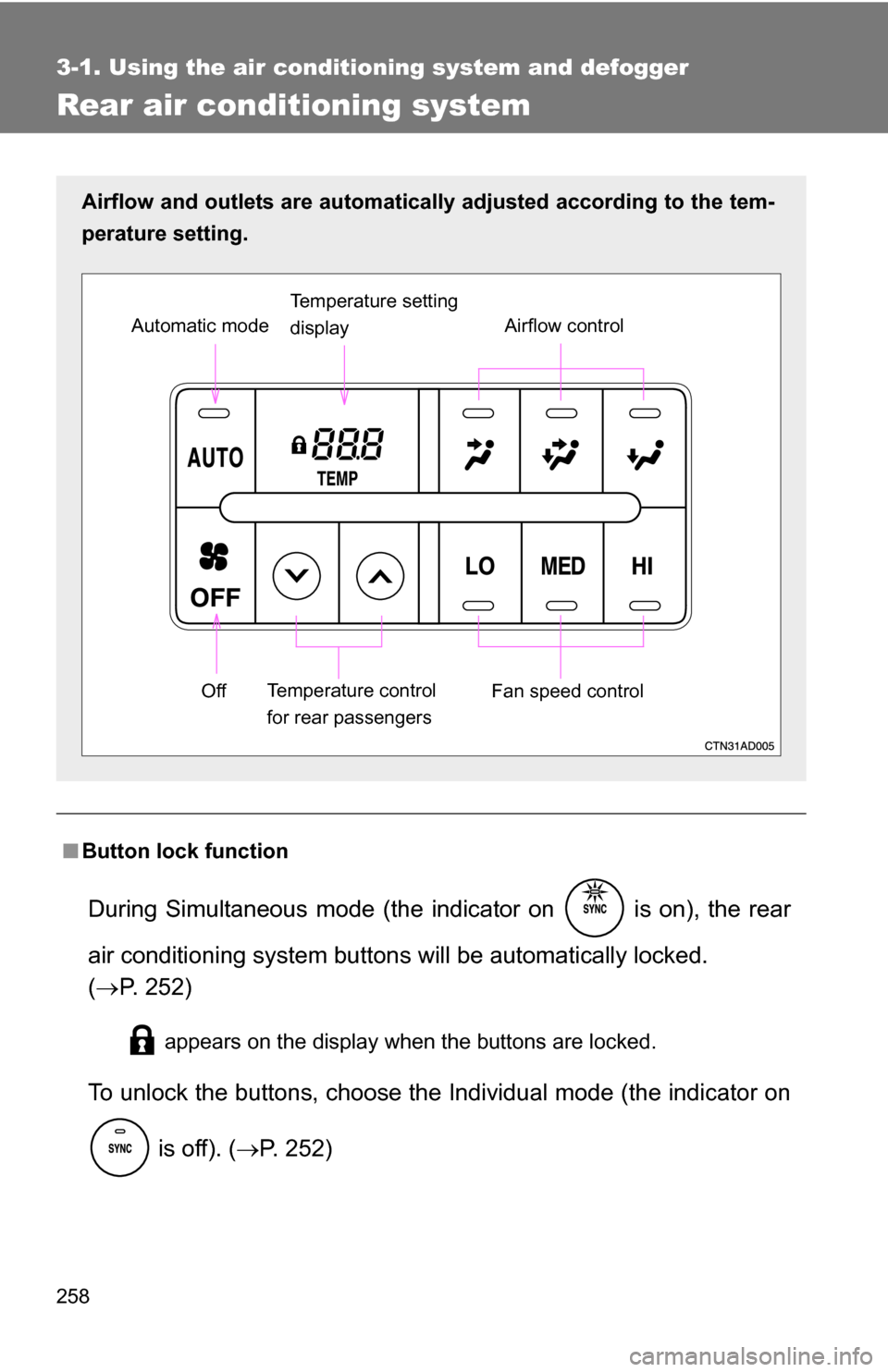
Rear air conditioning system
■Button lock function
During Simultaneous mode (the indicator on is on), the rear
air conditioning system button s will be automatically locked.
( P. 252)
appears on the display when the buttons are locked.
To unlock the buttons, c hoose the Individual mode (the indicator on
is off). ( P. 252)
Airflow and outlets are automatica lly adjusted according to the tem-
perature setting.
Airflow control
Temperature setting
display
Fan speed control
Off
Automatic mode
Temperature control
for rear passengers
Page 292 of 596
292
3-2. Using the audio system
Optimal use of the audio system
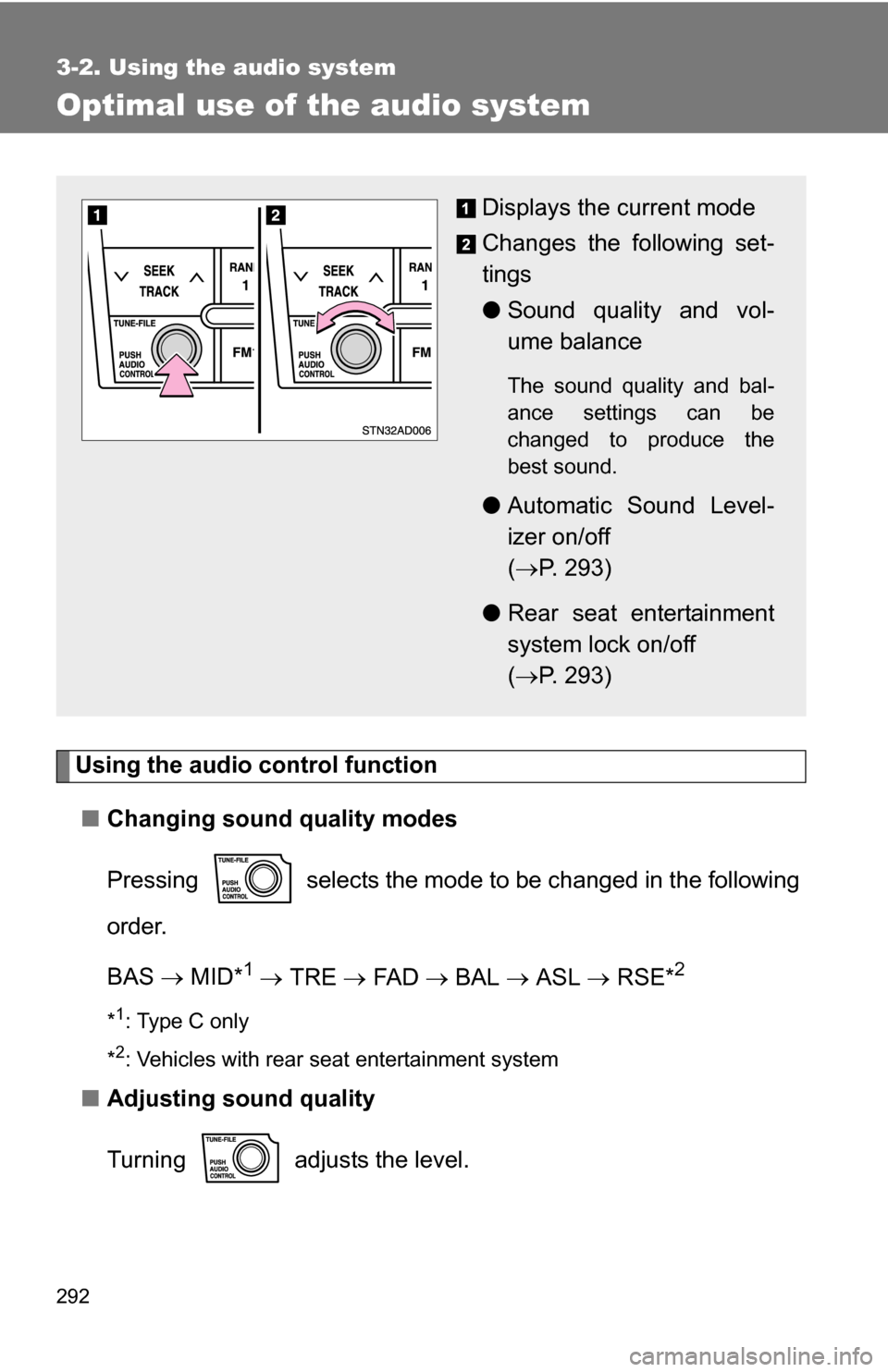
Using the audio control function■ Changing sound quality modes
Pressing selects the mode to be changed in the following
order.
BAS MID*
1 TRE FA D BAL ASL RSE*2
*1: Type C only
*
2: Vehicles with rear seat entertainment system
■ Adjusting sound quality
Turning adjusts the level.
Displays the current mode
Changes the following set-
tings
●Sound quality and vol-
ume balance
The sound quality and bal-
ance settings can be
changed to produce the
best sound.
●Automatic Sound Level-
izer on/off
( P. 293)
● Rear seat entertainment
system lock on/off
( P. 293)
Page 293 of 596
293
3-2. Using the audio system
3
Interior features*: The sound quality level is adjusted individually in each radio mode or
CD mode.
■ Adjusting the Automatic Sound Levelizer (ASL)
When ASL is selected, turning to the right changes the
amount of ASL in the order of LOW, MID and HIGH.
Turning to the left turns ASL off.
ASL automatically adjusts the volume and tone quality according to vehi-
cle speed.
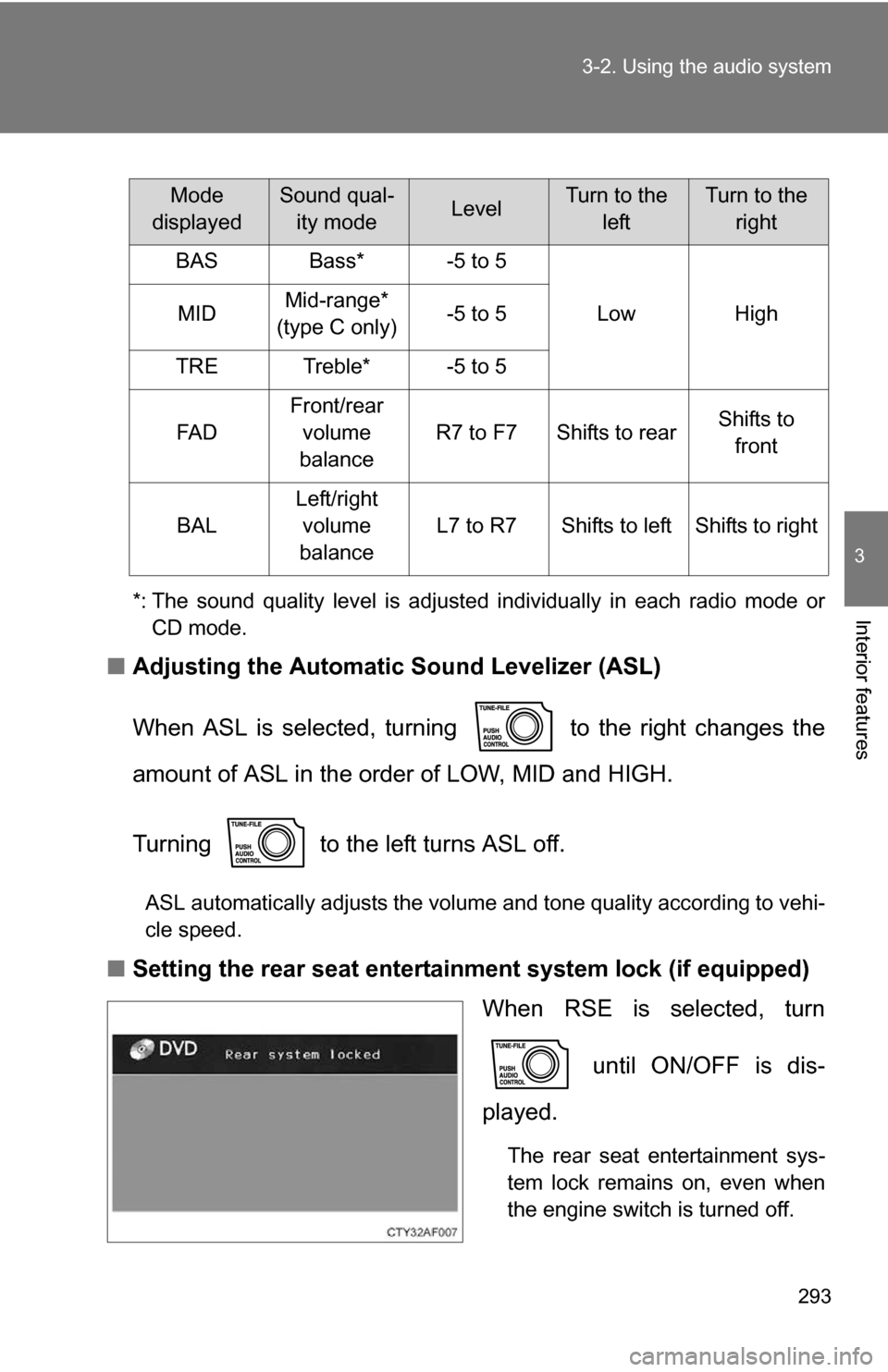
■Setting the rear seat entertainment system lock (if equipped)
When RSE is selected, turn
until ON/OFF is dis-
played.
The rear seat entertainment sys-
tem lock remains on, even when
the engine switch is turned off.
Mode
displayedSound qual- ity modeLevelTurn to the leftTurn to the right
BASBass*-5 to 5
LowHighMIDMid-range*
(type C only)-5 to 5
TRETreble*-5 to 5
FA D
Front/rear volume
balance
R7 to F7Shifts to rearShifts to front
BAL
Left/right volume
balance
L7 to R7Shifts to leftShifts to right
Page 299 of 596
299
3-3. Using the rear audio/video system
3
Interior features
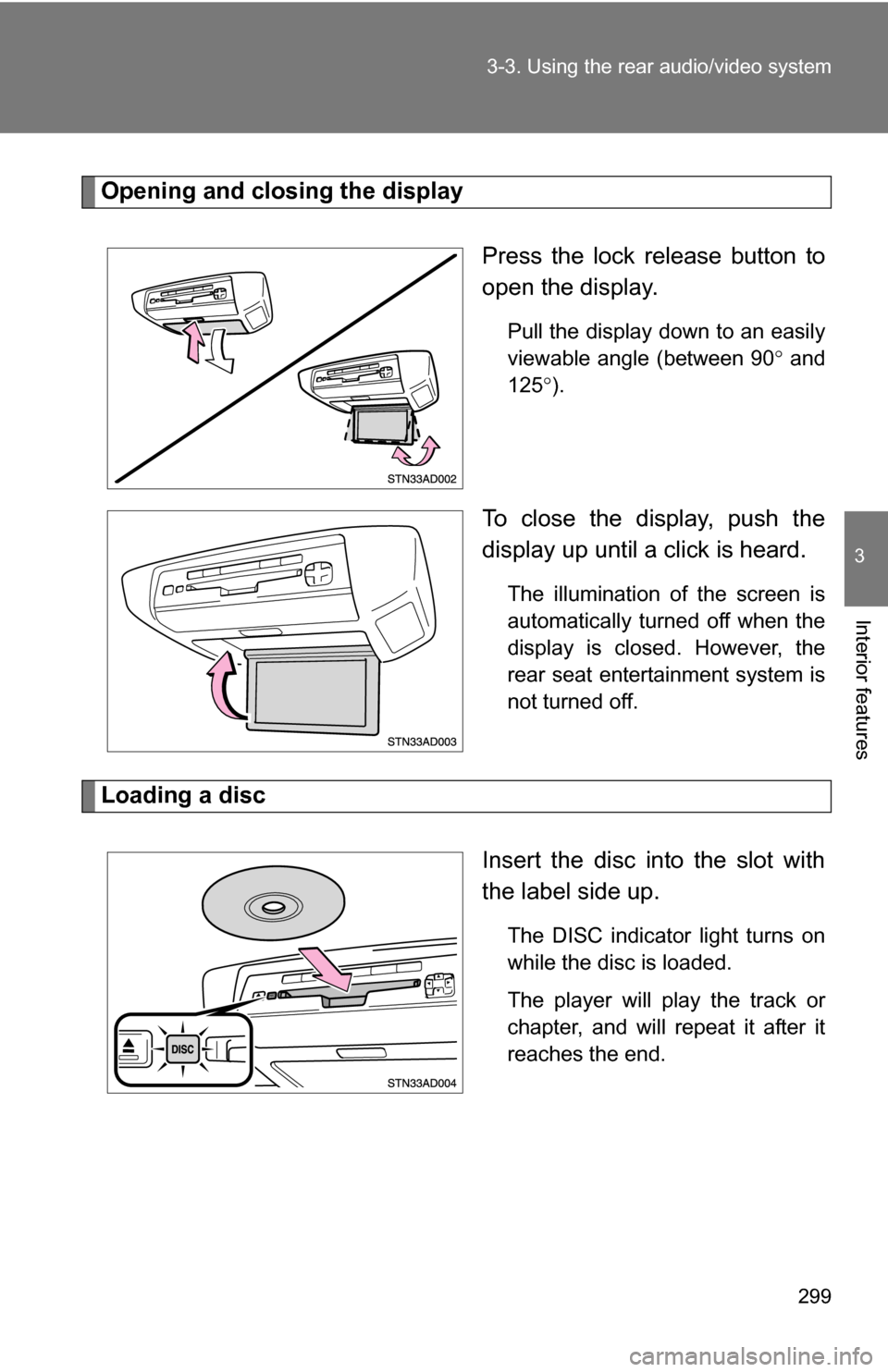
Opening and closing the display
Press the lock release button to
open the display.
Pull the display down to an easily
viewable angle (between 90 and
125 ).
To close the display, push the
display up until a click is heard.
The illumination of the screen is
automatically turned off when the
display is closed. However, the
rear seat entertainment system is
not turned off.
Loading a disc
Insert the disc into the slot with
the label side up.
The DISC indicator light turns on
while the disc is loaded.
The player will play the track or
chapter, and will repeat it after it
reaches the end.