change time TOYOTA SEQUOIA HYBRID 2023 User Guide
[x] Cancel search | Manufacturer: TOYOTA, Model Year: 2023, Model line: SEQUOIA HYBRID, Model: TOYOTA SEQUOIA HYBRID 2023Pages: 628, PDF Size: 14.27 MB
Page 160 of 628
1603-4. Adjusting the steering wheel and mirrors
Owners Manual_USA_M0C043_en
Responding to the level of
brightness of the headlights of
vehicles behind, the reflected
light is automatically reduced.
Turn the automatic anti-glare
function mode on/off
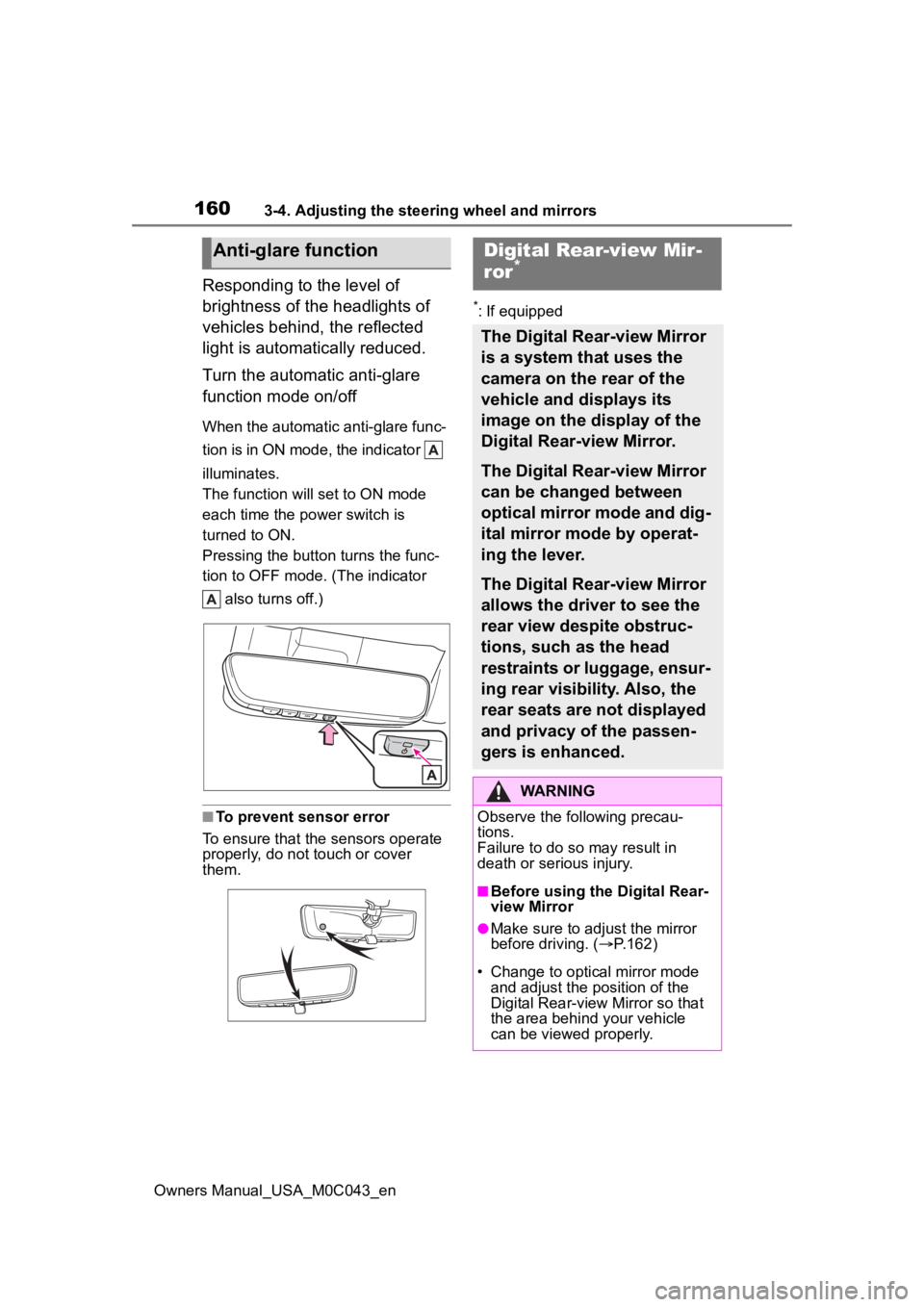
When the automatic anti-glare func-
tion is in ON mode, the indicator
illuminates.
The function will set to ON mode
each time the power switch is
turned to ON.
Pressing the button turns the func-
tion to OFF mode. (The indicator also turns off.)
■To prevent sensor error
To ensure that the sensors operate
properly, do not touch or cover
them.
*: If equipped
Anti-glare functionDigital Rear-view Mir-
ror*
The Digital Rear-view Mirror
is a system that uses the
camera on the rear of the
vehicle and displays its
image on the display of the
Digital Rear-view Mirror.
The Digital Rear-view Mirror
can be changed between
optical mirror mode and dig-
ital mirror mode by operat-
ing the lever.
The Digital Rear-view Mirror
allows the driver to see the
rear view despite obstruc-
tions, such as the head
restraints or luggage, ensur-
ing rear visibility. Also, the
rear seats are not displayed
and privacy of the passen-
gers is enhanced.
WARNING
Observe the following precau-
tions.
Failure to do so may result in
death or serious injury.
■Before using the Digital Rear-
view Mirror
●Make sure to adjust the mirror
before driving. ( P.162)
• Change to optical mirror mode and adjust the position of the
Digital Rear-view Mirror so that
the area behind your vehicle
can be viewed properly.
Page 163 of 628
1633-4. Adjusting the steering wheel and mirrors
Owners Manual_USA_M0C043_en
3
Before driving
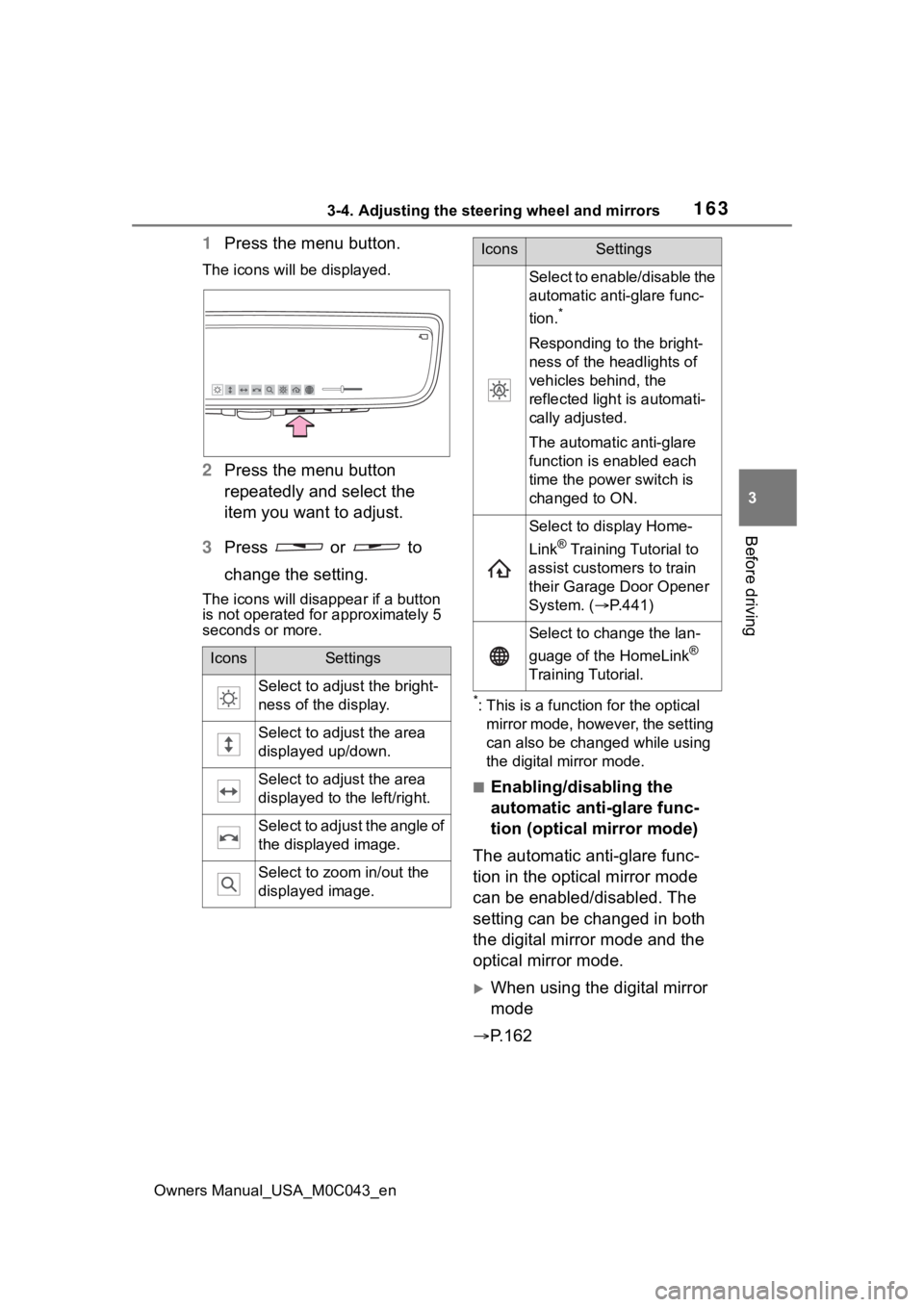
1 Press the menu button.
The icons will be displayed.
2Press the menu button
repeatedly and select the
item you want to adjust.
3 Press or to
change the setting.
The icons will disapp ear if a button
is not operated fo r approximately 5
seconds or more.
*: This is a functi on for the optical
mirror mode, however, the setting
can also be changed while using
the digital mirror mode.
■Enabling/disabling the
automatic anti-glare func-
tion (optical mirror mode)
The automatic anti-glare func-
tion in the optical mirror mode
can be enabled/disabled. The
setting can be changed in both
the digital mirror mode and the
optical mirror mode.
When using the digital mirror
mode
P.162
IconsSettings
Select to adjust the bright-
ness of the display.
Select to adjust the area
displayed up/down.
Select to adjust the area
displayed to the left/right.
Select to adjust the angle of
the displayed image.
Select to zoom in/out the
displayed image.
Select to enable/disable the
automatic anti-glare func-
tion.
*
Responding to the bright-
ness of the headlights of
vehicles behind, the
reflected light is automati-
cally adjusted.
The automatic anti-glare
function is enabled each
time the power switch is
changed to ON.
Select to display Home-
Link
® Training Tutorial to
assist customers to train
their Garage Door Opener
System. ( P.441)
Select to change the lan-
guage of the HomeLink
®
Training Tutorial.
IconsSettings
Page 173 of 628

1733-4. Adjusting the steering wheel and mirrors
Owners Manual_USA_M0C043_en
3
Before driving
the trailer.
When either “L” or “R” of the mir-
ror select switch is selected, the
outside rear view mirrors will
automatically angle downwards
when the vehicle is reversing in
order to give a better view of the
ground.
To disable this function, select
neither “L” nor “R”.
■Adjusting the mirror angle
when the vehicle is revers-
ing
With the shift lever in R, adjust
the mirror angle at a desired
position.
The adjusted angle will be mem-
orized and the mirror will auto-
matically tilt to the memorized
angle whenever the shift lever is
shifted to R from next time.
The memorized do wnward tilt posi-
tion of the mirror is linked to the
normal position (angle adjusted
with the shift posi tion in other than
R). Therefore, if the normal position
is changed after adjustment, the tilt
position will also change.
When the normal position is
changed, readjust the angle in
reversing.
Improves reverse operation for
trailer parking by turning on the
outer mirror lights at night.
These lights can be used as
work lights.
When the shift lever is in P or R,
press the switch.
■Automatic light off system
The lights will automa tically turn off
when any of the following conditions
are satisfied:
●When the shift lever is in N or D
●When the outer mirror is folded
( P.171)
Linked mirror function
when reversing
Trailering light (if
equipped)
Page 199 of 628
1994-1. Before driving
Owners Manual_USA_M0C043_en
4
Driving
■Trailer brake controller
P. 3 8 8
■Before towing
Check that the following conditions
are met:
●Ensure that your vehicle’s tires
are properly inflated. ( P.555)
●Trailer tires are inflated according
to the trailer manufacturer’s rec-
ommendation.
●All trailer lights work as required
by law.
●All lights work each time you con-
nect them.
●The trailer ball is set at the proper
height for the coupler on the
trailer.
●The trailer is level when it is
hitched. Do not dri ve if the trailer
is not level, and check for
improper tongue weight, overload-
ing, worn suspension, or other
possible causes.
●The trailer cargo is securely
loaded.
●The rear view mirrors conform to
all applicable federal, state/provin-
cial or local regu lations. If they do
not, install rear view mirrors
appropriate for towing purposes.
Contact your Toyota dealer for
further information about addi-
tional requirements such as a
towing kit, etc.WARNING
■Trailer towing precautions
●To tow a trailer safely, use
extreme care and drive the vehi-
cle in accordance with the
trailer’s characteristics and
operating conditions. Failure to
do so could cause an accident
resulting in death or serious
injury. Vehicle stability and brak-
ing performance are affected by
trailer stability, brake setting and
performance, and the hitch.
Your vehicle will handle differ-
ently when towing a trailer.
●Vehicles with electronically
modulated air suspension: Set
the vehicle height to the “N”
mode and turn off the rear
height control air suspension
when you connect a trailer, oth-
erwise the vehicle height may
change due to the automatic
leveling function, and you may
catch part of your body in the
vehicle.
■To avoid accident or injury
●Do not exceed the TWR,
unbraked TWR, GCWR, GVWR
or GAWR.
●If the gross trailer weight is over
2000 lb. (900 kg), a sway con-
trol device with sufficient capac-
ity is required.
●If the gross trailer weight is over
5000 lb. (2200 kg), a weight dis-
tributing hitch with sufficient
capacity is required.
●Adjust the tongue weight within
the appropriate range. Place
heavier loads as close to the
trailer axle as possible.
Page 212 of 628
2124-2. Driving procedures
Owners Manual_USA_M0C043_en
4-2.Driving procedures
1Pull the parking brake switch
to check that the parking
brake is set. ( P.222)
The parking brake indicator will
come on.
2Check that the shift lever is in
P.
3 Firmly depress the brake
pedal.
and a message will be dis-
played on the multi-information dis-
play.
If it is not displayed, the hybrid sys-
tem cannot be started.
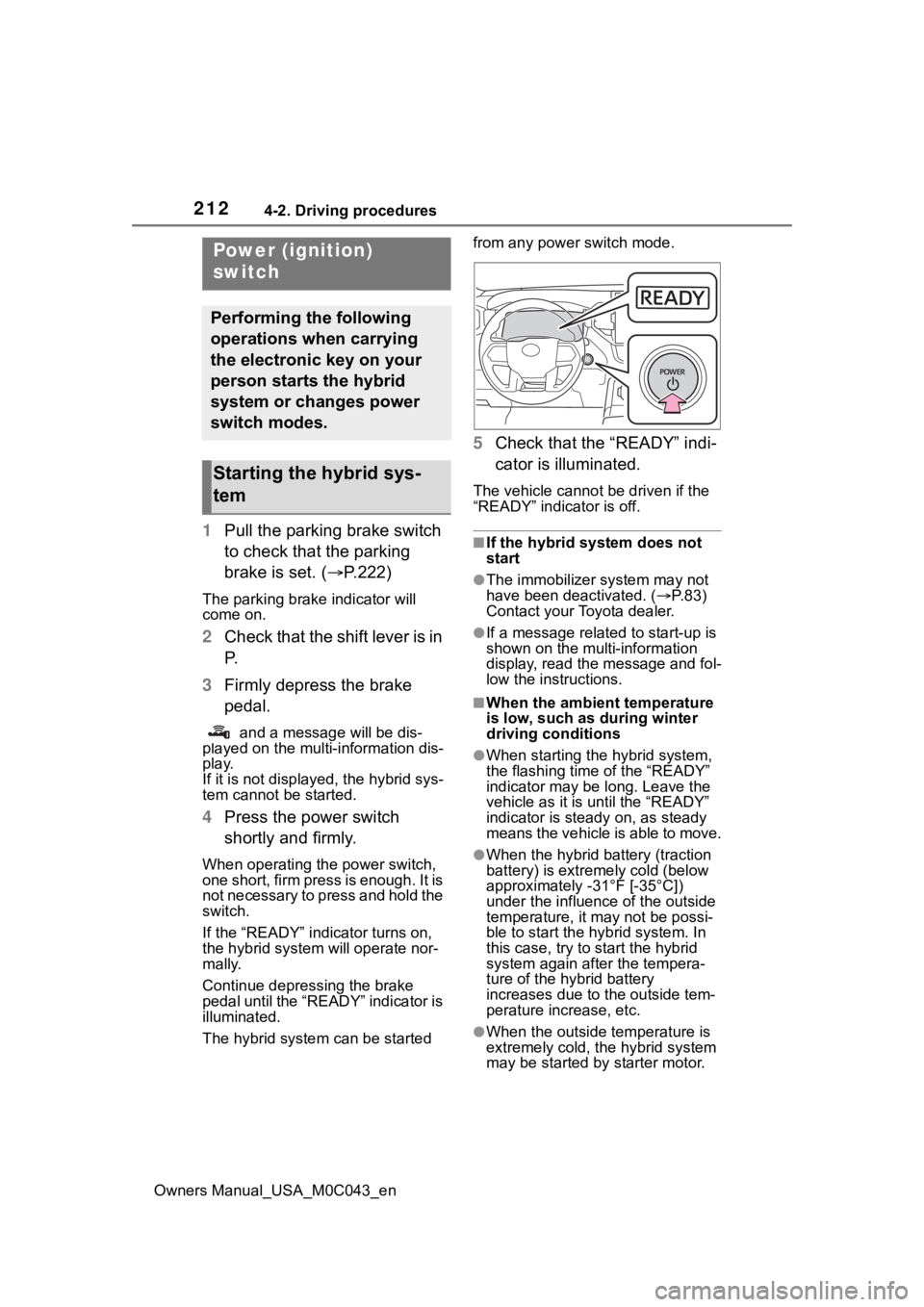
4 Press the power switch
shortly and firmly.
When operating the power switch,
one short, firm press is enough. It is
not necessary to press and hold the
switch.
If the “READY” indicator turns on,
the hybrid system will operate nor-
mally.
Continue depressing the brake
pedal until the “READY” indicator is
illuminated.
The hybrid system can be started from any power switch mode.
5
Check that the “READY” indi-
cator is illuminated.
The vehicle cannot be driven if the
“READY” indicator is off.
■If the hybrid system does not
start
●The immobilizer system may not
have been deactivated. ( P. 8 3 )
Contact your Toyota dealer.
●If a message related to start-up is
shown on the multi-information
display, read the message and fol-
low the instructions.
■When the ambient temperature
is low, such as during winter
driving conditions
●When starting th e hybrid system,
the flashing time of the “READY”
indicator may be long. Leave the
vehicle as it is until the “READY”
indicator is steady on, as steady
means the vehicle is able to move.
●When the hybrid battery (traction
battery) is extremely cold (below
approximately -31°F [-35°C])
under the influenc e of the outside
temperature, it ma y not be possi-
ble to start the hybrid system. In
this case, try to start the hybrid
system again after the tempera-
ture of the hybrid battery
increases due to the outside tem-
perature increase, etc.
●When the outside temperature is
extremely cold, the hybrid system
may be started by starter motor.
Power (ignition)
switch
Performing the following
operations when carrying
the electronic key on your
person starts the hybrid
system or changes power
switch modes.
Starting the hybrid sys-
tem
Page 215 of 628
2154-2. Driving procedures
Owners Manual_USA_M0C043_en
4
Driving
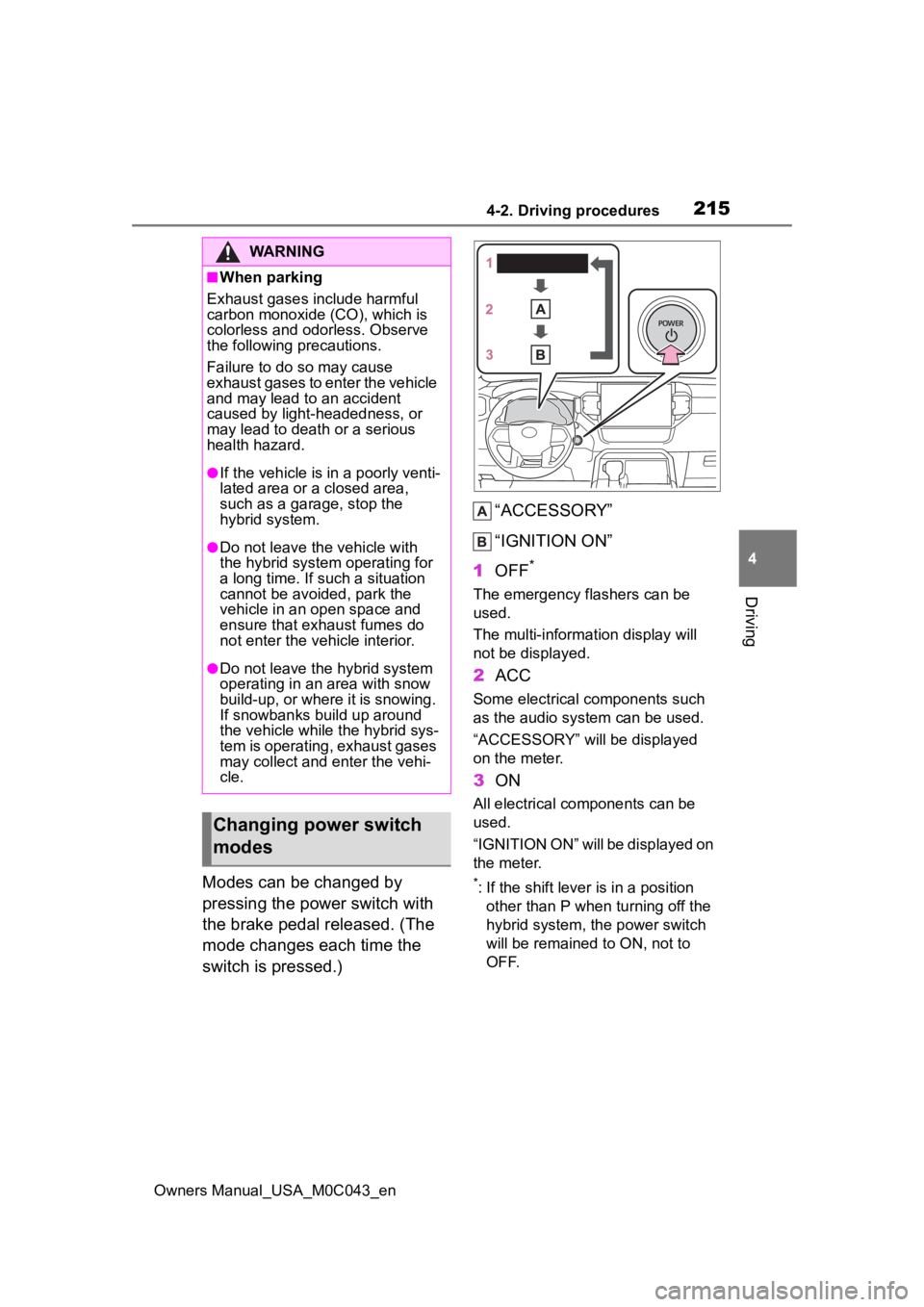
Modes can be changed by
pressing the power switch with
the brake pedal released. (The
mode changes each time the
switch is pressed.) “ACCESSORY”
“IGNITION ON”
1 OFF
*
The emergency flashers can be
used.
The multi-information display will
not be displayed.
2ACC
Some electrical components such
as the audio sys tem can be used.
“ACCESSORY” will be displayed
on the meter.
3 ON
All electrical components can be
used.
“IGNITION ON” will be displayed on
the meter.
*: If the shift lever is in a position
other than P when turning off the
hybrid system, the power switch
will be remained to ON, not to
OFF.
WARNING
■When parking
Exhaust gases include harmful
carbon monoxide (CO), which is
colorless and odorless. Observe
the following precautions.
Failure to do so may cause
exhaust gases to enter the vehicle
and may lead to an accident
caused by light-headedness, or
may lead to death or a serious
health hazard.
●If the vehicle is in a poorly venti-
lated area or a closed area,
such as a garage, stop the
hybrid system.
●Do not leave the vehicle with
the hybrid system operating for
a long time. If such a situation
cannot be avoided, park the
vehicle in an open space and
ensure that exhaust fumes do
not enter the vehicle interior.
●Do not leave the hybrid system
operating in an area with snow
build-up, or where it is snowing.
If snowbanks build up around
the vehicle while the hybrid sys-
tem is operating, exhaust gases
may collect and enter the vehi-
cle.
Changing power switch
modes
Page 220 of 628
2204-2. Driving procedures
Owners Manual_USA_M0C043_en
●To protect the automatic transmis-
sion, a function is adopted that
automatically select s a h i g h e r s h i f t
range when the fluid temperature
is high.
●When the shift range is 9 or lower,
holding the shift lever toward “+”
sets the shift range to 10.
■Downshifting restriction warn-
ing buzzer
To help ensure safety and driving
performance, downshifting opera-
tion may sometimes b e restricted. In
some circumstances, downshifting
may not be possible even when the
shift lever is opera ted. (A buzzer will
sound twice.)
■If the S indicator does not come
on even after shifting the shift
lever to S
This may indicate a malfunction in
the automatic tra nsmission system.
Have the vehicle inspected by your
Toyota dealer immediately.
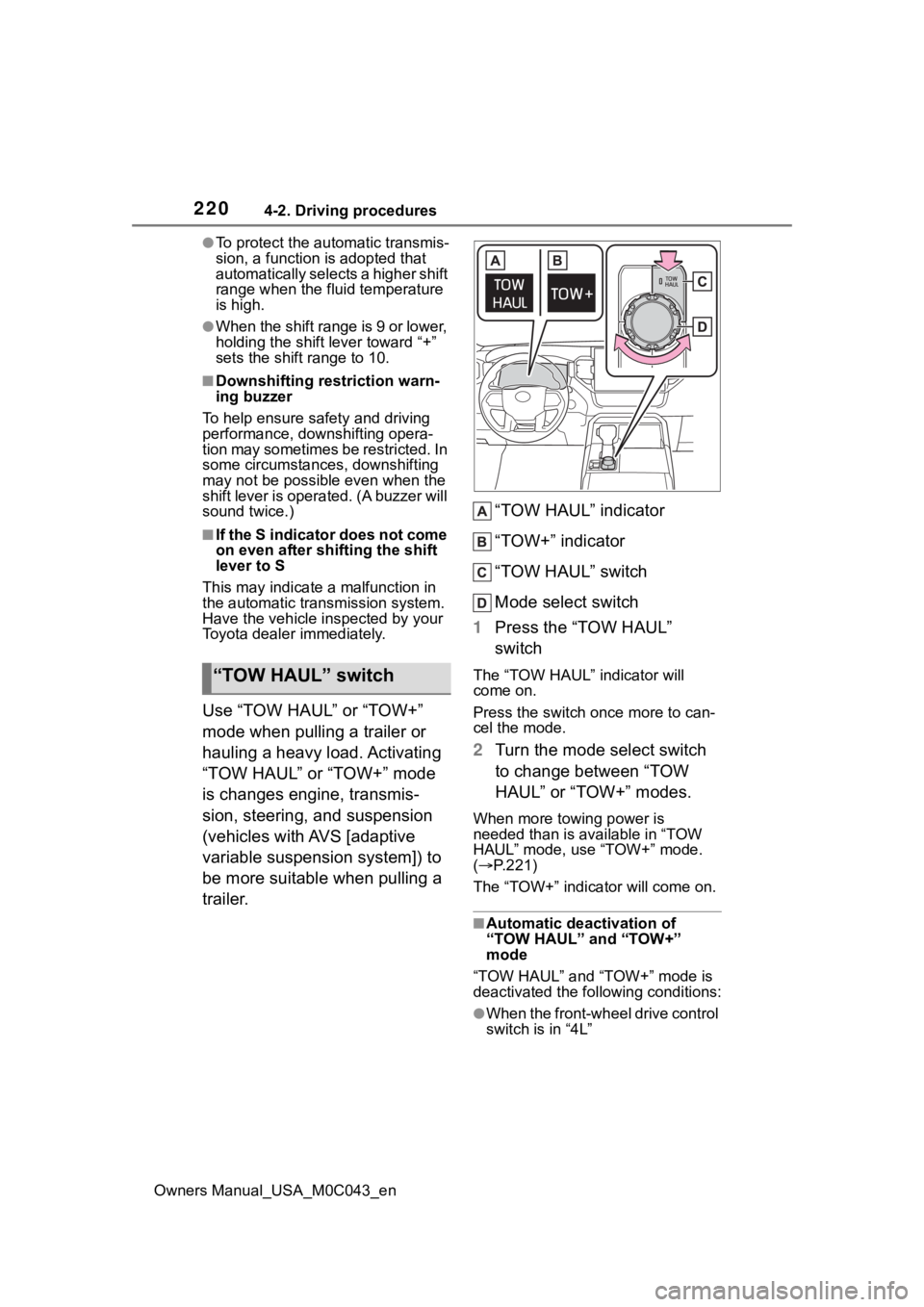
Use “TOW HAUL” or “TOW+”
mode when pulling a trailer or
hauling a heavy load. Activating
“TOW HAUL” or “TOW+” mode
is changes engine, transmis-
sion, steering, and suspension
(vehicles with AVS [adaptive
variable suspension system]) to
be more suitable when pulling a
trailer. “TOW HAUL” indicator
“TOW+” indicator
“TOW HAUL” switch
Mode select switch
1 Press the “TOW HAUL”
switch
The “TOW HAUL” indicator will
come on.
Press the switch once more to can-
cel the mode.
2Turn the mode select switch
to change between “TOW
HAUL” or “TOW+” modes.
When more towing power is
needed than is available in “TOW
HAUL” mode, use “TOW+” mode.
( P.221)
The “TOW+” indicator will come on.
■Automatic deactivation of
“TOW HAUL” and “TOW+”
mode
“TOW HAUL” and “TOW+” mode is
deactivated the following conditions:
●When the front-wheel drive control
switch is in “4L”
“TOW HAUL” switch
Page 221 of 628
2214-2. Driving procedures
Owners Manual_USA_M0C043_en
4
Driving
●When driving mode select or
Multi-terrain Select (if equipped) is
selected
■Differences with “TOW HAUL”
mode and “TOW+” mode
It is recommend ed to use each
mode according to the weight of the
trailer to be towed.
●“TOW HAUL” mode is used when
towing trailers that weigh less than
5000 lb. (2268 kg).
●“TOW+” mode is used when tow-
ing trailers that weigh more than
5000 lb. (2268 kg).
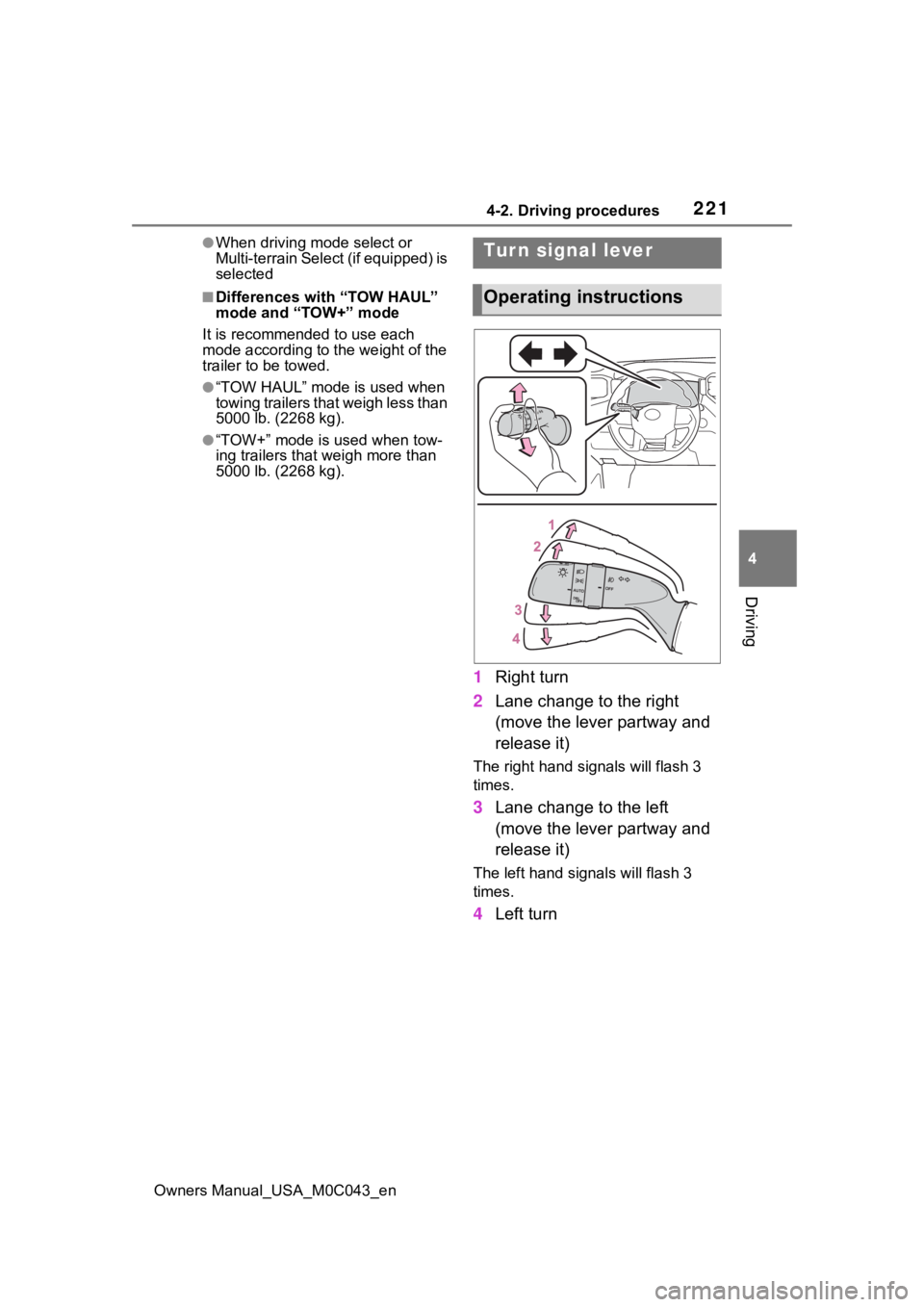
1 Right turn
2 Lane change to the right
(move the lever partway and
release it)
The right hand s ignals will flash 3
times.
3 Lane change to the left
(move the lever partway and
release it)
The left hand signals will flash 3
times.
4Left turn
Tur n signal lever
Operating instructions
Page 233 of 628
2334-3. Operating the lights and wipers
Owners Manual_USA_M0C043_en
4
Driving
• In bad weather ( rain, snow, fog,
sandstorms, etc.)
• The windshield is obscured by
fog, mist, ice, dirt, etc.
• The windshield is cracked or dam- aged
• The front camera is deformed or
dirty
• When the temperature of the front
camera is extremely high
• Surrounding brightness levels are equal to those of h eadlights, tail
lights or fog lights
• When headlights or tail lights of vehicles ahead are turned off,
dirty, changing color, or not aimed
properly
• When the vehicle is hit by water,
snow, dust, etc. from a preceding
vehicle
• When driving thr ough an area of
intermittently changing brightness
and darkness
• When frequently and repeatedly
driving ascending/descending
roads, or roads with rough, bumpy
or uneven surfaces (such as
stone-paved roads, gravel roads,
etc.)
• When frequently and repeatedly
taking curves or driving on a wind-
ing road
• There is a highly reflective object
ahead of the vehicle, such as a
sign or mirror
• The back of a vehicle ahead is
highly reflective, such as a con-
tainer on a truck
• The vehicle’s headlights are dam-
aged or dirty, or are not aimed
properly
• The vehicle is listing or titling due
to a flat tire, a trailer being towed,
etc.
• The high beam and low beam are
repeatedly being switched
between in an abnormal manner
• The driver believes that the high beam may be causing problems
or distress to other drivers or
pedestrians nearby■Temporarily lowering sensor
sensitivity
The sensitivity of the sensor can be
temporarily lowered.
1 Turn the power s witch off while
the following conditions are met.
●The headlight switch is in or
.
●The headlight switch lever is in
low beam position.
●Automatic High Beam switch is
on.
2 Turn the power switch to ON.
3 Within 60 seconds after step 2,
repeat pushing the headlight
switch lever to the high beam
position then pulling it to the orig-
inal position quickly 10 times,
then leave the lever in the origi-
nal position.
4 If the sensitivity is changed, the
AHB indicator is turn on and off 3
times.
Automatic High Beam (headlights)
may turn on even when the vehicle
is stopped.
■Switching to the high
beams
Push the lever away from you.
The AHB indicator will turn off and
the high beam indi cator will turn on.
Pull the lever to its original position
to activate the Automatic High
Beam system.
Turning the high beams
on/off manually
Page 248 of 628

2484-5. Using the driving support systems
Owners Manual_USA_M0C043_en
●In the following situations, if the situation has changed (or the vehicle has
been driven for some time) and the normal operating conditions are
detected, the message will disappear and the system will become opera-
tional.
If the message does not disappea r, contact your Toyota dealer.
• When the temperature around the radar sensor is outside of the opera-
tional range, such as when the vehicle is in the sun or in an e xtremely cold
environment
• When the front camera cannot d etect objects in front of the vehicle, such
as when driving in the dark, sno w, or fog, or when bright lights are shining
into the front camera
• Depending on the conditions in the vicinity of the vehicle, th e radar may
judge the surrounding environment can not be properly recognize d. In that
case, “Pre-Collision System Unavailable See Owner’s Manual” is dis-
played.