phone TOYOTA SIENNA 2018 Accessories, Audio & Navigation (in English)
[x] Cancel search | Manufacturer: TOYOTA, Model Year: 2018, Model line: SIENNA, Model: TOYOTA SIENNA 2018Pages: 435, PDF Size: 11.83 MB
Page 53 of 435
53
2. CONNECTIVITY SETTINGS
SIENNA_Navi+MM_OM08021U_(U)
17.08.16 10:05
BASIC FUNCTION
2
1Select “Device Name” .
2Enter the name and select “OK”.
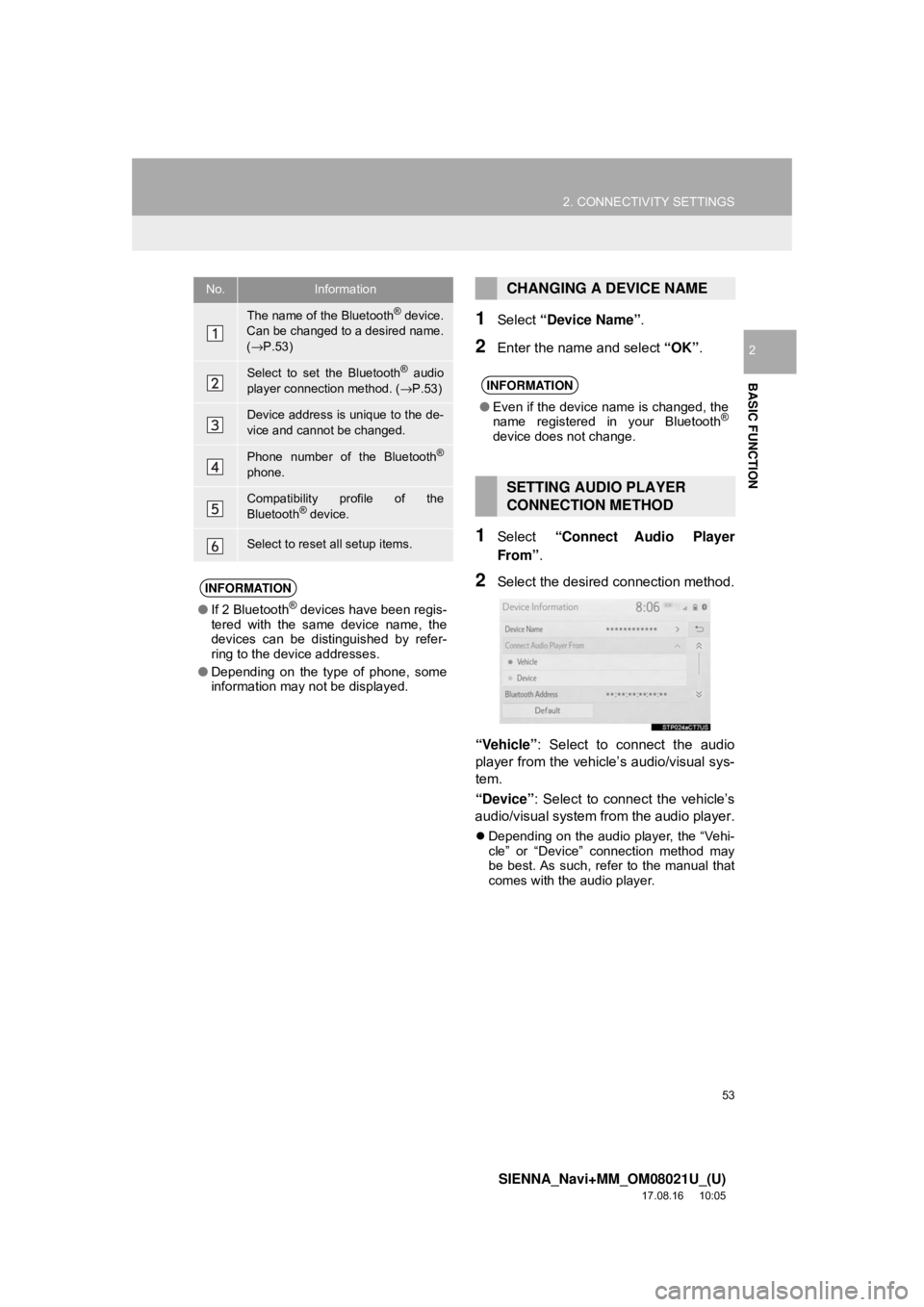
1Select “Connect Audio Player
From” .
2Select the desired connection method.
“Vehicle” : Select to connect the audio
player from the vehicle’s audio/visual sys-
tem.
“Device” : Select to connect the vehicle’s
audio/visual system from the audio player.
Depending on the audio player, the “Vehi-
cle” or “Device” connection method may
be best. As such, refer to the manual that
comes with the audio player.
No.Information
The name of the Bluetooth® device.
Can be changed to a desired name.
( → P.53)
Select to set the Bluetooth® audio
player connection method. ( →P.53)
Device address is unique to the de-
vice and cannot be changed.
Phone number of the Bluetooth®
phone.
Compatibility profile of the
Bluetooth® device.
Select to reset all setup items.
INFORMATION
● If 2 Bluetooth® devices have been regis-
tered with the same device name, the
devices can be distinguished by refer-
ring to the device addresses.
● Depending on the type of phone, some
information may not be displayed.
CHANGING A DEVICE NAME
INFORMATION
●Even if the device name is changed, the
name registered in your Bluetooth®
device does not change.
SETTING AUDIO PLAYER
CONNECTION METHOD
Page 55 of 435
55
2. CONNECTIVITY SETTINGS
SIENNA_Navi+MM_OM08021U_(U)
17.08.16 10:05
BASIC FUNCTION
2
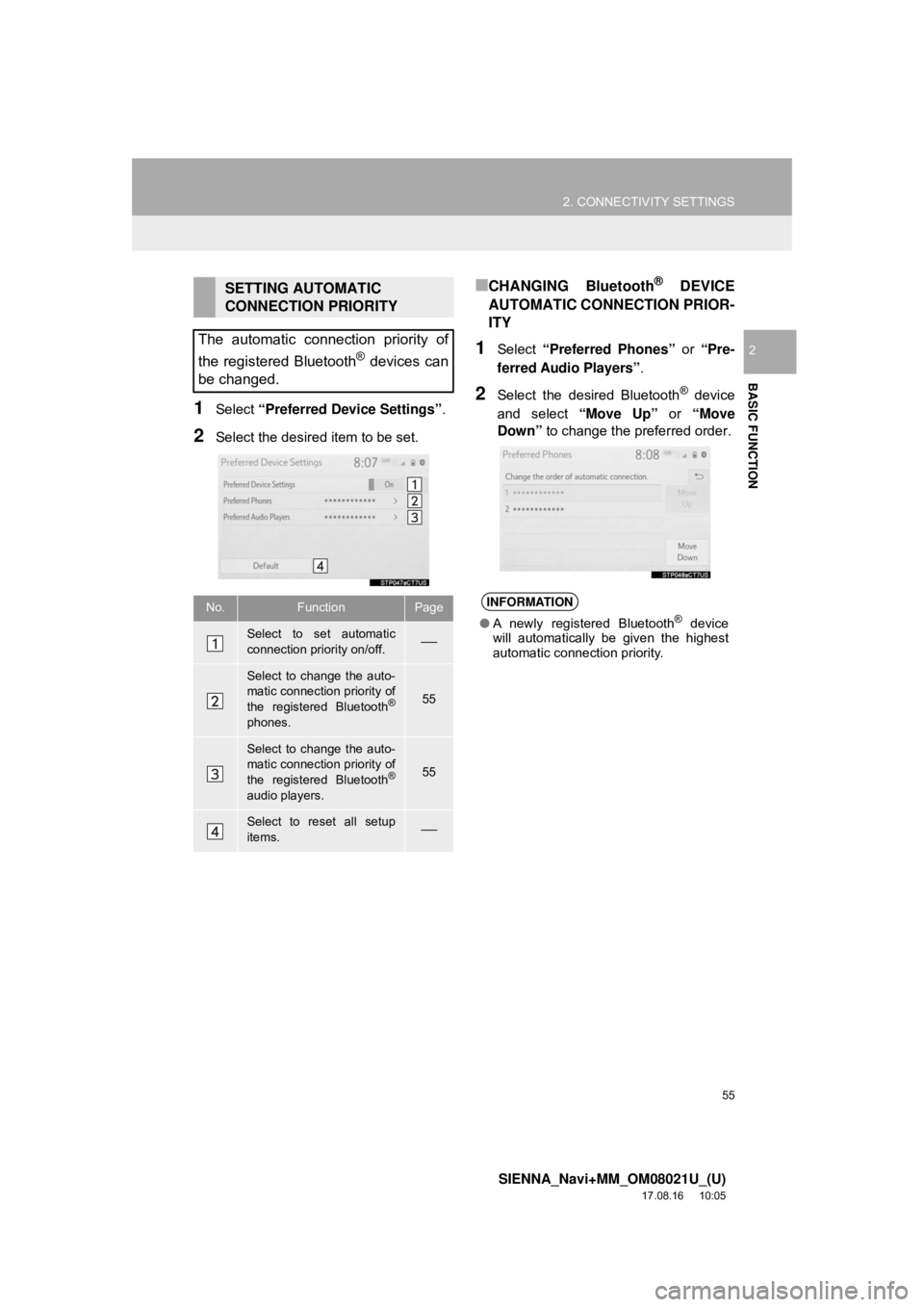
1Select “Preferred Device Settings” .
2Select the desired item to be set.
■CHANGING Bluetooth® DEVICE
AUTOMATIC CONNECTION PRIOR-
ITY
1Select “Preferred Phones” or “Pre-
ferred Audio Players” .
2Select the desired Bluetooth® device
and select “Move Up” or “Move
Down” to change the preferred order.
SETTING AUTOMATIC
CONNECTION PRIORITY
The automatic connection priority of
the registered Bluetooth
® devices can
be changed.
No.FunctionPage
Select to set automatic
connection priority on/off.⎯
Select to change the auto-
matic connection priority of
the registered Bluetooth
®
phones.
55
Select to change the auto-
matic connection priority of
the registered Bluetooth
®
audio players.
55
Select to reset all setup
items.⎯
INFORMATION
● A newly registered Bluetooth® device
will automatically be given the highest
automatic connection priority.
Page 56 of 435
56
2. CONNECTIVITY SETTINGS
SIENNA_Navi+MM_OM08021U_(U)
17.08.16 10:05
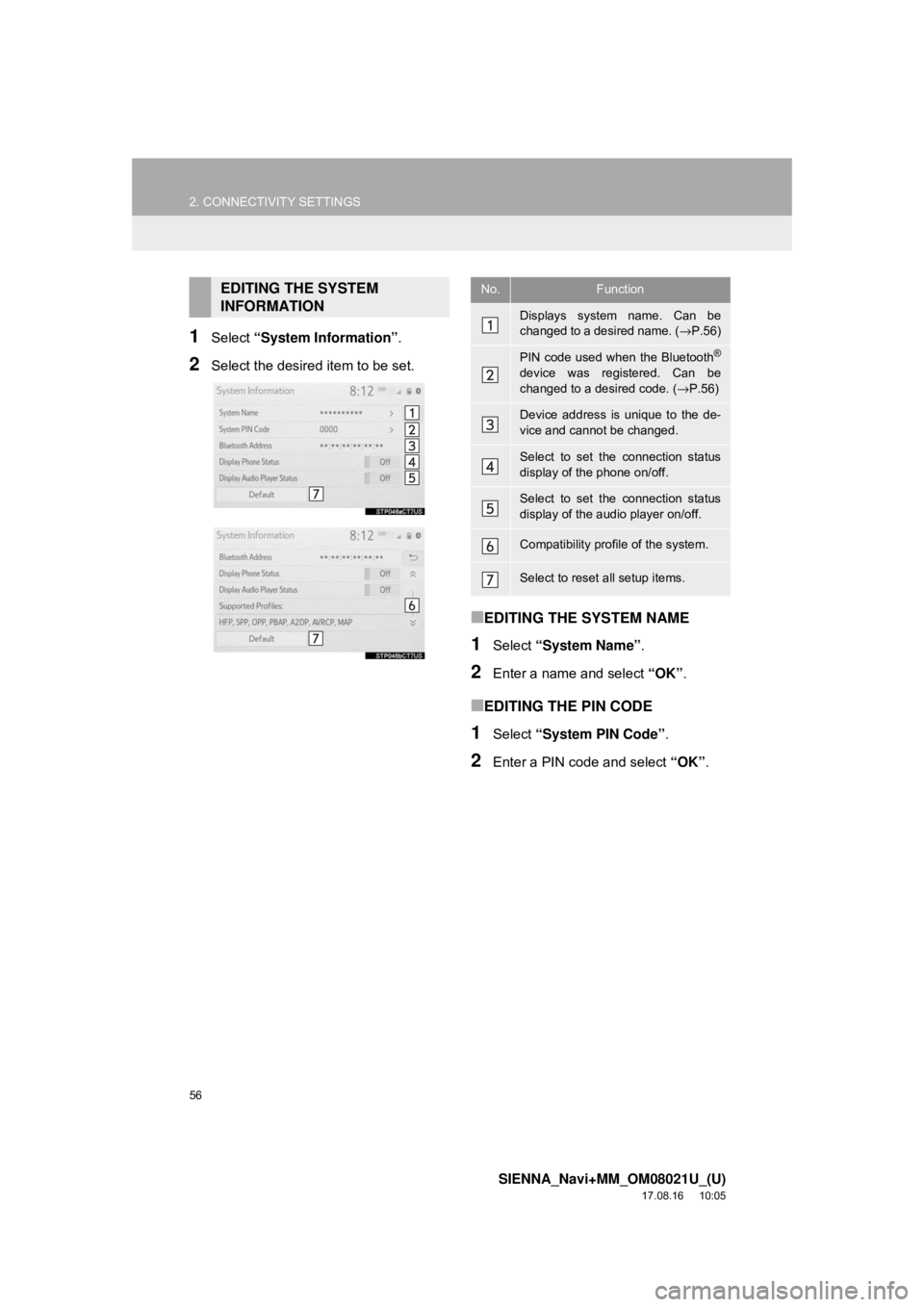
1Select “System Information” .
2Select the desired item to be set.
■EDITING THE SYSTEM NAME
1Select “System Name” .
2Enter a name and select “OK”.
■EDITING THE PIN CODE
1Select “System PIN Code” .
2Enter a PIN code and select “OK”.
EDITING THE SYSTEM
INFORMATIONNo.Function
Displays system name. Can be
changed to a desired name. ( →P.56)
PIN code used when the Bluetooth®
device was registered. Can be
changed to a desired code. ( →P.56)
Device address is unique to the de-
vice and cannot be changed.
Select to set the connection status
display of the phone on/off.
Select to set the connection status
display of the audio player on/off.
Compatibility profile of the system.
Select to reset all setup items.
Page 64 of 435
64
3. OTHER SETTINGS
SIENNA_Navi+MM_OM08021U_(U)
17.08.16 10:05
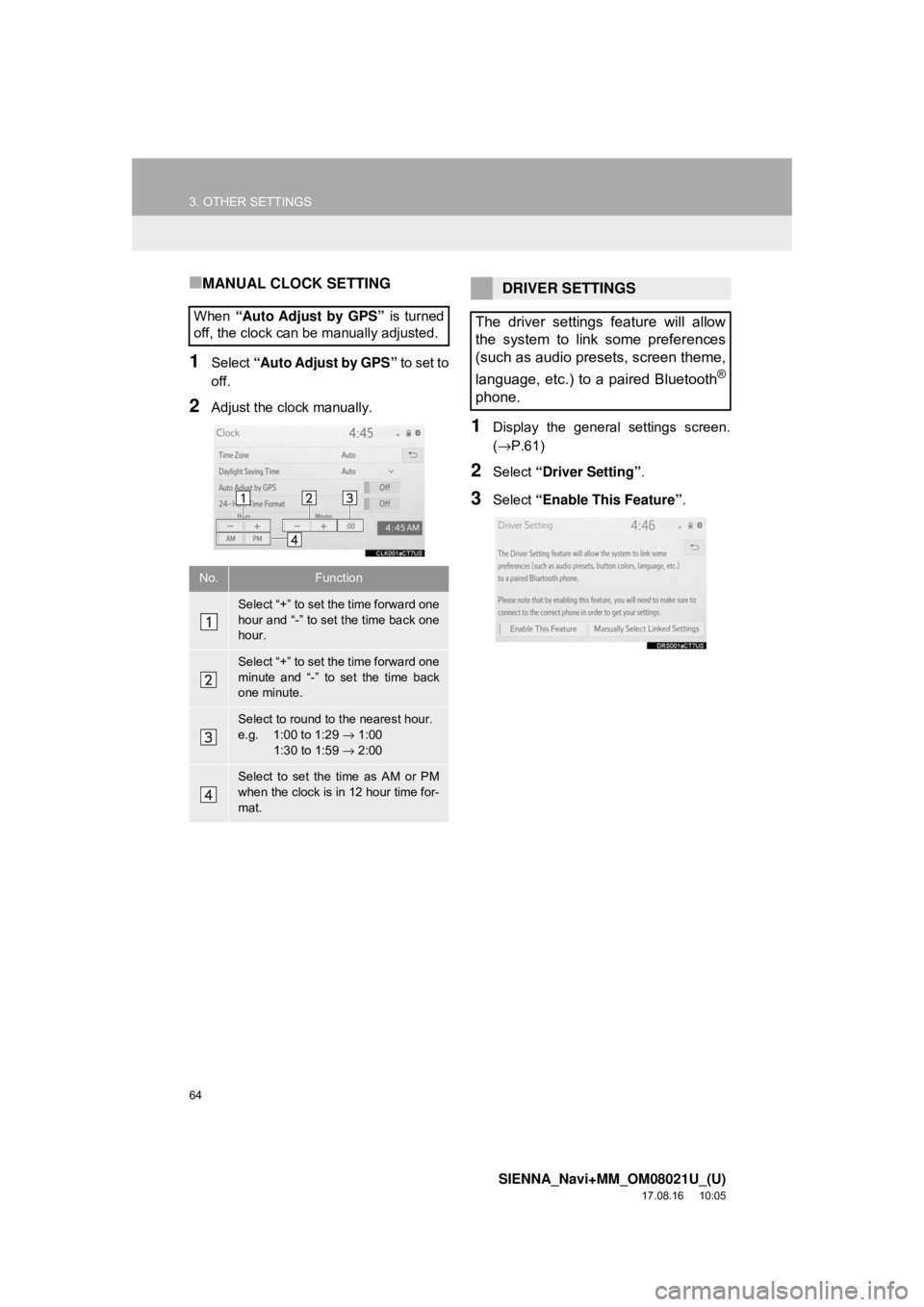
■MANUAL CLOCK SETTING
1Select “Auto Adjust by GPS” to set to
off.
2Adjust the clock manually.
1Display the general settings screen.
(→ P.61)
2Select “Driver Setting” .
3Select “Enable This Feature” .
When
“Auto Adjust by GPS” is turned
off, the clock can be manually adjusted.
No.Function
Select “+” to set the time forward one
hour and “-” to set the time back one
hour.
Select “+” to set the time forward one
minute and “-” to set the time back
one minute.
Select to round to the nearest hour.
e.g. 1:00 to 1:29 → 1:00
1:30 to 1:59 → 2:00
Select to set the time as AM or PM
when the clock is in 12 hour time for-
mat.
DRIVER SETTINGS
The driver settings feature will allow
the system to link some preferences
(such as audio presets, screen theme,
language, etc.) to a paired Bluetooth
®
phone.
Page 65 of 435
65
3. OTHER SETTINGS
SIENNA_Navi+MM_OM08021U_(U)
17.08.16 10:05
BASIC FUNCTION
2
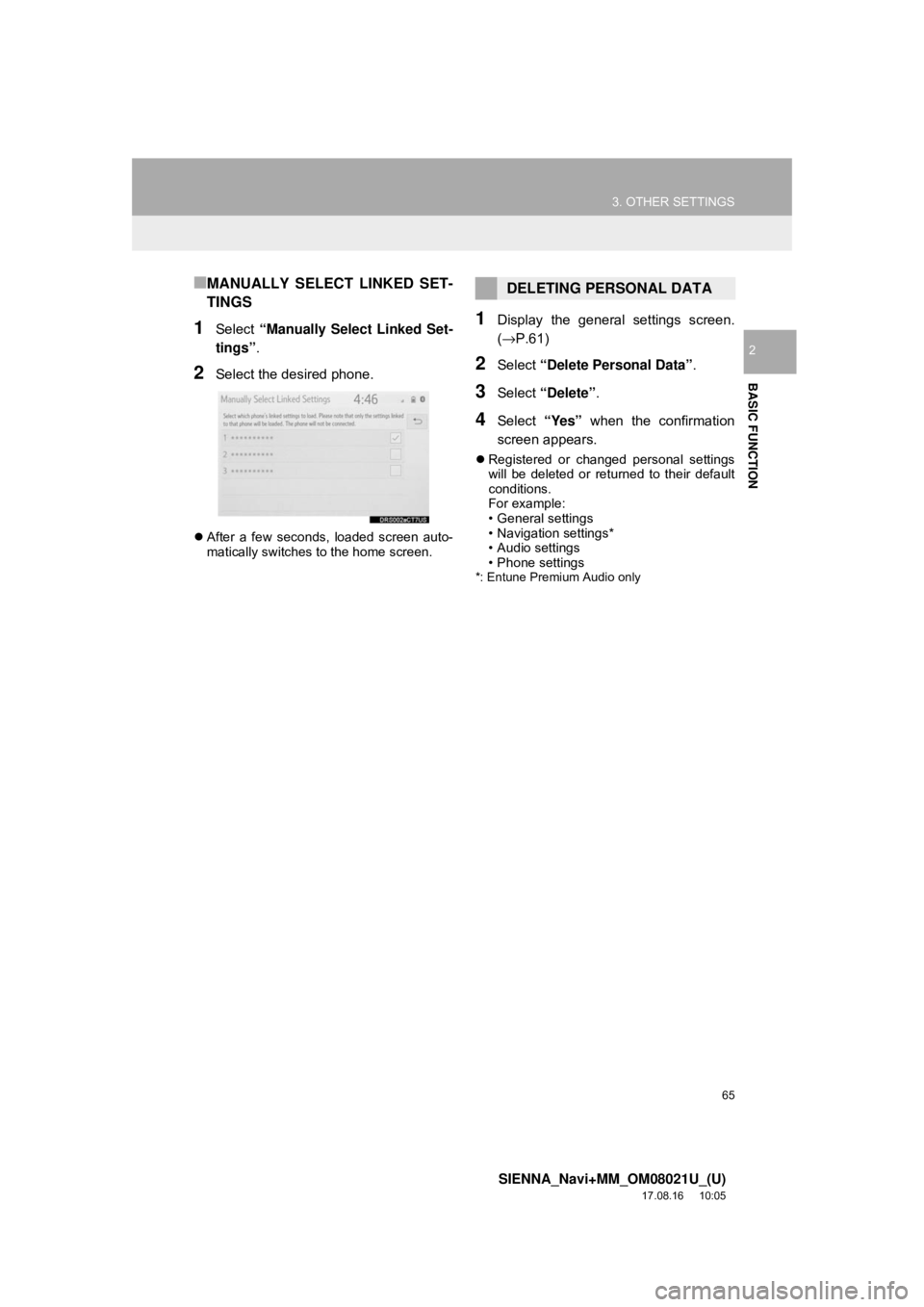
■MANUALLY SELECT LINKED SET-
TINGS
1Select “Manually Select Linked Set-
tings” .
2Select the desired phone.
After a few seconds, loaded screen auto-
matically switches to the home screen.
1Display the general settings screen.
(→P.61)
2Select “Delete Personal Data” .
3Select “Delete” .
4Select “Yes” when the confirmation
screen appears.
Registered or changed personal settings
will be deleted or returned to their default
conditions.
For example:
• General settings
• Navigation settings*
• Audio settings
• Phone settings
*: Entune Premium Audio only
DELETING PERSONAL DATA
Page 70 of 435
70
3. OTHER SETTINGS
SIENNA_Navi+MM_OM08021U_(U)
17.08.16 10:05
3Select “OK” after entering the condi-
tions.
1Select “Set Dealer” .
2Select the desired item to search for
the location. ( →P.340)
The editing dealer screen appears after
setting the location.
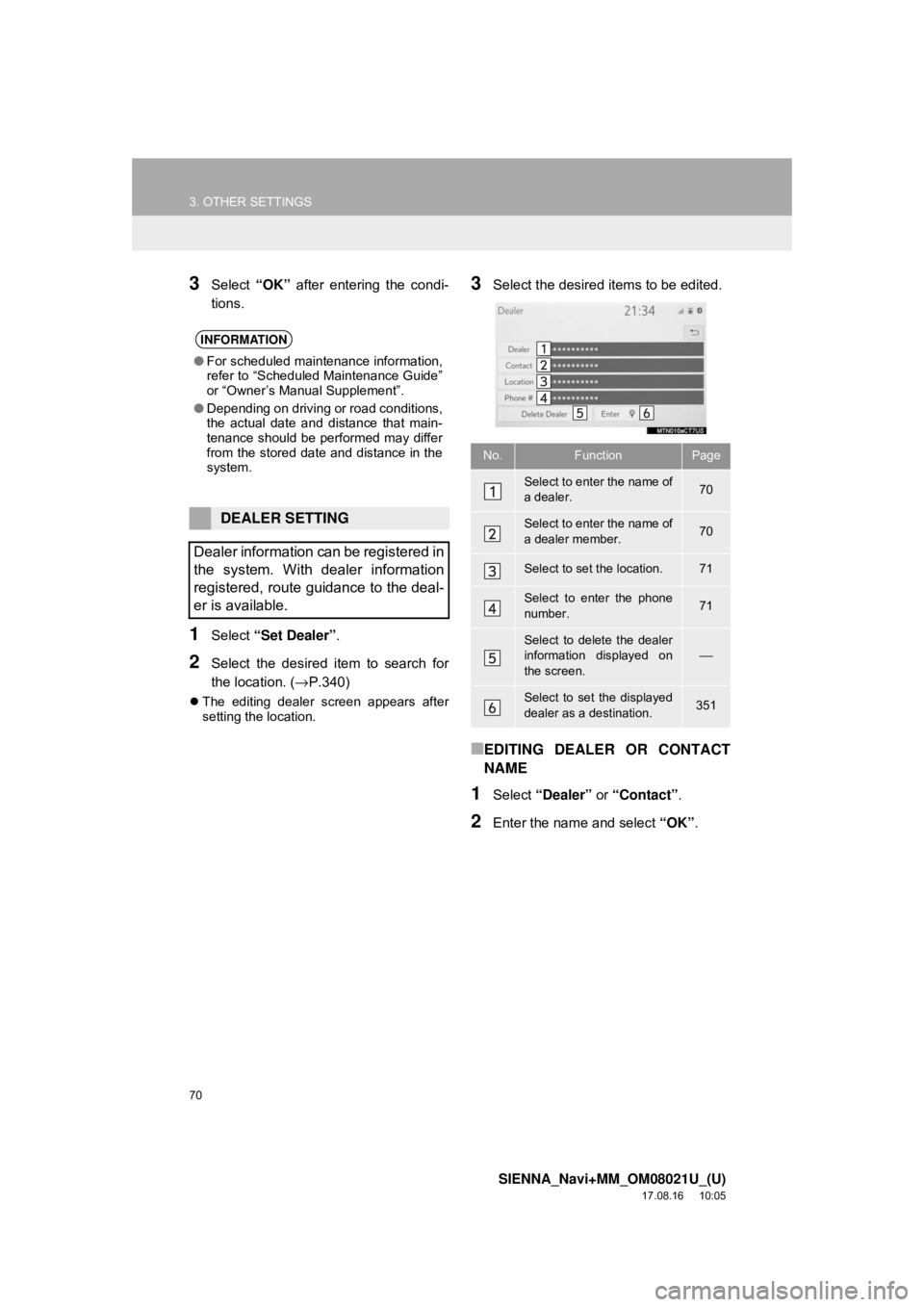
3Select the desired items to be edited.
■EDITING DEALER OR CONTACT
NAME
1Select “Dealer” or “Contact” .
2Enter the name and select “OK”.
INFORMATION
●For scheduled maintenance information,
refer to “Scheduled Maintenance Guide”
or “Owner’s Manual Supplement”.
● Depending on driving or road conditions,
the actual date and distance that main-
tenance should be performed may differ
from the stored date and distance in the
system.
DEALER SETTING
Dealer information can be registered in
the system. With dealer information
registered, route guidance to the deal-
er is available.
No.FunctionPage
Select to enter the name of
a dealer.70
Select to enter the name of
a dealer member.70
Select to set the location.71
Select to enter the phone
number.71
Select to delete the dealer
information displayed on
the screen.⎯
Select to set the displayed
dealer as a destination.351
Page 71 of 435
71
3. OTHER SETTINGS
SIENNA_Navi+MM_OM08021U_(U)
17.08.16 10:05
BASIC FUNCTION
2
■EDITING THE LOCATION
1Select “Location” .
2Scroll the map to the desired point
(→P.330) and select “Enter”.
■EDITING PHONE NUMBER
1Select “Phone #” .
2Enter the phone number and select
“OK”.
1Display the vehicle settings screen.
(→P.68)
2Select “Valet Mode” .
3Enter the 4-digit personal code and se-
lect “OK” .
4Enter the same 4-digit personal code
again and select “OK”.
The system will request that you input the
security code again to confirm that you
remember it correctly.
VALET MODE
The security system can be set to on
by entering a security code (4-digit
number).
When set to on, the system will be-
come inoperative once the electrical
power source is disconnected until the
security code is entered.
SETTING THE VALET MODE
When valet mode activates, the system
stops and a security code (4-digit num-
ber) standby screen is displayed.
(→ P. 7 2 )
INFORMATION
●If the 4-digit personal code is forgotten,
please contact your Toyota dealer.
Page 72 of 435
72
3. OTHER SETTINGS
SIENNA_Navi+MM_OM08021U_(U)
17.08.16 10:05
1Enter the 4-digit personal code and se-
lect “OK” .
1Display the vehicle settings screen.
(→P.68)
2Select “Dealer Info” .
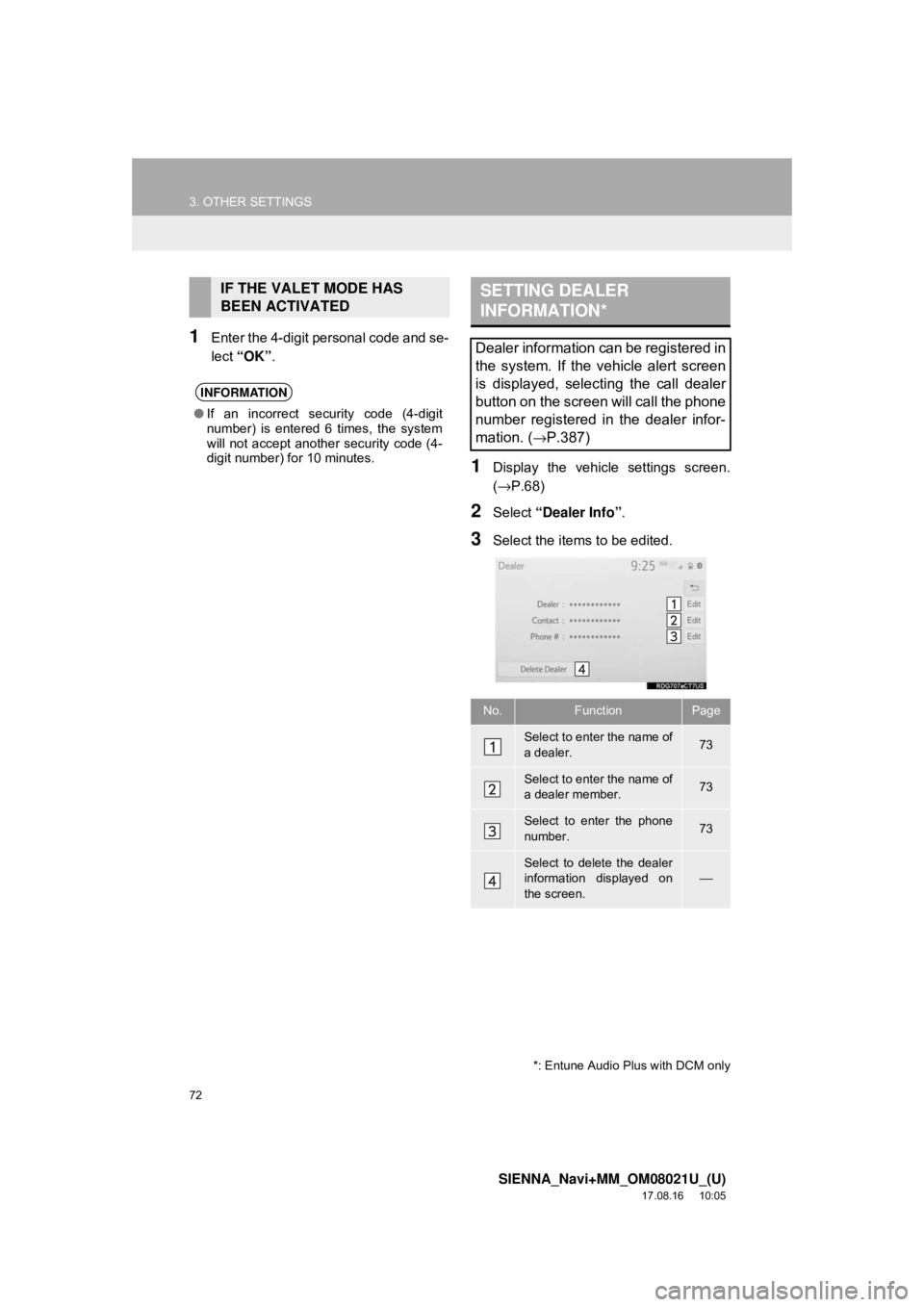
3Select the items to be edited.
IF THE VALET MODE HAS
BEEN ACTIVATED
INFORMATION
●If an incorrect security code (4-digit
number) is entered 6 times, the system
will not accept another security code (4-
digit number) for 10 minutes.
SETTING DEALER
INFORMATION*
Dealer information can be registered in
the system. If the vehicle alert screen
is displayed, selecting the call dealer
button on the screen will call the phone
number registered in the dealer infor-
mation. (
→P.387)
No.FunctionPage
Select to enter the name of
a dealer.73
Select to enter the name of
a dealer member.73
Select to enter the phone
number.73
Select to delete the dealer
information displayed on
the screen.
⎯
*: Entune Audio Plus with DCM only
Page 73 of 435
73
3. OTHER SETTINGS
SIENNA_Navi+MM_OM08021U_(U)
17.08.16 10:05
BASIC FUNCTION
21Select “Edit” next to “Dealer” or “Con-
tact”.
2Enter the name and select “OK”.
1Select “Edit” next to “Phone #”.
2Enter the phone number and select
“OK”.
EDITING DEALER OR
CONTACT NAME
EDITING PHONE NUMBER
Page 76 of 435
76
SIENNA_Navi+MM_OM08021U_(U)
17.08.16 10:05
4. Bluetooth® AUDIO ...................... 109
OVERVIEW.......................................... 109
REGISTERING/CONNECTING A
Bluetooth
® DEVICE........................... 113
5. AUX .............................................. 114
OVERVIEW.......................................... 114
1. STEERING SWITCHES ............... 117
1. AUDIO SETTINGS ....................... 120
AUDIO SETTINGS SCREEN............... 120
1. OPERATING INFORMATION ...... 123
RADIO.................................................. 123
CD PLAYER AND DISC ...................... 124
iPod ...................................................... 126
HIGH-RESOLUTION SOUND SOURCE ........................................... 128
FILE INFORMATION ........................... 128
TERMS ................................................ 131
ERROR MESSAGES ........................... 133
1. REAR SEAT ENTERTAINMENT SYSTEM FEATURES .. .............. 134
DISPLAY .............................................. 135
DISC SLOT .......................................... 136
SD CARD SLOT ................................... 137
REMOTE CONTROLLER .................... 137
HEADPHONE JACKS .......................... 142
OPERATING FROM THE FRONT
SEATS ............................................... 143
DISCS THAT CAN BE USED............... 144
SD CARD THAT CAN BE USED ......... 145
2. PLAYING A Blu-ray Disc™ (BD) AND DVD DISCS ...................... 146
REMOTE CONTROLLER .................... 146
TURNING ON THE BD/DVD MODE .... 147
PLAYING/PAUSING A DISC................ 147
OPERATING THE DISC MENU ........... 147
OPTION SCREEN................................ 147
BD/DVD VIDEO DISCS........................ 157
4AUDIO/VISUAL REMOTE
CONTROLS
5SETUP
6TIPS FOR OPERATING
THE AUDIO/VISUAL SYSTEM
7REAR SEAT ENTERTAINMENT
SYSTEM OPERATION