buttons TOYOTA SIENNA 2018 Owners Manual (in English)
[x] Cancel search | Manufacturer: TOYOTA, Model Year: 2018, Model line: SIENNA, Model: TOYOTA SIENNA 2018Pages: 584, PDF Size: 14.47 MB
Page 20 of 584
20Pictorial index
SIENNA_OM_OM08019U_(U)
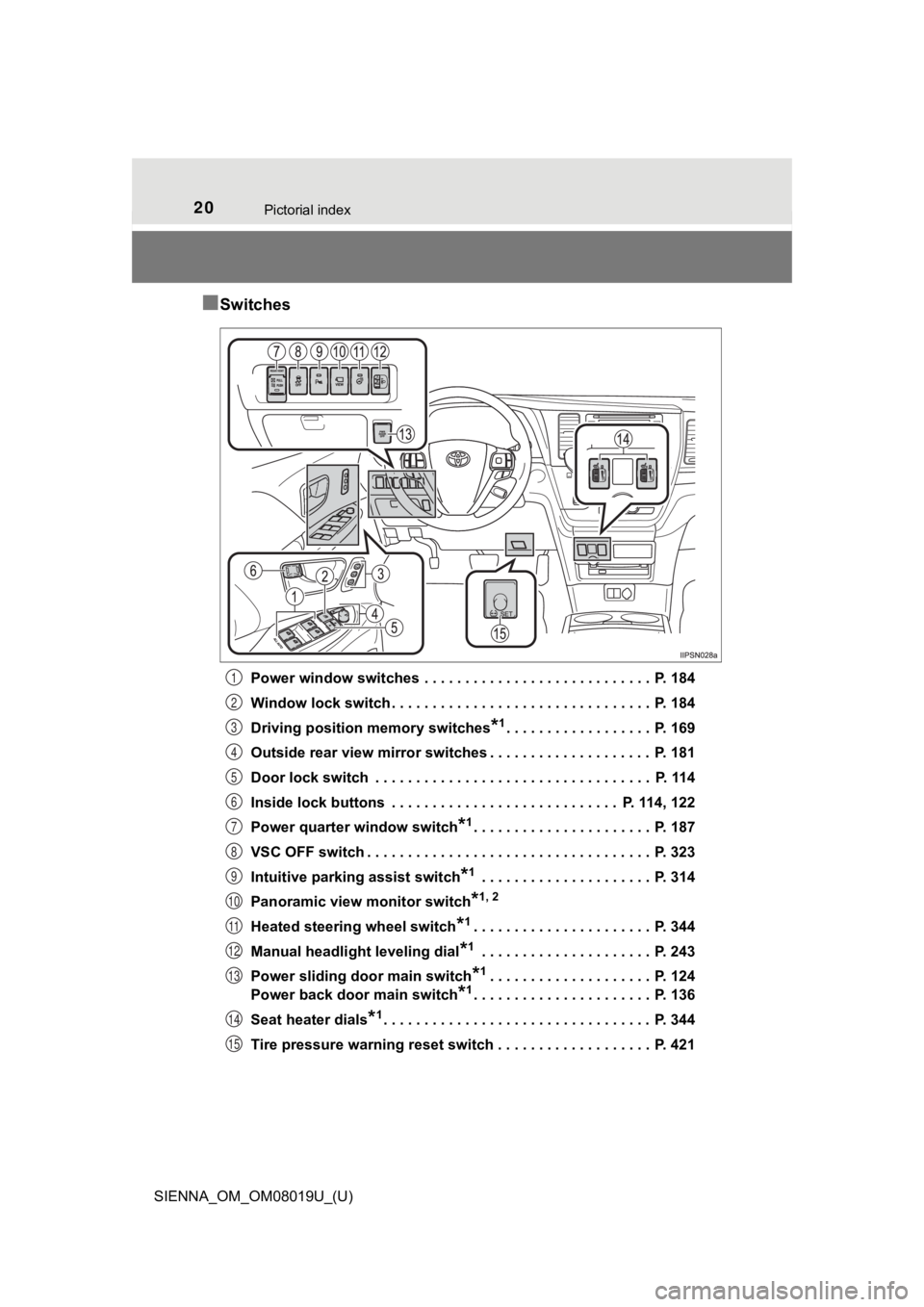
■Switches
Power window switches . . . . . . . . . . . . . . . . . . . . . . . . . . . . P. 184
Window lock switch . . . . . . . . . . . . . . . . . . . . . . . . . . . . . . . . P. 184
Driving position memory switches
*1. . . . . . . . . . . . . . . . . . P. 169
Outside rear view mirror switches . . . . . . . . . . . . . . . . . . . . P. 181
Door lock switch . . . . . . . . . . . . . . . . . . . . . . . . . . . . . . . . . . P. 114
Inside lock buttons . . . . . . . . . . . . . . . . . . . . . . . . . . . . P. 114, 122
Power quarter window switch
*1. . . . . . . . . . . . . . . . . . . . . . P. 187
VSC OFF switch . . . . . . . . . . . . . . . . . . . . . . . . . . . . . . . . . . . P. 323
Intuitive parking assist switch
*1 . . . . . . . . . . . . . . . . . . . . . P. 314
Panoramic view monitor switch
*1, 2
Heated steering wheel switch*1. . . . . . . . . . . . . . . . . . . . . . P. 344
Manual headlight leveling dial
*1 . . . . . . . . . . . . . . . . . . . . . P. 243
Power sliding door main switch
*1. . . . . . . . . . . . . . . . . . . . P. 124
Power back door main switch
*1. . . . . . . . . . . . . . . . . . . . . . P. 136
Seat heater dials
*1. . . . . . . . . . . . . . . . . . . . . . . . . . . . . . . . . P. 344
Tire pressure warning reset switch . . . . . . . . . . . . . . . . . . . P. 421
1
2
3
4
5
6
7
8
9
10
11
12
13
14
15
Page 62 of 584
621-1. For safe use
SIENNA_OM_OM08019U_(U)
Installing child restraints
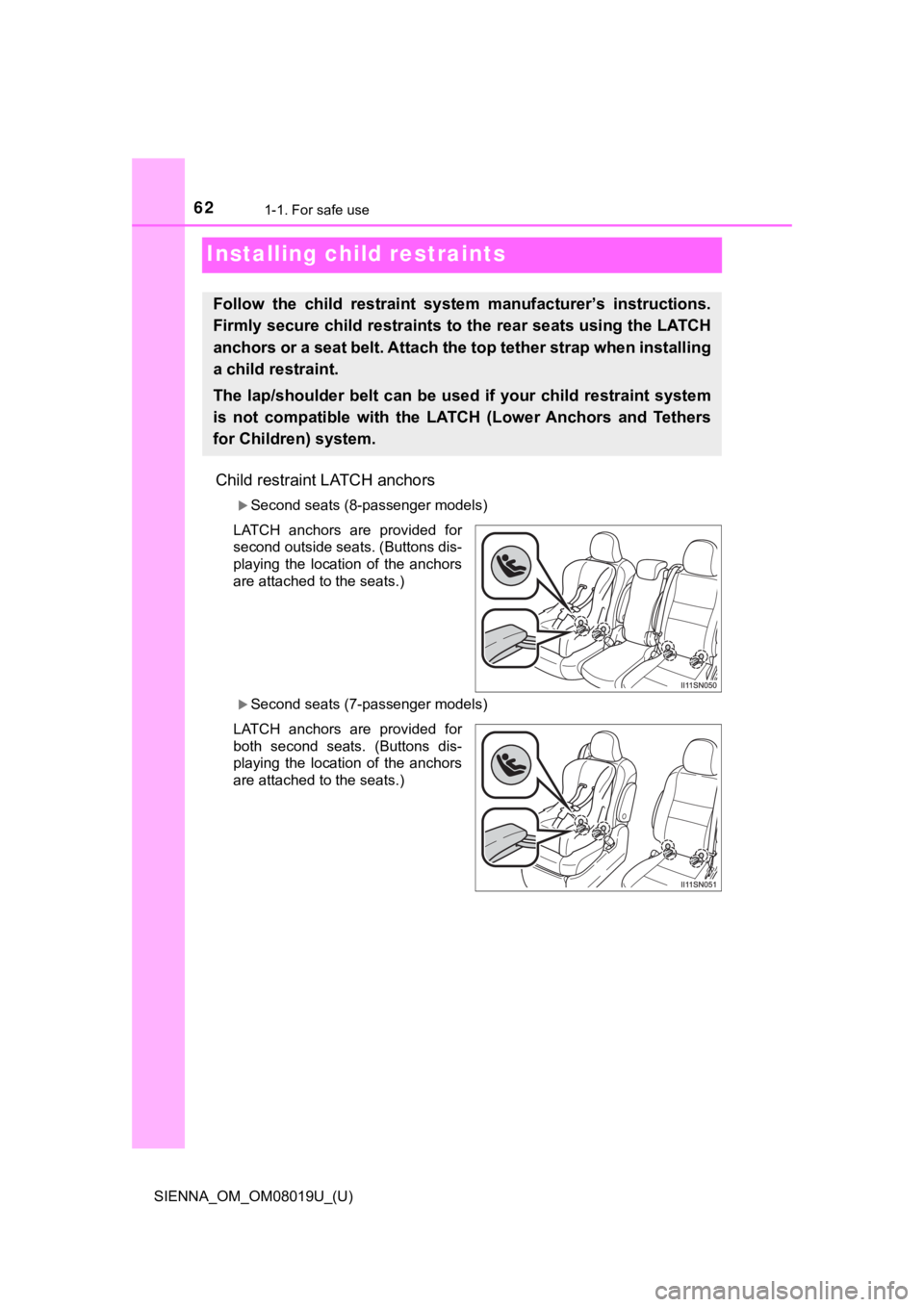
Child restraint LATCH anchors
Second seats (8-passenger models)
LATCH anchors are provided for
second outside seats. (Buttons dis-
playing the location of the anchors
are attached to the seats.)
Second seats (7-passenger models)
LATCH anchors are provided for
both second seats. (Buttons dis-
playing the location of the anchors
are attached to the seats.)
Follow the child restraint system manufacturer’s instructions.
Firmly secure child restraints to the rear seats using the LATC H
anchors or a seat belt. Attach t he top tether strap when installing
a child restraint.
The lap/shoulder belt can be used if your child restraint syste m
is not compatible with the LATCH (Lower Anchors and Tethers
for Children) system.
Page 63 of 584
631-1. For safe use
SIENNA_OM_OM08019U_(U)
1
For safety and security
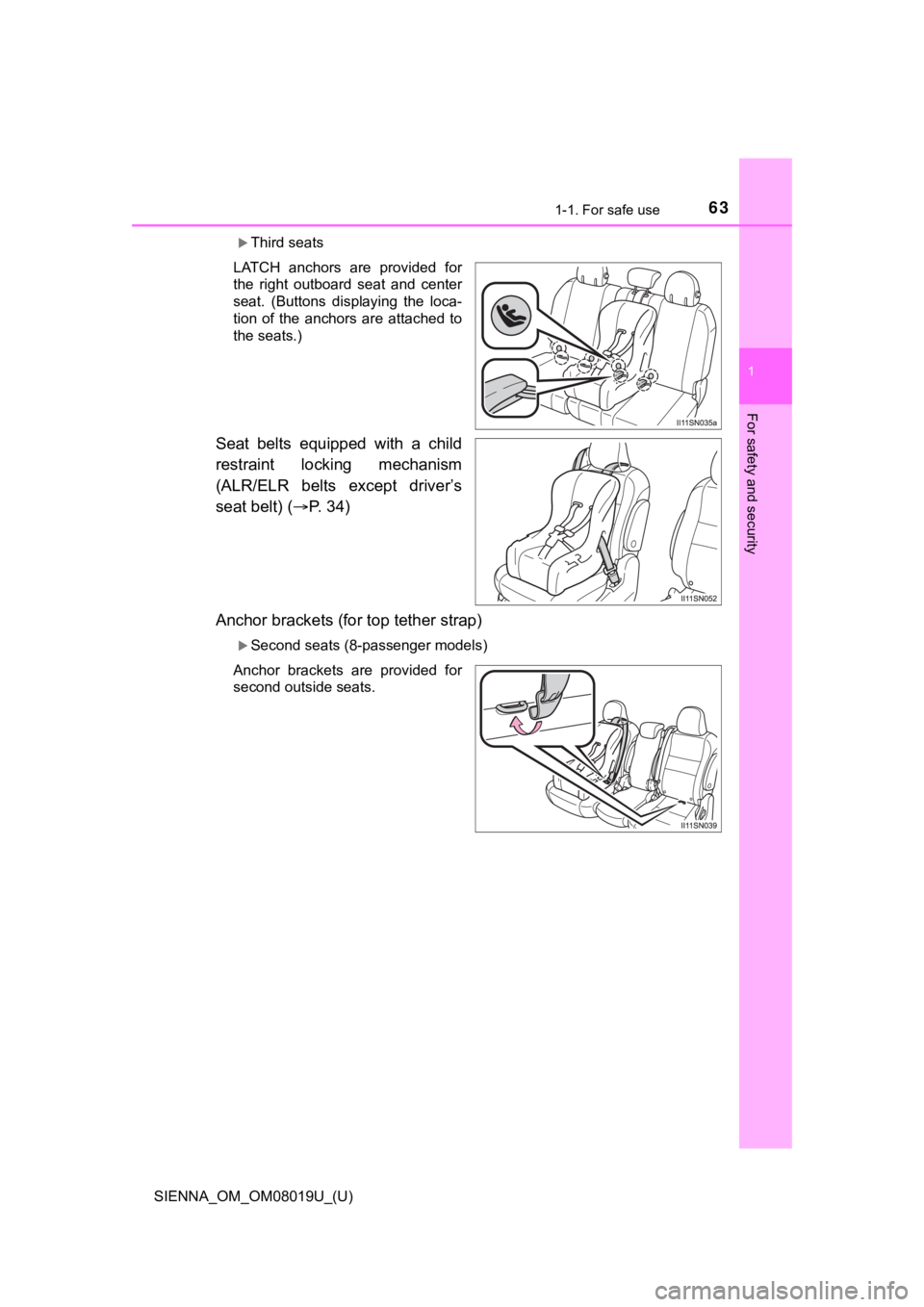
Third seats
LATCH anchors are provided for
the right outboard seat and center
seat. (Buttons displaying the loca-
tion of the anchors are attached to
the seats.)
Seat belts equipped with a child
restraint locking mechanism
(ALR/ELR belts except driver’s
seat belt) ( P. 34)
Anchor brackets (for top tether strap)
Second seats (8-passenger models)
Anchor brackets are provided for
second outside seats.
Page 107 of 584
SIENNA_OM_OM08019U_(U)
1073-1. Key information
3
Operation of each component
■When required to leave the vehicle’s key with a parking attendant
Lock the glove box as circumstances demand. ( P. 351)
On vehicles without the smart key system, provide the attendant with the
valet key.
On vehicles with the smart key system, remove the mechanical ke y for your
own use and provide the attendant with the electronic key only.
■ If you lose your keys
New genuine keys can be made by your Toyota dealer using a mast er key
(vehicles without a smart key system) or the other key (vehicle s with a smart
key system) and the key number stamped on your key number plate. Keep
the plate in a safe place such as your wallet, not in the vehic le.
■ When riding in an aircraft
When bringing a key with wireless remote control function onto an aircraft,
make sure you do not press any buttons on the key while inside the aircraft
cabin. If you are carrying the key in your bag etc., ensure tha t the buttons are
not likely to be pressed accidentally. Pressing a button may cause the key to
emit radio waves that could interfere with the operation of the aircraft.
■ Conditions affecting the operation of the smart key system or w ireless
remote control
P. 118
■ Key battery depletion
Vehicles without a smart key system
If the wireless remote control function does not operate, the b attery may be
depleted. Replace the battery when necessary. ( P. 436)
Vehicles with a smart key system
● The standard battery life is 1 to 2 years.
● If the battery becomes low, an alarm will sound in the cabin wh en the engine
stops. ( P. 436, 481)
● As the electronic key always receives radio waves, the battery will become
depleted even if the electronic key is not used. The following symptoms indi-
cate that the electronic key battery may be depleted. Replace the battery
when necessary. ( P. 436)
• The smart key system or the wireless remote control does not o perate.
• The detection area becomes smaller.
• The LED indicator on the key surface does not turn on.
● To avoid serious deterioration, do not leave the electronic key within 3 ft.
(1 m) of the following electrical appliances that produce a magnetic field.
•TVs
• Personal computers
• Cellular phones, cordless phones and battery chargers
• Recharging cellular phones or cordless phones
• Induction cookers
• Table lamps
Page 114 of 584
114
SIENNA_OM_OM08019U_(U)
3-2. Opening, closing and locking the doors
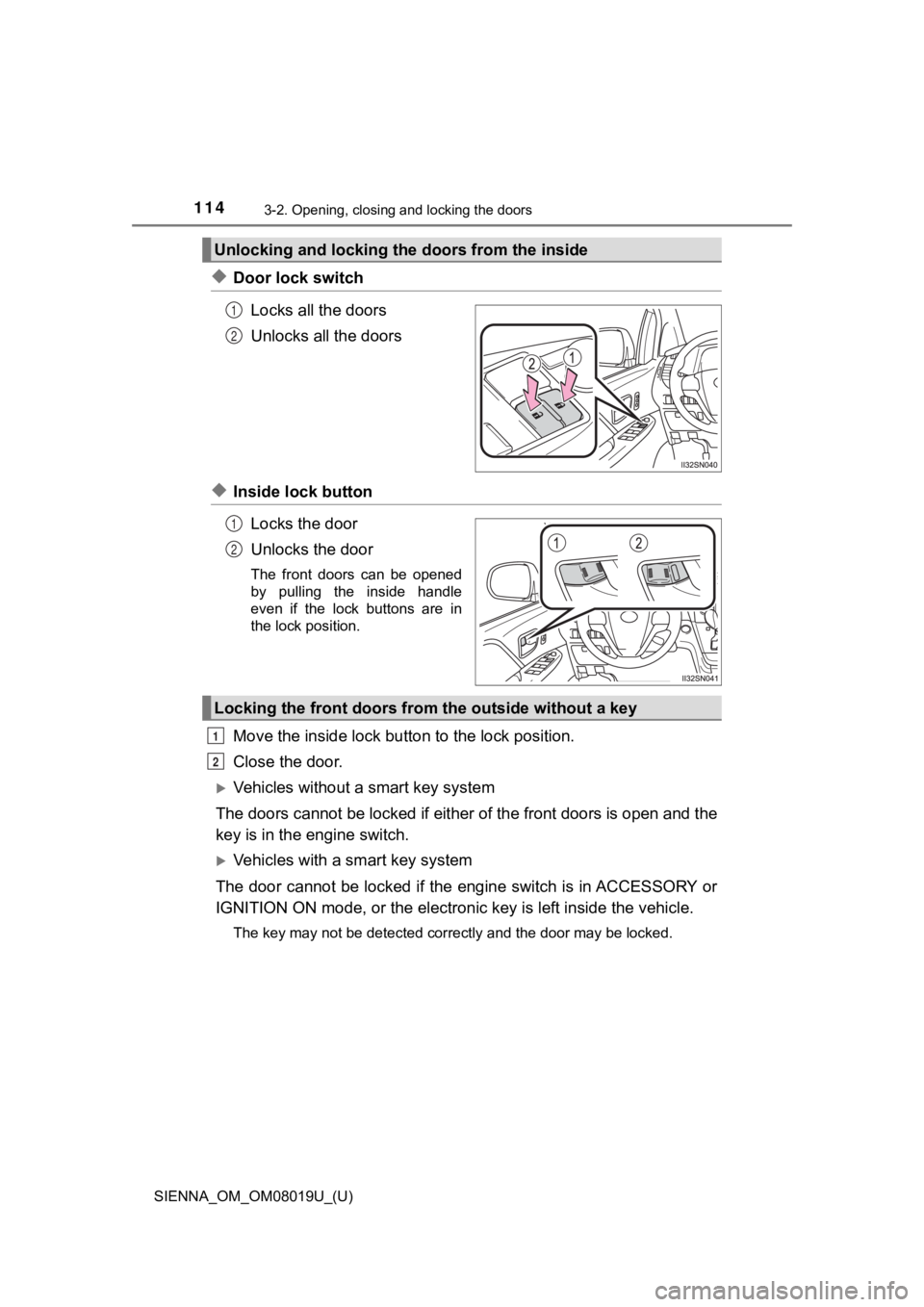
◆Door lock switchLocks all the doors
Unlocks all the doors
◆Inside lock buttonLocks the door
Unlocks the door
The front doors can be opened
by pulling the inside handle
even if the lock buttons are in
the lock position.
Move the inside lock bu tton to the lock position.
Close the door.
Vehicles without a smart key system
The doors cannot be locked if either of the front doors is open and the
key is in the engine switch.
Vehicles with a smart key system
The door cannot be locked if the engine switch is in ACCESSORY or
IGNITION ON mode, or the electronic key is left inside the vehi cle.
The key may not be detected correctly and the door may be locke d.
Unlocking and locking the doors from the inside
1
2
1
2
Locking the front doors from the outside without a key
1
2
Page 117 of 584
SIENNA_OM_OM08019U_(U)
1173-2. Opening, closing and locking the doors
3
Operation of each component
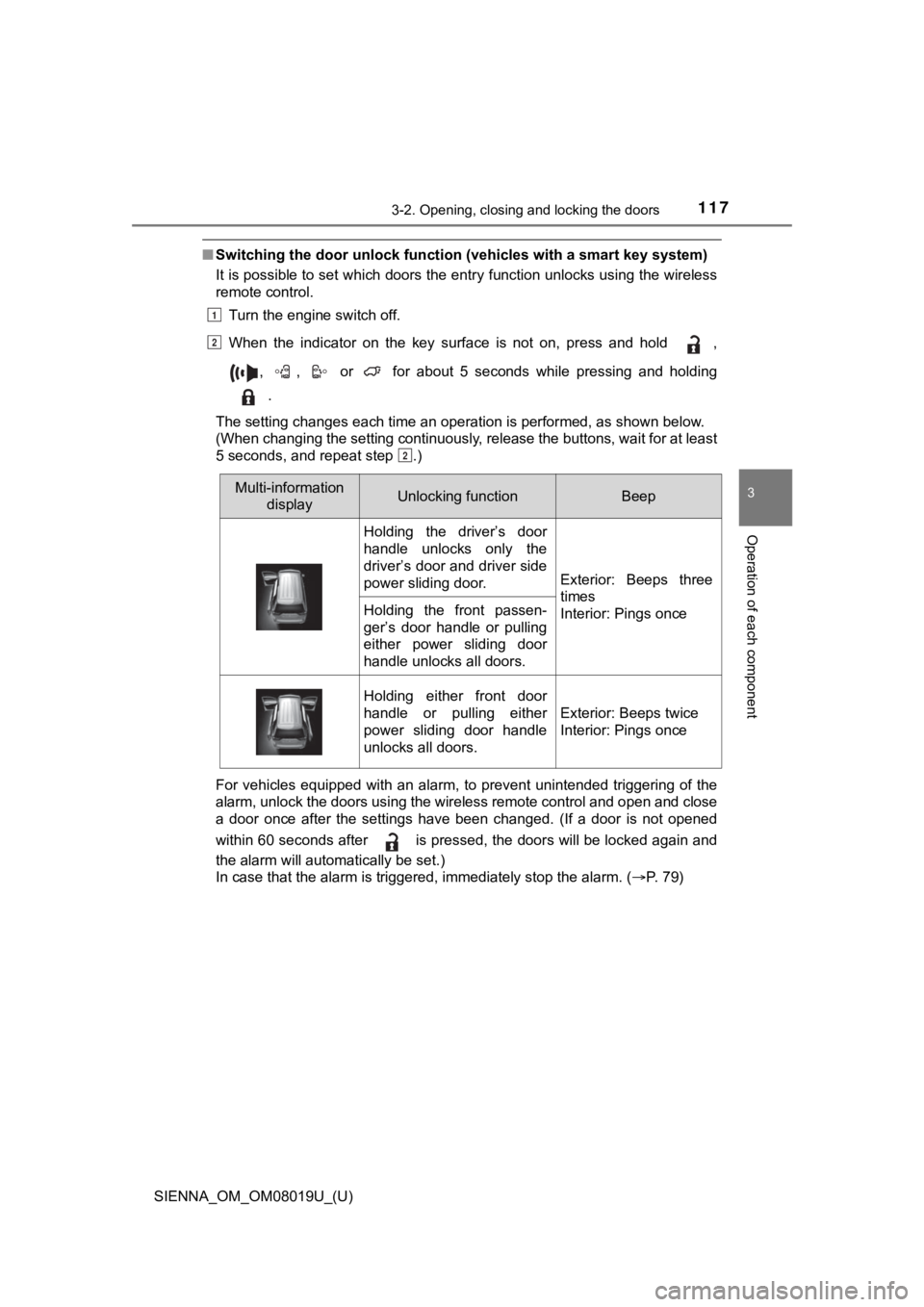
■Switching the door unlock func tion (vehicles with a smart key system)
It is possible to set which doors the entry function unlocks using the wireless
remote control.
Turn the engine switch off.
When the indicator on the key surface is not on, press and hold ,
, , or for about 5 seconds while pressing and holding .
The setting changes each time an operation is performed, as sho wn below.
(When changing the setting continuously, release the buttons, w ait for at least
5 seconds, and repeat step .)
For vehicles equipped with an alarm, to prevent unintended trig gering of the
alarm, unlock the doors using the wireless remote control and o pen and close
a door once after the settings have been changed. (If a door is not opened
within 60 seconds after is pressed, the doors will be locked a gain and
the alarm will automatically be set.)
In case that the alarm is triggered, immediately stop the alarm . ( P. 79)
1
2
2
Multi-information
display Unlocking functionBeep
Holding the driver’s door
handle unlocks only the
driver’s door and driver side
power sliding door.
Exterior: Beeps three
times
Interior: Pings once
Holding the front passen-
ger’s door handle or pulling
either power sliding door
handle unlocks all doors.
Holding either front door
handle or pulling either
power sliding door handle
unlocks all doors.
Exterior: Beeps twice
Interior: Pings once
Page 120 of 584

120
SIENNA_OM_OM08019U_(U)
3-2. Opening, closing and locking the doors
WARNING
■To prevent an accident
Observe the following precautions while driving the vehicle.
Failing to do so may result in a door opening and an occupant f alling out,
resulting in death or serious injury.
● Ensure that all doors are properly closed and locked.
● Do not pull the inside handle of the doors while driving.
Be especially careful for the front doors, as the doors may be opened even
if the inside lock buttons are in the locked position.
Page 127 of 584
SIENNA_OM_OM08019U_(U)
1273-2. Opening, closing and locking the doors
3
Operation of each component
■Jam protection function (vehicles with power sliding doors)
●If anything obstructs the power sliding door while it is closin g or opening, the
power sliding door will automatically operate in the opposite direction.
● If the jam protection function operates during two consecutive operations,
the power sliding door will be stopped at that position and the power sliding
door system will be canceled.
■ Power sliding door brake function (vehicles with power sliding doors)
When the power sliding door detects an abnormality and stops op erating,
power sliding door brake function may be activated. When brake function is
activated, door movement is restricted by the brake and motion may appear
to be not smooth. This is not malfunction. Move the door to ful ly closed posi-
tion to reset the system and normal power sliding door function will resume.
■ Sliding door closer (if equipped)
In the event that the sliding door is left slightly open, the s liding door closer
will automatically close it to the fully closed position.
■ Power sliding door operation (ve hicles with power sliding door)
Wireless remote control: Even if the door is locked, pressing a nd holding the
sliding door buttons will unlock all doors and start open opera tion.
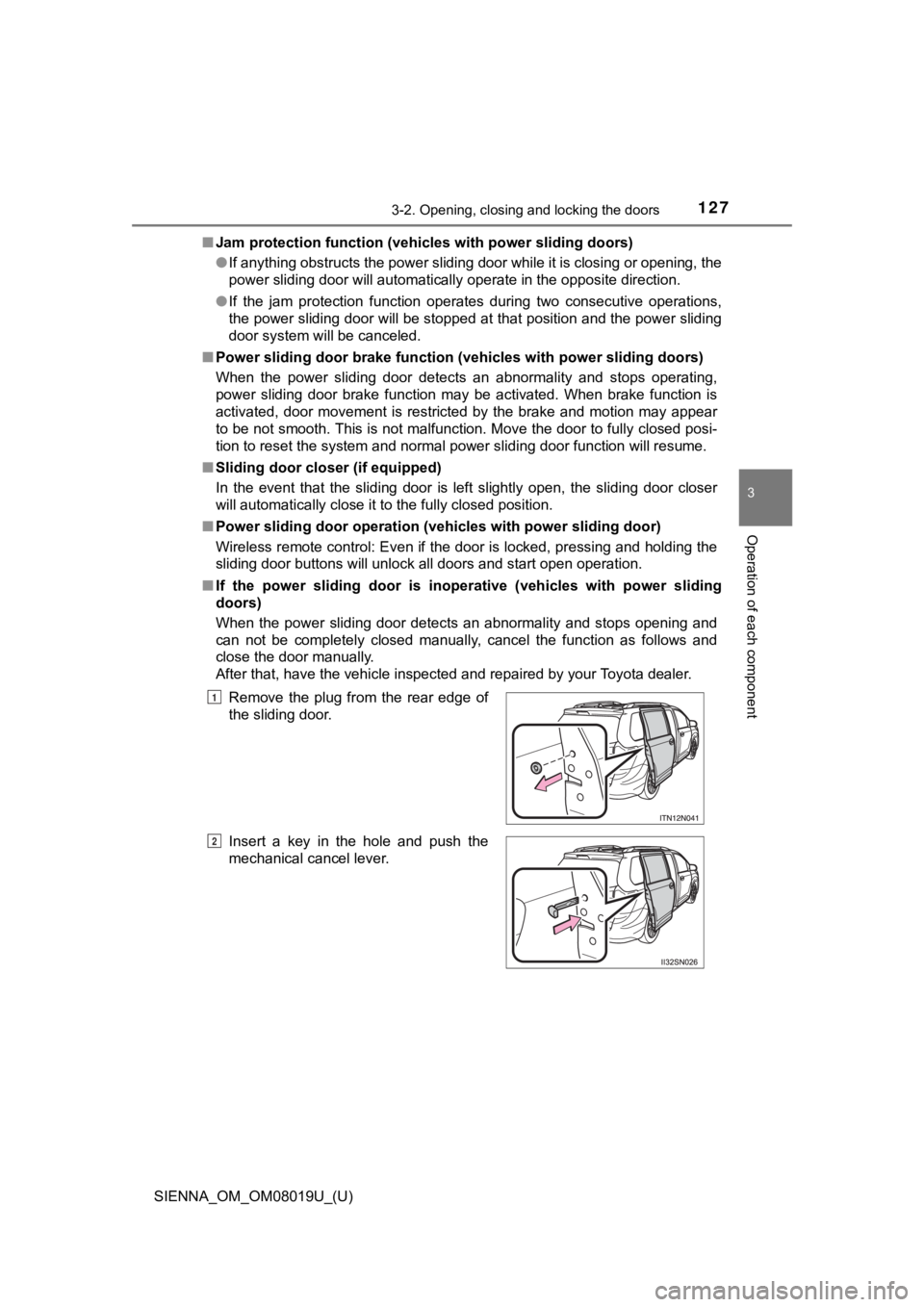
■ If the power sliding door is inop erative (vehicles with power sliding
doors)
When the power sliding door detects an abnormality and stops opening and
can not be completely closed manually, cancel the function as f ollows and
close the door manually.
After that, have the vehicle inspected and repaired by your Toy ota dealer.
Remove the plug from the rear edge of
the sliding door.
Insert a key in the hole and push the
mechanical cancel lever.
1
2
Page 170 of 584
170
SIENNA_OM_OM08019U_(U)
3-3. Adjusting the seats
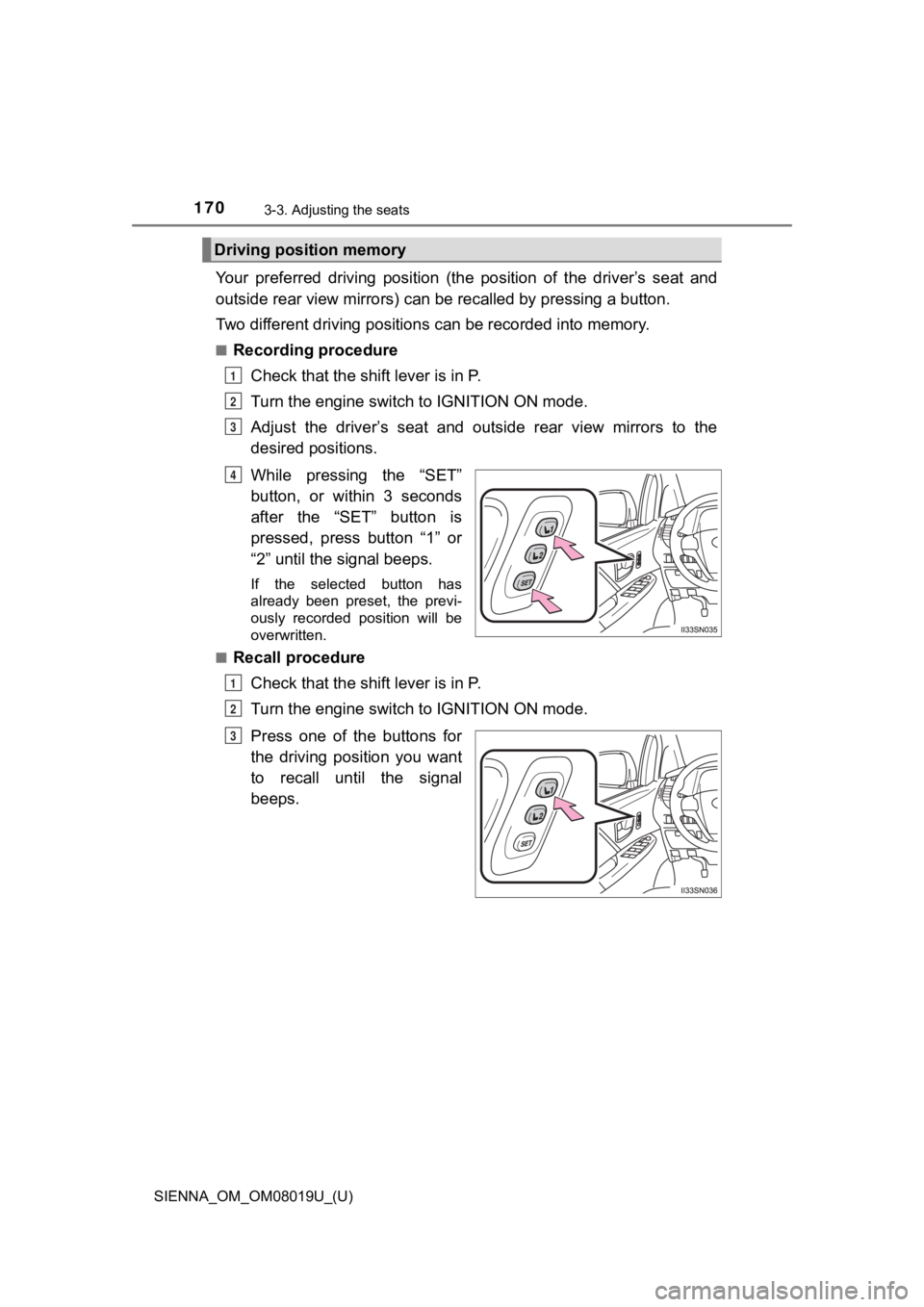
Your preferred driving position (the position of the driver’s seat and
outside rear view mirrors) can be recalled by pressing a button.
Two different driving positions can be recorded into memory.
■Recording procedure
Check that the shift lever is in P.
Turn the engine switch to IGNITION ON mode.
Adjust the driver’s seat and outside rear view mirrors to the
desired positions.
While pressing the “SET”
button, or within 3 seconds
after the “SET” button is
pressed, press button “1” or
“2” until the signal beeps.
If the selected button has
already been preset, the previ-
ously recorded position will be
overwritten.
■
Recall procedure
Check that the shift lever is in P.
Turn the engine switch to IGNITION ON mode.
Press one of the buttons for
the driving position you want
to recall until the signal
beeps.
Driving position memory
1
2
3
4
1
2
3
Page 374 of 584
374
SIENNA_OM_OM08019U_(U)
5-4. Using the other interior features
Garage door opener
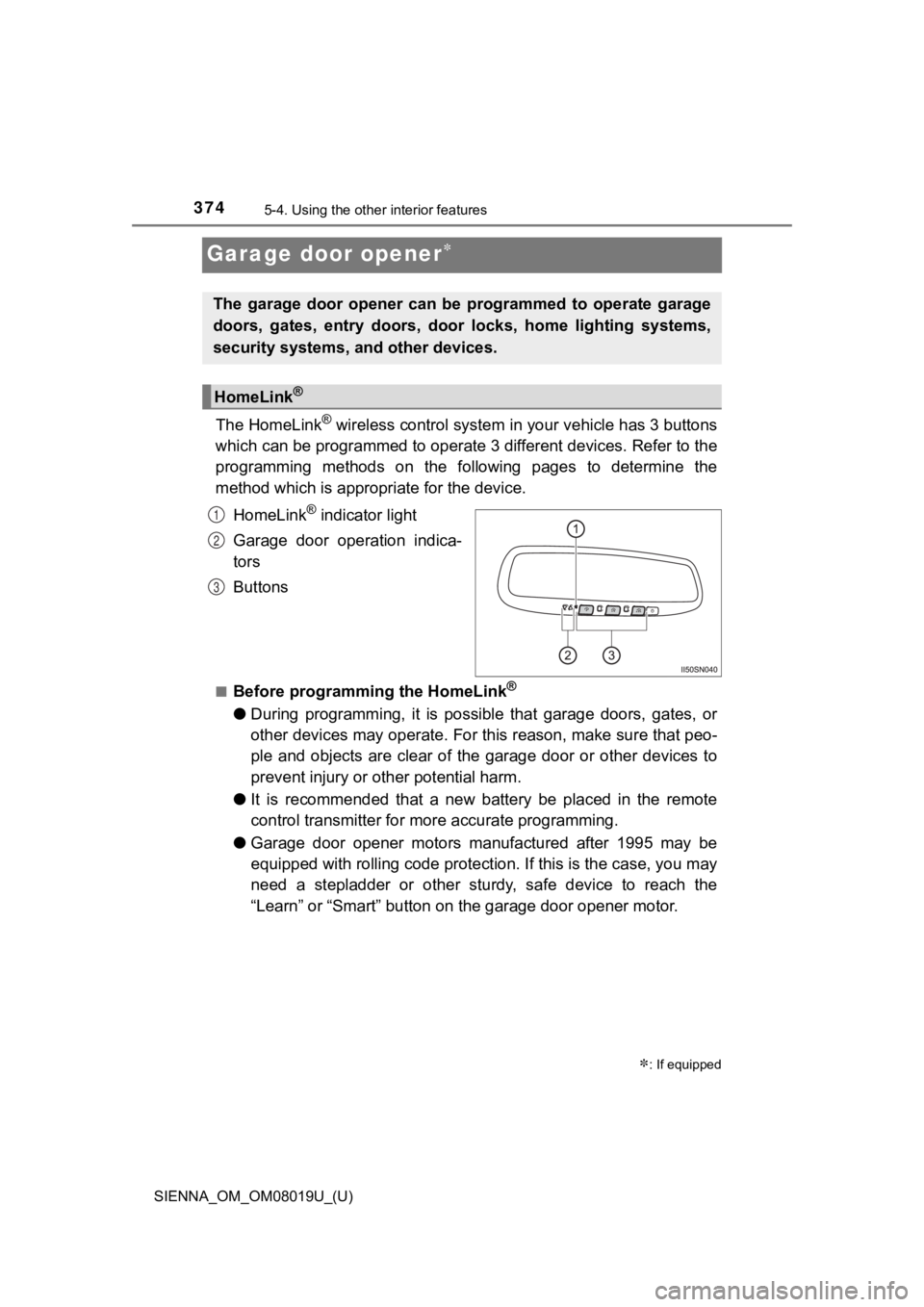
The HomeLink® wireless control system in your vehicle has 3 buttons
which can be programmed to operate 3 different devices. Refer to the
programming methods on the following pages to determine the
method which is approp riate for the device.
HomeLink
® indicator light
Garage door operation indica-
tors
Buttons
■Before programming the HomeLink®
● During programming, it is possible that garage doors, gates, or
other devices may operate. For this reason, make sure that peo-
ple and objects are clear of the garage door or other devices t o
prevent injury or other potential harm.
● It is recommended that a new battery be placed in the remote
control transmitter for mo re accurate programming.
● Garage door opener motors manufactured after 1995 may be
equipped with rolling code pro tection. If this is the case, you may
need a stepladder or other sturdy, safe device to reach the
“Learn” or “Smart” button on the garage door opener motor.
: If equipped
The garage door opener can be programmed to operate garage
doors, gates, entry doors, door locks, home lighting systems,
security systems, and other devices.
HomeLink®
1
2
3