CD player TOYOTA SUPRA 2020 Owners Manual (in English)
[x] Cancel search | Manufacturer: TOYOTA, Model Year: 2020, Model line: SUPRA, Model: TOYOTA SUPRA 2020Pages: 352, PDF Size: 6.49 MB
Page 10 of 352

101-1. NOTES
Supra Owner's Manual
any time.
For example, this includes:
• Setting for the seat position.
• Suspension and climate con-trol settings.
If necessary, data can be trans-
ferred to the entertainment and
communication system of the
vehicle, e.g. via smartphone.
This includes the following
depending on the respective
equipment:
• Multimedia data such as music, films or photos for
playback in an integrated mul-
timedia system.
• Address book data for use in conjunction with an integrated
hands-free system or an inte-
grated navigation system.
• Entered navigation destina- tions.
• Data on the use of Internet services.
This data can be stored locally
in the vehicle or is found on a
device that has been connected
to the vehicle, e.g., a smart-
phone, USB stick or MP3 player.
If this data is stored in the vehi-
cle, it can be deleted at any
time.
This data is only transmitted to
third parties upon personal
request as part of the use of
online services. The transmis-
sion depends on the selected
settings for the use of the ser-
vices. Depending on the vehicle equip-
ment, mobile devices connected
to the vehicle, for instance
smartphones, can be controlled
via the vehicle control elements.
The sound and picture from the
mobile device can be played
back and displayed through the
multimedia system. Certain
information is transferred to the
mobile device at the same time.
Depending on the type of incor-
poration, this includes, for
instance position data and other
general vehicle information. This
optimizes the way in which
selected apps, for instance navi-
gation or music playback, work.
There is no further interaction
between the mobile device and
the vehicle, for instance active
access to vehicle data.
How the data will be processed
further is determined by the pro-
vider of the particular app being
used. The extent of the possible
settings depends on the respec-
tive app and the operating sys-
tem of the mobile device.
If the vehicle has a wireless net-
work connection, this enables Incorporation of mobile end
devices
Services
General information
Page 65 of 352
653-1. CONTROLS
Supra Owner's Manual
3
CONTROLS
Heed and follow the instructions
on the Control Display.
Via Toyota Supra Command:
1 "My Vehicle"
2 "System settings"
3 "Data privacy"
4 "Delete personal data"
5 "Delete personal data"
6 "OK"
7 Exit and lock the vehicle.
After 15 minutes, the deletion
process is completed.
If not all of the data was deleted,
repeat the deletion.
Switch on the drive-ready state
to cancel deletion of the data.
Various connection types are
available for using mobile
devices in the vehicle. The con-
nection type to select depends
on the mobile device and the
desired function.
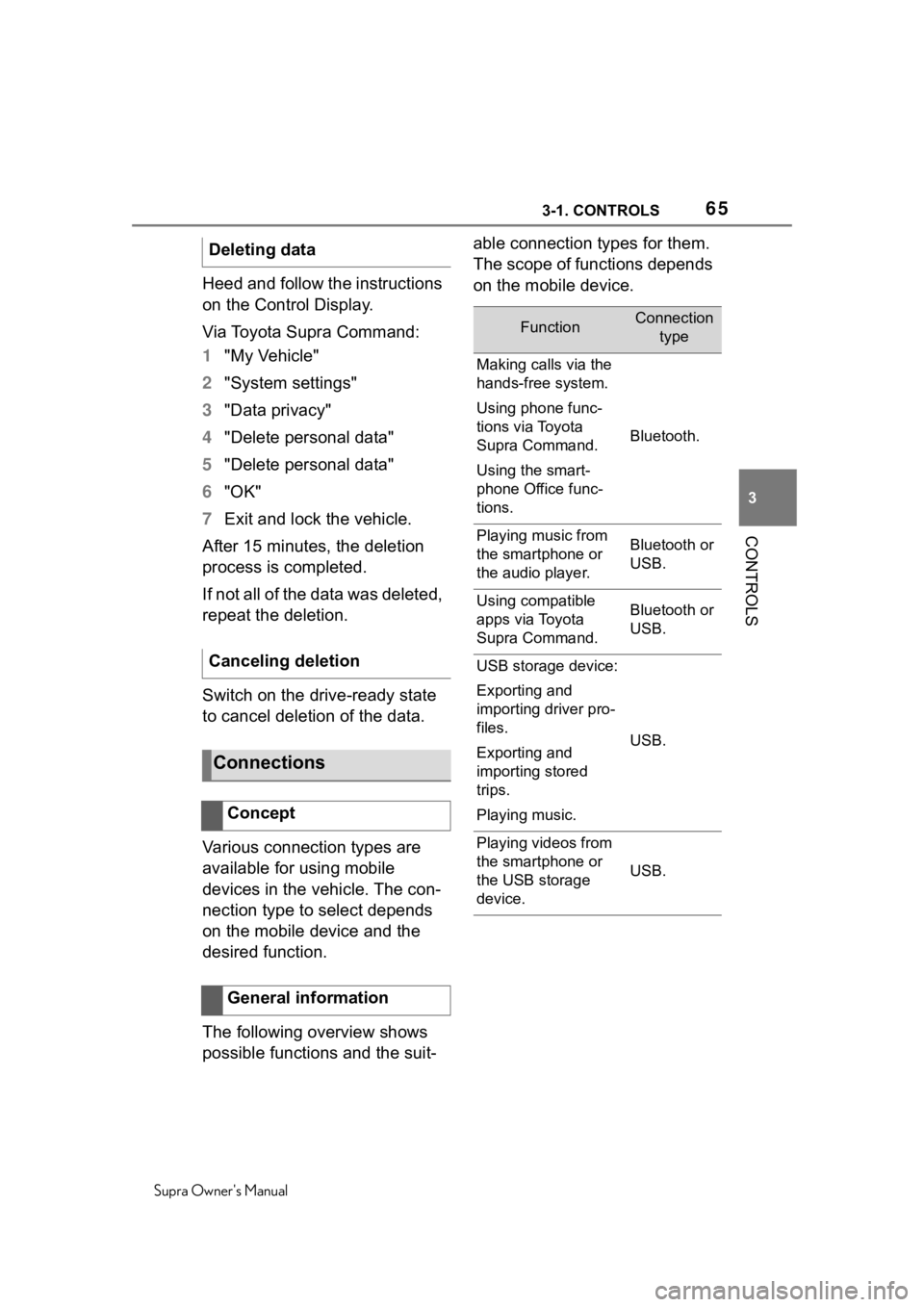
The following overview shows
possible functions and the suit- able connection types for them.
The scope of functions depends
on the mobile device.
Deleting data
Canceling deletion
Connections
Concept
General information
FunctionConnection
type
Making calls via the
hands-free system.
Using phone func-
tions via Toyota
Supra Command.
Using the smart-
phone Office func-
tions.
Bluetooth.
Playing music from
the smartphone or
the audio player.Bluetooth or
USB.
Using compatible
apps via Toyota
Supra Command.Bluetooth or
USB.
USB storage device:
Exporting and
importing driver pro-
files.
Exporting and
importing stored
trips.
Playing music.
USB.
Playing videos from
the smartphone or
the USB storage
device.
USB.
Page 68 of 352

683-1. CONTROLS
Supra Owner's Manual
• The applications on the mobile phone do not function
anymore.
Switch the mobile phone off and on
again.
• Too high or too low ambient temperature for mobile phone
operation.
Do not subject the mobile phone to
extreme ambient temperatures.
Why can phone functions not be
used via Toyota Supra Com-
mand?
• The mobile phone may not be
properly configured, for
instance as Bluetooth audio
device.
Connect the mobile phone with the
telephone or additional phone func-
tion.
Why are no or not all phone
book entries displayed or why
are they incomplete?
• Transmission of the phone book entries is not yet com-
plete.
• It is possible that only the phone book entries of the
mobile phone or the SIM card
are transmitted.
• It may not be possible to dis- play phone book entries with
special characters.
• It may not be possible to transmit contacts from social
networks.
• The number of phone book entries to be stored is too
high. • Data volume of the contact
too large, for instance due to
stored information such as
notes.
Reduce the data volume of the con-
tact.
• A mobile phone can only be connected as audio source or
as telephone.
Configure the mobile phone and
connect it with the telephone or
additional phone function.
How can the phone connection
quality be improved?
• Adjust the strength of the Bluetooth signal on the mobile
phone, depending on the
mobile phone.
• Insert mobile phone into the wireless charging tray.
• Adjust the volume of the microphone and loudspeak-
ers separately in the sound
settings.
If all points in this list have been
checked and the required func-
tion is still not available, contact
the Toyota dealer.
Mobile devices with a USB port
are connected to the USB inter-
face.
• Audio devices such as MP3 players.
• USB storage devices. USB connection
General information