coolant temperature TOYOTA SUPRA 2020 Owners Manual (in English)
[x] Cancel search | Manufacturer: TOYOTA, Model Year: 2020, Model line: SUPRA, Model: TOYOTA SUPRA 2020Pages: 360, PDF Size: 5.97 MB
Page 133 of 360
1334-1. CONTROLS
Supra Owner's Manual
4
CONTROLS
This chapter describes all stan-
dard, country-specific and
optional features offered with
the series. It also describes fea-
tures and functions that are not
necessarily available in your
vehicle, e.g., due to the selected
options or country versions. This
also applies to safety-related
functions and systems. When
using these functions and sys-
tems, the applicable laws and
regulations must be observed.
The instrument cluster is a vari-
able display. When the sport
mode switch is used to change
the driving mode, the instrument
cluster displays change to
match the driving mode.
The display change in the instru-
ment cluster can be deactivated
via Toyota Supra Command.
Some of the displays in the
instrument cluster may differ
from the illustrations in this
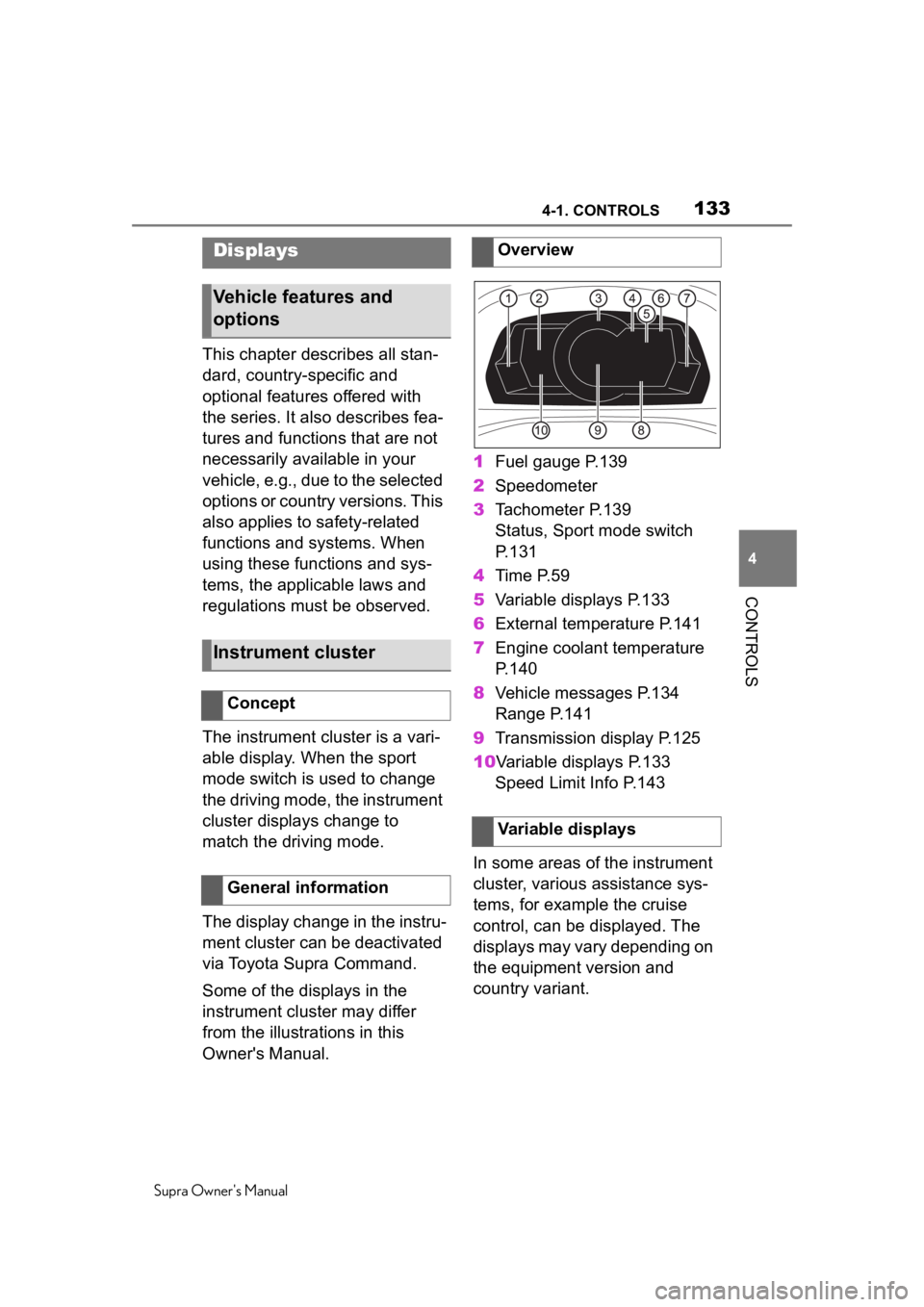
Owner's Manual. 1
Fuel gauge P.139
2 Speedometer
3 Tachometer P.139
Status, Sport mode switch
P. 1 3 1
4 Time P.59
5 Variable displays P.133
6 External temperature P.141
7 Engine coolant temperature
P. 1 4 0
8 Vehicle messages P.134
Range P.141
9 Transmission display P.125
10Variable displays P.133 Speed Limit Info P.143
In some areas of the instrument
cluster, various assistance sys-
tems, for example the cruise
control, can be displayed. The
displays may vary depending on
the equipment version and
country variant.
Displays
Vehicle features and
options
Instrument cluster
Concept
General information
Overview
Variable displays
Page 140 of 360
1404-1. CONTROLS
Supra Owner's Manual
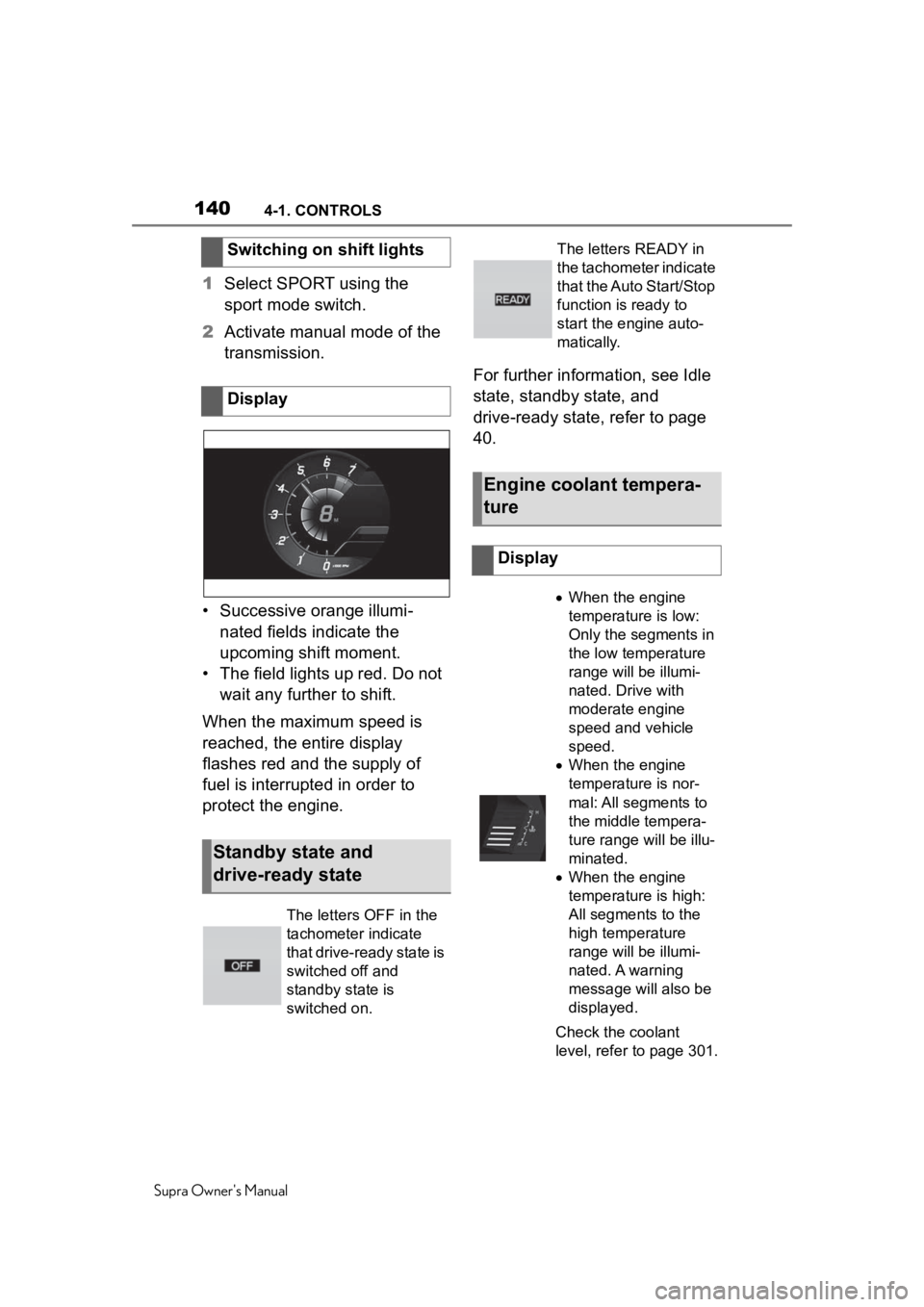
1Select SPORT using the
sport mode switch.
2 Activate manual mode of the
transmission.
• Successive orange illumi- nated fields indicate the
upcoming shift moment.
• The field lights up red. Do not wait any further to shift.
When the maximum speed is
reached, the entire display
flashes red and the supply of
fuel is interrupted in order to
protect the engine. For further information, see Idle
state, standby state, and
drive-ready state, refer to page
40.
Switching on shift lights
Display
Standby state and
drive-ready state
The letters OFF in the
tachometer indicate
that drive-ready state is
switched off and
standby state is
switched on.
The letters READY in
the tachometer indicate
that the Auto Start/Stop
function is ready to
start the engine auto-
matically.
Engine coolant tempera-
ture
Display
When the engine
temperature is low:
Only the segments in
the low temperature
range will be illumi-
nated. Drive with
moderate engine
speed and vehicle
speed.
When the engine
temperature is nor-
mal: All segments to
the middle tempera-
ture range will be illu-
minated.
When the engine
temperature is high:
All segments to the
high temperature
range will be illumi-
nated. A warning
message will also be
displayed.
Check the coolant
level, refer to page 301.
Page 348 of 360

348Alphabetical Index
Supra Owner's Manual
Changing wheels/tires ........... 274
Chassis number, see Vehicle identification number............. 12
Checking the engine oil level electronically ........................ 297
Checking the oil level electroni- cally ....................................... 297
Child restraint systems, mount- ing .......................................... 112
Child restraint systems, see Transporting ch ildren safely 111
Child seat, mountin g .............. 112
Child seats, see Transporting children safely ...................... 111
Children, seating position ..... 111
Children, transporting safely 111
Chrome surfaces, care .......... 327
Chrome-plated surfaces, care327
Cleaning displays, screens ... 329
Cleaning, Head-up Display .... 329
Climate control ....................... 228
Combination switch, see Turn signals ................................... 121
Combination switch, see Washer/wiper system........... 122
Comfort entry ........................... 86
Comparison of entries, see Entry comparison ............................. 44
Compartments in the doors .. 247
Compressor ............................ 278
Condensation water under the parked vehicle ...................... 259
Condensation, removing from the windows.......................... 232
Condition Based Service CBS ............................................... 304
Confirmation signal from the vehicle ..................................... 91
Connecting electr ical devices,
see Sockets .......................... 240
Connections, Screen Mirroring73
Control Display ......................... 46 Control Display, settings .........58
Control systems, driving stability
...............................................195
Controller ..................................47
Convenient closing with the remote control ........................80
Convenient opening with the remote control ........................80
Coolant ....................................300
Coolant level ...........................301
Coolant temperature ..............140
Cooling system .......................300
Cooling, maximum .................230
Corrosion on brake discs ......258
Cosmetic mirror .... ..................240
Cruise control .........................200
Cruise control with distance con- trol, see Dynami c radar cruise
control with full-speed range ...............................................204
Cruise control without distance control, see Cruise control ..200
Cruise control, active with Stop & Go .......................................204
Cruising range ........................141
Cup holder...............................247
Curtain shield air bag ..............160
Customize Settings, see Driver profiles.....................................64
Customize Settings, see Sport mode switch ..........................131
D
Damage, tires ..... .....................273
Data memory ...............................8
Data protection, settings .........62
Data, see Deleting personal data in the vehicle ...........................63
Data, technical ........................332
Date ............................................59
Daytime running lights...........156
Defogging the windows .........232
Page 349 of 360

349Alphabetical Index
Supra Owner's Manual
Defrosting the windows ......... 232
Deleting personal data ............. 63
Departure time, parked-car venti- lation...................................... 235
Device list, displaying .............. 74
Devices, managing ................... 74
Diagnosis connectio n ............ 304
Differential oil ......................... 334
Dimensions ............................. 332
Dimmable exterior mirrors .... 106
Dimmable interior mirror ....... 107
Direct dial butto ns, see Program-
mable memory buttons.......... 54
Direction indicator, see Turn sig- nals ........................................ 121
Display in the windshield, see Head-up Display ................... 150
Display lighting , see Instrument
lighting .................................. 158
Displays .................................. 133
Displays and symbols ............... 4
Displays, screens ................... 329
Disposal, coolant ................... 301
Disposal, vehicle battery ....... 309
Distance control , see Parking
Sensors ................................. 214
Driver assistance, see Toyota Supra Safety ......................... 172
Driver attention control.......... 193
Driver Fatigue Detector.......... 193
Driver profiles ........................... 64
Drive-ready state, idle state, and standby state .......................... 42
Driving Assistant, see Toyota Supra Safety ......................... 172
Driving comfort ...................... 227
Driving instructions, break-in254
Driving mode, see Sport mode switch .................................... 131
Driving notes, general ........... 255
Driving on racetracks ............ 259 Driving stability
control systems
...............................................195
Driving tips ..............................255
Drying air, see Air conditioning ...............................................230
Dynamic radar cruise control with full-speed range............204
E
Electronic oil measurement...297
Emergency brake function when parking, Parking Sensors with
emergency braking function217
Emergency service, see Break- down assistance ...................317
Emergency unlocking, fuel filler flap .........................................265
Emergency unlocking, transmis- sion lock ................................129
Energy savings, see Gear shift indicator ................................142
Engine compartment ..............293
Engine compartment, working in ...............................................293
Engine coolant ........................300
Engine coolant, Capacity .......333
Engine oil ........................297, 333
Engine oil change ...................300
Engine oil filler neck...............298
Engine oil temperature...........140
Engine oil types to add ..........299
Engine oil, adding...................298
Engine start, jump-starting ....319
Engine temperature ................140
Engine, Auto Start/Stop function ............................................... 116
Entry comparison, navigation .44
Equipment, interior.................236
Error displays, see Vehicle mes- sages .....................................134
Exchanging wheels/tires........274
Exhaust gas system ...............255