phone TOYOTA TACOMA 2009 Owners Manual (in English)
[x] Cancel search | Manufacturer: TOYOTA, Model Year: 2009, Model line: TACOMA, Model: TOYOTA TACOMA 2009Pages: 520, PDF Size: 10.75 MB
Page 3 of 520
1
2
3
4
5
6
7
3
2-4. Using other driving systems ........................... 163
Cruise control ...................... 163
Rear view monitor system (vehicles with auto anti-glare
inside rear view mirror) ..... 166
Four-wheel drive system ..... 170
Active traction control system .............................. 174
AUTO LSD system.............. 176
Rear differential lock system .............................. 178
Downhill Assist Control system .............................. 181
Clutch start cancel switch ... 183
Driving assist systems ........ 184
2-5. Driving information ........... 190 Off-road precautions (4WD models and
PreRunner) ....................... 190
Cargo and luggage ............. 195
Vehicle load limits ............... 199
Winter driving tips ............... 201
Trailer towing ...................... 205
Dinghy towing ..................... 218
3-1. Using the air conditioning system and defogger...... 220
Air conditioning system ....... 220 3-2. Using the audio
system ............................. 228
Audio system types ............ 228
Using the radio ................... 231
Using the CD player ........... 237
Playing back MP3 and WMA discs ....................... 244
Optimal use of the audio system .............................. 253
Operating the sub woofer (on some Access Cab
models) ............................ 256
Using the AUX adapter....... 257
Using the steering wheel audio switches.................. 259
3-3. Using the hands-free phone system (for
cellular phone)................ 262
Hands-free phone system (for cellular phone) ........... 262
Using the hands-free phone system .............................. 266
Making a phone call ........... 274
Setting a cellular phone ...... 279
Security and system setup ................................ 284
Using the phone book ........ 287
3-4. Using the interior lights ... 294 Interior lights list ................. 294
• Interior light ....................... 295
• Personal lights................... 295
3Interior and exterior
features
Page 21 of 520
21
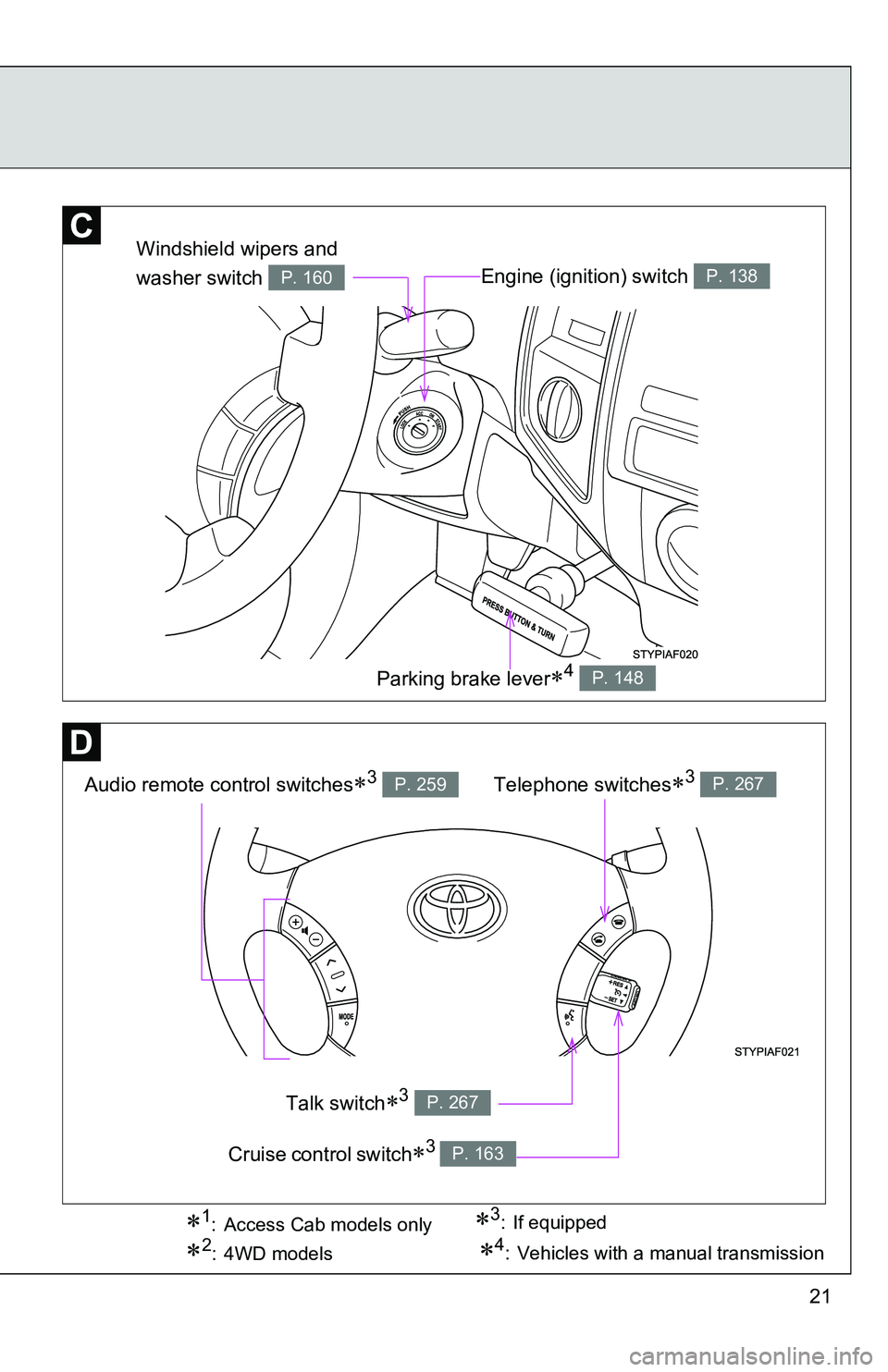
Engine (ignition) switch P. 138
Audio remote control switches3 P. 259
Windshield wipers and
washer switch
P. 160
Parking brake lever4 P. 148
Telephone switches3 P. 267
Talk switch3 P. 267
Cruise control switch3 P. 163
3: If equipped1: Access Cab models only
2:4WD models4: Vehicles with a manual transmission
Page 25 of 520
25
Scrapping your Toyota
The SRS airbag and seat belt pretensioner devices in your Toyota contain
explosive chemicals. If the vehicle is scrapped with the airbags and seat belt
pretensioners left as they are, this may cause an accident such as fire. Be
sure to have the systems of the SRS airbag and seat belt pretensioner
removed and disposed of by a qualified service shop or by your Toyota
dealer before you scrap your vehicle.
Perchlorate Material
Special handling may apply,
See www.dtsc.ca.gov/hazardouswaste/perchlorate.
Your vehicle has components that may contain perchlorate. These compo-
nents may include airbag, seat belt pretensioners, and wireless remote con-
trol batteries.
CAUTION
■General precautions while driving
Driving under the influence: Never drive your vehicle when under the influ-
ence of alcohol or drugs that have impaired your ability to operate your vehi-
cle. Alcohol and certain drugs delay reaction time, impair judgment and
reduce coordination, which could lead to an accident that will hurt or kill you,
your occupants or others.
Defensive driving: Always drive defensively. Anticipate mistakes that other
drivers or pedestrians might make and be ready to avoid accidents.
Driver distraction: Always give your full attention to driving. Anything that dis-
tracts the driver, such as adjusting controls, talking on a cellular phone or
reading can result in a collision with resulting death or serious injury to you,
your occupants or others.
Page 33 of 520
33
1-2. Opening, closing and locking the doors
1
Before driving
■
Wireless remote control depletion
The standard battery life is 1 to 2 years. (The battery becomes depleted
even if the key is not used.) If the wireless remote control function does not
operate, the battery may be depleted. Replace the battery when necessary.
(P. 391)
■ If the wireless remote control does not operate
Locking and unlocking the doors: Use the key. ( P. 35)
■ Security feature
If a door is not opened within approximately 30 seconds after the vehicle is
unlocked, the security feature automatically locks the vehicle again.
■ Conditions affecting operation
The wireless remote control function may not operate normally in the follow-
ing situations.
●Near a TV tower, radio station, electr ic power plant, airport or other facil-
ity that generates strong radio waves
● When carrying a portable radio, cell ular phone or other wireless commu-
nication device
● When multiple wireless keys are in the vicinity
● When the wireless key has come into contact with, or is covered by a
metallic object
● When a wireless key (that emits radio waves) is being used nearby
● When the wireless key has been left near an electrical appliance such as
a personal computer
■ Customization that can be co nfigured at Toyota dealer
Settings (e.g. wireless remote control system) can be changed.
(Customizable features P. 493)
Page 219 of 520
Interior and exterior features3
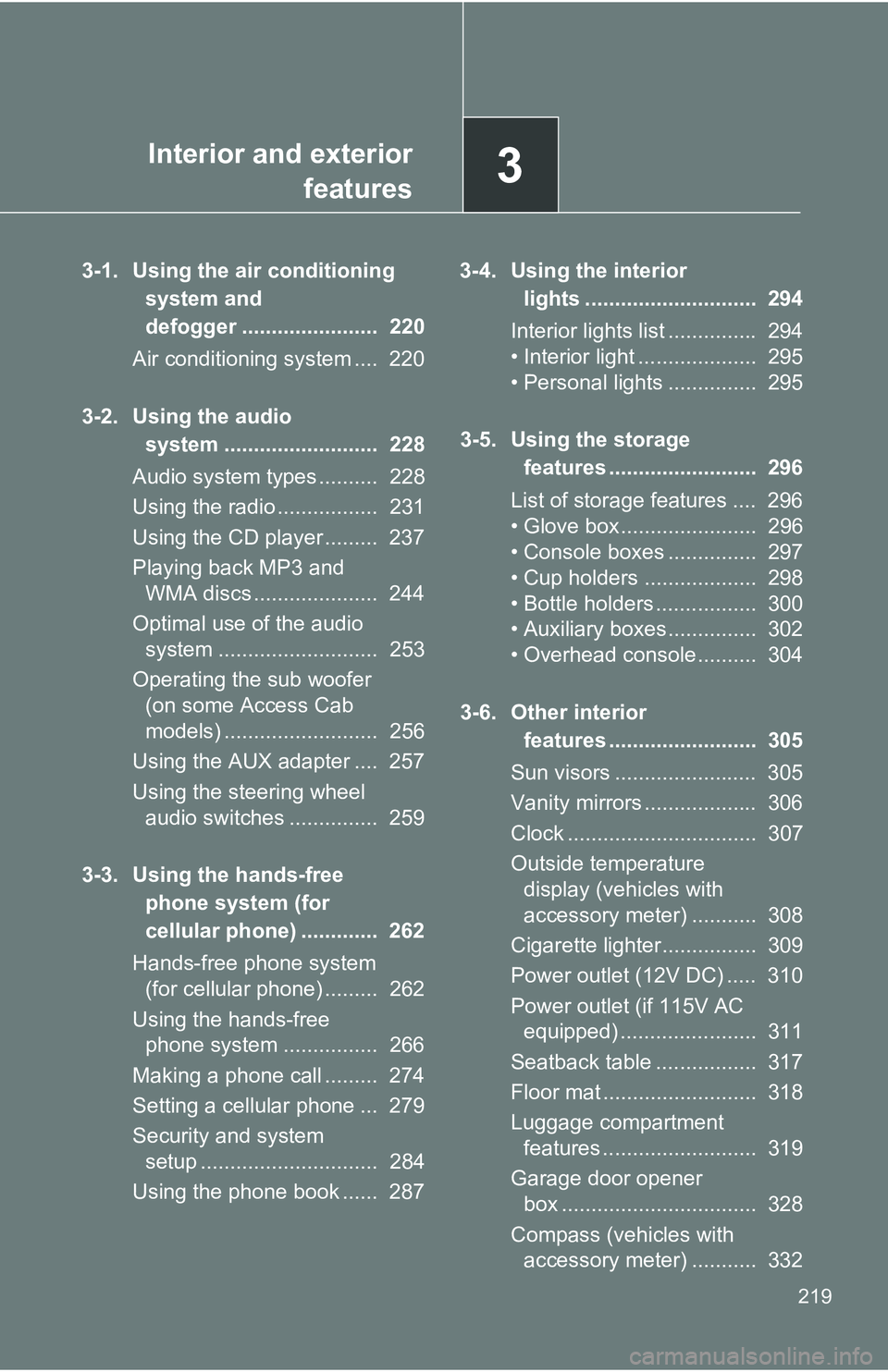
219
3-1. Using the air conditioning
system and
defogger ....................... 220
Air conditioning system .... 220
3-2. Using the audio system .......................... 228
Audio system types .......... 228
Using the radio ................. 231
Using the CD player ......... 237
Playing back MP3 and WMA discs ..................... 244
Optimal use of the audio system ........................... 253
Operating the sub woofer (on some Access Cab
models) .......................... 256
Using the AUX adapter .... 257
Using the steering wheel audio switches ............... 259
3-3. Using the hands-free phone system (for
cellular phone) ............. 262
Hands-free phone system (for cellular phone) ......... 262
Using the hands-free phone system ................ 266
Making a phone call ......... 274
Setting a cellular phone ... 279
Security and system setup .............................. 284
Using the phone book ...... 287 3-4. Using the interior
lights ............................. 294
Interior lights list ............... 294
• Interior light .................... 295
• Personal lights ............... 295
3-5. Using the storage features ......................... 296
List of storage features .... 296
• Glove box....................... 296
• Console boxes ............... 297
• Cup holders ................... 298
• Bottle holders ................. 300
• Auxiliary boxes ............... 302
• Overhead console .......... 304
3-6. Other interior features ......................... 305
Sun visors ........................ 305
Vanity mirrors ................... 306
Clock ................................ 307
Outside temperature display (vehicles with
accessory meter) ........... 308
Cigarette lighter................ 309
Power outlet (12V DC) ..... 310
Power outlet (if 115V AC equipped) ....................... 311
Seatback table ................. 317
Floor mat .......................... 318
Luggage compartment features .......................... 319
Garage door opener box ................................. 328
Compass (vehicles with accessory meter) ........... 332
Page 229 of 520
229
3-2. Using the audio system
3
Interior and exterior features■
Using cellular phones
Interference may be heard through the audio system’s speakers if a cellular
phone is being used inside or close to the vehicle while the audio syste\
m is
operating.
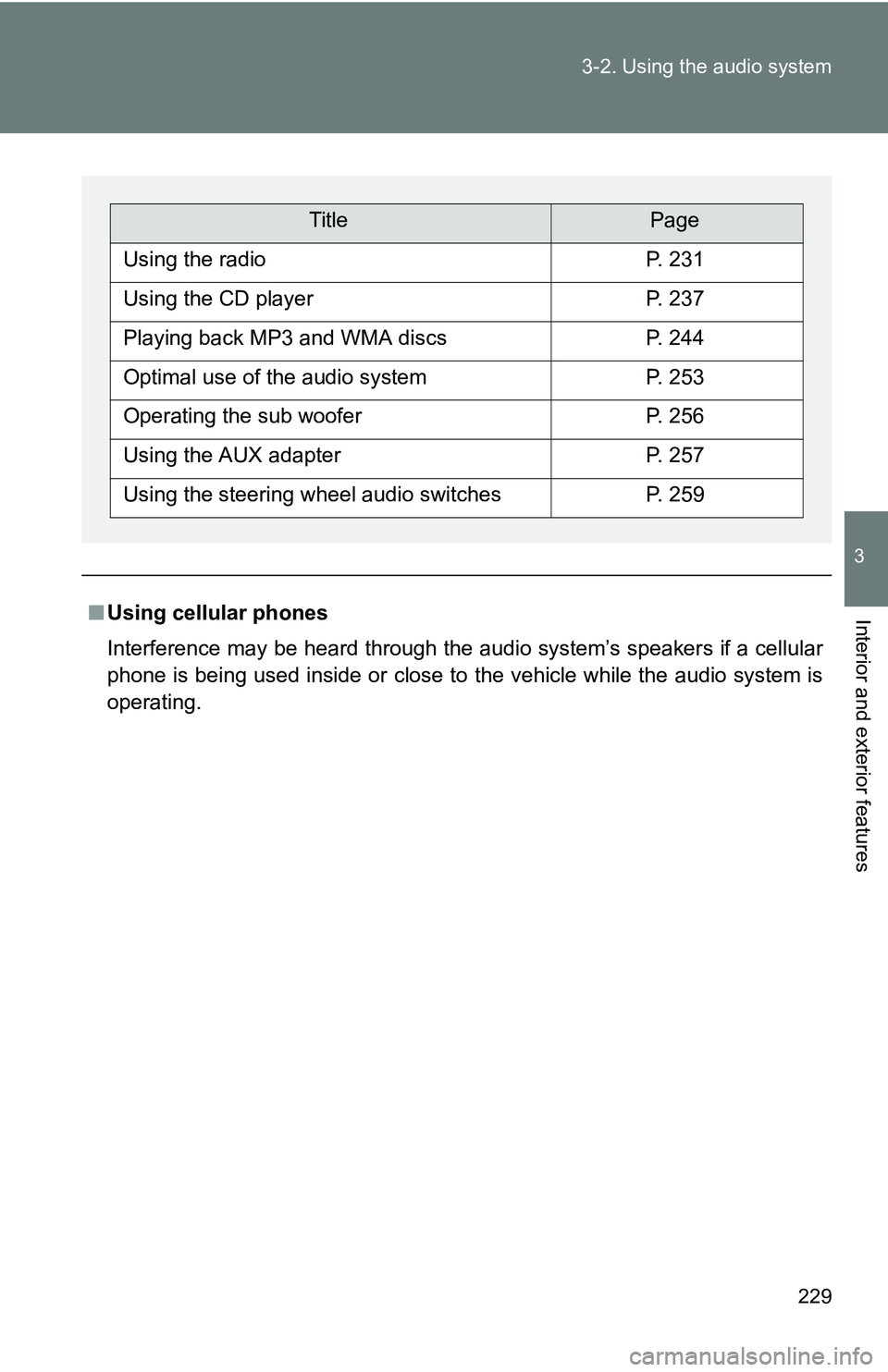
TitlePage
Using the radioP. 231
Using the CD playerP. 237
Playing back MP3 and WMA discsP. 244
Optimal use of the audio systemP. 253
Operating the sub wooferP. 256
Using the AUX adapterP. 257
Using the steering wheel audio switchesP. 259
Page 262 of 520
262
3-3. Using the hands-free phone system (for cellular phone)
Hands-free phone system (for cellular phone) (if equipped)
■When using the hands-free system
●The audio system and voice guidance are muted when making a call.
● If both parties speak at the same time it may be difficult to hear.
● If the received call volume is overly loud, an echo may be heard.
● Try to face toward the microphone as much as possible when speaking.
● In the following circumstances it may be difficult to hear the other party:
• If driving on unpaved roads
• If driving at high speeds
• If a window is open
• If the air conditioning is blowing directly on the microphone
• If the air conditioning fan speed is set to high
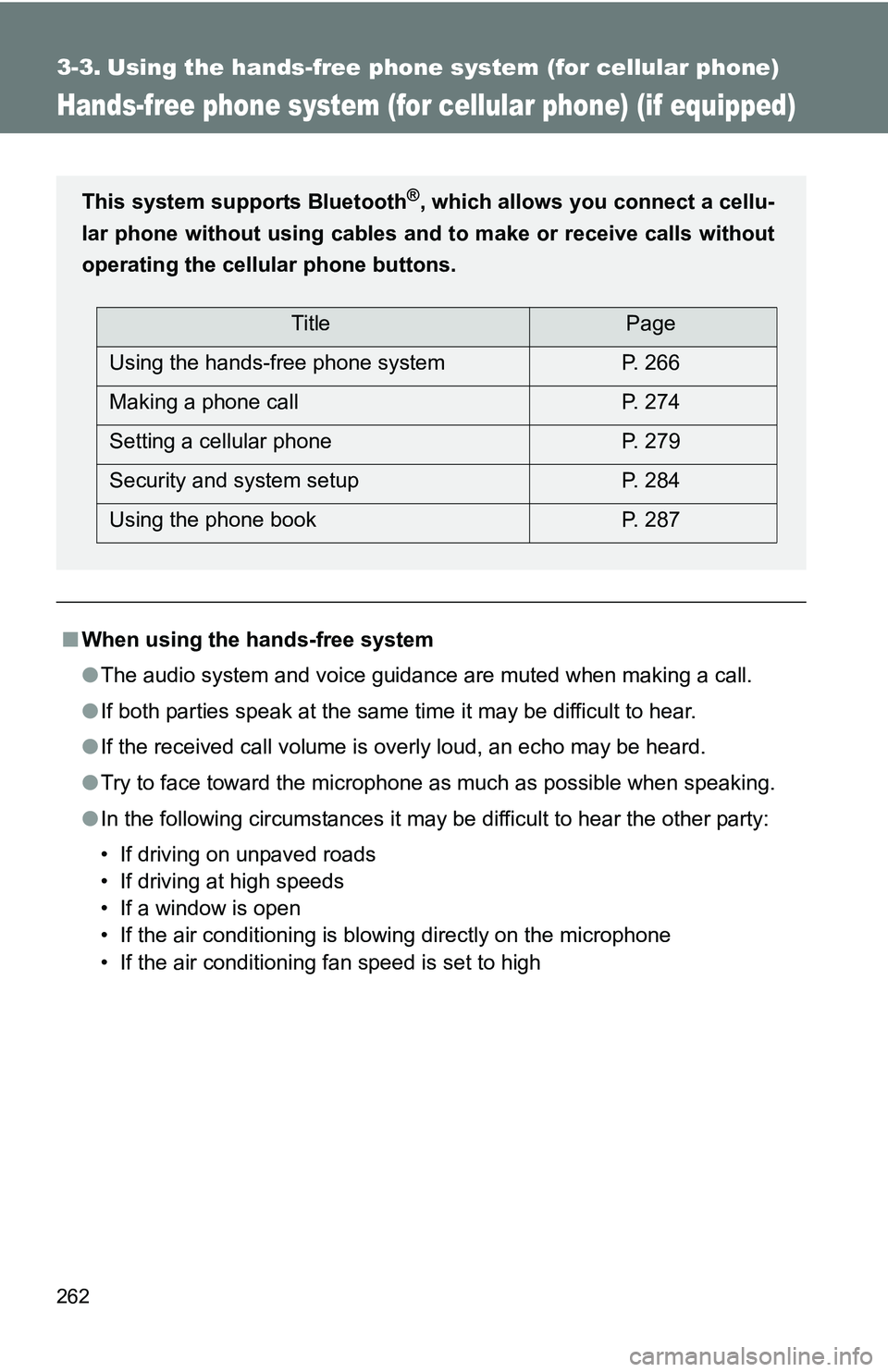
This system supports Bluetooth®, which allows you connect a cellu-
lar phone without using cables a nd to make or receive calls without
operating the cellular phone buttons.
TitlePage
Using the hands-free phone system P. 266
Making a phone call P. 274
Setting a cellular phone P. 279
Security and system setup P. 284
Using the phone book P. 287
Page 263 of 520
263
3-3. Using the hand
s-free phone system (for cellular phone)
3
Interior and exterior features
■Conditions under which th e system will not operate
● If using a cellular phone that does not support Bluetooth
®
●If the cellular phone is switched off
● If you are outside service range
● If the cellular phone is not connected
● If the cellular phone’s battery is low
■ Bluetooth
® antenna
The antenna is built into the display. If the cellular phone is behind the seat
or in the console box, or touching or covered by metal objects, connection
status may deteriorate.
■ Signal status
This display may not correspond exactly with the cellular phone itself.
■ About Bluetooth
®
■Compatible models
Compatible with HFP (Hands Free Profile) Ver. 1.0 and OPP (Object Push
Profile) Ver. 1.1.
If your cellular phone does not support HFP, you cannot enter the Blue-
tooth
® phone. If your cellular phone supports OPP alone, you cannot use
the Bluetooth® phone.
Bluetooth is a registered trademark of
Bluetooth SIG, Inc.
Page 264 of 520
264 3-3. Using the hands-free phone system (for cellular phone)
■Certification for the hands-free phone system
NOTE:
This device complies with Part 15 of the FCC Rules and RSS-210 of industry
Canada. Operation is subject to the following two conditions: (1) This device
may not cause harmful interference, and (2) this device must accept an\
y
interference received, including interference that may cause undesired oper-
ation.
NOTICE:
This equipment has been tested and found to comply with the limits for a
Class B digital device, pursuant to part 15 of the FCC Rules. These limits are
designed to provide reasonable protection against harmful interference in a
residential installation. This equipment generates, uses and can radiate
radio frequency energy and, if not installed and used in accordance with the
instructions, may cause harmful interference to radio communications. How-
ever, there is no guarantee that interference will not occur in a particular
installation. If this equipment does cause harmful interference to radio or
television reception, which can be determined by turning the equipment off
and on, the user is encouraged to try to correct the interference by one or
more of the following measures:
● Reorient or relocate the receiving antenna.
● Increase the separation between the equipment and receiver.
● Connect the equipment into an outlet on a circuit different from that to
which the receiver is connected.
● Consult the dealer or an experienc ed radio/TV technician for help.
FCC ID: ACJ932C5ZZZ035
IC ID: 216J-C5ZZZ035
MADE IN U.S.A.
Page 265 of 520
265
3-3. Using the hand
s-free phone system (for cellular phone)
3
Interior and exterior features
FCC WARNING:
Changes or modifications not expressly approved by the party responsible
for compliance could void the user’s authority to operate the equipment.
CAUTION:
Radio Frequency Radiation Exposure
This equipment complies with FCC radiation exposure limits set forth for
uncontrolled equipment and meets the FCC radio frequency (RF) Exposure
Guidelines in Supplement C to OET65. This equipment has very low levels
of RF energy that it deemed to comply without maximum permissive expo-
sure evaluation (MPE). But it is desirable that it should be installed and oper-
ated with at least 20 cm and more between the radiator and person’s body
(excluding extremities: hands, wrists, feet and legs).
Co-location:
This transmitter must not be co-located or operated in conjunction with any
other antenna or transmitter.
CAUTION
■Caution while driving
Do not use a cellular phone or connect the Bluetooth
® phone.
NOTICE
■When leaving the vehicle
Do not leave a cellular phone in the vehicle. The inside of the vehicle may
become hot, causing damage to the phone.