power steering TOYOTA TACOMA 2009 Owners Manual (in English)
[x] Cancel search | Manufacturer: TOYOTA, Model Year: 2009, Model line: TACOMA, Model: TOYOTA TACOMA 2009Pages: 520, PDF Size: 10.75 MB
Page 2 of 520
TABLE OF CONTENTSIndex
2
1-1. Key information .................. 30Keys ..................................... 30
1-2. Opening, closing and
locking the doors ............. 32
Wireless remote control ....... 32
Side doors ............................ 35
Access doors (Access Cab models only) ....................... 39
Tailgate ................................ 40
1-3. Adjustable components
(seats, mirrors, steering
wheel) ................................ 45
Front seats ........................... 45
Rear seats (Access Cab and Double Cab models) .......... 50
Head restraints ..................... 54
Seat belts ............................. 56
Steering wheel ..................... 62
Anti-glare inside rear view mirror .................................. 63
Outside rear view mirrors ..... 66
1-4. Opening a nd closing the
window s ............................ 69
Power windows .................... 69
Back window (vehicles with sliding type) ........................ 71
1-5. Refueling ............................. 72 Opening the fuel tank cap .... 72 1-6. Theft deterrent system ....... 76
Engine immobilizer system ... 76
Theft prevention labels (U.S.A.)............................... 78
1-7. Safety information .............. 79 Correct driving posture ......... 79
SRS airbags ......................... 81
Front passenger occupant classification system ........... 97
Child restraint systems ....... 104
Installing child restraints ..... 109
2-1. Driving procedures........... 128 Driving the vehicle .............. 128
Engine (ignition) switch....... 138
Automatic
Transmission...... 141
Manual Transmission ......... 144
Turn signal lever ................. 147
Parking brake ..................... 148
2-2. Gauges and meters .......... 150 Gauges and meters ............ 150
Indicators and warning lights ................................. 153
Accessory meter ................. 156
2-3. Operating the lights and wipers .............................. 157
Headlight switch ................. 157
Fog light switch ................... 159
Windshield wipers and washer .............................. 160
1Before driving
2When driving
Page 29 of 520
Before driving1
29
1-1. Key information................ 30Keys ................................... 30
1-2. Opening, closing and locking the doors ........... 32
Wireless remote control ..... 32
Side doors .......................... 35
Access doors (Access Cab models only) .................... 39
Tailgate .............................. 40
1-3. Adjustable components (seats, mirrors, steering
wheel).............................. 45
Front seats ......................... 45
Rear seats (Access Cab and Double Cab models) ........ 50
Head restraints................... 54
Seat belts ........................... 56
Steering wheel ................... 62
Anti-glare inside rear view mirror ............................... 63
Outside rear view mirrors ... 66
1-4. Opening and closing the windows.......................... 69
Power windows .................. 69
Back window (vehicles with sliding type)...................... 71 1-5. Refueling........................... 72
Opening the fuel tank cap ................................... 72
1-6. Theft deterrent system .... 76 Engine immobilizer system ............................. 76
Theft prevention labels (U.S.A.) ............................ 78
1-7. Safety information ........... 79 Correct driving posture....... 79
SRS airbags ....................... 81
Front passenger occupant classification system ........ 97
Child restraint systems..... 104
Installing child restraints ........................ 109
Page 66 of 520
66
1-3. Adjustable components (seats, mirrors, steering wheel)
Outside rear view mirrors
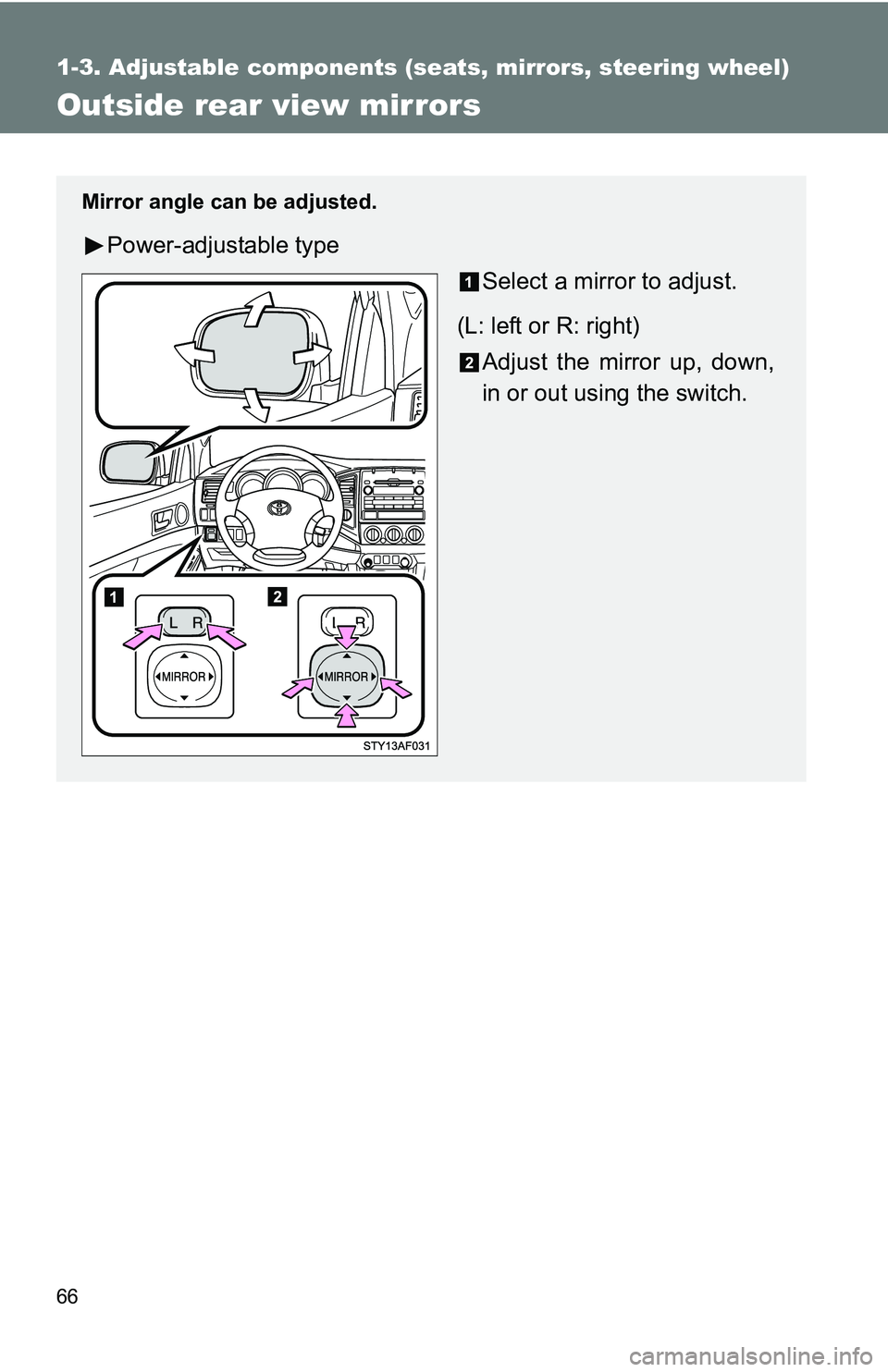
Mirror angle can be adjusted.
Power-adjustable type
Select a mirror to adjust.
(L: left or R: right) Adjust the mirror up, down,
in or out using the switch.
Page 67 of 520
67
1-3. Adjustable components (s
eats, mirrors, steering wheel)
1
Before driving
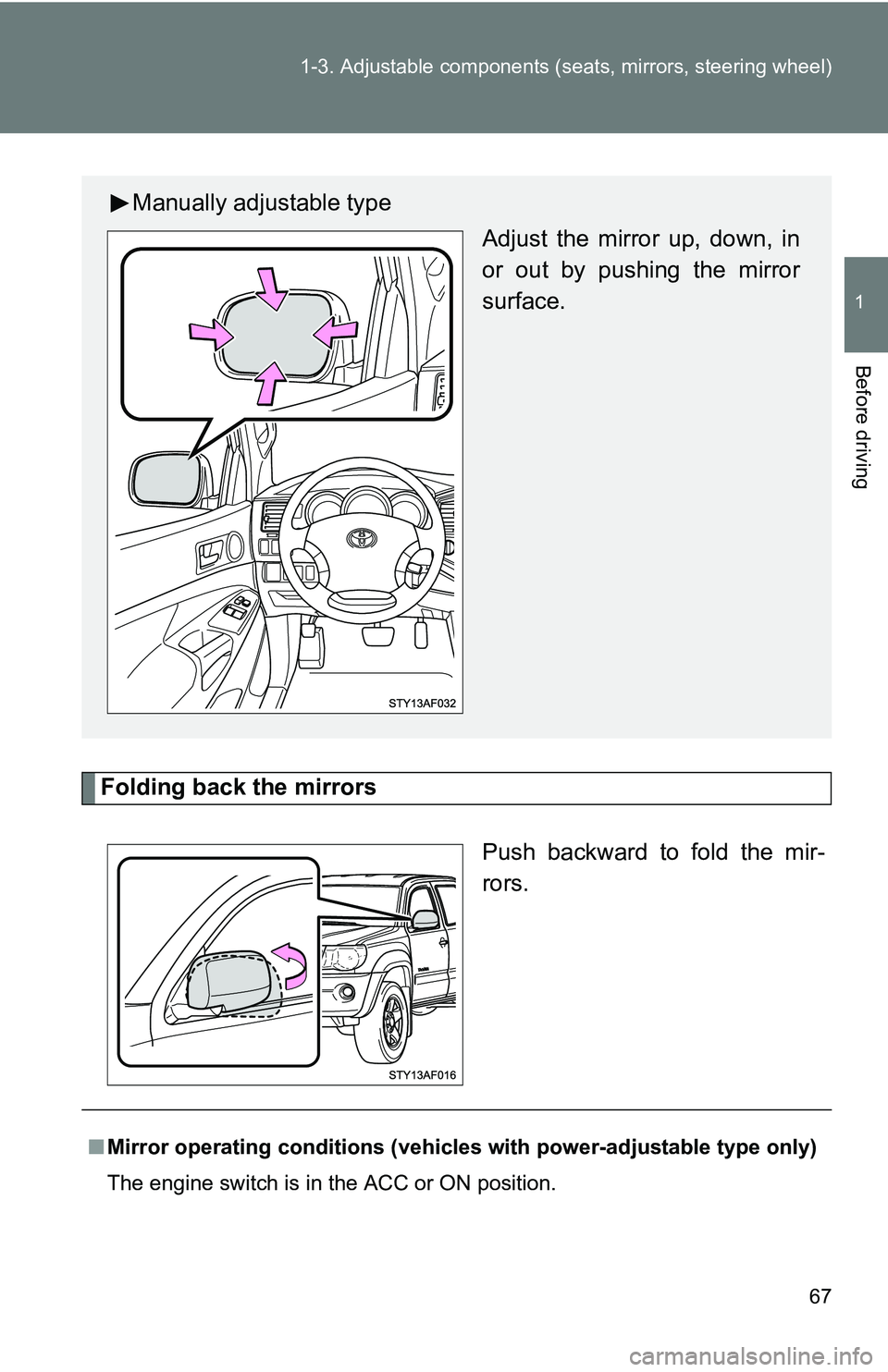
Folding back the mirrors
Push backward to fold the mir-
rors.
Manually adjustable typeAdjust the mirror up, down, in
or out by pushing the mirror
surface.
■Mirror operating conditions (vehicle s with power-adjustable type only)
The engine switch is in the ACC or ON position.
Page 84 of 520
84 1-7. Safety information
■SRS warning light
This warning light system monitors the airbag sensor assembly, front airbag
sensors, side and curtain shield airbag sensor assemblies, curtain shield air-
bag sensor assemblies (Access Cab and Double cab models), driver’s seat
position sensor, driver’s seat belt buckle switch, front passenger occupant
classification system, AIR BAG ON and AIR BAG OFF indicator lights, front
passenger’s seat position sensor (Regular Cab models), front passenger’s
seat belt buckle switch, passenger ai rbag off switch (Access Cab models),
front seat belt pretensioner assemblies, belt tension sensor (Regular Cab
models), RSCA OFF indicator light, inflators, interconnecting wiring and
power sources. ( P. 425)
■ If the SRS airbags deploy (inflate)
●Bruising and slight abrasions may result from contact with a deploying
(inflating) SRS airbag.
● A loud noise and white powder will be emitted.
● Parts of the airbag module (steering wheel hub, airbag cover and inflator)
as well as the front seats, and parts of the front and rear pillars and roof
side rail, may be hot for several minutes. The airbag itself may also be
hot.
● The front windshield may crack.
■ Operating conditions (front airbags)
● The SRS front airbags will deploy if the severity of the frontal impact is
above the designed threshold level, comparable to an approximate 15
mph (25 km/h) collision when the vehicle impacts straight into a fixed bar-
rier that does not move or deform.
However, this threshold velocity will be considerably higher if the vehicle
strikes an object, such as a parked vehicle or sign pole, which can move or
deform on impact, or if the vehicle is involved in an underride collision (e.g.
a collision in which the front of the vehicle “underrides”, or goes under, the
bed of a truck, etc.).
● It is possible that in some collisions where the forward deceleration of the
vehicle is very close to the designed threshold level, the SRS front air-
bags and the seat belt pretensioners may not activate together.
Page 132 of 520
132 2-1. Driving procedures
CAUTION
■When driving the vehicle
●Do not shift the shift lever to N while the vehicle is moving.
Doing so may cause the engine brake to not operate properly and lead to
an accident.
● Do not turn the engine off while driving.
The power steering and brake booster systems will not operate properly if
the engine is not running.
● Use engine braking (downshift) to maintain a safe speed when driving
down a steep hill.
Using the brakes continuously may cause the brakes to overheat and lose
effectiveness. ( P. 142145)
● When stopped on an inclined surface, use the brake pedal and parking
brake to prevent the vehicle from rolling backward or forward and causing
an accident.
● Do not adjust the position of the steering wheel, the seat, or the inside or
outside rear view mirrors while driving.
Doing so may result in a loss of vehicle control that can cause accidents
that may result in death or serious injury.
● Always check that all passengers’ arms, heads or other parts of their bod-
ies are not outside the vehicle, as this may result in death or serious injury.
● Do not drive in excess of the speed limit. Even if the legal speed limit per-
mits it, do not drive over 85 mph (140 km/h) unless your vehicle has high-
speed capability tires. Driving over 85 mph (140 km/h) may result in tire
failure, loss of control and possible injury. Be sure to consult a tire dealer
to determine whether the tires on your vehicle are high-speed capability
tires or not before driving at such speeds.
■ When driving on slippery road surfaces
●Sudden braking, acceleration and steering may cause tire slippage and
reduce your ability to control the vehicle, resulting in an accident.
● Sudden changes in engine speed, such as engine braking caused by up-
shifting or down-shifting, may cause the vehicle to skid, resulting in an
accident.
Page 136 of 520
136 2-1. Driving procedures
NOTICE
■When driving the vehicle
Vehicles with a manual transmission
● Do not rest your foot on the clutch pedal while driving.
Doing so may cause clutch trouble.
● Do not use any gears other than the first gear when starting off and mov-
ing forward.
Doing so may damage the clutch.
● Do not use the clutch to hold the vehicle when stopping on an uphill grade.
Doing so may damage the clutch.
Vehicles with an automatic transmission
● Do not use the accelerator pedal or depress accelerator and brake pedals
together to hold the vehicle on a hill.
■ When parking the vehicle
Vehicles with an automatic transmission: Always put the shift lever in P.
Failure to do so may cause the vehicle to move or the vehicle may acceler-
ate suddenly if the accelerator pedal is accidentally depressed.
■ Avoiding damage to vehicle parts
●Do not turn the steering wheel fully in either direction and hold it there for a
long time.
Doing so may damage the power steering pump.
● When driving over bumps in the road, drive as slowly as possible to avoid
damaging the wheels, underside of the vehicle, etc.
■ If you hear a squealing or scrapin g noise while driving (brake pad wear
limit indicators)
Have the brake pads checked and replaced by your Toyota dealer as soon
as possible.
The rotor damage can result if the pads are not replaced when needed.
It is dangerous to drive the vehicle when the wear limits of the brake pads
and/or that of the brake discs are exceeded.
Page 175 of 520
175
2-4. Using other
driving systems
2
When driving
■When the rear differential is locked (vehicles with the rear differential
lock system)
The active traction control system is activated only when the vehicle speed
is less than 3 mph (6 km/h).
■ Sounds and vibrations caused by the active traction control system
●A sound may be heard from the engine compartment when the engine is
started or just after the vehicle begins to move. This sound does not indi-
cate that a malfunction has occurred in the system.
● Vibrations may be felt through the vehicle body and steering. It may
occur when the system is operating.
■ If the brake system overheats
The system will cease operation, a buz zer will sound and A-TRAC indicator
blink to alert the driver. Stop the vehicle in a safe place. (There is no problem
with continuing normal driving.)
The system will be automatically restored after a short time.
CAUTION
■ The active traction control system m ay not operate effectively when
Directional control and power may not be achievable while driving on slip-
pery road surfaces, even if the active traction control system is operating.
Do not drive the vehicle in conditions where stability and power may be lost.
Page 219 of 520
Interior and exterior features3
219
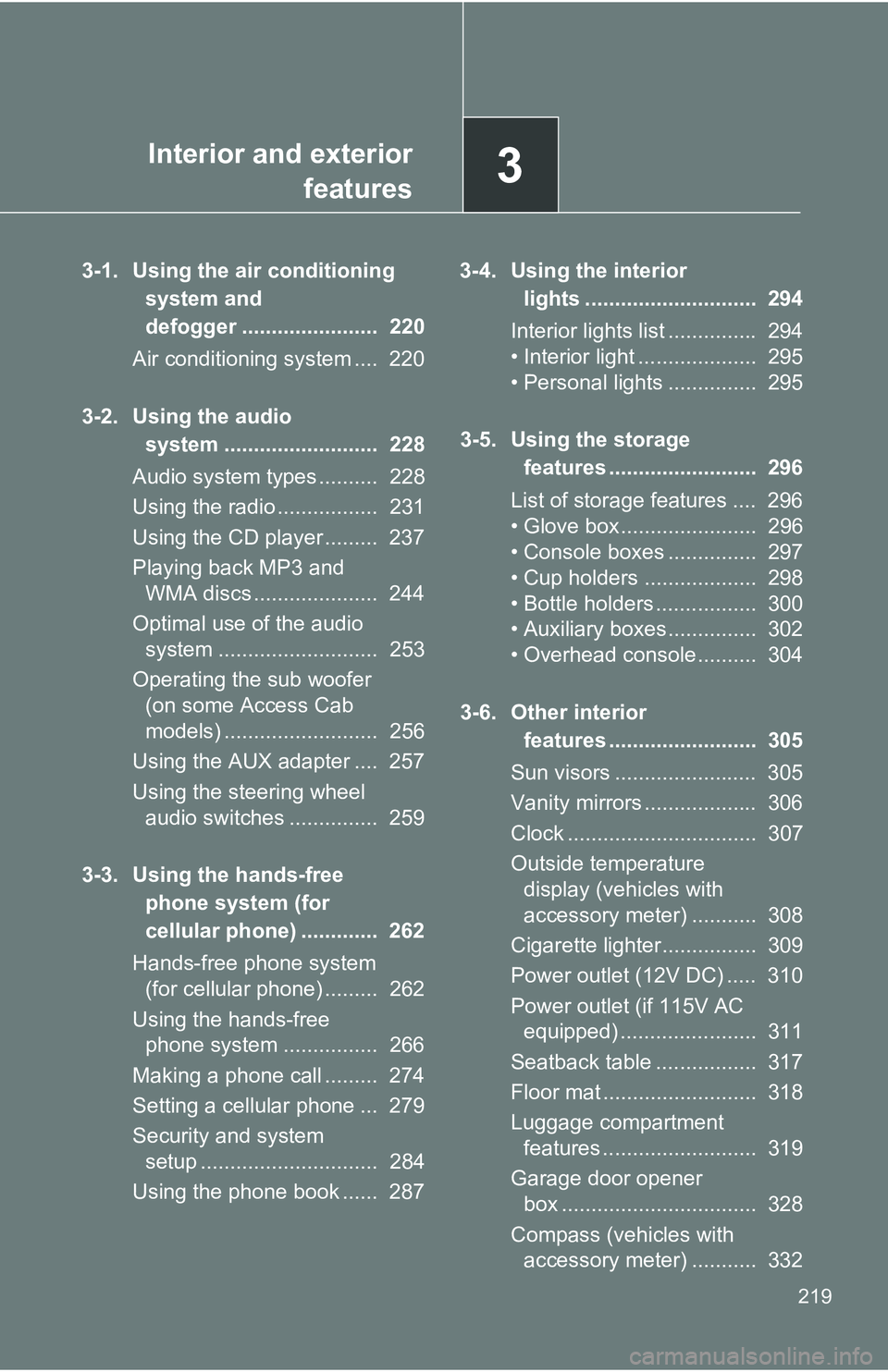
3-1. Using the air conditioning
system and
defogger ....................... 220
Air conditioning system .... 220
3-2. Using the audio system .......................... 228
Audio system types .......... 228
Using the radio ................. 231
Using the CD player ......... 237
Playing back MP3 and WMA discs ..................... 244
Optimal use of the audio system ........................... 253
Operating the sub woofer (on some Access Cab
models) .......................... 256
Using the AUX adapter .... 257
Using the steering wheel audio switches ............... 259
3-3. Using the hands-free phone system (for
cellular phone) ............. 262
Hands-free phone system (for cellular phone) ......... 262
Using the hands-free phone system ................ 266
Making a phone call ......... 274
Setting a cellular phone ... 279
Security and system setup .............................. 284
Using the phone book ...... 287 3-4. Using the interior
lights ............................. 294
Interior lights list ............... 294
• Interior light .................... 295
• Personal lights ............... 295
3-5. Using the storage features ......................... 296
List of storage features .... 296
• Glove box....................... 296
• Console boxes ............... 297
• Cup holders ................... 298
• Bottle holders ................. 300
• Auxiliary boxes ............... 302
• Overhead console .......... 304
3-6. Other interior features ......................... 305
Sun visors ........................ 305
Vanity mirrors ................... 306
Clock ................................ 307
Outside temperature display (vehicles with
accessory meter) ........... 308
Cigarette lighter................ 309
Power outlet (12V DC) ..... 310
Power outlet (if 115V AC equipped) ....................... 311
Seatback table ................. 317
Floor mat .......................... 318
Luggage compartment features .......................... 319
Garage door opener box ................................. 328
Compass (vehicles with accessory meter) ........... 332
Page 259 of 520
259
3-2. Using the audio system
3
Interior and exterior features
Using the steering wheel audio switches (if equipped)
Turning on the powerPress when the audio system is turned off.
The audio system can be turned off by holding the switch down until the
system turns off.
Changing the audio sourcePress when the audio system is turned on. The audio source
changes as follows each time is pressed.
Type A:
FM1FM2CDCD changer*1AUXAMSAT1*2SAT2*2SAT3*2
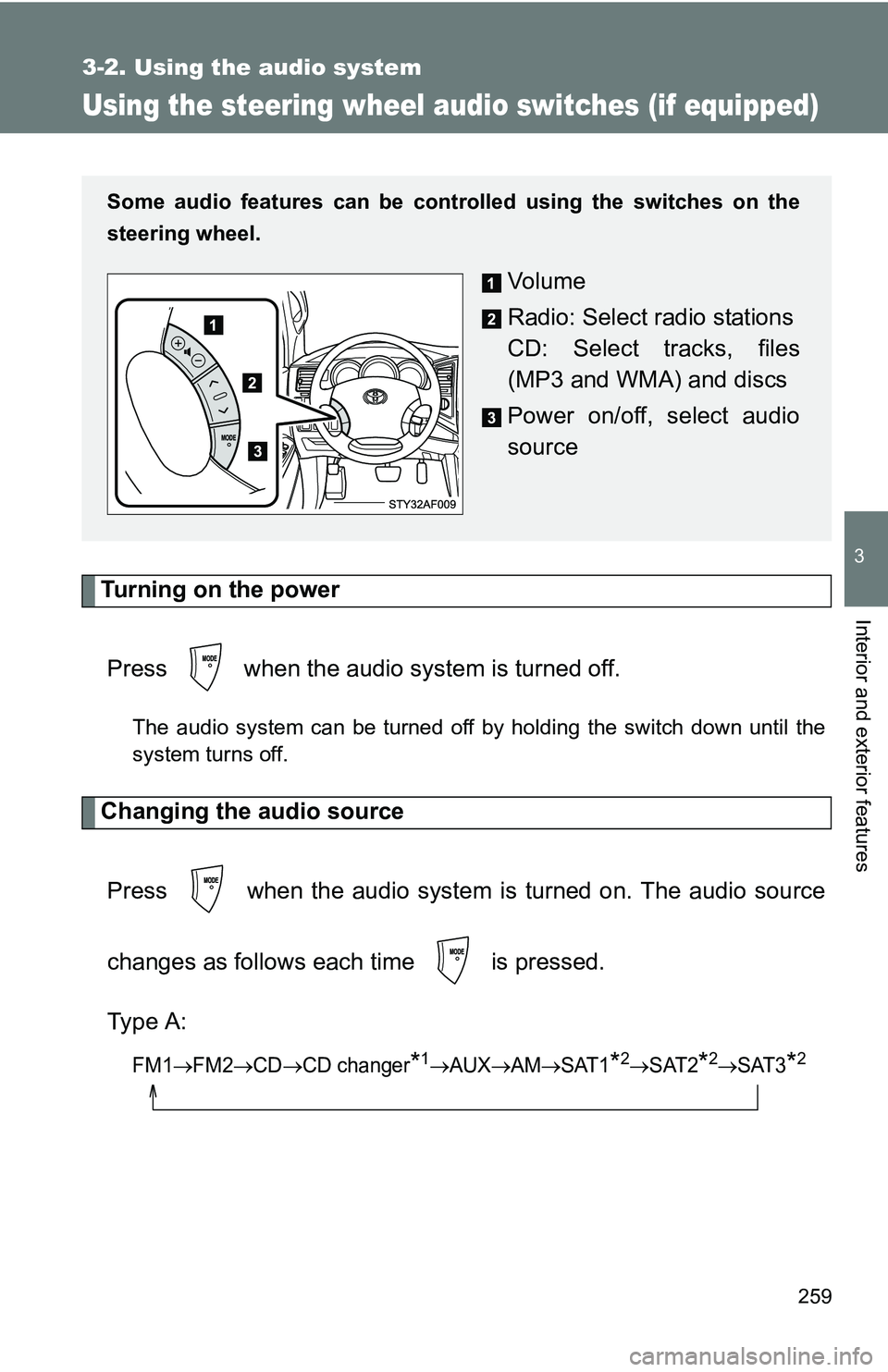
Some audio features can be cont rolled using the switches on the
steering wheel.
Vo l u m e
Radio: Select radio stations
CD: Select tracks, files
(MP3 and WMA) and discs
Power on/off, select audio
source