engine TOYOTA tC 2011 Owners Manual (in English)
[x] Cancel search | Manufacturer: TOYOTA, Model Year: 2011, Model line: tC, Model: TOYOTA tC 2011Pages: 473, PDF Size: 10.91 MB
Page 367 of 473
366 5-2. Steps to take in an emergency
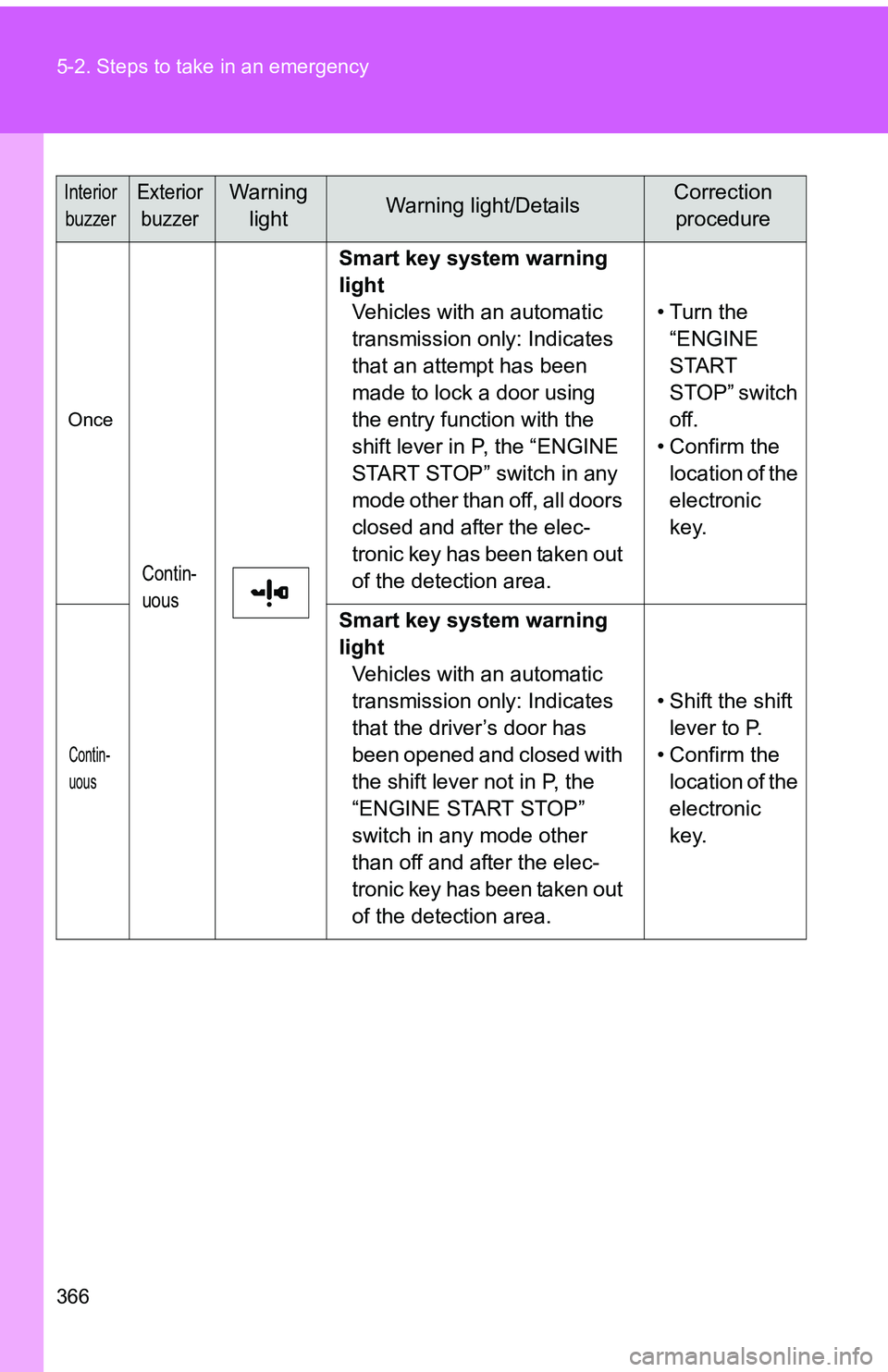
InteriorbuzzerExterior buzzerWarning lightWarning light/DetailsCorrection procedure
Once
Contin-
uous
Smart key system warning
light Vehicles with an automatic
transmission only: Indicates
that an attempt has been
made to lock a door using
the entry function with the
shift lever in P, the “ENGINE
START STOP” switch in any
mode other than off, all doors
closed and after the elec-
tronic key has been taken out
of the detection area. • Turn the
“ENGINE
START
STOP” switch
off.
• Confirm the location of the
electronic
key.
Contin-
uous
Smart key system warning
light Vehicles with an automatic
transmission only: Indicates
that the driver’s door has
been opened and closed with
the shift lever not in P, the
“ENGINE START STOP”
switch in any mode other
than off and after the elec-
tronic key has been taken out
of the detection area. • Shift the shift
lever to P.
• Confirm the location of the
electronic
key.
Page 371 of 473
370 5-2. Steps to take in an emergency
■If the tire pressure warning light comes on after flashing frequently
for 1 minute (U.S.A. only)
If the tire pressure warning light comes on after flashing frequently for
1 minute when the engine switch is turned to the “ON” position (vehicles
without a smart key system), “ENGIN E START STOP” switch is turned to
IGNITION ON mode (vehicles with a smart key system), have it checked
by your Scion dealer.
■Customization that can be configured at Scion dealer
The vehicle speed linked seat belt reminder buzzer can be disabled.
(Customizable features ( P. 438) However, Scion recommends that the
seat belt reminder buzzer be operational to alert the driver and front pas-
senger when seat belts are not fastened.
Page 375 of 473
374
5-2. Steps to take in an emergency
If you have a flat tire
Remove the flat tire and replace it with the spare tire provided.
■Before jacking up the vehicle
●Stop the vehicle on a hard, flat surface.
● Set the parking brake.
● Shift the shift lever to P (automatic transmission) or R (manual
transmission).
● Stop the engine.
● Turn on the emergency flashers.
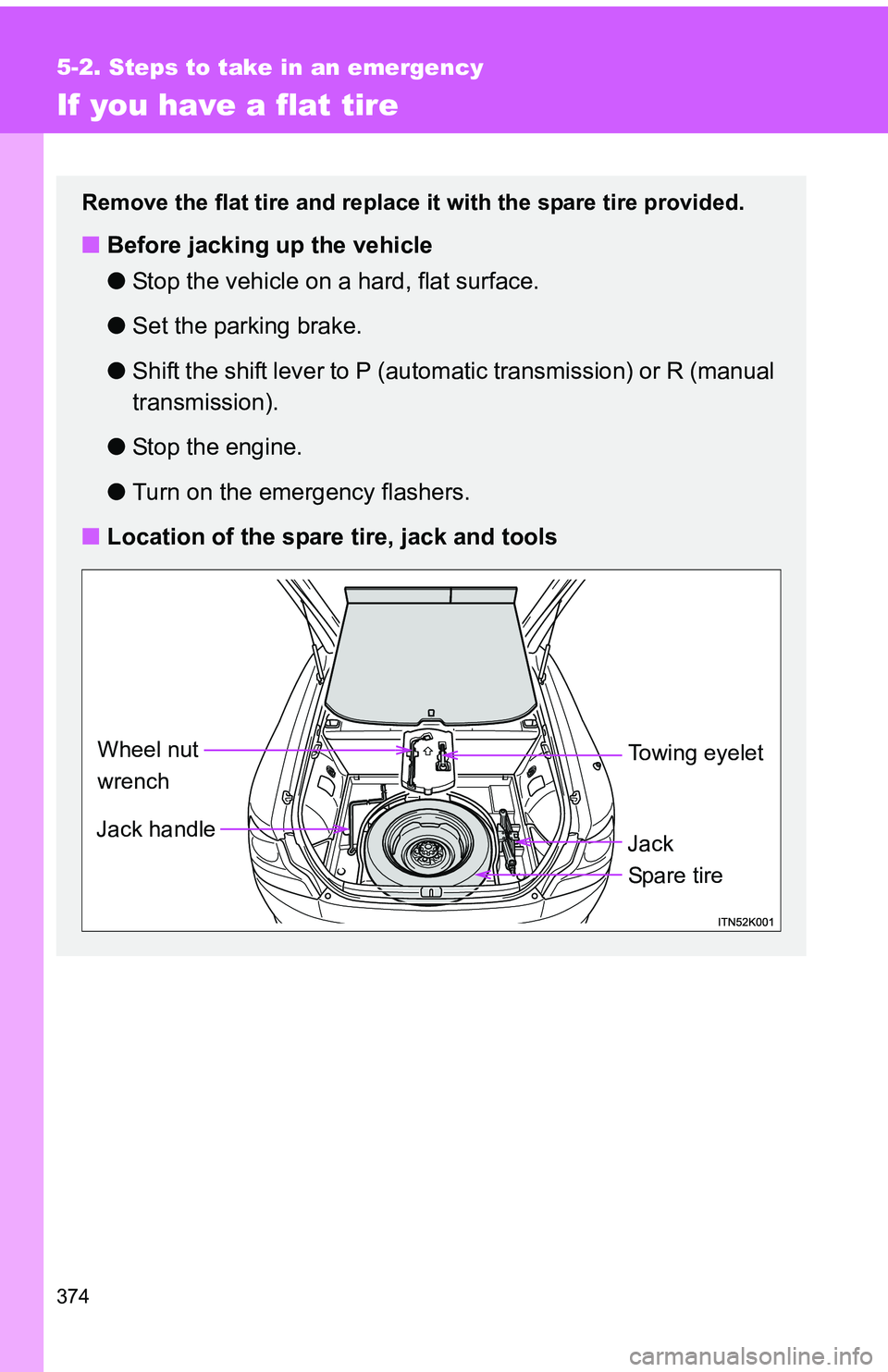
■ Location of the spare tire, jack and tools
Jack handle
Jack
Wheel nut
wrench
Spa r e tire
Towing eyelet
Page 386 of 473
5
When trouble arises
385
5-2. Steps to take in an emergency
CAUTION
■Using the tire jack
Improper use of the tire jack may cause the vehicle to suddenly fall off
the jack, leading to death or serious injury.
●Do not use the tire jack for any pu
rpose other than replacing tires or
installing and removing tire chains.
●Only use the tire jack that comes wi th this vehicle for replacing a flat
tire.
Do not use it on other vehicles, and do not use other tire jacks for
replacing tires on this vehicle.
●Always check that the tire jack is securely set to the jack point.
●Do not put any part of your body under the vehicle while it is supported
by the jack.
●Do not start or run the engine while your vehicle is supported by the
jack.
●Do not raise the vehicle while someone is inside.
●When raising the vehicle, do not put an object on or under the jack.
●Do not raise the vehicle to a hei ght greater than that required to
replace the tire.
●Use a jack stand if it is necessary to get under the vehicle.
Take particular care when lowering the vehicle to ensure that no one
working on or near the vehicle may be injured.
Page 390 of 473
5
When trouble arises
389
5-2. Steps to take in an emergency
If the engine will not star t
If the engine will not start even though correct starting procedures
are being followed ( P. 159), consider each of the following points:
■The engine will not start even though the starter motor
operates normally.
One of the following may be the cause of the problem:
●There may not be sufficient fuel in the vehicle’s tank.
Refuel the vehicle.
● The engine may be flooded.
Try to restart the engine again following correct starting proce-
dures. ( P. 159)
● Vehicles with an engine immobilizer system: There may be a
malfunction in the engine immobilizer system. (P. 9 7 )
■ The starter motor turns over slowly, the interior lights and
headlights are dim, or the horn does not sound or sounds at
a low volume.
One of the following may be the cause of the problem:
●The battery may be discharged. ( P. 398)
● The battery terminal connec tions may be loose or corroded.
■ The starter motor does not turn over (vehicles with a smart
key system)
The engine starting system may be malfunctioning due to an
electrical problem such as an open circuit or a blown fuse. How-
ever, an interim measure is available to start the engine.
( P. 391)
Page 392 of 473
5
When trouble arises
391
5-2. Steps to take in an emergency
Emergency start function (vehicles with a smart key system)
When the engine does not start, the following steps can be used as
an interim measure to start the engine if the “ENGINE START STOP”
switch is functioning normally: Set the parking brake.
Shift the shift lever to P (automatic transmission) or N (manual
transmission).
Turn the “ENGINE START STOP” switch to ACCESSORY
mode.
Press and hold the “ENGINE START STOP” switch for about
15 seconds while depressing the brake pedal (automatic
transmission) or brake and clutch pedals (manual transmis-
sion) firmly.
Even if the engine can be start ed using the above steps, the system
may be malfunctioning. Have the vehicle inspected by your Scion
dealer.
STEP 1
STEP 2
STEP 3
STEP 4
Page 393 of 473
392
5-2. Steps to take in an emergency
If the shift lever cannot be shifted from P (automatic transmission)
If the shift lever cannot be shifted with your foot on the brake pedal,
there may be a problem with the shift lock system (a system to pre-
vent accidental operation of the shift lever). Have the vehicle
inspected by your Scion dealer immediately.
The following steps may be used as an emergency measure to
ensure that the shift lever can be shifted:
Set the parking brake.
Vehicles without a smart ke y system: Turn the engine
switch to the “ACC” position.
Vehicles with a smart key system: Turn the “ENGINE
START STOP” switch to ACCESSORY mode.
Depress the brake pedal.
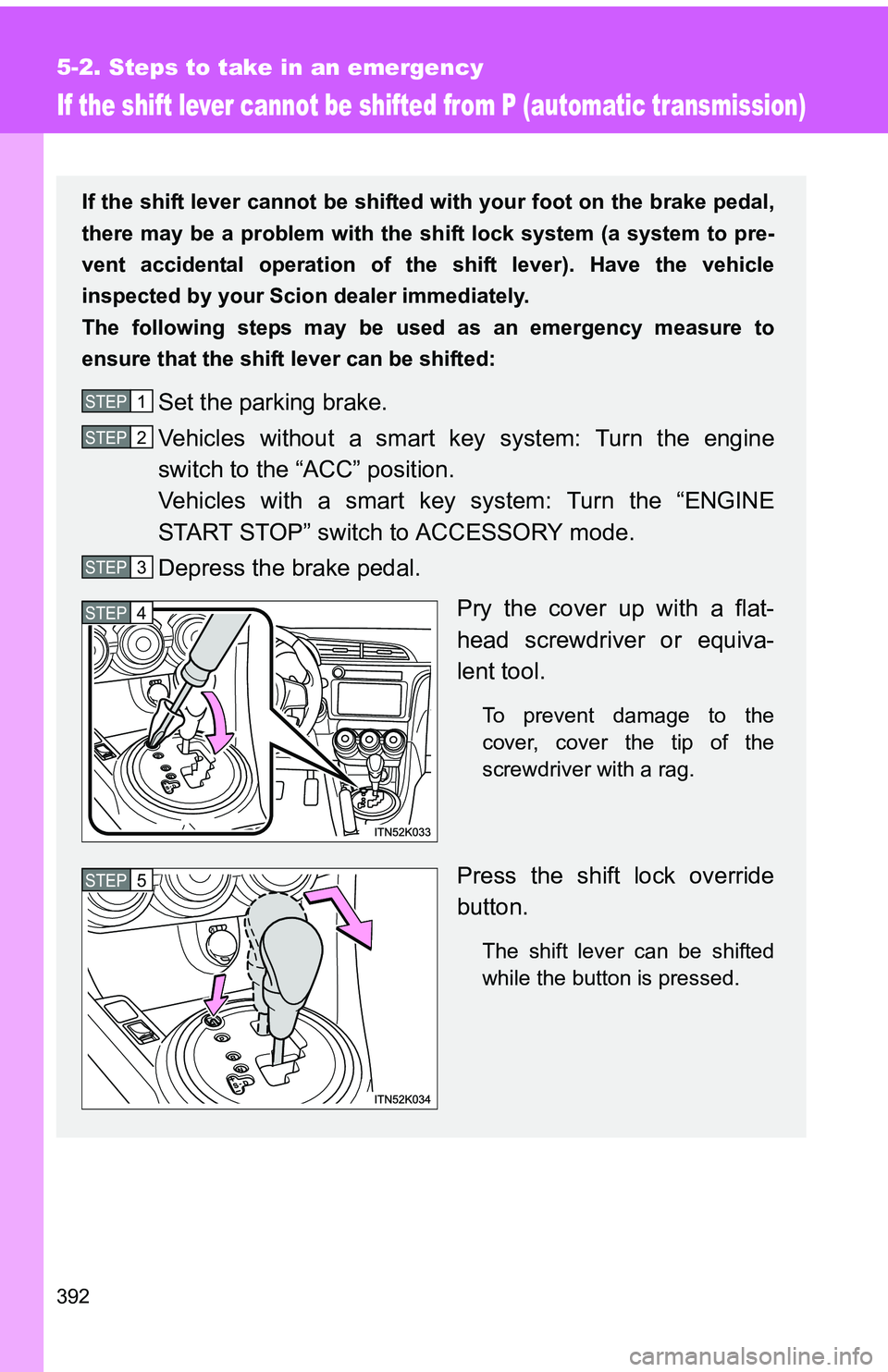
Pry the cover up with a flat-
head screwdriver or equiva-
lent tool.
To prevent damage to the
cover, cover the tip of the
screwdriver with a rag.
Press the shift lock override
button.
The shift lever can be shifted
while the button is pressed.
STEP 1
STEP 2
STEP 3
STEP 4
STEP 5
Page 395 of 473
394
5-2. Steps to take in an emergency
If the electronic key does not operate properly
Locking and unlocking the door s and key linked functions
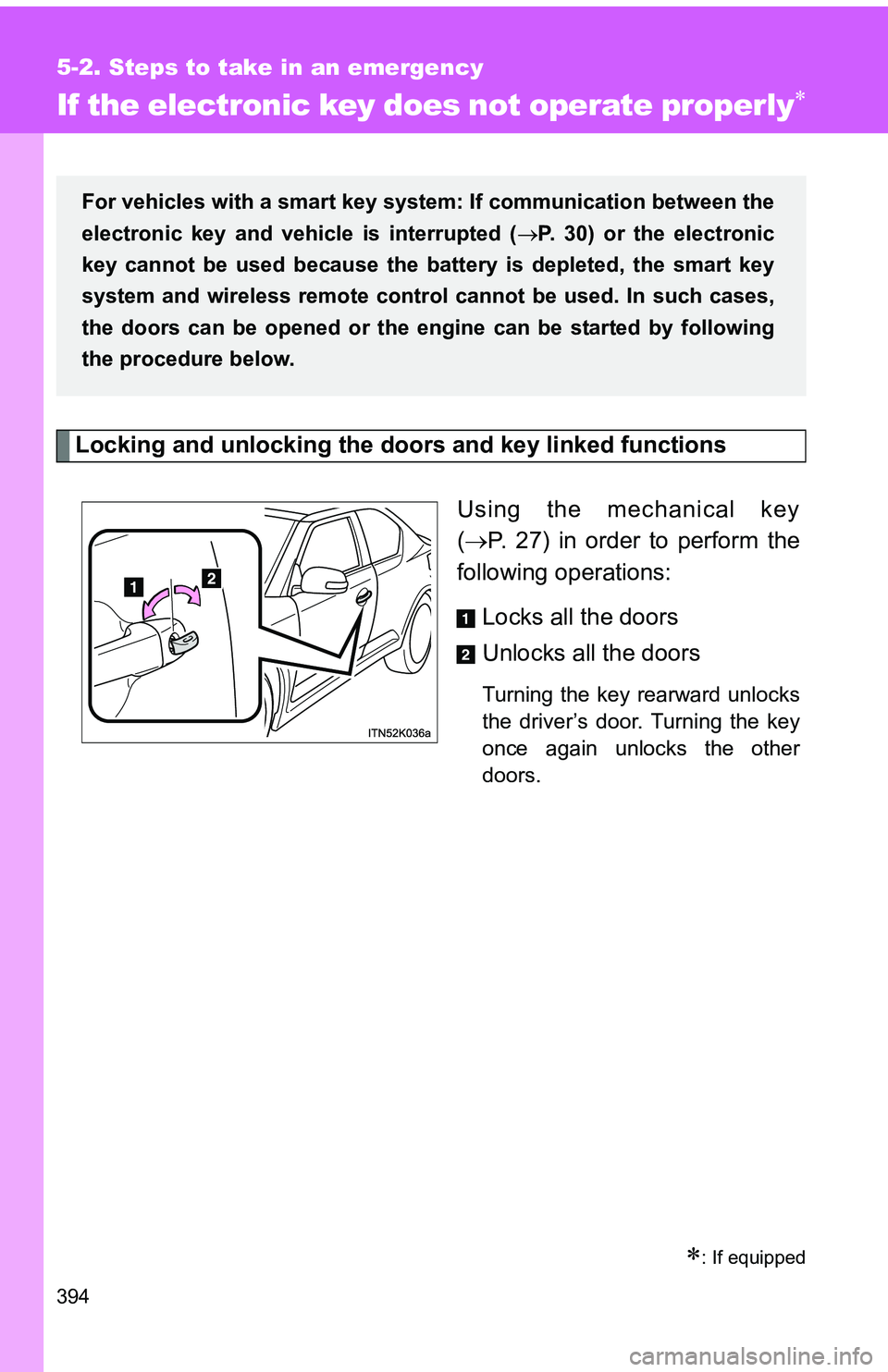
Using the mechanical key
( P. 27) in order to perform the
following operations:
Locks all the doors
Unlocks all the doors
Turning the key rearward unlocks
the driver’s door. Turning the key
once again unlocks the other
doors.
: If equipped
For vehicles with a smart key system : If communication between the
electronic key and vehic le is interrupted (P. 30) or the electronic
key cannot be used because the batt ery is depleted, the smart key
system and wireless remote contro l cannot be used. In such cases,
the doors can be opened or the engine can be started by following
the procedure below.
Page 396 of 473
5
When trouble arises
395
5-2. Steps to take in an emergency
Changing “ENGINE START STOP”
switch modes and starting the
engine
Automatic transmission Ensure that the shift lever is in P and depress the brake pedal.
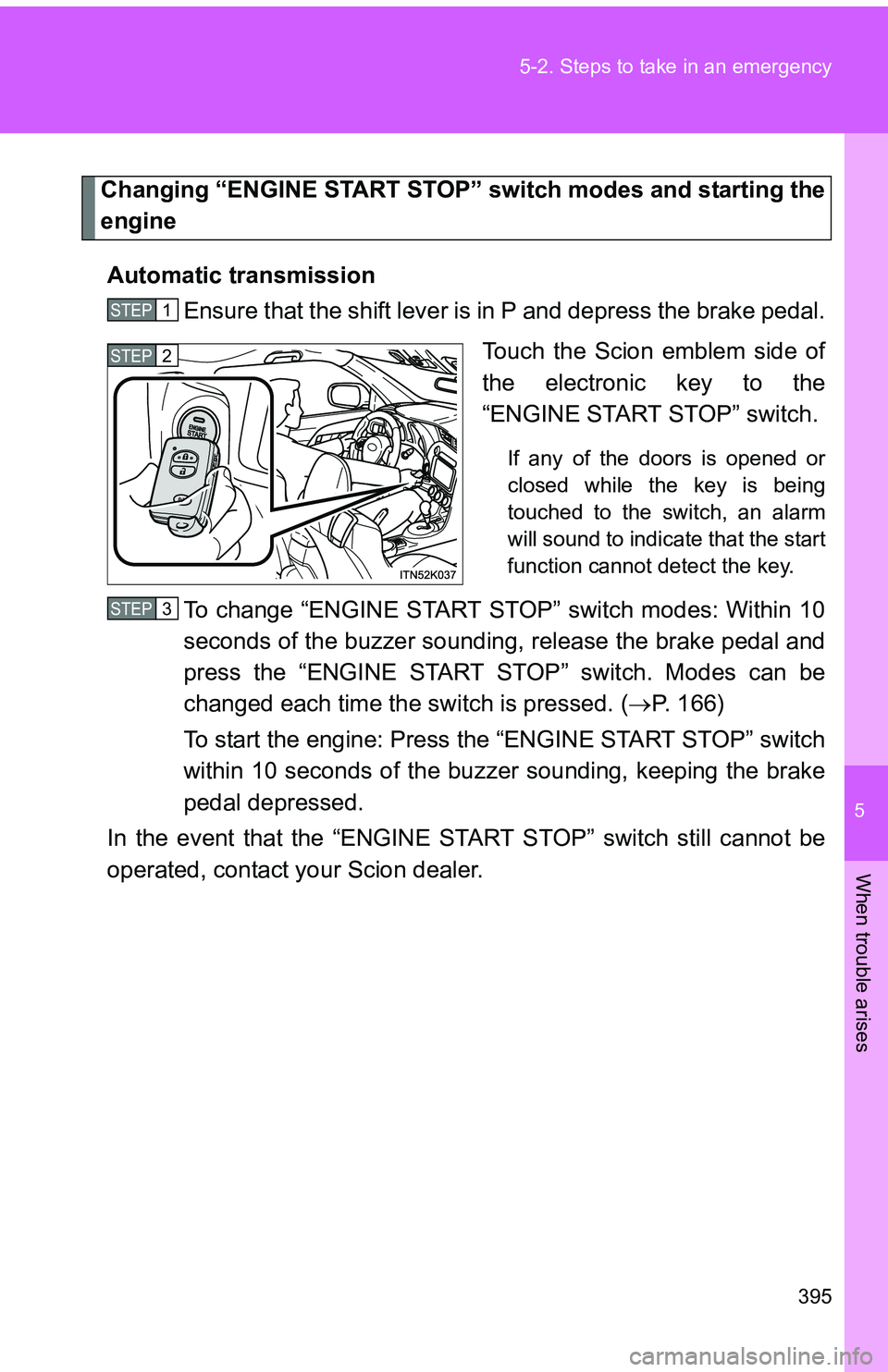
Touch the Scion emblem side of
the electronic key to the
“ENGINE START STOP” switch.
If any of the doors is opened or
closed while the key is being
touched to the switch, an alarm
will sound to indicate that the start
function cannot detect the key.
To change “ENGINE START STOP” switch modes: Within 10
seconds of the buzzer soundin g, release the brake pedal and
press the “ENGINE START STOP” switch. Modes can be
changed each time the sw itch is pressed. (P. 166)
To start the engine: Press the “ENGINE START STOP” switch
within 10 seconds of the buz zer sounding, keeping the brake
pedal depressed.
In the event that the “ENGINE ST ART STOP” switch still cannot be
operated, contact your Scion dealer.
STEP 1
STEP 2
STEP 3
Page 397 of 473
396 5-2. Steps to take in an emergency
Manual transmissionShift the shift lever to N and depress the clutch pedal.
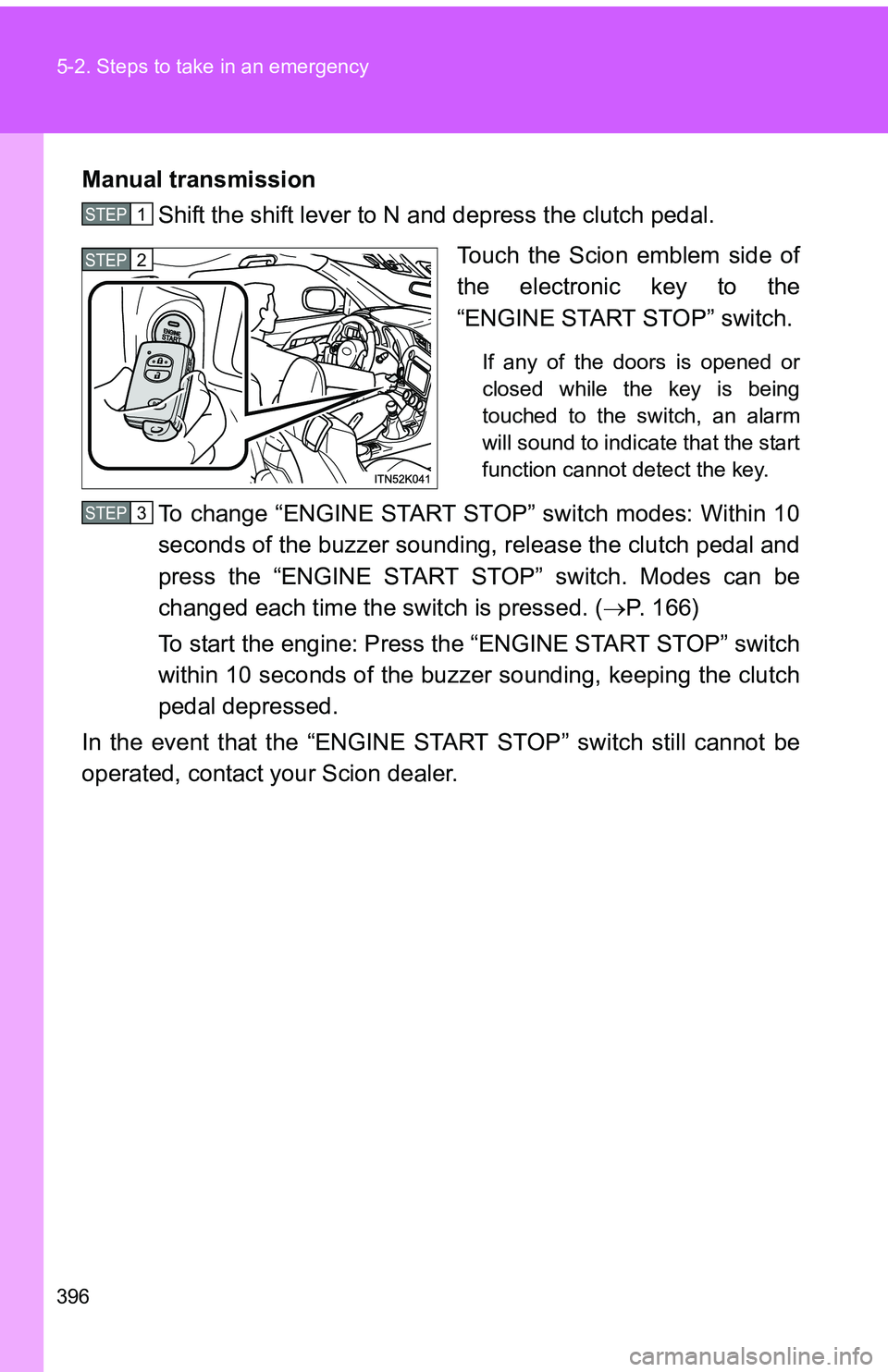
Touch the Scion emblem side of
the electronic key to the
“ENGINE START STOP” switch.
If any of the doors is opened or
closed while the key is being
touched to the switch, an alarm
will sound to indicate that the start
function cannot detect the key.
To change “ENGINE START STOP” switch modes: Within 10
seconds of the buzzer sounding, release the clutch pedal and
press the “ENGINE START STOP” switch. Modes can be
changed each time the sw itch is pressed. (P. 166)
To start the engine: Press the “ENGINE START STOP” switch
within 10 seconds of the buzzer sounding, keeping the clutch
pedal depressed.
In the event that the “ENGINE ST ART STOP” switch still cannot be
operated, contact your Scion dealer.
STEP 1
STEP 2
STEP 3