key TOYOTA VENZA 2016 Manual PDF
[x] Cancel search | Manufacturer: TOYOTA, Model Year: 2016, Model line: VENZA, Model: TOYOTA VENZA 2016Pages: 688, PDF Size: 18.51 MB
Page 228 of 688
2282-3. Operating the lights and wipers
VENZA_OM_OM73030U_(U) ■ The windshield wiper and washer can be operated when
Vehicles with smart key system
The “ENGINE START STOP” switch is in IGNITION ON mode.
Vehicles without smart key system
The engine switch is in the “ON” position.
■ If no windshield washer fluid sprays
Check that the washer nozzles are not blocked if there is washer fluid in the
windshield washer fluid reservoir.
CAUTION■ Caution regarding the use of washer fluid
When it is cold, do not use the washer fluid until the windshield becomes
warm. The fluid may freeze on the windshield and cause low visibility. This
may lead to an accident, resulting in death or serious injury.
NOTICE■ When the windshield is dry
Do not use the wipers, as they may damage the windshield.
■ When there is no washer fluid spray from the nozzle
Damage to the washer fluid pump may be caused if the lever is pulled
toward you and held continually.
■ When a nozzle becomes blocked
Do not try to clear it with a pin or other object. The nozzle will be damaged.
Page 230 of 688
2302-3. Operating the lights and wipers
VENZA_OM_OM73030U_(U) ■ The rear window wiper and w asher can be operated when
Vehicles with smart key system
The “ENGINE START STOP” switch is in IGNITION ON mode.
Vehicles without smart key system
The engine switch is in the “ON” position.
NOTICE■ When the rear window is dry
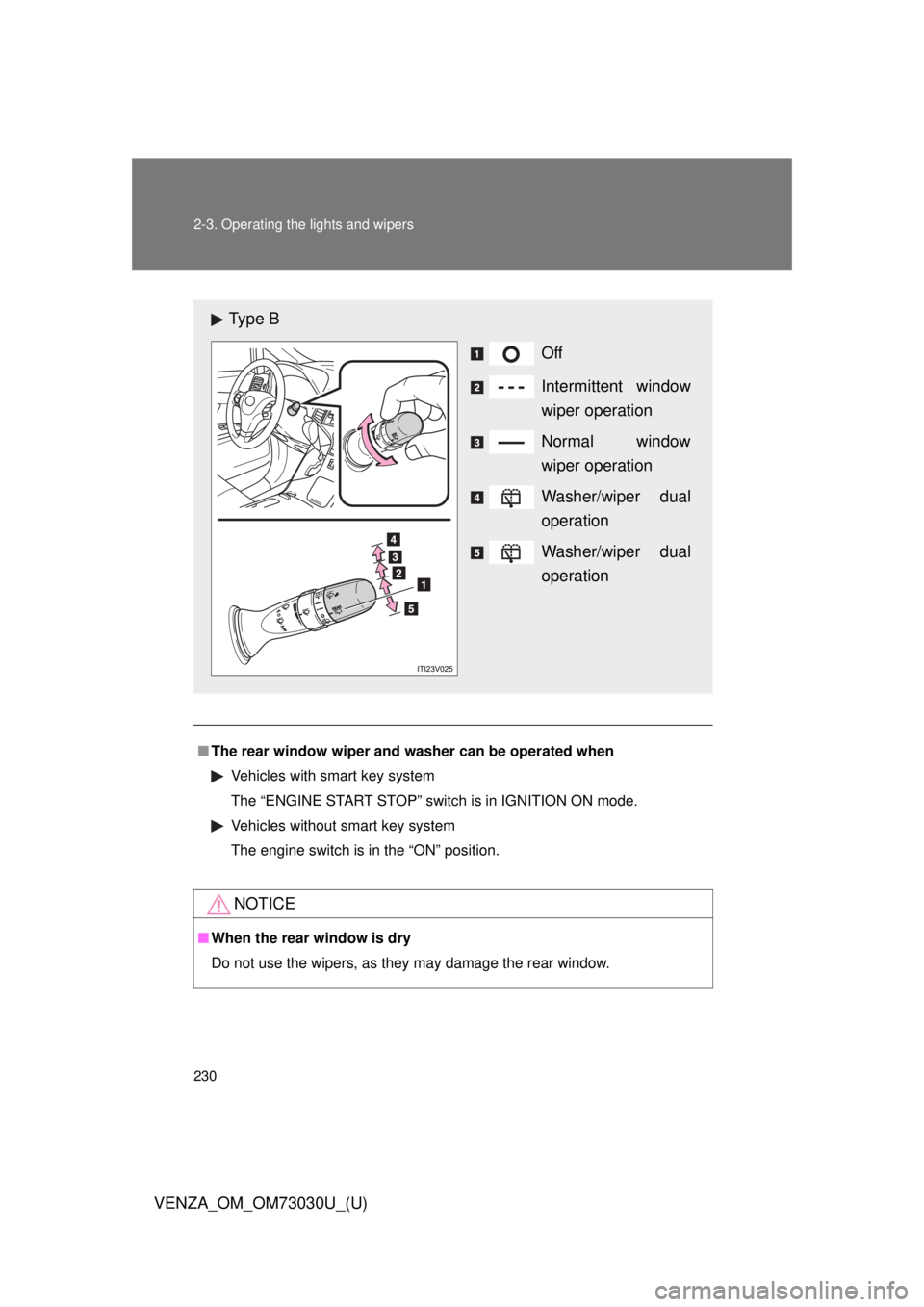
Do not use the wipers, as they may damage the rear window.Ty p e B
Off
Intermittent window
wiper operation
Normal window
wiper operation
Washer/wiper dual
operation
Washer/wiper dual
operation
Page 243 of 688
2432-4. Using other driving systems
2
When driving
VENZA_OM_OM73030U_(U) Rear view monitor system
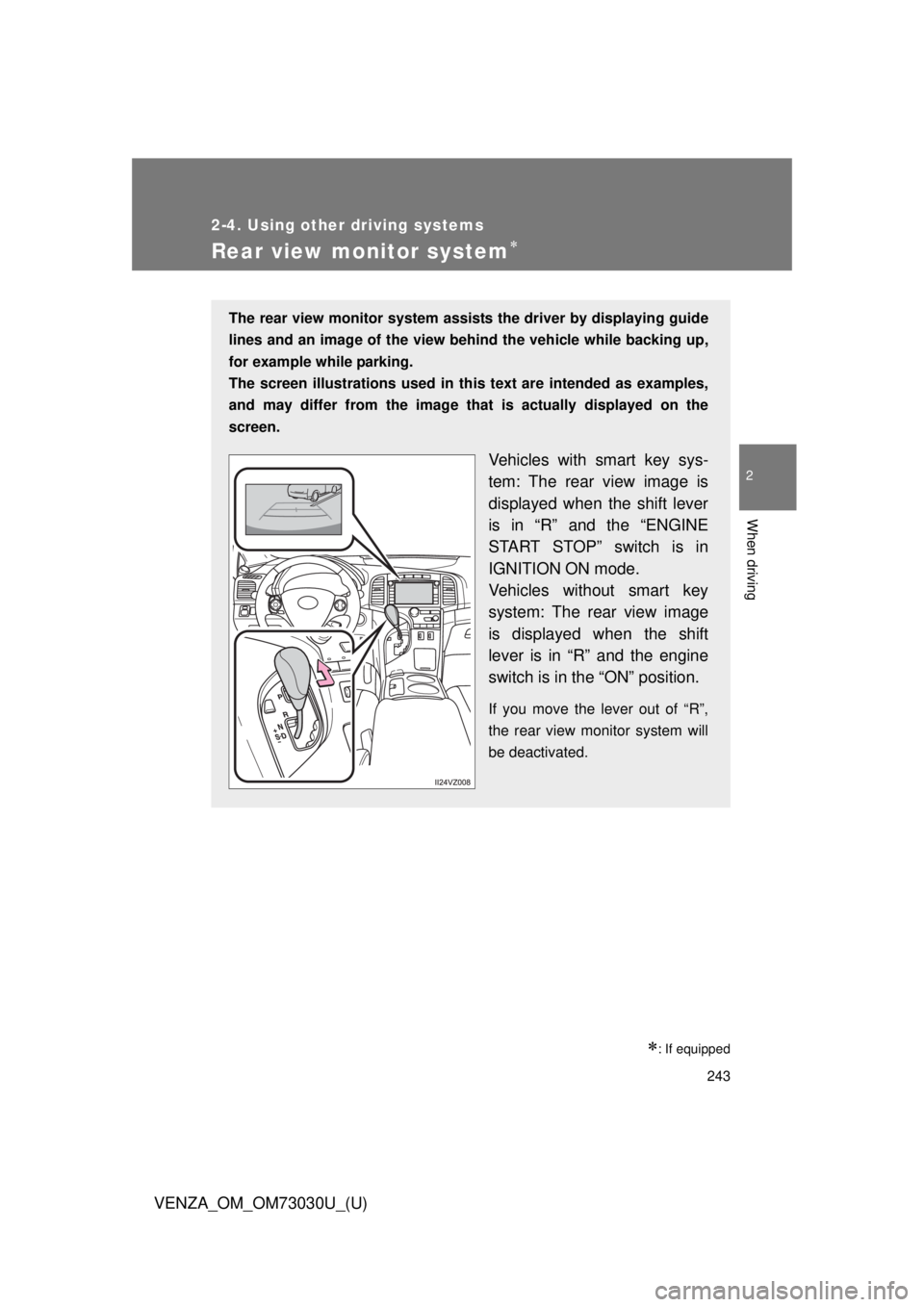
: If equippedThe rear view monitor system assists the driver by displaying guide
lines and an image of the view behind the vehicle while backing up,
for example while parking.
The screen illustrations used in this text are intended as examples,
and may differ from th e image that is actually displayed on the
screen.
Vehicles with smart key sys-
tem: The rear view image is
displayed when the shift lever
is in “R” and the “ENGINE
START STOP” switch is in
IGNITION ON mode.
Vehicles without smart key
system: The rear view image
is displayed when the shift
lever is in “R” and the engine
switch is in the “ON” position. If you move the lever out of “R”,
the rear view monitor system will
be deactivated.
Page 259 of 688
2592-4. Using other driving systems
2
When driving
VENZA_OM_OM73030U_(U) ■ When the “TRAC OFF” indicator li ght comes on even if the VSC OFF
switch has not been pressed
TRAC and hill-start assist control cannot be operated. Contact your Toyota
dealer.
■ Automatic reactivation of TRAC and VSC
After turning the TRAC and VSC systems off, the systems will be automati-
cally re-enabled in the following situations:
● When the “ENGINE START STOP” switch is turned off (vehicles with
smart key system)
● When the engine switch is turned to the “LOCK” position (vehicles with-
out smart key system)
● If only the TRAC system is turned off, the TRAC will turn on when vehicle
speed increases
If both the TRAC and VSC systems are turned off, automatic re-enabling
will not occur when vehicle speed increases.
■ Sounds and vibrations caused by the ABS, brake assist, TRAC and
VSC
● A sound may be heard from the engine compartment when the engine is
started or just after the vehicle begins to move. This sound does not indi-
cate that a malfunction has occurred in any of these systems.
● Any of the following conditions may occur when the above systems are
operating. None of these indicates that a malfunction has occurred.
• Vibrations may be felt through the vehicle body and steering.
• A motor sound may be heard after the vehicle comes to a stop.
• The brake pedal may pulsate slightly after the ABS is activated.
• The brake pedal may move down slightly after the ABS is activated.
Page 314 of 688
3143-1. Using the air cond itioning system and defogger
VENZA_OM_OM73030U_(U) ■ Using the automatic mode
Fan speed is adjusted automatically in accordance with the temperature set-
ting and ambient conditions. As a result, the following may occur.
● Immediately after is pressed, the fan may stop for a while
until warm or cool air is ready to flow.
● Cool air may flow to the area around the upper body when the heater is
on.
■ Using the system in recirculated air mode
The windows will fog up more easily if the recirculated air mode is used for
an extended period.
■ Switching between outside air and recirculated air modes
Recirculated air mode or outside air mode may be automatically switched in
accordance with the temperature setting and the inside temperature.
■ When the outside temperature exceed s 75°F (24°C) an d the air condi-
tioning system is on
● In order to reduce the air conditioning power consumption, the air condi-
tioning system may switch to recirculated air mode automatically. This
may help to improve fuel consumption.
● Vehicles with smart key system:
Recirculated air mode is selected as a default mode when the “ENGINE
START STOP” switch is turned to IGNITION ON mode.
Vehicles without smart key system:
Recirculated air mode is selected as a default mode when the engine
switch is turned to the “ON” position.
● It is possible to switch to outside air mode at any time by pressing .
■ Window defogger feature
Recirculated air mode may automatically switch to outside air mode in situa-
tions where the windows need to be defogged.
Page 316 of 688
3163-1. Using the air conditioning system and defogger
VENZA_OM_OM73030U_(U)Rear window defogger
■ The rear window defogger can be operated when
Vehicles with smart key system
The “ENGINE START STOP” switch is in IGNITION ON mode.
Vehicles without smart key system
The engine switch is in the “ON” position.
■ Outside rear view mirror defogg ers and windshield wiper de-icer
Turning the rear window defogger on will turn the outside rear view mirror
defoggers and the windshield wiper de-icer on.
The outside rear view mirror is used to remove raindrops, dew and frost from
the outside rear view mirrors.
The windshield wiper de-icer is used to prevent ice from building up on the
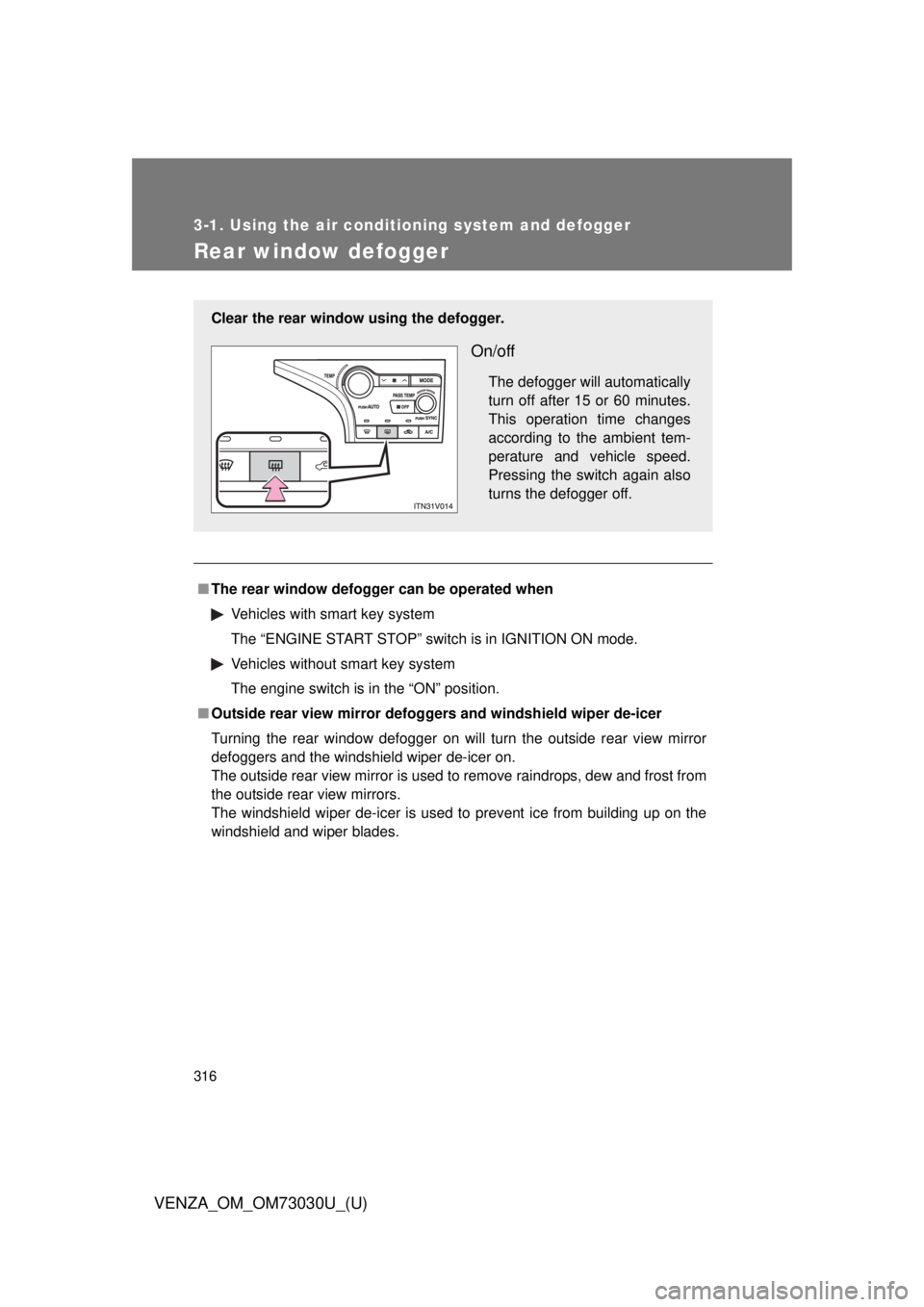
windshield and wiper blades.Clear the rear window using the defogger.
On/off The defogger will automatically
turn off after 15 or 60 minutes.
This operation time changes
according to the ambient tem-
perature and vehicle speed.
Pressing the switch again also
turns the defogger off.
Page 330 of 688
3303-2. Using the audio system (Entune Audio)
VENZA_OM_OM73030U_(U)General settings Screen for general settings
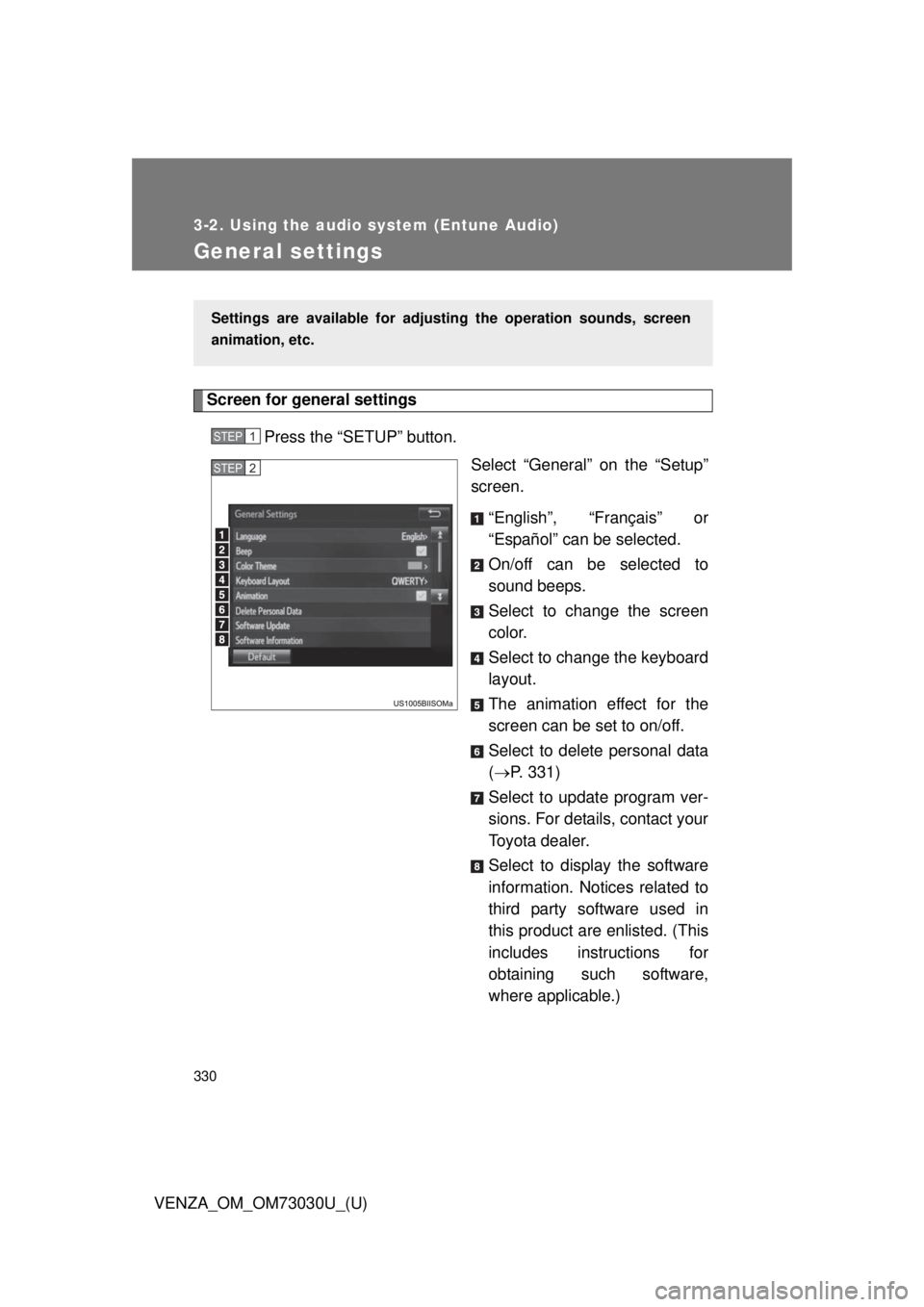
Press the “SETUP” button.
Select “General” on the “Setup”
screen.
“English”, “Français” or
“Español” can be selected.
On/off can be selected to
sound beeps.
Select to change the screen
color.
Select to change the keyboard
layout.
The animation effect for the
screen can be set to on/off.
Select to delete personal data
( P. 331)
Select to update program ver-
sions. For details, contact your
Toyota dealer.
Select to display the software
information. Notices related to
third party software used in
this product are enlisted. (This
includes instructions for
obtaining such software,
where applicable.)Settings are available for adjusting the operation sounds, screen
animation, etc. STEP 1
STEP 2
Page 371 of 688
3713-2. Using the audio system (Entune Audio)
VENZA_OM_OM73030U_(U) 3
Interior features Auto connection
To turn auto connection mode on, set “Bluetooth
* Power” to on.
( P. 375)
When you register a phone, auto connection will be activated. Always
set it to this mode and leave the Bluetooth ®
phone in a place where a
connection can be established. When the engine switch is turned to the “ACC” or “ON” position (vehicles
without a smart key system) or ACCESSORY or IGNITION ON mode
(vehicles with a smart key system), the system will search for a nearby
cellular phone you have registered.
Next, the system automatically connects with the most recent of the
phones connected to in the past. Then, the connection result is displayed.
Manual connection
When auto connection has failed or “Bluetooth
* Power” is turned off,
you must connect the Bluetooth ®
device manually.
* : Bluetooth is a registered trademark of Bluetooth SIG, Inc.
Follow the steps in “Connecting a Bluetooth ®
device” from
. ( P. 370)
Connecting a Bluetooth ®
audio player
Registering an additional device
Select “Select Devi ce” on the Bluetooth ®
audio control
screen.
For more information: P. 3 6 8
Selecting a registered device
Select “Select Devi ce” on the Bluetooth ®
audio control
screen.
For more information: P. 3 7 0STEP 1
STEP 1
STEP 1
STEP 2
STEP 1
STEP 2
Page 372 of 688

3723-2. Using the audio system (Entune Audio)
VENZA_OM_OM73030U_(U) ■ Reconnecting a Bluetooth ®
phone
If the system cannot connect due to poor signal strength with the engine
switch in the “ACC” or “ON” position (vehicles without a smart key system) or
ACCESSORY or IGNITION ON mode (vehicles with a smart key system),
the system will automatically attempt to reconnect.
If the phone is turned off, the system will not attempt to reconnect. In this
case, the connection must be made manually, or the phone must be rese-
lected.
Page 413 of 688
4133-2. Using the audio system (Entune Audio)
VENZA_OM_OM73030U_(U) 3
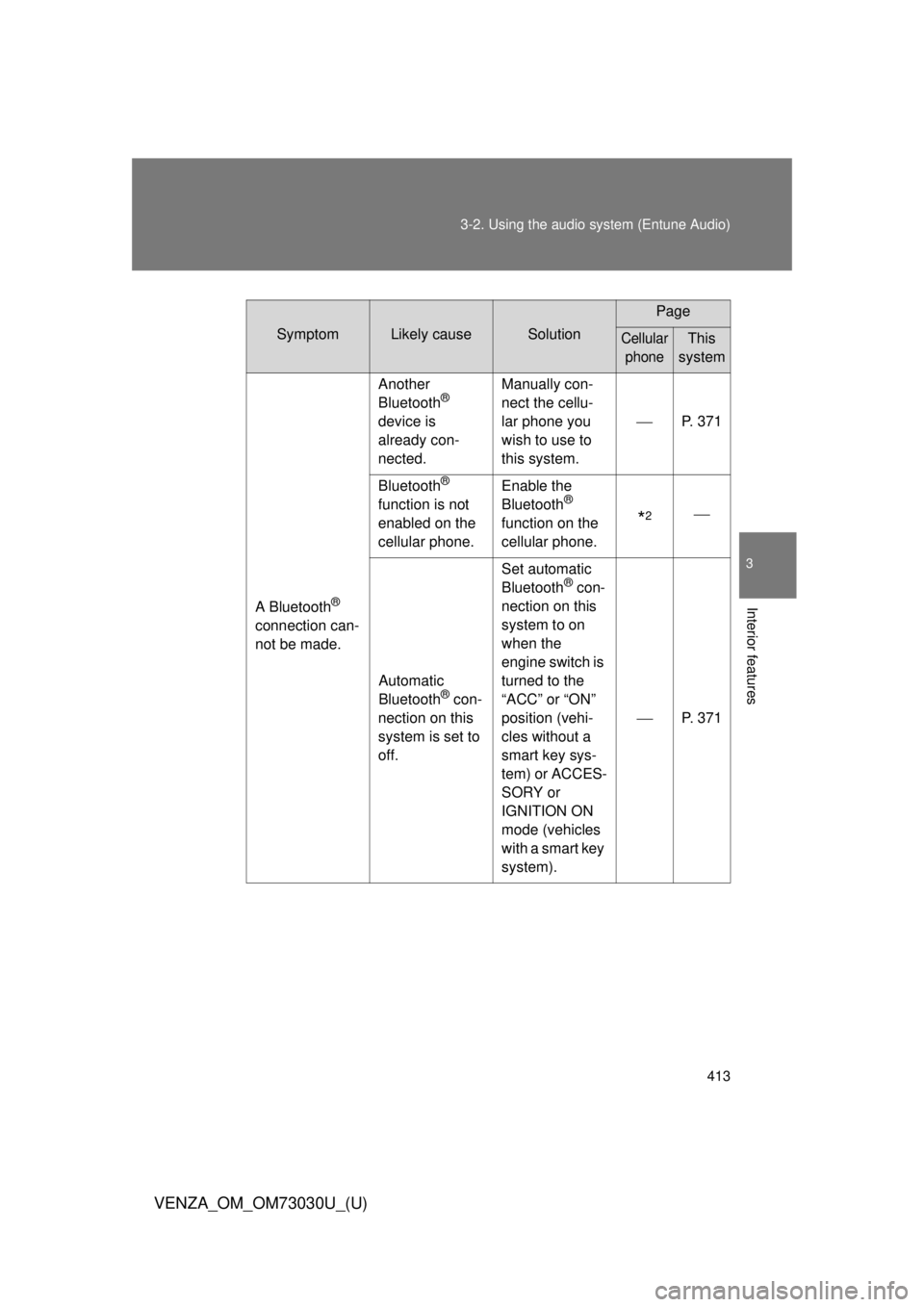
Interior features Symptom Likely cause Solution Page
Cellular
phone This
system
A Bluetooth ®
connection can-
not be made. Another
Bluetooth ®
device is
already con-
nected. Manually con-
nect the cellu-
lar phone you
wish to use to
this system. P. 371
Bluetooth ®
function is not
enabled on the
cellular phone. Enable the
Bluetooth ®
function on the
cellular phone.
* 2
Automatic
Bluetooth ®
con-
nection on this
system is set to
off. Set automatic
Bluetooth ®
con-
nection on this
system to on
when the
engine switch is
turned to the
“ACC” or “ON”
position (vehi-
cles without a
smart key sys-
tem) or ACCES-
SORY or
IGNITION ON
mode (vehicles
with a smart key
system). P. 371