battery TOYOTA VENZA 2016 Owners Manual
[x] Cancel search | Manufacturer: TOYOTA, Model Year: 2016, Model line: VENZA, Model: TOYOTA VENZA 2016Pages: 688, PDF Size: 18.51 MB
Page 5 of 688
1
2
3
4
5
6
7
5
VENZA_OM_OM73030U_(U) 3-3. Using the interior lights
Interior lights list .................. 430
• Personal/interior light main
switch ................................ 431
• Personal/interior lights
and luggage compartment
light ................................... 432
3-4. Using the storage features
List of storage features ....... 434
• Glove box.......................... 435
• Console boxes .................. 436
• Overhead console............. 438
• Cup holders ...................... 439
• Bottle holders .................... 441
• Auxiliary boxes.................. 442
3-5. Other interior features
Sun visors ........................... 445
Vanity mirror........................ 446
Power outlets ...................... 447
Seat heaters........................ 449
Armrest ............................... 451
Assist grips (folding type) .... 452
Floor mats ........................... 453
Luggage compartment
features ............................. 455
Garage door opener............ 457
Compass ............................. 464 4-1. Maintenance and care
Cleaning and protecting the
vehicle exterior ................. 470
Cleaning and protecting the
vehicle interior .................. 473
4-2. Maintenance
Maintenance
requirements .................... 476
General maintenance ......... 479
Emission inspection and
maintenance (I/M)
programs .......................... 482
4-3. Do-it-yourself maintenance
Do-it-yourself service
precautions....................... 483
Hood ................................... 487
Positioning a floor jack ....... 489
Engine compartment .......... 491
Tires ................................... 506
Tire inflation pressure ......... 513
Wheels ............................... 517
Air conditioning filter ........... 520
Key battery ......................... 523
Checking and
replacing fuses ................. 527
Light bulbs .......................... 5374
Maintenance and care
Page 6 of 688

TABLE OF CONTENTS Index
6
VENZA_OM_OM73030U_(U) 5-1. Essential information
Emergency flashers ........... 554
If your vehicle needs
to be towed ...................... 555
If you think something is
wrong ............................... 561
Fuel pump shut off
system .............................. 563
5-2. Steps to take in an
emergency
If a warning light turns
on or a warning buzzer
sounds... ......................... 564
If a warning message is
displayed .......................... 578
If you have a flat tire ........... 579
If the engine will not start ... 590
If the shift lever cannot be
shifted from “P”................. 593
If you lose your keys .......... 594
If the electronic key does
not operate properly
(vehicles with smart key
system) ............................ 595
If the battery is
discharged ....................... 598
If your vehicle overheats .... 603
If the vehicle becomes
stuck................................. 606
If your vehicle has to be
stopped in an
emergency ....................... 608 6-1. Specifications
Maintenance data
(fuel, oil level, etc.) ........... 612
Fuel information .................. 626
Tire information................... 630
6-2. Customization
Customizable features ........ 645
6-3. Initialization
Items to initialize ................. 655
Reporting safety defects
for U.S. owners ................. 658
Seat belt instructions for
Canadian owners
(in French) ........................ 659
SRS airbag instructions for
Canadian owners
(in French) ........................ 6615
When trouble arises 6
Vehicle specifications
7
For owners
Page 29 of 688
291-1. Key information
1
Before driving
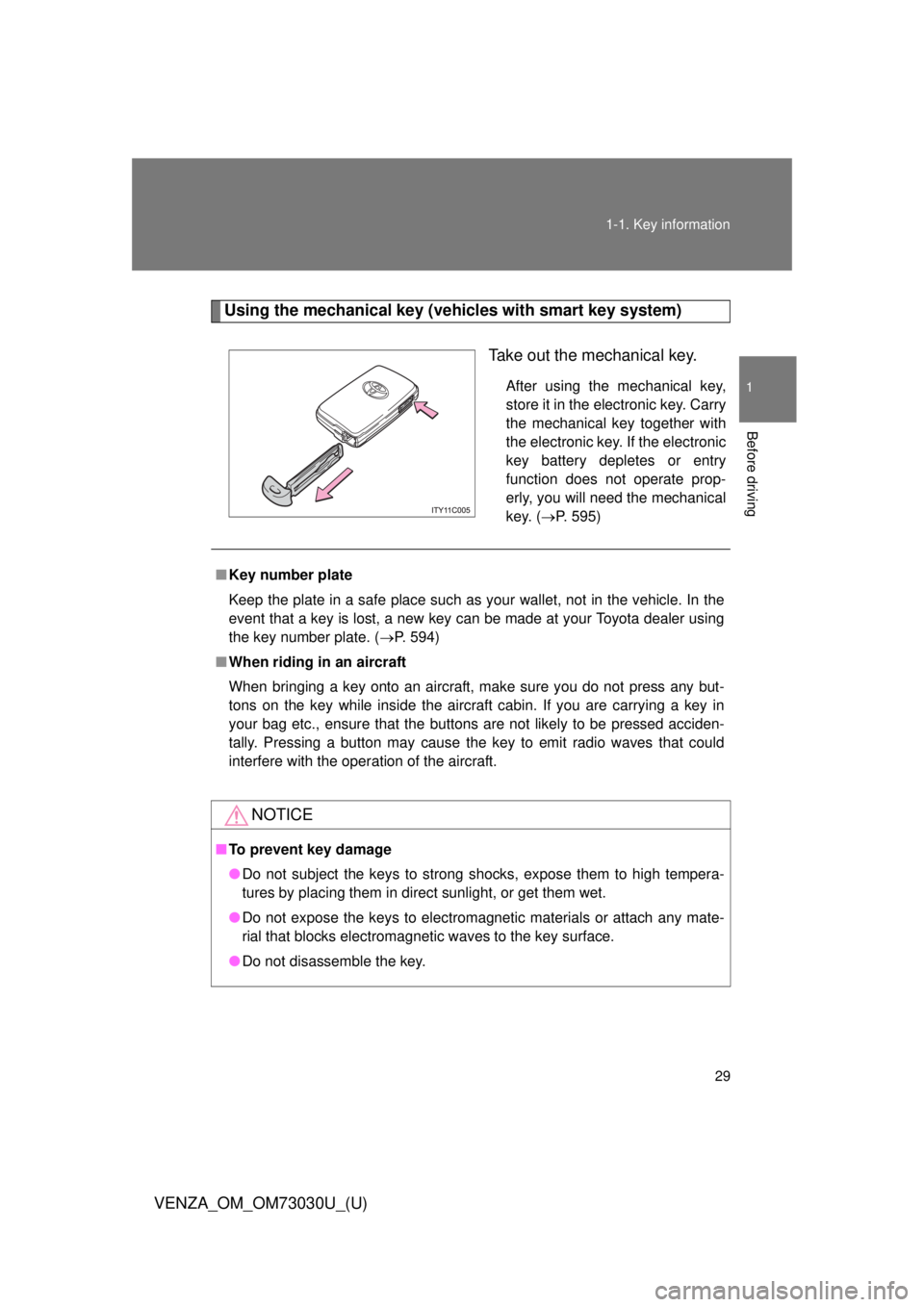
VENZA_OM_OM73030U_(U) Using the mechanical key (vehicles with smart key system)
Take out the mechanical key. After using the mechanical key,
store it in the electronic key. Carry
the mechanical key together with
the electronic key. If the electronic
key battery depletes or entry
function does not operate prop-
erly, you will need the mechanical
key. ( P. 595)
■ Key number plate
Keep the plate in a safe place such as your wallet, not in the vehicle. In the
event that a key is lost, a new key can be made at your Toyota dealer using
the key number plate. ( P. 594)
■ When riding in an aircraft
When bringing a key onto an aircraft, make sure you do not press any but-
tons on the key while inside the aircraft cabin. If you are carrying a key in
your bag etc., ensure that the buttons are not likely to be pressed acciden-
tally. Pressing a button may cause the key to emit radio waves that could
interfere with the operation of the aircraft.
NOTICE■ To prevent key damage
● Do not subject the keys to strong shocks, expose them to high tempera-
tures by placing them in direct sunlight, or get them wet.
● Do not expose the keys to electromagnetic materials or attach any mate-
rial that blocks electromagnetic waves to the key surface.
● Do not disassemble the key.
Page 35 of 688
351-2. Opening, closing and locking the doors
1
Before driving
VENZA_OM_OM73030U_(U) ■ Operation signals
A buzzer sounds and the emergency flashers flash to indicate that the doors
have been locked/unlocked. (Locked: Once; Unlocked: Twice)
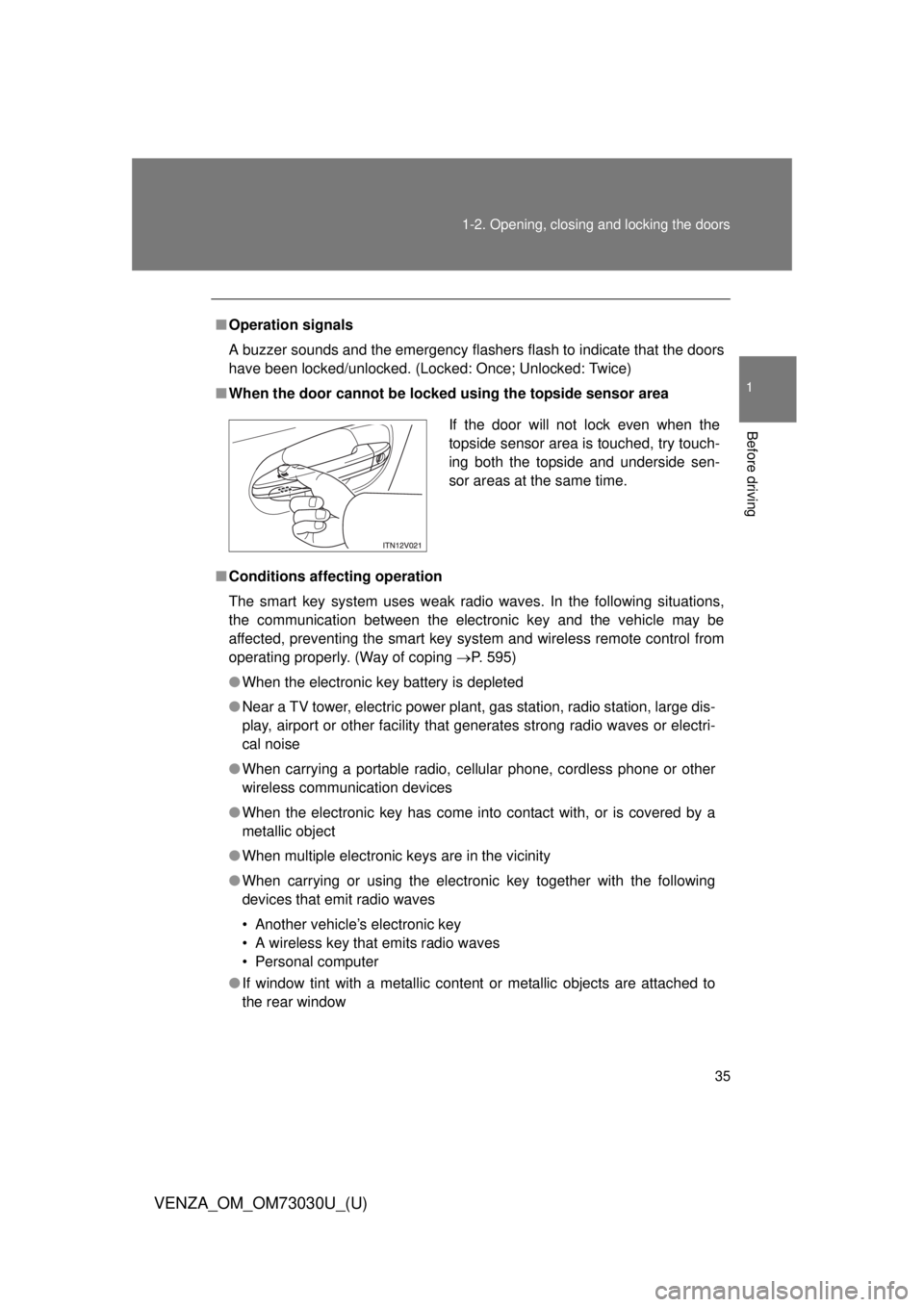
■ When the door cannot be locked using the topside sensor area
■ Conditions aff ecting operation
The smart key system uses weak radio waves. In the following situations,
the communication between the electronic key and the vehicle may be
affected, preventing the smart key system and wireless remote control from
operating properly. (Way of coping P. 595)
● When the electronic key battery is depleted
● Near a TV tower, electric power plant, gas station, radio station, large dis-
play, airport or other facility that generates strong radio waves or electri-
cal noise
● When carrying a portable radio, ce llular phone, cordless phone or other
wireless communication devices
● When the electronic key has come into contact with, or is covered by a
metallic object
● When multiple electronic keys are in the vicinity
● When carrying or using the electronic key together with the following
devices that emit radio waves
• Another vehicle’s electronic key
• A wireless key that emits radio waves
• Personal computer
● If window tint with a metallic content or metallic objects are attached to
the rear window If the door will not lock even when the
topside sensor area is touched, try touch-
ing both the topside and underside sen-
sor areas at the same time.
Page 37 of 688
371-2. Opening, closing and locking the doors
1
Before driving
VENZA_OM_OM73030U_(U) ■ Battery-saving function
In the following circumstances, the entry function is disabled in order to pre-
vent the vehicle and electronic key batteries from discharging.
● When the entry function has not been used for 2 weeks or more
● When the electronic key has been left within approximately 3 ft. (1 m) of
the vehicle for 10 minutes or more
The system will resume operation when...
● The vehicle is locked using the door handle lock switch.
● The vehicle is locked/unlocked using the wireless remote control function
( P. 45) or the mechanical key. ( P. 595)
■ Electronic key battery depletion
● The standard battery life is 1 to 2 years. (The battery becomes depleted
even if the electronic key is not used.) If the smart key system or the
wireless remote control function does not operate, or the detection area
becomes smaller, the battery may be depleted. Replace the battery when
necessary. ( P. 523)
● If the battery becomes low, an alarm will sound in the cabin when the
engine stops. ( P. 40)
● To avoid serious deterioration, do not leave the electronic key within 3 ft.
(1 m) of the following electrical appliances that produce a magnetic field.
•TVs
• Personal computers
• Recharging cellular phones or cordless phones
• Table lamps
Page 42 of 688

421-2. Opening, closing and locking the doors
VENZA_OM_OM73030U_(U) * 1
: A message will be shown on the multi-information display in the instru-
ment cluster.
* 2
: If the engine does not start when the electronic key is inside the vehicle,
the electronic key battery may be depleted or there may be difficulties
receiving signal from the key. ( P. 595)Alarm Situation Correction procedure
Interior alarm
pings once
* 1
The electronic key has a
low battery Replace the electronic
key battery
An attempt was made to
start the engine without the
electronic key being
present, or the electronic
key was not functioning
normally Start the engine with
the electronic key
present
* 2
Interior alarm
pings once and
exterior alarm
sounds 3 times
* 1
The driver’s door was
closed after the key was
carried outside the vehicle,
and the “ENGINE START
STOP” switch was not
turned OFF Turn the “ENGINE
START STOP” switch
OFF and close the
driver’s door again
An occupant carried the
electronic key outside the
vehicle and closed the
door while the “ENGINE
START STOP” switch was
not OFF Bring the electronic
key back into the vehi-
cle
Page 43 of 688
431-2. Opening, closing and locking the doors
1
Before driving
VENZA_OM_OM73030U_(U) ■ If the smart key system does not operate properly
● Locking and unlocking the doors: Use the mechanical key. ( P. 595)
● Starting the engine ( P. 596)
■ When the electronic key battery is fully depleted
P. 523
■ Customization
Settings (e.g. smart key system) can be changed.
(Customizable features P. 645)
■ Certification for the smart key system
For vehicles sold in the U.S.A.
FCC ID: HYQ14ACX FCC ID: HYQ14ADF
FCC ID: HYQ13CZD FCC ID: HYQ13CZE
NOTE:
This device complies with part 15 of the FCC Rules. Operation is subject
to the following two conditions: (1) This device may not cause harmful
interference, and (2) this device must accept any interference received,
including interference that may cause undesired operation.
FCC WARNING:
Changes or modifications not expressly approved by the party responsi-
ble for compliance could void the user’s authority to operate the equip-
ment.
Page 47 of 688
471-2. Opening, closing and locking the doors
1
Before driving
VENZA_OM_OM73030U_(U) ■ Door lock buzzer
If a door or back door is not fully closed, a buzzer sounds continuously for 10
seconds if an attempt to lock the door is made. Fully close the door to stop
the buzzer, and lock the vehicle once more.
■ Security feature
P. 4 0
■ Alarm
Using the wireless remote control to lock the door will set the alarm system.
( P. 112)
■ Key battery depletion
Vehicles with smart key system
P. 3 7
Vehicles without smart key system
The standard battery life is 1 to 2 years. (The battery becomes depleted
even if the key is not used.) If the wireless remote control function does
not operate, the battery may be depleted. Replace the battery when nec-
essary. ( P. 524)
■ If the wireless remote control does not operate properly
Vehicles with smart key system
Locking and unlocking the doors: Use the mechanical key. ( P. 595)
Vehicles without smart key system
Locking and unlocking the doors: Use the key. ( P. 50)
Page 64 of 688
641-2. Opening, closing and locking the doors
VENZA_OM_OM73030U_(U) CAUTION■ Power back door (if equipped)
Observe the following precautions when operating the power back door.
Failure to do so may cause death or serious injury.
● Check the safety of the surrounding area to make sure there are no obsta-
cles or anything that could cause any of your belongings to get caught.
● If anyone is in the vicinity, make sure they are safe and let them know that
the back door is about to open or close.
● On an incline, the back door may suddenly shut after it opens. Make sure
the back door is fully open and secure.
● In the following situations, the power back door may detect an abnormality
and automatic operation may be stopped. In this case, the back door has
to be operated manually. Take extra care when on an incline, as the back
door may open or close abruptly.
• When the back door contacts an obstacle
• Vehicles with smart key system:
When the battery voltage suddenly drops, such as when the “ENGINE
START STOP” switch is turned to IGNITION ON mode or the engine is
started during automatic operation
Vehicles without smart key system:
When the battery voltage suddenly drops, such as when the engine
switch is turned to the “ON” position or the engine is started during
automatic operation
● If a bicycle carrier or similar heavy object is attached to the back door, the
power back door may not operate, causing itself to malfunction, or the
back door may suddenly shut again after being opened, causing some-
one’s hands, head or neck to be caught and injured. When installing an
accessory part to the back door, using a genuine Toyota part is recom-
mended.
Page 76 of 688

761-3. Adjustable components (s eats, mirrors, steering wheel)
VENZA_OM_OM73030U_(U) ■ Operating the driving position me mory after turning the “ENGINE
START STOP” switch off (vehicles with smart key system) or the key is
removed from the engine switch (vehicle without smart key system)
Memorized seat positions can be activated up to 180 seconds after the
driver’s door is opened and another 60 seconds after it is closed again.
■ Stopping seat position recall operation part-way through
Perform any of the following operations:
● Press the “SET” button.
● Press button “1” or “2”.
● Adjust the seat using the switches.
■ Correct seat position
When the seat is in the most forward or most backward position, and the
seat is being moved in those directions, the system may not correctly recog-
nize the current position and the memorized position will not be correctly
recalled.
■ The auto away function for exiting the driver’s seat
If the seat is already close to the rearmost position, the auto away function
may not operate when the driver exits the vehicle.
■ If the battery is disconnected
The memorized positions are erased when the battery is disconnected.
■ Customization
The auto away function for driver’s seat may be disabled.
(Customizable features: P. 645)