Rear TOYOTA VERSO 2011 Workshop Manual
[x] Cancel search | Manufacturer: TOYOTA, Model Year: 2011, Model line: VERSO, Model: TOYOTA VERSO 2011Pages: 588, PDF Size: 31.32 MB
Page 178 of 588
178 2-1. Driving procedures
VERSO_WE_OM64524E
CAUTION
When driving the vehicle
On vehicles with a Multidrive or an automatic transmission, do not shift the
shift lever to “P” while the vehicle is moving.
Doing so can damage the transmission and may result in a loss of vehicle
control.
Do not shift the shift lever to “R” while the vehicle is moving forward.
Doing so can damage the transmission and may result in a loss of vehicle
control.
Do not shift the shift lever to “D” (Multidrive or automatic transmission) or
“1” (manual transmission) while the vehicle is moving backward.
Doing so can damage the transmission and may result in a loss of vehicle
control.
Moving the shift lever to “N” while the vehicle is moving will disengage the
engine from the transmission. Engine braking is not available when “N” is
selected.
During normal driving, do not turn off the engine. Turning the engine off
while driving will not cause loss of steering or braking control, but the
power assist to these systems will be lost. This will make it more difficult to
steer and brake, so you should pull over and stop the vehicle as soon as it
is safe to do so.
However, in the event of an emergency, such as if it becomes impossible
to stop the vehicle in the normal way: P. 538
Use engine braking (downshift) to maintain a safe speed when driving
down a steep hill.
Using the brakes continuously may cause the brakes to overheat and lose
effectiveness. (P. 196, 202, 209)
When stopped on an inclined surface, use the brake pedal and parking
brake to prevent the vehicle from rolling backward or forward and causing
an accident.
Do not adjust the position of the steering wheel, the seat, or the inside or
outside rear view mirrors while driving.
Doing so may result in a loss of vehicle control that can cause accidents
that may result in death or serious injury.
Page 213 of 588
213
2-1. Driving procedures
2
When driving
VERSO_WE_OM64524E
Turn signal lever
Turn signals can be operated when
Vehicles without smart entry & start system
The engine switch is in the “ON” position.
Vehicles with smart entry & start system
The “ENGINE START STOP” switch is in IGNITION ON mode.
If the indicators flash faster than usual
Check that a light bulb in the front or rear turn signal lights has not burned
out.
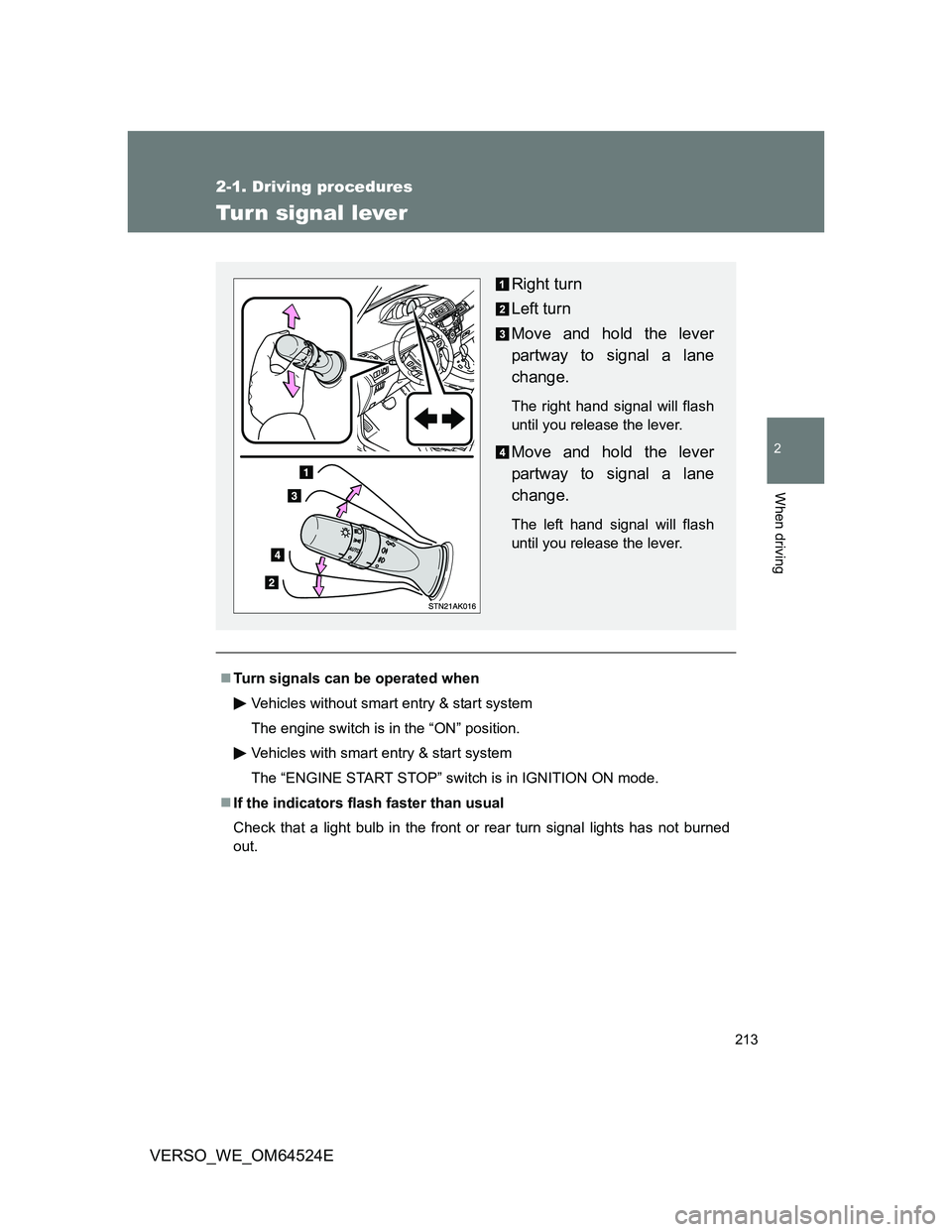
Right turn
Left turn
Move and hold the lever
partway to signal a lane
change.
The right hand signal will flash
until you release the lever.
Move and hold the lever
partway to signal a lane
change.
The left hand signal will flash
until you release the lever.
Page 224 of 588
224 2-2. Instrument cluster
VERSO_WE_OM64524E
Indicators
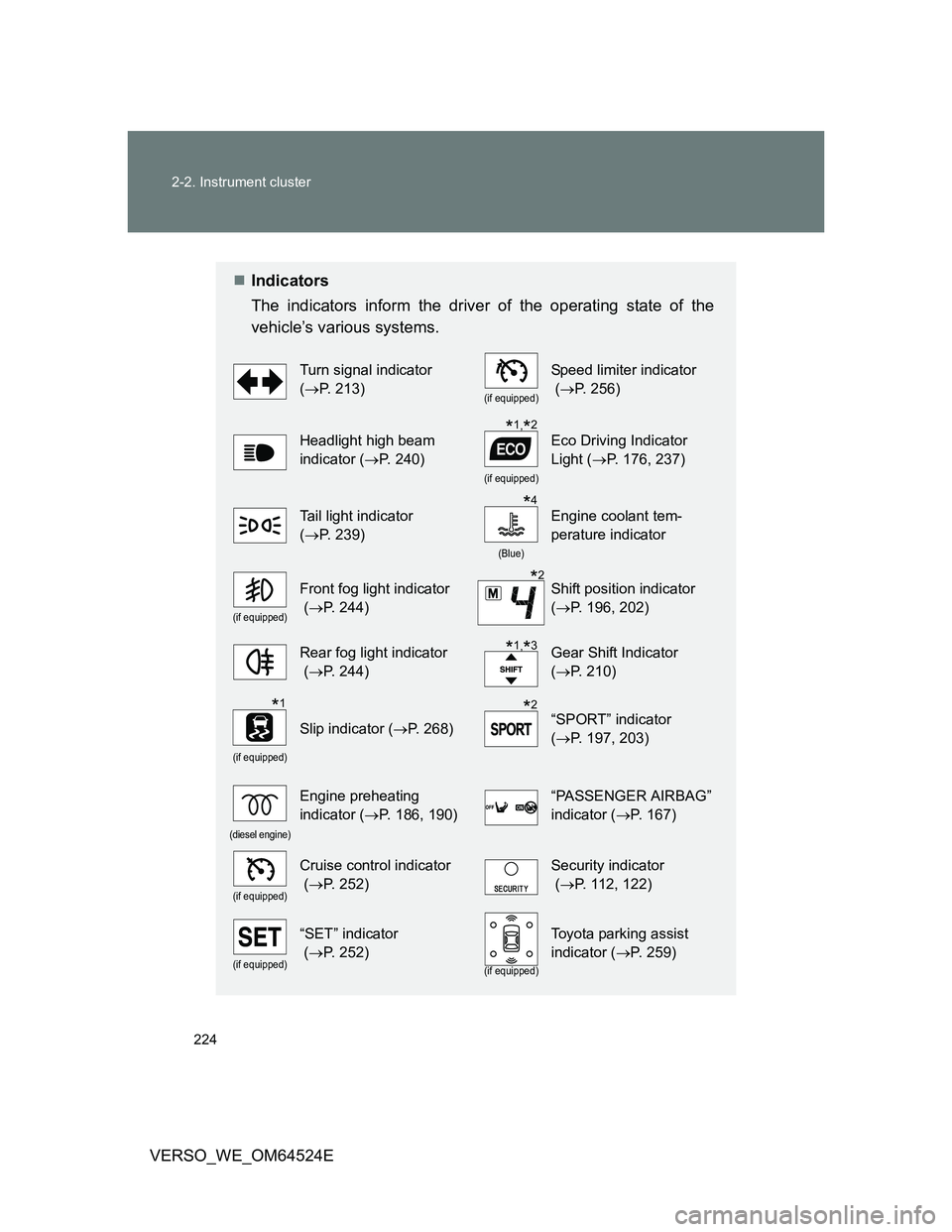
The indicators inform the driver of the operating state of the
vehicle’s various systems.
Turn signal indicator
(P. 213)
(if equipped)
Speed limiter indicator
(P. 256)
Headlight high beam
indicator (P. 240)
(if equipped)
Eco Driving Indicator
Light (P. 176, 237)
Tail light indicator
(P. 239)
(Blue)
Engine coolant tem-
perature indicator
(if equipped)
Front fog light indicator
(P. 244)Shift position indicator
(P. 196, 202)
Rear fog light indicator
(P. 244)Gear Shift Indicator
(P. 210)
(if equipped)
Slip indicator (P. 268)“SPORT” indicator
(P. 197, 203)
(diesel engine)
Engine preheating
indicator (P. 186, 190)“PASSENGER AIRBAG”
indicator (P. 167)
(if equipped)
Cruise control indicator
(P. 252)Security indicator
(P. 112, 122)
(if equipped)
“SET” indicator
(P. 252)
(if equipped)
Toyota parking assist
indicator (P. 259)
*1,*2
*4
*2
*1,*3
*1*2
Page 231 of 588
231 2-2. Instrument cluster
2
When driving
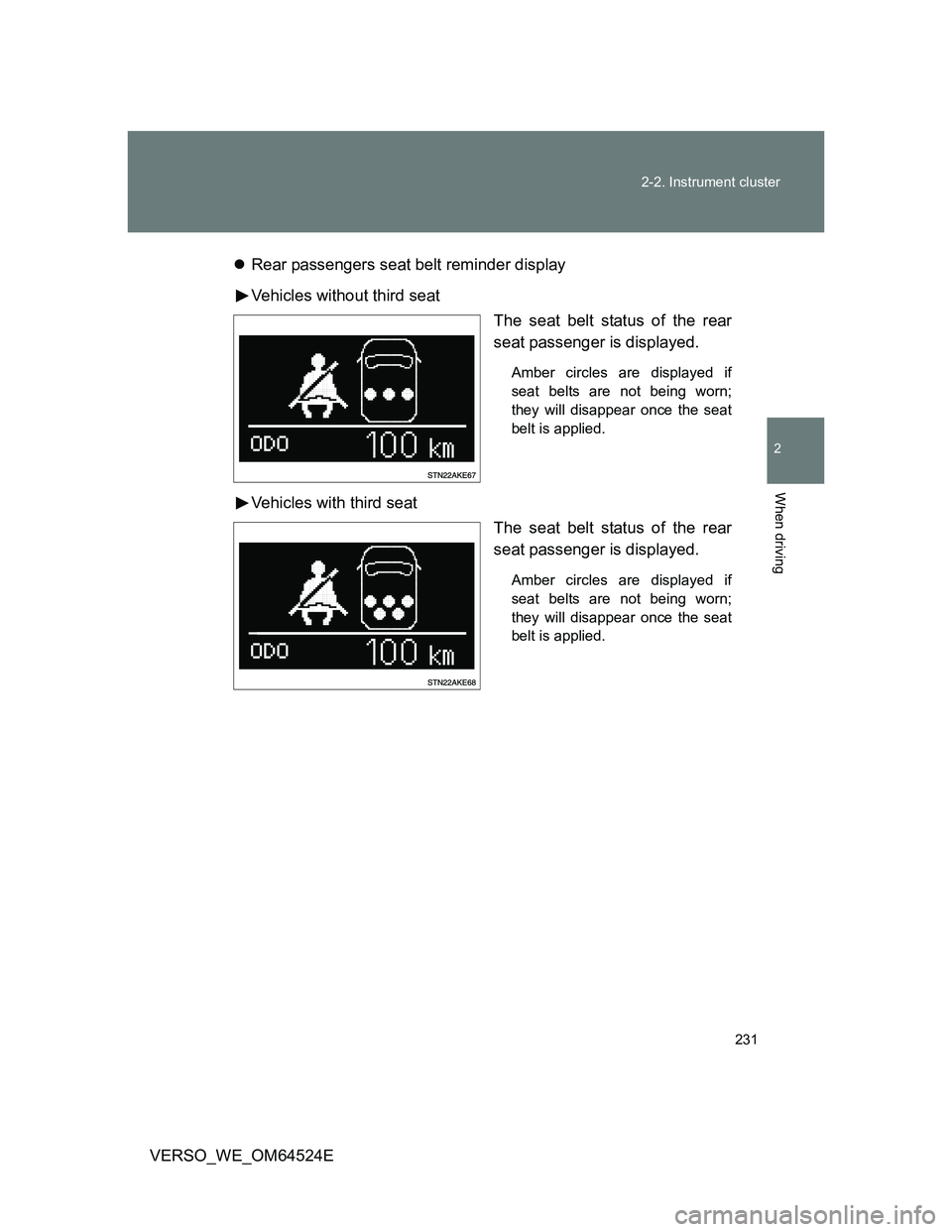
VERSO_WE_OM64524ERear passengers seat belt reminder display
Vehicles without third seat
The seat belt status of the rear
seat passenger is displayed.
Amber circles are displayed if
seat belts are not being worn;
they will disappear once the seat
belt is applied.
Vehicles with third seat
The seat belt status of the rear
seat passenger is displayed.
Amber circles are displayed if
seat belts are not being worn;
they will disappear once the seat
belt is applied.
Page 237 of 588
237 2-2. Instrument cluster
2
When driving
VERSO_WE_OM64524E
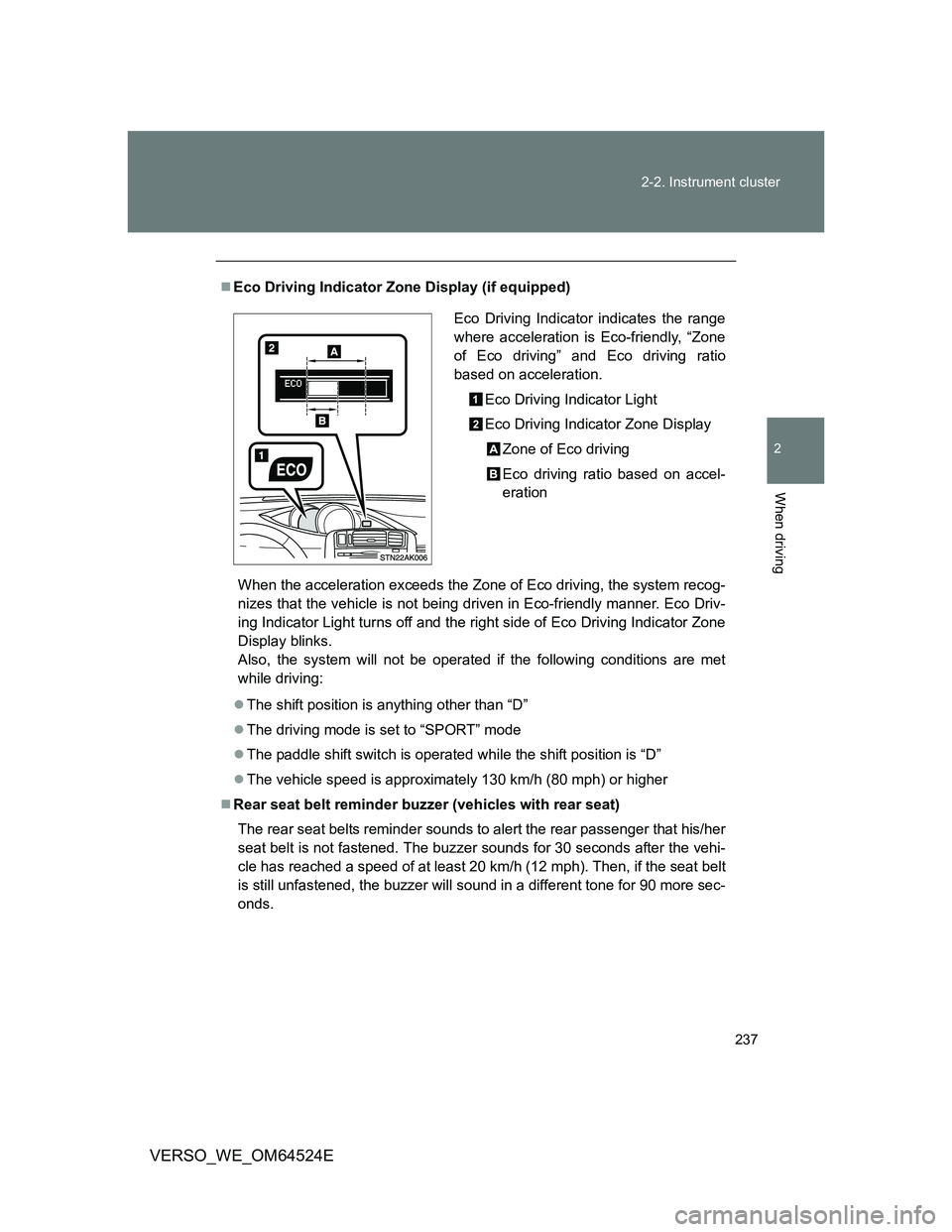
Eco Driving Indicator Zone Display (if equipped)
When the acceleration exceeds the Zone of Eco driving, the system recog-
nizes that the vehicle is not being driven in Eco-friendly manner. Eco Driv-
ing Indicator Light turns off and the right side of Eco Driving Indicator Zone
Display blinks.
Also, the system will not be operated if the following conditions are met
while driving:
The shift position is anything other than “D”
The driving mode is set to “SPORT” mode
The paddle shift switch is operated while the shift position is “D”
The vehicle speed is approximately 130 km/h (80 mph) or higher
Rear seat belt reminder buzzer (vehicles with rear seat)
The rear seat belts reminder sounds to alert the rear passenger that his/her
seat belt is not fastened. The buzzer sounds for 30 seconds after the vehi-
cle has reached a speed of at least 20 km/h (12 mph). Then, if the seat belt
is still unfastened, the buzzer will sound in a different tone for 90 more sec-
onds.
Eco Driving Indicator indicates the range
where acceleration is Eco-friendly, “Zone
of Eco driving” and Eco driving ratio
based on acceleration.
Eco Driving Indicator Light
Eco Driving Indicator Zone Display
Zone of Eco driving
Eco driving ratio based on accel-
eration
Page 238 of 588
238 2-2. Instrument cluster
VERSO_WE_OM64524E
Outside temperature display
In the following situations, the correct outside temperature may not be
displayed, or the display may take longer than normal to change.
• When stopped, or driving at low speeds (less than 20 km/h [12 mph])
• When the outside temperature has changed suddenly (at the entrance/
exit of a garage, tunnel, etc.)
When “--” is displayed, the system may be malfunctioning.
Take your vehicle to any authorized Toyota dealer or repairer, or another
duly qualified and equipped professional.
Liquid crystal display
Small spots or light spots may appear on the display. This phenomenon is
characteristic of liquid crystal displays, and there is no problem to continue
using the display.
Customization that can be configured at any authorized Toyota dealer
or repairer, or another duly qualified and equipped professional
Settings (e.g. rear seat belt reminder buzzer) can be changed.
(Customizable featuresP. 569)
NOTICE
The multi-information display at low temperatures
Allow the interior of the vehicle to warm up before using the liquid crystal
information display. At extremely low temperatures, the information display
monitor may respond slowly, and display changes may be delayed.
Page 241 of 588
241 2-3. Operating the lights and wipers
2
When driving
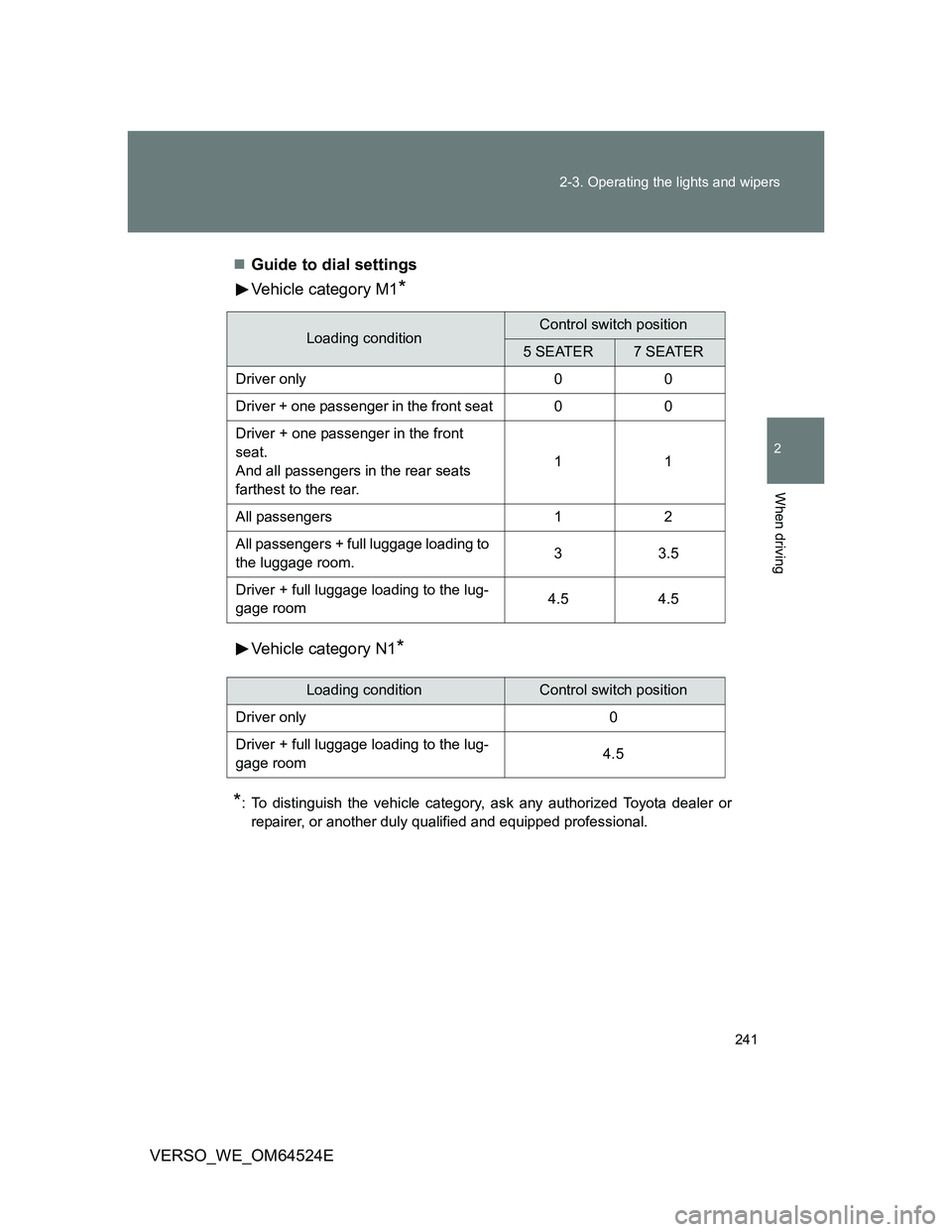
VERSO_WE_OM64524EGuide to dial settings
Vehicle category M1
*
Vehicle category N1*
*
: To distinguish the vehicle category, ask any authorized Toyota dealer or
repairer, or another duly qualified and equipped professional.
Loading conditionControl switch position
5 SEATER7 SEATER
Driver only 0 0
Driver + one passenger in the front seat 0 0
Driver + one passenger in the front
seat.
And all passengers in the rear seats
farthest to the rear.11
All passengers 1 2
All passengers + full luggage loading to
the luggage room.33.5
Driver + full luggage loading to the lug-
gage room4.5 4.5
Loading conditionControl switch position
Driver only 0
Driver + full luggage loading to the lug-
gage room4.5
Page 244 of 588
244
2-3. Operating the lights and wipers
VERSO_WE_OM64524E
Fog light switch
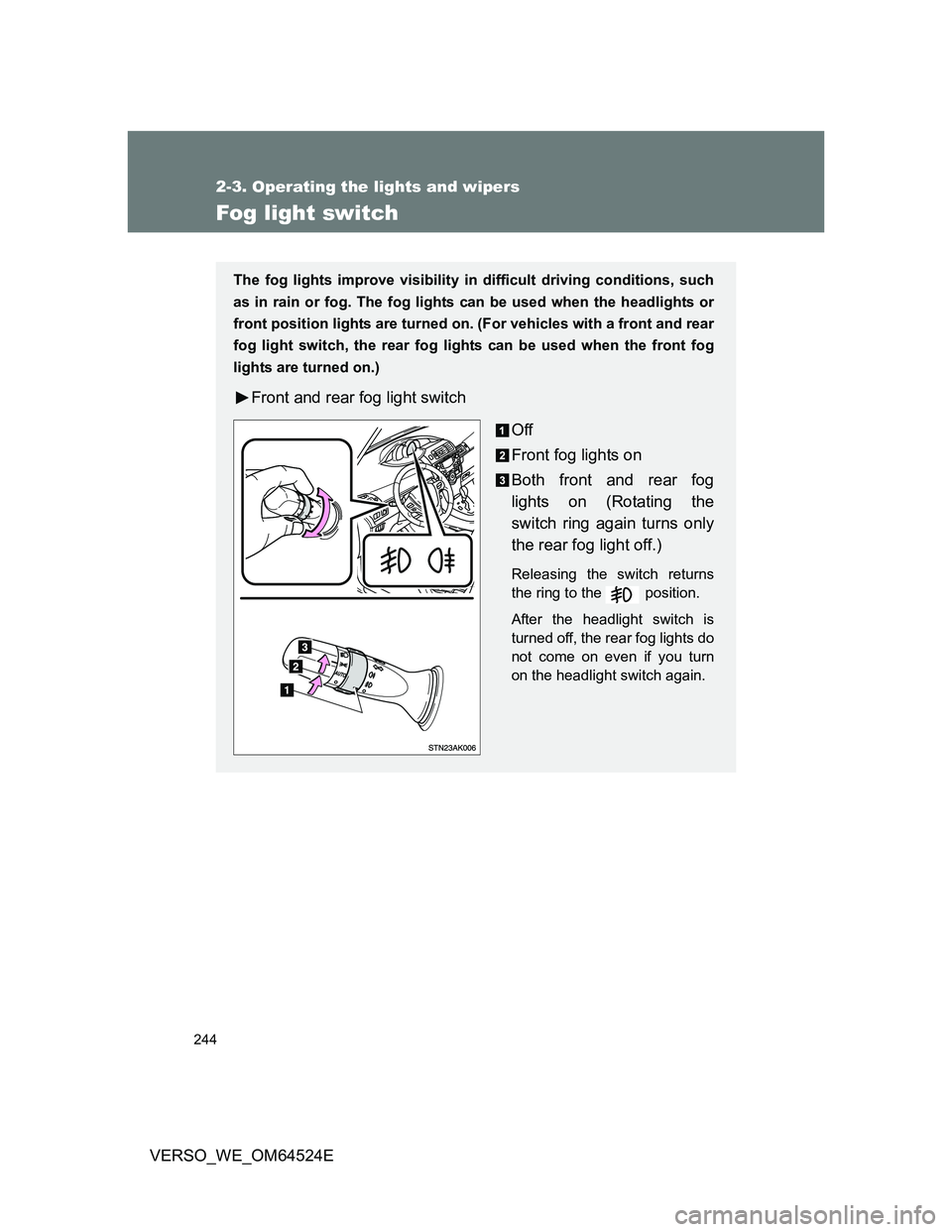
The fog lights improve visibility in difficult driving conditions, such
as in rain or fog. The fog lights can be used when the headlights or
front position lights are turned on. (For vehicles with a front and rear
fog light switch, the rear fog lights can be used when the front fog
lights are turned on.)
Front and rear fog light switch
Off
Front fog lights on
Both front and rear fog
lights on (Rotating the
switch ring again turns only
the rear fog light off.)
Releasing the switch returns
the ring to the position.
After the headlight switch is
turned off, the rear fog lights do
not come on even if you turn
on the headlight switch again.
Page 245 of 588
245 2-3. Operating the lights and wipers
2
When driving
VERSO_WE_OM64524E
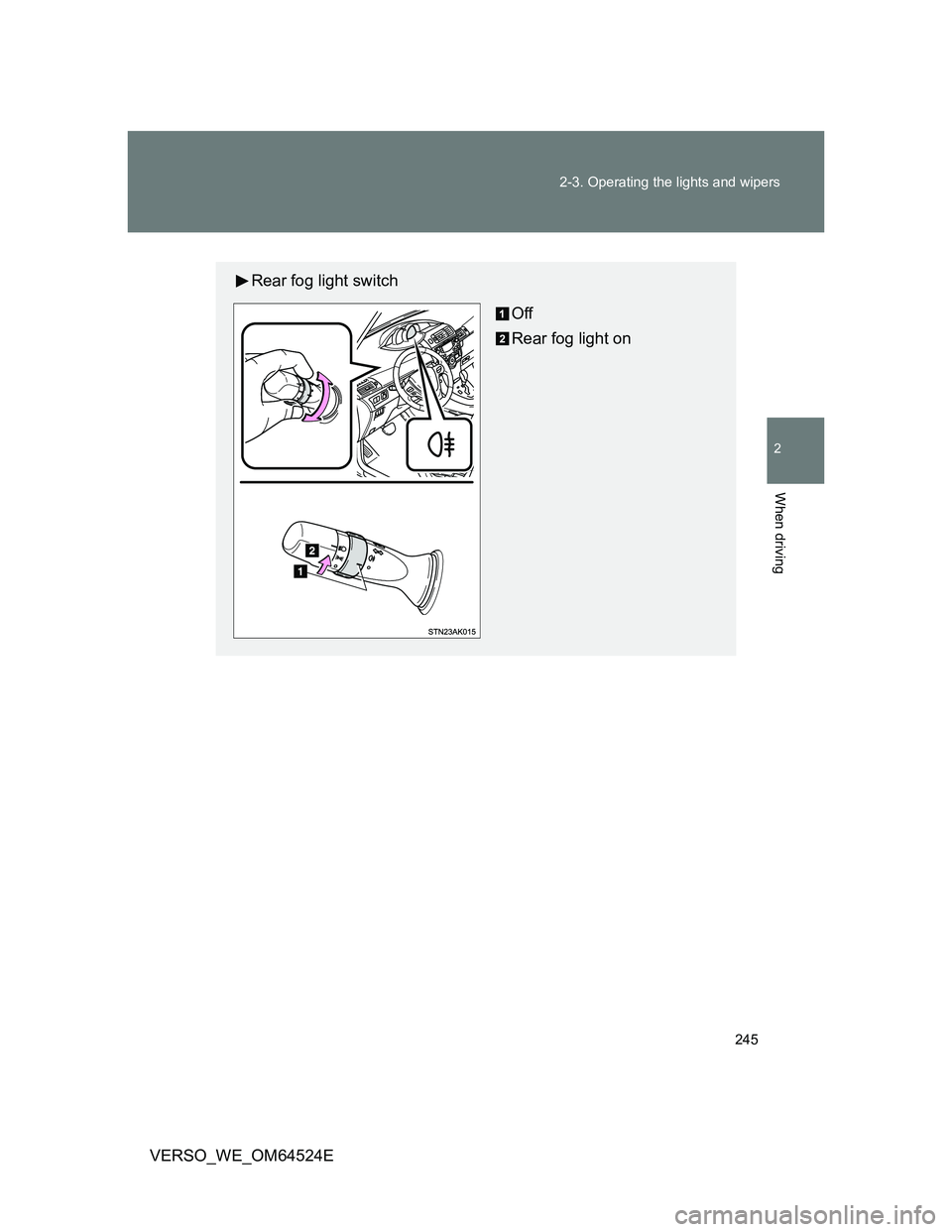
Rear fog light switch
Off
Rear fog light on
Page 251 of 588
251
2-3. Operating the lights and wipers
2
When driving
VERSO_WE_OM64524E
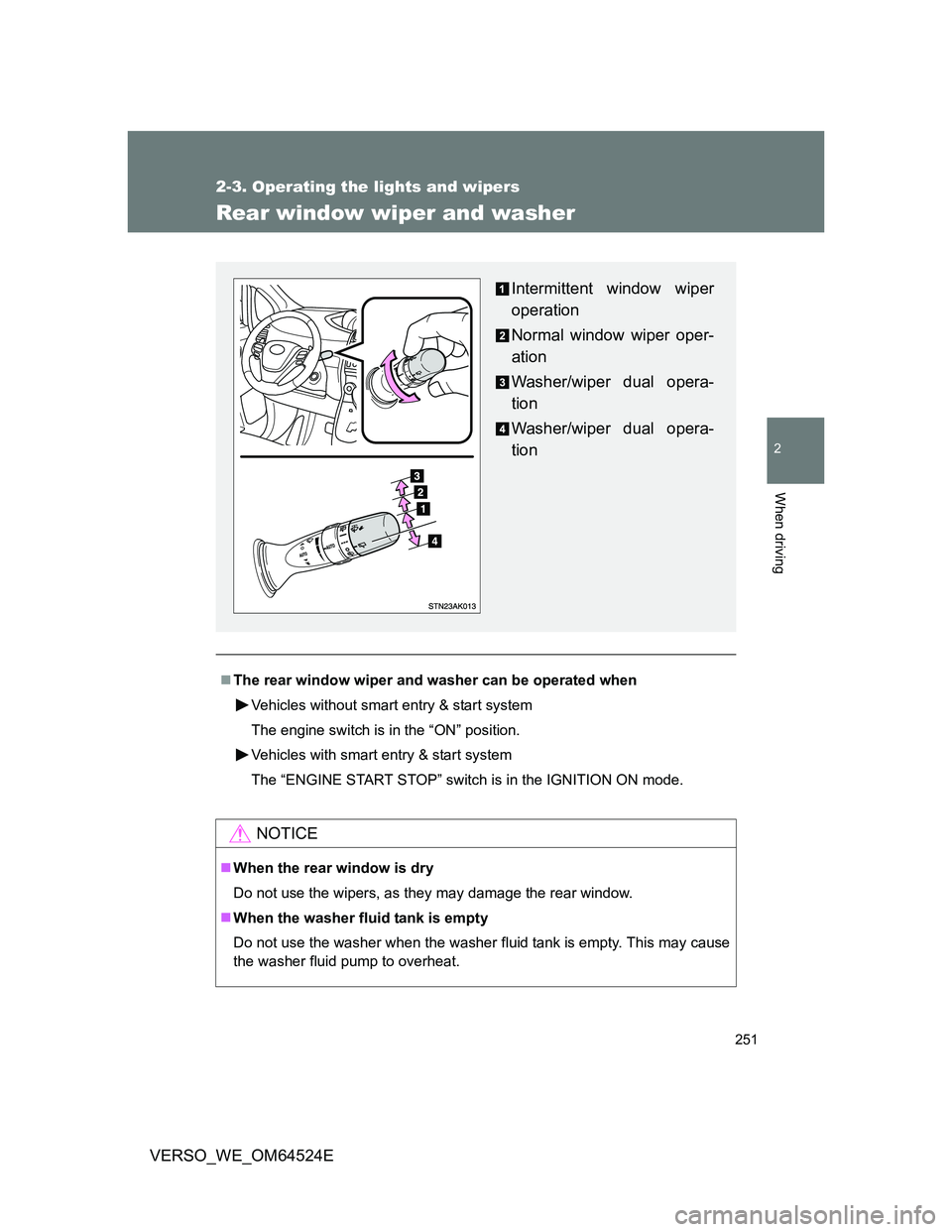
Rear window wiper and washer
The rear window wiper and washer can be operated when
Vehicles without smart entry & start system
The engine switch is in the “ON” position.
Vehicles with smart entry & start system
The “ENGINE START STOP” switch is in the IGNITION ON mode.
NOTICE
When the rear window is dry
Do not use the wipers, as they may damage the rear window.
When the washer fluid tank is empty
Do not use the washer when the washer fluid tank is empty. This may cause
the washer fluid pump to overheat.
Intermittent window wiper
operation
Normal window wiper oper-
ation
Washer/wiper dual opera-
tion
Washer/wiper dual opera-
tion