air condition TOYOTA VERSO 2014 Owner's Manual
[x] Cancel search | Manufacturer: TOYOTA, Model Year: 2014, Model line: VERSO, Model: TOYOTA VERSO 2014Pages: 650, PDF Size: 36.61 MB
Page 234 of 650
234 2-2. Instrument cluster
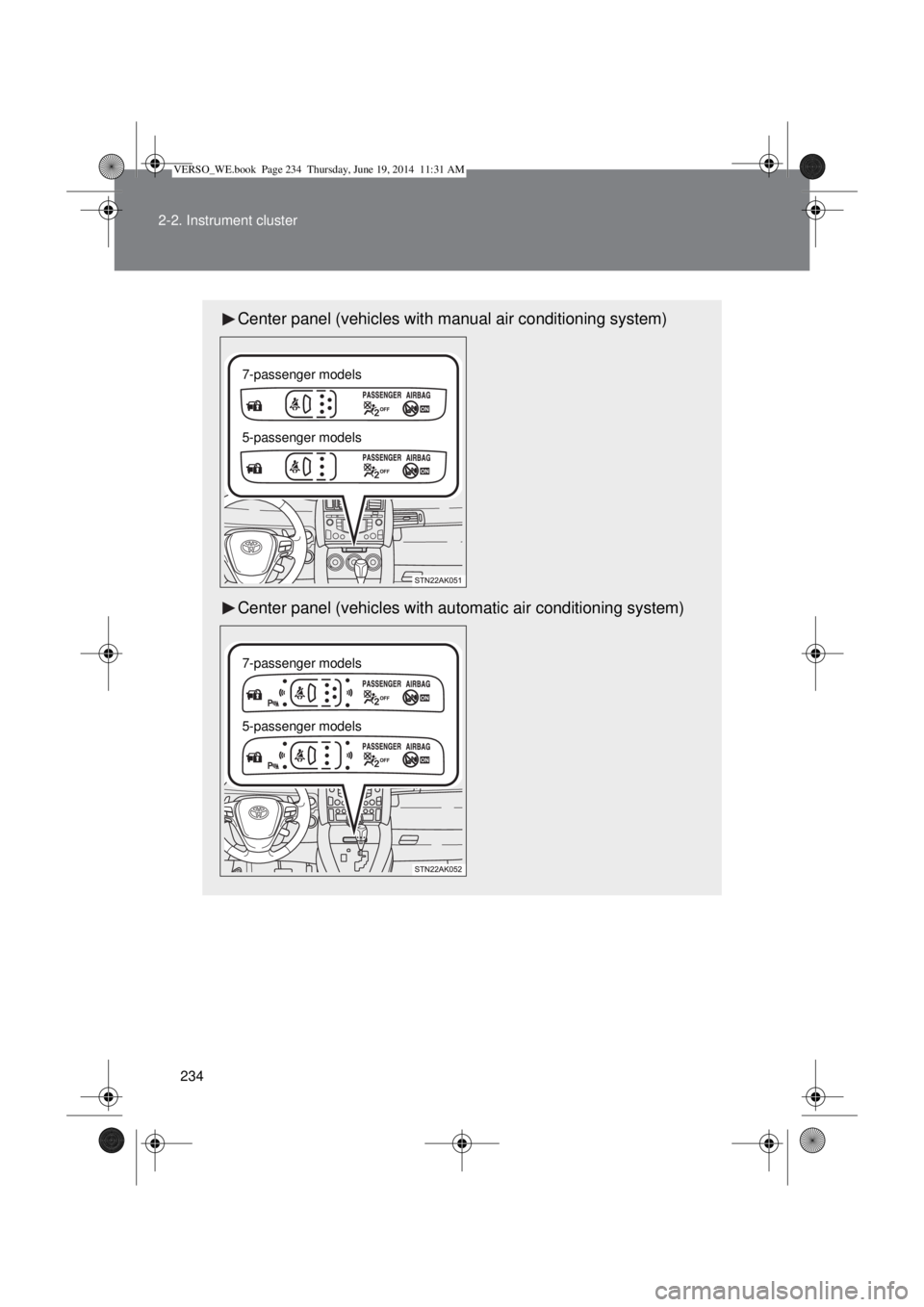
Center panel (vehicles with manual air conditioning system)
Center panel (vehicles with automatic air conditioning system)
7-passenger models
5-passenger models
7-passenger models
5-passenger models
VERSO_WE.book Page 234 Thursday, June 19, 2014 11:31 AM
Page 249 of 650
249 2-2. Instrument cluster
2
When driving
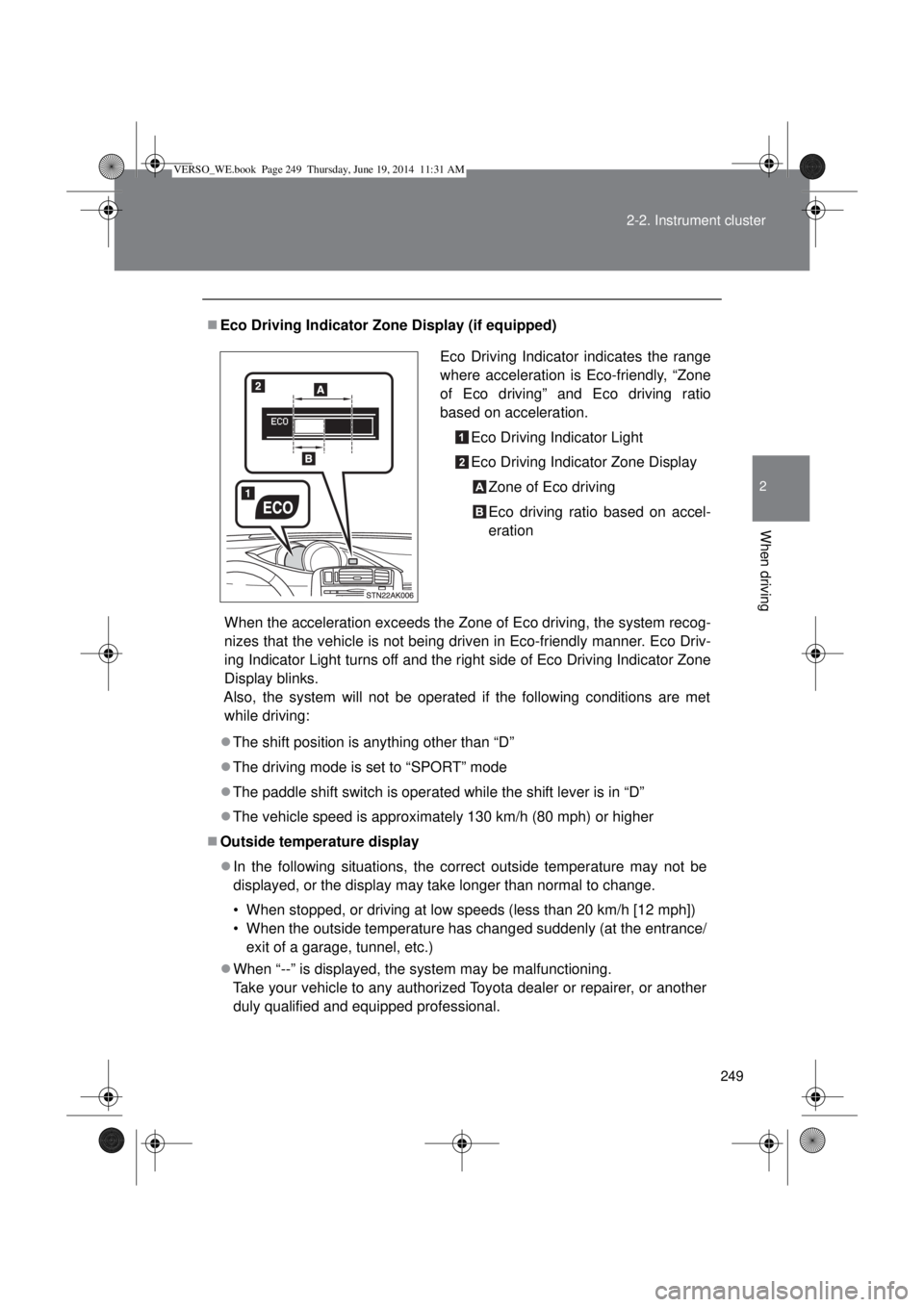
Eco Driving Indicator Zone Display (if equipped)
When the acceleration exceeds the Zone of Eco driving, the system recog-
nizes that the vehicle is not being driven in Eco-friendly manner. Eco Driv-
ing Indicator Light turns off and the right side of Eco Driving Indicator Zone
Display blinks.
Also, the system will not be operated if the following conditions are met
while driving:
The shift position is anything other than “D”
The driving mode is set to “SPORT” mode
The paddle shift switch is operated while the shift lever is in “D”
The vehicle speed is approximately 130 km/h (80 mph) or higher
Outside temperature display
In the following situations, the correct outside temperature may not be
displayed, or the display may take longer than normal to change.
• When stopped, or driving at low speeds (less than 20 km/h [12 mph])
• When the outside temperature has changed suddenly (at the entrance/
exit of a garage, tunnel, etc.)
When “--” is displayed, the system may be malfunctioning.
Take your vehicle to any authorized Toyota dealer or repairer, or another
duly qualified and equipped professional.Eco Driving Indicator indicates the range
where acceleration is Eco-friendly, “Zone
of Eco driving” and Eco driving ratio
based on acceleration.
Eco Driving Indicator Light
Eco Driving Indicator Zone Display
Zone of Eco driving
Eco driving ratio based on accel-
eration
VERSO_WE.book Page 249 Thursday, June 19, 2014 11:31 AM
Page 253 of 650
253 2-3. Operating the lights and wipers
2
When driving
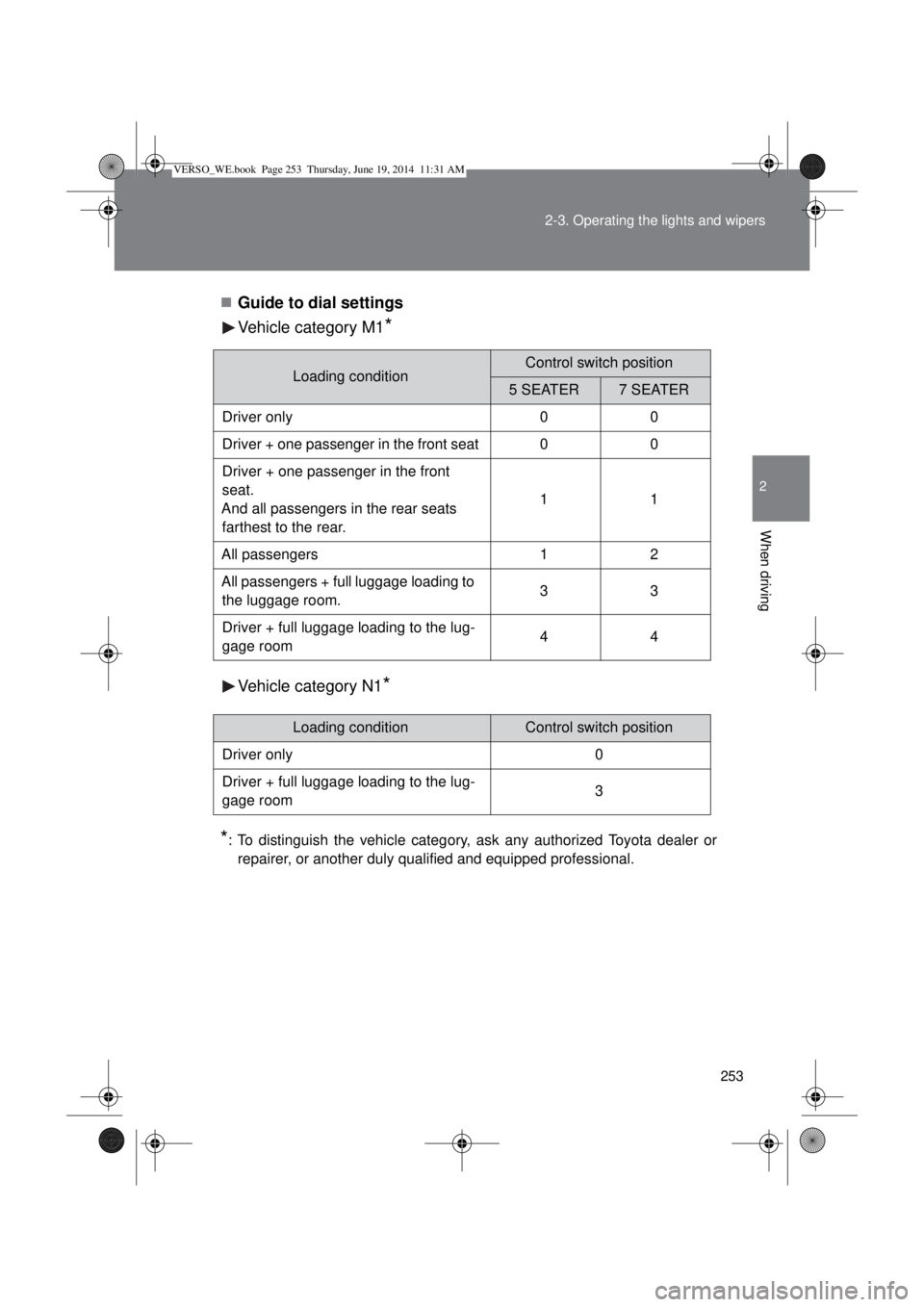
Guide to dial settings
Vehicle category M1
*
Vehicle category N1*
*
: To distinguish the vehicle category, ask any authorized Toyota dealer or
repairer, or another duly qualified and equipped professional.
Loading conditionControl switch position
5 SEATER7 SEATER
Driver only 0 0
Driver + one passenger in the front seat 0 0
Driver + one passenger in the front
seat.
And all passengers in the rear seats
farthest to the rear.11
All passengers 1 2
All passengers + full luggage loading to
the luggage room.33
Driver + full luggage loading to the lug-
gage room44
Loading conditionControl switch position
Driver only 0
Driver + full luggage loading to the lug-
gage room3
VERSO_WE.book Page 253 Thursday, June 19, 2014 11:31 AM
Page 277 of 650
277 2-4. Using other driving systems
2
When driving
Rear corner and rear center sensors:
• The shift lever is in “R”.
Sensor detection information
Certain vehicle conditions and the surrounding environment may affect
the ability of a sensor to correctly detect an obstacle. Particular instances
where this may occur are listed below.
• There is dirt, snow or ice on a sensor.
• A sensor is frozen.
• A sensor is covered in any way.
• The vehicle is leaning considerably to one side.
• On an extremely bumpy road, on an incline, on gravel, or on grass.
• The vicinity of the vehicle is noisy due to vehicle horns, motorcycle
engines, air brakes of large vehicles, or other loud noises producing
ultrasonic waves.
• There is another vehicle equipped with parking assist sensors in the
vicinity.
• A sensor is coated with a sheet of spray or heavy rain.
• The vehicle is equipped with a fender pole or radio antenna.
• Towing eyelet is installed.
• A bumper or sensor receives a strong impact.
• The vehicle is approaching a tall or right-angled curb.
• In harsh sunlight or intense cold weather.
• A non-genuine Toyota suspension (lowered suspension etc.) is
installed.
In addition to the examples above, there are instances in which, because of
their shape, signs and other objects may be judged by a sensor to be closer
than they are.
The shape of the obstacle may prevent a sensor from detecting it. Pay
particular attention to the following obstacles:
• Wires, fences, ropes, etc.
• Cotton, snow and other materials that absorb sound waves
• Sharply-angles objects
• Low obstacles
• Tall obstacles with upper sections projecting outwards in the direction
of your vehicle
VERSO_WE.book Page 277 Thursday, June 19, 2014 11:31 AM
Page 282 of 650

282 2-4. Using other driving systems
Operating conditions
The Stop & Start system is operational when all of the following condi-
tions are met:
• The engine is adequately warmed up.
• The battery is sufficiently charged.
• The driver’s door is closed.
• The driver’s seat belt is fastened.
• The hood is closed.
• The clutch pedal is not being depressed.
• The shift lever is in “N”.
• The steering wheel is not in use.
In the following circumstances the engine may not be stopped by the
Stop & Start system. This is not a malfunction of the Stop & Start system.
• Engine coolant temperature is too low or too high.
• The outside temperature is too low.
• Vehicles with an automatic air conditioning system: The air condition-
ing system is being used when the vehicle interior temperature is
extremely high such as after the vehicle was parked under the hot sun.
• Vehicles with an automatic air conditioning system: The windshield
defogger is being used.
• Vehicles with a power heater: The power heater is being used.
• The battery is not sufficiently charged, or is undergoing a periodic
recharge.
• Due to traffic or other circumstances the vehicle is stopped repeatedly,
resulting in the amount of time the engine is stopped by the Stop &
Start system to become excessively high.
• The brake booster vacuum is low.
• A large amount of electricity is being used.
• At high altitude.
When the above conditions improve, the Stop & Start system will stop and
restart the engine from the next time the vehicle is stopped.
In the following situations, it may take longer than normal for the Stop &
Start system to activate.
• The battery is discharged.
• After the battery terminals have been disconnected and reconnected
after a battery replacement, etc.
• The engine coolant temperature is low.
VERSO_WE.book Page 282 Thursday, June 19, 2014 11:31 AM
Page 283 of 650

283 2-4. Using other driving systems
2
When driving
Automatic engine start function
In the following situations, the engine may start even without the clutch pedal
being depressed.
• The brake pedal is pumped or strongly depressed.
• Vehicles with an automatic air conditioning system: The air conditioning
system is being used or turned on.
• Vehicles with an automatic air conditioning system: The windshield
defogger is turned on.
• The battery is not sufficiently charged.
• The vehicle starts to roll on an incline.
• A large amount of electricity is being used.
• The driver’s door is opened.
• The driver’s seat belt is unfastened.
• The steering wheel is turned.
Automatic reactivation of the Stop & Start system
Vehicles without smart entry & start system
Even if the Stop & Start system is disabled by the Stop & Start cancel switch,
it will be automatically re-enabled once the engine switch is turned to the
“LOCK” position then to the “START” position.
Vehicles with smart entry & start system
Even if the Stop & Start system is disabled by the Stop & Start cancel switch,
it will be automatically re-enabled once the engine switch is turned off then
the engine is started.
The Stop & Start system protection feature
Vehicles without smart entry & start system
When an excessively loud sound is being projected by the audio system, the
audio system may be automatically cut off in order to maintain power for the
Stop & Start system function.
If this occurs, turning the engine switch to the “LOCK” position then to the
“ACC” or “ON” position re-enables the audio system.
Vehicles with smart entry & start system
When an excessively loud sound is being projected by the audio system, the
audio system may be automatically cut off in order to maintain power for the
Stop & Start system function.
If this occurs, turning the “ENGINE START STOP” switch off then to ACCES-
SORY mode or IGNITION ON mode re-enables the audio system.
VERSO_WE.book Page 283 Thursday, June 19, 2014 11:31 AM
Page 284 of 650

284 2-4. Using other driving systems
Steering wheel operation
When the engine is stopped by the Stop & Start system, the steering wheel
may become heavier than when driving.
Hood
If the hood is opened while the engine is stopped by the Stop & Start system,
the engine cannot be restarted by the Stop & Start system or by the auto-
matic engine start function. Restart the engine with the engine switch opera-
tion. (P. 196, 200)
When to use the Stop & Start system
Use the Stop & Start system when stopping the vehicle temporarily at red
lights, intersections, etc. When stopping the vehicle for a longer period of
time, turn off the engine completely.
Stop & Start system warning buzzer
If the engine is stopped by the Stop & Start system and the following action
is performed, a buzzer will sound and the Stop & Start indicator will flash.
This indicates that the engine is only stopped by the Stop & Start system, not
that the engine has been turned off completely.
The shift lever is shifted to a position other than “N” with the clutch pedal
released.
If the Stop & Start cancel indicator continues to flash
The Stop & Start system may be malfunctioning. Contact any authorized
Toyota dealer or repairer, or another duly qualified and equipped profes-
sional.
If the windshield is fogged up while the engine is stopped by the Stop
& Start system
Vehicles with a manual air conditioning system: Restart the engine by
depressing the clutch pedal (P. 280) or by pressing the Stop & Start
cancel switch, and then set the air outlet selection dial to . (P. 313)
Vehicles with an automatic air conditioning system: Turn the windshield
defogger on. (The engine will start due to the automatic engine start func-
tion.) (P. 321)
If the windshield fogs up frequently, press the Stop & Start cancel switch to
deactivate the system.
VERSO_WE.book Page 284 Thursday, June 19, 2014 11:31 AM
Page 298 of 650
298
2-5. Driving information
Winter driving tips
Carry out the necessary preparations and inspections before driving
the vehicle in winter. Always drive the vehicle in a manner appropri-
ate to the prevailing weather conditions.
Pre-winter preparations
Use fluids that are appropriate to the prevailing outside tem-
peratures.
• Engine oil
• Engine coolant
• Washer fluid
Have a service technician inspect the condition of the battery.
Have the vehicle fitted with four snow tires or purchase a set
of tire chains for the front tires.
Ensure that all tires are the same size and brand, and that chains
match the size of the tires.
Before driving the vehicle
Perform the following according to the driving conditions:
Do not try to forcibly open a window or move a wiper that is
frozen. Pour warm water over the frozen area to melt the ice.
Wipe away the water immediately to prevent it from freezing.
To ensure proper operation of the climate control system fan,
remove any snow that has accumulated on the air inlet vents
in front of the windshield.
Check for and remove any excess ice or snow that may have
accumulated on the exterior lights, vehicle’s roof, chassis,
around the tires or on the brakes.
Remove any snow or mud from the bottom of your shoes
before getting in the vehicle.
VERSO_WE.book Page 298 Thursday, June 19, 2014 11:31 AM
Page 309 of 650

309 2-5. Driving information
2
When driving
Important points regarding turning
The wheels of the trailer will travel closer to the inside of the curve
than the wheels of the vehicle. To make allowance for this, take the
turns wider than you would normally.
Important points regarding stability
Vehicle movement resulting from uneven road surfaces and strong
crosswinds will affect handling. The vehicle may also be rocked by
passing buses or large trucks. Frequently check behind when mov-
ing alongside such vehicles. As soon as such vehicle movement
occurs, immediately start to decelerate smoothly by slowly apply-
ing the brakes. Always steer the vehicle straight ahead while brak-
ing.
Passing other vehicles
Consider the total combined length of your vehicle and trailer, and
ensure that the vehicle-to-vehicle distance is sufficient before exe-
cuting lane changes.
Transmission information
Multidrive or automatic transmission
To maintain engine braking efficiency, when using engine brak-
ing, do not use the transmission in “D”. Transmission shift gear
position must be in “4” in the 7-speed sport sequential shiftmatic
mode (Multidrive) (P. 206) or the “M” mode (automatic trans-
mission) (P. 212).
Manual transmission
To maintain engine braking efficiency, when using engine brak-
ing, do not use the transmission in “5” and “6” gear. (P. 220)
When towing a trailer, check the engine coolant temperature
warning light (Red)
Towing a loaded trailer up a long steep incline in temperatures
exceeding 30C (85F) may result in the engine overheating.
If the engine coolant temperature warning light (Red) flashes or
comes on, turn the air conditioning off immediately and stop the
vehicle in a safe place. (P. 589)
VERSO_WE.book Page 309 Thursday, June 19, 2014 11:31 AM
Page 311 of 650
3Interior features
311
3-1. Using the air conditioning
system and defogger
Manual air conditioning
system ............................ 312
Automatic air conditioning
system ............................ 317
Power heater .................... 324
Rear window and outside
rear view mirror
defoggers........................ 326
3-2. Using the audio system
Audio system types .......... 328
Using the radio ................. 330
Using the CD player ......... 334
Playing back MP3 and
WMA discs...................... 339
Operating an iPod............. 345
Operating a USB
memory........................... 352
Optimal use of the audio
system ............................ 359
Using the AUX port ........... 361
Using the steering wheel
audio switches ................ 362
3-3. Using the interior lights
Interior lights list ................ 365
• Personal/interior lights
main switch ..................... 366
• Personal/interior lights .... 3673-4. Using the storage features
List of storage features ..... 369
• Glove box ....................... 370
• Console box.................... 371
• Overhead console .......... 372
• Cup holders .................... 373
• Bottle holders.................. 374
• Auxiliary boxes ............... 375
3-5. Other interior features
Sun visors ......................... 378
Vanity mirrors.................... 379
Conversation mirror .......... 380
Power outlets .................... 381
Seat heaters ..................... 383
Armrests ........................... 385
Front seatback tables ....... 386
Rear side sunshades ........ 388
Assist grips ....................... 389
Floor mat........................... 390
Luggage compartment
features........................... 392
VERSO_WE.book Page 311 Thursday, June 19, 2014 11:31 AM