wheel TOYOTA VERSO 2014 Workshop Manual
[x] Cancel search | Manufacturer: TOYOTA, Model Year: 2014, Model line: VERSO, Model: TOYOTA VERSO 2014Pages: 650, PDF Size: 36.61 MB
Page 288 of 650
288 2-4. Using other driving systems
When the TRC and VSC+ are operating
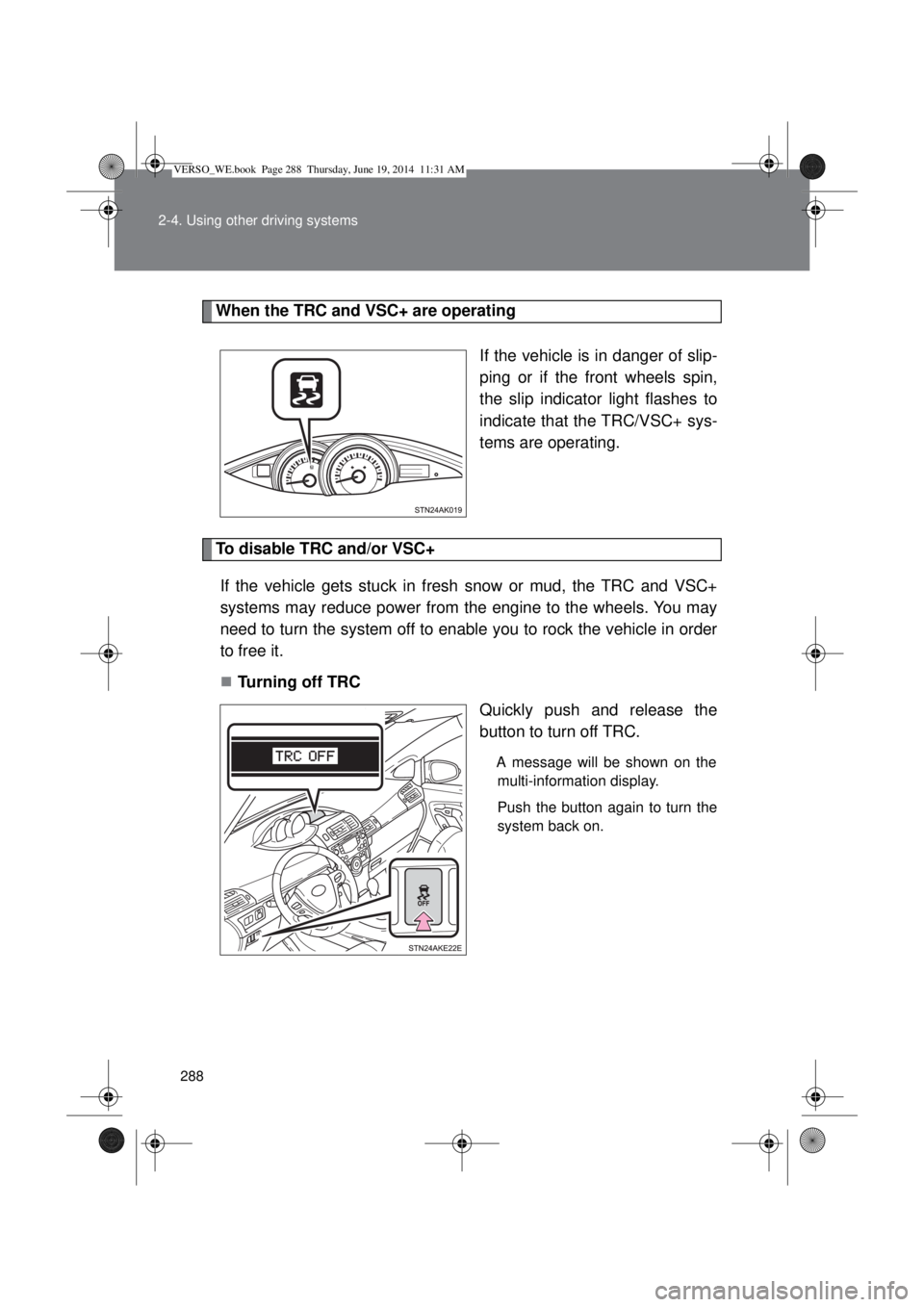
If the vehicle is in danger of slip-
ping or if the front wheels spin,
the slip indicator light flashes to
indicate that the TRC/VSC+ sys-
tems are operating.
To disable TRC and/or VSC+
If the vehicle gets stuck in fresh snow or mud, the TRC and VSC+
systems may reduce power from the engine to the wheels. You may
need to turn the system off to enable you to rock the vehicle in order
to free it.
Turning off TRC
Quickly push and release the
button to turn off TRC.
A message will be shown on the
multi-information display.
Push the button again to turn the
system back on.
VERSO_WE.book Page 288 Thursday, June 19, 2014 11:31 AM
Page 290 of 650
290 2-4. Using other driving systems
Sounds and vibrations caused by the ABS, brake assist, TRC and
VSC+
A sound may be heard from the engine compartment when the engine is
started or just after the vehicle begins to move. This sound does not indi-
cate that a malfunction has occurred in any of these systems.
Any of the following conditions may occur when the above systems are
operating. None of these indicates that a malfunction has occurred.
• Vibrations may be felt through the vehicle body and steering.
• A motor sound may be heard after the vehicle comes to a stop.
• The brake pedal may pulsate slightly after the ABS is activated.
• The brake pedal may move down slightly after the ABS is activated.
EPS operation sound
When the steering wheel is operated, a motor sound (whirring sound) may
be heard. This does not indicate a malfunction.
Reduced effectiveness of the EPS system
The effectiveness of the EPS system is reduced to prevent the system from
overheating when there is frequent steering input over an extended period of
time. The steering wheel may feel heavy as a result. Should this occur,
refrain from excessive steering input or stop the vehicle and turn the engine
off. The EPS system should return to normal after about 10 minutes.
VERSO_WE.book Page 290 Thursday, June 19, 2014 11:31 AM
Page 292 of 650
292 2-4. Using other driving systems
CAUTION
Replacing tires
Make sure that all tires are of the same size, brand, tread pattern and total
load capacity. In addition, make sure that the tires are inflated to the speci-
fied tire pressure level.
The ABS and VSC+ systems will not function correctly if different tires are fit-
ted on the vehicle.
Contact any authorized Toyota dealer or repairer, or another duly qualified
and equipped professional for further information when replacing tires or
wheels.
Handling of tires and suspension
Using tires with any kind of problem or modifying the suspension will affect
the driving assist systems, and may cause the system to malfunction.
VERSO_WE.book Page 292 Thursday, June 19, 2014 11:31 AM
Page 299 of 650
299 2-5. Driving information
2
When driving
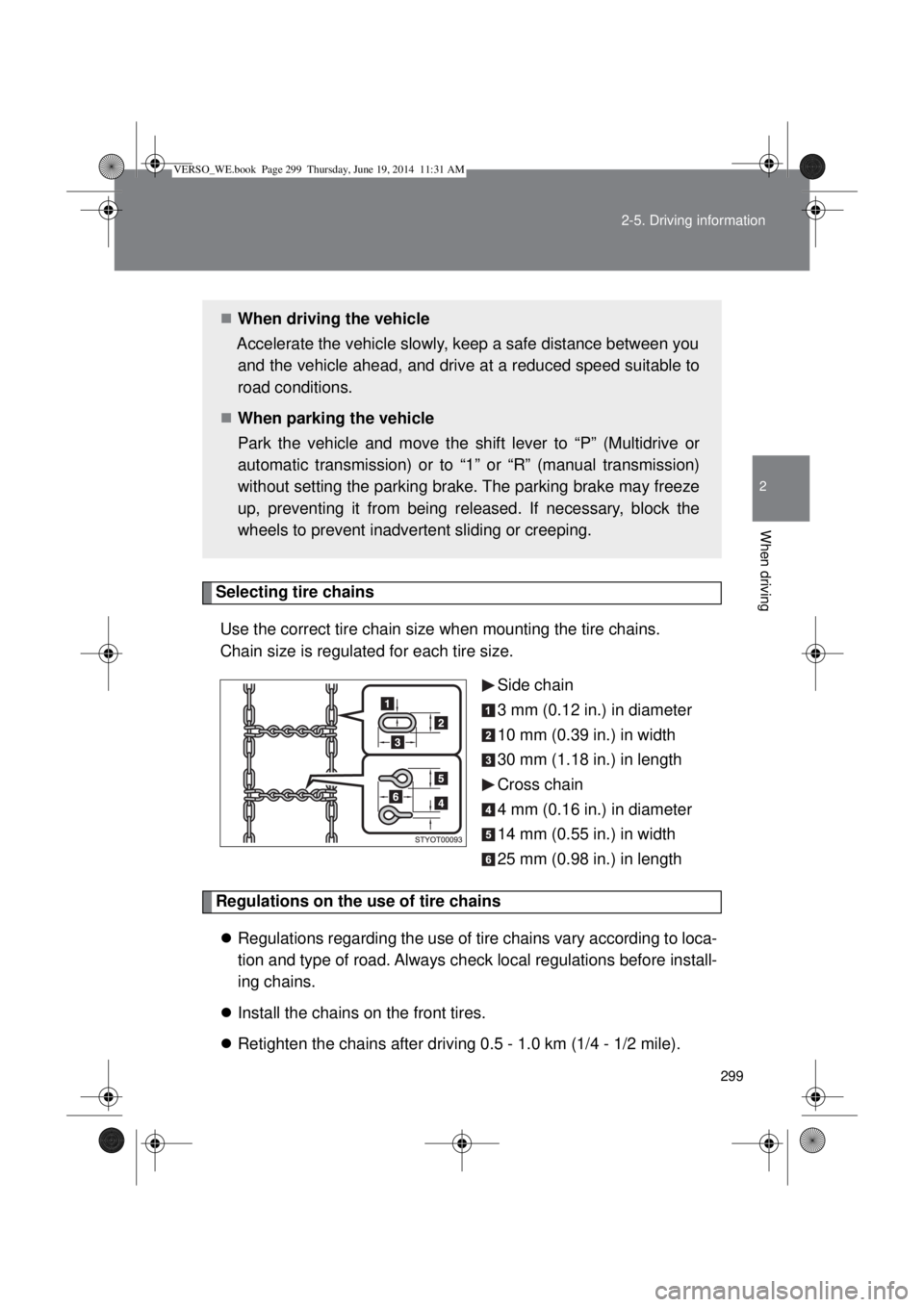
Selecting tire chains
Use the correct tire chain size when mounting the tire chains.
Chain size is regulated for each tire size.
Side chain
3 mm (0.12 in.) in diameter
10 mm (0.39 in.) in width
30 mm (1.18 in.) in length
Cross chain
4 mm (0.16 in.) in diameter
14 mm (0.55 in.) in width
25 mm (0.98 in.) in length
Regulations on the use of tire chains
Regulations regarding the use of tire chains vary according to loca-
tion and type of road. Always check local regulations before install-
ing chains.
Install the chains on the front tires.
Retighten the chains after driving 0.5 - 1.0 km (1/4 - 1/2 mile).
When driving the vehicle
Accelerate the vehicle slowly, keep a safe distance between you
and the vehicle ahead, and drive at a reduced speed suitable to
road conditions.
When parking the vehicle
Park the vehicle and move the shift lever to “P” (Multidrive or
automatic transmission) or to “1” or “R” (manual transmission)
without setting the parking brake. The parking brake may freeze
up, preventing it from being released. If necessary, block the
wheels to prevent inadvertent sliding or creeping.
VERSO_WE.book Page 299 Thursday, June 19, 2014 11:31 AM
Page 300 of 650
300 2-5. Driving information
Tire chain installation
Observe the following precautions when installing and removing chains:
Install and remove tire chains in a safe location.
Install tire chains on the front tires only. Do not install the chains on the
rear tires.
Install tire chains on front tires as tightly as possible. Retighten chains
after driving 0.5 1.0 km (1/4 1/2 mile).
Install tire chains following the instructions provided with the tire chains.
If wheel ornaments are used, they will be scratched by the chain band,
so remove the ornaments before putting on the chains.
CAUTION
Driving with snow tires
Observe the following precautions to reduce the risk of accidents.
Failing to do so may result in a loss of vehicle control and cause death or
serious injury.
Use tires of the size specified for your vehicle.
Maintain the recommended level of tire inflation pressure.
Do not drive at speeds in excess of the speed limit or the speed limit spec-
ified for the snow tires being used.
Snow tires should be installed on all wheels.
Driving with tire chains
Observe the following precautions to reduce the risk of accidents.
Failing to do so may result in the vehicle being unable to be driven safely,
and may cause death or serious injury.
Do not drive in excess of the speed limit specified for the tire chains being
used or 50 km/h (30 mph), whichever is lower.
Avoid driving on bumpy road surfaces or over potholes.
Avoid sudden acceleration, abrupt steering, sudden braking and shifting
operations that cause sudden engine braking.
Slow down sufficiently before entering a curve to ensure that vehicle con-
trol is maintained.
VERSO_WE.book Page 300 Thursday, June 19, 2014 11:31 AM
Page 308 of 650
308 2-5. Driving information
Guidance
Your vehicle will handle differently when towing a trailer. In order to
avoid accident, death or serious injury, keep the following in mind
when towing:
Checking connections between trailer and lights
Stop the vehicle and check the operation of the connection
between the trailer and lights after driving for a brief period as well
as before setting off.
Practicing driving with a coupled trailer
Get the feel for turning, stopping and reversing with the trailer
coupled by practicing in an area with no or light traffic.
When reversing with a coupled trailer, hold the section of the
steering wheel nearest to you and rotate clockwise to turn the
trailer left or counterclockwise to turn right. Always rotate gradu-
ally to prevent steering error. Have someone guide you when
reversing to lessen the risk of accident.
Increasing vehicle-to-vehicle distance
At a speed of 10 km/h (6 mph), the distance to the vehicle running
ahead of you should be equivalent to or greater than the combined
length of your vehicle and trailer. Avoid sudden braking that may
cause skidding. Otherwise, the vehicle may spin out of control.
This is especially true when driving on wet or slippery road sur-
faces.
Sudden acceleration/steering input/cornering
Executing sharp turns when towing may result in the trailer collid-
ing with your vehicle. Decelerate well in advance when approach-
ing turns and take them slowly and carefully to avoid sudden
braking.
VERSO_WE.book Page 308 Thursday, June 19, 2014 11:31 AM
Page 309 of 650
309 2-5. Driving information
2
When driving
Important points regarding turning
The wheels of the trailer will travel closer to the inside of the curve
than the wheels of the vehicle. To make allowance for this, take the
turns wider than you would normally.
Important points regarding stability
Vehicle movement resulting from uneven road surfaces and strong
crosswinds will affect handling. The vehicle may also be rocked by
passing buses or large trucks. Frequently check behind when mov-
ing alongside such vehicles. As soon as such vehicle movement
occurs, immediately start to decelerate smoothly by slowly apply-
ing the brakes. Always steer the vehicle straight ahead while brak-
ing.
Passing other vehicles
Consider the total combined length of your vehicle and trailer, and
ensure that the vehicle-to-vehicle distance is sufficient before exe-
cuting lane changes.
Transmission information
Multidrive or automatic transmission
To maintain engine braking efficiency, when using engine brak-
ing, do not use the transmission in “D”. Transmission shift gear
position must be in “4” in the 7-speed sport sequential shiftmatic
mode (Multidrive) (P. 206) or the “M” mode (automatic trans-
mission) (P. 212).
Manual transmission
To maintain engine braking efficiency, when using engine brak-
ing, do not use the transmission in “5” and “6” gear. (P. 220)
When towing a trailer, check the engine coolant temperature
warning light (Red)
Towing a loaded trailer up a long steep incline in temperatures
exceeding 30C (85F) may result in the engine overheating.
If the engine coolant temperature warning light (Red) flashes or
comes on, turn the air conditioning off immediately and stop the
vehicle in a safe place. (P. 589)
VERSO_WE.book Page 309 Thursday, June 19, 2014 11:31 AM
Page 310 of 650
310 2-5. Driving information
When parking the vehicle
Always place wheel chocks under the wheels of both the vehicle
and trailer. Firmly set the parking brake and shift the shift lever to
“P” for Multidrive or automatic transmission, and “1” or “R” for man-
ual transmission.
CAUTION
Follow all the instructions described in this section.
Failure to do so could cause an accident resulting in death or serious injury.
Trailer towing precautions
When towing, make sure that none of the weight limits are exceeded.
(P. 303)
Before descending hills or long declines
Reduce speed and downshift. However, never downshift suddenly while
descending steep or long downhill grades.
Operation of the brake
Do not hold the brake pedal depressed often or for long periods.
Doing so may result in the brake overheating or reduce braking effects.
To avoid accident or injury
Do not exceed 100 km/h (62 mph) or the posted towing speed limit, which-
ever is lower.
Do not use cruise control when you are towing.
Vehicles with a compact spare tire: Do not tow a trailer when the compact
spare tire is installed on your vehicle.
Vehicles with an emergency tire puncture repair kit: Do not tow a trailer
when the tire installed is repaired with the emergency tire puncture repair
kit.
VERSO_WE.book Page 310 Thursday, June 19, 2014 11:31 AM
Page 311 of 650
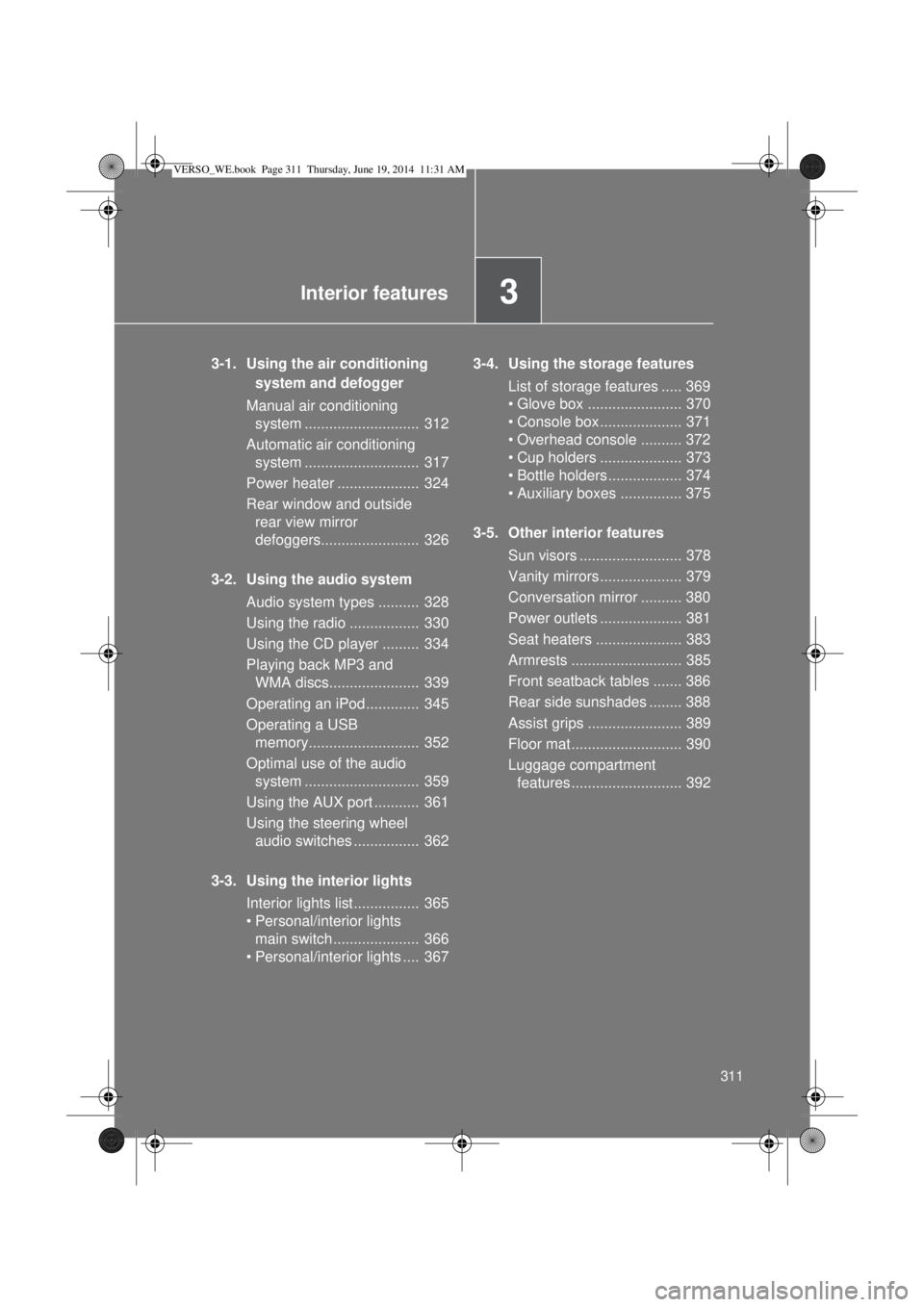
3Interior features
311
3-1. Using the air conditioning
system and defogger
Manual air conditioning
system ............................ 312
Automatic air conditioning
system ............................ 317
Power heater .................... 324
Rear window and outside
rear view mirror
defoggers........................ 326
3-2. Using the audio system
Audio system types .......... 328
Using the radio ................. 330
Using the CD player ......... 334
Playing back MP3 and
WMA discs...................... 339
Operating an iPod............. 345
Operating a USB
memory........................... 352
Optimal use of the audio
system ............................ 359
Using the AUX port ........... 361
Using the steering wheel
audio switches ................ 362
3-3. Using the interior lights
Interior lights list ................ 365
• Personal/interior lights
main switch ..................... 366
• Personal/interior lights .... 3673-4. Using the storage features
List of storage features ..... 369
• Glove box ....................... 370
• Console box.................... 371
• Overhead console .......... 372
• Cup holders .................... 373
• Bottle holders.................. 374
• Auxiliary boxes ............... 375
3-5. Other interior features
Sun visors ......................... 378
Vanity mirrors.................... 379
Conversation mirror .......... 380
Power outlets .................... 381
Seat heaters ..................... 383
Armrests ........................... 385
Front seatback tables ....... 386
Rear side sunshades ........ 388
Assist grips ....................... 389
Floor mat........................... 390
Luggage compartment
features........................... 392
VERSO_WE.book Page 311 Thursday, June 19, 2014 11:31 AM
Page 329 of 650
329 3-2. Using the audio system
3
Interior features
Using cellular phones
Interference may be heard through the audio system’s speakers if a cellular
phone is being used inside or close to the vehicle while the audio system is
operating.
NOTICE
To prevent battery discharge
Do not leave the audio system on longer than necessary when the engine is
stopped.
To avoid damaging the audio system
Take care not to spill drinks or other fluids over the audio system.
To prevent damage to USB memory or its terminal
Depending on the size and shape of the USB memory that is connected to
the system, the passenger’s seat may hit the USB memory when moving the
seat forward. In this case, do not forcibly move the seat forward as this may
damage the USB memory or the terminal, etc.
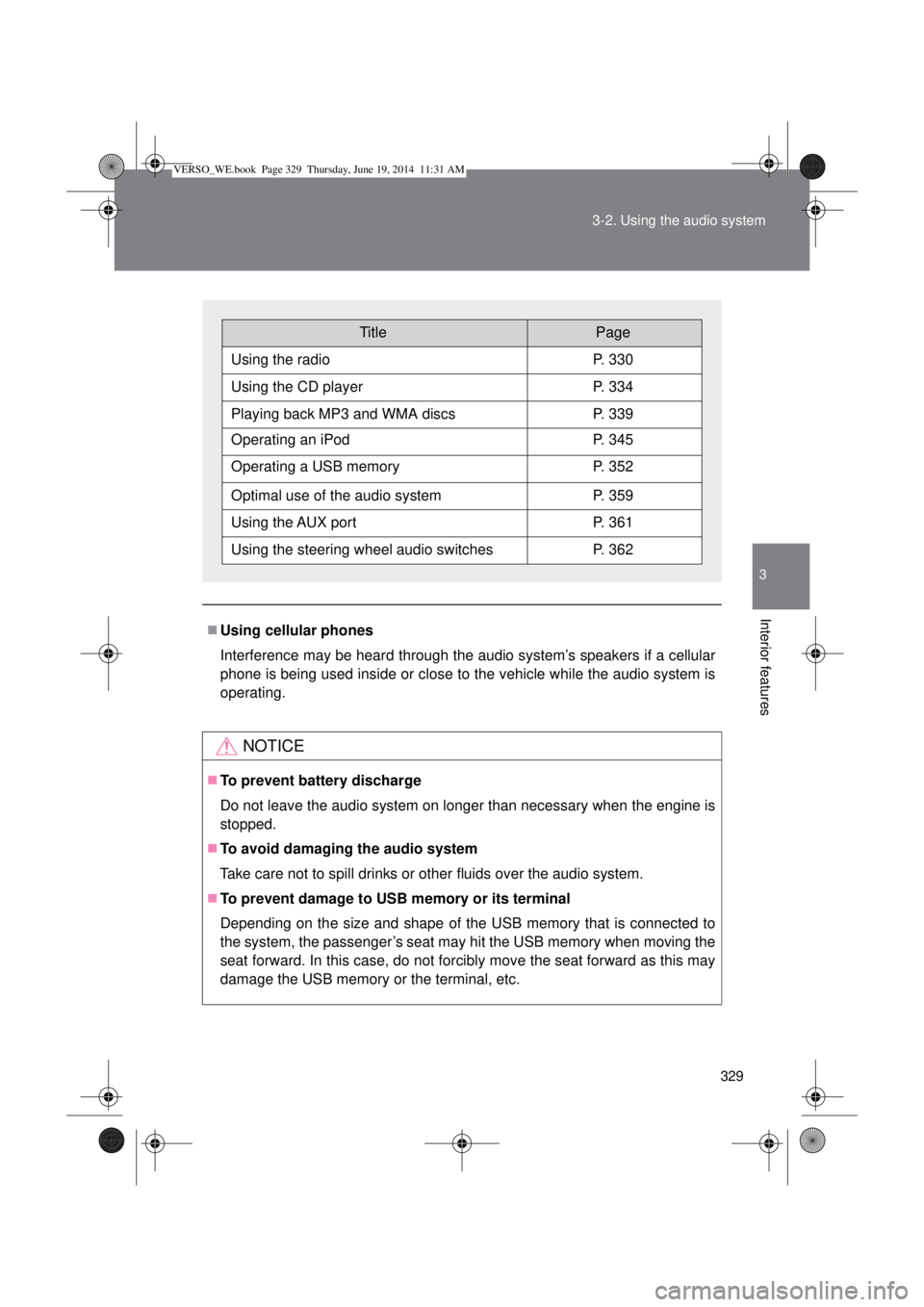
TitlePage
Using the radioP. 330
Using the CD playerP. 334
Playing back MP3 and WMA discsP. 339
Operating an iPodP. 345
Operating a USB memoryP. 352
Optimal use of the audio systemP. 359
Using the AUX portP. 361
Using the steering wheel audio switchesP. 362
VERSO_WE.book Page 329 Thursday, June 19, 2014 11:31 AM