lock TOYOTA VERSO 2017 Owners Manual
[x] Cancel search | Manufacturer: TOYOTA, Model Year: 2017, Model line: VERSO, Model: TOYOTA VERSO 2017Pages: 668, PDF Size: 49.7 MB
Page 200 of 668
200
2-1. Driving procedures
VERSO_EE_OM64517E
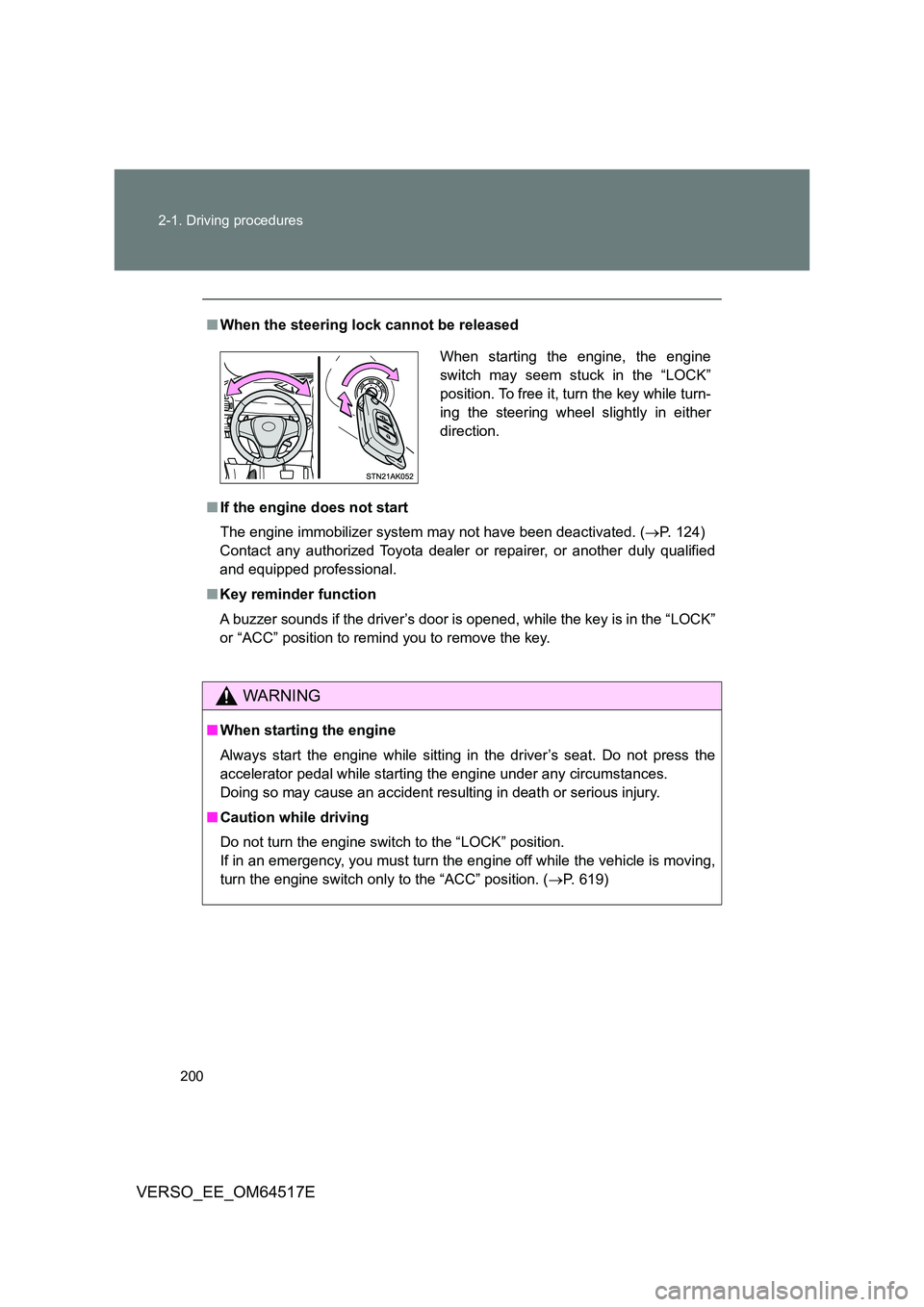
■ When the steering lock cannot be released
■ If the engine does not start
The engine immobilizer system may not have been deactivated. ( P. 124)
Contact any authorized Toyota dealer or repairer, or another duly qualified
and equipped professional.
■ Key reminder function
A buzzer sounds if the driver’s door is opened, while the key is in the “LOCK”
or “ACC” position to remind you to remove the key.
WARNING
■ When starting the engine
Always start the engine while sitting in the driver’s seat. Do not press the
accelerator pedal while starting the engine under any circumstances.
Doing so may cause an accident resulting in death or serious injury.
■ Caution while driving
Do not turn the engine switch to the “LOCK” position.
If in an emergency, you must turn the engine off while the vehicle is moving,
turn the engine switch only to the “ACC” position. ( P. 619)
When starting the engine, the engine
switch may seem stuck in the “LOCK”
position. To free it, turn the key while turn-
ing the steering wheel slightly in either
direction.
Page 205 of 668
205
2-1. Driving procedures
2
When driving
VERSO_EE_OM64517E
■ If the engine does not start
The engine immobilizer system may not have been deactivated. ( P. 124)
Contact any authorized Toyota dealer or repairer, or another duly qualified
and equipped professional.
■ Steering lock
When the “ENGINE START STOP” switch is turned off and then a door is
opened and closed, the steering lock function locks the steering wheel in its
current position. The steering lock is disabled when the “ENGINE START
STOP” switch is operated again.
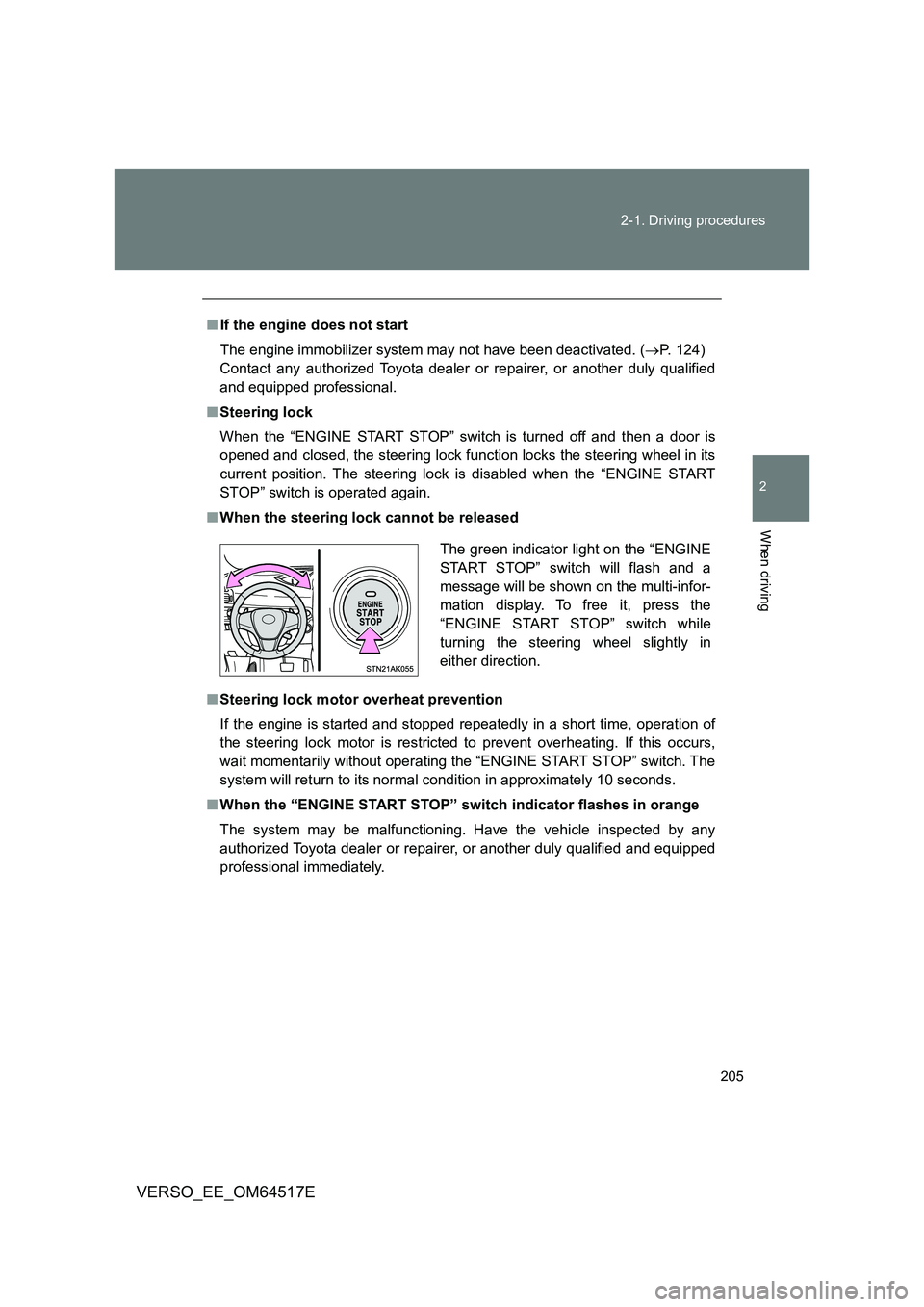
■ When the steering lock cannot be released
■ Steering lock motor overheat prevention
If the engine is started and stopped repeatedly in a short time, operation of
the steering lock motor is restricted to prevent overheating. If this occurs,
wait momentarily without operating the “ENGINE START STOP” switch. The
system will return to its normal condition in approximately 10 seconds.
■ When the “ENGINE START STOP” switch indicator flashes in orange
The system may be malfunctioning. Have the vehicle inspected by any
authorized Toyota dealer or repairer, or another duly qualified and equipped
professional immediately.
The green indicator light on the “ENGINE
START STOP” switch will flash and a
message will be shown on the multi-infor-
mation display. To free it, press the
“ENGINE START STOP” switch while
turning the steering wheel slightly in
either direction.
Page 207 of 668
207
2-1. Driving procedures
2
When driving
VERSO_EE_OM64517E
WARNING
■ Caution while driving
If the vehicle is coasting without engine power, for example if the engine
stalls, do not open a door or operate the locks until the vehicle is completely
stopped in a safe condition. Driving with the steering locked may cause an
accident, resulting in death or serious injury.
■ Stopping the engine in an emergency
If you want to stop the engine in an emergency while driving the vehicle,
press and hold the “ENGINE START STOP” switch for more than 2 seconds,
or press it briefly 3 times or more in succession. ( P. 619)
However, do not touch the “ENGINE START STOP” switch while driving
except in an emergency. Turning the engine off while driving will not cause
loss of steering or braking control, but the power assist to these systems will
be lost. This will make it more difficult to steer and brake, so you should pull
over and stop the vehicle as soon as it is safe to do so.
NOTICE
■ To prevent battery discharge
Do not leave the “ENGINE START STOP” switch in ACCESSORY or IGNI-
TION ON mode for long periods without the engine running.
■ When starting the engine
● Do not race a cold engine.
● If the engine becomes difficult to start or stalls frequently, have your vehi-
cle checked by any authorized Toyota dealer or repairer, or another duly
qualified and equipped professional immediately.
■ “ENGINE START STOP” switch operation
If you feel something catching or sense irregular resistance when operating
the “ENGINE START STOP” switch, then there may be a malfunction. Imme-
diately contact any authorized Toyota dealer or repairer, or another duly
qualified and equipped professional.
Page 213 of 668
213
2-1. Driving procedures
2
When driving
VERSO_EE_OM64517E
■ Automatic deactivation of “SPORT” mode
Vehicles without smart entry & start system
If the engine switch is turned to the “LOCK” position after driving in
“SPORT” mode, the mode is automatically deactivated.
Vehicles with smart entry & start system
If the “ENGINE START STOP” switch is turned off after driving in
“SPORT” mode, the mode is automatically deactivated.
■ If the shift lever cannot be shifted from “P”
P. 603
■ If the “M” indicator is not displayed after shifting the shift lever to the
“M” position
If the display does not change to “M” on an occasion other than that
described above, it may indicate a malfunction in the transmission system.
Have your vehicle inspected by any authorized Toyota dealer or repairer, or
another duly qualified and equipped professional immediately.
■ Automatic gear step selection
When the vehicle comes to a stop, the transmission will automatically down-
shift to allow you to start off in 1st step.
Page 221 of 668
221
2-1. Driving procedures
2
When driving
VERSO_EE_OM64517E
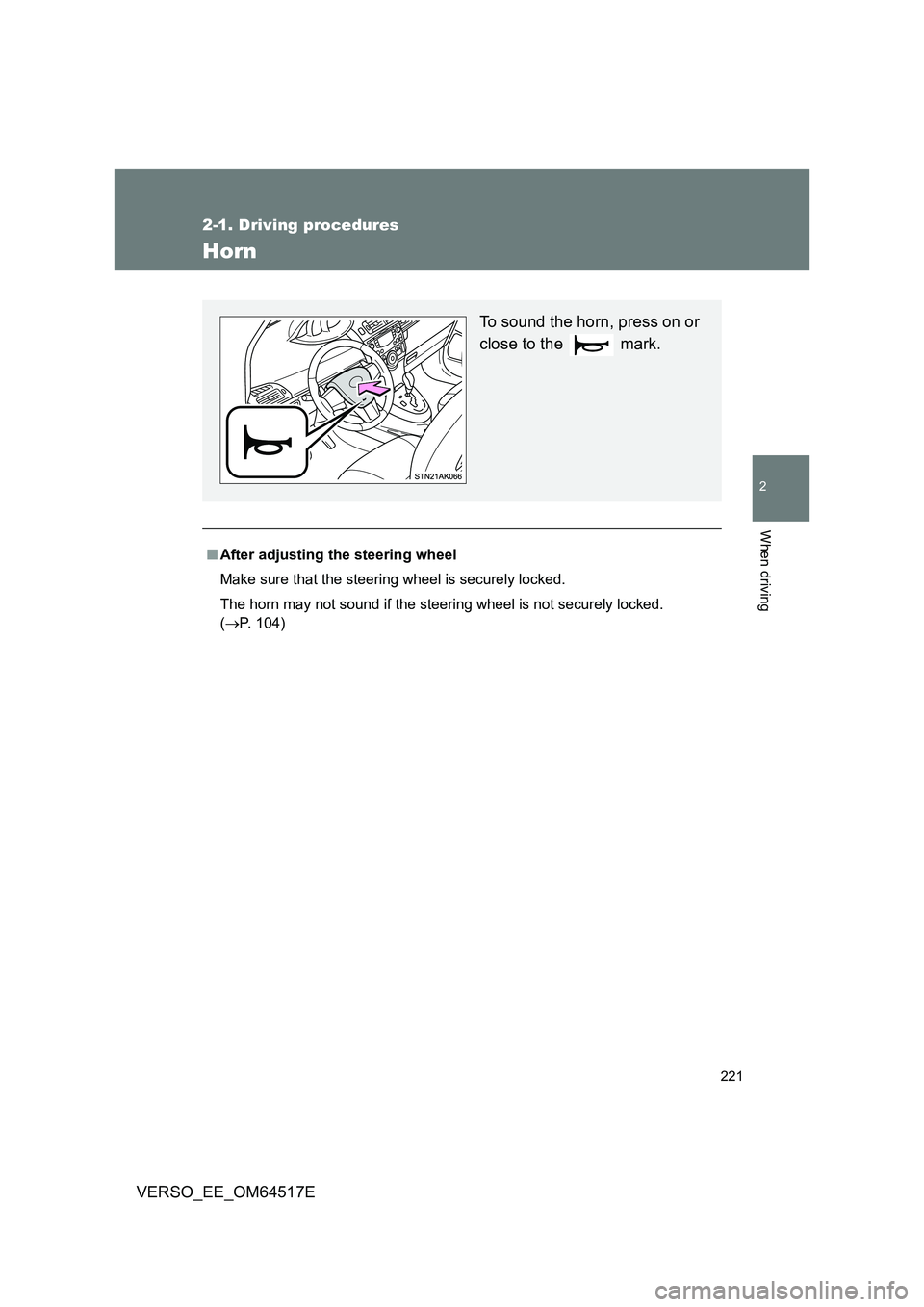
Horn
■After adjusting the steering wheel
Make sure that the steering wheel is securely locked.
The horn may not sound if the steering wheel is not securely locked.
( P. 1 0 4 )
To sound the horn, press on or
close to the mark.
Page 235 of 668
235
2-2. Instrument cluster
2
When driving
VERSO_EE_OM64517E
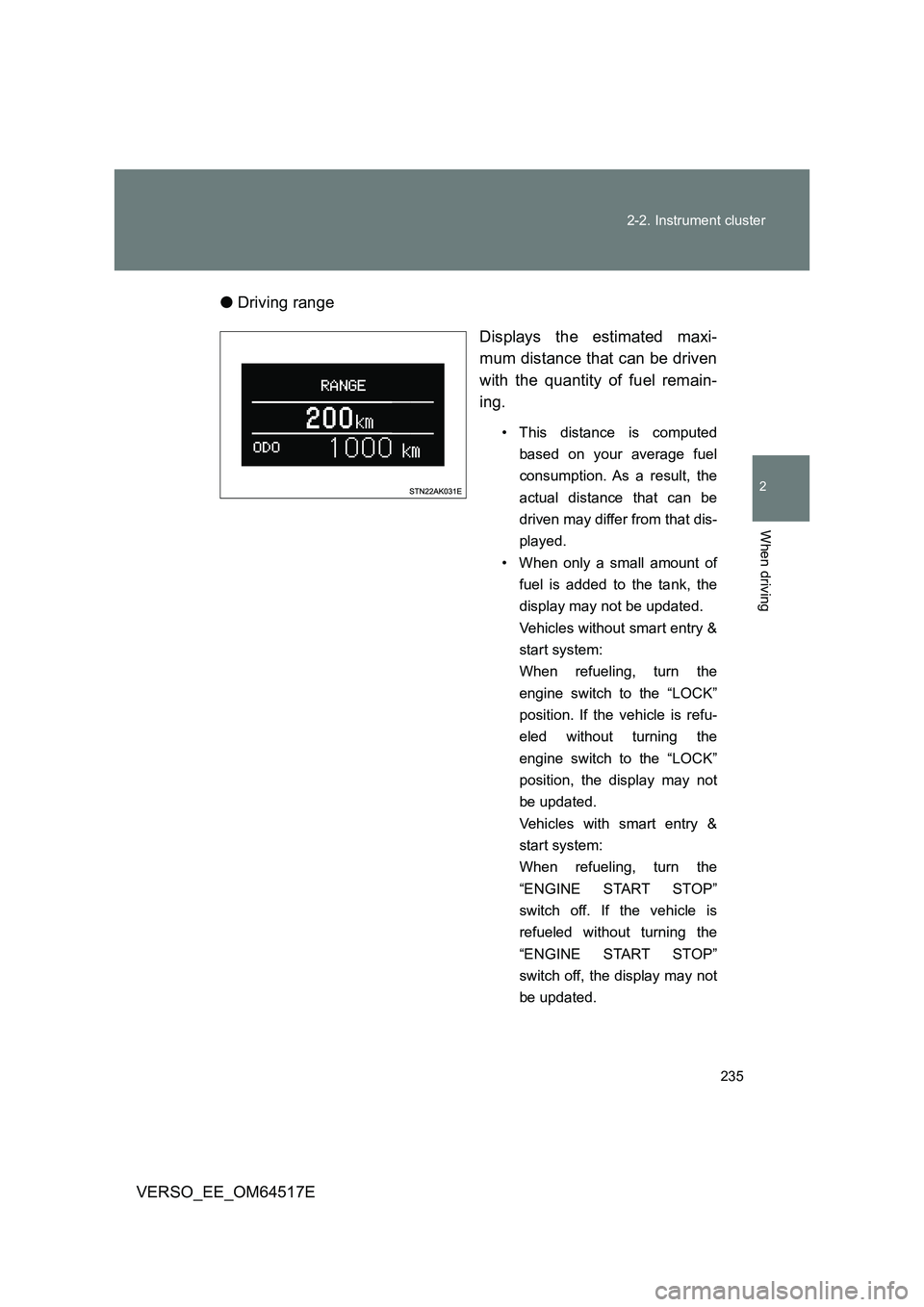
● Driving range
Displays the estimated maxi-
mum distance that can be driven
with the quantity of fuel remain-
ing.
• This distance is computed
based on your average fuel
consumption. As a result, the
actual distance that can be
driven may differ from that dis-
played.
• When only a small amount of
fuel is added to the tank, the
display may not be updated.
Vehicles without smart entry &
start system:
When refueling, turn the
engine switch to the “LOCK”
position. If the vehicle is refu-
eled without turning the
engine switch to the “LOCK”
position, the display may not
be updated.
Vehicles with smart entry &
start system:
When refueling, turn the
“ENGINE START STOP”
switch off. If the vehicle is
refueled without turning the
“ENGINE START STOP”
switch off, the display may not
be updated.
Page 238 of 668
238
2-2. Instrument cluster
VERSO_EE_OM64517E
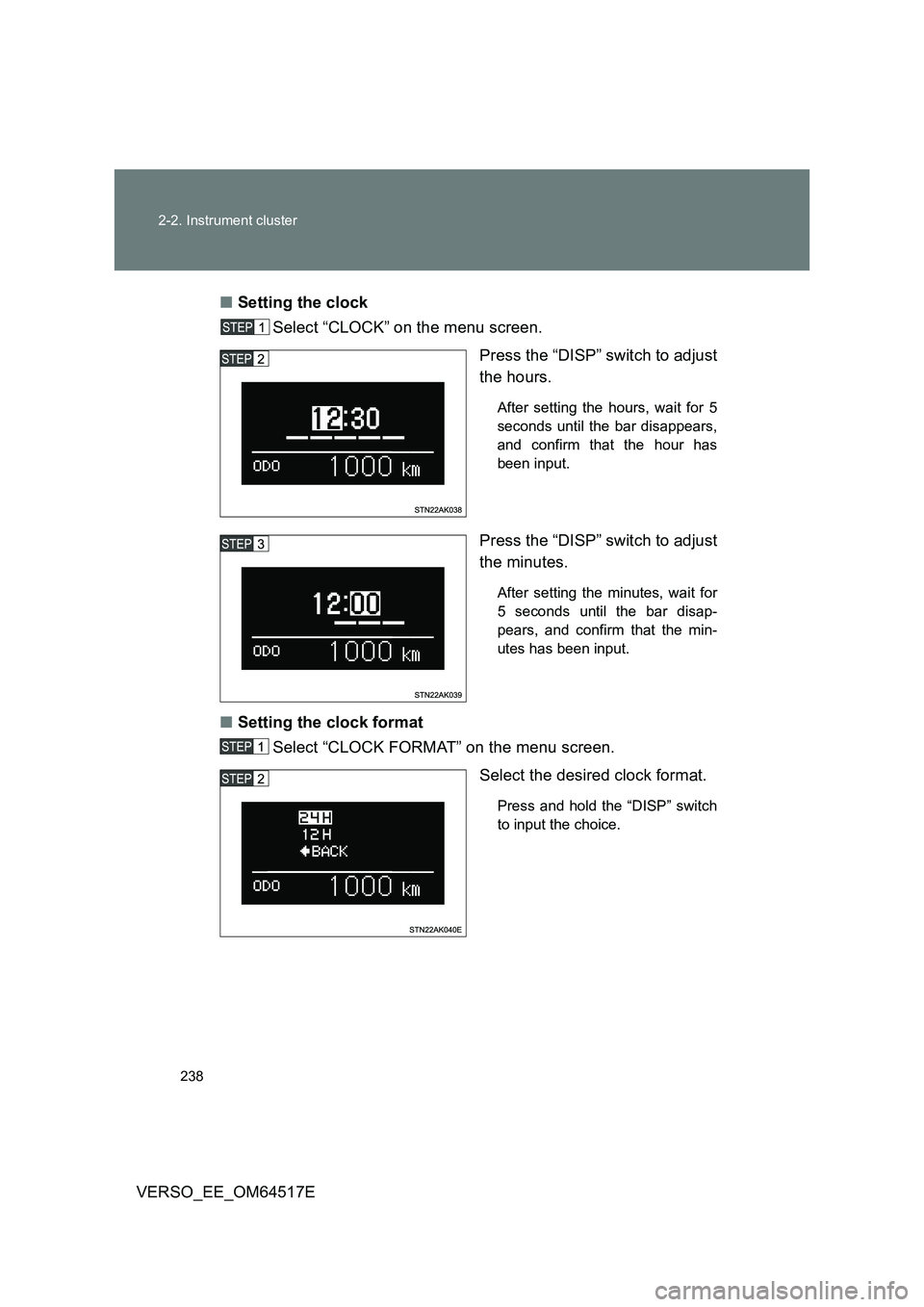
■ Setting the clock
Select “CLOCK” on the menu screen.
Press the “DISP” switch to adjust
the hours.
After setting the hours, wait for 5
seconds until the bar disappears,
and confirm that the hour has
been input.
Press the “DISP” switch to adjust
the minutes.
After setting the minutes, wait for
5 seconds until the bar disap-
pears, and confirm that the min-
utes has been input.
■ Setting the clock format
Select “CLOCK FORMAT” on the menu screen.
Select the desired clock format.
Press and hold the “DISP” switch
to input the choice.
Page 251 of 668
251
2-3. Operating the lights and wipers
2
When driving
VERSO_EE_OM64517E
Daytime running light system
To make your vehicle more visible to other drivers, the daytime run-
ning lights turn on automatically whenever the engine is started.
(However, the daytime running light system will be canceled when
the headlight switch is operated manually or the automatic headlight
system turns on the tail lights.) Daytime running lights are not
designed for use at night.
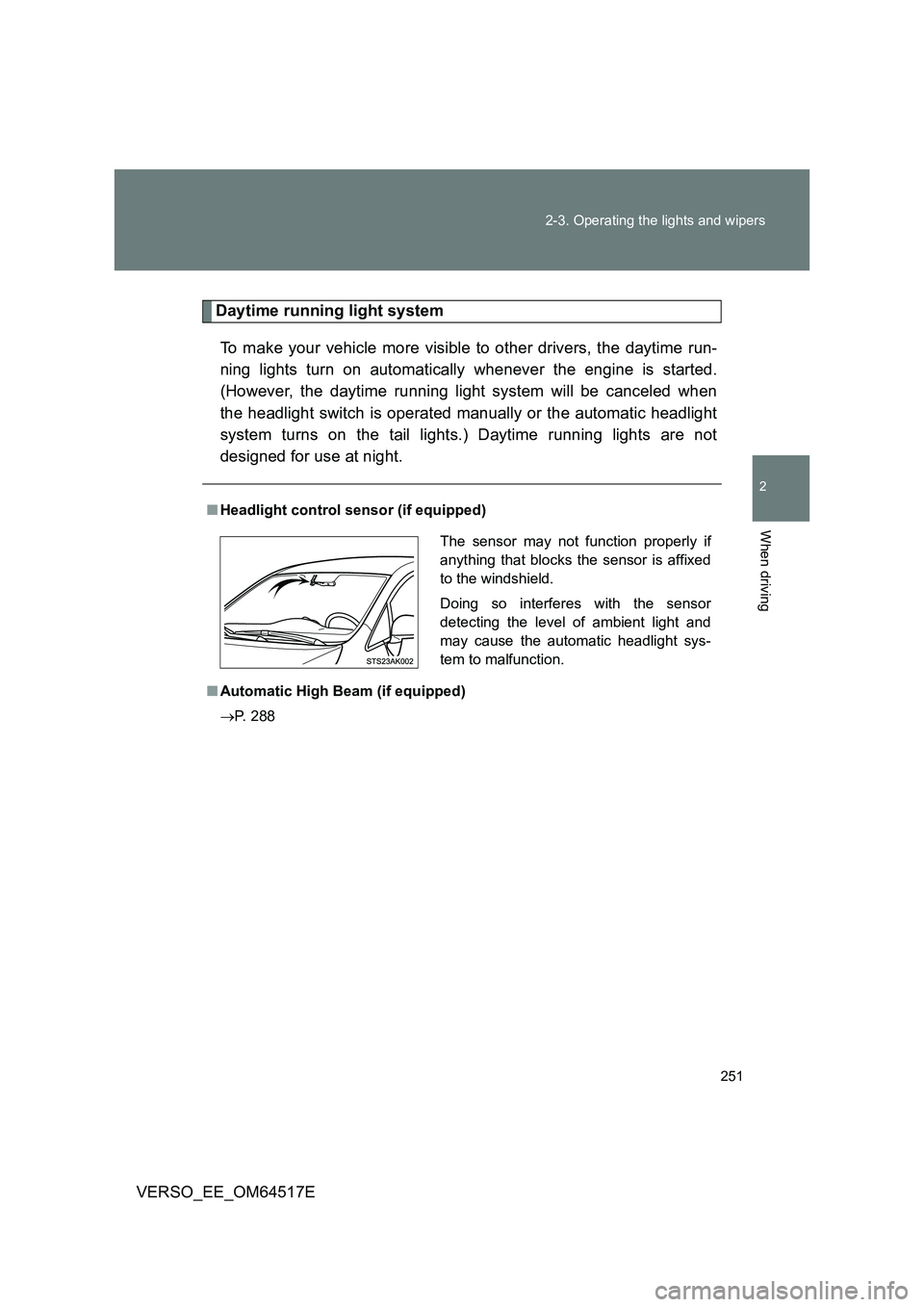
■ Headlight control sensor (if equipped)
■ Automatic High Beam (if equipped)
P. 288
The sensor may not function properly if
anything that blocks the sensor is affixed
to the windshield.
Doing so interferes with the sensor
detecting the level of ambient light and
may cause the automatic headlight sys-
tem to malfunction.
Page 252 of 668
252
2-3. Operating the lights and wipers
VERSO_EE_OM64517E
■ Automatic light off system
Vehicles without smart entry & start system
● When the light switch is in the position, the headlight and all the
lights turn off automatically if the engine switch is turned to the “ACC”
or “LOCK” position.
● When the light switch is in the or position, the headlights
and front fog lights turn off automatically if the engine switch is turned
to the “ACC” or “LOCK” position.
To turn the lights on again, turn the engine switch to the “ON” position, or
turn the light switch off once and then back to the or position.
Vehicles with smart entry & start system
● When the light switch is in the position, the headlight and all the
lights turn off automatically if the “ENGINE START STOP” switch is
turned to ACCESSORY mode or turned off.
● When the light switch is in the or position, the headlights
and front fog lights turn off automatically if the “ENGINE START STOP”
switch is turned to ACCESSORY mode or turned off.
To turn the lights on again, turn to IGNITION ON mode, or turn the light
switch off once and then back to the or position.
■ Light reminder buzzer
Vehicles without smart entry & start system
A buzzer sounds when the engine switch is turned to the “LOCK” or
“ACC” position and the driver’s door is opened while the lights are turned
on.
Vehicles with smart entry & start system
A buzzer sounds when the “ENGINE START STOP” switch is turned off or
to the ACCESSORY mode and the driver’s door is opened while the lights
are turned on.
■ Automatic headlight leveling system (vehicles with discharge head-
lights)
The level of the headlights is automatically adjusted according to the number
of passengers and the loading condition of the vehicle to ensure that the
headlights do not interfere with other road users.
Page 259 of 668
259
2-3. Operating the lights and wipers
2
When driving
VERSO_EE_OM64517E
● Vehicles with smart entry & start system:
If the wiper switch is turned to the position while the “ENGINE
START STOP” switch is in IGNITION ON mode, the wiper will operate
once to show that AUTO mode is activated.
If the wiper sensitivity is adjusted to higher, the wiper may operate once to
indicate the change of sensitivity.
● If the temperature of the raindrop sensor is 85°C (185°F) or higher, or
-40°C (-40°F) or lower, automatic operation may not occur. In this case,
operate the wipers in any mode other than AUTO.
■ If no windshield washer fluid sprays
Check that the washer nozzles are not blocked and if there is washer fluid in
the windshield washer fluid reservoir.
WARNING
■ Caution regarding the use of windshield wipers in AUTO mode
The windshield wipers may operate unexpectedly if the sensor is touched or
the windshield is subject to vibration in AUTO mode. Take care that your fin-
gers or anything else do not become caught in the windshield wipers.
■ Caution regarding the use of washer fluid
When it is cold, do not use the washer fluid until the windshield becomes
warm. The fluid may freeze on the windshield and cause low visibility. This
may lead to an accident, resulting in death or serious injury.
NOTICE
■ When the windshield is dry
Do not use the wipers, as they may damage the windshield.
■ When the washer fluid tank is empty
Do not use the washer when the washer fluid tank is empty. This may cause
the washer fluid pump to overheat.
■ When there is no windshield washer fluid spray from the nozzle
Damage to the washer fluid pump may be caused if the lever is pulled
toward you and held continually.