key battery TOYOTA VERSO 2017 User Guide
[x] Cancel search | Manufacturer: TOYOTA, Model Year: 2017, Model line: VERSO, Model: TOYOTA VERSO 2017Pages: 668, PDF Size: 49.7 MB
Page 140 of 668
140
1-6. Theft deterrent system
VERSO_EE_OM64517E
■ System maintenance
The vehicle has a maintenance-free type alarm system.
■ Items to check before locking the vehicle
To prevent unexpected triggering of the alarm and vehicle theft, make sure
of the following.
● Nobody is in the vehicle.
● The windows is closed before the alarm is set.
● No valuables or other personal items are left in the vehicle.
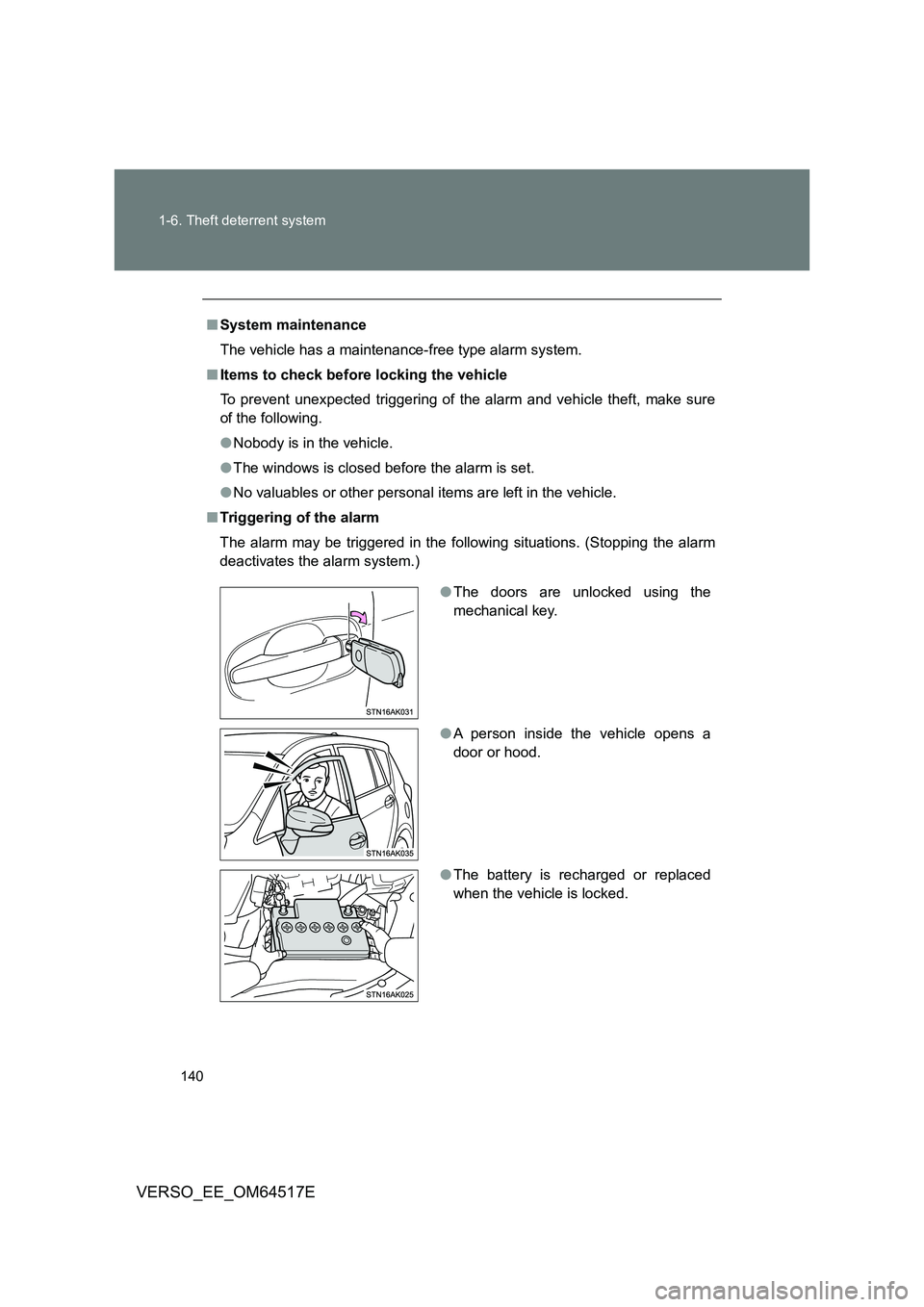
■ Triggering of the alarm
The alarm may be triggered in the follow ing situations. (Stopping the alarm
deactivates the alarm system.)
● The doors are unlocked using the
mechanical key.
● A person inside the vehicle opens a
door or hood.
● The battery is recharged or replaced
when the vehicle is locked.
Page 206 of 668
206
2-1. Driving procedures
VERSO_EE_OM64517E
■ Auto power off function
Vehicles with a Multidrive
If the vehicle is left in ACCESSORY mode for more than 20 minutes with
the shift lever in “P”, the “ENGINE START STOP” switch will automatically
turn off.
Vehicles with a manual transmission
If the vehicle is left in ACCESSORY mode for more than 20 minutes, the
“ENGINE START STOP” switch will automatically turn off.
■ “ENGINE START STOP” switch operation
When operating the “ENGINE START STOP” switch, push it quickly and
firmly. If the switch is not pushed firmly, the mode may not change or the
engine may not start. Furthermore, if the switch is pushed quickly and firmly,
there is no need to hold it down.
■ Electronic key battery depletion
P. 4 7
■ When the electronic key battery is discharged
P. 606
■ Conditions affecting operation
P. 6 3
■ Note for the smart entry & start system
P. 4 7
WARNING
■When starting the engine
Always start the engine while sitting in the driver’s seat. Do not depress the
accelerator pedal while starting the engine under any circumstances.
Doing so may cause an accident resulting in death or serious injury.
Page 397 of 668
397
3-3. Using the interior lights
3
Interior features
VERSO_EE_OM64517E
■ Illuminated entry system
Vehicles without smart entry & start system
The lights automatically turn on/off according to the engine switch posi-
tion, whether the doors are locked/ unlocked, and whether the doors are
open/closed.
Vehicles with smart entry & start system
The lights automatically turn on/off according to “ENGINE START STOP”
switch mode, the presence of the electronic key, whether the doors are
locked/unlocked, and whether the doors are open/closed.
■ To prevent battery discharge
Vehicles without smart entry & start system
If the interior lights remain on when the engine switch is turned off, the
lights will go off automatically after 20 minutes.
Vehicles with smart entry & start system
If the interior lights remain on when the “ENGINE START STOP” switch
is turned off, the lights will go off automatically after 20 minutes.
■ Customization that can be configured at any authorized Toyota dealer
or repairer, or another duly qua lified and equipped professional
Settings (e.g. The time elapsed before lights turn off) can be changed.
(Customizable features P. 646)
Personal/interior lights
Page 431 of 668
4Maintenance and care
431
VERSO_EE_OM64517E
4-1. Maintenance and care
Cleaning and protecting
the vehicle exterior ......... 432
Cleaning and protecting
the vehicle interior .......... 436
4-2. Maintenance
Maintenance
requirements................... 439
4-3. Do-it-yourself maintenance
Do-it-yourself service
precautions ..................... 442
Hood ................................. 446
Positioning a floor jack ...... 448
Engine compartment......... 450
Tires .................................. 467
Tire inflation pressure ....... 479
Wheels .............................. 481
Air conditioning filter ......... 484
Key battery........................ 487
Checking and replacing
fuses ............................... 491
Light bulbs ........................ 506
Page 487 of 668
487
4-3. Do-it-yourself maintenance
4
Maintenance and care
VERSO_EE_OM64517E
Key battery
Replace the battery with a new one if it is discharged.
■You will need the following items:
● Flathead screwdriver (To prevent damage to the key, cover
the tip of the screwdriver with rag.)
● Small Phillips-head screwdriver
● Lithium battery
Vehicles without smart entry & start system: CR2016
Vehicles with smart entry & start system: CR1632
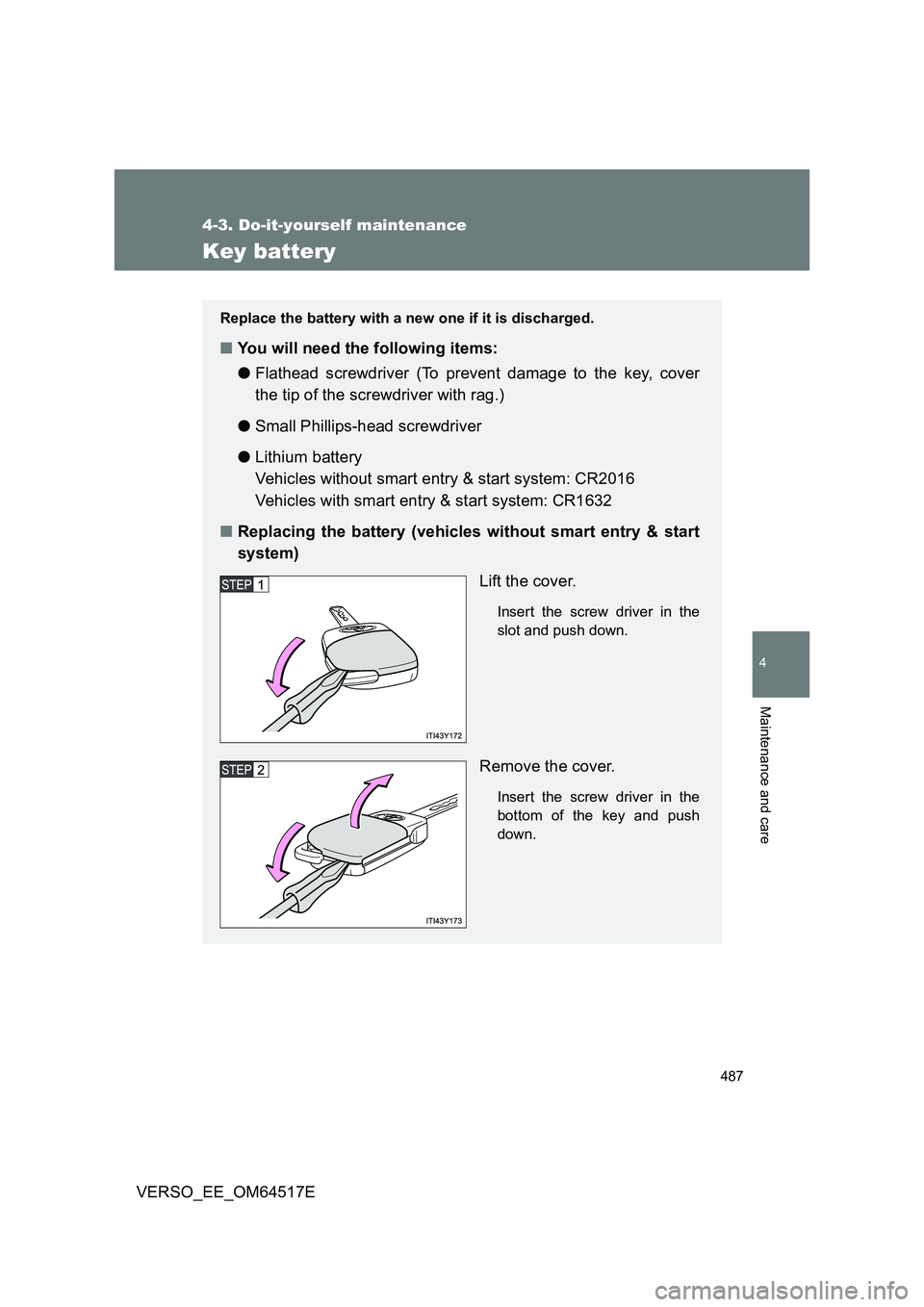
■ Replacing the battery (vehicles without smart entry & start
system)
Lift the cover.
Insert the screw driver in the
slot and push down.
Remove the cover.
Insert the screw driver in the
bottom of the key and push
down.
Page 488 of 668
488
4-3. Do-it-yourself maintenance
VERSO_EE_OM64517E
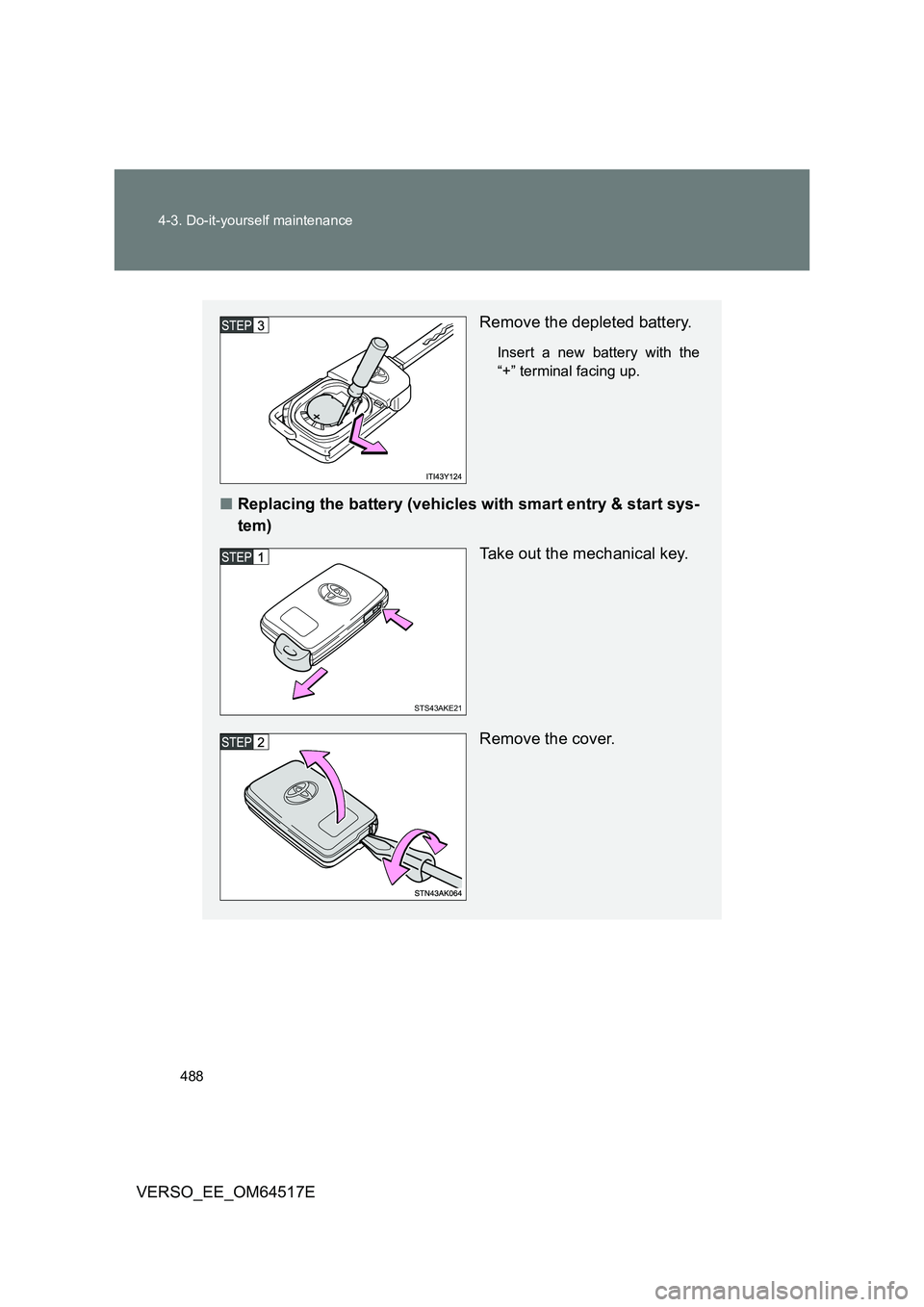
Remove the depleted battery.
Insert a new battery with the
“+” terminal facing up.
■ Replacing the battery (vehicles with smart entry & start sys-
tem)
Take out the mechanical key.
Remove the cover.
STS43AKE21
Page 489 of 668
489
4-3. Do-it-yourself maintenance
4
Maintenance and care
VERSO_EE_OM64517E
■ If the key battery is discharged
The following symptoms may occur.
● The smart entry & start system (if equipped) and wireless remote control
will not function properly.
● The operational range is reduced.
■ Use the following types of lithium battery
Vehicles without smart entry & start system: CR2016
Vehicles with smart entry & start system: CR1632
● Batteries can be purchased at any authorized Toyota dealer or repairer,
or another duly qualified and equipped professional, jewelers, or camera
stores.
● Replace only with the same or equivalent type recommended by any
authorized Toyota dealer or repairer, or another duly qualified and
equipped professional.
● Dispose of used batteries according to local laws.
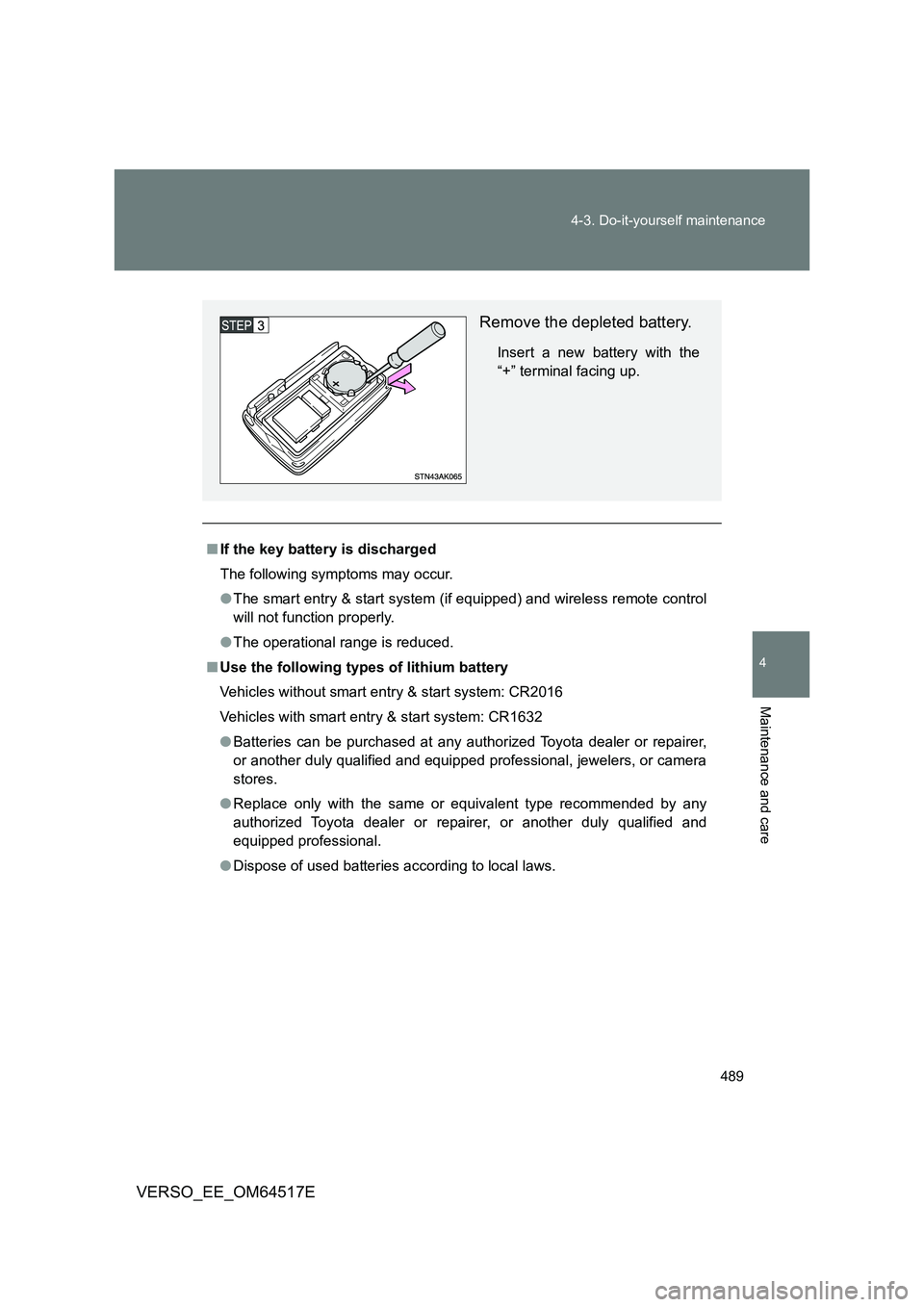
Remove the depleted battery.
Insert a new battery with the
“+” terminal facing up.
Page 490 of 668
490
4-3. Do-it-yourself maintenance
VERSO_EE_OM64517E
WARNING
■ Removed battery and other parts
These parts are small and if swallowed by a child, they can cause choking.
Keep away from children. Failure to do so could result in death or serious
injury.
■ Certification for the key battery
CAUTION: RISK OF EXPLOSION IF BATTERY IS REPLACED BY AN
INCORRECT TYPE. DISPOSE OF USED BATTERIES ACCORDING TO
THE INSTRUCTIONS
NOTICE
■ For normal operation after replacing the battery
Observe the following precautions to prevent accidents.
● Always work with dry hands.
Moisture may cause the battery to rust.
● Do not touch or move any other components inside the remote control.
● Do not bend the battery terminals.
Page 531 of 668
5When trouble arises
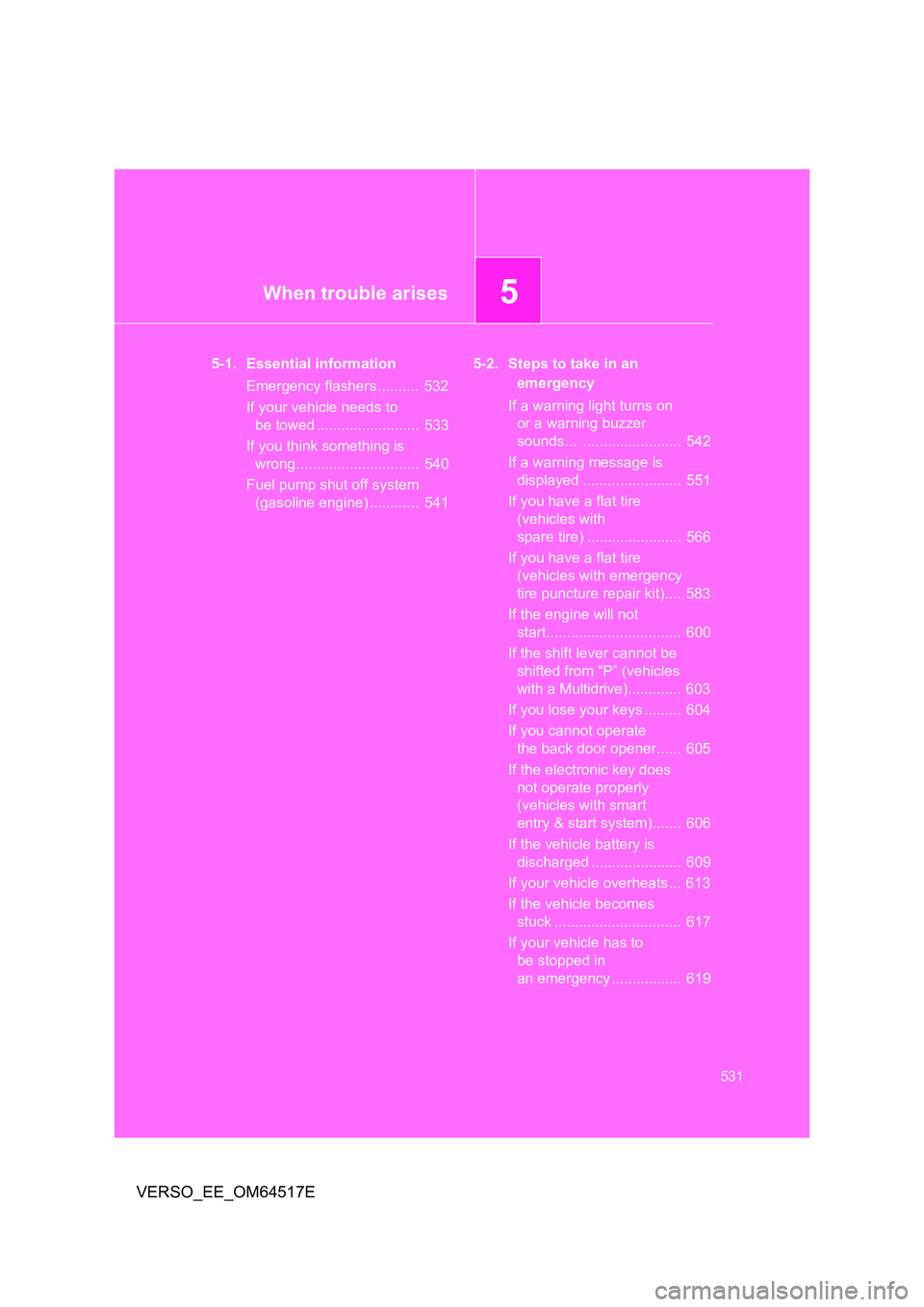
531
VERSO_EE_OM64517E
5-1. Essential information
Emergency flashers .......... 532
If your vehicle needs to
be towed ......................... 533
If you think something is
wrong .............................. 540
Fuel pump shut off system
(gasoline engine) ............ 541
5-2. Steps to take in an
emergency
If a warning light turns on
or a warning buzzer
sounds... ........................ 542
If a warning message is
displayed ........................ 551
If you have a flat tire
(vehicles with
spare tire) ....................... 566
If you have a flat tire
(vehicles with emergency
tire puncture repair kit).... 583
If the engine will not
start................................. 600
If the shift lever cannot be
shifted from “P” (vehicles
with a Multidrive)............. 603
If you lose your keys ......... 604
If you cannot operate
the back door opener...... 605
If the electronic key does
not operate properly
(vehicles with smart
entry & start system)....... 606
If the vehicle battery is
discharged ...................... 609
If your vehicle overheats ... 613
If the vehicle becomes
stuck ............................... 617
If your vehicle has to
be stopped in
an emergency ................. 619
Page 563 of 668
5
563
5-2. Steps to take in an emergency
When trouble arises
VERSO_EE_OM64517E
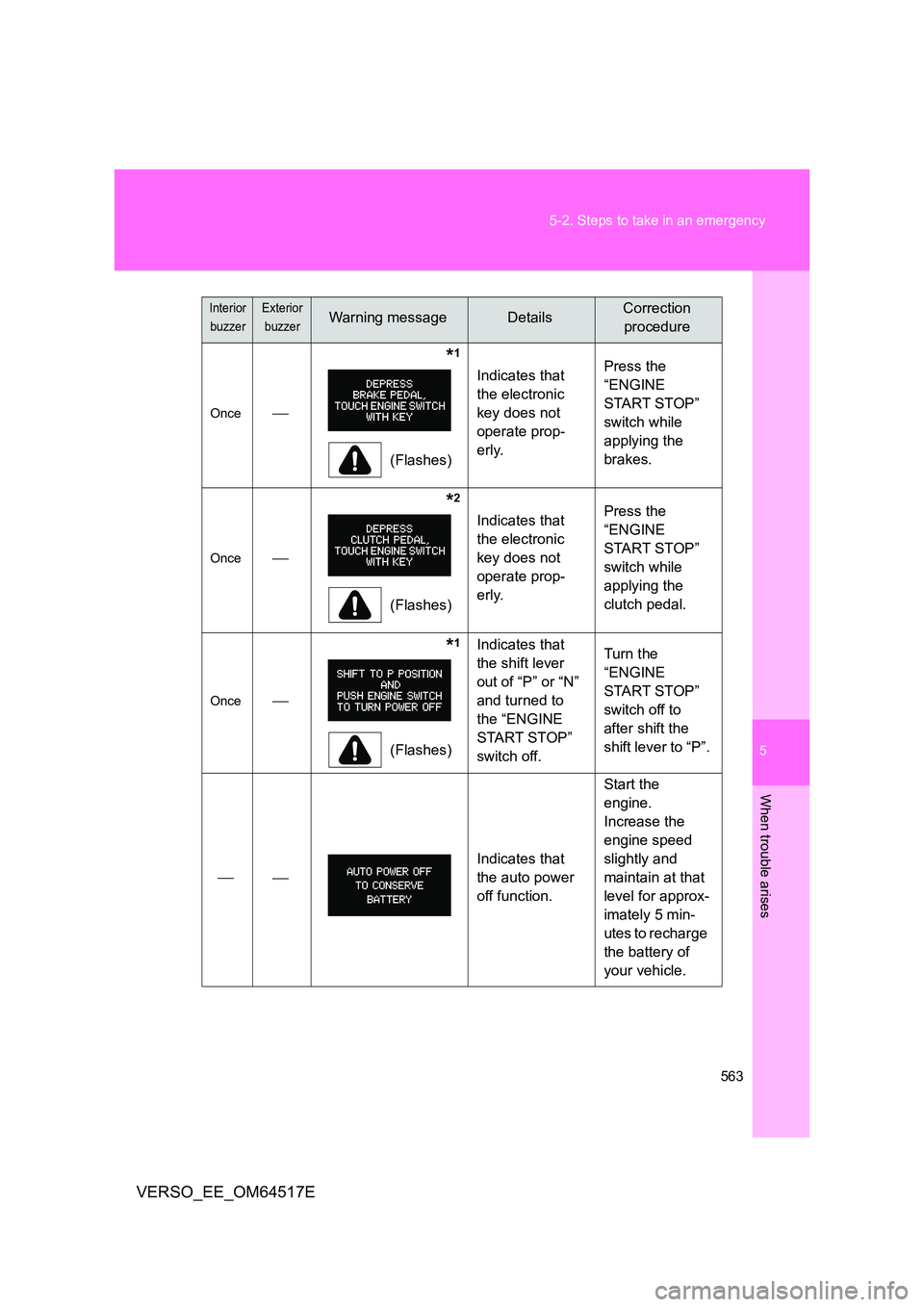
Once
*1
(Flashes)
Indicates that
the electronic
key does not
operate prop-
erly.
Press the
“ENGINE
START STOP”
switch while
applying the
brakes.
Once
*2
(Flashes)
Indicates that
the electronic
key does not
operate prop-
erly.
Press the
“ENGINE
START STOP”
switch while
applying the
clutch pedal.
Once
*1
(Flashes)
Indicates that
the shift lever
out of “P” or “N”
and turned to
the “ENGINE
START STOP”
switch off.
Turn the
“ENGINE
START STOP”
switch off to
after shift the
shift lever to “P”.
Indicates that
the auto power
off function.
Start the
engine.
Increase the
engine speed
slightly and
maintain at that
level for approx-
imately 5 min-
utes to recharge
the battery of
your vehicle.
Interior
buzzer
Exterior
buzzerWarning messageDetailsCorrection
procedure