lock TOYOTA VERSO 2017 User Guide
[x] Cancel search | Manufacturer: TOYOTA, Model Year: 2017, Model line: VERSO, Model: TOYOTA VERSO 2017Pages: 668, PDF Size: 49.7 MB
Page 30 of 668
30
VERSO_EE_OM64517E
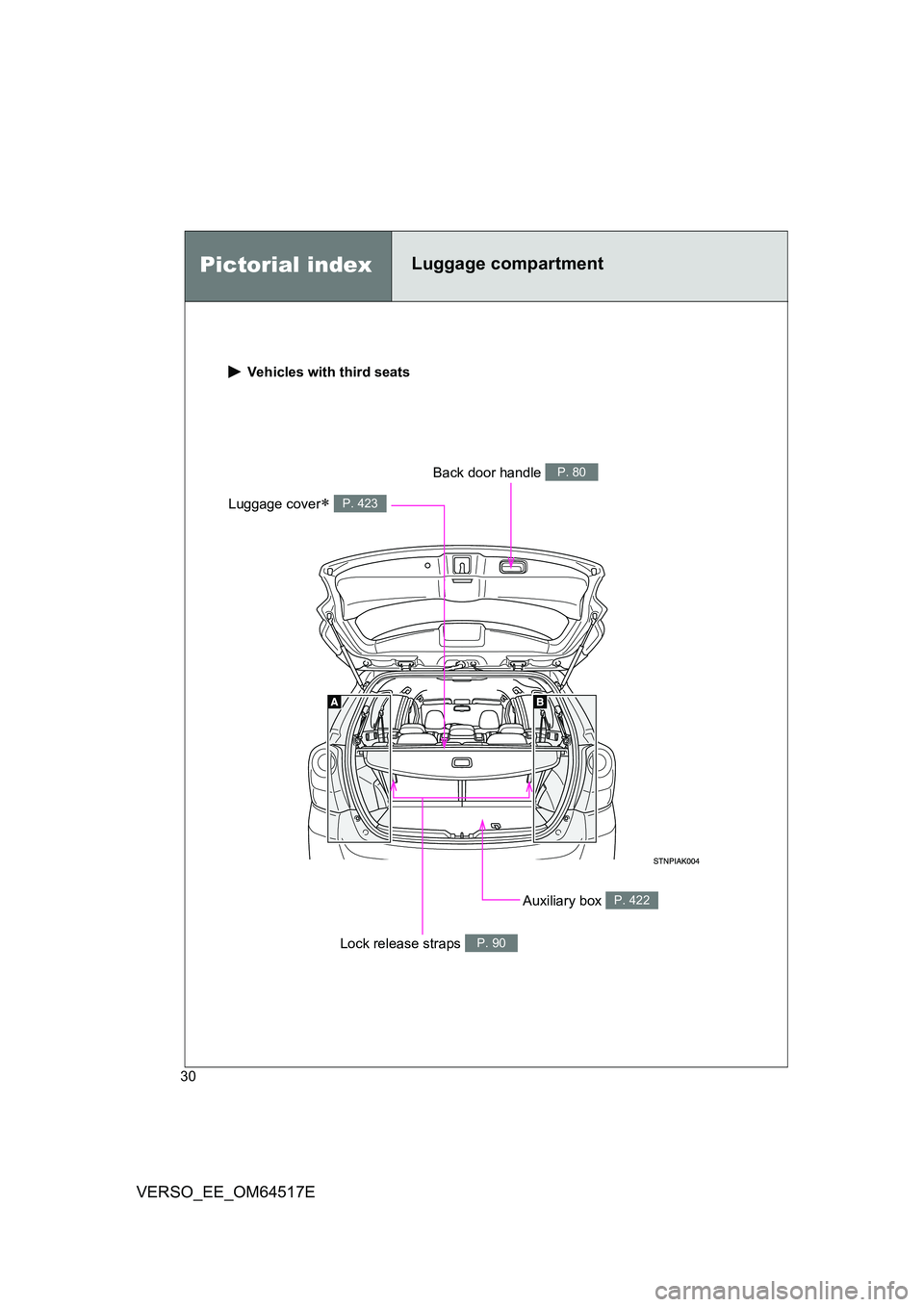
Vehicles with third seats
Auxiliary box P. 422
Luggage cover P. 423
Back door handle P. 80
Lock release straps P. 90
Pictorial indexLuggage compartment
Page 33 of 668
33
VERSO_EE_OM64517E
Installation of an RF-transmitter system
The installation of an RF-transmitter system in your vehicle could affect elec-
tronic systems such as:
● Multiport fuel injection system/sequential multiport fuel injection system
● Cruise control system (if equipped)
● Anti-lock brake system
● SRS airbag system
● Seat belt pretensioner system
Be sure to check with any authorized Toyota dealer or repairer, or another
duly qualified and equipped professional for precautionary measures or spe-
cial instructions regarding installation of an RF-transmitter system.
Further information regarding frequency bands, power levels, antenna posi-
tions and installation provisions for the installation of RF-transmitters, is
available on request at any authorized To yota dealer or repairer, or another
duly qualified and equipped professional.
Scrapping of your Toyota
The SRS airbag and seat belt pretensioner devices in your Toyota contain
explosive chemicals. If the vehicle is scrapped with the airbags and seat belt
pretensioners left as they are, this may cause an accident such as fire. Be
sure to have the systems of the SRS airbag and seat belt pretensioner
removed and disposed of by a qualified service shop or by any authorized
Toyota dealer or repairer, or another duly qualified and equipped profes-
sional, before you scrap your vehicle.
Page 37 of 668
1Before driving
37
VERSO_EE_OM64517E
1-1. Key information
Keys.................................... 38
1-2. Opening, closing and
locking the doors
Smart entry & start
system .............................. 42
Wireless remote control ...... 64
Side doors .......................... 73
Back door ........................... 79
1-3. Adjustable components
(seats, mirrors, steering
wheel)
Front seats.......................... 84
Rear seats .......................... 86
Head restraints ................... 94
Seat belts............................ 96
Steering wheel .................. 104
Anti-glare inside rear view
mirror .............................. 105
Outside rear view
mirrors ............................ 109
1-4. Opening and closing
the windows and
panoramic roof shade
Power windows................. 112
Panoramic roof shade ...... 116
1-5. Refueling
Opening the fuel tank
cap .................................. 119
1-6. Theft deterrent system
Engine immobilizer
system ............................ 124
Double locking system ...... 135
Alarm ................................ 137
1-7. Safety information
Correct driving posture ..... 146
SRS airbags...................... 148
Child restraint systems ..... 159
Installing child restraints ... 167
Airbag manual on-off
system ............................ 179
Page 40 of 668
40
1-1. Key information
VERSO_EE_OM64517E
■ When required to leave a key to the vehicle with a parking attendant
(for right-hand drive vehicles with smart entry & start system)
Lock the glove box. ( P. 400)
Remove the mechanical key for your own use and provide the attendant with
the electronic key only.
■ Key number plate
Keep the plate in a safe place such as your wallet, not in the vehicle. In the
event that a key (vehicles without smart entry & start system) or mechanical
key (vehicles with smart entry & start system) is lost, a new key can be made
by any authorized Toyota dealer or repairer, or another duly qualified and
equipped professional, using the key number plate. ( P. 604)
■ When riding in an aircraft
When bringing a key with wireless remo te control function onto an aircraft,
make sure you do not press any buttons on the key while inside the aircraft
cabin. If you are carrying the key in your bag etc., ensure that the buttons
are not likely to be pressed accidentally. Pressing a button may cause the
key to emit radio waves that could inte rfere with the operation of the aircraft.
NOTICE
■To prevent key damage (vehicles without smart entry & start system)
● Do not subject the keys to strong shocks, expose them to high tempera-
tures by placing them in direct sunlight, or get them wet.
● Do not expose the keys to electromagnetic materials or attach any mate-
rial that blocks electromagnetic waves to the key surface.
● Do not disassemble the key.
Page 42 of 668
42
VERSO_EE_OM64517E
1-2. Opening, closing and locking the doors
Smart entry & start system
: If equipped
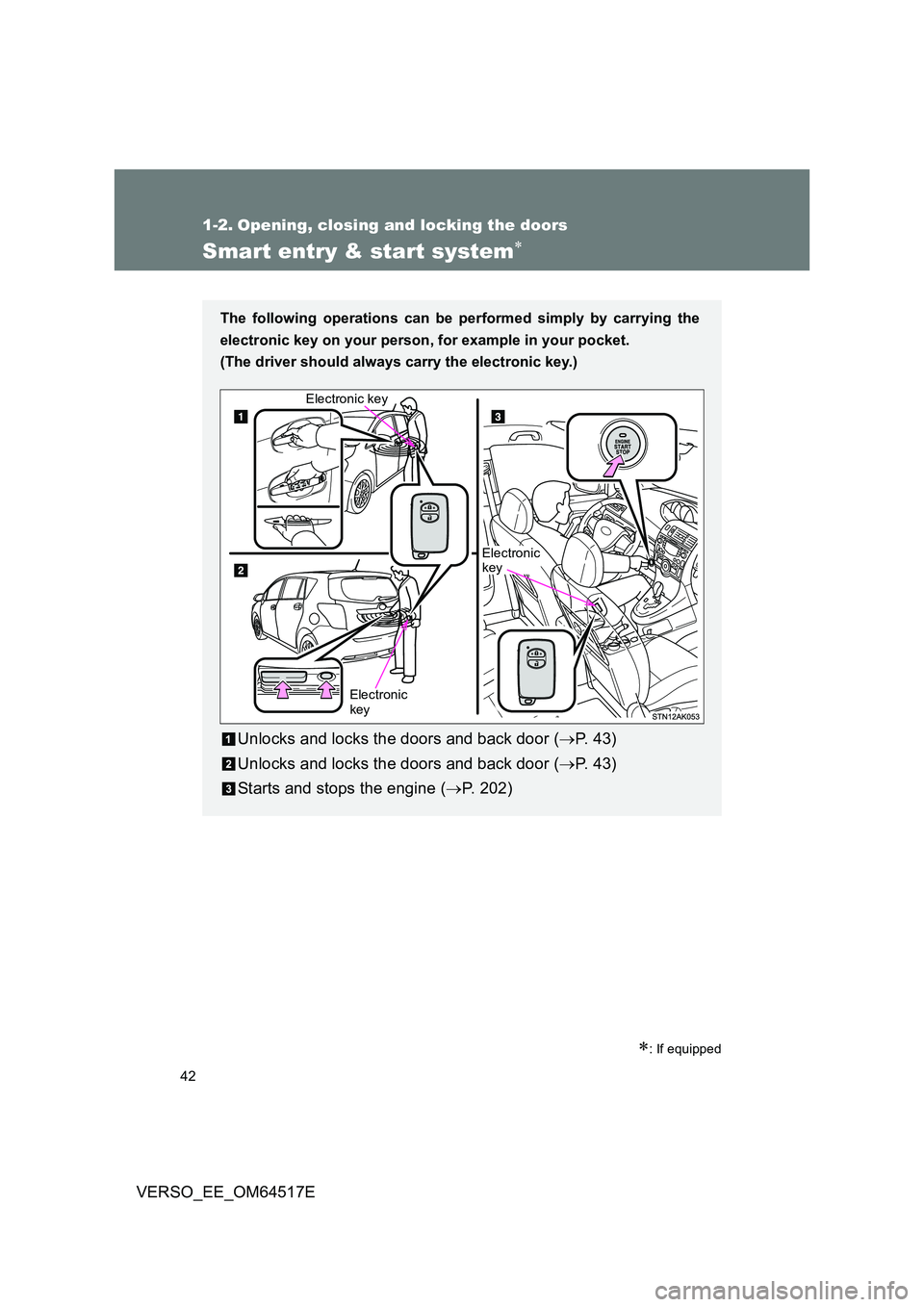
The following operations can be performed simply by carrying the
electronic key on your person, for example in your pocket.
(The driver should always carry the electronic key.)
Unlocks and locks the doors and back door ( P. 4 3 )
Unlocks and locks the doors and back door ( P. 4 3 )
Starts and stops the engine ( P. 202)
Electronic key
Electronic key
Electronic key
Page 43 of 668
43
1-2. Opening, closing and locking the doors
1
Before driving
VERSO_EE_OM64517E
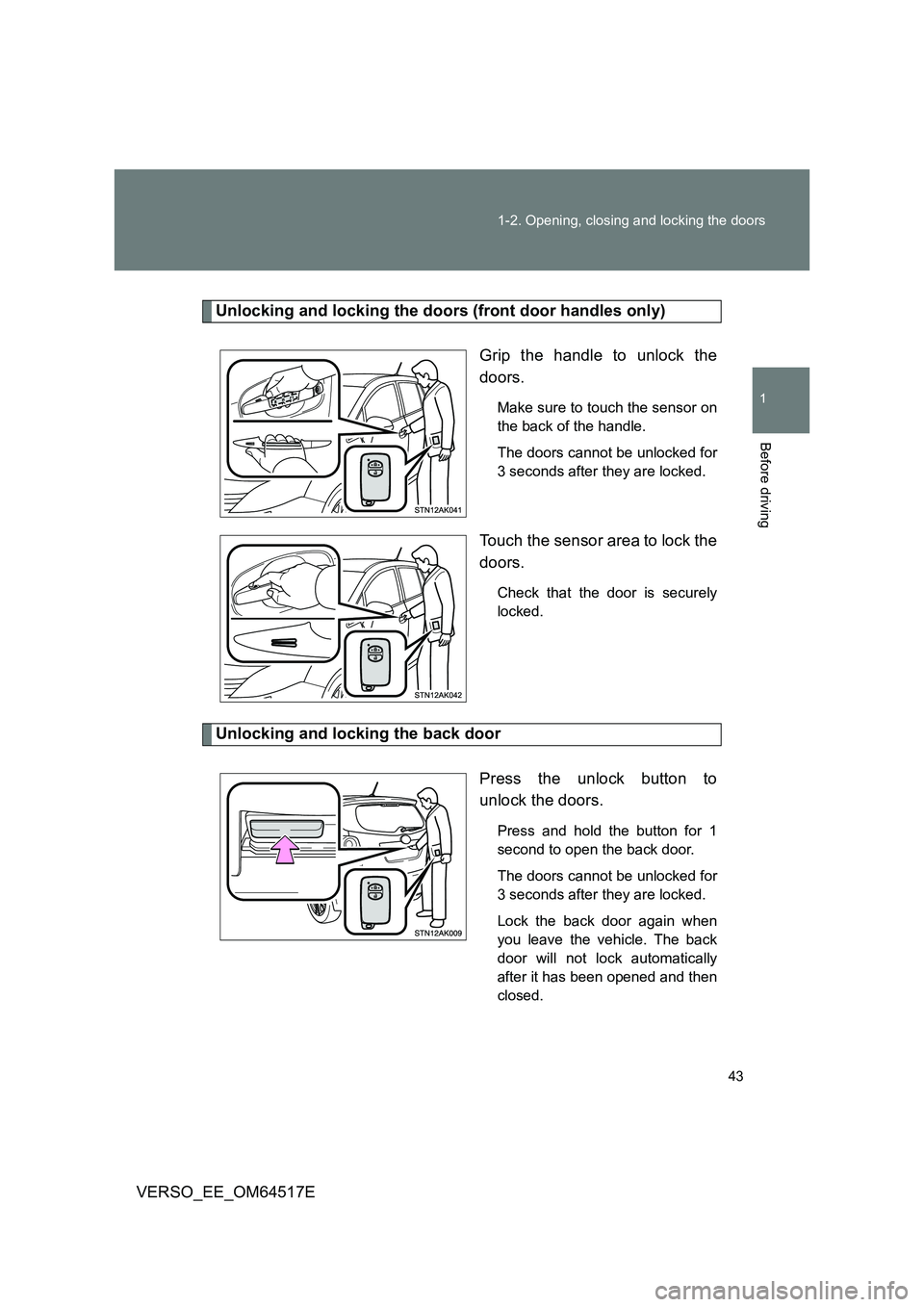
Unlocking and locking the doors (front door handles only)
Grip the handle to unlock the
doors.
Make sure to touch the sensor on
the back of the handle.
The doors cannot be unlocked for
3 seconds after they are locked.
Touch the sensor area to lock the
doors.
Check that the door is securely
locked.
Unlocking and locking the back door
Press the unlock button to
unlock the doors.
Press and hold the button for 1
second to open the back door.
The doors cannot be unlocked for
3 seconds after they are locked.
Lock the back door again when
you leave the vehicle. The back
door will not lock automatically
after it has been opened and then
closed.
Page 44 of 668
44
1-2. Opening, closing and locking the doors
VERSO_EE_OM64517E
Press the lock button to lock the
doors.
Check that the door is securely
locked.
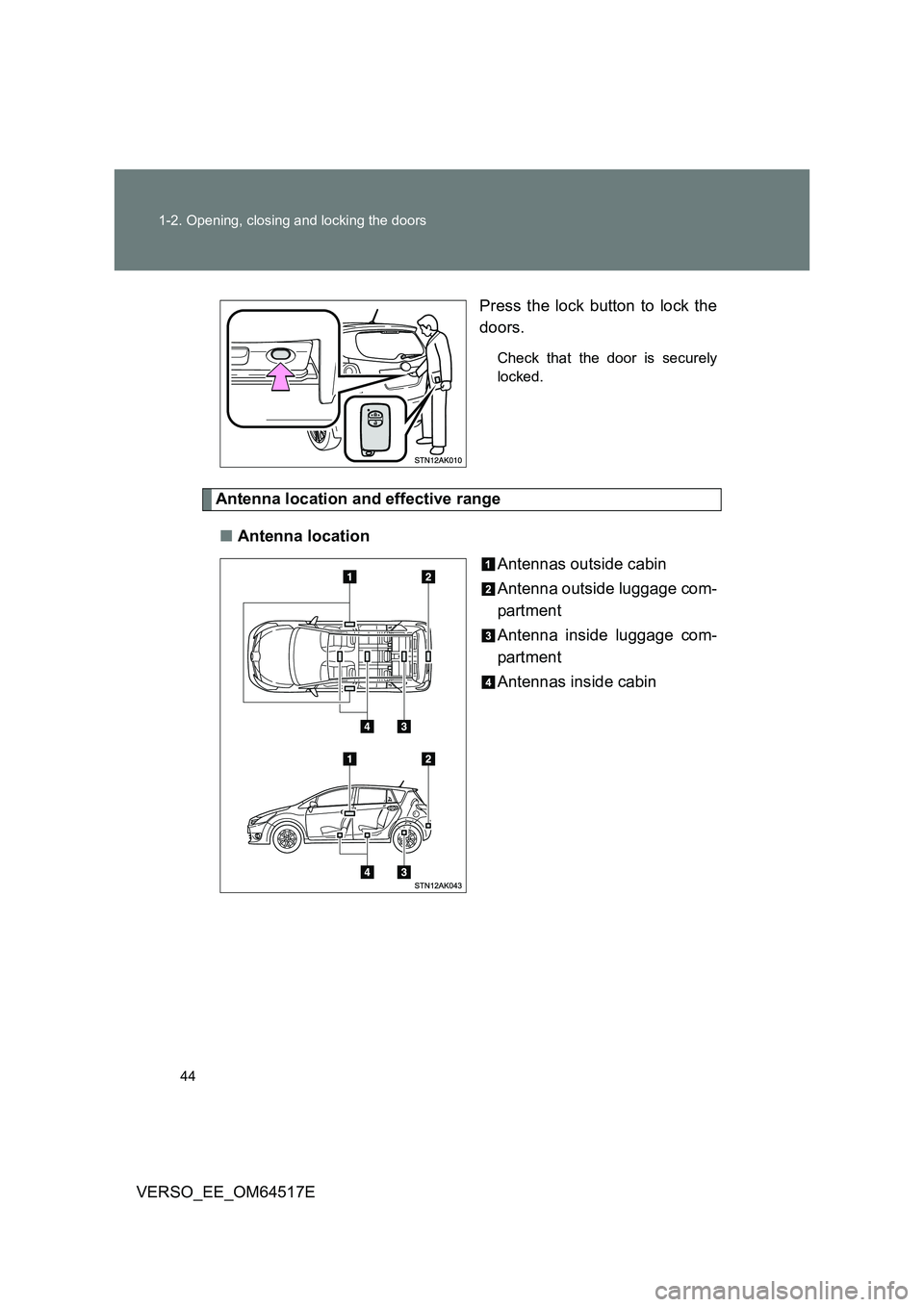
Antenna location and effective range
■ Antenna location
Antennas outside cabin
Antenna outside luggage com-
partment
Antenna inside luggage com-
partment
Antennas inside cabin
Page 45 of 668
45
1-2. Opening, closing and locking the doors
1
Before driving
VERSO_EE_OM64517E
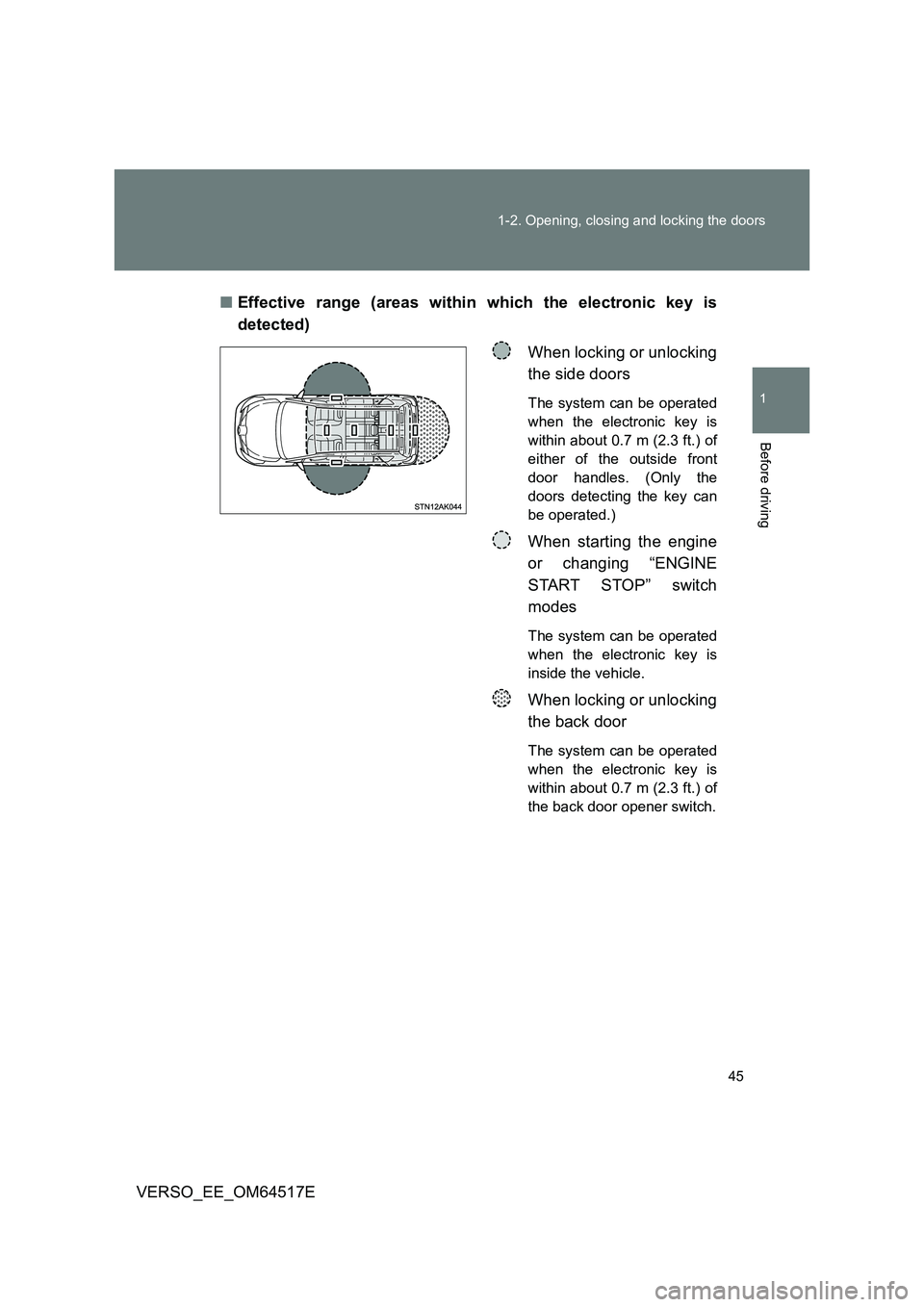
■ Effective range (areas within which the electronic key is
detected)
When locking or unlocking
the side doors
The system can be operated
when the electronic key is
within about 0.7 m (2.3 ft.) of
either of the outside front
door handles. (Only the
doors detecting the key can
be operated.)
When starting the engine
or changing “ENGINE
START STOP” switch
modes
The system can be operated
when the electronic key is
inside the vehicle.
When locking or unlocking
the back door
The system can be operated
when the electronic key is
within about 0.7 m (2.3 ft.) of
the back door opener switch.
Page 46 of 668
46
1-2. Opening, closing and locking the doors
VERSO_EE_OM64517E
■ Operation signals
The emergency flashers flash to indicate that the doors have been locked/
unlocked. (Locked: Once; Unlocked: Twice)
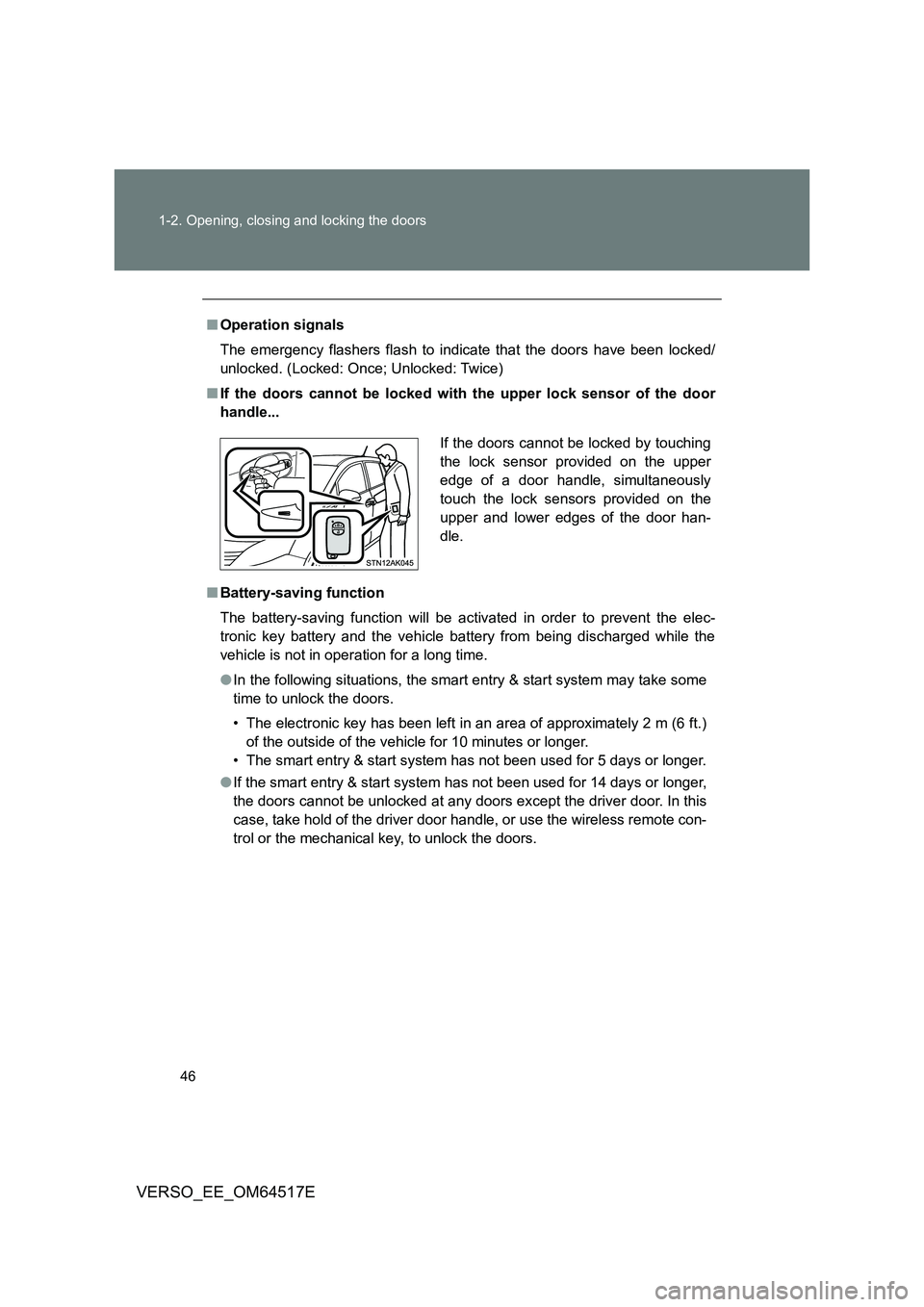
■ If the doors cannot be locked with the upper lock sensor of the door
handle...
■ Battery-saving function
The battery-saving function will be activated in order to prevent the elec-
tronic key battery and the vehicle battery from being discharged while the
vehicle is not in operation for a long time.
● In the following situations, the smart entry & start system may take some
time to unlock the doors.
• The electronic key has been left in an area of approximately 2 m (6 ft.)
of the outside of the vehicle for 10 minutes or longer.
• The smart entry & start system has not been used for 5 days or longer.
● If the smart entry & start system has not been used for 14 days or longer,
the doors cannot be unlocked at any doors except the driver door. In this
case, take hold of the driver door handle, or use the wireless remote con-
trol or the mechanical key, to unlock the doors.
If the doors cannot be locked by touching
the lock sensor provided on the upper
edge of a door handle, simultaneously
touch the lock sensors provided on the
upper and lower edges of the door han-
dle.
Page 47 of 668
47
1-2. Opening, closing and locking the doors
1
Before driving
VERSO_EE_OM64517E
■ Electronic key battery depletion
● The standard battery life is 1 to 2 years.
● If the battery becomes low, an alarm will sound in the cabin when the
engine stops. ( P. 560)
● Since the electronic key receives radio waves all the time, the key battery
will be depleted even when the electronic key is not being used. If any of
the following problems occurs, it is assumed that the key battery has
been depleted. Replace it with a new battery.
• The smart entry & start system or wireless remote control does not
work
• The operating range has narrowed
• The electronic key LED light does not come on
● To prevent the electronic key battery from being depleted significantly, do
not place the key within 1 m (3 ft.) of the following electrical appliances,
which produce magnetism.
•TVs
• Personal computers
• Mobile and cordless phones, and their battery chargers
• Lamps
• Induction cookers
■ To operate the system properly
Make sure to carry the electronic key when operating the system.
■ Note for electronic key operation
● Do not get the electronic key too close to the vehicle when operating the
system from the outside of the vehicle. Depending on the position and
holding conditions of t he electronic key, the key may not be detected cor-
rectly and the system may not operate properly. (The alarm may go off
accidentally, or the door lock prevention may not function.)
● Even when the electronic key is within the effective range (detection
areas), the system may not operate properly in the following cases.
• When locking or unlocking the doors, the electronic key is too close to
a door window or door handle, near the ground, or in a high place.
• The electronic key is on the instrument panel, interior floor, or in a door
pocket, or inside the glove box.