engine TOYOTA VERSO 2017 Repair Manual
[x] Cancel search | Manufacturer: TOYOTA, Model Year: 2017, Model line: VERSO, Model: TOYOTA VERSO 2017Pages: 668, PDF Size: 49.7 MB
Page 211 of 668
211
2-1. Driving procedures
2
When driving
VERSO_EE_OM64517E
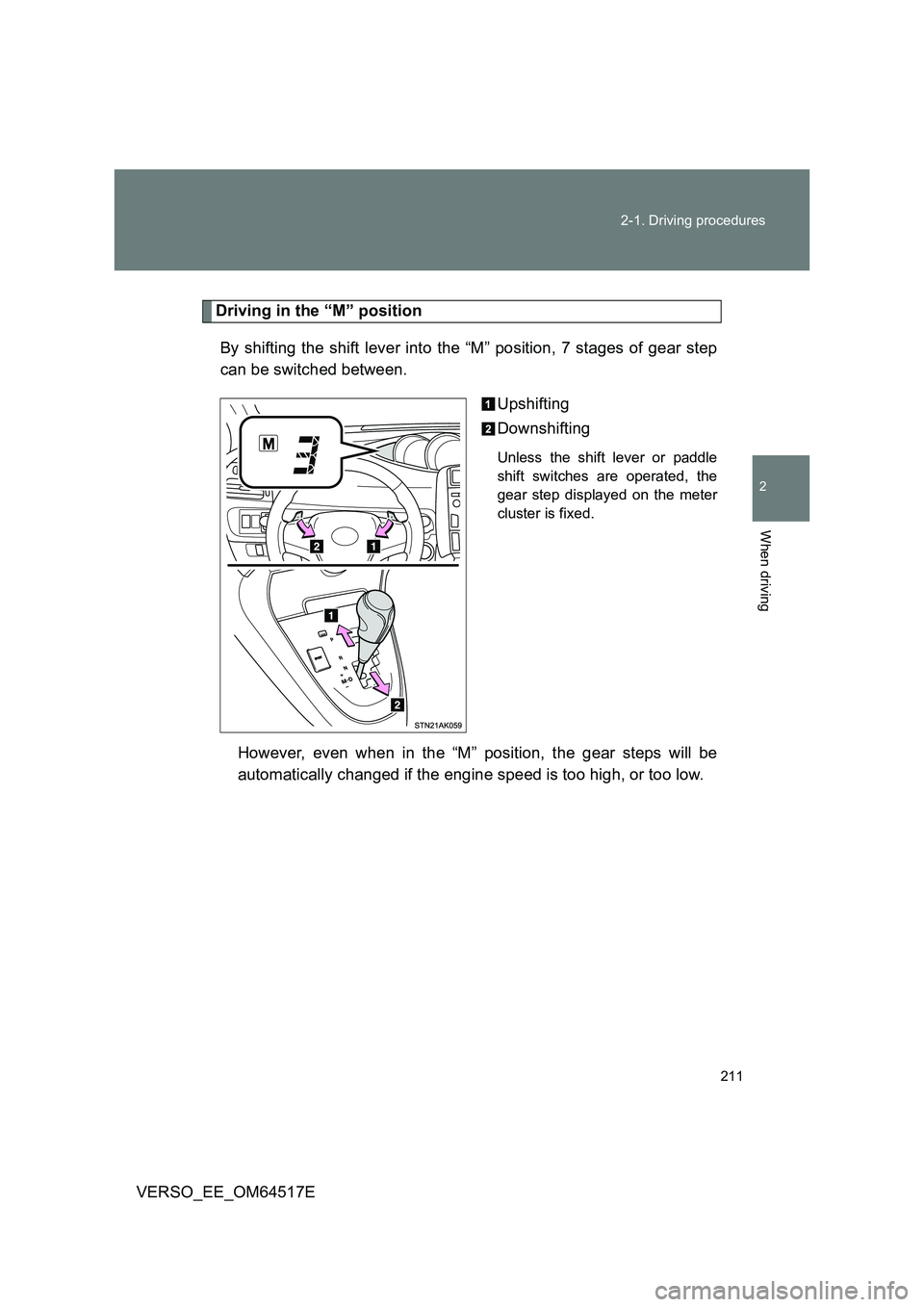
Driving in the “M” position
By shifting the shift lever into the “M” position, 7 stages of gear step
can be switched between.
Upshifting
Downshifting
Unless the shift lever or paddle
shift switches are operated, the
gear step displayed on the meter
cluster is fixed.
However, even when in the “M” position, the gear steps will be
automatically changed if the engine speed is too high, or too low.
Page 212 of 668
212
2-1. Driving procedures
VERSO_EE_OM64517E
■ Paddle shift switch
● When the paddle shift switch is operated in the “D” position, a gear step
will be automatically selected according to the vehicle speed and driving
conditions.
● Automatic deactivation of gear step selection in the “D” position.
Gear step selection in the “D” position will be deactivated in the following
situations:
• The “+” paddle shift switch is held down for a period of time
• When the vehicle comes to a stop
• If the accelerator pedal is depressed for longer than a certain period of
time in one gear step
■ Downshifting restrictions warning buzzer
To help ensure safety and driving per formance, downshifting operation may
sometimes be restricted. In some circumstances, downshifting may not be
possible even when the shift lever or paddle shift switches are operated.
(The warning buzzer will sound twice.)
■ When driving with cruise control activated (if equipped)
Even when performing the following actions with the intent of enabling
engine braking, engine braking will not activate because cruise control will
not be canceled.
• While driving in “D” or 7-speed s port sequential shiftmatic mode, down-
shifting to “6”, “5” or “4”. ( P. 210, 211)
• When switching the driving mode to “SPORT” mode while driving in “D”
position. ( P. 209)
Page 213 of 668
213
2-1. Driving procedures
2
When driving
VERSO_EE_OM64517E
■ Automatic deactivation of “SPORT” mode
Vehicles without smart entry & start system
If the engine switch is turned to the “LOCK” position after driving in
“SPORT” mode, the mode is automatically deactivated.
Vehicles with smart entry & start system
If the “ENGINE START STOP” switch is turned off after driving in
“SPORT” mode, the mode is automatically deactivated.
■ If the shift lever cannot be shifted from “P”
P. 603
■ If the “M” indicator is not displayed after shifting the shift lever to the
“M” position
If the display does not change to “M” on an occasion other than that
described above, it may indicate a malfunction in the transmission system.
Have your vehicle inspected by any authorized Toyota dealer or repairer, or
another duly qualified and equipped professional immediately.
■ Automatic gear step selection
When the vehicle comes to a stop, the transmission will automatically down-
shift to allow you to start off in 1st step.
Page 215 of 668
215
2-1. Driving procedures
2
When driving
VERSO_EE_OM64517E
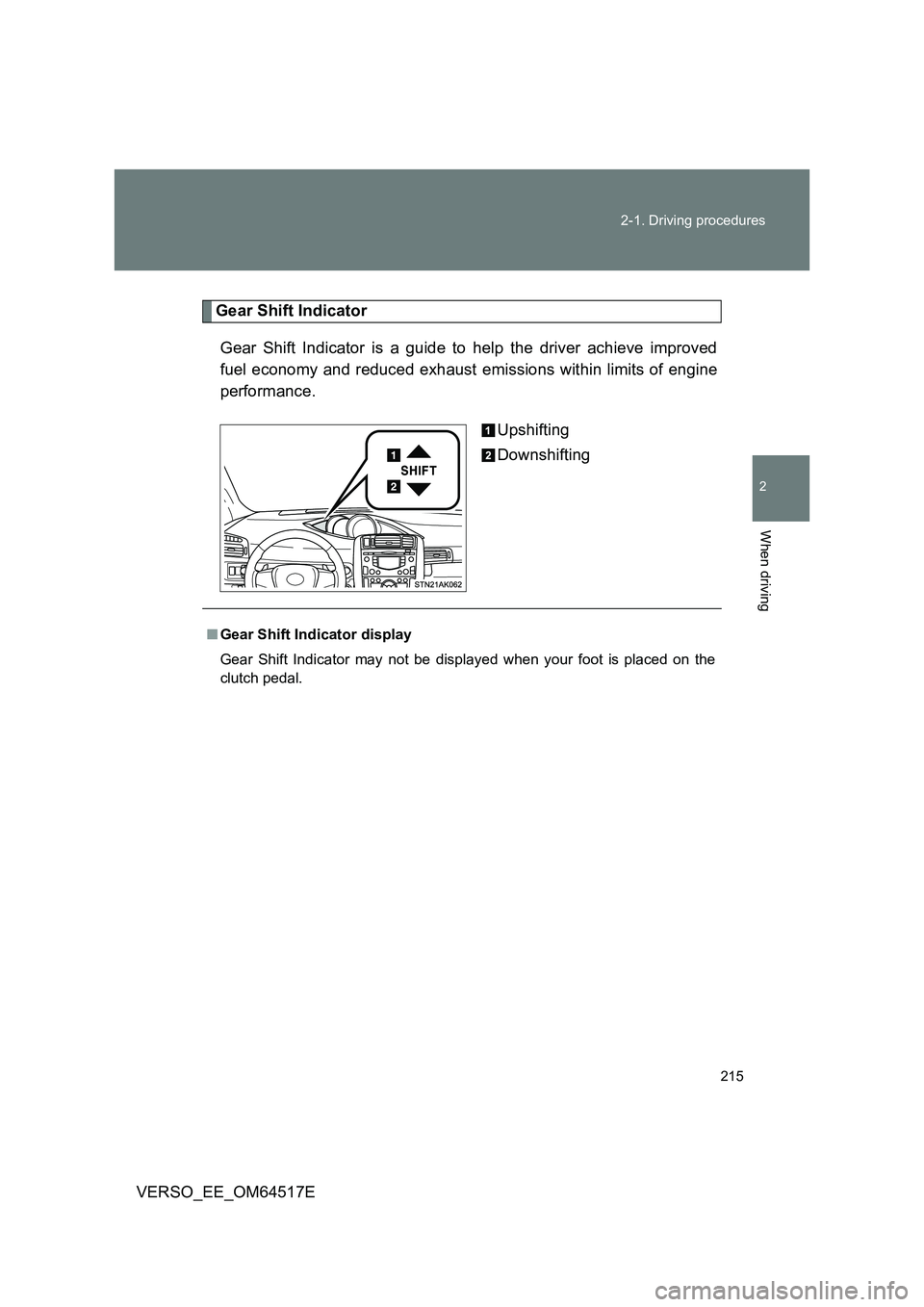
Gear Shift Indicator
Gear Shift Indicator is a guide to help the driver achieve improved
fuel economy and reduced exhaust emissions within limits of engine
performance.
Upshifting
Downshifting
■ Gear Shift Indicator display
Gear Shift Indicator may not be displayed when your foot is placed on the
clutch pedal.
Page 216 of 668
216
2-1. Driving procedures
VERSO_EE_OM64517E
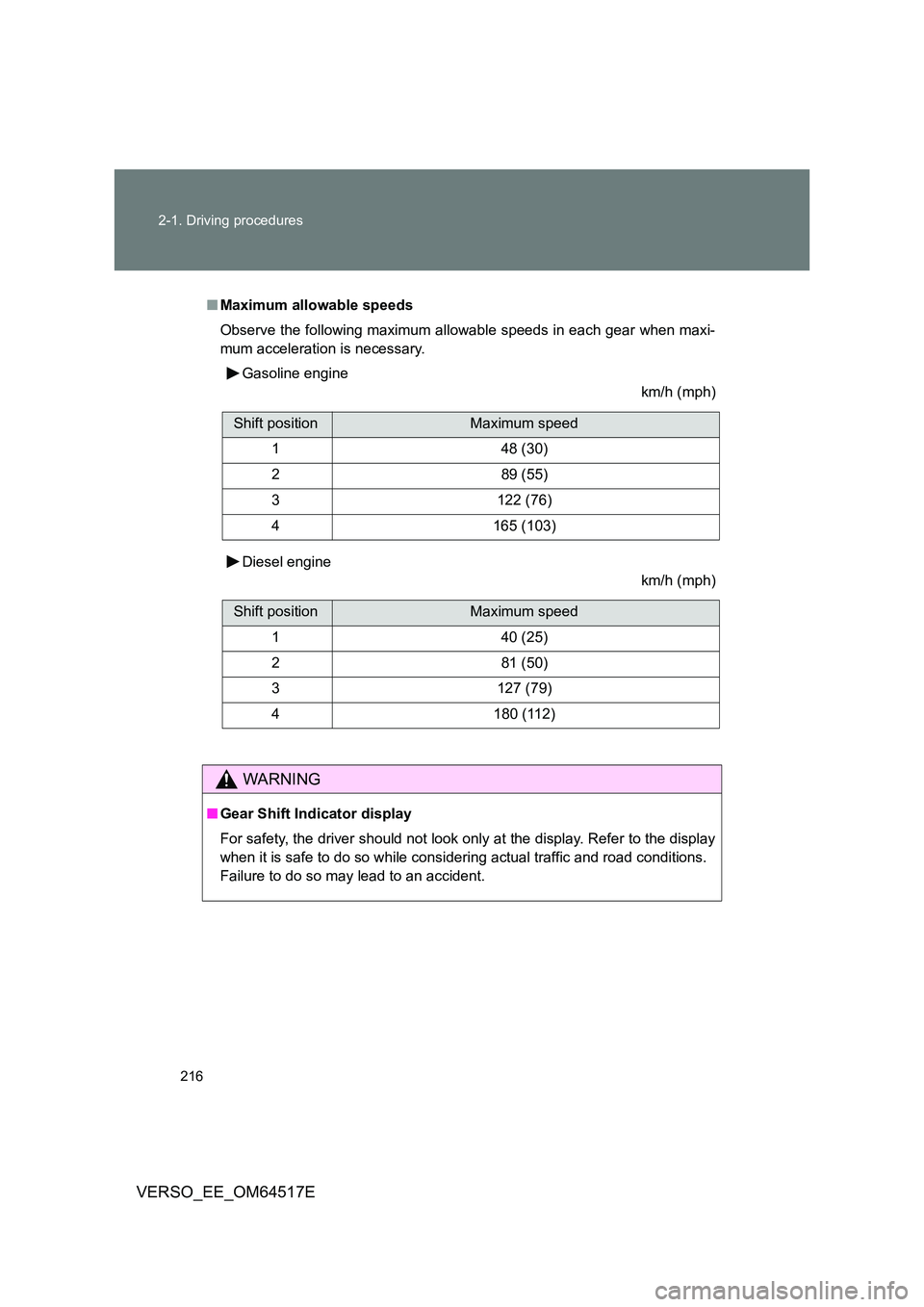
■ Maximum allowable speeds
Observe the following maximum allowable speeds in each gear when maxi-
mum acceleration is necessary.
Gasoline engine
km/h (mph)
Diesel engine
km/h (mph)
WARNING
■ Gear Shift Indicator display
For safety, the driver should not look only at the display. Refer to the display
when it is safe to do so while considering actual traffic and road conditions.
Failure to do so may lead to an accident.
Shift positionMaximum speed
148 (30)
289 (55)
3122 (76)
4165 (103)
Shift positionMaximum speed
140 (25)
281 (50)
3127 (79)
4180 (112)
Page 218 of 668
218
2-1. Driving procedures
VERSO_EE_OM64517E
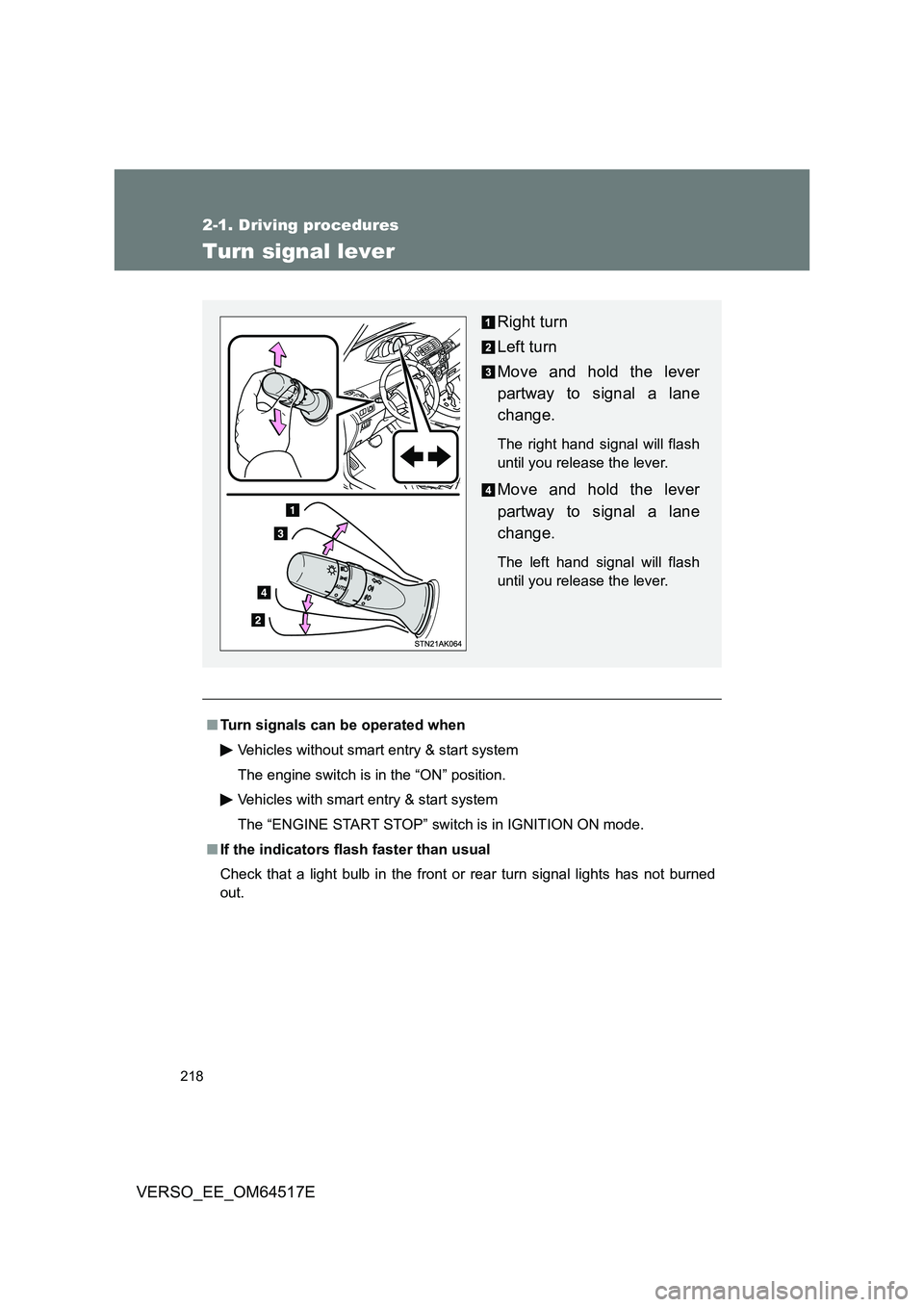
Turn signal lever
■Turn signals can be operated when
Vehicles without smart entry & start system
The engine switch is in the “ON” position.
Vehicles with smart entry & start system
The “ENGINE START STOP” switch is in IGNITION ON mode.
■ If the indicators flash faster than usual
Check that a light bulb in the front or rear turn signal lights has not burned
out.
Right turn
Left turn
Move and hold the lever
partway to signal a lane
change.
The right hand signal will flash
until you release the lever.
Move and hold the lever
partway to signal a lane
change.
The left hand signal will flash
until you release the lever.
Page 222 of 668
222
VERSO_EE_OM64517E
2-2. Instrument cluster
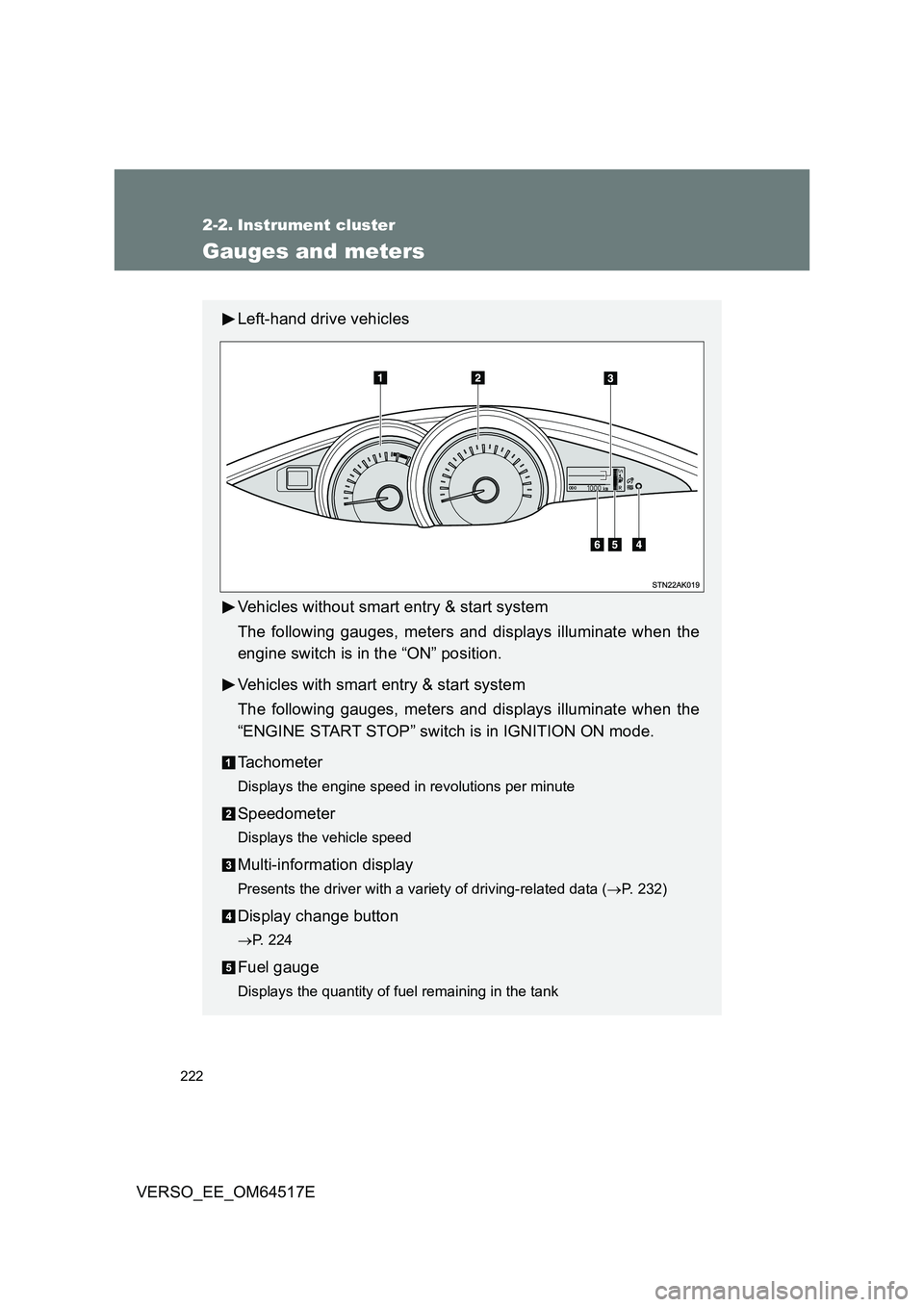
Gauges and meters
Left-hand drive vehicles
Vehicles without smart entry & start system
The following gauges, meters and displays illuminate when the
engine switch is in the “ON” position.
Vehicles with smart entry & start system
The following gauges, meters and displays illuminate when the
“ENGINE START STOP” switch is in IGNITION ON mode.
Tachometer
Displays the engine speed in revolutions per minute
Speedometer
Displays the vehicle speed
Multi-information display
Presents the driver with a variety of driving-related data ( P. 232)
Display change button
P. 224
Fuel gauge
Displays the quantity of fuel remaining in the tank
Page 223 of 668
223
2-2. Instrument cluster
2
When driving
VERSO_EE_OM64517E
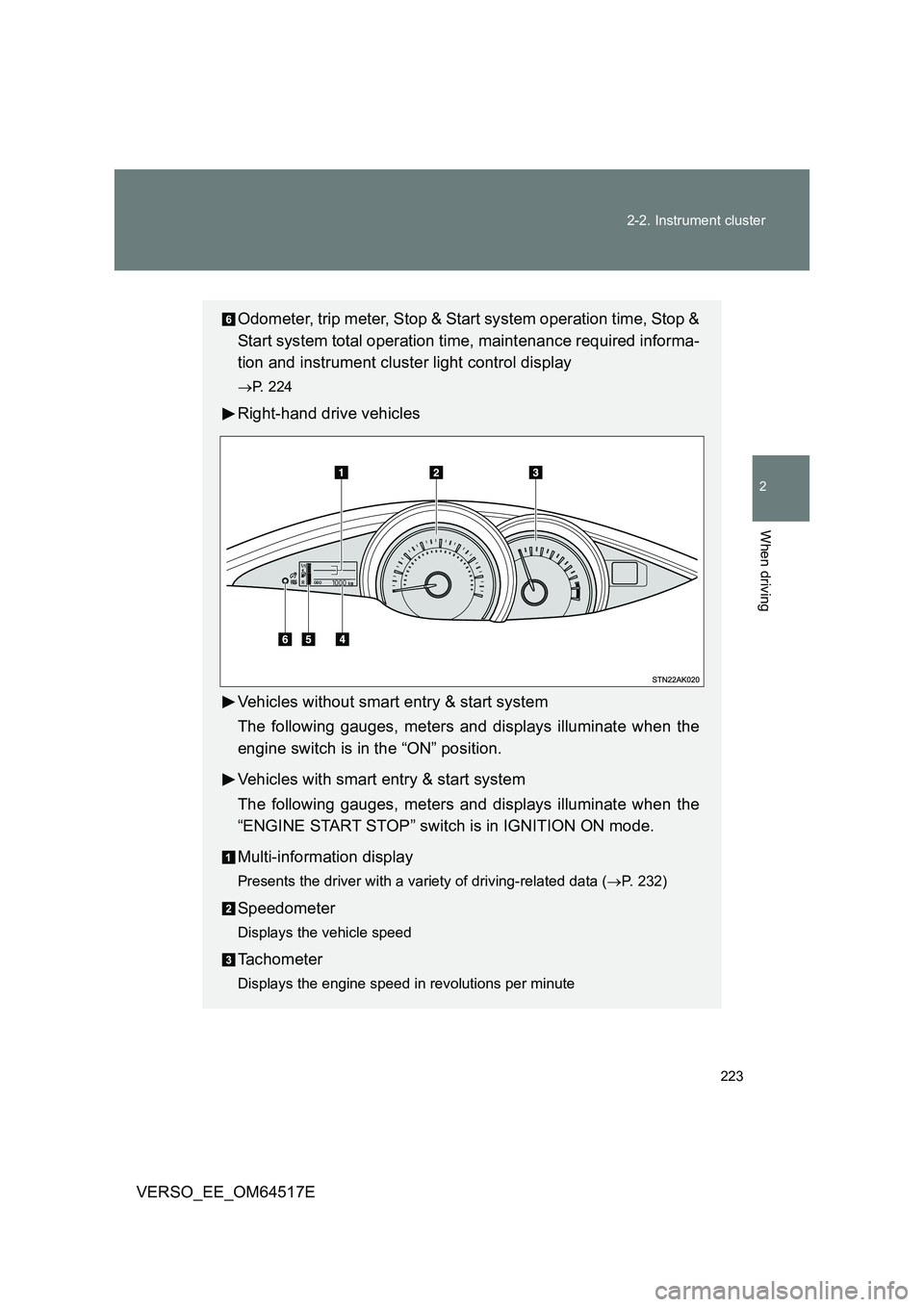
Odometer, trip meter, Stop & Start system operation time, Stop &
Start system total operation time, maintenance required informa-
tion and instrument cluster light control display
P. 224
Right-hand drive vehicles
Vehicles without smart entry & start system
The following gauges, meters and displays illuminate when the
engine switch is in the “ON” position.
Vehicles with smart entry & start system
The following gauges, meters and displays illuminate when the
“ENGINE START STOP” switch is in IGNITION ON mode.
Multi-information display
Presents the driver with a variety of driving-related data ( P. 232)
Speedometer
Displays the vehicle speed
Tachometer
Displays the engine speed in revolutions per minute
Page 225 of 668
225
2-2. Instrument cluster
2
When driving
VERSO_EE_OM64517E
Trip meter A
Displays the distance the vehicle has been driven since the meter
was last reset.
Pressing and holding the button will reset.
Trip meter B
Displays the distance the vehicle has been driven since the meter
was last reset.
Press and hold the button will reset.
Stop & Start system operation time (if equipped)
Displays the amount of time the engine was stopped due to opera-
tion of the Stop & Start system during the current trip.
Stop & Start system total operation time (if equipped)
Displays the total amount of time that the engine has been stopped
due to operation of the Stop & Start system since the system was
last reset.
Maintenance required information (diesel engine only)
Displays the remaining distance until the engine oil should be
changed. If “-” is displayed before distance, it means oil mainte-
nance is overdue. Have the engine oil changed by any authorized
Toyota dealer or repairer, or another duly qualified and equipped
professional.
• Displays the Maintenance required information when the engine switch
is turned to the “ON” position (vehicles without smart entry & start sys-
tem) or the “ENGINE START STOP” is switched to IGNITION ON mode
(vehicles with smart entry & start system).
• Maintenance required information reset method ( P. 456).
Page 226 of 668
226
2-2. Instrument cluster
VERSO_EE_OM64517E
Instrument cluster light control
The brightness of the instrument cluster lights, for when the head-
light switch is on, can be adjusted 5 brightness levels.
Press the display change button.
The button is pressed several times and the brightness control
screen appears.
When the button is pushed for more than 1 second, each second
the screen brightness changes. When the button is released, the
suitable brightness is selected.
The illumination level will be set automatically 10 seconds after the
switch was last pressed.
Pressing the display change button before the 10 seconds have
passed will also set the illumination level.
NOTICE
■ To prevent damage to the engine and its components
● Do not let the indicator needle of the tachometer enter the red zone, which
indicates the maximum engine speed.
● The engine may be overheating if the high engine coolant temperature
warning light (Red) flashes or comes on. In this case, immediately stop the
vehicle in a safe place, and check the engine after it has cooled com-
pletely. ( P. 613)