charging TOYOTA VERSO S 2011 Owners Manual
[x] Cancel search | Manufacturer: TOYOTA, Model Year: 2011, Model line: VERSO S, Model: TOYOTA VERSO S 2011Pages: 664, PDF Size: 160.56 MB
Page 322 of 664
3225-2. Driving procedures
shifting to 5 or 4. ( P.323, 324)
●When switching the driving mode to sport mode while driving in D position.
( P.434)
■Restraining sudden start (Drive- Start Control)
P.301
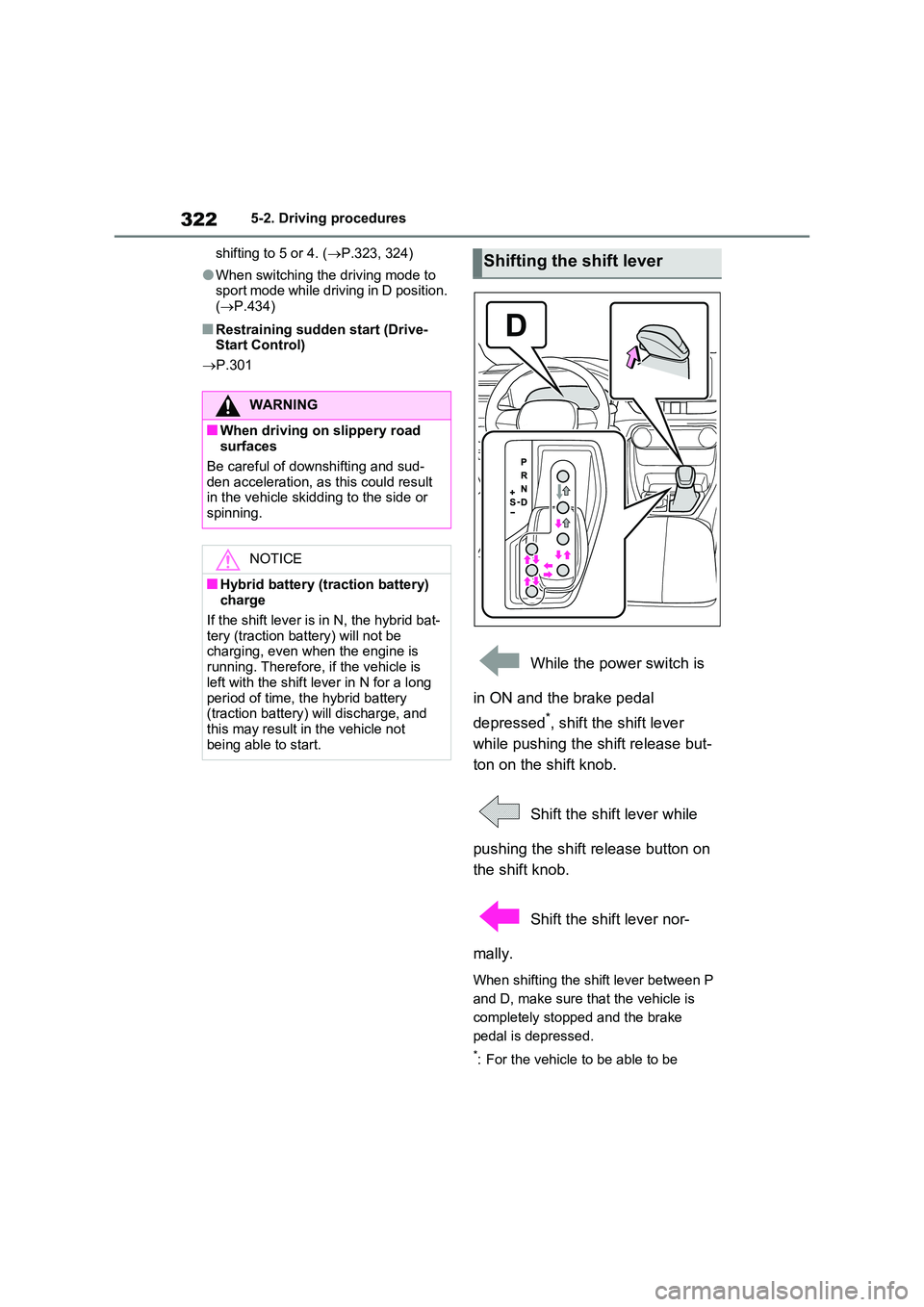
While the power switch is
in ON and the brake pedal
depressed*, shift the shift lever
while pushing the shift release but-
ton on the shift knob.
Shift the shift lever while
pushing the shift release button on
the shift knob.
Shift the shift lever nor-
mally.
When shifting the shift lever between P
and D, make sure that the vehicle is
completely stopped and the brake
pedal is depressed.
*: For the vehicle to be able to be
WARNING
■When driving on slippery road surfaces
Be careful of downshifting and sud-
den acceleration, as this could result in the vehicle skidding to the side or spinning.
NOTICE
■Hybrid battery (traction battery) charge
If the shift lever is in N, the hybrid bat- tery (traction battery) will not be charging, even when the engine is
running. Therefore, if the vehicle is left with the shift lever in N for a long
period of time, the hybrid battery (traction battery) will discharge, and this may result in the vehicle not
being able to start.
Shifting the shift lever
Page 333 of 664
333
5
5-3. Operating the lights and wipers
Driving
■Automatic headlight leveling sys-
tem
The level of the headlights is automati- cally adjusted according to the number
of passengers and the loading condition of the vehicle to ensure that the head-lights do not interfere with other road
users.
■12-volt battery-saving function
In order to prevent the 12-volt battery of the vehicle from discharging, if the light
switch is in position when the
power switch is turned to OFF, the 12- volt battery-saving function will operate
and automatically turn off all the lights after approximately 20 minutes.
When any of the following are per-
formed, the 12-volt battery-saving func- tion is canceled once and then reactivated. All the lights will turn off
automatically 20 minutes after the 12- volt battery-saving function has been reactivated:
●When the headlight switch is operated
●When a door is opened or closed
■If “Headlight System Malfunction Visit Your Dealer” is displayed on the multi-information display
The system may be malfunctioning. Have the vehicle inspected by any authorized Toyota retailer or Toyota
authorized repairer, or any reliable repairer.
■Customization
Settings (e.g. light sensor sensitivity)
can be changed. (Customizable features: P.637)
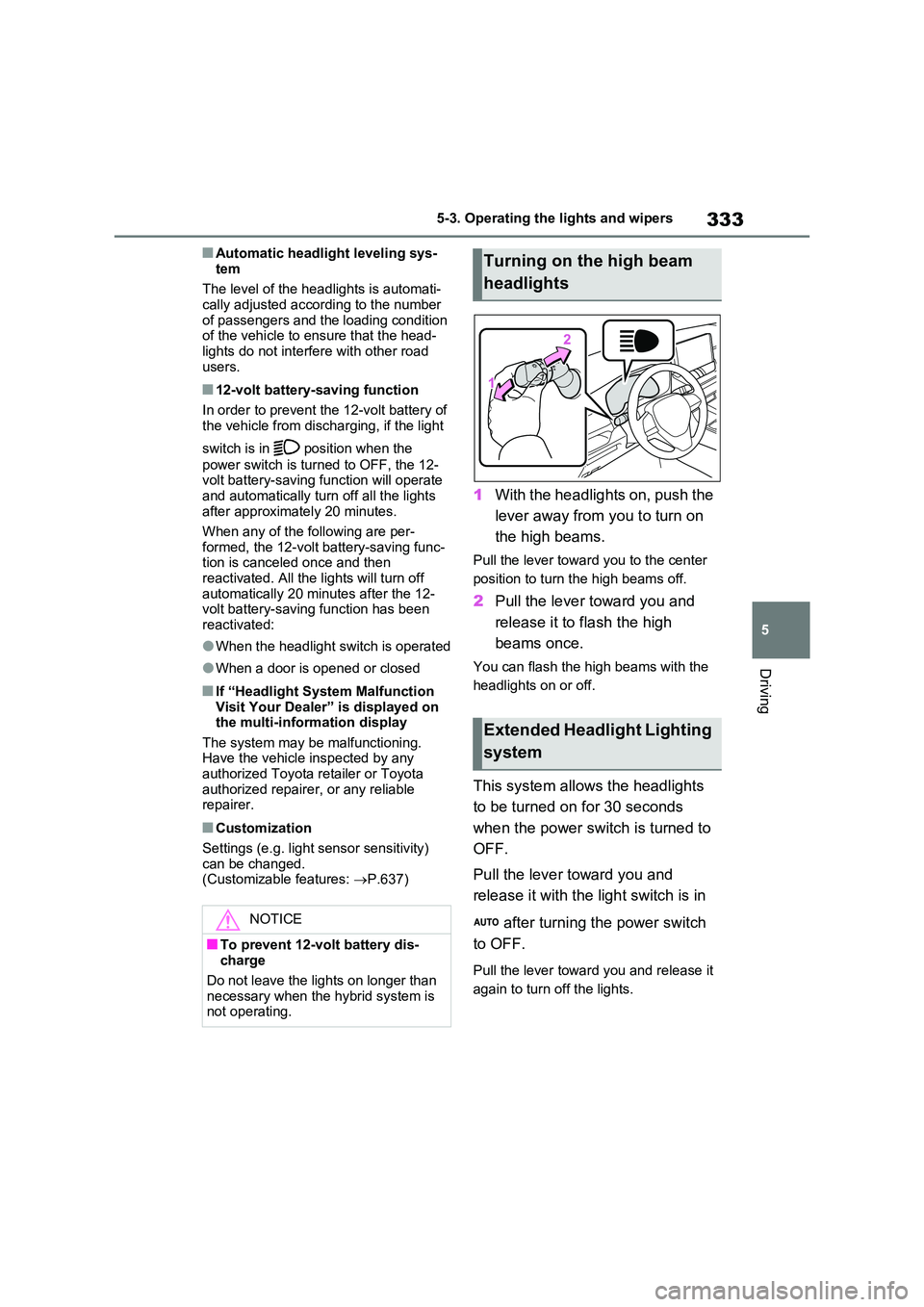
1With the headlights on, push the
lever away from you to turn on
the high beams.
Pull the lever toward you to the center
position to turn the high beams off.
2 Pull the lever toward you and
release it to flash the high
beams once.
You can flash the high beams with the
headlights on or off.
This system allows the headlights
to be turned on for 30 seconds
when the power switch is turned to
OFF.
Pull the lever toward you and
release it with the light switch is in
after turning the power switch
to OFF.
Pull the lever toward you and release it
again to turn off the lights.
NOTICE
■To prevent 12-volt battery dis- charge
Do not leave the lights on longer than
necessary when the hybrid system is not operating.
Turning on the high beam
headlights
Extended Headlight Lighting
system
Page 455 of 664
455
6 6-1. Using the air conditioning system and defogger
Interior features
• is operating
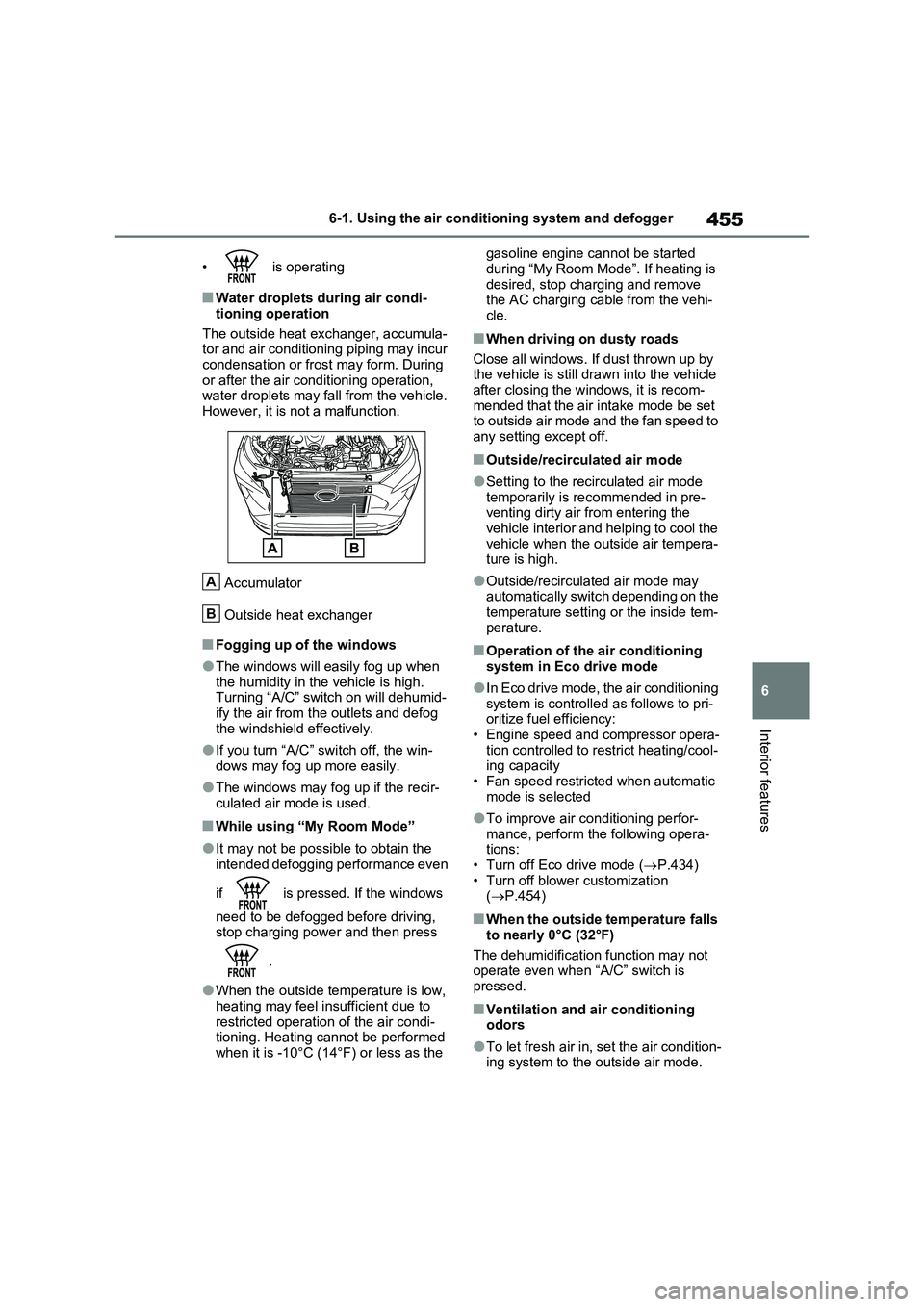
■Water droplets during air condi-
tioning operation
The outside heat exchanger, accumula-
tor and air conditioning piping may incur
condensation or frost may form. During
or after the air conditioning operation,
water droplets may fall from the vehicle.
However, it is not a malfunction.
Accumulator
Outside heat exchanger
■Fogging up of the windows
●The windows will easily fog up when
the humidity in the vehicle is high.
Turning “A/C” switch on will dehumid-
ify the air from the outlets and defog
the windshield effectively.
●If you turn “A/C” switch off, the win-
dows may fog up more easily.
●The windows may fog up if the recir-
culated air mode is used.
■While using “My Room Mode”
●It may not be possible to obtain the
intended defogging performance even
if is pressed. If the windows
need to be defogged before driving,
stop charging power and then press
.
●When the outside temperature is low,
heating may feel insufficient due to
restricted operation of the air condi-
tioning. Heating cannot be performed
when it is -10°C (14°F) or less as the gasoline engine cannot be started
during “My Room Mode”. If heating is
desired, stop charging and remove
the AC charging cable from the vehi-
cle.
■When driving on dusty roads
Close all windows. If dust thrown up by
the vehicle is still drawn into the vehicle
after closing the windows, it is recom-
mended that the air intake mode be set
to outside air mode and the fan speed to
any setting except off.
■Outside/recirculated air mode
●Setting to the recirculated air mode
temporarily is recommended in pre-
venting dirty air from entering the
vehicle interior and helping to cool the
vehicle when the outside air tempera-
ture is high.
●Outside/recirculated air mode may
automatically switch depending on the
temperature setting or the inside tem-
perature.
■Operation of the air conditioning
system in Eco drive mode
●In Eco drive mode, the air conditioning
system is controlled as follows to pri-
oritize fuel efficiency:
• Engine speed and compressor opera-
tion controlled to restrict heating/cool-
ing capacity
• Fan speed restricted when automatic
mode is selected
●To improve air conditioning perfor-
mance, perform the following opera-
tions:
• Turn off Eco drive mode (P.434)
• Turn off blower customization
(P.454)
■When the outside temperature falls
to nearly 0°C (32°F)
The dehumidification function may not
operate even when “A/C” switch is
pressed.
■Ventilation and air conditioning
odors
●To let fresh air in, set the air condition-
ing system to the outside air mode.
A
B
Page 460 of 664
4606-1. Using the air conditioning system and defogger
If the Remote Air Conditioning Sys-
tem is used while the AC charging
cable is connected to the vehicle,
electricity from an external power
source can be used minimizing the
drop in charge of the hybrid battery
(traction battery).
Charging will be conducted automati-
cally after the Remote Air Conditioning
System is stopped.
Check the temperature setting of
the air conditioning system.
(P.452)
The Remote Air Conditioning System
will operate in accordance with the tem-
perature settings of the air conditioning
system.
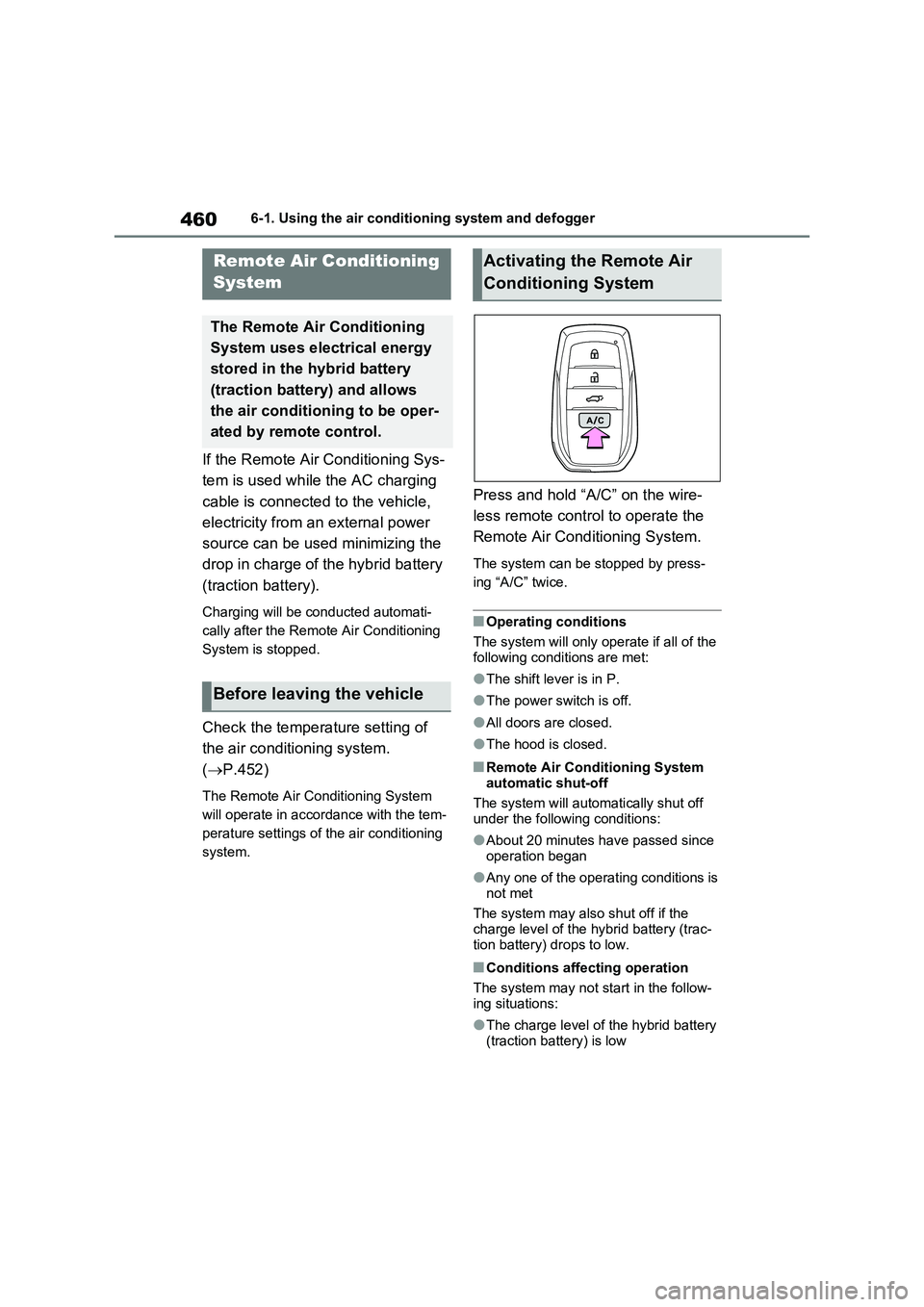
Press and hold “A/C” on the wire-
less remote control to operate the
Remote Air Conditioning System.
The system can be stopped by press-
ing “A/C” twice.
■Operating conditions
The system will only operate if all of the
following conditions are met:
●The shift lever is in P.
●The power switch is off.
●All doors are closed.
●The hood is closed.
■Remote Air Conditioning System
automatic shut-off
The system will automatically shut off
under the following conditions:
●About 20 minutes have passed since
operation began
●Any one of the operating conditions is
not met
The system may also shut off if the
charge level of the hybrid battery (trac-
tion battery) drops to low.
■Conditions affecting operation
The system may not start in the follow-
ing situations:
●The charge level of the hybrid battery
(traction battery) is low
Remote Air Conditioning
System
The Remote Air Conditioning
System uses electrical energy
stored in the hybrid battery
(traction battery) and allows
the air conditioning to be oper-
ated by remote control.
Before leaving the vehicle
Activating the Remote Air
Conditioning System
Page 473 of 664
473
6
6-3. Using the storage features
Interior features
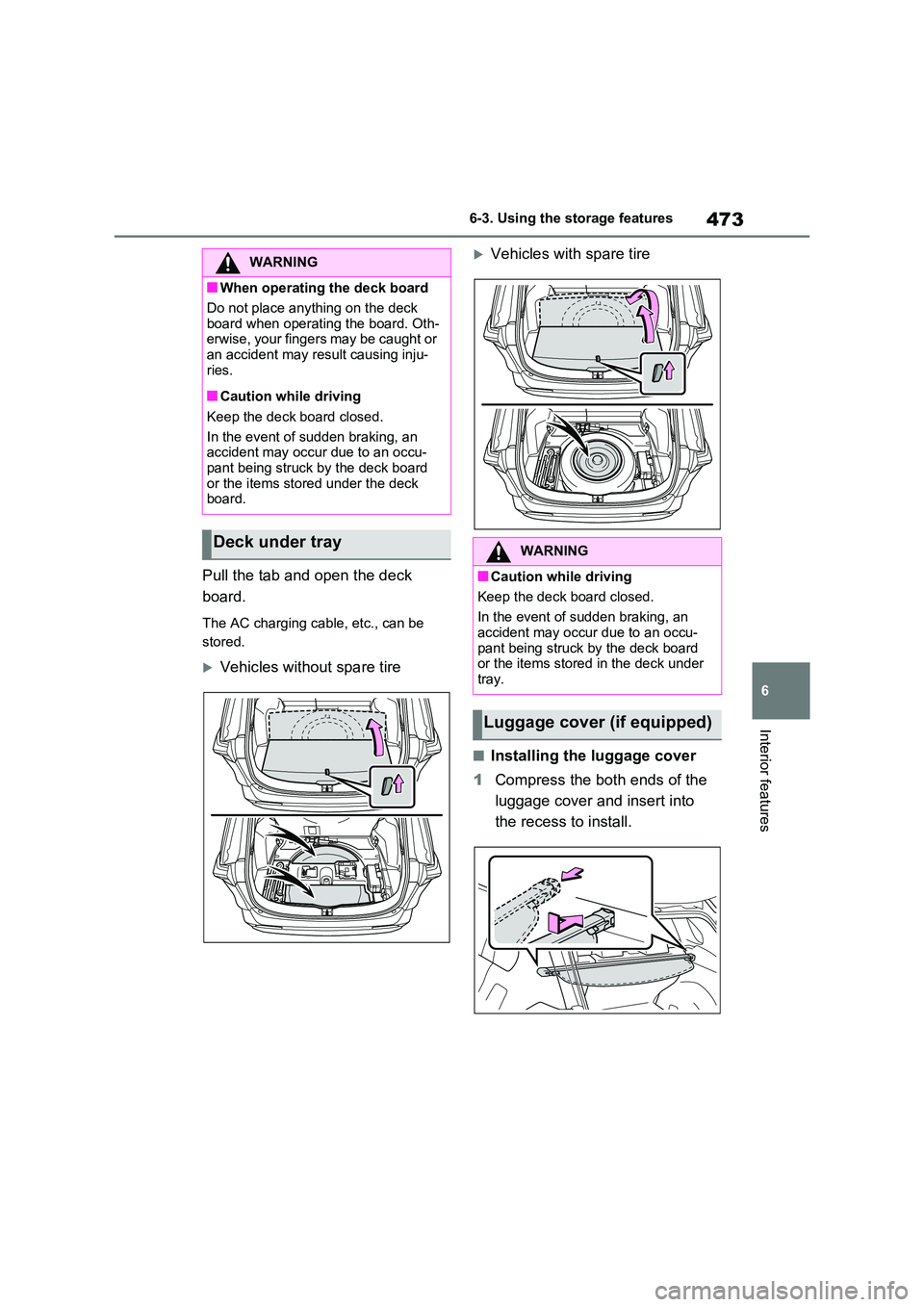
Pull the tab and open the deck
board.
The AC charging cable, etc., can be
stored.
Vehicles without spare tire
Vehicles with spare tire
■Installing the luggage cover
1 Compress the both ends of the
luggage cover and insert into
the recess to install.
WARNING
■When operating the deck board
Do not place anything on the deck
board when operating the board. Oth- erwise, your fingers may be caught or an accident may result causing inju-
ries.
■Caution while driving
Keep the deck board closed.
In the event of sudden braking, an accident may occur due to an occu-
pant being struck by the deck board or the items stored under the deck board.
Deck under trayWARNING
■Caution while driving
Keep the deck board closed.
In the event of sudden braking, an
accident may occur due to an occu- pant being struck by the deck board or the items stored in the deck under
tray.
Luggage cover (if equipped)
Page 477 of 664
477
6
6-4. Using the other interior features
Interior features
than 10 A.
220 VAC: Accessories that use less
than 150 W.
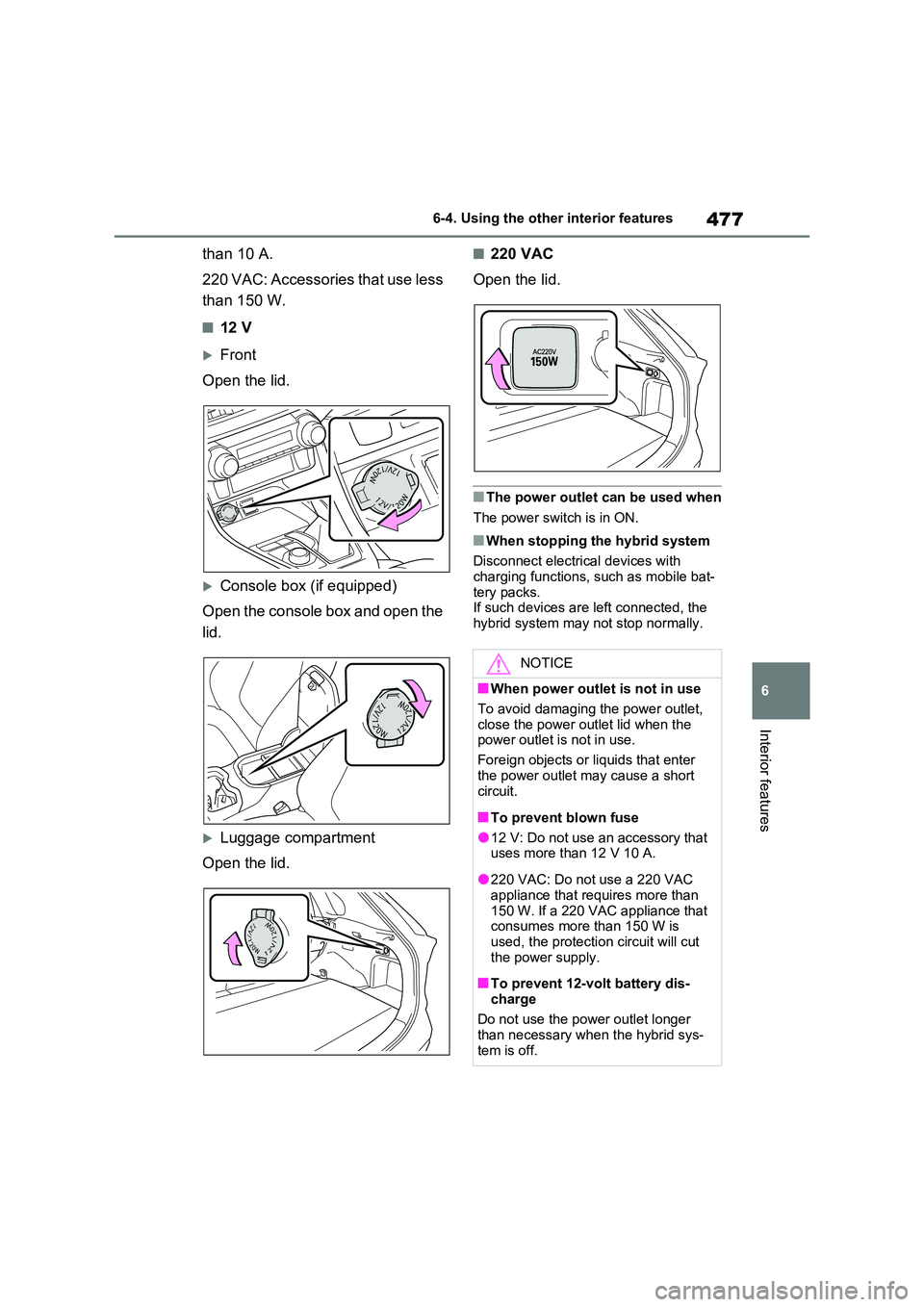
■12 V
Front
Open the lid.
Console box (if equipped)
Open the console box and open the
lid.
Luggage compartment
Open the lid.
■220 VAC
Open the lid.
■The power outlet can be used when
The power switch is in ON.
■When stopping the hybrid system
Disconnect electrical devices with charging functions, such as mobile bat-
tery packs. If such devices are left connected, the hybrid system may not stop normally.
NOTICE
■When power outlet is not in use
To avoid damaging the power outlet,
close the power outlet lid when the power outlet is not in use.
Foreign objects or liquids that enter
the power outlet may cause a short circuit.
■To prevent blown fuse
●12 V: Do not use an accessory that uses more than 12 V 10 A.
●220 VAC: Do not use a 220 VAC appliance that requires more than
150 W. If a 220 VAC appliance that consumes more than 150 W is used, the protection circuit will cut
the power supply.
■To prevent 12-volt battery dis-
charge
Do not use the power outlet longer than necessary when the hybrid sys-
tem is off.
Page 478 of 664
4786-4. Using the other interior features
The USB charging ports are used
to supply 2.1 A of electricity at 5 V
to external devices.
The USB charging ports are for
charging only. They are not
designed for data transfer or other
purposes.
Depending on the external device,
it may not charge properly. Refer to
the manual included with the device
before using a USB charging port.
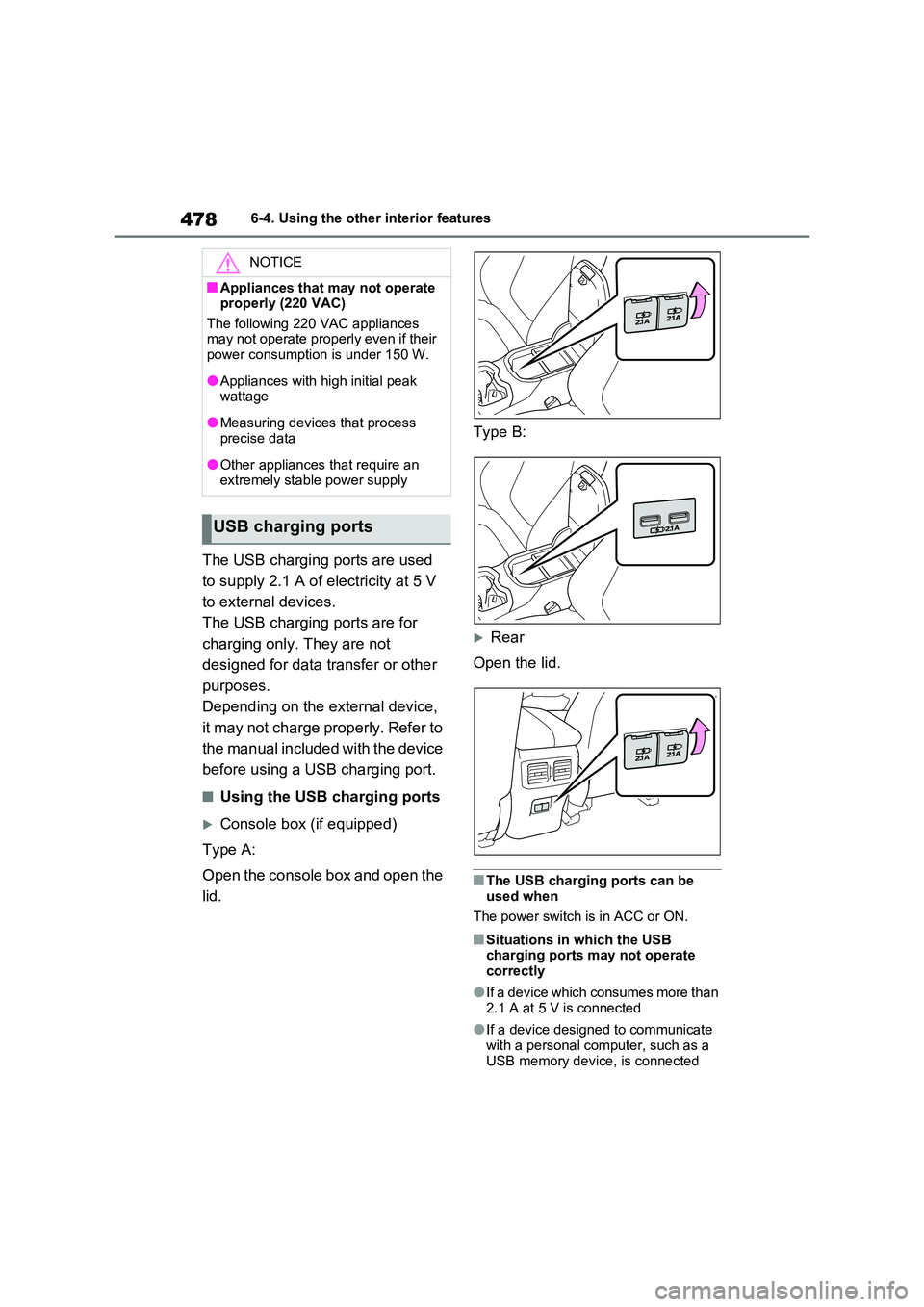
■Using the USB charging ports
Console box (if equipped)
Type A:
Open the console box and open the
lid.
Type B:
Rear
Open the lid.
■The USB charging ports can be
used when
The power switch is in ACC or ON.
■Situations in which the USB charging ports may not operate
correctly
●If a device which consumes more than
2.1 A at 5 V is connected
●If a device designed to communicate
with a personal computer, such as a USB memory device, is connected
NOTICE
■Appliances that may not operate properly (220 VAC)
The following 220 VAC appliances may not operate properly even if their power consumption is under 150 W.
●Appliances with high initial peak wattage
●Measuring devices that process precise data
●Other appliances that require an extremely stable power supply
USB charging ports
Page 479 of 664
479
6
6-4. Using the other interior features
Interior features
●If the connected external device is
turned off (depending on device)
●If the temperature inside the vehicle is
high, such as after the vehicle has been parked in the sun
■About connected external devices
Depending on the connected external
device, charging may occasionally be suspended and then start again. This is not a malfunction.
A portable device can be charged
by just placing Qi standard wireless
charge compatible portable devices
according to the Wireless Power
Consortium, such as smartphones
and mobile batteries, etc., on the
charge area.
This function cannot be used with
portable devices that are larger
than the charging area. Also,
depending on the portable device, it
may not operate as normal. Please
read the operation manual for por-
table devices to be used.
■The “Qi” symbol
The “Qi” symbol is a trademark of
the Wireless Power Consortium.
NOTICE
■To prevent damage to the USB charging ports
●Do not insert foreign objects into
the ports.
●Do not spill water or other liquids
into the ports.
●When the USB charging ports are
not in use, close the lids. If a foreign object or liquid enters a port may cause a short circuit.
●Do not apply excessive force to or impact the USB charging ports.
●Do not disassemble or modify the USB charging ports.
■To prevent damage to external devices
●Do not leave external devices in the vehicle. The temperature inside the vehicle may become high, resulting
in damage to an external device.
●Do not push down on or apply
unnecessary force to an external device or the cable of an external device while it is connected.
■To prevent 12-volt battery dis-charge
Do not use the USB charging ports for a long period of time when the hybrid system is off.
Wireless charger (if
equipped)
Page 480 of 664
4806-4. Using the other interior features
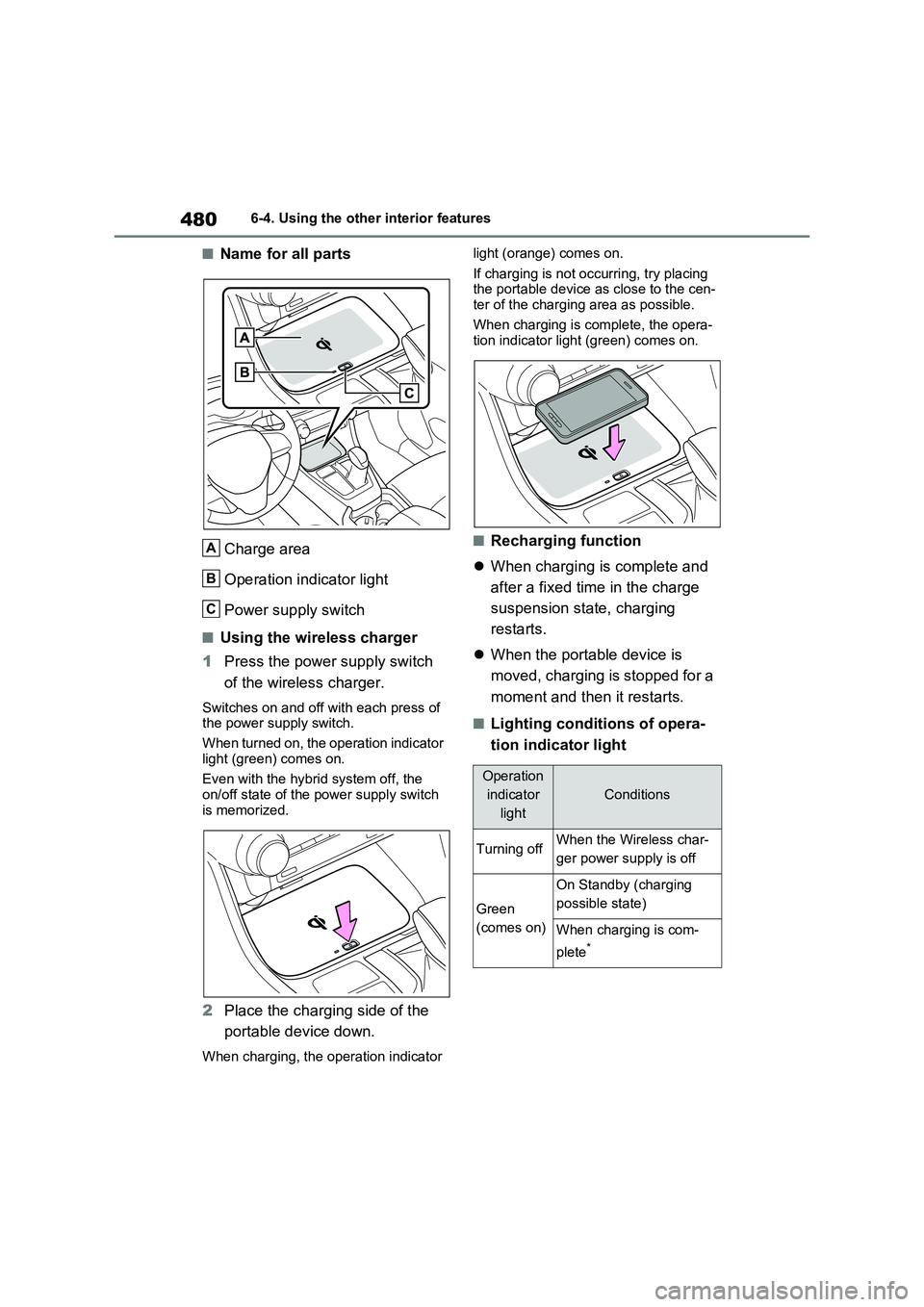
■Name for all parts
Charge area
Operation indicator light
Power supply switch
■Using the wireless charger
1Press the power supply switch
of the wireless charger.
Switches on and off with each press of
the power supply switch.
When turned on, the operation indicator
light (green) comes on.
Even with the hybrid system off, the
on/off state of the power supply switch
is memorized.
2Place the charging side of the
portable device down.
When charging, the operation indicator light (orange) comes on.
If charging is not occurring, try placing
the portable device as close to the cen-
ter of the charging area as possible.
When charging is complete, the opera-
tion indicator light (green) comes on.
■Recharging function
When charging is complete and
after a fixed time in the charge
suspension state, charging
restarts.
When the portable device is
moved, charging is stopped for a
moment and then it restarts.
■Lighting conditions of opera-
tion indicator light
A
B
C
Operation
indicator
light
Conditions
Turning offWhen the Wireless char-
ger power supply is off
Green
(comes on)
On Standby (charging
possible state)
When charging is com-
plete
*
Page 481 of 664
481
6 6-4. Using the other interior features
Interior features
*: Depending on the portable device,
there are cases where the operation
indicator light will continue being lit
up orange even after the charging is
complete.
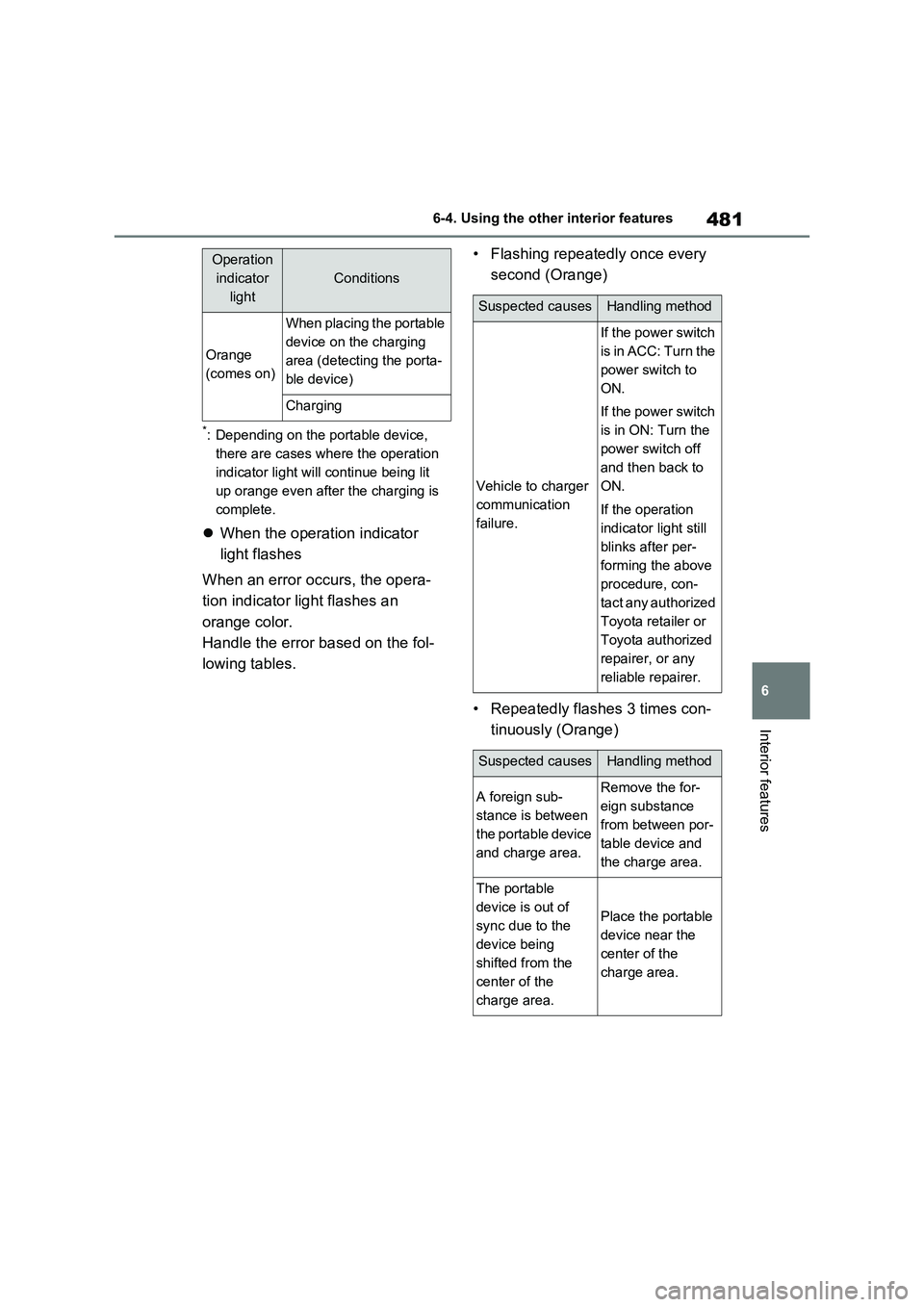
When the operation indicator
light flashes
When an error occurs, the opera-
tion indicator light flashes an
orange color.
Handle the error based on the fol-
lowing tables.• Flashing repeatedly once every
second (Orange)
• Repeatedly flashes 3 times con-
tinuously (Orange)
Orange
(comes on)
When placing the portable
device on the charging
area (detecting the porta-
ble device)
Charging
Operation
indicator
light
Conditions
Suspected causesHandling method
Vehicle to charger
communication
failure.
If the power switch
is in ACC: Turn the
power switch to
ON.
If the power switch
is in ON: Turn the
power switch off
and then back to
ON.
If the operation
indicator light still
blinks after per-
forming the above
procedure, con-
tact any authorized
Toyota retailer or
Toyota authorized
repairer, or any
reliable repairer.
Suspected causesHandling method
A foreign sub-
stance is between
the portable device
and charge area.Remove the for-
eign substance
from between por-
table device and
the charge area.
The portable
device is out of
sync due to the
device being
shifted from the
center of the
charge area.
Place the portable
device near the
center of the
charge area.