charging TOYOTA VERSO S 2011 Owners Manual
[x] Cancel search | Manufacturer: TOYOTA, Model Year: 2011, Model line: VERSO S, Model: TOYOTA VERSO S 2011Pages: 664, PDF Size: 160.56 MB
Page 482 of 664
4826-4. Using the other interior features
• Repeatedly flashes 4 times con-
tinuously (Orange)
■The wireless charger can be oper-
ated when
The power switch is in ACC or ON.
■Usable portable devices
Qi standard wireless charge standard
can be used on compatible devices.
However, not all Qi standard devices
and compatibility are guaranteed.
Starting with mobile phones and
smartphones, it is aimed for low power
electrically supplied portable devices of
no more than 5W.
■When covers and accessories are
attached to portable devices
Do not charge in situations where cover
and accessories not able to handle Qi
are attached to the portable device.
Depending on the type of cover and
accessory, it may not be possible to
charge. When charging is not performed
even with the portable device placed on
the charge area, remove the cover and
accessories.
■While charging, noise enters the
AM radio
Turn off the wireless charger and con-
firm that the noise has decreased. If the
noise decreases, continuously pushing
the power supply switch of the wireless
charger for 2 seconds, the frequency of
the charger can be changed and the
noise can be reduced.Also, on that
occasion, the operation indicator light
will flash orange 2 times.
■Important points of the wireless
charger
●If the electronic key cannot be detected within the vehicle interior,
charging cannot be done. When the
door is opened and closed, charging
may be temporarily suspended.
●When charging, the wireless charging
device and portable device will get
warmer, however this is not a mal-
function.
When a portable device gets warm
while charging, charging may stop
due to the protection function on the
portable device side. In this case,
when the temperature of the portable
device drops significantly, charge
again.
●Depending on usage of the portable
device, it may not be fully charged.
This is not a malfunction.
●When using a mobile phone near a
wireless charger, the call sensitivity
and communication speed may be
reduced.
■Operation sounds
When the power supply is turned on,
while searching for the portable device a
sound will be produced, however this is
not a malfunction.
■Cleaning the wireless charger
P.492
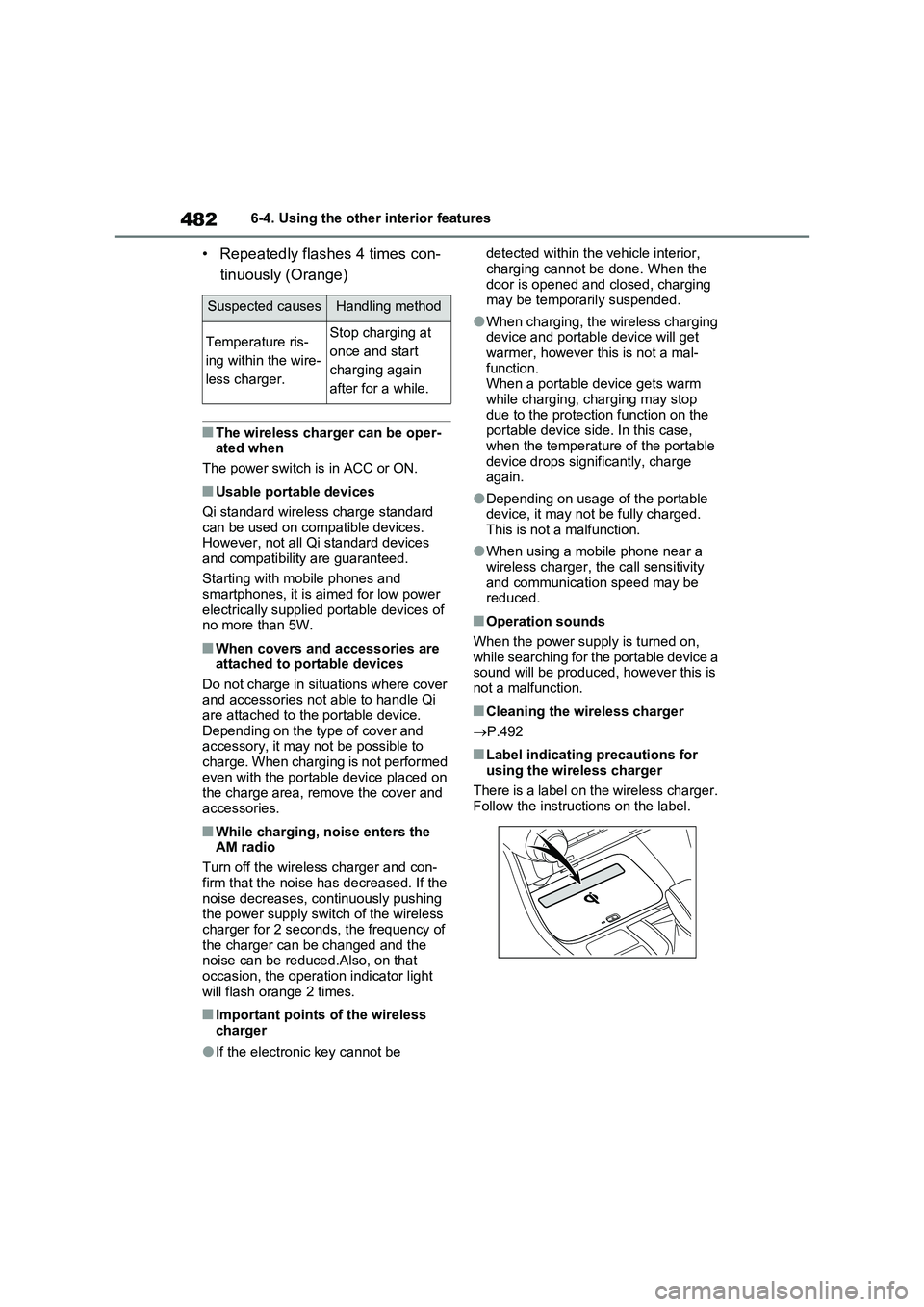
■Label indicating precautions for
using the wireless charger
There is a label on the wireless charger.
Follow the instructions on the label.
Suspected causesHandling method
Temperature ris-
ing within the wire-
less charger.Stop charging at
once and start
charging again
after for a while.
Page 483 of 664
483
6
6-4. Using the other interior features
Interior features
WARNING
■Caution while driving
When charging a portable device, for
safety reasons, the driver should not operate the main part of the portable device while driving.
■Caution regarding interference with electronic devices
People with implantable cardiac pace- makers, cardiac resynchronization therapy-pacemakers or implantable
cardioverter defibrillators, as well as any other electrical medical device, should consult their physician about
the usage of the wireless charger. The operations of the wireless char-ger may have an affect on medical
devices.
■To prevent damage or burns
Observe the following precautions. Failure to do so may result in a possi-bility of equipment failure and dam-
age, catch fire, burns due to overheat.
●Do not insert any metallic objects between the charging area and the
portable device while charging
●Do not place containers with liquid
such as water on the wireless char- ger.
●Do not attach stickers, metallic objects, etc., to the charger area or portable device
●Do not cover with cloth, etc., and charge
●Do not charge portable devices other than designated
●Do not attempt to dismantle for dis-assembly or modifications
●Do not hit or apply a strong force
NOTICE
■Conditions in which the function may not operate correctly
In the following conditions, it may not operate correctly
●The portable device is fully charged
●There is foreign matter between the charge area and portable device
●The temperature of the portable device gets higher from charging
●The charging surface of the porta-ble device is facing up
●The placement of the portable device is out of alignment with the
charge area
●Near a TV tower, electric power
plant, gas station, radio station, large display, airport or other facility that generates strong radio waves
or electrical noise
●When the electronic key is in con-
tact with, or is covered by the fol- lowing metallic objects
• Cards to which aluminum foil is
attached
• Cigarette boxes that have alumi- num foil inside
• Metallic wallets or bags
•Coins
• Hand warmers made of metal
• Media such as CDs and DVDs
●When other wireless keys (that emit
radio waves) are being used nearby
In addition, excluding the above-men-
tioned, when the charger does not
perform normally or the operation dis-
play lamp is flashing continuously, it is
considered that the wireless charger
is malfunctioning. Contact authorized
Toyota dealer.
Page 484 of 664
4846-4. Using the other interior features
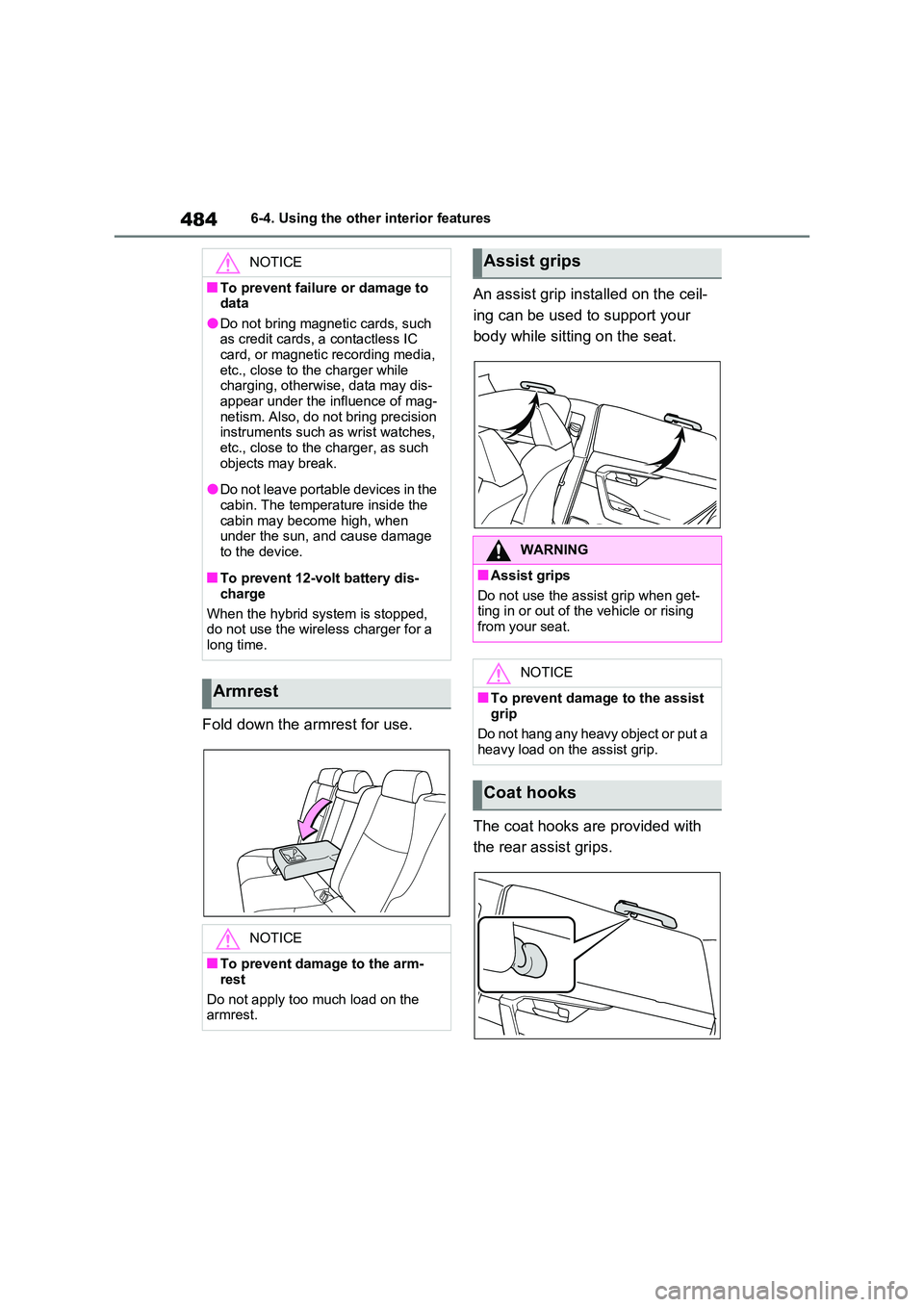
Fold down the armrest for use.
An assist grip installed on the ceil-
ing can be used to support your
body while sitting on the seat.
The coat hooks are provided with
the rear assist grips.
NOTICE
■To prevent failure or damage to data
●Do not bring magnetic cards, such as credit cards, a contactless IC card, or magnetic recording media,
etc., close to the charger while charging, otherwise, data may dis-appear under the influence of mag-
netism. Also, do not bring precision instruments such as wrist watches, etc., close to the charger, as such
objects may break.
●Do not leave portable devices in the
cabin. The temperature inside the cabin may become high, when under the sun, and cause damage
to the device.
■To prevent 12-volt battery dis-
charge
When the hybrid system is stopped, do not use the wireless charger for a
long time.
Armrest
NOTICE
■To prevent damage to the arm-
rest
Do not apply too much load on the armrest.
Assist grips
WARNING
■Assist grips
Do not use the assist grip when get- ting in or out of the vehicle or rising
from your seat.
NOTICE
■To prevent damage to the assist
grip
Do not hang any heavy object or put a heavy load on the assist grip.
Coat hooks
Page 488 of 664
4887-1. Maintenance and care
7-1.Mainte nance a nd care
Working from top to bottom, lib-
erally apply water to the vehicle
body, wheel wells and underside
of the vehicle to remove any dirt
and dust.
Wash the vehicle body using a
sponge or soft cloth, such as a
chamois.
For hard-to-remove marks, use
car wash soap and rinse thor-
oughly with water.
Wipe away any water.
Wax the vehicle when the water-
proof coating deteriorates.
If water does not bead on a clean sur-
face, apply wax when the vehicle body
is cool.
■Before car washes
Check that the fuel filler door and
charging port lid on your vehicle are
closed properly.
■Automatic car washes
●Before washing the vehicle:
• Fold the mirrors
• Turn off the power back door (if
equipped)
Start washing from the front of the vehi-
cle. Make sure to extend the mirrors
before driving.
●Brushes used in automatic car
washes may scratch the vehicle sur-
face, parts (wheel, etc.) and harm
your vehicle’s paint.
●Rear spoiler may not be washable in
some automatic car washes. There
may also be an increased risk of dam-
age to vehicle.
■High pressure car washes
As water may enter the cabin, do not
bring the nozzle tip near the gaps
around the doors or perimeter of the
windows, or spray these areas continu-
ously.
■Note for a smart entry & start sys-
tem
If the door handle becomes wet while
the electronic key is within the effective
range, the door may lock and unlock
repeatedly. In that case, follow the fol-
lowing correction procedures to wash
the vehicle:
●Place the key in a position 2 m (6 ft.)
or more separate from the vehicle
while the vehicle is being washed.
(Take care to ensure that the key is
not stolen.)
●Set the electronic key to battery-sav-
ing mode to disable the smart entry &
start system. (P.224)
■Wheels and wheel ornaments
●Remove any dirt immediately by using
a neutral detergent.
●Wash detergent off with water imme-
diately after use.
●To protect the paint from damage,
make sure to observe the following
precautions.
• Do not use acidic, alkaline or abrasive
detergent.
• Do not use hard brushes.
• Do not use detergent on the wheels
when they are hot, such as after driv-
ing or parking in hot weather.
Cleaning and protecting
the vehicle exterior
Perform the following to pro-
tect the vehicle and maintain it
in prime condition:
Cleaning instructions
Page 491 of 664
491
7
7-1. Maintenance and care
Maintenance and care
Remove dirt and dust using a
vacuum cleaner. Wipe dirty sur-
faces with a cloth dampened with
lukewarm water.
If dirt cannot be removed, wipe it
off with a soft cloth dampened
with neutral detergent diluted to
approximately 1%.
Wring out any excess water from
the cloth and thoroughly wipe off
remaining traces of detergent
and water.
■Shampooing the carpets
There are several commercial foaming-
type cleaners available. Use a sponge or brush to apply the foam. Rub in over-lapping circles. Do not use water. Wipe
dirty surfaces and let them dry. Excel- lent results are obtained by keeping the carpet as dry as possible.
■Handling the seat belts
Clean with mild soap and lukewarm water using a cloth or sponge. Also check the belts periodically for exces-
sive wear, fraying or cuts.
NOTICE
●Do not spray the lower part of the windshield continuously. If water
enters the air conditioning system intake located near the lower part of the windshield, the air conditioning
system may not operate correctly.
●Do not wash the underside of the
vehicle using a high pressure car washer.
●Do not use the washer on the area around the charging port lid. Water could get into the AC charging inlet
and could damage the vehicle.
Cleaning and protecting
the vehicle interior
Perform cleaning in a manner
appropriate to each compo-
nent and its material.
Protecting the vehicle inte-
rior
Page 506 of 664
5067-3. Do-it-yourself maintenance
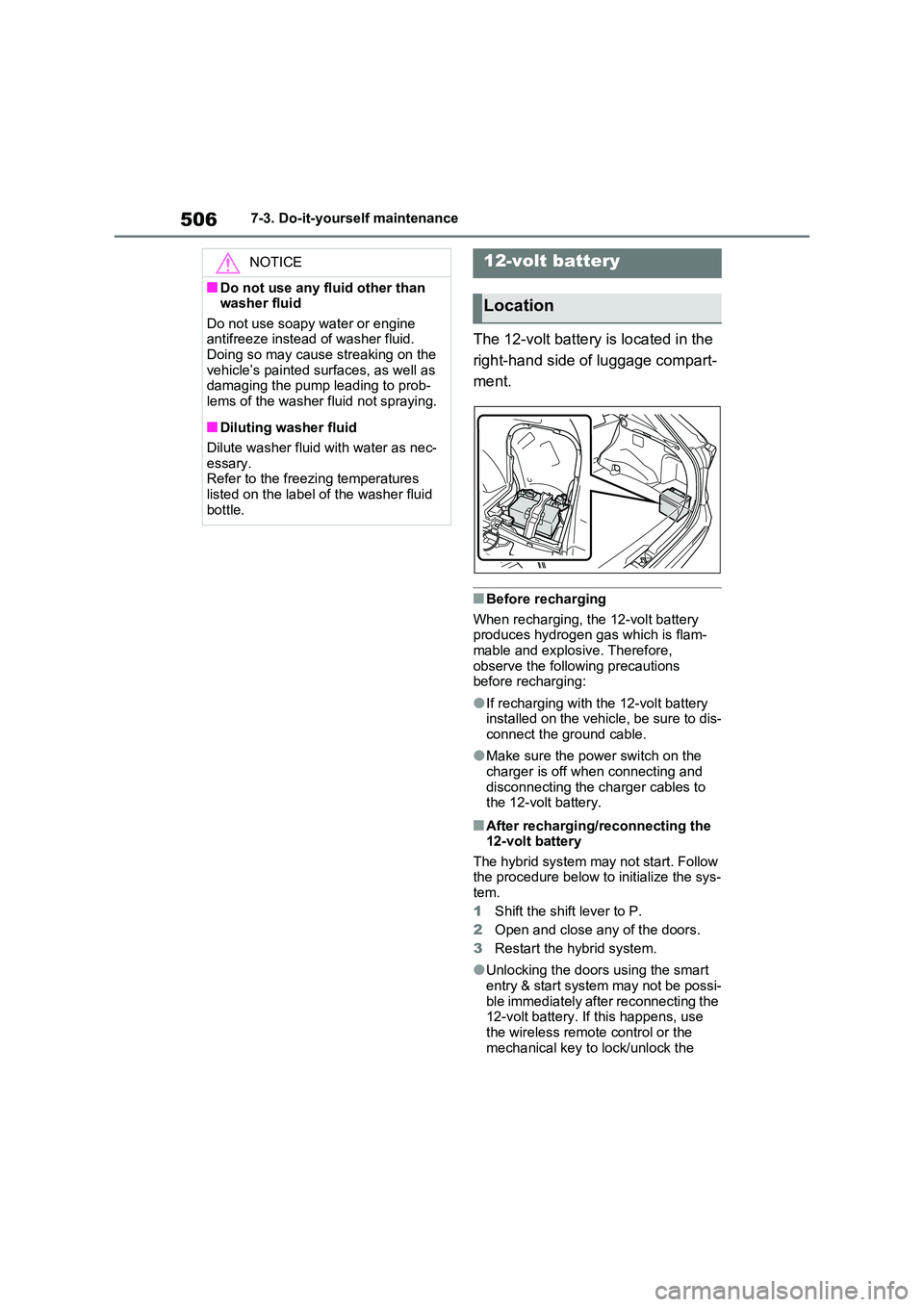
The 12-volt battery is located in the
right-hand side of luggage compart-
ment.
■Before recharging
When recharging, the 12-volt battery produces hydrogen gas which is flam-mable and explosive. Therefore,
observe the following precautions before recharging:
●If recharging with the 12-volt battery installed on the vehicle, be sure to dis-connect the ground cable.
●Make sure the power switch on the charger is off when connecting and
disconnecting the charger cables to the 12-volt battery.
■After recharging/reconnecting the 12-volt battery
The hybrid system may not start. Follow the procedure below to initialize the sys-tem.
1 Shift the shift lever to P.
2 Open and close any of the doors.
3 Restart the hybrid system.
●Unlocking the doors using the smart entry & start system may not be possi-
ble immediately after reconnecting the 12-volt battery. If this happens, use the wireless remote control or the
mechanical key to lock/unlock the
NOTICE
■Do not use any fluid other than washer fluid
Do not use soapy water or engine antifreeze instead of washer fluid.Doing so may cause streaking on the
vehicle’s painted surfaces, as well as damaging the pump leading to prob-lems of the washer fluid not spraying.
■Diluting washer fluid
Dilute washer fluid with water as nec-
essary. Refer to the freezing temperatures listed on the label of the washer fluid
bottle.
12-volt battery
Location
Page 508 of 664
5087-3. Do-it-yourself maintenance
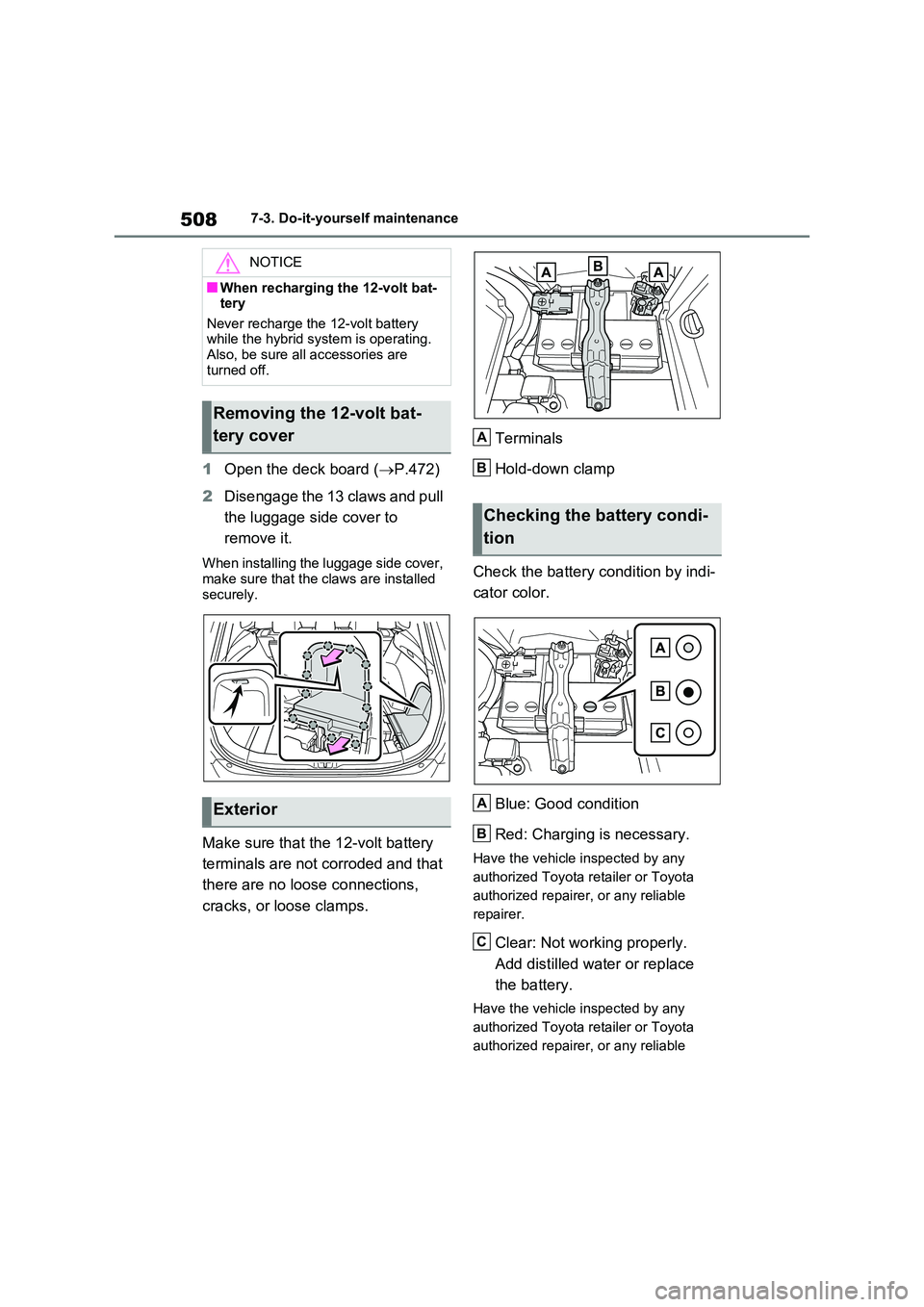
1Open the deck board (P.472)
2 Disengage the 13 claws and pull
the luggage side cover to
remove it.
When installing the luggage side cover,
make sure that the claws are installed securely.
Make sure that the 12-volt battery
terminals are not corroded and that
there are no loose connections,
cracks, or loose clamps.
Terminals
Hold-down clamp
Check the battery condition by indi-
cator color.
Blue: Good condition
Red: Charging is necessary.
Have the vehicle inspected by any
authorized Toyota retailer or Toyota
authorized repairer, or any reliable
repairer.
Clear: Not working properly.
Add distilled water or replace
the battery.
Have the vehicle inspected by any
authorized Toyota retailer or Toyota
authorized repairer, or any reliable
NOTICE
■When recharging the 12-volt bat- tery
Never recharge the 12-volt battery while the hybrid system is operating. Also, be sure all accessories are
turned off.
Removing the 12-volt bat-
tery cover
Exterior
Checking the battery condi-
tion
A
B
A
B
C
Page 532 of 664
5327-3. Do-it-yourself maintenance
Left-hand drive vehicles
1Turn the power switch off.
Confirm that the charging connector is
not connected. Also, do not use the
Remote Air Conditioning System during
the procedure.
2Open the front passenger’s
door.
By keeping the door open, unexpected
operation of the Remote Air Condition-
ing System can be prevent. (P.460)
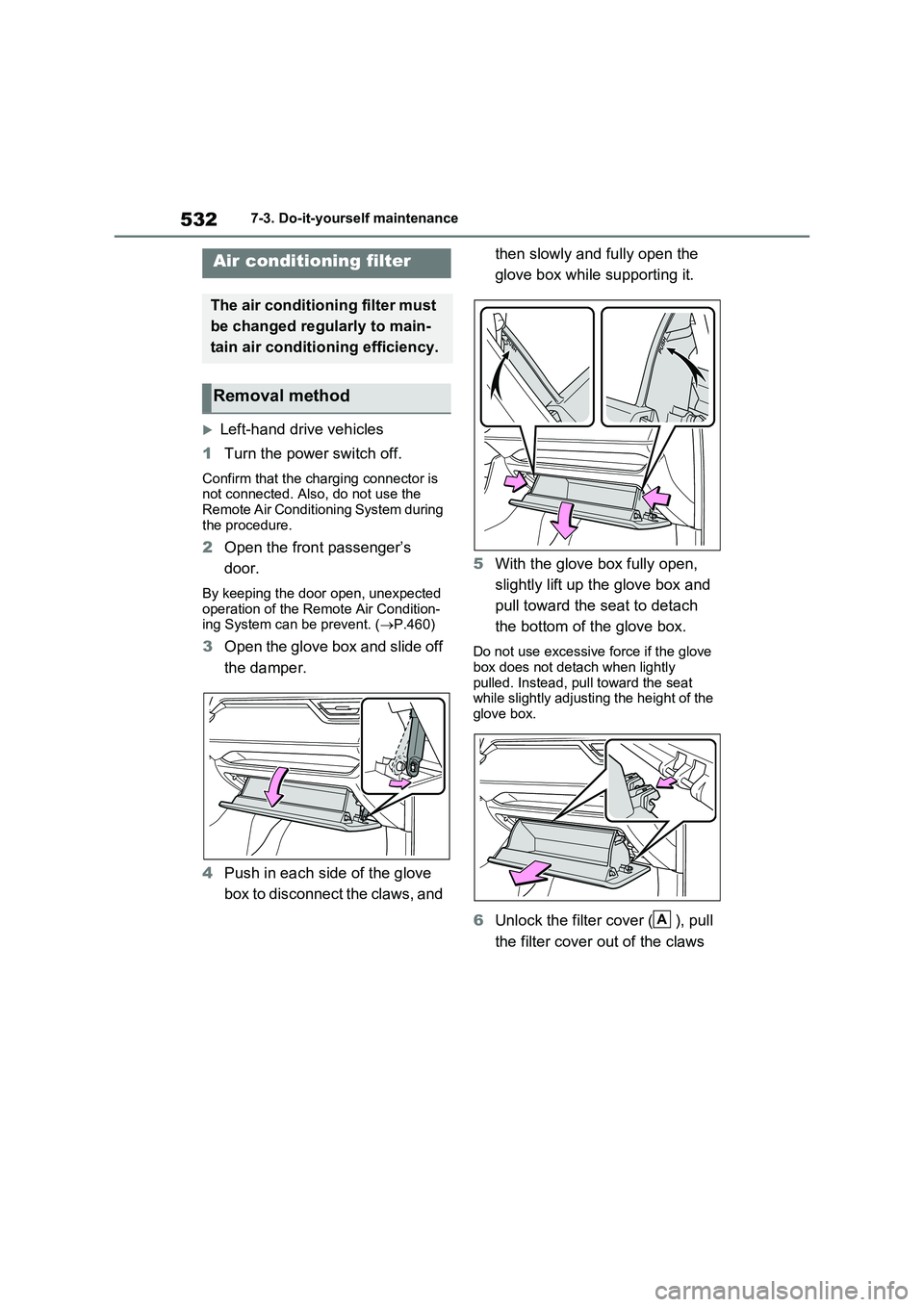
3Open the glove box and slide off
the damper.
4Push in each side of the glove
box to disconnect the claws, and then slowly and fully open the
glove box while supporting it.
5With the glove box fully open,
slightly lift up the glove box and
pull toward the seat to detach
the bottom of the glove box.Do not use excessive force if the glove
box does not detach when lightly
pulled. Instead, pull toward the seat
while slightly adjusting the height of the
glove box.
6Unlock the filter cover ( ), pull
the filter cover out of the claws
Air conditioning filter
The air conditioning filter must
be changed regularly to main-
tain air conditioning efficiency.
Removal method
A
Page 533 of 664
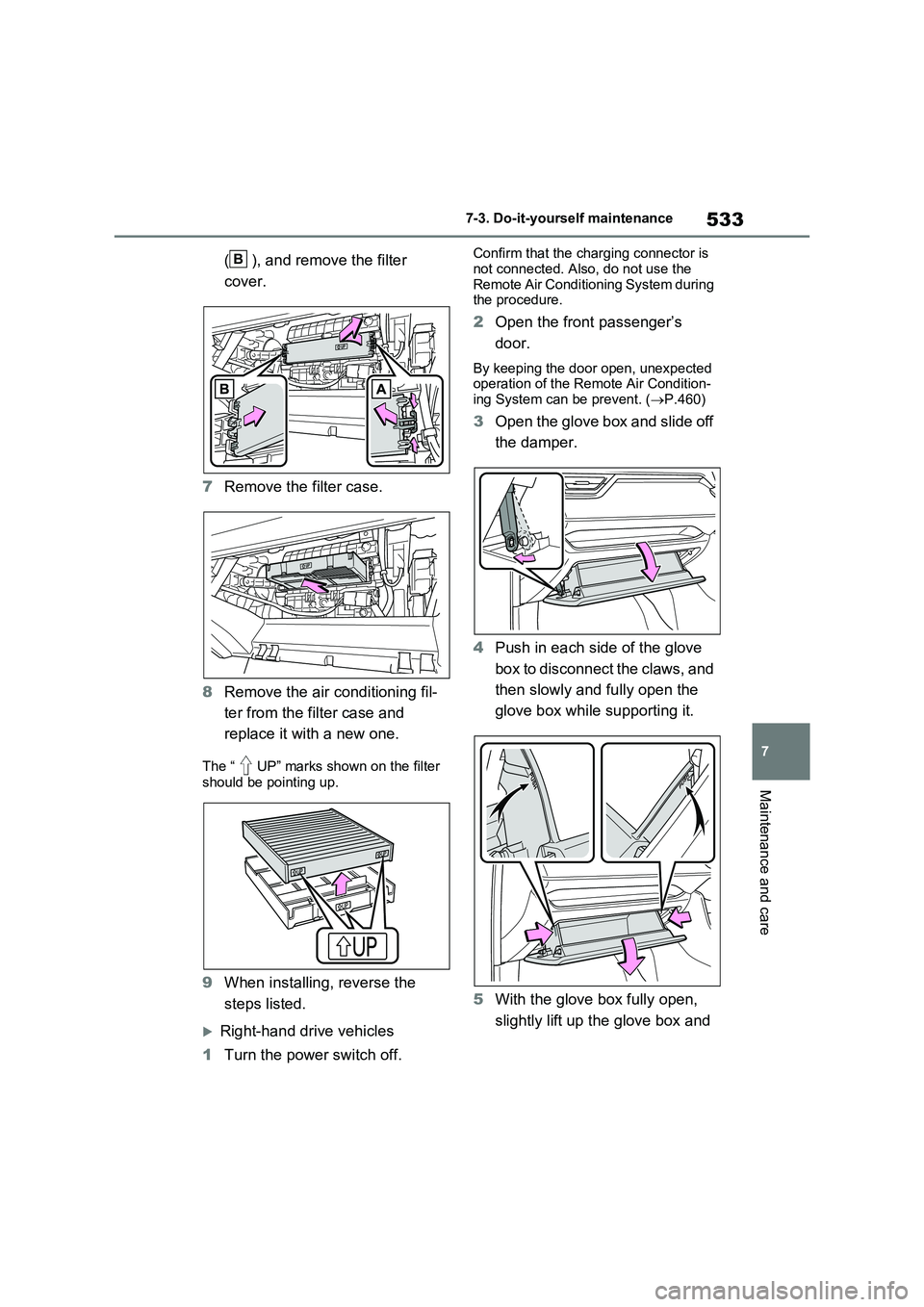
533
7
7-3. Do-it-yourself maintenance
Maintenance and care
( ), and remove the filter
cover.
7 Remove the filter case.
8 Remove the air conditioning fil-
ter from the filter case and
replace it with a new one.
The “ UP” marks shown on the filter
should be pointing up.
9 When installing, reverse the
steps listed.
Right-hand drive vehicles
1 Turn the power switch off.
Confirm that the charging connector is
not connected. Also, do not use the Remote Air Conditioning System during the procedure.
2 Open the front passenger’s
door.
By keeping the door open, unexpected operation of the Remote Air Condition-
ing System can be prevent. ( P.460)
3Open the glove box and slide off
the damper.
4 Push in each side of the glove
box to disconnect the claws, and
then slowly and fully open the
glove box while supporting it.
5 With the glove box fully open,
slightly lift up the glove box and
B
Page 535 of 664
535
7
7-3. Do-it-yourself maintenance
Maintenance and care
WARNING
■When replacing the air condition- ing filter
Observe the following precautions. Failure to do so may result in the air conditioning system operating during
the procedure, possibly resulting in injury.
●Check that the charging connector
is not connected
Check that the charging connector is not connected
The air conditioning may operate due to the “Climate Prep” ( P.144) set- ting.
●Do not use the Remote Air Condi-tioning System
NOTICE
■When using the air conditioning system
Make sure that a filter is always installed.
Using the air conditioning system without a filter may cause damage to the system.
■When removing the glove box
Always follow the specified procedure
to remove the glove box ( P.532). If the glove box is removed without fol-lowing the specified procedure, the
hinge of the glove box may become damaged.
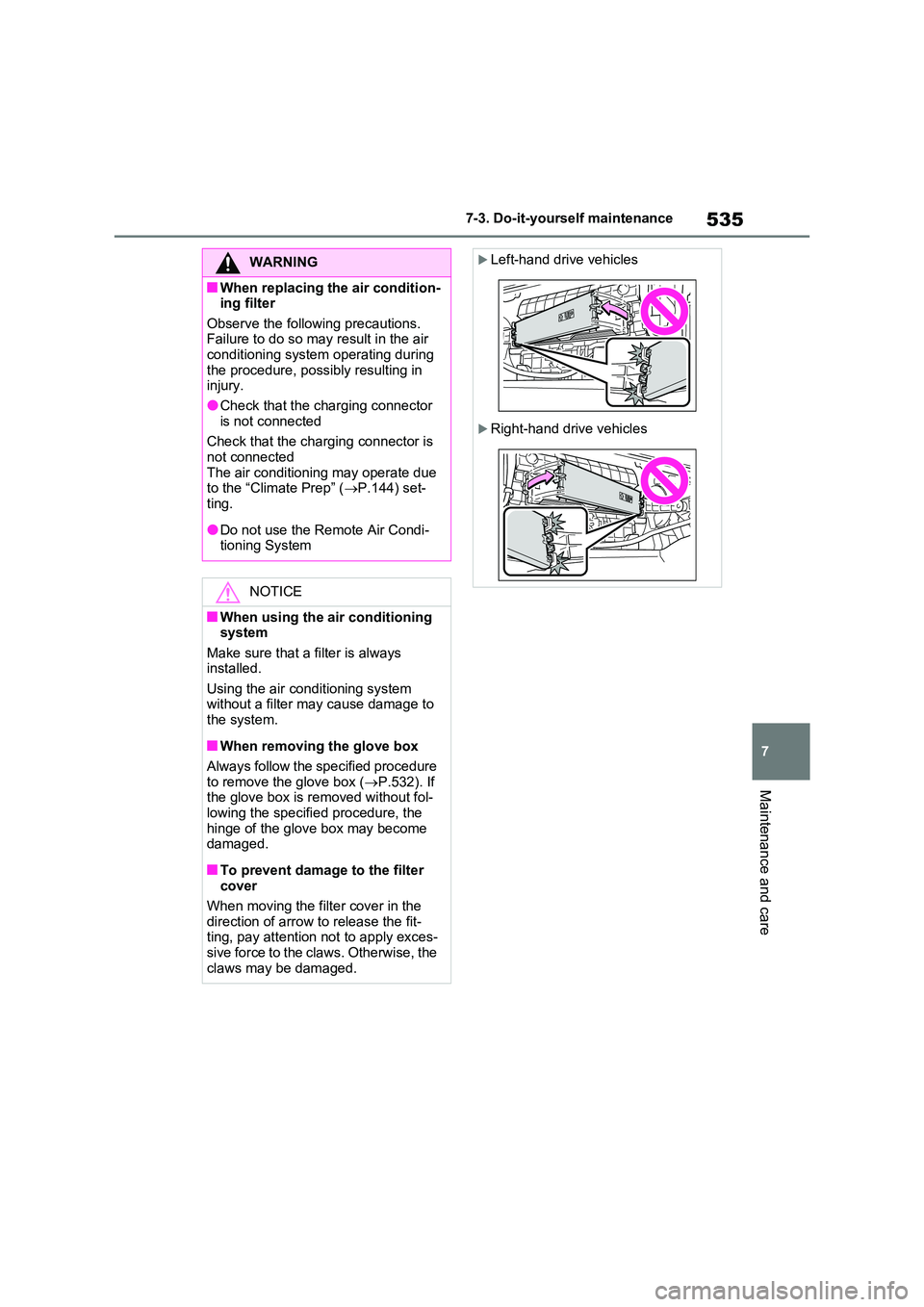
■To prevent damage to the filter cover
When moving the filter cover in the
direction of arrow to release the fit- ting, pay attention not to apply exces-sive force to the claws. Otherwise, the
claws may be damaged.
Left-hand drive vehicles
Right-hand drive vehicles