charging TOYOTA VERSO S 2011 Manual Online
[x] Cancel search | Manufacturer: TOYOTA, Model Year: 2011, Model line: VERSO S, Model: TOYOTA VERSO S 2011Pages: 664, PDF Size: 160.56 MB
Page 170 of 664
1703-1. Instrument cluster
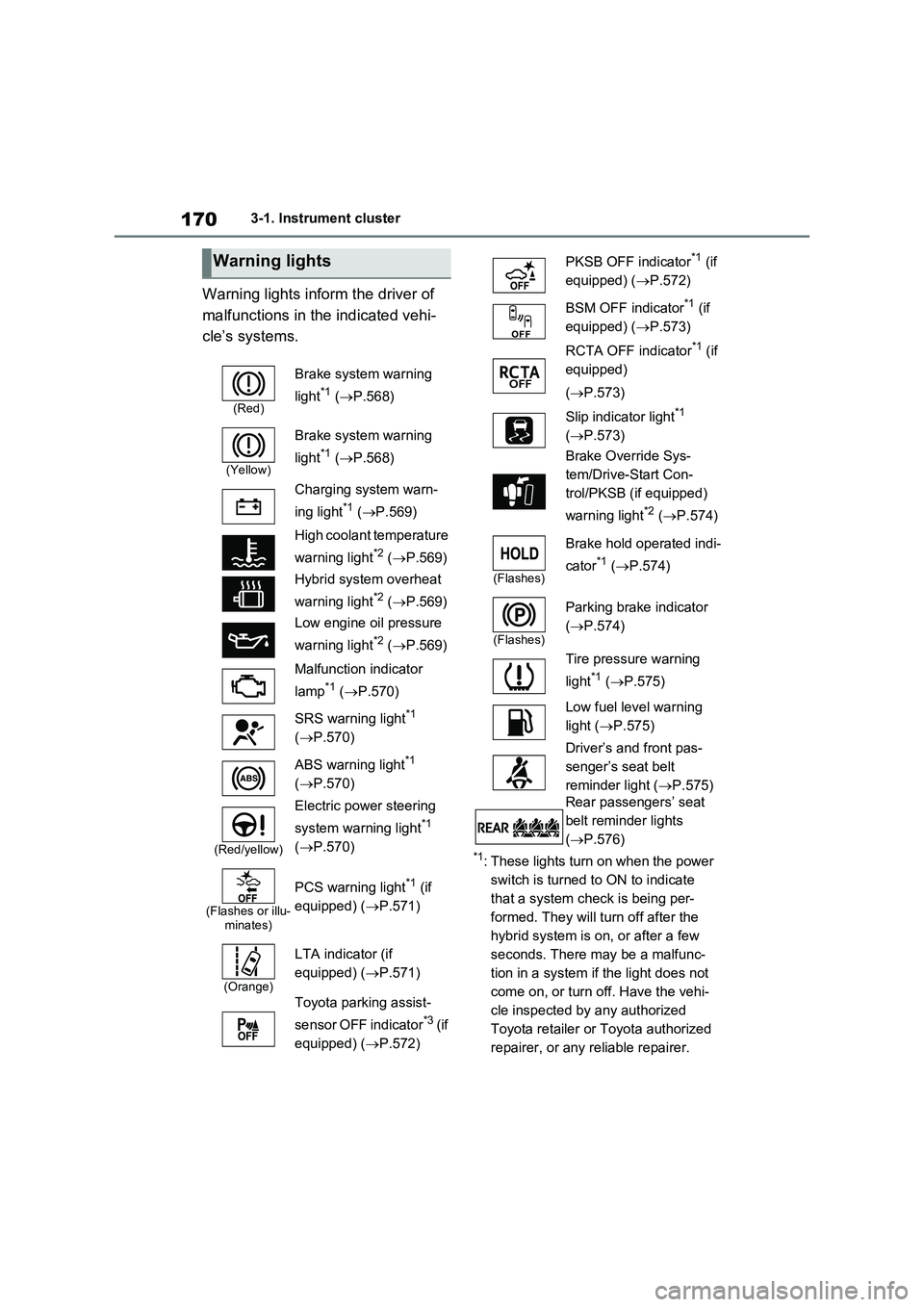
Warning lights inform the driver of
malfunctions in the indicated vehi-
cle’s systems.
*1: These lights turn on when the power
switch is turned to ON to indicate
that a system check is being per-
formed. They will turn off after the
hybrid system is on, or after a few
seconds. There may be a malfunc-
tion in a system if the light does not
come on, or turn off. Have the vehi-
cle inspected by any authorized
Toyota retailer or Toyota authorized
repairer, or any reliable repairer.
Warning lights
(Red)
Brake system warning
light
*1 (P.568)
(Yellow)
Brake system warning
light
*1 (P.568)
Charging system warn-
ing light
*1 (P.569)
High coolant temperature
warning light
*2 (P.569)
Hybrid system overheat
warning light
*2 (P.569)
Low engine oil pressure
warning light
*2 (P.569)
Malfunction indicator
lamp
*1 (P.570)
SRS warning light
*1
(P.570)
ABS warning light
*1
(P.570)
(Red/yellow)
Electric power steering
system warning light
*1
(P.570)
(Flashes or illu-
minates)
PCS warning light*1 (if
equipped) (P.571)
(Orange)
LTA indicator (if
equipped) (P.571)
Toyota parking assist-
sensor OFF indicator
*3 (if
equipped) (P.572)
PKSB OFF indicator*1 (if
equipped) (P.572)
BSM OFF indicator
*1 (if
equipped) (P.573)
RCTA OFF indicator
*1 (if
equipped)
(P.573)
Slip indicator light
*1
(P.573)
Brake Override Sys-
tem/Drive-Start Con-
trol/PKSB (if equipped)
warning light
*2 (P.574)
(Flashes)
Brake hold operated indi-
cator
*1 (P.574)
(Flashes)
Parking brake indicator
(P.574)
Tire pressure warning
light
*1 (P.575)
Low fuel level warning
light (P.575)
Driver’s and front pas-
senger’s seat belt
reminder light (P.575)
Rear passengers’ seat
belt reminder lights
(P.576)
Page 187 of 664
187
3 3-1. Instrument cluster
Vehicle status information and indicators
■ (Toyota parking assist-
sensor) (if equipped) (P.414)
Select to set up the following items.
Toyota parking assist-sensor
on/off
Select to enable/disable the Toyota
parking assist-sensor.
“Volume”
Select to set the volume of the buzzer
which sounds when the Toyota parking
assist-sensor is operated.
■RCTA (Rear Crossing Traffic
Alert) (if equipped) (P.393)
RCTA (Rear Crossing Traffic
Alert) on/off
Select to enable/disable the RCTA sys-
tem.
“Volume”
Select to change the RCTA buzzer vol-
ume.
■ PKSB (Parking Support
Brake System) (if equipped)
(P.420)
Select to enable/disable the Park-
ing Support Brake function.
■“HUD Main” (if equipped)
(P.191)
HUD on/off
Select to enable/disable the head-up
display.
“HUD Brightness/Position”
Select to adjust the brightness or verti-
cal position of the head-up display.
“HUD Driving Support”
Select to change the items displayed
on the head-up display.
“HUD Rotation”
Select to adjust the angle of the head-
up display.
■ RSA (Road Sign Assist)
(if equipped) (P.372)
Select to set up the following items.
Road Sign Assist on/off
Select to enable/disable the RSA sys-
tem.
“Notification Method”
Select to change each notification
method used to notify the driver when
the system recognizes excess speed,
no overtaking and no-entry sign.
“Notification Level”
Select to change each notification level
used to notify the driver when the sys-
tem recognizes a speed limit sign.
■DRCC (RSA) (if equipped)
(P.384)
Select to enable/disable the
Dynamic Radar Cruise Control with
Road Sign Assist.
■Vehicle Settings
“Charging Settings”
Select to set up the following items.
• “Charging Schedule”
Select to register or change the
charging schedule. (P.144)
• “Charging Current”
Select to change the charging current.
(P.125)
• “Battery Heater”
Select to enable/disable the battery
heater. (P.128)
• “Battery Cooler”
Page 196 of 664
1963-1. Instrument cluster
and select , and then press
or to select the energy mon-
itor display.
Audio system screen (without
navigation function)
1Press the “MENU” button.
2Select “Info” on the “Menu”
screen.
If a screen other than “Energy monitor”
is displayed, select “Energy”.
Audio system screen (with navi-
gation function)
1Press the “MENU” button.
2Select “Info” on the “Menu”
screen.
3Select “ECO” on the “Informa-
tion” screen.
If a screen other than “Energy monitor”
is displayed, select “Energy”.
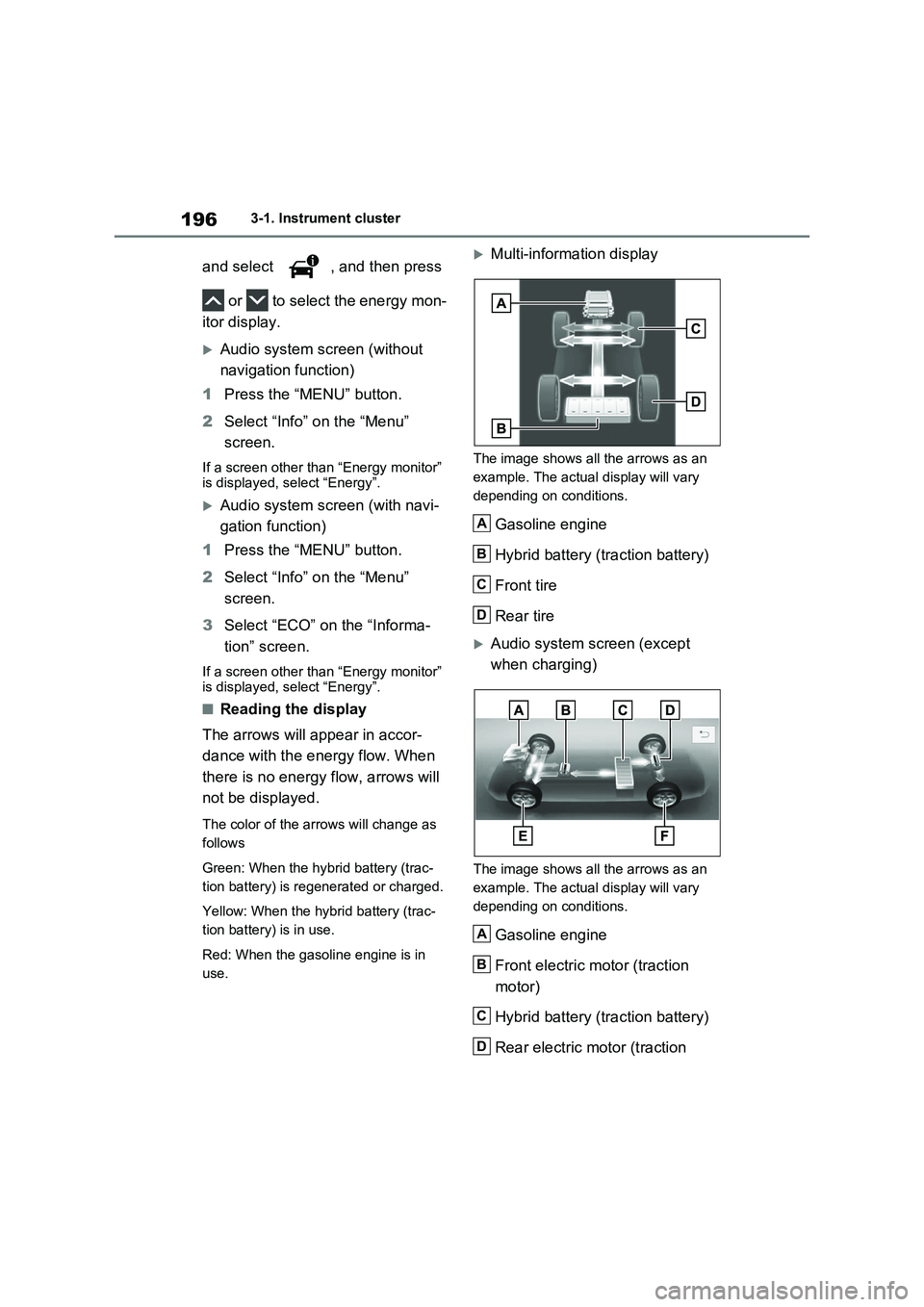
■Reading the display
The arrows will appear in accor-
dance with the energy flow. When
there is no energy flow, arrows will
not be displayed.
The color of the arrows will change as
follows
Green: When the hybrid battery (trac-
tion battery) is regenerated or charged.
Yellow: When the hybrid battery (trac-
tion battery) is in use.
Red: When the gasoline engine is in
use.
Multi-information display
The image shows all the arrows as an
example. The actual display will vary
depending on conditions.
Gasoline engine
Hybrid battery (traction battery)
Front tire
Rear tire
Audio system screen (except
when charging)
The image shows all the arrows as an
example. The actual display will vary
depending on conditions.
Gasoline engine
Front electric motor (traction
motor)
Hybrid battery (traction battery)
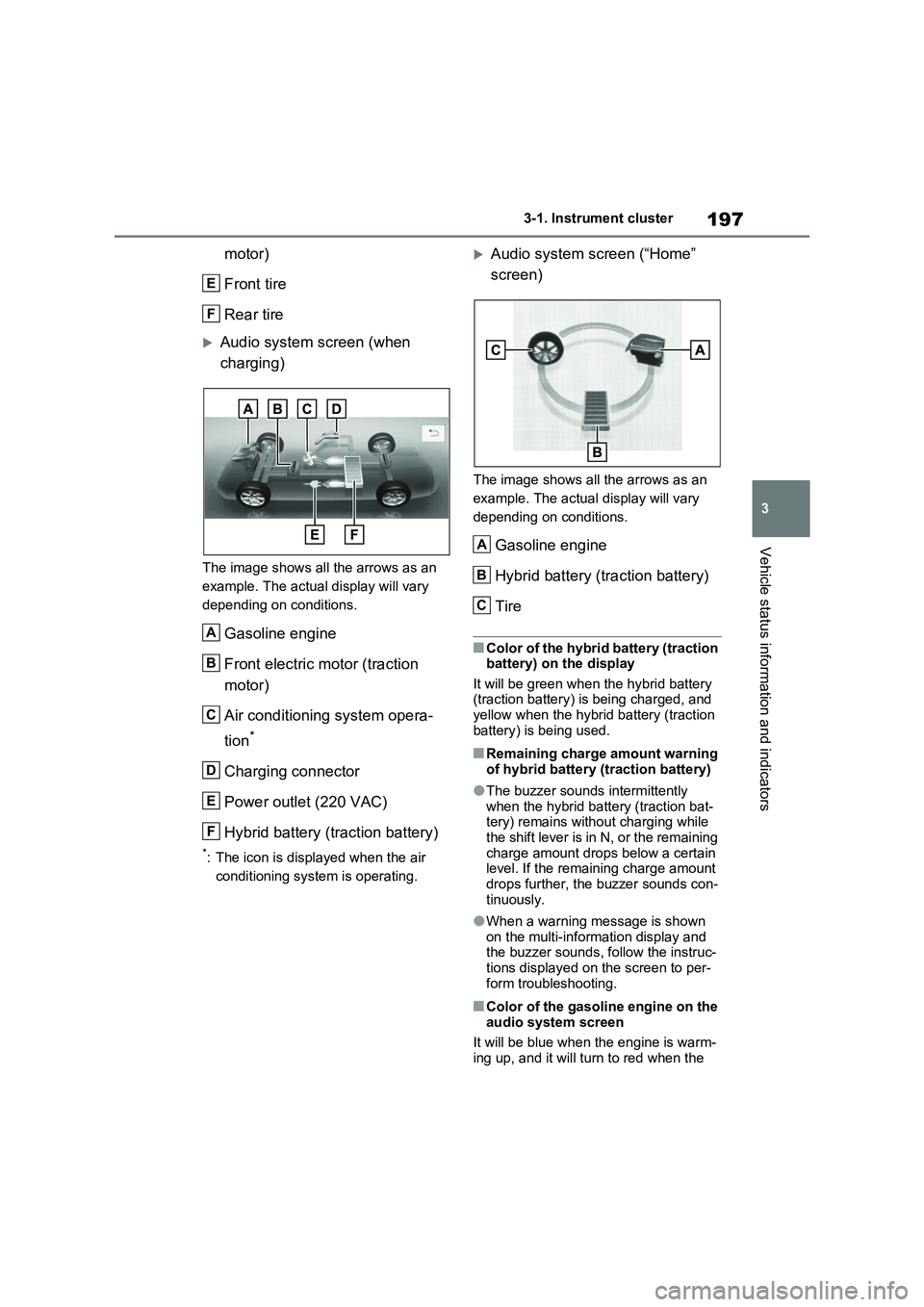
Rear electric motor (traction
A
B
C
D
A
B
C
D
Page 197 of 664
197
3 3-1. Instrument cluster
Vehicle status information and indicators
motor)
Front tire
Rear tire
Audio system screen (when
charging)
The image shows all the arrows as an
example. The actual display will vary
depending on conditions.
Gasoline engine
Front electric motor (traction
motor)
Air conditioning system opera-
tion
*
Charging connector
Power outlet (220 VAC)
Hybrid battery (traction battery)
*: The icon is displayed when the air
conditioning system is operating.
Audio system screen (“Home”
screen)
The image shows all the arrows as an
example. The actual display will vary
depending on conditions.
Gasoline engine
Hybrid battery (traction battery)
Tire
■Color of the hybrid battery (traction
battery) on the display
It will be green when the hybrid battery
(traction battery) is being charged, and
yellow when the hybrid battery (traction
battery) is being used.
■Remaining charge amount warning
of hybrid battery (traction battery)
●The buzzer sounds intermittently
when the hybrid battery (traction bat-
tery) remains without charging while
the shift lever is in N, or the remaining
charge amount drops below a certain
level. If the remaining charge amount
drops further, the buzzer sounds con-
tinuously.
●When a warning message is shown
on the multi-information display and
the buzzer sounds, follow the instruc-
tions displayed on the screen to per-
form troubleshooting.
■Color of the gasoline engine on the
audio system screen
It will be blue when the engine is warm-
ing up, and it will turn to red when the
E
F
A
B
C
D
E
F
A
B
C
Page 205 of 664
205
4
4-2. Opening, closing and locking the doors
Before driving
4-2.Opening, closing and lo cking th e d oors
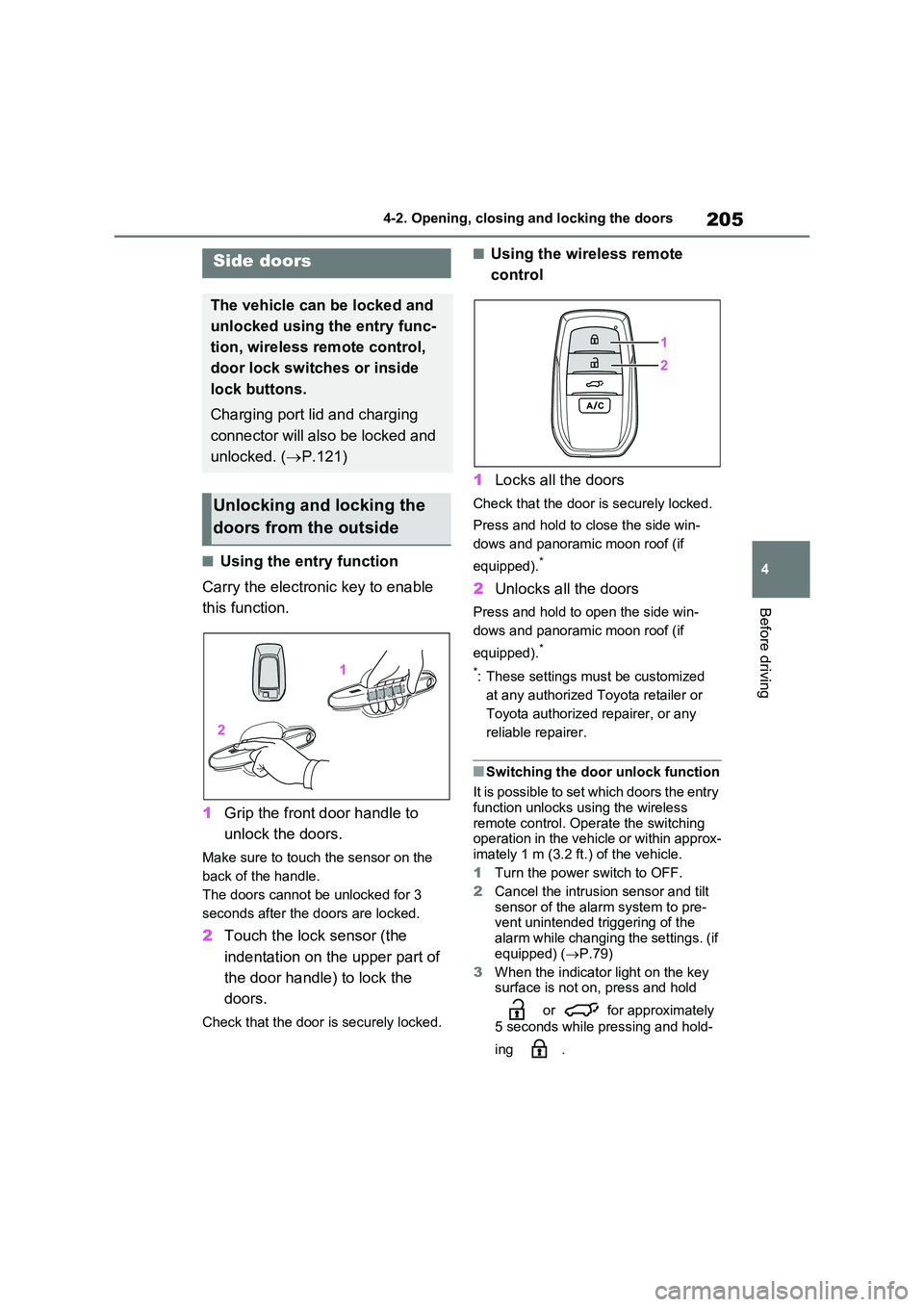
■Using the entry function
Carry the electronic key to enable
this function.
1 Grip the front door handle to
unlock the doors.
Make sure to touch the sensor on the
back of the handle.
The doors cannot be unlocked for 3
seconds after the doors are locked.
2 Touch the lock sensor (the
indentation on the upper part of
the door handle) to lock the
doors.
Check that the door is securely locked.
■Using the wireless remote
control
1 Locks all the doors
Check that the door is securely locked.
Press and hold to close the side win-
dows and panoramic moon roof (if
equipped).*
2 Unlocks all the doors
Press and hold to open the side win-
dows and panoramic moon roof (if
equipped).*
*: These settings must be customized
at any authorized Toyota retailer or
Toyota authorized repairer, or any
reliable repairer.
■Switching the door unlock function
It is possible to set which doors the entry function unlocks using the wireless
remote control. Operate the switching operation in the vehicle or within approx-imately 1 m (3.2 ft.) of the vehicle.
1 Turn the power switch to OFF.
2 Cancel the intrusion sensor and tilt
sensor of the alarm system to pre- vent unintended triggering of the
alarm while changing the settings. (if equipped) ( P.79)
3 When the indicator light on the key surface is not on, press and hold
or for approximately
5 seconds while pressing and hold-
ing .
Side doors
The vehicle can be locked and
unlocked using the entry func-
tion, wireless remote control,
door lock switches or inside
lock buttons.
Charging port lid and charging
connector will also be locked and
unlocked. ( P.121)
Unlocking and locking the
doors from the outside
Page 210 of 664
2104-2. Opening, closing and locking the doors
Back door
The back door can be
locked/unlocked and
opened/closed by the follow-
ing procedures.
Charging port lid and charging
connector will also be locked and
unlocked. ( P.121)
WARNING
Observe the following precautions.
Failure to do so may result in death or serious injury.
■Before driving
●Make sure that the back door is fully closed.
If the back door is not fully closed, it may open unexpectedly while driv-ing and hit near-by objects or lug-
gage in the luggage compartment may be thrown out, causing an accident.
●Do not allow children to play in the luggage compartment.
If a child is accidentally locked in the luggage compartment, they could get heat exhaustion or other
injuries.
●Do not allow a child to open or
close the back door. Doing so may cause the back door to operate unexpectedly, or cause
the child’s hands, head, or neck to be caught by the closing back door.
■Important points while driving
●Keep the back door closed while driving.
If the back door is left open, it may hit near-by objects or luggage in the luggage compartment may be
thrown out, causing an accident.
●Never let anyone sit in the luggage compartment. In the event of sudden braking, sud-
den swerving or a collision, they are susceptible to death or serious injury.
■Back door handles
Do not hang any object to the back
door handles. If any object is hung, the back door may suddenly shut, causing parts of
the body to be caught, resulting in death or serious injury.
■Operating the back door
Observe the following precautions. Failure to do so may cause parts of
the body to be caught, resulting in death or serious injury.
●Remove any heavy loads, such as
snow and ice, from the back door before opening it. Failure to do so may cause the back door to sud-
denly shut again after it is opened.
●When opening or closing the back
door, thoroughly check to make sure the surrounding area is safe.
●If anyone is in the vicinity, make sure they are safe and let them know that the back door is about to
open or close.
●Use caution when opening or clos-
ing the back door in windy weather as it may move abruptly in strong wind.
Page 218 of 664
2184-2. Opening, closing and locking the doors
●When an external radio wave source
interferes with the communication
between the electronic key and the
vehicle (P.225)
●When charging from an external
power source or connecting the AC
charging cable
●When the vehicle is parked near an
electrical noise source which affects
the sensitivity of the Hands Free
Power Back Door, such as a pay park-
ing spot, gas station, electrically
heated road, or fluorescent light
●When the vehicle is near a TV tower,
electric power plant, radio station,
large display, airport or other facility
that generates strong radio waves or
electrical noise
●When a large amount of water is
applied to the rear bumper, such as
when the vehicle is being washed or
in heavy rain
●When mud, snow, ice, etc. is attached
to the rear bumper
●When the vehicle has been parked for
a while near objects that may move
and contact the rear bumper, such as
plants
●When an accessory is installed to the
rear bumper
If an accessory has been installed, turn
the Hands Free Power Back Door oper-
ation setting off.
■Preventing unintentional operation
of the Hands Free Power Back Door
(vehicles with Hands Free Power
Back Door)
When an electronic key is in the opera-
tion range, the Hands Free Power Back
Door may operate unintentionally, so be
careful in the following situations.
●When a large amount of water is
applied to the rear bumper, such as
when the vehicle is being washed or
in heavy rain
●When dirt is wiped off the rear bumper
●When a small animal or small object, such as a ball, moves under the rear
bumper
●When an object is moved from under
the rear bumper
●If someone is swinging their legs while
sitting on the rear bumper
●If the legs or another part of some-
one’s body contacts the rear bumper
while passing by the vehicle
●When the vehicle is parked near an
electrical noise source which affects
the sensitivity of the Hands Free
Power Back Door, such as a pay park-
ing spot, gas station, electrically
heated road, or fluorescent light
●When the vehicle is near a TV tower,
electric power plant, radio station,
large display, airport or other facility
that generates strong radio waves or
electrical noise
●When the vehicle is parked in a place
where objects such as plants are near
the rear bumper
●If luggage, etc. is set near the rear
bumper
●If accessories or a vehicle cover is
installed/removed near the rear
bumper
●When the vehicle is being towed
To prevent unintentional operation, turn
the Hands Free Power Back Door oper-
ation setting off. (P.186)
■When reconnecting the 12-volt bat-
tery
To enable the power back door to oper-
ate properly, close the back door manu-
ally.
■If the back door opener is inopera-
tive
The back door can be unlocked from the
inside.
1Remove the cover.
To prevent damage, cover the tip of the
screwdriver with a rag.
Page 223 of 664
223
4
4-2. Opening, closing and locking the doors
Before driving
■Customization
The opening position can be set with the multi-information display. ( P.186)
Priority for the stop position is given to
the last position set by either the power back door switch on the back door or multi-information display.
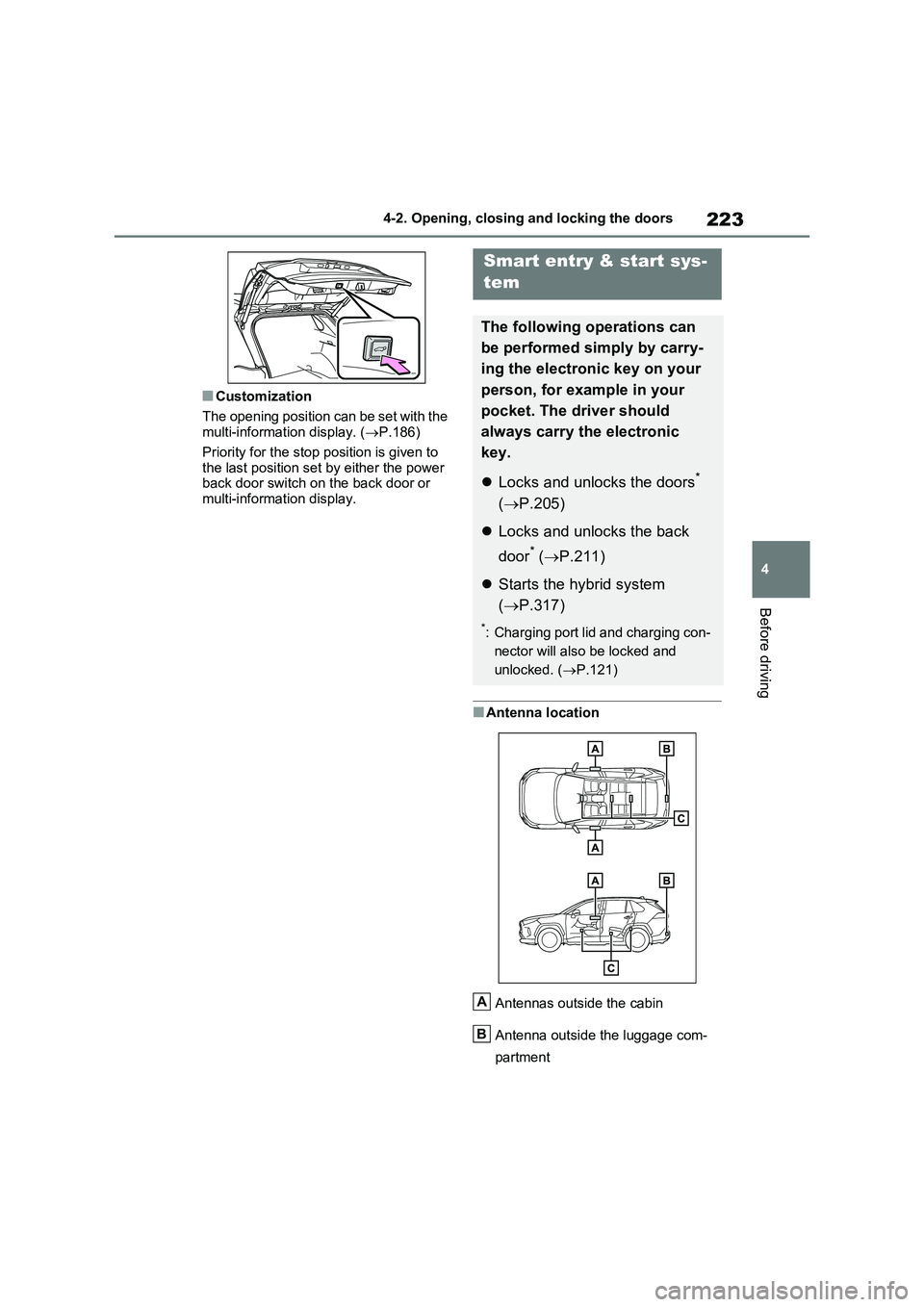
■Antenna location
Antennas outside the cabin
Antenna outside the luggage com-
partment
Smart entry & start sys-
tem
The following operations can
be performed simply by carry-
ing the electronic key on your
person, for example in your
pocket. The driver should
always carry the electronic
key.
Locks and unlocks the doors*
( P.205)
Locks and unlocks the back
door* ( P.211)
Starts the hybrid system
( P.317)
*: Charging port lid and charging con-
nector will also be locked and
unlocked. ( P.121)
A
B
Page 300 of 664
3005-1. Before driving
5- 1. B ef ore dr iv in g
■Before starting the hybrid sys-
tem
Check that the AC charging cable is
disconnected. (P.135)
■Starting the hybrid system
P.317
■Driving
1With the brake pedal depressed,
shift the shift lever to D.
(P.321)
2Release the parking brake.
(P.326)
If the parking brake is in automatic
mode, the parking brake is released
automatically when shifting the shift
lever to any position other than P.
(P.327)
3Gradually release the brake
pedal and gently depress the
accelerator pedal to accelerate
the vehicle.
■Stopping
1With the shift lever in D, depress
the brake pedal.
2If necessary, set the parking
brake. (P.326)
If the vehicle is to be stopped for an
extended period of time, shift the shift
lever to P. (P.321)
■Parking the vehicle
1With the shift lever in D, depress
the brake pedal.
2Set the parking brake (P.326),
and shift the shift lever to P.
(P.321)
3Turn the power switch to OFF to
stop the hybrid system.
4Lock the door, making sure that
you have the key on your per-
son.
If parking on a hill, block the wheels as
needed.
■Starting off on a steep uphill
1With the brake pedal depressed,
shift the shift lever to D.
(P.321)
2Pull the parking brake switch to
set the parking brake manually.
(P.326)
3Release the brake pedal and
gently depress the accelerator
pedal to accelerate the vehicle.
Parking brake automatic release func-
tion (P.327)
■When starting off on a uphill
The hill-start assist control will activate.
(P.438)
■For electricity-saving and fuel-effi-
cient driving
Understand the system characteristics
of the vehicle to use the functions of the
hybrid system. Also, keep in mind that
hybrid vehicles are similar to conven-
tional vehicles, and it is necessary to
refrain from activities such as sudden
acceleration. Refer to “Plug-in hybrid
vehicle driving tips” (P.99).
Driving the vehicle
The following procedures
should be observed to ensure
safe driving:
Driving procedure
Page 317 of 664
317
5 5-2. Driving procedures
Driving
5-2.Driving pro cedu res
1Check that the AC charging
cable is disconnected. (P.135)
2Pull the parking brake switch to
check that the parking brake is
set. (P.326)
The parking brake indicator will come
on.
3Check that the shift lever is set
in P.
4Firmly depress the brake pedal.
and a message will be dis-
played on the multi-information display.
If it is not displayed, the hybrid system
cannot be started.
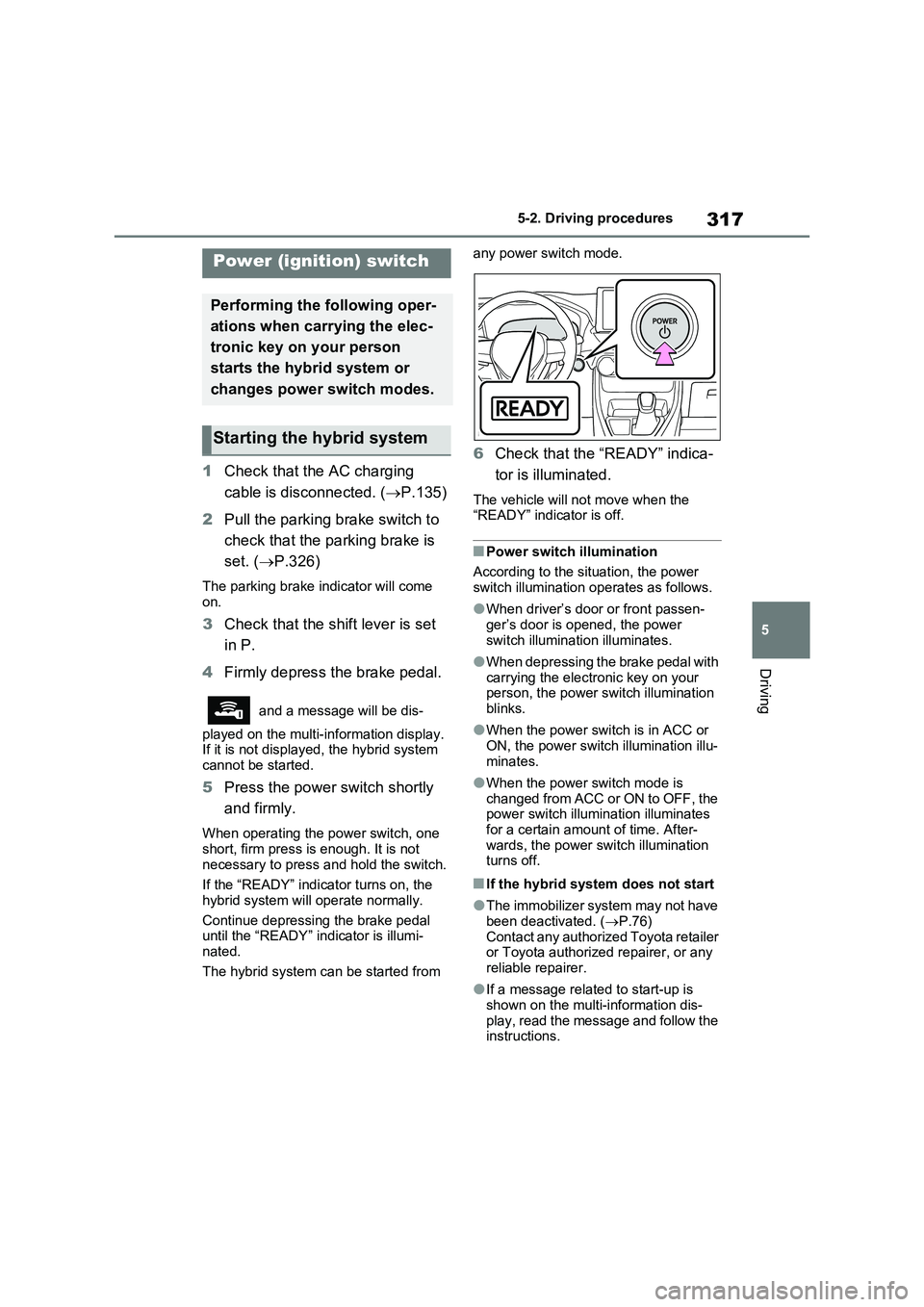
5Press the power switch shortly
and firmly.
When operating the power switch, one
short, firm press is enough. It is not
necessary to press and hold the switch.
If the “READY” indicator turns on, the
hybrid system will operate normally.
Continue depressing the brake pedal
until the “READY” indicator is illumi-
nated.
The hybrid system can be started from any power switch mode.
6Check that the “READY” indica-
tor is illuminated.
The vehicle will not move when the
“READY” indicator is off.
■Power switch illumination
According to the situation, the power
switch illumination operates as follows.
●When driver’s door or front passen-
ger’s door is opened, the power
switch illumination illuminates.
●When depressing the brake pedal with
carrying the electronic key on your
person, the power switch illumination
blinks.
●When the power switch is in ACC or
ON, the power switch illumination illu-
minates.
●When the power switch mode is
changed from ACC or ON to OFF, the
power switch illumination illuminates
for a certain amount of time. After-
wards, the power switch illumination
turns off.
■If the hybrid system does not start
●The immobilizer system may not have
been deactivated. (P.76)
Contact any authorized Toyota retailer
or Toyota authorized repairer, or any
reliable repairer.
●If a message related to start-up is
shown on the multi-information dis-
play, read the message and follow the
instructions.
Power (ignition) switch
Performing the following oper-
ations when carrying the elec-
tronic key on your person
starts the hybrid system or
changes power switch modes.
Starting the hybrid system