tires TOYOTA VERSO S 2011 User Guide
[x] Cancel search | Manufacturer: TOYOTA, Model Year: 2011, Model line: VERSO S, Model: TOYOTA VERSO S 2011Pages: 664, PDF Size: 160.56 MB
Page 330 of 664
3305-2. Driving procedures
enabled, the system will turn off and the
brake hold standby indicator light will go off. In addition, if any of the conditions are detected while the system is holding
the brake, a warning buzzer will sound and a message will be shown on the multi-information display. The parking
brake will then be set automatically.
■Brake hold function
●If the brake pedal is left released for a
period of about 3 minutes after the system has started holding the brake, the parking brake will be set automati-
cally. In this case, a warning buzzer sounds and a message is shown on the multi-information display.
●To turn the system off while the sys-tem is holding the brake, firmly
depress the brake pedal and press the button again.
●The brake hold function may not hold the vehicle when the vehicle is on a steep incline. In this situation, it may
be necessary for the driver to apply the brakes. A warning buzzer will sound and the multi-information dis-
play will inform the driver of this situa- tion. If a warning message is shown on the multi-information display, read
the message and follow the instruc- tions.
■When the parking brake is set auto-matically while the system is hold-
ing the brakes
Perform any of the following operations to release the parking brake:
●Depress the accelerator pedal. (The parking brake will not be released
automatically if the seat belt is not fas- tened.)
●Operate the parking brake switch with the brake pedal depressed.
Make sure that the parking brake indica-
tor light goes off. ( P.326)
■When an inspection at any autho-
rized Toyota retailer or Toyota authorized repairer, or any reliable repairer is necessary
When the brake hold standby indicator (green) does not illuminate even when the brake hold switch is pressed with the
brake hold system operating conditions met, the system may be malfunctioning. Have the vehicle inspected at any
authorized Toyota retailer or Toyota authorized repairer, or any reliable repairer.
■If “Brake Hold Malfunction Press
Brake to Deactivate Visit Your Dealer” or “Brake Hold Malfunction Visit Your Dealer” is displayed on
the multi-information display
The system may be malfunctioning. Have the vehicle inspected by any
authorized Toyota retailer or Toyota authorized repairer, or any reliable repairer.
■Warning messages and buzzers
Warning messages and buzzers are used to indicate a system malfunction or to inform the driver of the need for cau-
tion. If a warning message is shown on the multi-information display, read the message and follow the instructions.
■If the brake hold operated indicator
flashes
P.574
WARNING
■When the vehicle is on a steep
incline
When using the brake hold system on a steep incline, exercise caution. The
brake hold function may not hold the vehicle in such a situation.
■When stopped on a slippery road
The system cannot stop the vehicle when the gripping ability of the tires
has been exceeded. Do not use the system when stopped on a slippery road.
Page 356 of 664
3565-5. Using the driving support systems
WARNING
■Limitations of the pre-collision system
●The driver is solely responsible for safe driving. Always drive safely, taking care to observe your sur-
roundings. Do not use the pre-collision system instead of normal braking opera-
tions under any circumstances. This system will not prevent colli-sions or lessen collision damage or
injury in every situation. Do not overly rely on this system. Failure to do so may lead to an accident,
resulting in death or serious injury.
●Although this system is designed to
help avoid a collision or help reduce the impact of the collision, its effec-tiveness may change according to
various conditions, therefore the system may not always be able to achieve the same level of perfor-
mance. Read the following conditions care-fully. Do not overly rely on this sys-
tem and always drive carefully.
• Conditions under which the system may operate even if there is no pos-
sibility of a collision: P.359
• Conditions under which the system may not operate properly: P.360
●Do not attempt to test the operation of the pre-collision system yourself.
Depending on the objects used for testing (dummies, cardboard objects imitating detectable objects,
etc.), the system may not operate properly, possibly leading to an accident.
■Pre-collision braking
●When the pre-collision braking
function is operating, a large amount of braking force will be applied.
●If the vehicle is stopped by the operation of the pre-collision brak-ing function, the pre-collision brak-
ing function operation will be canceled after approximately 2 sec-onds. Depress the brake pedal as
necessary.
●The pre-collision braking function
may not operate if certain opera- tions are performed by the driver. If the accelerator pedal is being
depressed strongly or the steering wheel is being turned, the system may determine that the driver is tak-
ing evasive action and possibly pre- vent the pre-collision braking function from operating.
●In some situations, while the pre-collision braking function is operat-
ing, operation of the function may be canceled if the accelerator pedal is depressed strongly or the steer-
ing wheel is turned and the system determines that the driver is taking evasive action.
●If the brake pedal is being depressed, the system may deter-
mine that the driver is taking eva- sive action and possibly delay the operation timing of the pre-collision
braking function.
■When to disable the pre-colli-
sion system
In the following situations, disable the system, as it may not operate prop-
erly, possibly leading to an accident resulting in death or serious injury:
●When the vehicle is being towed
●When your vehicle is towing another vehicle
●When transporting the vehicle via truck, boat, train or similar means of
transportation
●When the vehicle is raised on a lift
with the hybrid system on and the tires are allowed to rotate freely
Page 357 of 664
357
5
5-5. Using the driving support systems
Driving
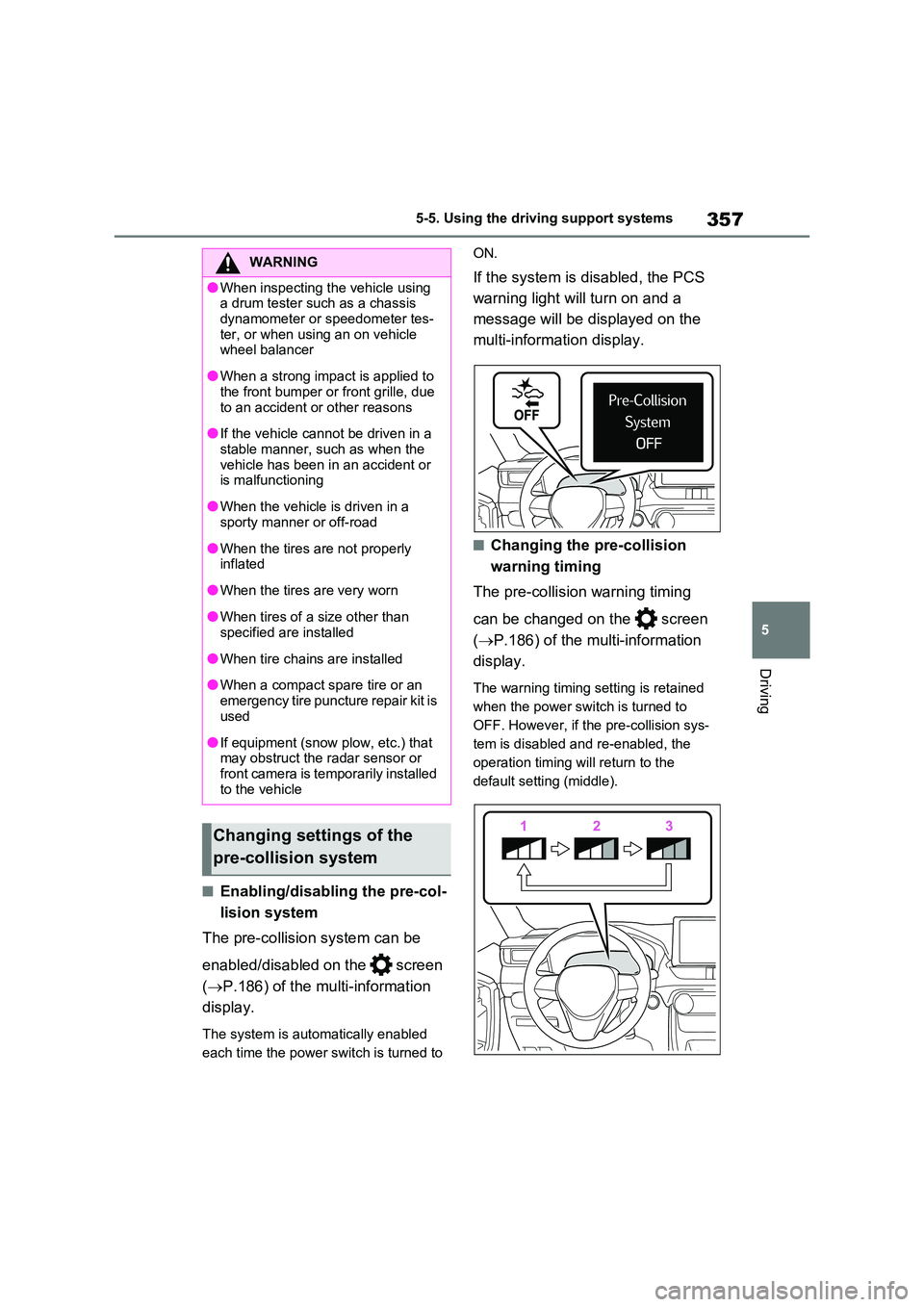
■Enabling/disabling the pre-col-
lision system
The pre-collision system can be
enabled/disabled on the screen
( P.186) of the multi-information
display.
The system is automatically enabled
each time the power switch is turned to
ON.
If the system is disabled, the PCS
warning light will turn on and a
message will be displayed on the
multi-information display.
■Changing the pre-collision
warning timing
The pre-collision warning timing
can be changed on the screen
( P.186) of the multi-information
display.
The warning timing setting is retained
when the power switch is turned to
OFF. However, if the pre-collision sys-
tem is disabled and re-enabled, the
operation timing will return to the
default setting (middle).
WARNING
●When inspecting the vehicle using a drum tester such as a chassis
dynamometer or speedometer tes- ter, or when using an on vehicle wheel balancer
●When a strong impact is applied to the front bumper or front grille, due
to an accident or other reasons
●If the vehicle cannot be driven in a
stable manner, such as when the vehicle has been in an accident or is malfunctioning
●When the vehicle is driven in a sporty manner or off-road
●When the tires are not properly inflated
●When the tires are very worn
●When tires of a size other than specified are installed
●When tire chains are installed
●When a compact spare tire or an
emergency tire puncture repair kit is used
●If equipment (snow plow, etc.) that may obstruct the radar sensor or front camera is temporarily installed
to the vehicle
Changing settings of the
pre-collision system
Page 361 of 664
361
5 5-5. Using the driving support systems
Driving
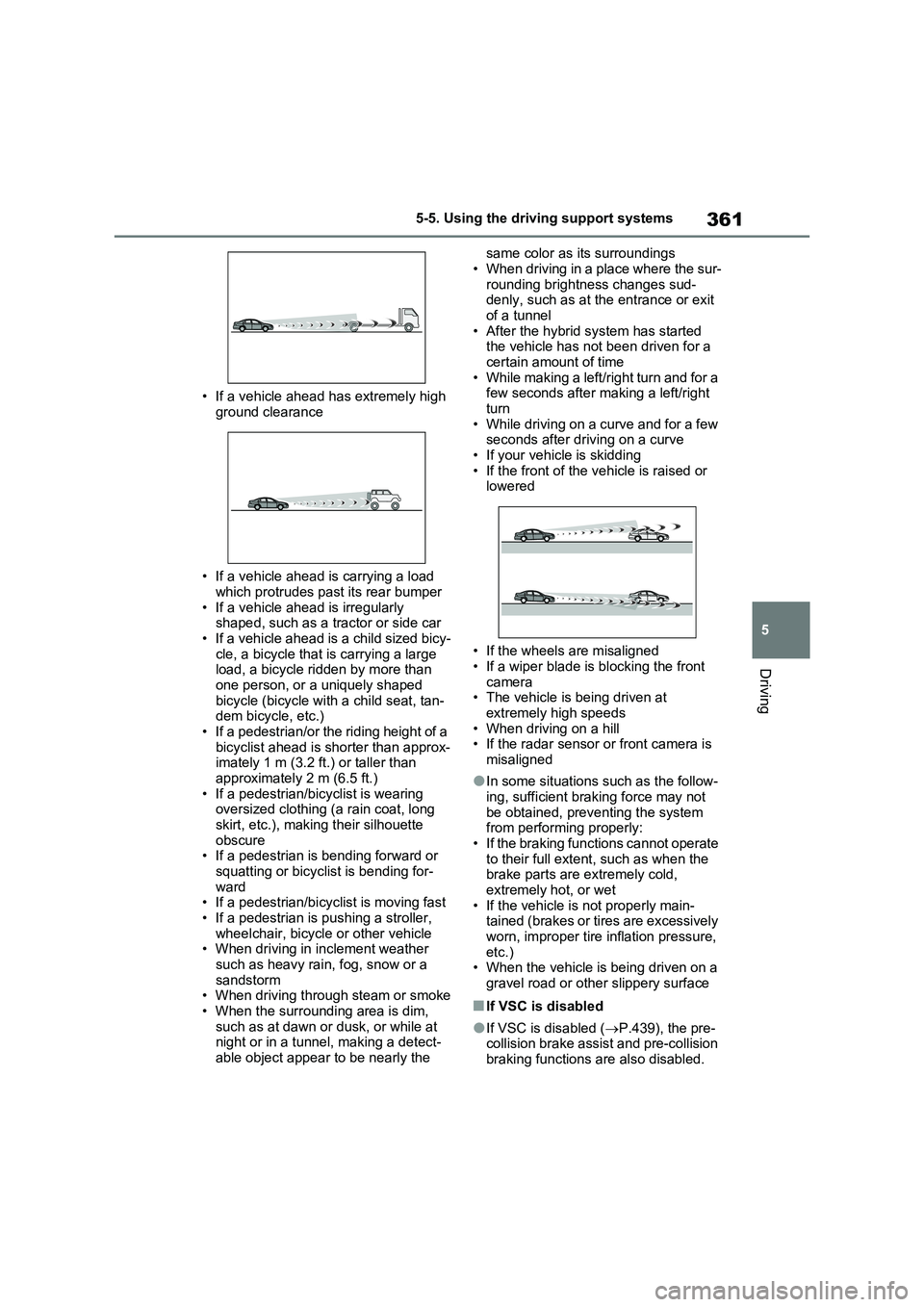
• If a vehicle ahead has extremely high
ground clearance
• If a vehicle ahead is carrying a load
which protrudes past its rear bumper
• If a vehicle ahead is irregularly
shaped, such as a tractor or side car
• If a vehicle ahead is a child sized bicy-
cle, a bicycle that is carrying a large
load, a bicycle ridden by more than
one person, or a uniquely shaped
bicycle (bicycle with a child seat, tan-
dem bicycle, etc.)
• If a pedestrian/or the riding height of a
bicyclist ahead is shorter than approx-
imately 1 m (3.2 ft.) or taller than
approximately 2 m (6.5 ft.)
• If a pedestrian/bicyclist is wearing
oversized clothing (a rain coat, long
skirt, etc.), making their silhouette
obscure
• If a pedestrian is bending forward or
squatting or bicyclist is bending for-
ward
• If a pedestrian/bicyclist is moving fast
• If a pedestrian is pushing a stroller,
wheelchair, bicycle or other vehicle
• When driving in inclement weather
such as heavy rain, fog, snow or a
sandstorm
• When driving through steam or smoke
• When the surrounding area is dim,
such as at dawn or dusk, or while at
night or in a tunnel, making a detect-
able object appear to be nearly the same color as its surroundings
• When driving in a place where the sur-
rounding brightness changes sud-
denly, such as at the entrance or exit
of a tunnel
• After the hybrid system has started
the vehicle has not been driven for a
certain amount of time
• While making a left/right turn and for a
few seconds after making a left/right
turn
• While driving on a curve and for a few
seconds after driving on a curve
• If your vehicle is skidding
• If the front of the vehicle is raised or
lowered
• If the wheels are misaligned
• If a wiper blade is blocking the front
camera
• The vehicle is being driven at
extremely high speeds
• When driving on a hill
• If the radar sensor or front camera is
misaligned
●In some situations such as the follow-
ing, sufficient braking force may not
be obtained, preventing the system
from performing properly:
• If the braking functions cannot operate
to their full extent, such as when the
brake parts are extremely cold,
extremely hot, or wet
• If the vehicle is not properly main-
tained (brakes or tires are excessively
worn, improper tire inflation pressure,
etc.)
• When the vehicle is being driven on a
gravel road or other slippery surface
■If VSC is disabled
●If VSC is disabled (P.439), the pre-
collision brake assist and pre-collision
braking functions are also disabled.
Page 363 of 664
363
5
5-5. Using the driving support systems
Driving
WARNING
■Before using LTA system
●Do not rely solely upon the LTA
system. The LTA system does not automatically drive the vehicle or reduce the amount of attention that
must be paid to the area in front of the vehicle. The driver must always assume full responsibility for driving
safely by paying careful attention to the surrounding conditions and operating the steering wheel to cor-
rect the path of the vehicle. Also, the driver must take adequate breaks when fatigued, such as from
driving for a long period of time.
●Failure to perform appropriate driv-
ing operations and pay careful attention may lead to an accident, resulting in death or serious injury.
●When not using the LTA system, use the LTA switch to turn the sys-
tem off.
■Situations unsuitable for LTA
system
In the following situations, use the LTA switch to turn the system off.
Failure to do so may lead to an acci- dent, resulting in death or serious injury.
●Vehicle is driven on a road surface which is slippery due to rainy
weather, fallen snow, freezing, etc.
●Vehicle is driven on a snow-cov-
ered road.
●White (yellow) lines are difficult to
see due to rain, snow, fog, dust, etc.
●Vehicle is driven in a temporary lane or restricted lane due to con-struction work.
●Vehicle is driven in a construction zone.
●A spare tire, tire chains, etc. are equipped.
●When the tires have been exces-sively worn, or when the tire infla-tion pressure is low.
●When tires of a size other than specified are installed.
●Vehicle is driven in traffic lanes other than that highways and free-
ways.
●When your vehicle is towing a
trailer or during emergency towing
■Preventing LTA system malfunc-
tions and operations performed by mistake
●Do not modify the headlights or
place stickers, etc. on the surface of the lights.
●Do not modify the suspension etc. If the suspension etc. needs to be replaced, contact any authorized
Toyota retailer or Toyota authorized repairer, or any reliable repairer.
●Do not install or place anything on the hood or grille. Also, do not install a grille guard (bull bars, kan-
garoo bar, etc.).
●If your windshield needs repairs,
contact any authorized Toyota retailer or Toyota authorized repairer, or any reliable repairer.
■Conditions in which functions may not operate properly
In the following situations, the func- tions may not operate properly and the vehicle may depart from its lane.
Drive safely by always paying careful attention to your surroundings and operate the steering wheel to correct
the path of the vehicle without relying solely on the functions.
Page 365 of 664
365
5
5-5. Using the driving support systems
Driving
■Lane departure alert function
When the system determines that
the vehicle might depart from its
lane or course*, a warning is dis-
played on the multi-information dis-
play, and either a warning buzzer
will sound or the steering wheel will
vibrate to alert the driver.
When the warning buzzer sounds or
the steering wheel vibrates, check the
area around your vehicle and carefully
WARNING
●The vehicle is driven in an area without white (yellow) lines, such as
in front of a tollgate or checkpoint, or at an intersection, etc.
●The white (yellow) lines are cracked, “Raised pavement marker” or stones are present.
●The white (yellow) lines cannot be seen or are difficult to see due to
sand, etc.
●The vehicle is driven on a road sur-
face that is wet due to rain, pud- dles, etc.
●The traffic lines are yellow (which may be more difficult to recognize than lines that are white).
●The white (yellow) lines cross over a curb, etc.
●The vehicle is driven on a bright surface, such as concrete.
●If the edge of the road is not clear or straight.
●The vehicle is driven on a surface that is bright due to reflected light,
etc.
●The vehicle is driven in an area
where the brightness changes sud- denly, such as at the entrances and exits of tunnels, etc.
●Light from the headlights of an oncoming vehicle, the sun, etc.
enters the camera.
●The vehicle is driven on a slope.
●The vehicle is driven on a road which tilts left or right, or a winding
road.
●The vehicle is driven on an
unpaved or rough road.
●The traffic lane is excessively nar-
row or wide.
●The vehicle is extremely tilted due to carrying heavy luggage or having improper tire pressure.
●The distance to the preceding vehi-cle is extremely short.
●The vehicle is moving up and down a large amount due to road condi-
tions during driving (poor roads or road seams).
●When driving in a tunnel or at night with the headlights off or when a headlight is dim due to its lens
being dirty or it being misaligned.
●The vehicle is struck by a cross-
wind.
●The vehicle is affected by wind from
a vehicle driven in a nearby lane.
●The vehicle has just changed lanes
or crossed an intersection.
●Tires which differ by structure, man-
ufacturer, brand or tread pattern are used.
●Snow tires, etc. are equipped.
●The vehicle is being driven at
extremely high speeds.
Functions included in LTA
system
Page 411 of 664
411
5 5-5. Using the driving support systems
Driving
●Instances of the BSM function unnec-
essarily detecting a vehicle and/or
object may increase in the following
situations:
• When the sensor is misaligned due to
a strong impact to the sensor or its
surrounding area
• When the distance between your vehi-
cle and a guardrail, wall, etc. that
enters the detection area is short
• When driving up and down consecu-
tive steep inclines, such as hills, dips
in the road, etc.
• When vehicle lanes are narrow, or
when driving on the edge of a lane,
and a vehicle traveling in a lane other
than the adjacent lanes enters the
detection area
• When driving on roads with sharp
bends, consecutive curves, or uneven
surfaces
• When the tires are slipping or spinning
• When the distance between your vehi-
cle and a following vehicle is short
• When an accessory (such as a bicycle
carrier) is installed to the rear of the
vehicle
• When the vehicle throws up water or
snow behind.
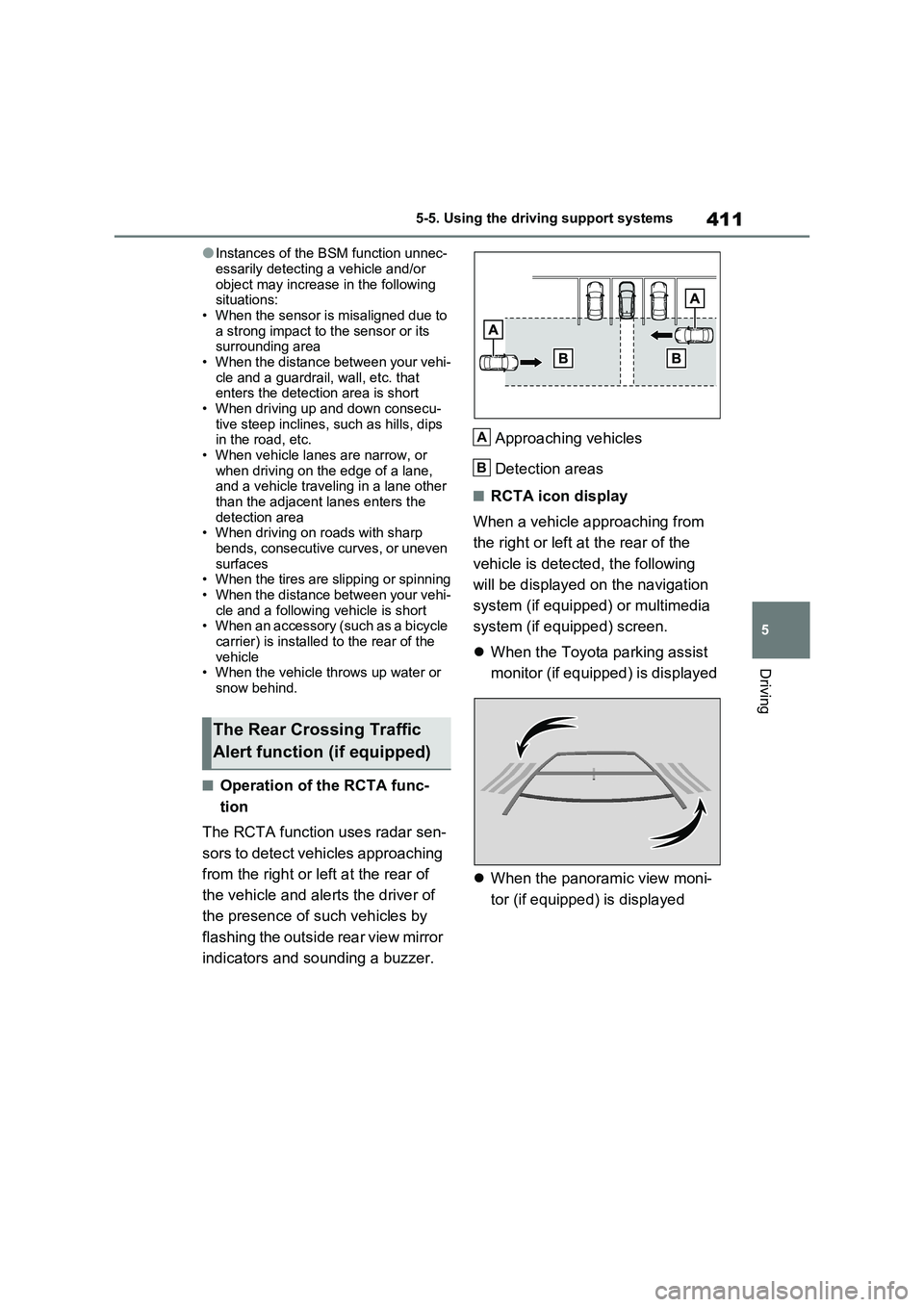
■Operation of the RCTA func-
tion
The RCTA function uses radar sen-
sors to detect vehicles approaching
from the right or left at the rear of
the vehicle and alerts the driver of
the presence of such vehicles by
flashing the outside rear view mirror
indicators and sounding a buzzer.Approaching vehicles
Detection areas
■RCTA icon display
When a vehicle approaching from
the right or left at the rear of the
vehicle is detected, the following
will be displayed on the navigation
system (if equipped) or multimedia
system (if equipped) screen.
When the Toyota parking assist
monitor (if equipped) is displayed
When the panoramic view moni-
tor (if equipped) is displayed
The Rear Crossing Traffic
Alert function (if equipped)
A
B
Page 426 of 664
4265-5. Using the driving support systems
■The Parking Support Brake func- tion (static object) will operate
when
The function will operate when the PKSB OFF indicator is not illuminated
( P.170, 171) and all of the following conditions are met:
●Hybrid system output restriction con-trol
• The Parking Support Brake is enabled.• The vehicle speed is approximately 15
km/h (9 mph) or less. • There is a static object in the traveling direction of the vehicle and approxi-
mately 2 to 4 m (6 to 13 ft.) away. • The Parking Support Brake deter-mines that a stronger-than-normal
brake operation is necessary to avoid a collision.
●Brake control• Hybrid system output restriction con-
WARNING
●If the area around a radar sensor is subjected to an impact, the system
may not operate properly due to a sensor malfunction. Have the vehi-cle inspected by any authorized
Toyota retailer or Toyota authorized repairer, or any reliable repairer.
■Handling the suspension
Do not modify the suspension, as changes to the height or inclination of
the vehicle may prevent the sensors from detecting objects correctly or cause the system to not operate or
operate unnecessarily.
■If the Parking Support Brake
function (static objects) operates unnecessarily, such as at a rail-road crossing
In the event that the Parking Support Brake function (static objects) oper-ates unnecessarily, such as at a rail-
road crossing, brake control will be canceled after approximately 2 sec-onds, allowing you to proceed forward
and leave the area, brake control can also be canceled by depressing the brake pedal. Depressing the acceler-
ator pedal after brake control is can- celed will allow you to proceed forward and leave the area.
■Notes when washing the vehicle
Do not apply intensive bursts of water
or steam to the sensor area.
Doing so may result in the sensor malfunctioning.
●When using a high pressure washer to wash the vehicle, do not
spray the sensors directly, as doing so may cause a sensor to malfunc-tion.
●When using steam to clean the vehicle, do not direct steam too
close to the sensors as doing so may cause a sensor to malfunction.
■When to disable the Parking Sup-port Brake
In the following situations, disable the
Parking Support Brake as the system may operate even though there is no possibility of a collision.
●When inspecting the vehicle using a chassis roller, chassis dynamo or
free roller
●When loading the vehicle onto a
boat, truck or other transport vessel
●If the suspension has been modi-
fied or tires of a size other than specified are installed
●If the front of the vehicle is raised or lowered due to the carried load
●When equipment that may obstruct a sensor is installed, such as a tow-ing eyelet, bumper protector (an
additional trim strip, etc.), bicycle carrier, or snow plow
●When using an automatic car wash
Page 429 of 664
429
5 5-5. Using the driving support systems
Driving
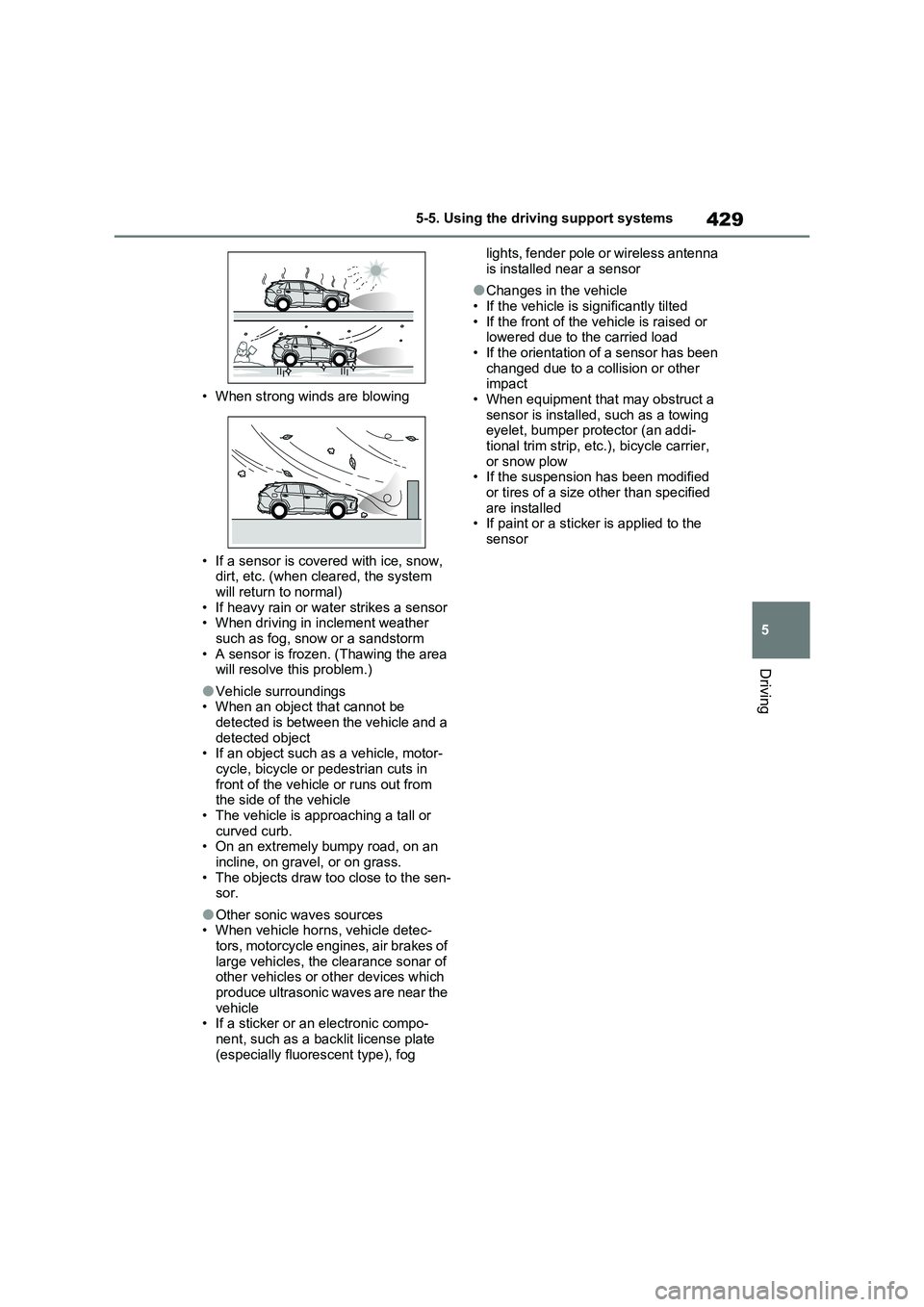
• When strong winds are blowing
• If a sensor is covered with ice, snow,
dirt, etc. (when cleared, the system
will return to normal)
• If heavy rain or water strikes a sensor
• When driving in inclement weather
such as fog, snow or a sandstorm
• A sensor is frozen. (Thawing the area
will resolve this problem.)
●Vehicle surroundings
• When an object that cannot be
detected is between the vehicle and a
detected object
• If an object such as a vehicle, motor-
cycle, bicycle or pedestrian cuts in
front of the vehicle or runs out from
the side of the vehicle
• The vehicle is approaching a tall or
curved curb.
• On an extremely bumpy road, on an
incline, on gravel, or on grass.
• The objects draw too close to the sen-
sor.
●Other sonic waves sources
• When vehicle horns, vehicle detec-
tors, motorcycle engines, air brakes of
large vehicles, the clearance sonar of
other vehicles or other devices which
produce ultrasonic waves are near the
vehicle
• If a sticker or an electronic compo-
nent, such as a backlit license plate
(especially fluorescent type), fog lights, fender pole or wireless antenna
is installed near a sensor
●Changes in the vehicle
• If the vehicle is significantly tilted
• If the front of the vehicle is raised or
lowered due to the carried load
• If the orientation of a sensor has been
changed due to a collision or other
impact
• When equipment that may obstruct a
sensor is installed, such as a towing
eyelet, bumper protector (an addi-
tional trim strip, etc.), bicycle carrier,
or snow plow
• If the suspension has been modified
or tires of a size other than specified
are installed
• If paint or a sticker is applied to the
sensor
Page 432 of 664
4325-5. Using the driving support systems
approximately 24 km/h (15 mph)
*: Depending on the conditions, detec-
tion of a vehicle and/or object may
occur.
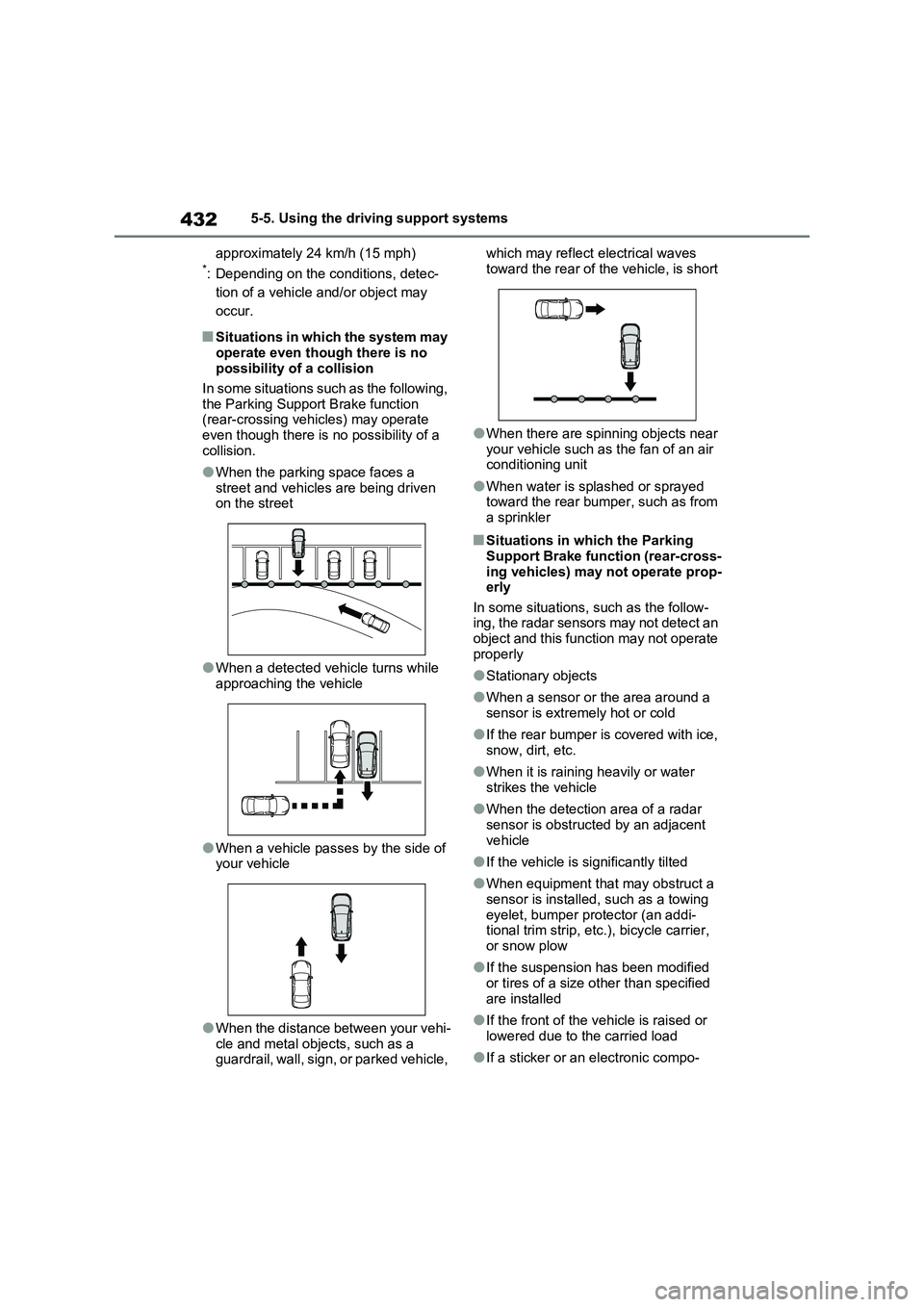
■Situations in which the system may
operate even though there is no
possibility of a collision
In some situations such as the following,
the Parking Support Brake function
(rear-crossing vehicles) may operate
even though there is no possibility of a
collision.
●When the parking space faces a
street and vehicles are being driven
on the street
●When a detected vehicle turns while
approaching the vehicle
●When a vehicle passes by the side of
your vehicle
●When the distance between your vehi-
cle and metal objects, such as a
guardrail, wall, sign, or parked vehicle, which may reflect electrical waves
toward the rear of the vehicle, is short
●When there are spinning objects near
your vehicle such as the fan of an air
conditioning unit
●When water is splashed or sprayed
toward the rear bumper, such as from
a sprinkler
■Situations in which the Parking
Support Brake function (rear-cross-
ing vehicles) may not operate prop-
erly
In some situations, such as the follow-
ing, the radar sensors may not detect an
object and this function may not operate
properly
●Stationary objects
●When a sensor or the area around a
sensor is extremely hot or cold
●If the rear bumper is covered with ice,
snow, dirt, etc.
●When it is raining heavily or water
strikes the vehicle
●When the detection area of a radar
sensor is obstructed by an adjacent
vehicle
●If the vehicle is significantly tilted
●When equipment that may obstruct a
sensor is installed, such as a towing
eyelet, bumper protector (an addi-
tional trim strip, etc.), bicycle carrier,
or snow plow
●If the suspension has been modified
or tires of a size other than specified
are installed
●If the front of the vehicle is raised or
lowered due to the carried load
●If a sticker or an electronic compo-