lock TOYOTA VERSO S 2015 Owners Manual
[x] Cancel search | Manufacturer: TOYOTA, Model Year: 2015, Model line: VERSO S, Model: TOYOTA VERSO S 2015Pages: 564, PDF Size: 18.47 MB
Page 233 of 564
233 2-4. Using other driving systems
2
When driving
Automatic reactivation of the Stop & Start system
Vehicles without a smart entry & start system: Even if the Stop & Start sys-
tem is disabled by the Stop & Start cancel switch, it will be automatically re-
enabled once the engine switch is turned to the “LOCK” position then to the
“START” position.
Vehicles with a smart entry & start system: Even if the Stop & Start system is
disabled by the Stop & Start cancel switch, it will be automatically re-enabled
once the “ENGINE START STOP” switch is turned off then the engine is
started.
The Stop & Start system protection feature
Vehicles without a smart entry & start system: When an excessively loud
sound is being projected by the audio system, the audio system may be
automatically cut off in order to maintain power for the Stop & Start system
function.
If this occurs, turning the engine switch to the “LOCK” position then to the
“ACC” or “ON” position re-enables the audio system.
Vehicles with a smart entry & start system: When an excessively loud sound
is being projected by the audio system, the audio system may be automati-
cally cut off in order to maintain power for the Stop & Start system function.
If this occurs, turning the “ENGINE START STOP” switch off then to ACCES-
SORY mode or IGNITION ON mode re-enables the audio system.
Steering wheel operation
When the engine is stopped by the Stop & Start system, the steering wheel
may become heavier than when driving.
Hood
If the hood is opened while the engine is stopped by the Stop & Start system,
the engine cannot be restarted by the Stop & Start system or by the auto-
matic engine start function. Restart the engine with the engine switch opera-
tion. (P. 173182)
Vehicles with a Multidrive: If the hood is opened while the engine is stopped
by the Stop & Start system and the shift lever is in N or P, the engine will
restart.
Page 240 of 564
240
2-4. Using other driving systems
Driving assist systems
To help enhance driving safety and performance, the following sys-
tems operate automatically in response to various driving situations.
Be aware, however, that these systems are supplementary and
should not be relied upon too heavily when operating the vehicle.
ABS (Anti-lock Brake System)
Helps to prevent wheel lock when the brakes are applied suddenly, or if
the brakes are applied while driving on a slippery road surface
Brake assist
Generates an increased level of braking force after the brake pedal is
depressed when the system detects a panic stop situation
VSC (Vehicle Stability Control)
Helps the driver to control skidding when swerving suddenly or turning
on slippery road surfaces
VSC+ (Vehicle Stability Control +)
Provides cooperative control of the ABS, TRC, VSC and EPS.
Helps to maintain directional stability when swerving on slippery road
surfaces by controlling steering performance.
TRC (Traction Control)
Helps to maintain drive power and prevent the drive wheels from spin-
ning when starting the vehicle or accelerating on slippery roads
Hill-start assist control (with Stop & Start system and Multi-
drive)
Helps to prevent the vehicle from rolling backwards when the brake
pedal is released to restart the engine
EPS (Electric Power Steering)
Employs an electric motor to reduce the amount of effort needed to turn
the steering wheel
Emergency brake signal
When the brakes are applied suddenly, the emergency flashers auto-
matically flash to alert the vehicle behind.
Page 243 of 564
243 2-4. Using other driving systems
2
When driving
Automatic reactivation of TRC and VSC systems
After turning the TRC and VSC systems off, the systems will be automati-
cally re-enabled in the following situations:
Vehicles without a smart entry & start system: When the engine switch is
turned to the “LOCK” position.
Vehicles with a smart entry & start system: When the “ENGINE START
STOP” switch is turned off
If only the TRC system is turned off, the TRC will turn on when vehicle
speed increases
If both the TRC and VSC systems are turned off, automatic re-enabling
will not occur when vehicle speed increases.
Reduced effectiveness of the EPS system
The effectiveness of the EPS system is reduced to prevent the system from
overheating when there is frequent steering input over an extended period of
time. The steering wheel may feel heavy as a result. Should this occur,
refrain from excessive steering input or stop the vehicle and turn the engine
off. The EPS system should return to normal within 10 minutes.
Operating conditions of emergency brake signal
When the following three conditions are met, the emergency brake signal
will operate:
The emergency flashers are off.
Actual vehicle speed is over 55 km/h (35 mph).
The brake pedal is depressed in a manner that cause the system to
judge from the vehicle deceleration that this is a sudden braking opera-
tion.
Automatic system cancelation of emergency brake signal
The emergency brake signal will turn off in any of the following situations:
The emergency flashers are turned on.
The brake pedal is released.
The system judges from the vehicle deceleration that is not a sudden
braking operation.
Page 248 of 564
248
2-5. Driving information
Cargo and luggage
CAUTION
Things that must not be carried in the luggage compartment
The following things may cause a fire if loaded in the luggage compartment:
Receptacles containing gasoline
Aerosol cans
Storage precautions
Observe the following precautions.
Failure to do so may result in death or serious injury.
Stow cargo and luggage in the luggage compartment whenever possible.
Do not stack anything in the luggage compartment higher than the seat-
backs.
Such items may be thrown about and possibly injure people in the vehicle
in the event of sudden braking or in an accident.
Do not place cargo or luggage in or on the following locations as the item
may get under the clutch, brake or accelerator pedal and prevent the ped-
als from being depressed properly, block the driver’s vision, or hit the
driver or passengers, causing an accident:
• At the feet of the driver
• On the front passenger or rear seats (when stacking items)
• On the luggage cover
• On the instrument panel
• On the dashboard
Take notice of the following information about storage precautions,
cargo capacity and load:
Stow cargo and luggage in the luggage compartment whenever
possible.
Be sure all items are secured in place.
To maintain vehicle balance while driving, position luggage
evenly within the luggage compartment.
For better fuel economy, do not carry unnecessary weight.
Page 251 of 564
251 2-5. Driving information
2
When driving
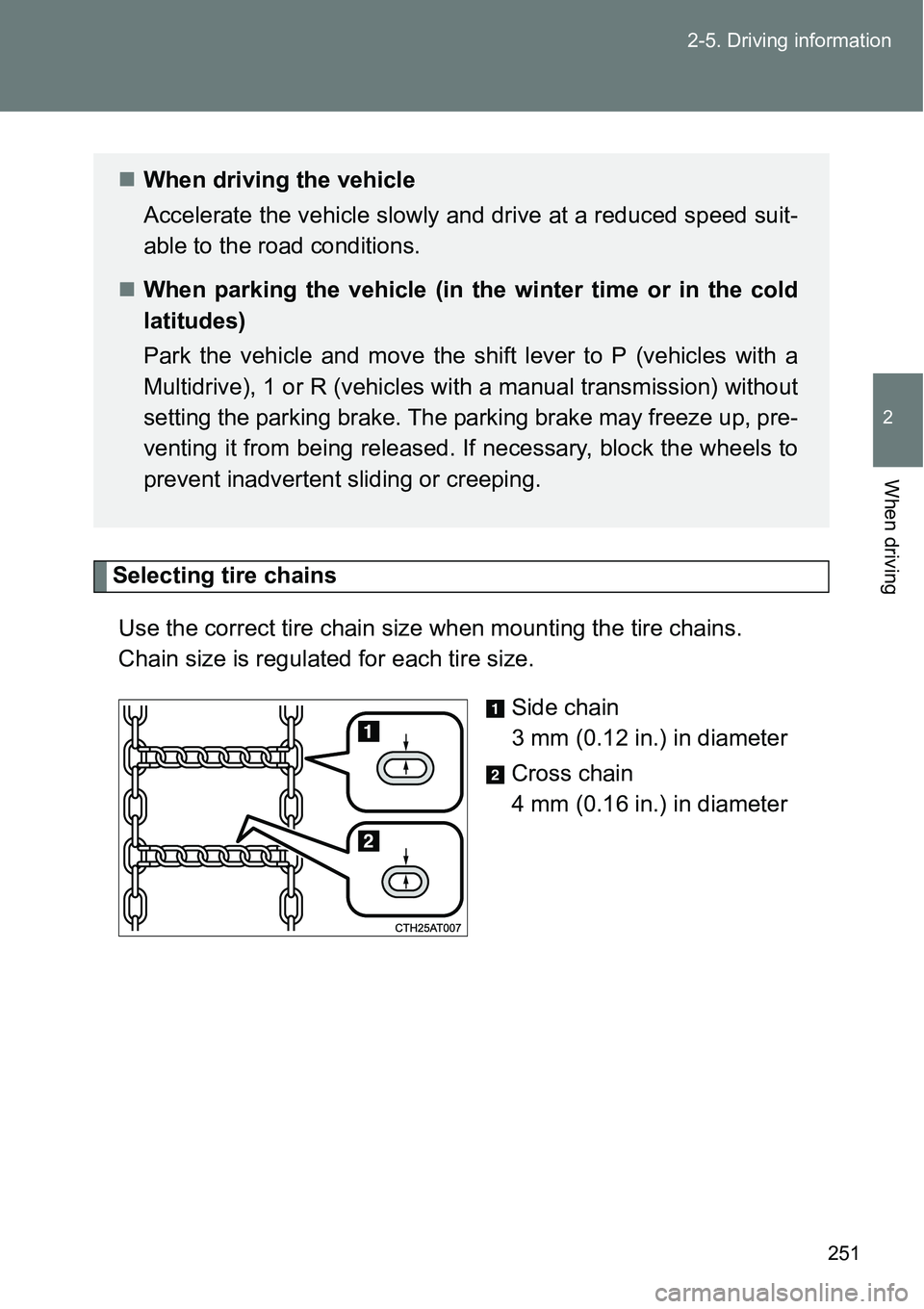
Selecting tire chains
Use the correct tire chain size when mounting the tire chains.
Chain size is regulated for each tire size.
Side chain
3 mm (0.12 in.) in diameter
Cross chain
4 mm (0.16 in.) in diameter
When driving the vehicle
Accelerate the vehicle slowly and drive at a reduced speed suit-
able to the road conditions.
When parking the vehicle (in the winter time or in the cold
latitudes)
Park the vehicle and move the shift lever to P (vehicles with a
Multidrive), 1 or R (vehicles with a manual transmission) without
setting the parking brake. The parking brake may freeze up, pre-
venting it from being released. If necessary, block the wheels to
prevent inadvertent sliding or creeping.
Page 260 of 564
260 2-5. Driving information
Guidance
Your vehicle will handle differently when towing a trailer. In order to
avoid accident, death or serious injury, keep the following in mind
when towing:
Checking connections between trailer and lights
Stop the vehicle and check the operation of the connection
between the trailer and lights after driving for a brief period as well
as before starting off.
Practicing driving with a coupled trailer
Get the feel for turning, stopping and reversing with the trailer
coupled by practicing in an area with no or light traffic.
When reversing with a coupled trailer, hold the section of the
steering wheel nearest to you and rotate clockwise to turn the
trailer left or counterclockwise to turn it right. Always rotate a lit-
tle at a time to prevent steering error. Have someone guide you
when reversing to lessen the risk of an accident.
NOTICE
When the rear bumper strengthening material is aluminum
Ensure the steel bracket part does not come directly in contact with that
area.
When steel and aluminum come into contact, there is a reaction similar to
corrosion, which will weaken the section concerned and may result in dam-
age. Apply a rust inhibitor to parts that will come in contact when attaching a
steel bracket.
Page 265 of 564

3Interior features
265
3-1. Using the air
conditioning system
and defogger
Manual air conditioning
system ............................ 266
Automatic air conditioning
system ............................ 272
Power heater .................... 279
Rear window and
outside rear view
mirror defoggers ............. 281
3-2. Using the audio system
Audio system types .......... 283
Using the radio ................. 285
Using the CD player ......... 289
Playing back MP3 and
WMA discs...................... 294
Operating an iPod............. 301
Operating a USB
memory........................... 309
Optimal use of the audio
system ............................ 317
Using the AUX port ........... 319
Using the steering wheel
audio switches ................ 320
3-3. Using the interior lights
Interior lights list................ 323
• Personal lights ................ 324
• Personal/interior
lights ............................... 324
• Interior light ..................... 3253-4. Using the storage
features
List of storage features ..... 326
• Auxiliary box ................... 327
• Glove box ....................... 327
• Bottle holders.................. 329
• Tray ................................ 330
• Cup holders .................... 331
3-5. Other interior features
Sun visors ......................... 332
Vanity mirrors.................... 333
Clock ................................. 334
Outside temperature
display ............................ 335
Power outlets .................... 336
Seat heaters ..................... 338
Armrests ........................... 340
Panoramic roof shade....... 341
Assist grips ....................... 344
Floor mat........................... 345
Luggage compartment
features........................... 347
Page 266 of 564

266
3-1. Using the air conditioning system and defogger
Manual air conditioning system
Adjusting the settings
Adjusting the temperature setting (vehicles without the
button)
Turn the temperature control dial clockwise to increase the tem-
perature.
Adjusting the temperature setting (vehicles with the
button)
Turn the temperature control dial clockwise (warm) or counter-
clockwise (cool).
If is not pressed, the system will blow ambient temperature air or
heated air.
: If equipped
Fan speed control dial Air outlet selection dial
Air conditioning ON/OFF button
(if equipped)Temperature control dial
Outside air or recirculated air mode dial
Page 267 of 564

267 3-1. Using the air conditioning system and defogger
3
Interior features
Adjusting the fan speed
Turn the fan speed control dial clockwise (increase) or counter-
clockwise (decrease).
Set the dial to “0” to turn the fan off.
Selecting the air outlets
Set the air outlet selection dial to an appropriate position.
The positions between the air outlet selections shown below can also be
selected for more detailed adjustment.
Air flows to the upper body.
Air flows to the upper body and
feet.
: Some models
Page 271 of 564
271 3-1. Using the air conditioning system and defogger
3
Interior features
An odor comes from the air conditioning system due to the Stop &
Start system operation (vehicles with a Stop & Start system)
When the engine is stopped due to the Stop & Start system, an odor caused
by moisture may be detected. This does not indicate a malfunction.
CAUTION
To prevent the windshield from fogging up
Do not use during cool air operation in extremely humid weather. The
difference between the temperature of the outside air and that of the wind-
shield can cause the outer surface of the windshield to fog up, blocking your
vision.
NOTICE
To prevent battery discharge
Do not leave the air conditioning system on longer than necessary when the
engine is stopped.