lock TOYOTA VERSO S 2015 Owners Manual
[x] Cancel search | Manufacturer: TOYOTA, Model Year: 2015, Model line: VERSO S, Model: TOYOTA VERSO S 2015Pages: 564, PDF Size: 18.47 MB
Page 497 of 564
5
497
5-2. Steps to take in an emergency
When trouble arises
If the electronic key does not operate properly (vehicles with a smart entr y & start system)
Unlocking and locking the doors
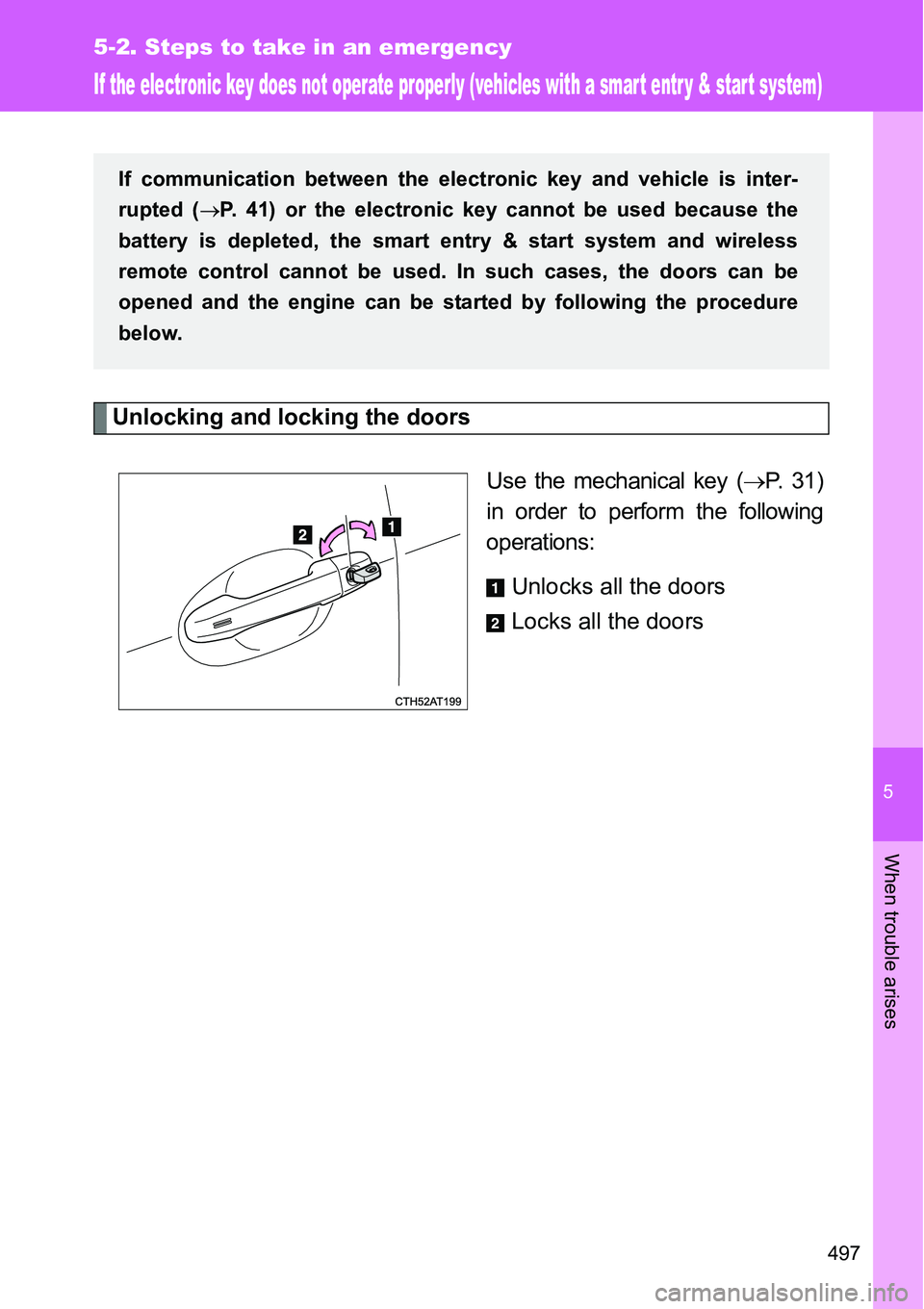
Use the mechanical key (P. 31)
in order to perform the following
operations:
Unlocks all the doors
Locks all the doors
If communication between the electronic key and vehicle is inter-
rupted (P. 41) or the electronic key cannot be used because the
battery is depleted, the smart entry & start system and wireless
remote control cannot be used. In such cases, the doors can be
opened and the engine can be started by following the procedure
below.
Page 500 of 564
500 5-2. Steps to take in an emergency
Stopping the engine
Vehicles with a Multidrive: Shift the shift lever to P and press the “ENGINE
START STOP” switch as you normally do when stopping the engine.
Except vehicles with a Multidrive: Shift the shift lever to N and press the
“ENGINE START STOP” switch as you normally do when stopping the
engine.
Replacing the key battery
As the above procedure is a temporary measure, it is recommended that the
electronic key battery be replaced immediately when the battery is depleted.
(P. 403)
Alarm (if equipped)
Using the mechanical key to lock the doors will not set the alarm system.
If a door is unlocked using the mechanical key when the alarm system is set,
the alarm may be triggered. (P. 117)
If the doors cannot be locked or unlocked by the smart entry & start
system
Lock and unlock the doors by the mechanical key or wireless remote control.
When the electronic key does not work properly
Make sure that the smart entry & start system has not been deactivated in
the customization setting. If it is off, turn the function on.
(Customizable features P. 540)
Changing “ENGINE START STOP” switch modes (if the smart entry &
start system has been deactivated in a customized setting)
Release the brake pedal (except for manual transmission) or clutch pedal
(for manual transmission) and press the “ENGINE START STOP” switch in
above.
The engine does not start and modes will be changed each time the switch
is pressed. (P. 176)
STEP3
Page 506 of 564
506 5-2. Steps to take in an emergency
Precautions when the battery is discharged (vehicles with a smart
entry & start system)
In some cases, it may not be possible to unlock the doors using the smart
entry & start system when the battery is discharged. Use the wireless
remote control or the mechanical key to lock or unlock the doors.
The engine may not start on the first attempt after the battery has
recharged but will start normally after the second attempt. This is not a
malfunction.
The “ENGINE START STOP” switch mode is memorized by the vehicle.
When the battery is reconnected, the system will return to the mode it
was in before the battery was discharged. Before disconnecting the bat-
tery, turn the “ENGINE START STOP” switch off.
If you are unsure what mode the “ENGINE START STOP” switch was in
before the battery discharged, be especially careful when reconnecting
the battery.
When the battery is removed or discharged (vehicle with an alarm)
Make sure that the key is not inside the vehicle when recharging or replacing
the battery. The key may be locked in the vehicle if the alarm is activated.
(P. 1 1 8 )
Page 519 of 564
5
519 5-2. Steps to take in an emergency
When trouble arises
CAUTION
If the engine has to be turned off while driving
Power assist for the brakes and steering wheel will be lost, making the
brake pedal harder to depress and the steering wheel heavier to turn.
Decelerate as much as possible before turning off the engine.
Vehicles without a smart entry & start system: Never attempt to remove
the key, as doing so will lock the steering wheel.
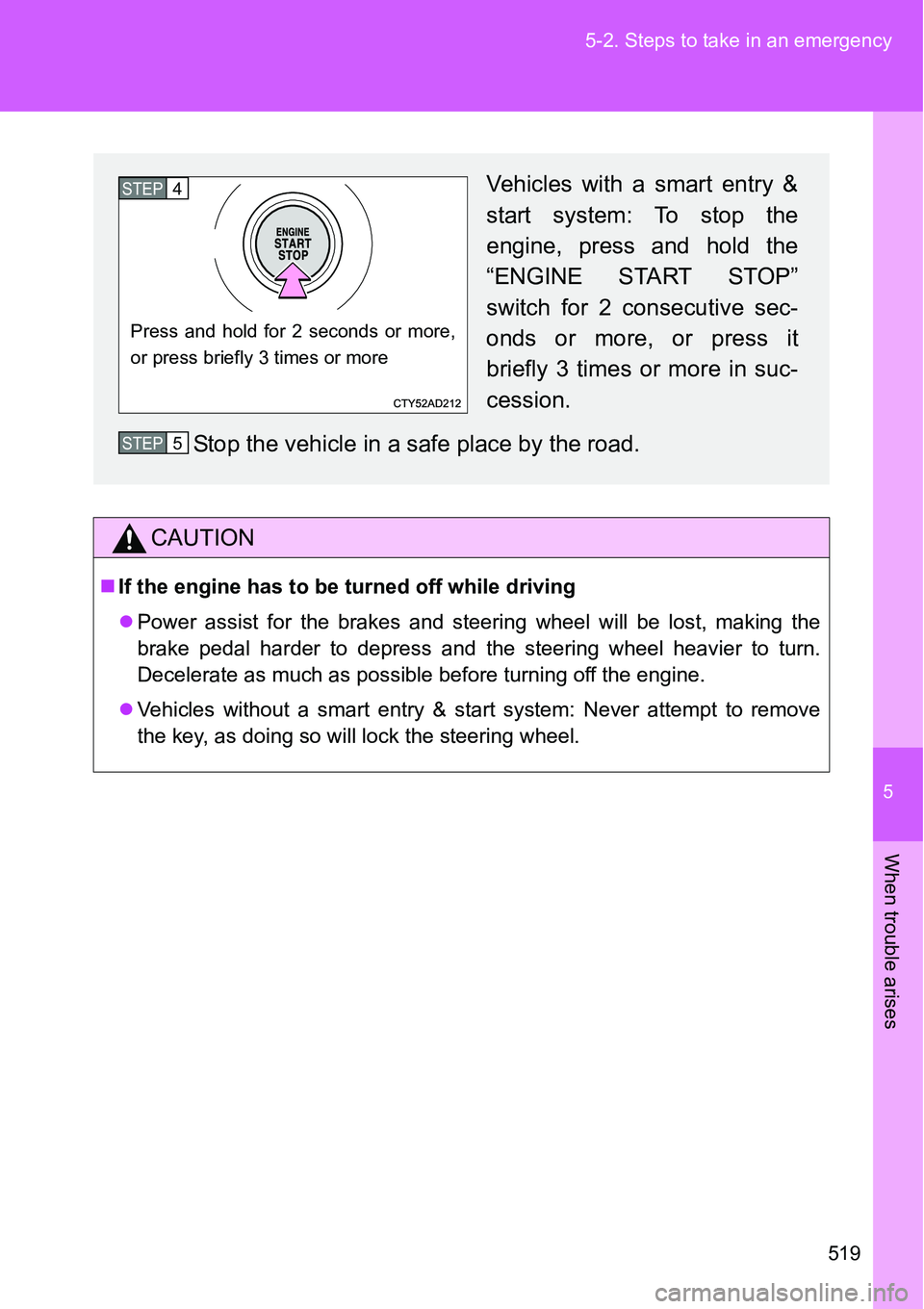
Vehicles with a smart entry &
start system: To stop the
engine, press and hold the
“ENGINE START STOP”
switch for 2 consecutive sec-
onds or more, or press it
briefly 3 times or more in suc-
cession.
Stop the vehicle in a safe place by the road.
Press and hold for 2 seconds or more,
or press briefly 3 times or more
STEP4
STEP5
Page 524 of 564
524 6-1. Specifications
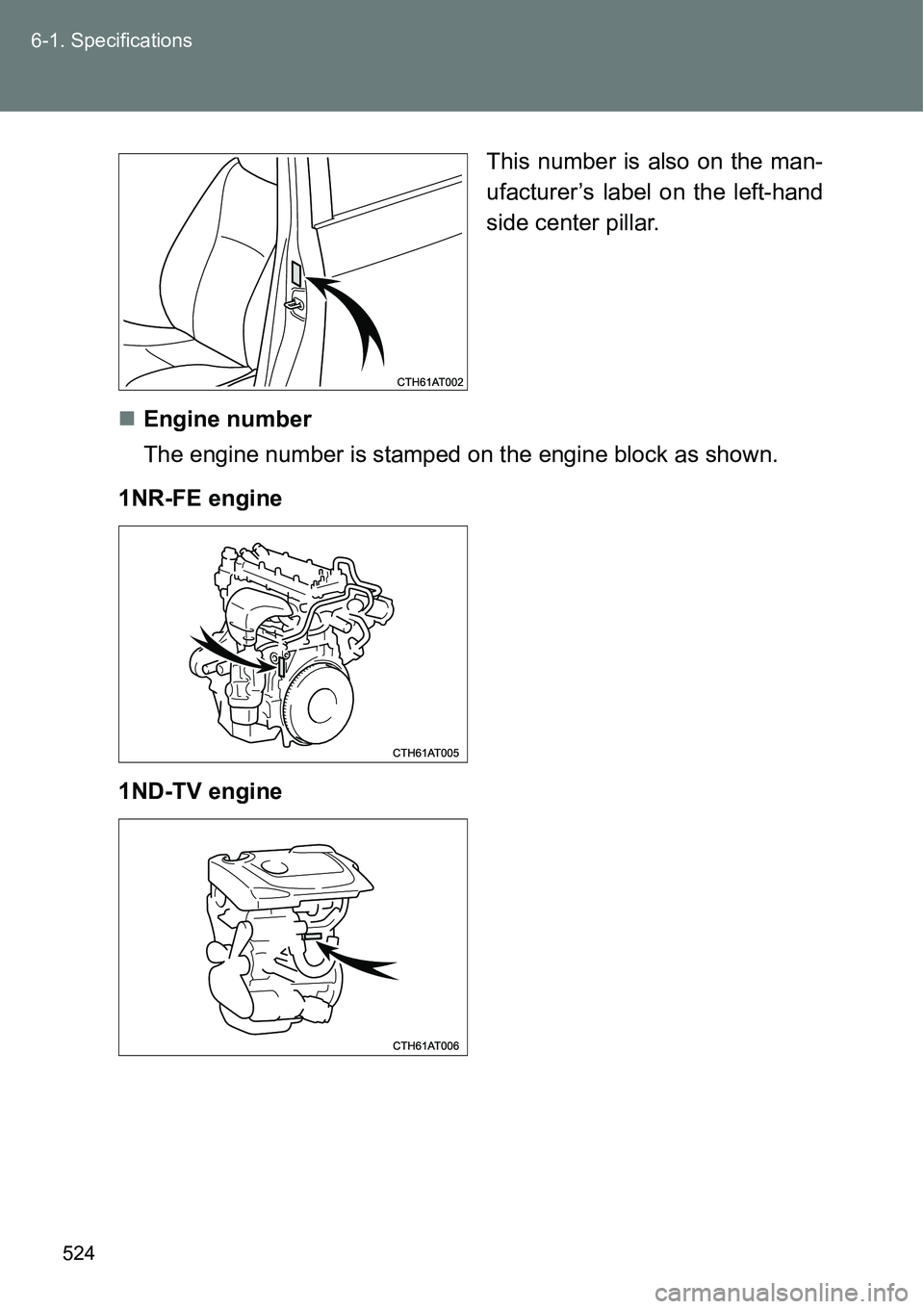
This number is also on the man-
ufacturer’s label on the left-hand
side center pillar.
Engine number
The engine number is stamped on the engine block as shown.
1NR-FE engine
1ND-TV engine
Page 532 of 564
532 6-1. Specifications
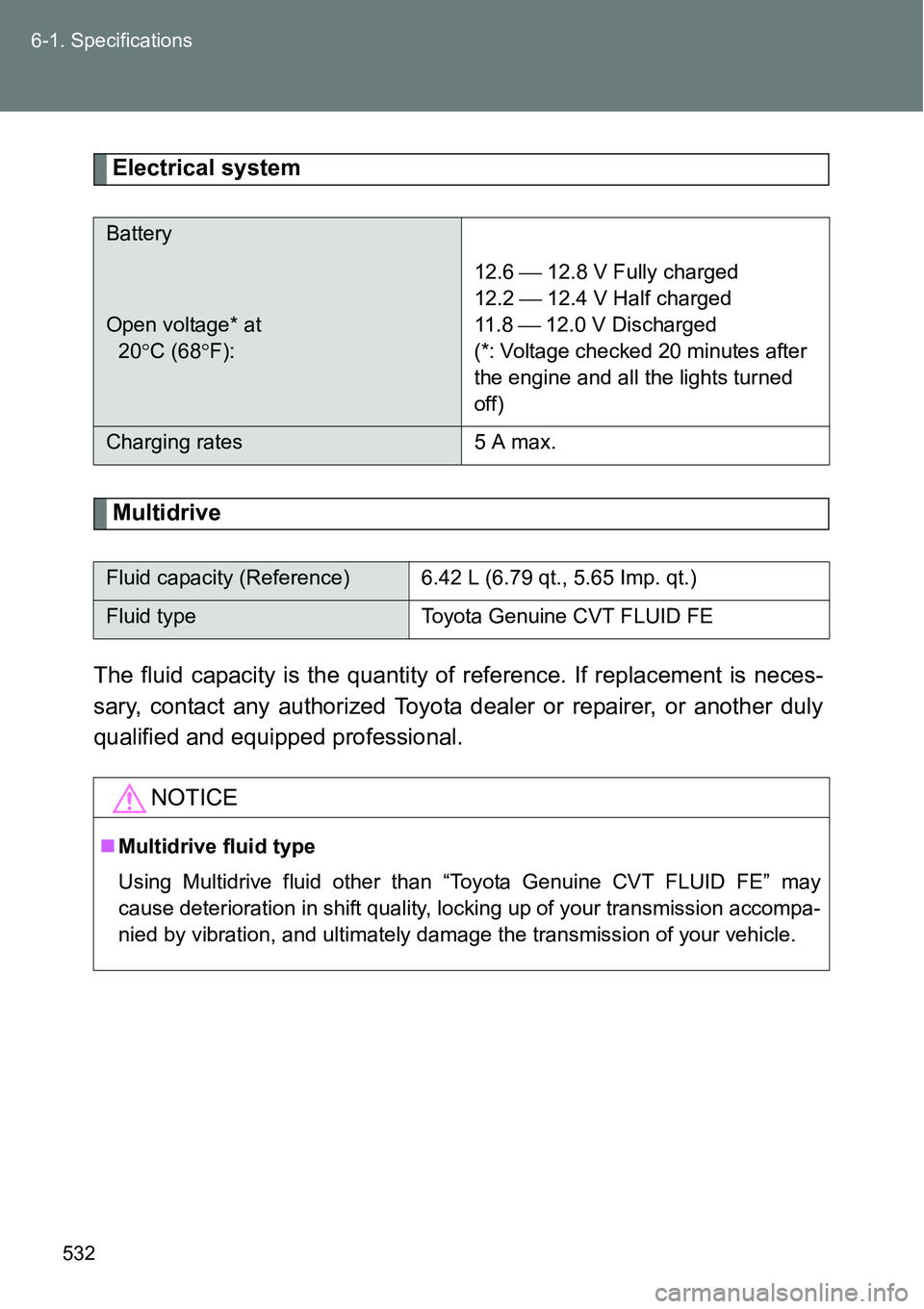
Electrical system
Multidrive
The fluid capacity is the quantity of reference. If replacement is neces-
sary, contact any authorized Toyota dealer or repairer, or another duly
qualified and equipped professional.
Battery
Open voltage* at
20C (68F):12.6 12.8 V Fully charged
12.2 12.4 V Half charged
11 . 8 12.0 V Discharged
(*: Voltage checked 20 minutes after
the engine and all the lights turned
off)
Charging rates 5 A max.
Fluid capacity (Reference) 6.42 L (6.79 qt., 5.65 Imp. qt.)
Fluid type Toyota Genuine CVT FLUID FE
NOTICE
Multidrive fluid type
Using Multidrive fluid other than “Toyota Genuine CVT FLUID FE” may
cause deterioration in shift quality, locking up of your transmission accompa-
nied by vibration, and ultimately damage the transmission of your vehicle.
Page 541 of 564
541 6-2. Customization
6
Vehicle specifications
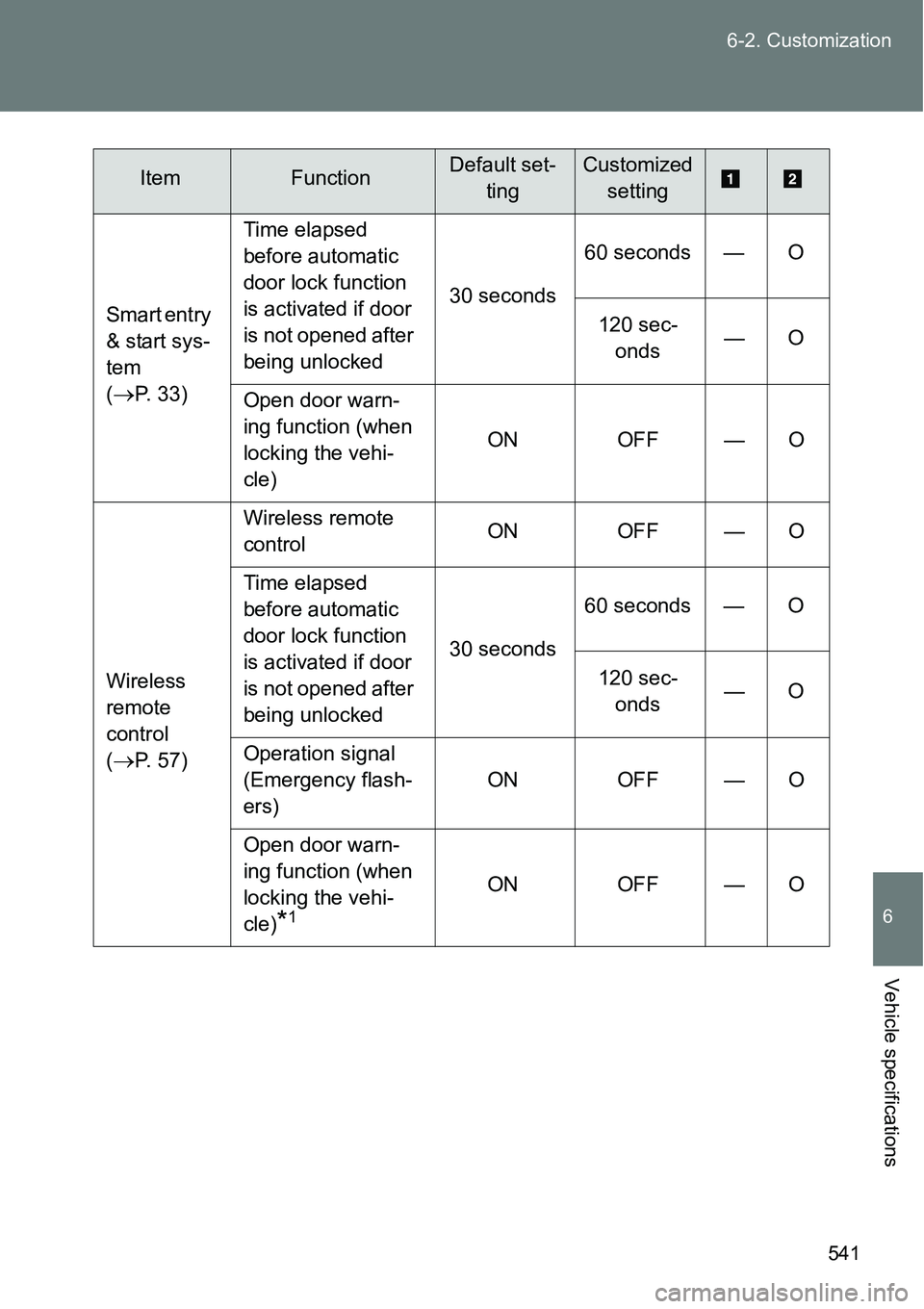
Smart entry
& start sys-
tem
(
P. 33)Time elapsed
before automatic
door lock function
is activated if door
is not opened after
being unlocked30 seconds60 seconds — O
120 sec-
onds—O
Open door warn-
ing function (when
locking the vehi-
cle)ON OFF — O
Wireless
remote
control
(
P. 57)Wireless remote
controlON OFF — O
Time elapsed
before automatic
door lock function
is activated if door
is not opened after
being unlocked30 seconds60 seconds — O
120 sec-
onds—O
Operation signal
(Emergency flash-
ers)ON OFF — O
Open door warn-
ing function (when
locking the vehi-
cle)
*1
ON OFF — O
ItemFunctionDefault set-
tingCustomized
setting
Page 542 of 564
542 6-2. Customization
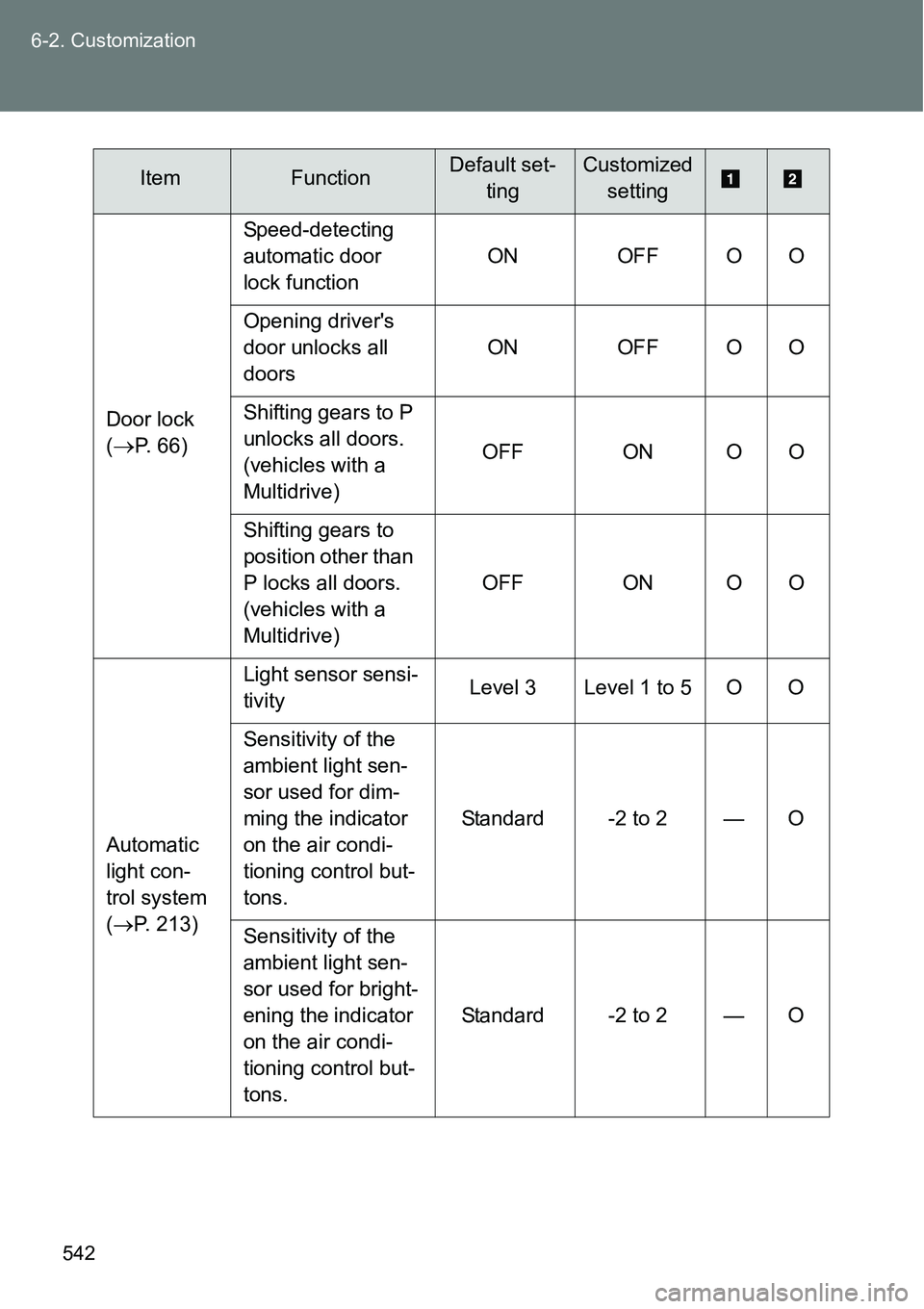
Door lock
(
P. 66)Speed-detecting
automatic door
lock functionON OFF O O
Opening driver's
door unlocks all
doorsON OFF O O
Shifting gears to P
unlocks all doors.
(vehicles with a
Multidrive)OFF ON O O
Shifting gears to
position other than
P locks all doors.
(vehicles with a
Multidrive)OFF ON O O
Automatic
light con-
trol system
(P. 213)Light sensor sensi-
tivityLevel 3 Level 1 to 5 O O
Sensitivity of the
ambient light sen-
sor used for dim-
ming the indicator
on the air condi-
tioning control but-
tons.Standard -2 to 2 — O
Sensitivity of the
ambient light sen-
sor used for bright-
ening the indicator
on the air condi-
tioning control but-
tons.Standard -2 to 2 — O
ItemFunctionDefault set-
tingCustomized
setting
Page 543 of 564
543 6-2. Customization
6
Vehicle specifications
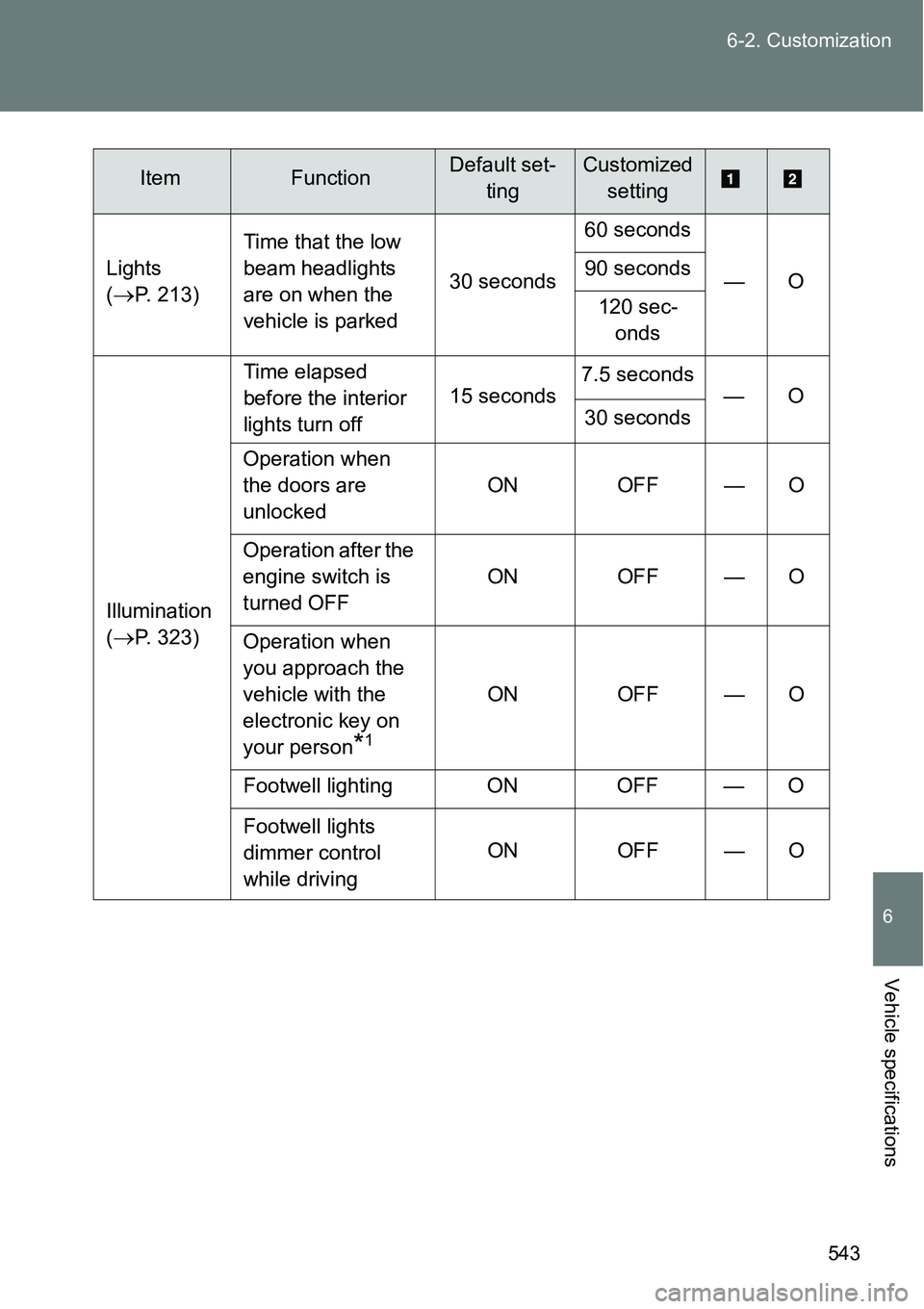
Lights
(
P. 213)Time that the low
beam headlights
are on when the
vehicle is parked30 seconds60 seconds
—O 90 seconds
120 sec-
onds
Illumination
(
P. 323)Time elapsed
before the interior
lights turn off15 seconds7.5 seconds
—O
30 seconds
Operation when
the doors are
unlockedON OFF — O
Operation after the
engine switch is
turned OFFON OFF — O
Operation when
you approach the
vehicle with the
electronic key on
your person
*1
ON OFF — O
Footwell lighting ON OFF — O
Footwell lights
dimmer control
while drivingON OFF — O
ItemFunctionDefault set-
tingCustomized
setting
Page 544 of 564
544 6-2. Customization
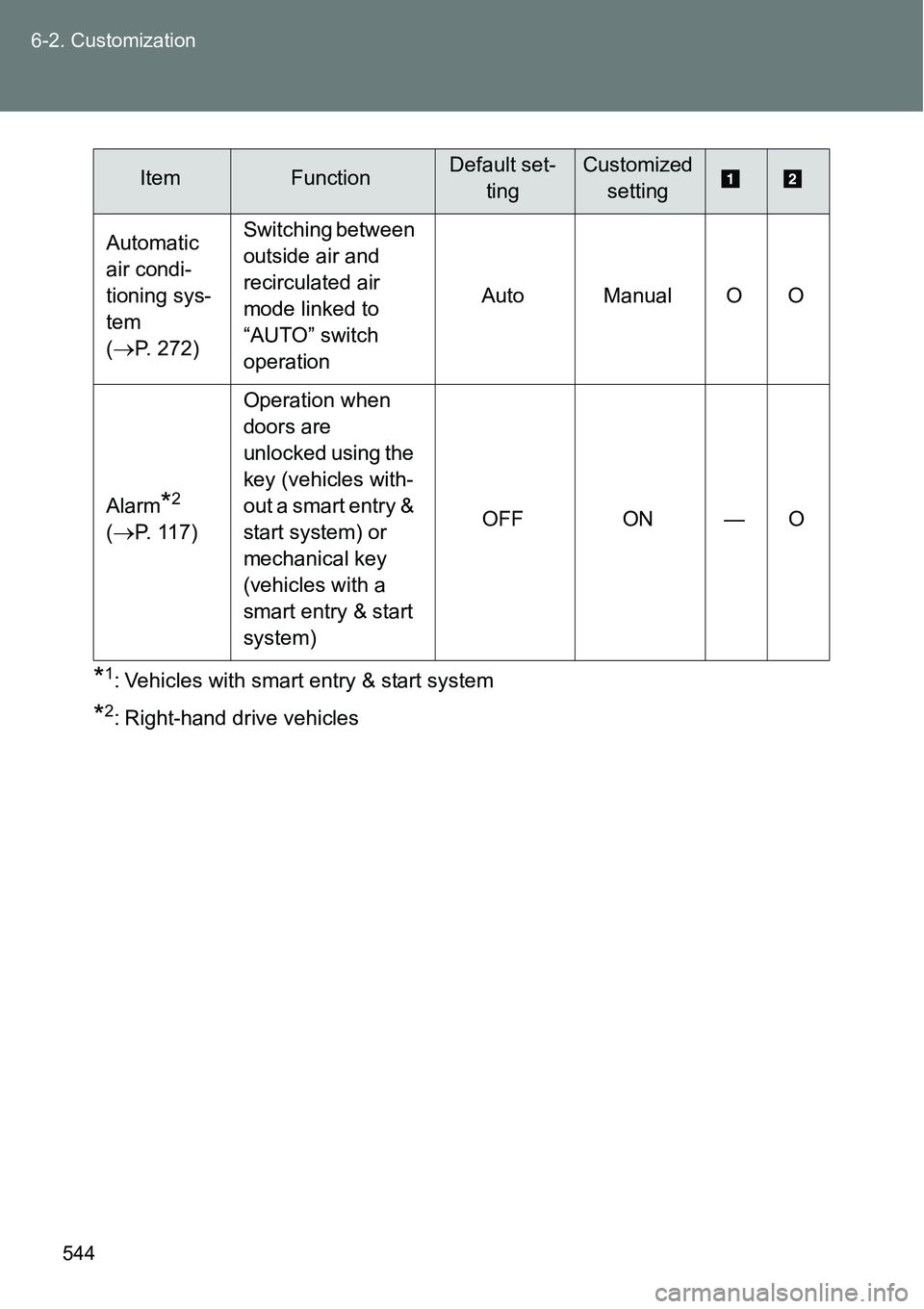
*1: Vehicles with smart entry & start system
*2: Right-hand drive vehicles Automatic
air condi-
tioning sys-
tem
(
P. 272)Switching between
outside air and
recirculated air
mode linked to
“AUTO” switch
operationAuto Manual O O
Alarm
*2
(P. 117)Operation when
doors are
unlocked using the
key (vehicles with-
out a smart entry &
start system) or
mechanical key
(vehicles with a
smart entry & start
system)OFF ON — O
ItemFunctionDefault set-
tingCustomized
setting