lock TOYOTA VERSO S 2015 Owners Manual
[x] Cancel search | Manufacturer: TOYOTA, Model Year: 2015, Model line: VERSO S, Model: TOYOTA VERSO S 2015Pages: 564, PDF Size: 18.47 MB
Page 278 of 564
278 3-1. Using the air conditioning system and defogger
Ventilation and air conditioning odors
To let fresh air in, set the air conditioning system to the outside air mode.
During use, various odors from inside and outside the vehicle may enter
into and accumulate in the air conditioning system. This may then cause
odor to be emitted from the vents.
To reduce potential odors from occurring:
• It is recommended that the air conditioning system be set to outside air
mode prior to turning the vehicle off.
• The start timing of the blower may be delayed for a short period of time
immediately after the air conditioning system is started in automatic
mode.
An odor comes from the air conditioning system due to the Stop &
Start system operation (vehicles with a Stop & Start system)
When the engine is stopped due to the Stop & Start system, an odor caused
by moisture may be detected. This does not indicate a malfunction.
CAUTION
To prevent the windshield from fogging up
Do not use
during cool air operation in extremely humid weather.
The difference between the temperature of the outside air and that of the
windshield can cause the outer surface of the windshield to fog up, blocking
your vision.
NOTICE
To prevent battery discharge
Do not leave the air conditioning system on longer than necessary when the
engine is stopped.
Page 302 of 564

302 3-2. Using the audio system
Selecting a play mode
Press (MENU) to select iPod menu mode.
Turning clockwise changes the play mode in the fol-
lowing order:
“Playlists”“Artists”“Albums”“Songs”“Podcasts”“Genres”
“Composers”“Audiobooks”
Press to select the desired play mode.
Control panel
PlaybackBack
buttonDisplays lists
Selecting a song, fast-forwarding or reversingPower VolumeShuffle playback
Repeat play iPod menu/Song
selector or
displays text
message
iPod
menu
mode
STEP1
STEP2
STEP3
Page 325 of 564
325 3-3. Using the interior lights
3
Interior features
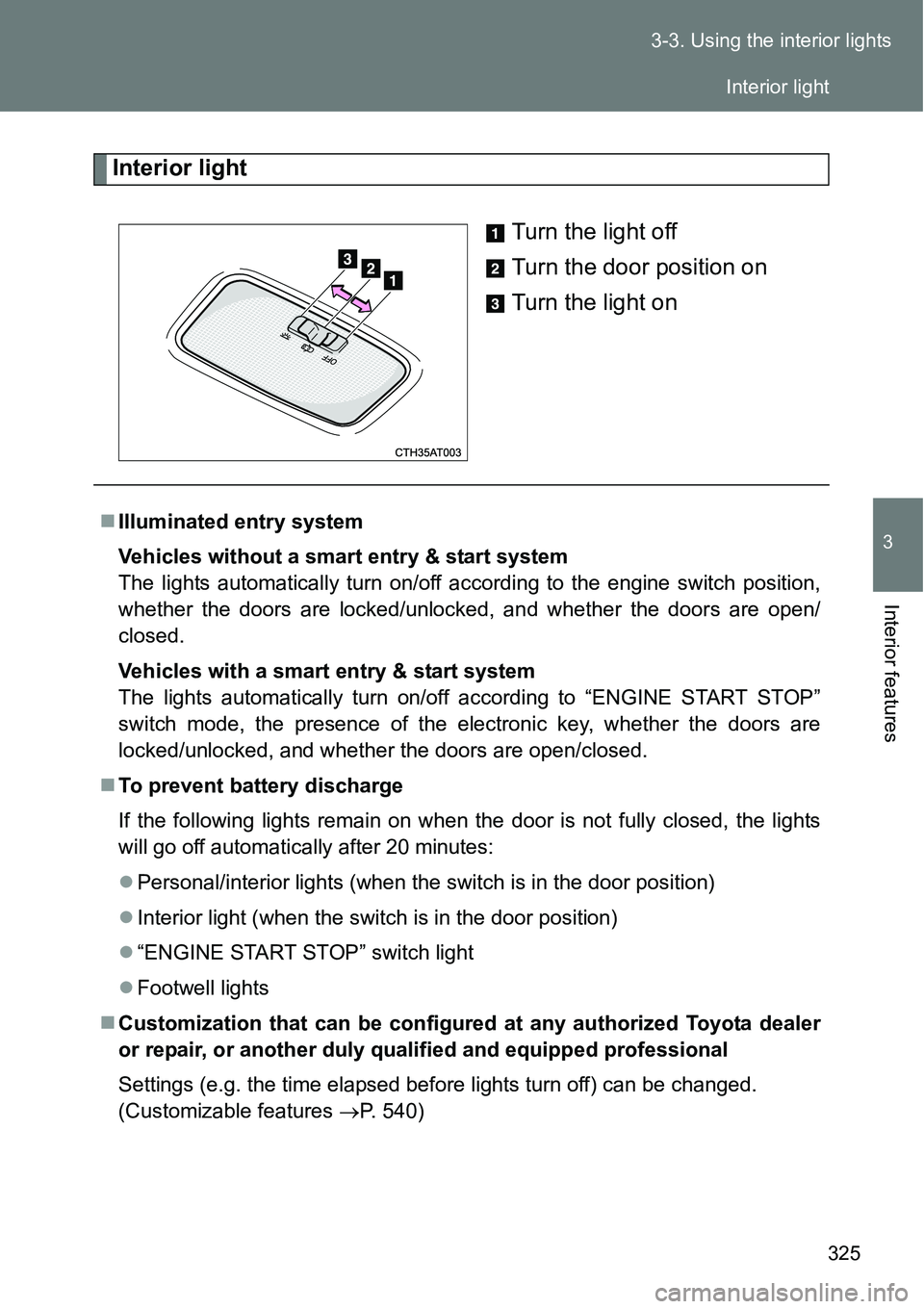
Interior light
Turn the light off
Turn the door position on
Turn the light on
Illuminated entry system
Vehicles without a smart entry & start system
The lights automatically turn on/off according to the engine switch position,
whether the doors are locked/unlocked, and whether the doors are open/
closed.
Vehicles with a smart entry & start system
The lights automatically turn on/off according to “ENGINE START STOP”
switch mode, the presence of the electronic key, whether the doors are
locked/unlocked, and whether the doors are open/closed.
To prevent battery discharge
If the following lights remain on when the door is not fully closed, the lights
will go off automatically after 20 minutes:
Personal/interior lights (when the switch is in the door position)
Interior light (when the switch is in the door position)
“ENGINE START STOP” switch light
Footwell lights
Customization that can be configured at any authorized Toyota dealer
or repair, or another duly qualified and equipped professional
Settings (e.g. the time elapsed before lights turn off) can be changed.
(Customizable features P. 540)
Interior light
Page 334 of 564
334
3-5. Other interior features
Clock
The clock is displayed when
Vehicles without a smart entry & start system
The engine switch is in the “ON” position.
Vehicles with a smart entry & start system
The “ENGINE START STOP” switch is in IGNITION ON mode.
When disconnecting and reconnecting battery terminals
The clock data will be reset.
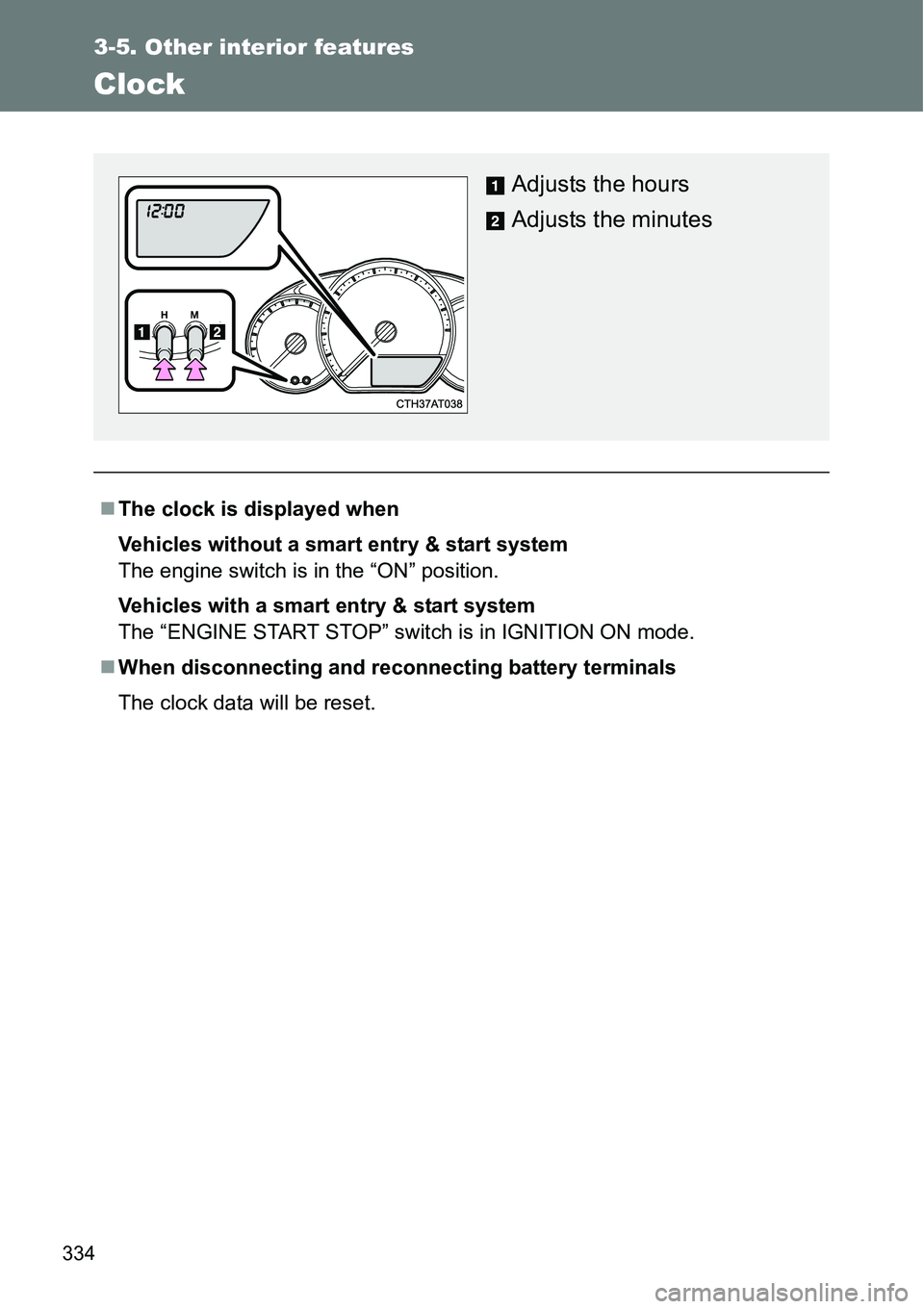
Adjusts the hours
Adjusts the minutes
Page 355 of 564
355 4-1. Maintenance and care
4
Maintenance and care
When using a car wash (vehicles with a smart entry & start system)
If the door handle becomes wet while the electronic key is within the effec-
tive range, the door may lock and unlock repeatedly. Place the key in a posi-
tion 2 m (6 ft.) or more separate from the vehicle while the vehicle is being
washed. (Take care to ensure that the key is not stolen.)
Aluminum wheels (if equipped)
Remove any dirt immediately by using a neutral detergent. Do not use
hard brushes or abrasive cleaners. Do not use strong or harsh chemical
cleaners.
Use the same mild detergent and wax as used on the paint.
Do not use detergent on the wheels when they are hot, for example after
driving for long distance in the hot weather.
Wash detergent from the wheels immediately after use.
Bumpers
Do not scrub with abrasive cleaners.
CAUTION
When washing the vehicle
Do not apply water to the inside of the engine compartment. Doing so may
cause the electrical components etc. to catch fire.
Page 367 of 564
367
4-3. Do-it-yourself maintenance
4
Maintenance and care
Hood
CAUTION
Pre-driving check
Check that the hood is fully closed and locked.
If the hood is not locked properly, it may open while the vehicle is in motion
and cause an accident, which may result in death or serious injury.
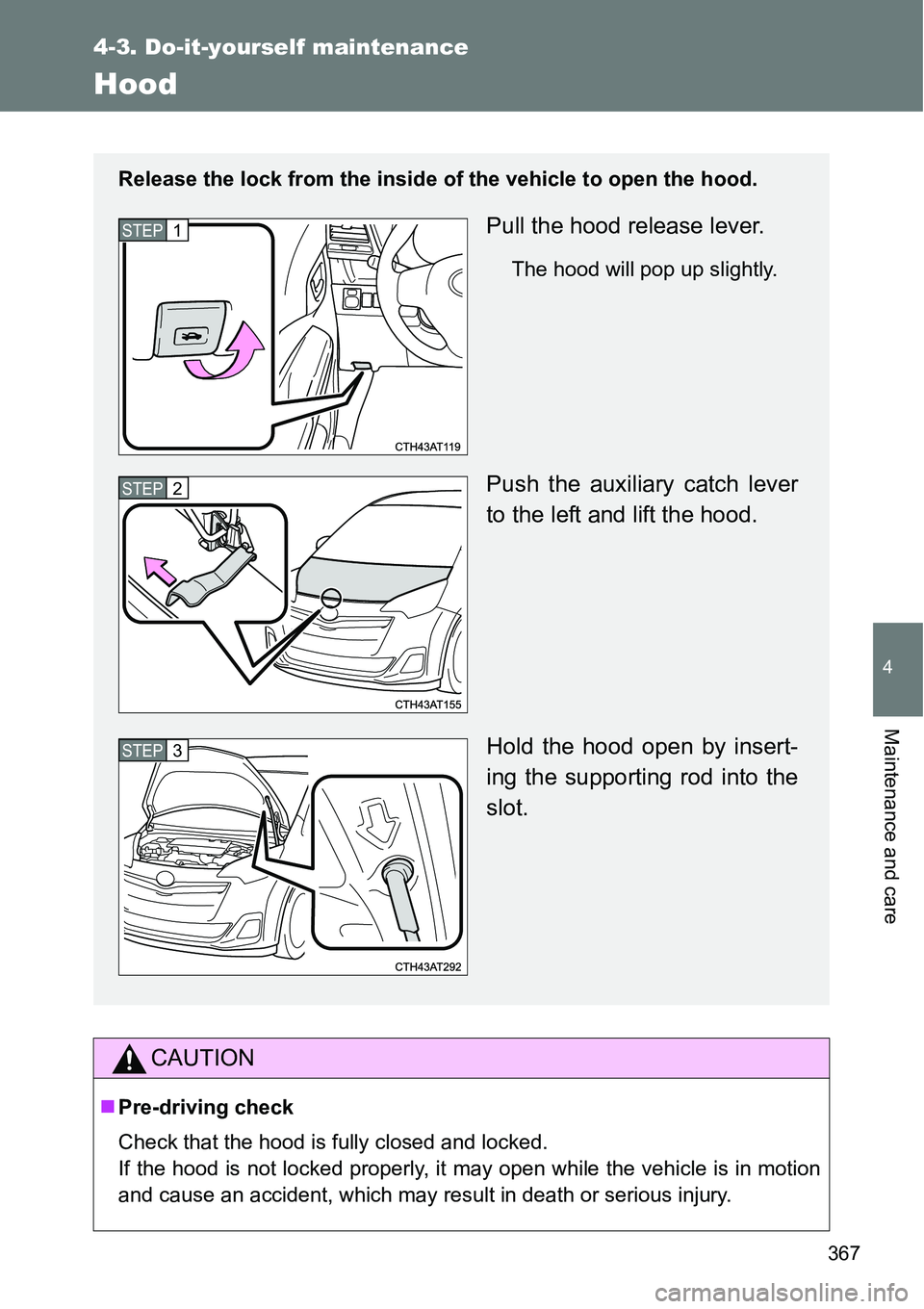
Release the lock from the inside of the vehicle to open the hood.
Pull the hood release lever.
The hood will pop up slightly.
Push the auxiliary catch lever
to the left and lift the hood.
Hold the hood open by insert-
ing the supporting rod into the
slot.
STEP1
STEP2
STEP3
Page 373 of 564
373 4-3. Do-it-yourself maintenance
4
Maintenance and care
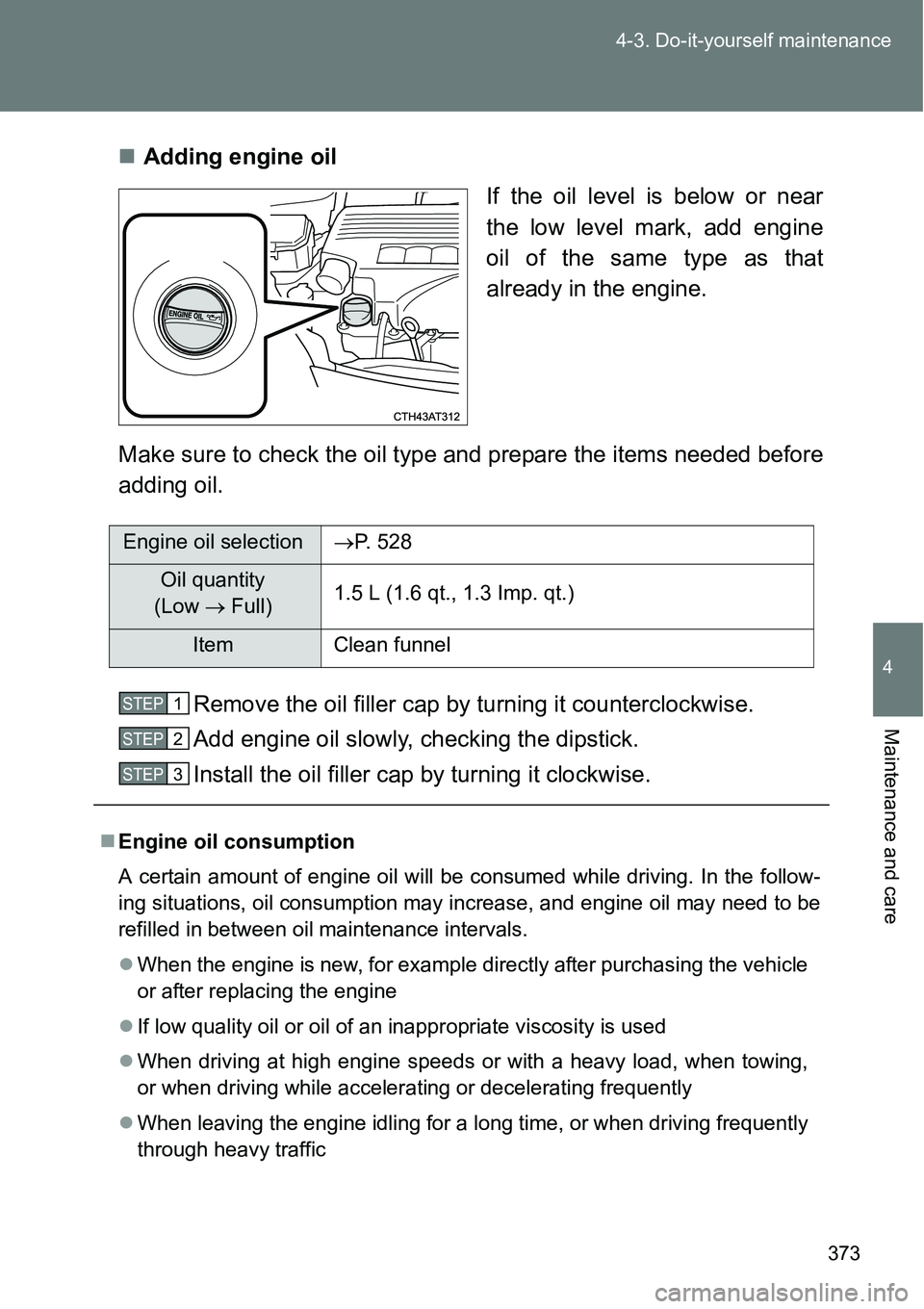
Adding engine oil
If the oil level is below or near
the low level mark, add engine
oil of the same type as that
already in the engine.
Make sure to check the oil type and prepare the items needed before
adding oil.
Remove the oil filler cap by turning it counterclockwise.
Add engine oil slowly, checking the dipstick.
Install the oil filler cap by turning it clockwise.
Engine oil selectionP. 528
Oil quantity
(Low Full)1.5 L (1.6 qt., 1.3 Imp. qt.)
Item Clean funnel
Engine oil consumption
A certain amount of engine oil will be consumed while driving. In the follow-
ing situations, oil consumption may increase, and engine oil may need to be
refilled in between oil maintenance intervals.
When the engine is new, for example directly after purchasing the vehicle
or after replacing the engine
If low quality oil or oil of an inappropriate viscosity is used
When driving at high engine speeds or with a heavy load, when towing,
or when driving while accelerating or decelerating frequently
When leaving the engine idling for a long time, or when driving frequently
through heavy traffic
STEP1
STEP2
STEP3
Page 380 of 564
380 4-3. Do-it-yourself maintenance
Add distilled water.
If the “UPPER LEVEL” line cannot be seen, check the fluid level by
looking directly at the cell.
Put the vent plug back on and close it securely.
Before recharging
When recharging, the battery produces hydrogen gas which is flammable
and explosive. Therefore, observe the following before recharging:
If recharging with the battery installed on the vehicle, be sure to discon-
nect the ground cable.
Make sure the power switch on the charger is off when connecting and
disconnecting the charger cables to the battery.
After recharging/reconnecting the battery (vehicles with a smart entry
& start system)
Unlocking the doors using the smart entry & start system may not be
possible immediately after reconnecting the battery. If this happens, use
the wireless remote control or the mechanical key to lock/unlock the
doors.
Start the engine with the “ENGINE START STOP” switch in ACCES-
SORY mode. The engine may not start with the “ENGINE START STOP”
switch turned off. However, the engine will operate normally from the sec-
ond attempt.
The “ENGINE START STOP” switch mode is recorded by the vehicle. If
the battery is reconnected, the vehicle will return the “ENGINE START
STOP” switch mode to the status it was in before the battery was discon-
nected. Make sure to turn off the engine before disconnect the battery.
Take extra care when connecting the battery if the “ENGINE START
STOP” switch mode prior to discharge is unknown.
If the engine will not start even after multiple attempts, contact any autho-
rized Toyota dealer or repairer, or another duly qualified and equipped pro-
fessional.
STEP2
STEP3
Page 387 of 564
387 4-3. Do-it-yourself maintenance
4
Maintenance and care
Vehicles with a smart entry & start system: Wait for a few min-
utes with the “ENGINE START STOP” switch in IGNITION ON
mode and then turn the “ENGINE START STOP” switch off.
Vehicles without a smart entry & start system: Wait for a few
minutes with the engine switch in the “ON” position and then
turn the engine switch to the “ACC” or “LOCK” position.
Registering ID codes
The tire pressure warning valve and transmitter is equipped with a
unique ID code. When replacing a tire pressure warning valve and
transmitter, it is necessary to register the ID code. Have the ID code
registered by any authorized Toyota dealer or repairer, or another
duly qualified and equipped professional.
STEP5
Page 415 of 564
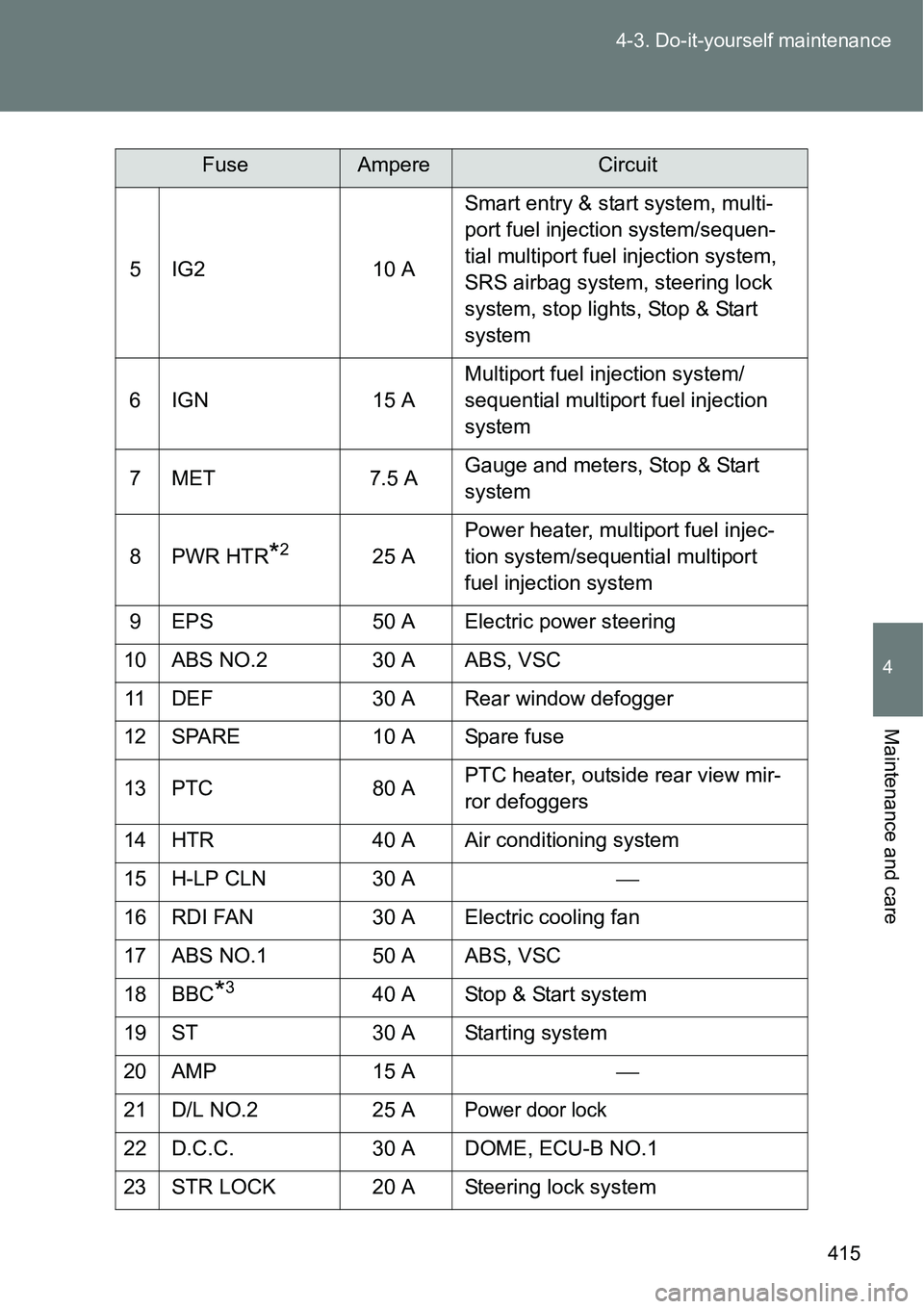
415 4-3. Do-it-yourself maintenance
4
Maintenance and care
5 IG2 10 ASmart entry & start system, multi-
port fuel injection system/sequen-
tial multiport fuel injection system,
SRS airbag system, steering lock
system, stop lights, Stop & Start
system
6 IGN 15 AMultiport fuel injection system/
sequential multiport fuel injection
system
7MET 7.5 AGauge and meters, Stop & Start
system
8PWR HTR
*225 APower heater, multiport fuel injec-
tion system/sequential multiport
fuel injection system
9 EPS 50 A Electric power steering
10 ABS NO.2 30 A ABS, VSC
11 DEF 30 A Rear window defogger
12 SPARE 10 A Spare fuse
13 PTC 80 APTC heater, outside rear view mir-
ror defoggers
14 HTR 40 A Air conditioning system
15 H-LP CLN 30 A
16 RDI FAN 30 A Electric cooling fan
17 ABS NO.1 50 A ABS, VSC
18 BBC
*340 A Stop & Start system
19 ST 30 A Starting system
20 AMP 15 A
21 D/L NO.2 25 A
Power door lock
22 D.C.C. 30 A DOME, ECU-B NO.1
23 STR LOCK 20 A Steering lock system
FuseAmpereCircuit