display TOYOTA YARIS 2016 Owners Manual
[x] Cancel search | Manufacturer: TOYOTA, Model Year: 2016, Model line: YARIS, Model: TOYOTA YARIS 2016Pages: 592, PDF Size: 10.44 MB
Page 399 of 592
YARIS_SEDAN_OM_OM99M18z_(U)
3974-3. Bluetooth®
4
Interior Features
Switch the tab and select the station category.
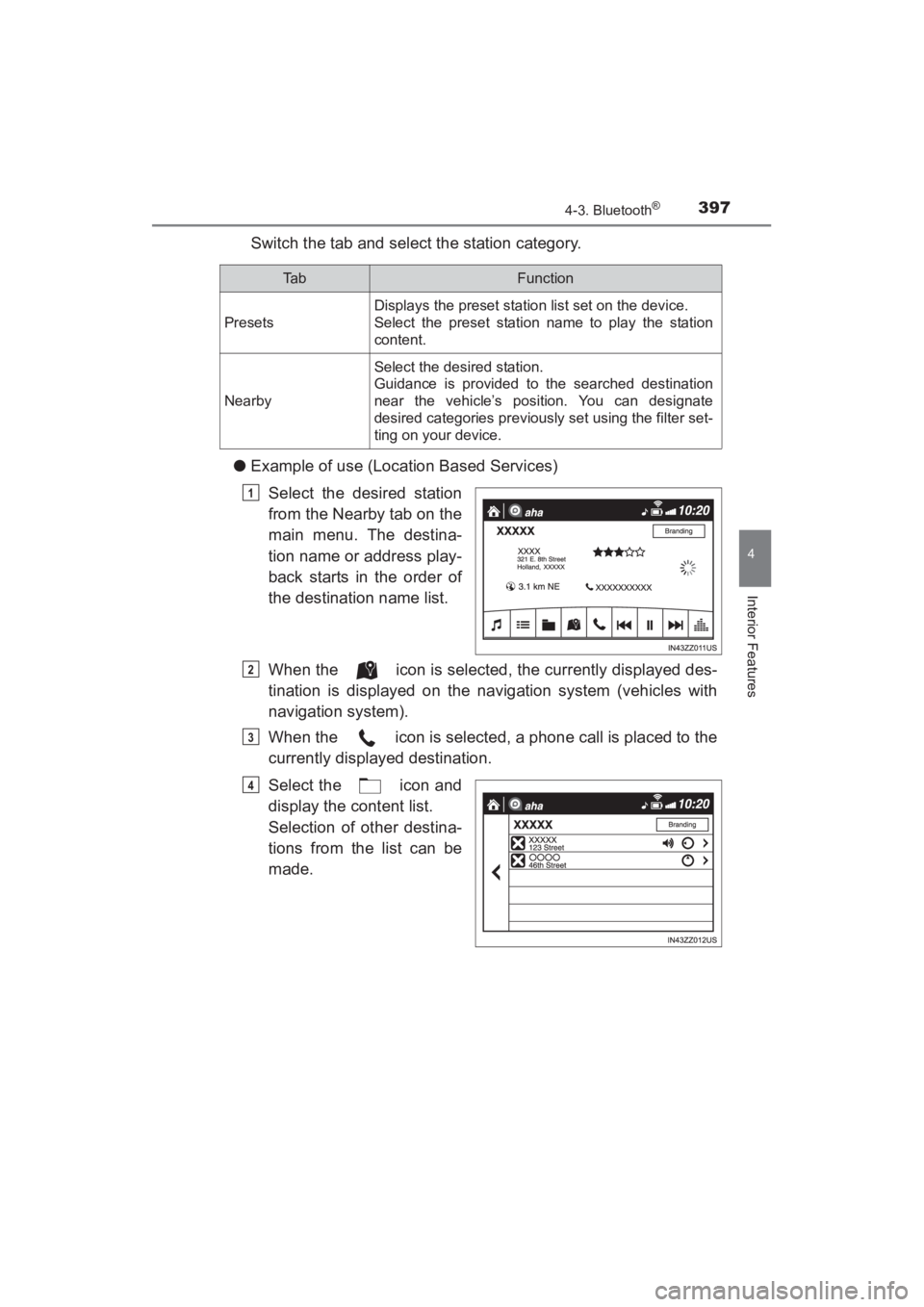
● Example of use (Location Based Services)
Select the desired station
from the Nearby tab on the
main menu. The destina-
tion name or address play-
back starts in the order of
the destination name list.
When the icon is selected, the currently displayed des-
tination is displayed on the navigation system (vehicles with
navigation system).
When the icon is selected, a phone call is placed to the
currently displayed destination.
Select the icon and
display the content list.
Selection of other destina-
tions from the list can be
made.
Ta bFunction
Presets
Displays the preset station list set on the device.
Select the preset station name to play the station
content.
Nearby
Select the desired station.
Guidance is provided to the searched destination
near the vehicle’s position. You can designate
desired categories previously set using the filter set-
ting on your device.
1
2
3
4
YARIS_SEDAN_OM_OM99M18z_(U).book Page 397 Monday, June 1, 2015 9:22 PM
Page 401 of 592
YARIS_SEDAN_OM_OM99M18z_(U)
3994-3. Bluetooth®
4
Interior Features
■What is Stitcher™ Radio?
Stitcher™ radio is an application which can be used to listen to
Internet radio or stream podcasts.
Recommended content is automatically selected by registering
content which you put into your favorites, or by pressing the Like or
Dislike button.
For details on Stitcher™ Radio, refer to “http://stitcher.com/”.
*Stitcher™, the Stitcher™ logo, and the Stitcher™ trade dress are trade-
marks or registered trademarks of Stitcher, Inc., used with permission.
To operate Stitcher™ Radio from your Bluetooth
® device, perform the fol-
lowing in advance:
• Install the Stitcher™ Radio application to your device.
• Create a Stitcher™ Radio account for your device.
• Log onto Stitcher™ Radio using your device.
■
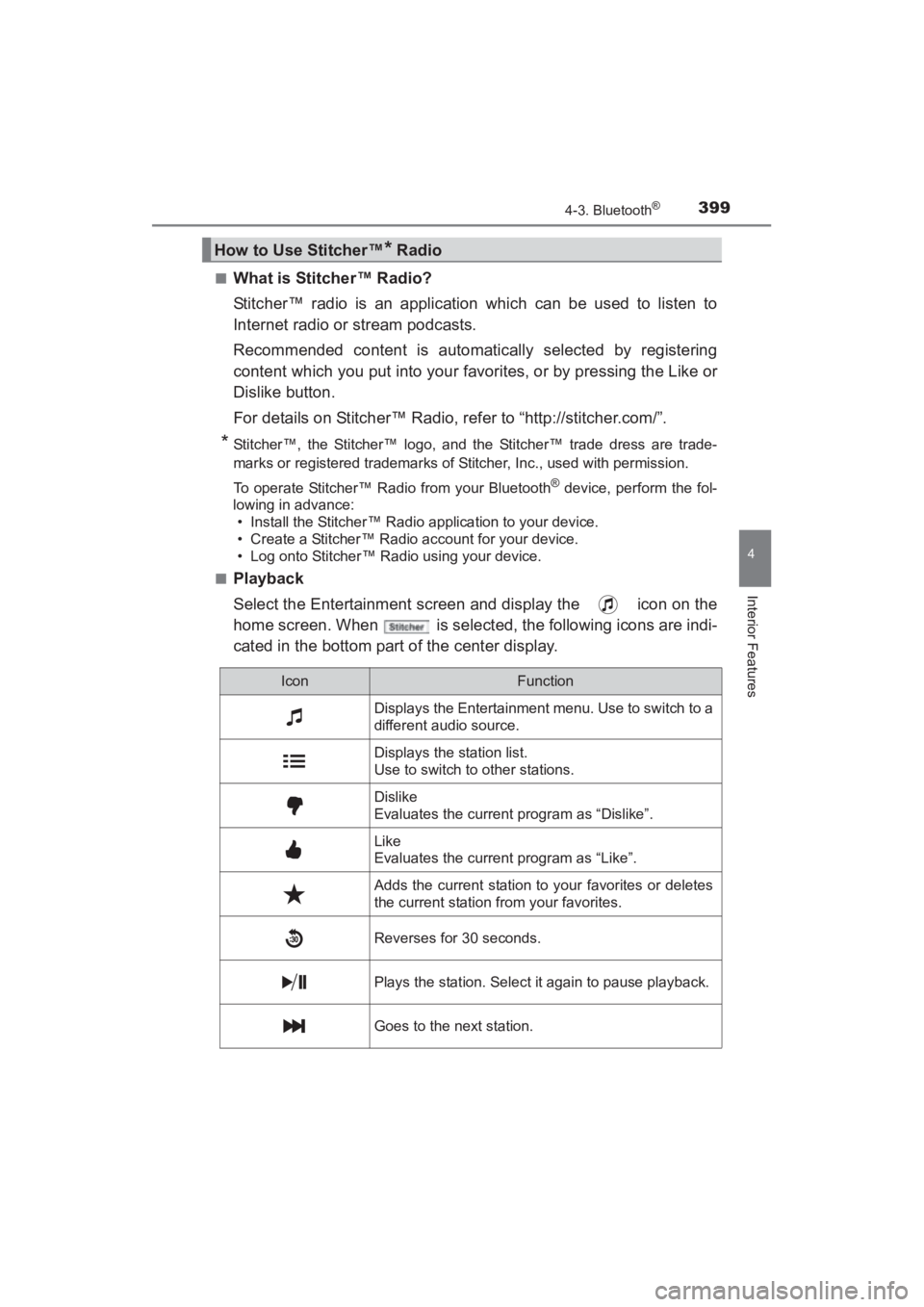
Playback
Select the Entertainment screen and display the icon on the
home screen. When is selected, the following icons are indi-
cated in the bottom part of the center display.
How to Use Stitcher™* Radio
IconFunction
Displays the Entertainment menu. Use to switch to a
different audio source.
Displays the station list.
Use to switch to other stations.
Dislike
Evaluates the current program as “Dislike”.
Like
Evaluates the current program as “Like”.
Adds the current station to your favorites or deletes
the current station from your favorites.
Reverses for 30 seconds.
Plays the station. Select it again to pause playback.
Goes to the next station.
YARIS_SEDAN_OM_OM99M18z_(U).book Page 399 Monday, June 1, 2015 9:22 PM
Page 402 of 592
400
YARIS_SEDAN_OM_OM99M18z_(U)
4-3. Bluetooth®
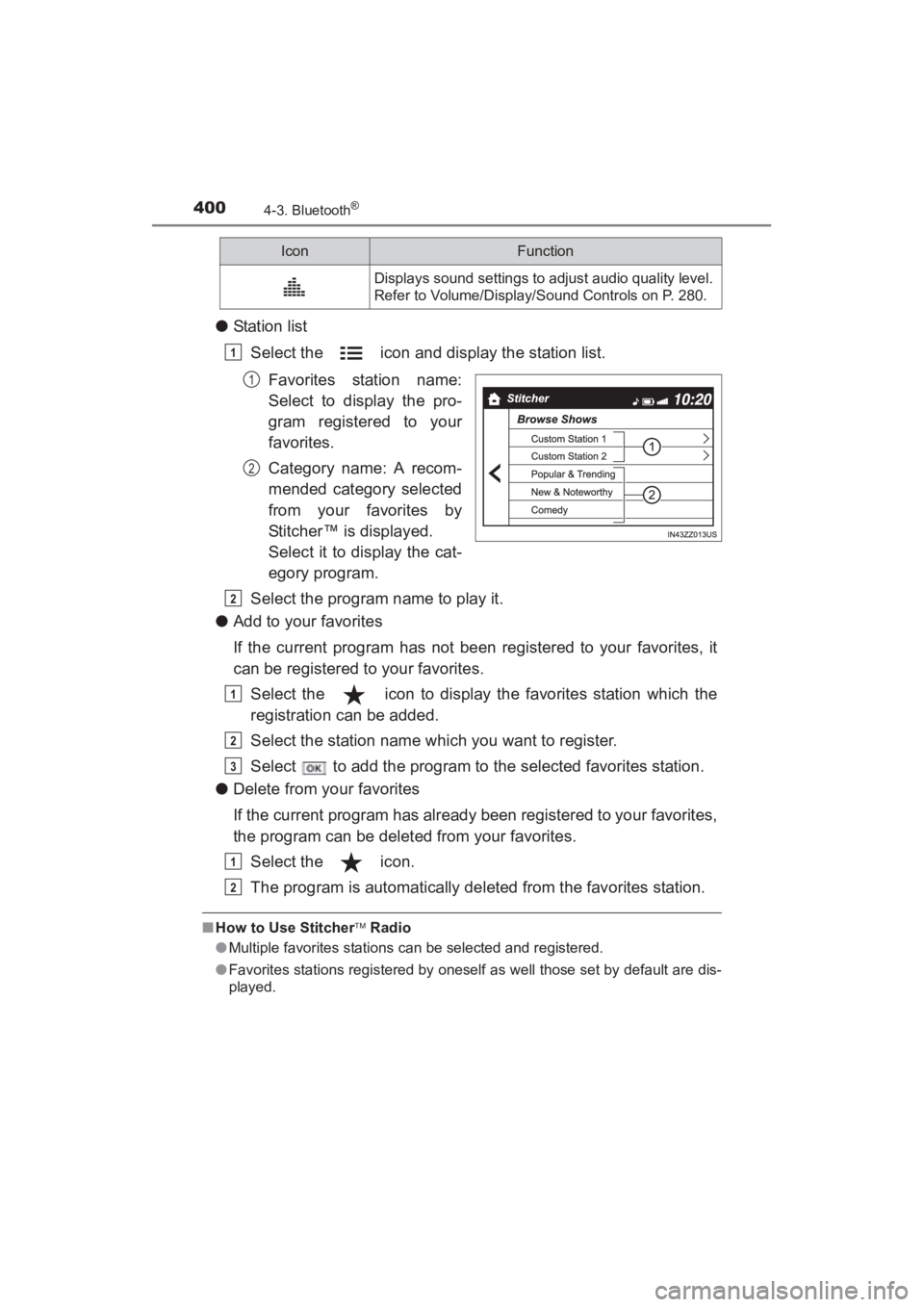
●Station list
Select the icon and display the station list.
Favorites station name:
Select to display the pro-
gram registered to your
favorites.
Category name: A recom-
mended category selected
from your favorites by
Stitcher™ is displayed.
Select it to display the cat-
egory program.
Select the program name to play it.
● Add to your favorites
If the current program has not been registered to your favorites, it
can be registered to your favorites.
Select the icon to display the favorites station which the
registration can be added.
Select the station name which you want to register.
Select to add the program to the selected favorites station.
● Delete from your favorites
If the current program has already been registered to your favorites,
the program can be deleted from your favorites.
Select the icon.
The program is automatically deleted from the favorites station.
■How to Use Stitcher Radio
● Multiple favorites stations can be selected and registered.
● Favorites stations registered by oneself as well those set by default are dis-
played.
Displays sound settings to adjust audio quality level.
Refer to Volume/Display/Sound Controls on P. 280.
IconFunction
1
1
2
2
1
2
3
1
2
YARIS_SEDAN_OM_OM99M18z_(U).book Page 400 Monday, June 1, 2015 9:22 PM
Page 420 of 592
418
YARIS_SEDAN_OM_OM99M18z_(U)
5-1. Essential Information
Introduction
Be extremely careful and prevent injury to yourself and others or dam-
age to your vehicle when using this manual for inspection and mainte-
nance.
If you are unsure about any procedure it describes, we strongly urge
you to have a reliable and qualified service shop perform the work,
preferably your Toyota dealer.
Factory-trained Toyota technicians and genuine Toyota parts are best
for your vehicle. Without this expertise and the parts that have been
designed and made especially for your Toyota, inadequate, incom-
plete, and insufficient servicing may result in problems. This could
lead to vehicle damage or an accident and injuries.
For expert advice and quality service, consult your Toyota dealer.
To continue warranty eligibility and to protect your investment, it is
your responsibility to properly maintain your vehicle according to fac-
tory recommended schedules outlined in this manual. Keep a copy of
the repair order. It proves that the maintenance that has been per-
formed is under warranty coverage. If any problem should arise while
your vehicle is under warranty, your Toyota dealer will promptly take
care of it.
This evidence may consist of the following:
●The Maintenance Log, found within the Warranty and Maintenance
Guide, must be completely filled out showing mileage, repair order
number, date for each service, and signed by a qualified automotive
service technician who service vehicles.
● Original copies of repair orders or other receipts that include the
mileage and date the vehicle was serviced. Each receipt should be
signed by a qualified automotive service technician.
● For self maintenance, a statement that you completed the mainte-
nance yourself, displaying mileage and the date the work was per-
formed. Also, receipts for the replacement parts (fluid, filters, etc.)
indicating the date and mileage must accompany this statement.
YARIS_SEDAN_OM_OM99M18z_(U).book Page 418 Monday, June 1, 2015 9:22 PM
Page 422 of 592
420
YARIS_SEDAN_OM_OM99M18z_(U)
5-2. Scheduled Maintenance
Maintenance Monitor
“Oil Change” with a flexible setting*1 is available. Consult your Autho-
rized Toyota Dealer when you want to change the setting
*2. Once the
system turns on, the wrench indicator light in the instrument cluster
will be illuminated when remaining oil life becomes less than
300 miles (500 km), or remaining days are less than 15 (whichever
comes first).
■Reset method
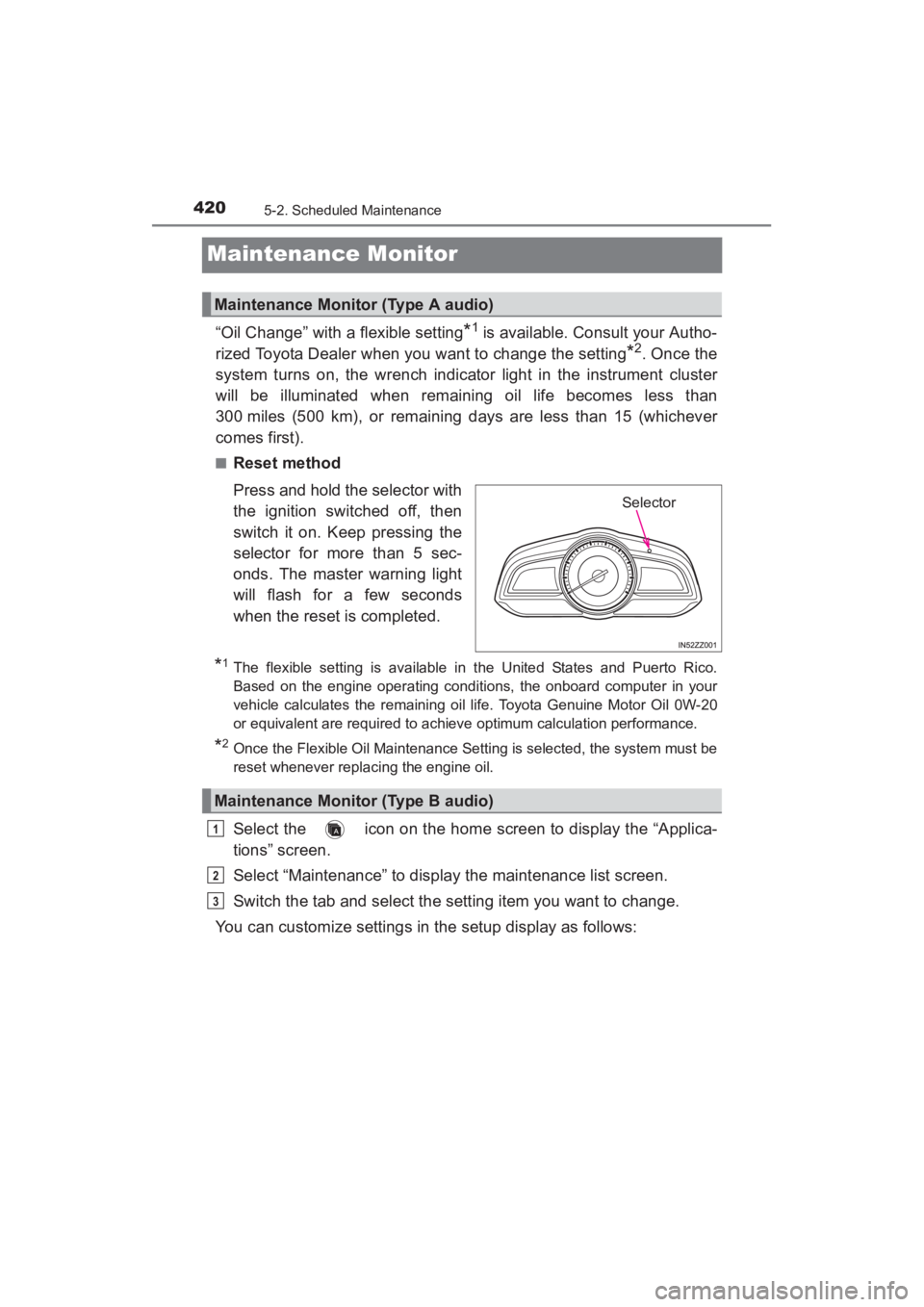
Press and hold the selector with
the ignition switched off, then
switch it on. Keep pressing the
selector for more than 5 sec-
onds. The master warning light
will flash for a few seconds
when the reset is completed.
*1The flexible setting is available in the United States and Puerto Rico.
Based on the engine operating conditions, the onboard computer in your
vehicle calculates the remaining oil life. Toyota Genuine Motor Oil 0W-20
or equivalent are required to achiev e optimum calculation performance.
*2Once the Flexible Oil Maintenance Setting is selected, the system must be
reset whenever replacing the engine oil.
Select the icon on the home screen to display the “Applica-
tions” screen.
Select “Maintenance” to display the maintenance list screen.
Switch the tab and select the setting item you want to change.
You can customize settings in the setup display as follows:
Maintenance Monitor (Type A audio)
Selector
Maintenance Monitor (Type B audio)
1
2
3
YARIS_SEDAN_OM_OM99M18z_(U).book Page 420 Monday, June 1, 2015 9:22 PM
Page 423 of 592
YARIS_SEDAN_OM_OM99M18z_(U)
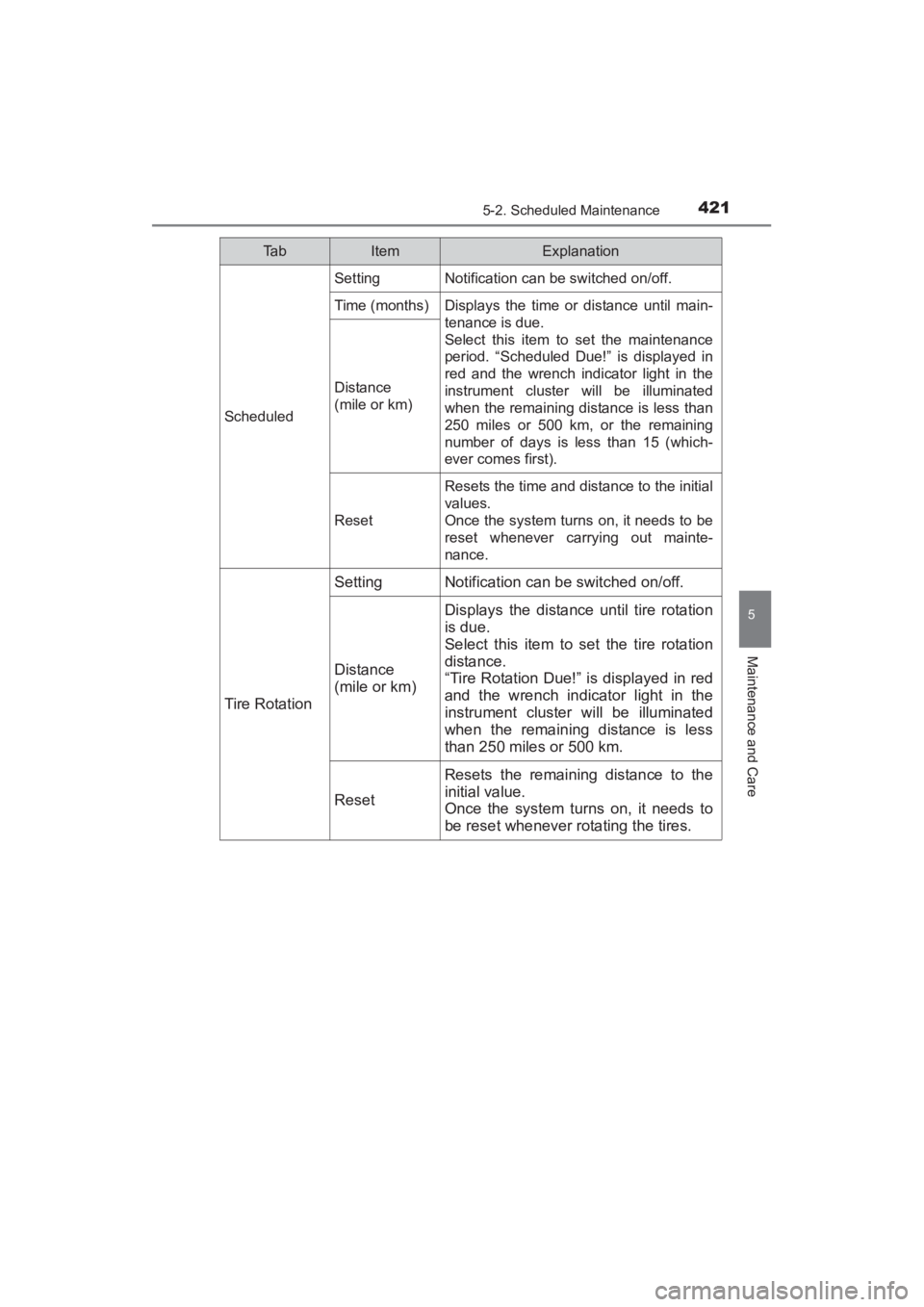
4215-2. Scheduled Maintenance
5
Maintenance and Care
Ta bItemExplanation
Scheduled
SettingNotification can be switched on/off.
Time (months)Displays the time or distance until main-
tenance is due.
Select this item to set the maintenance
period. “Scheduled Due!” is displayed in
red and the wrench indicator light in the
instrument cluster will be illuminated
when the remaining distance is less than
250 miles or 500 km, or the remaining
number of days is less than 15 (which-
ever comes first).
Distance
(mile or km)
Reset
Resets the time and distance to the initial
values.
Once the system turns on, it needs to be
reset whenever carrying out mainte-
nance.
Tire Rotation
SettingNotification can be switched on/off.
Distance
(mile or km)
Displays the distance until tire rotation
is due.
Select this item to set the tire rotation
distance.
“Tire Rotation Due!” is displayed in red
and the wrench indicator light in the
instrument cluster will be illuminated
when the remaining distance is less
than 250 miles or 500 km.
Reset
Resets the remaining distance to the
initial value.
Once the system turns on, it needs to
be reset whenever rotating the tires.
YARIS_SEDAN_OM_OM99M18z_(U).book Page 421 Monday, June 1, 2015 9:22 PM
Page 424 of 592
4225-2. Scheduled Maintenance
YARIS_SEDAN_OM_OM99M18z_(U)
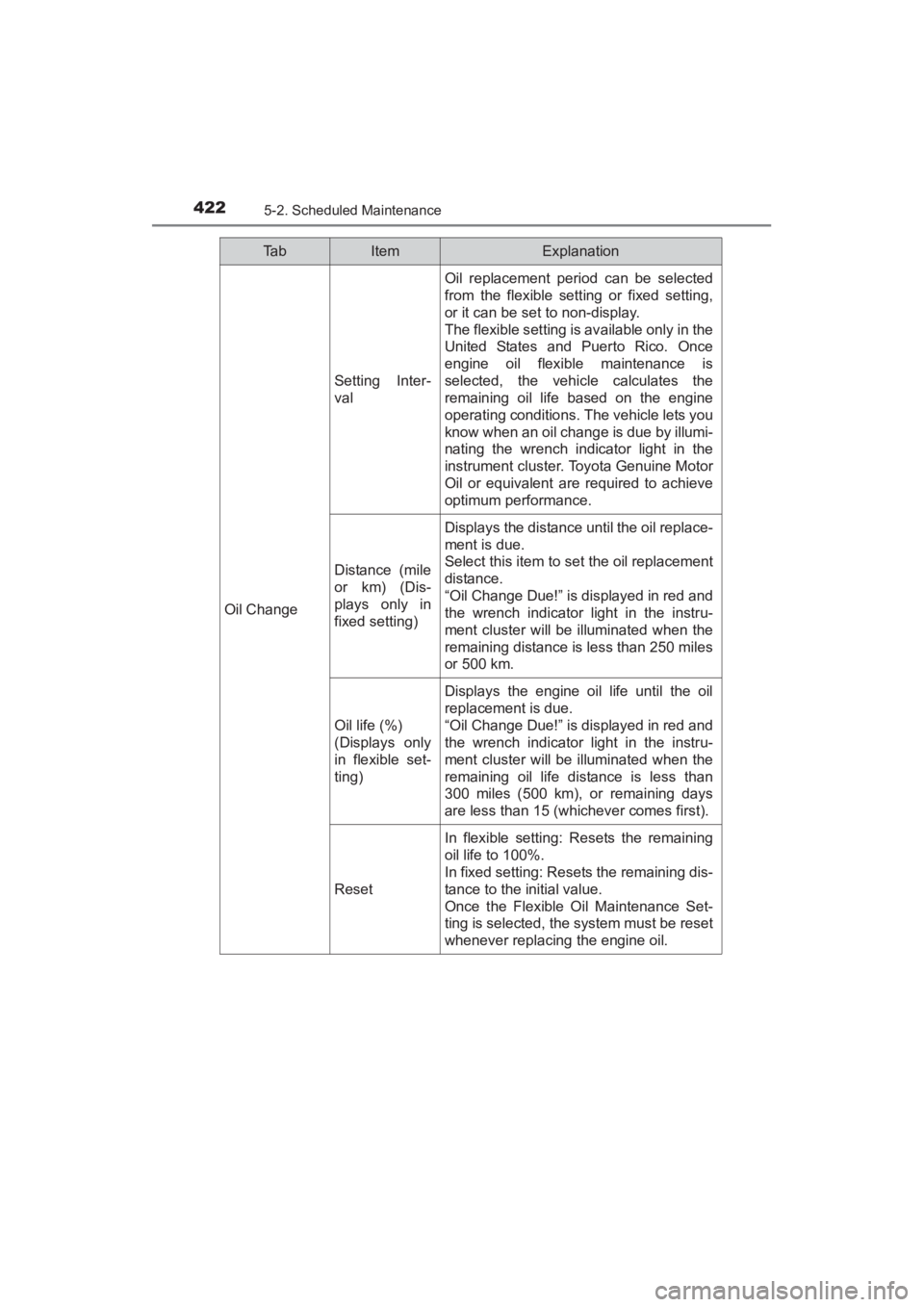
Oil Change
Setting Inter-
val
Oil replacement period can be selected
from the flexible setting or fixed setting,
or it can be set to non-display.
The flexible setting is available only in the
United States and Puerto Rico. Once
engine oil flexible maintenance is
selected, the vehicle calculates the
remaining oil life based on the engine
operating conditions. The vehicle lets you
know when an oil change is due by illumi-
nating the wrench indicator light in the
instrument cluster. Toyota Genuine Motor
Oil or equivalent are required to achieve
optimum performance.
Distance (mile
or km) (Dis-
plays only in
fixed setting)
Displays the distance until the oil replace-
ment is due.
Select this item to set the oil replacement
distance.
“Oil Change Due!” is displayed in red and
the wrench indicator light in the instru-
ment cluster will be illuminated when the
remaining distance is less than 250 miles
or 500 km.
Oil life (%)
(Displays only
in flexible set-
ting)
Displays the engine oil life until the oil
replacement is due.
“Oil Change Due!” is displayed in red and
the wrench indicator light in the instru-
ment cluster will be illuminated when the
remaining oil life distance is less than
300 miles (500 km), or remaining days
are less than 15 (whichever comes first).
Reset
In flexible setting: Resets the remaining
oil life to 100%.
In fixed setting: Resets the remaining dis-
tance to the initial value.
Once the Flexible Oil Maintenance Set-
ting is selected, the system must be reset
whenever replacing the engine oil.
Ta bItemExplanation
YARIS_SEDAN_OM_OM99M18z_(U).book Page 422 Monday, June 1, 2015 9:22 PM
Page 483 of 592
481
YARIS_SEDAN_OM_OM99M18z_(U)
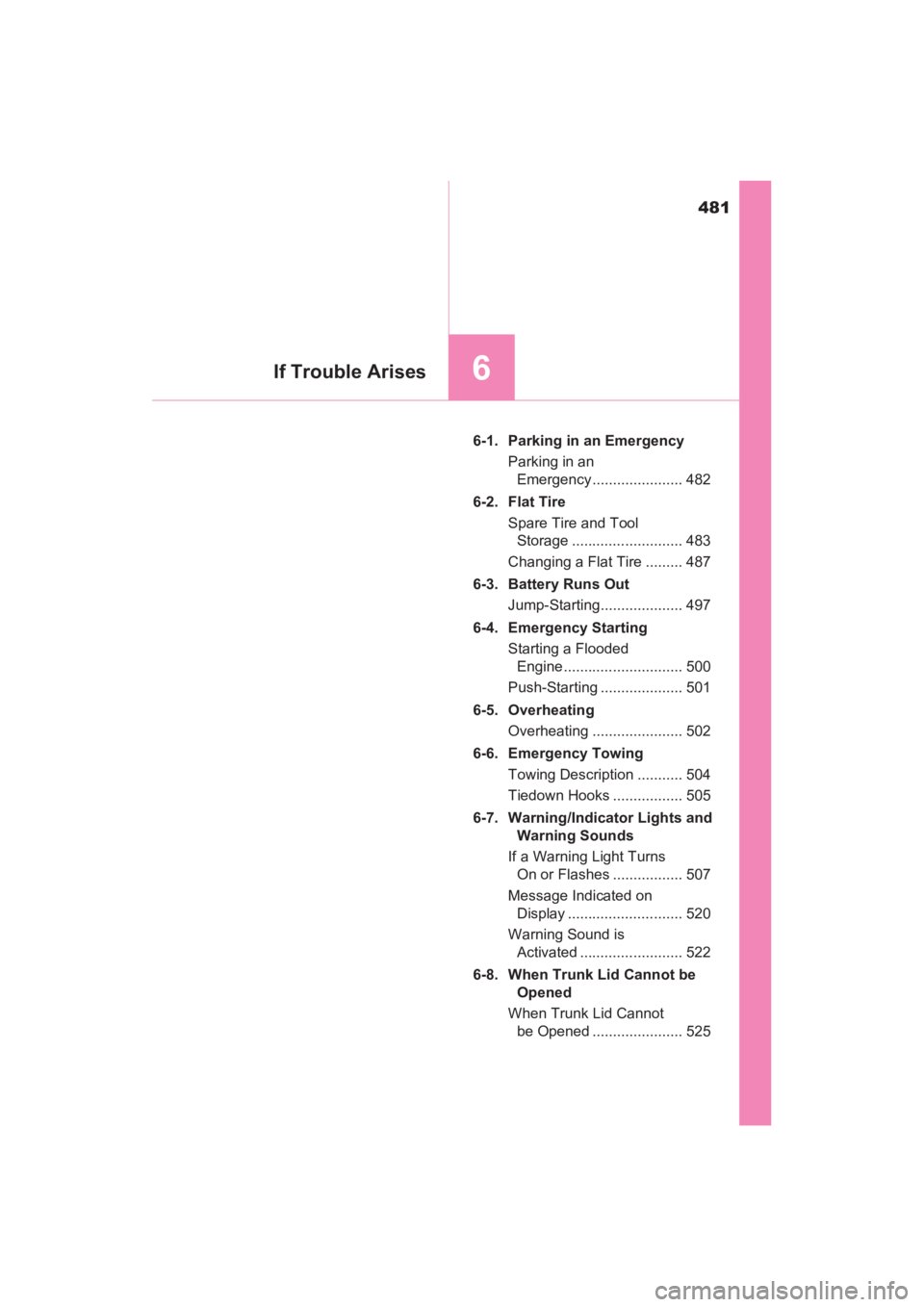
6If Trouble Arises
6-1. Parking in an EmergencyParking in an Emergency ...................... 482
6-2. Flat Tire Spare Tire and Tool Storage ........................... 483
Changing a Flat Tire ......... 487
6-3. Battery Runs Out Jump-Starting.................... 497
6-4. Emergency Starting Starting a Flooded Engine ............................. 500
Push-Starting .................... 501
6-5. Overheating Overheating ...................... 502
6-6. Emergency Towing Towing Description ........... 504
Tiedown Hooks ................. 505
6-7. Warning/Indicator Lights and Warning Sounds
If a Warning Light Turns On or Flashes ................. 507
Message Indicated on Display ............................ 520
Warning Sound is Activated ......................... 522
6-8. When Trunk Lid Cannot be Opened
When Trunk Lid Cannot be Opened ...................... 525
YARIS_SEDAN_OM_OM99M18z_(U).book Page 481 Monday, June 1, 2015 9:22 PM
Page 509 of 592
507
YARIS_SEDAN_OM_OM99M18z_(U)
6-7. Warning/Indicator Lights and Warning Sounds
6
If Trouble Arises
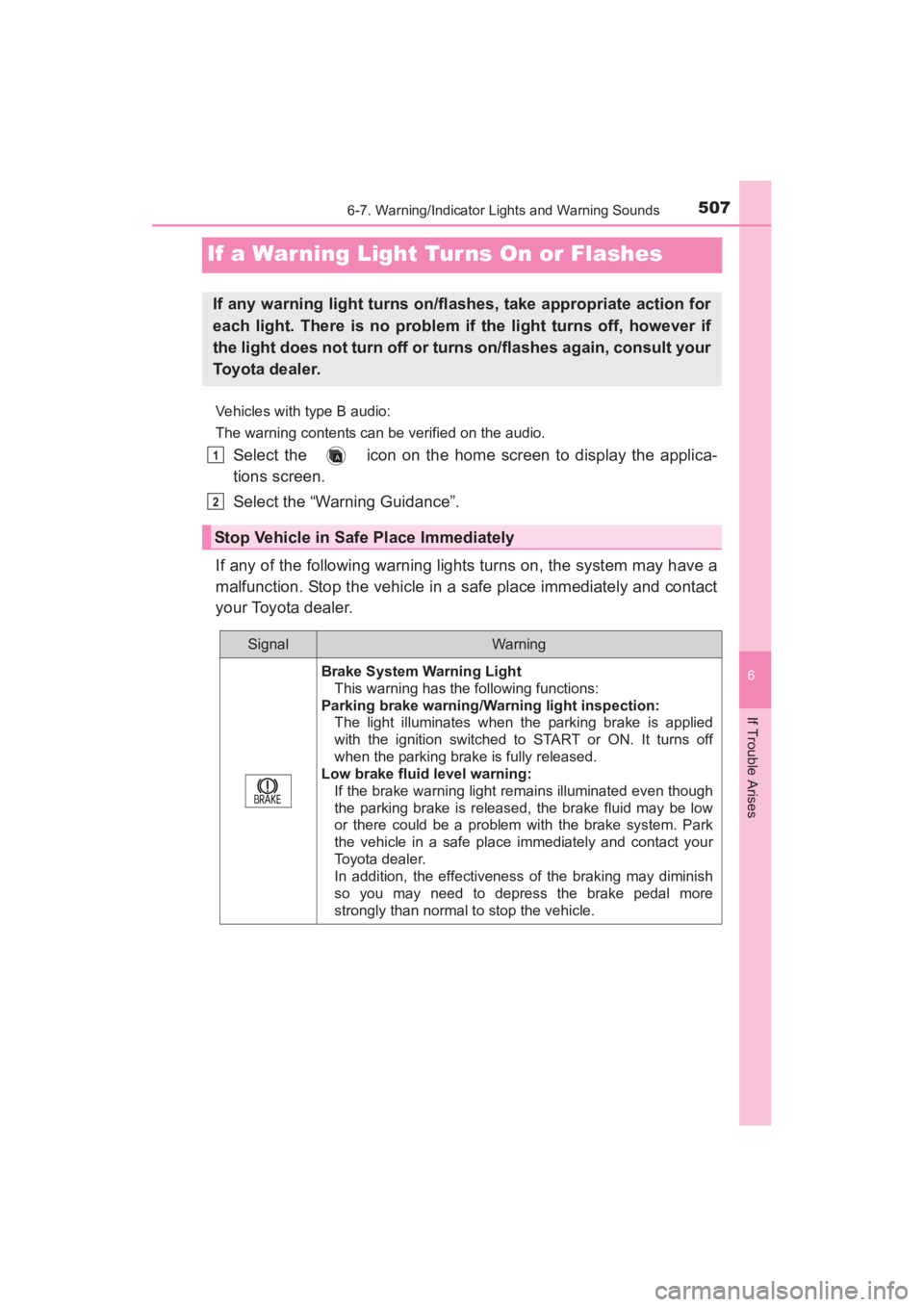
If a Warning Light Tur ns On or Flashes
Vehicles with type B audio:
The warning contents can be verified on the audio.
Select the icon on the home screen to display the applica-
tions screen.
Select the “Warning Guidance”.
If any of the following warning lights turns on, the system may have a
malfunction. Stop the vehicle in a safe place immediately and contact
your Toyota dealer.
If any warning light turns on/flashes, take appropriate action for
each light. There is no problem if the light turns off, however if
the light does not turn off or turns on/flashes again, consult your
Toyota dealer.
Stop Vehicle in Safe Place Immediately
SignalWar ning
Brake System Warning Light This warning has the following functions:
Parking brake warning/Wa rning light inspection:
The light illuminates when the parking brake is applied
with the ignition switched to START or ON. It turns off
when the parking brake is fully released.
Low brake fluid level warning:
If the brake warning light remains illuminated even though
the parking brake is released, the brake fluid may be low
or there could be a problem with the brake system. Park
the vehicle in a safe place immediately and contact your
Toyota dealer.
In addition, the effectiveness of the braking may diminish
so you may need to depress the brake pedal more
strongly than normal to stop the vehicle.
1
2
YARIS_SEDAN_OM_OM99M18z_(U).book Page 507 Monday, June 1, 2015 9:22 PM
Page 513 of 592
YARIS_SEDAN_OM_OM99M18z_(U)
5116-7. Warning/Indicator Lights and Warning Sounds
6
If Trouble Arises
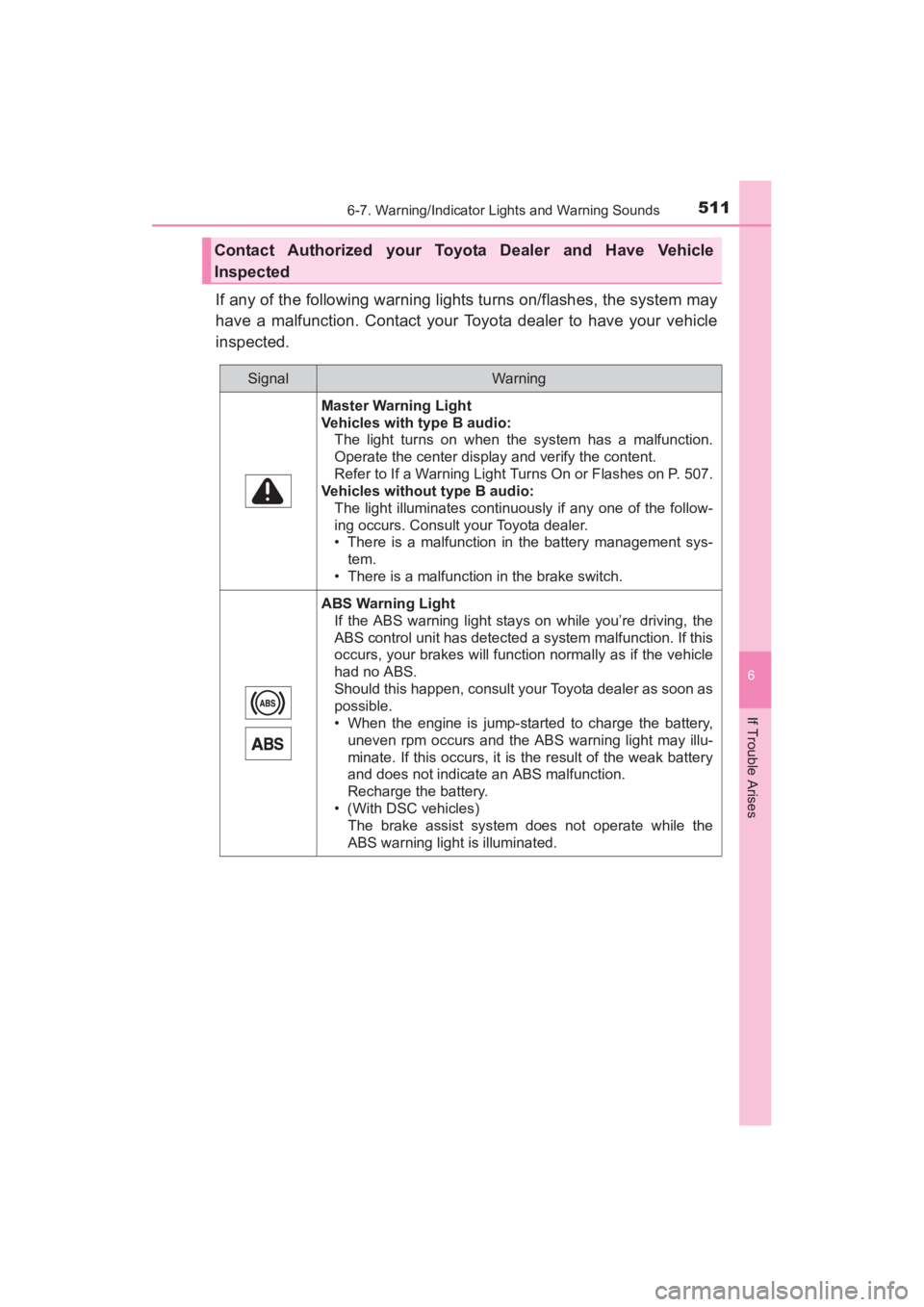
If any of the following warning lights turns on/flashes, the system may
have a malfunction. Contact your Toyota dealer to have your vehicle
inspected.
Contact Authorized your Toyota Dealer and Have Vehicle
Inspected
SignalWar ning
Master Warning Light
Vehicles with type B audio:The light turns on when the system has a malfunction.
Operate the center display and verify the content.
Refer to If a Warning Light Turns On or Flashes on P. 507.
Vehicles without type B audio:
The light illuminates continuously if any one of the follow-
ing occurs. Consult your Toyota dealer.
• There is a malfunction in the battery management sys-tem.
• There is a malfunction in the brake switch.
ABS Warning Light If the ABS warning light stays on while you’re driving, the
ABS control unit has detected a system malfunction. If this
occurs, your brakes will function normally as if the vehicle
had no ABS.
Should this happen, consult your Toyota dealer as soon as
possible.
• When the engine is jump-started to charge the battery,uneven rpm occurs and the ABS warning light may illu-
minate. If this occurs, it is the result of the weak battery
and does not indicate an ABS malfunction.
Recharge the battery.
• (With DSC vehicles) The brake assist system does not operate while the
ABS warning light is illuminated.
YARIS_SEDAN_OM_OM99M18z_(U).book Page 511 Monday, June 1, 2015 9:22 PM