display TOYOTA YARIS 2016 Repair Manual
[x] Cancel search | Manufacturer: TOYOTA, Model Year: 2016, Model line: YARIS, Model: TOYOTA YARIS 2016Pages: 592, PDF Size: 10.44 MB
Page 292 of 592
290
YARIS_SEDAN_OM_OM99M18z_(U)
4-2. Audio System
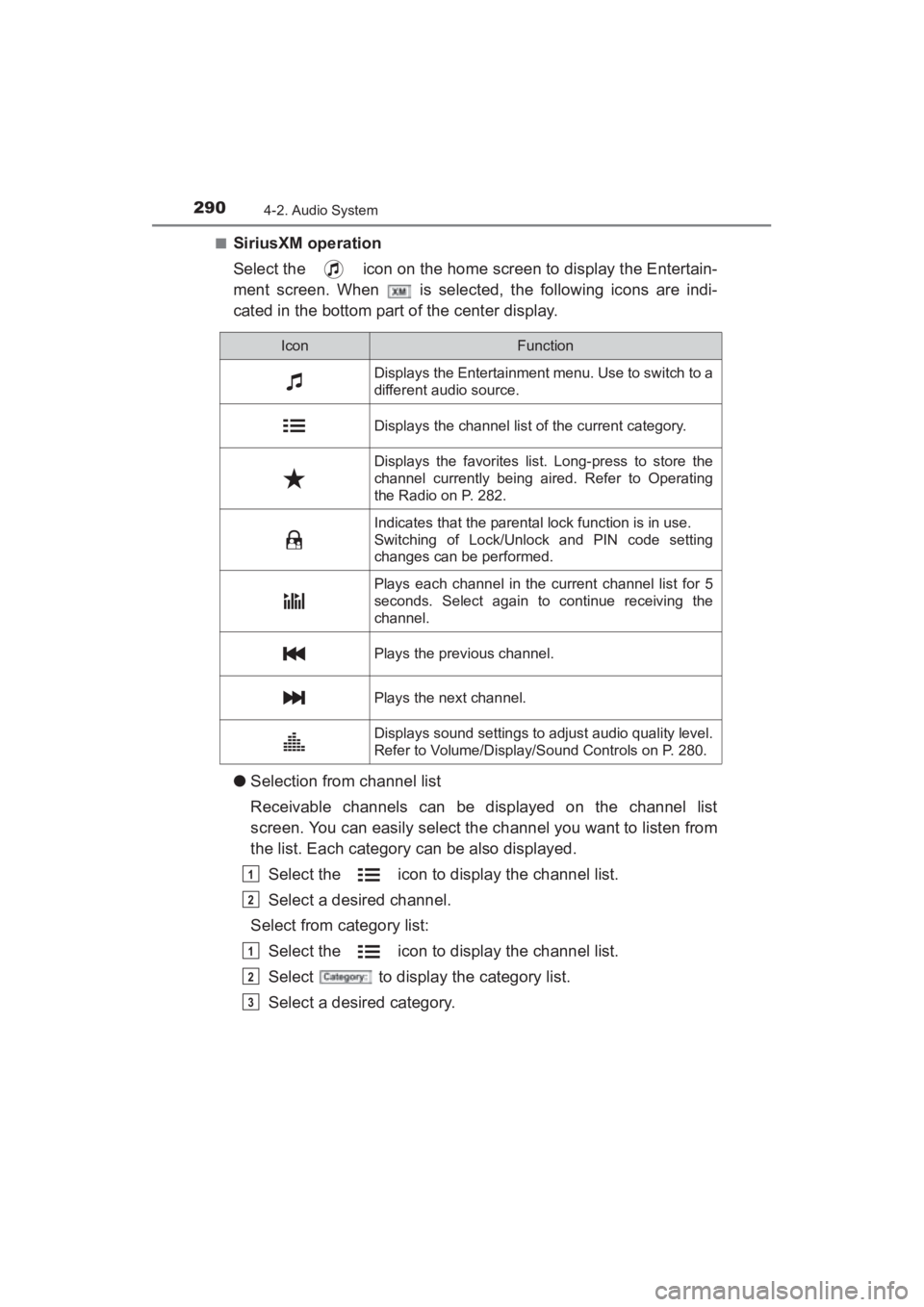
■SiriusXM operation
Select the icon on the home screen to display the Entertain-
ment screen. When is selected, the following icons are indi-
cated in the bottom part of the center display.
●Selection from channel list
Receivable channels can be displayed on the channel list
screen. You can easily select the channel you want to listen from
the list. Each category can be also displayed.
Select the icon to display the channel list.
Select a desired channel.
Select from category list:
Select the icon to display the channel list.
Select to display the category list.
Select a desired category.
IconFunction
Displays the Entertainment menu. Use to switch to a
different audio source.
Displays the channel list of the current category.
Displays the favorites list. Long-press to store the
channel currently being aired. Refer to Operating
the Radio on P. 282.
Indicates that the parental lock function is in use.
Switching of Lock/Unlock and PIN code setting
changes can be performed.
Plays each channel in the current channel list for 5
seconds. Select again to continue receiving the
channel.
Plays the previous channel.
Plays the next channel.
Displays sound settings to adjust audio quality level.
Refer to Volume/Display/Sound Controls on P. 280.
1
2
1
2
3
YARIS_SEDAN_OM_OM99M18z_(U).book Page 290 Monday, June 1, 2015 9:22 PM
Page 293 of 592
YARIS_SEDAN_OM_OM99M18z_(U)
2914-2. Audio System
4
Interior Features
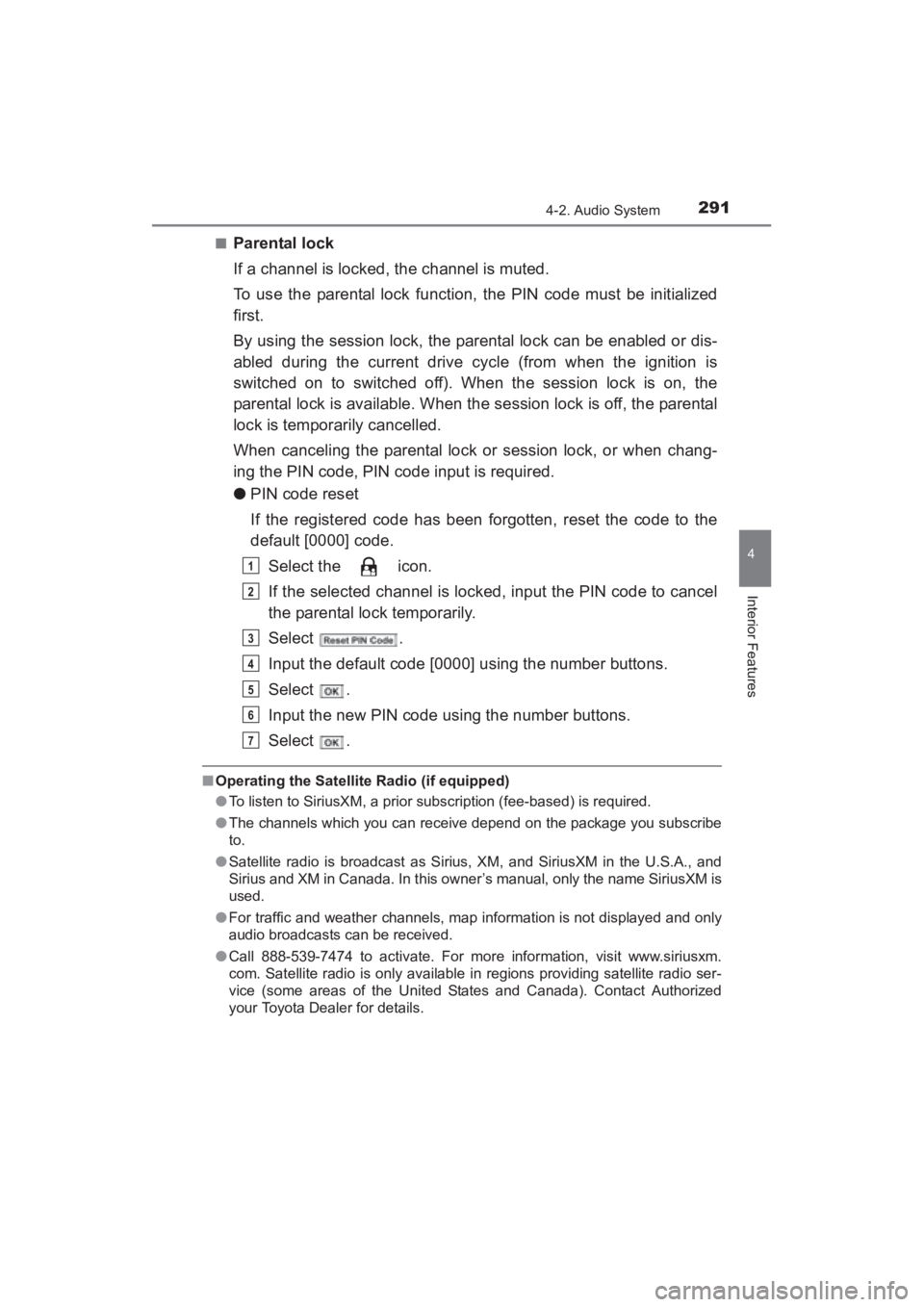
■Parental lock
If a channel is locked, the channel is muted.
To use the parental lock function, the PIN code must be initialized
first.
By using the session lock, the parental lock can be enabled or dis-
abled during the current drive cycle (from when the ignition is
switched on to switched off). When the session lock is on, the
parental lock is available. When the session lock is off, the parental
lock is temporarily cancelled.
When canceling the parental lock or session lock, or when chang-
ing the PIN code, PIN code input is required.
●PIN code reset
If the registered code has been forgotten, reset the code to the
default [0000] code.
Select the icon.
If the selected channel is locked, input the PIN code to cancel
the parental lock temporarily.
Select .
Input the default code [0000] using the number buttons.
Select .
Input the new PIN code using the number buttons.
Select .
■Operating the Satellite Radio (if equipped)
●To listen to SiriusXM, a prior subscription (fee-based) is required.
● The channels which you can receive depend on the package you subscribe
to.
● Satellite radio is broadcast as Sirius, XM, and SiriusXM in the U.S.A., and
Sirius and XM in Canada. In this owner’s manual, only the name SiriusXM is
used.
● For traffic and weather channels, map information is not displayed and only
audio broadcasts can be received.
● Call 888-539-7474 to activate. For more information, visit www.siriusxm.
com. Satellite radio is only available in regions providing satellite radio ser-
vice (some areas of the United States and Canada). Contact Authorized
your Toyota Dealer for details.
1
2
3
4
5
6
7
YARIS_SEDAN_OM_OM99M18z_(U).book Page 291 Monday, June 1, 2015 9:22 PM
Page 295 of 592
YARIS_SEDAN_OM_OM99M18z_(U)
2934-2. Audio System
4
Interior Features
■Inserting the CD
Insert the CD into the slot, label-side up. The auto-loading mecha-
nism will set the CD and begin play.
■Ejecting the CD
Press the CD eject button ( ) to eject the CD.
■Playback
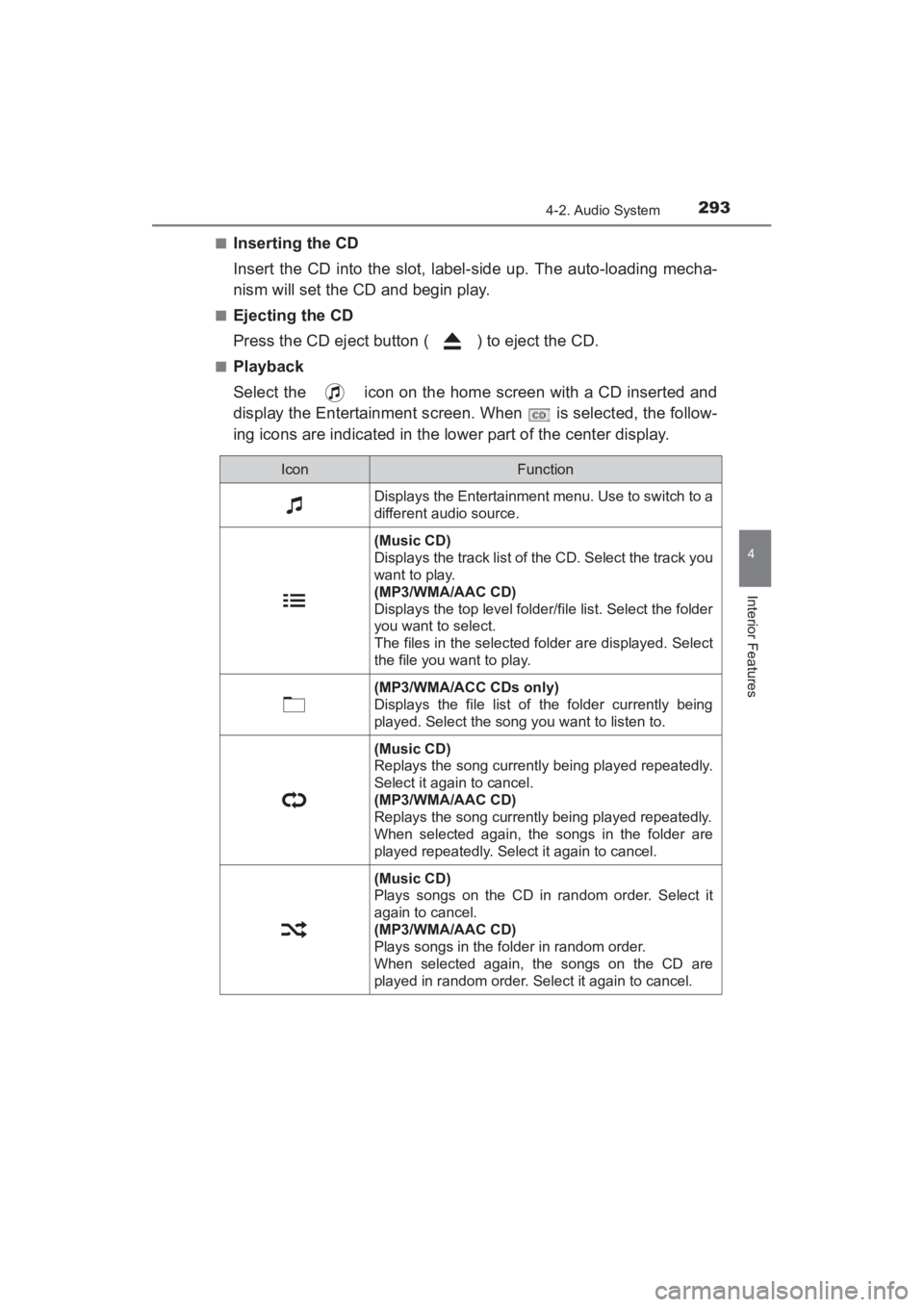
Select the icon on the home screen with a CD inserted and
display the Entertainment screen. When is selected, the follow-
ing icons are indicated in the lower part of the center display.
IconFunction
Displays the Entertainment menu. Use to switch to a
different audio source.
(Music CD)
Displays the track list of the CD. Select the track you
want to play.
(MP3/WMA/AAC CD)
Displays the top level folder/file list. Select the folder
you want to select.
The files in the selected folder are displayed. Select
the file you want to play.
(MP3/WMA/ACC CDs only)
Displays the file list of the folder currently being
played. Select the song you want to listen to.
(Music CD)
Replays the song currently being played repeatedly.
Select it again to cancel.
(MP3/WMA/AAC CD)
Replays the song currently being played repeatedly.
When selected again, the songs in the folder are
played repeatedly. Select it again to cancel.
(Music CD)
Plays songs on the CD in random order. Select it
again to cancel.
(MP3/WMA/AAC CD)
Plays songs in the folder in random order.
When selected again, the songs on the CD are
played in random order. Select it again to cancel.
YARIS_SEDAN_OM_OM99M18z_(U).book Page 293 Monday, June 1, 2015 9:22 PM
Page 296 of 592
294
YARIS_SEDAN_OM_OM99M18z_(U)
4-2. Audio System
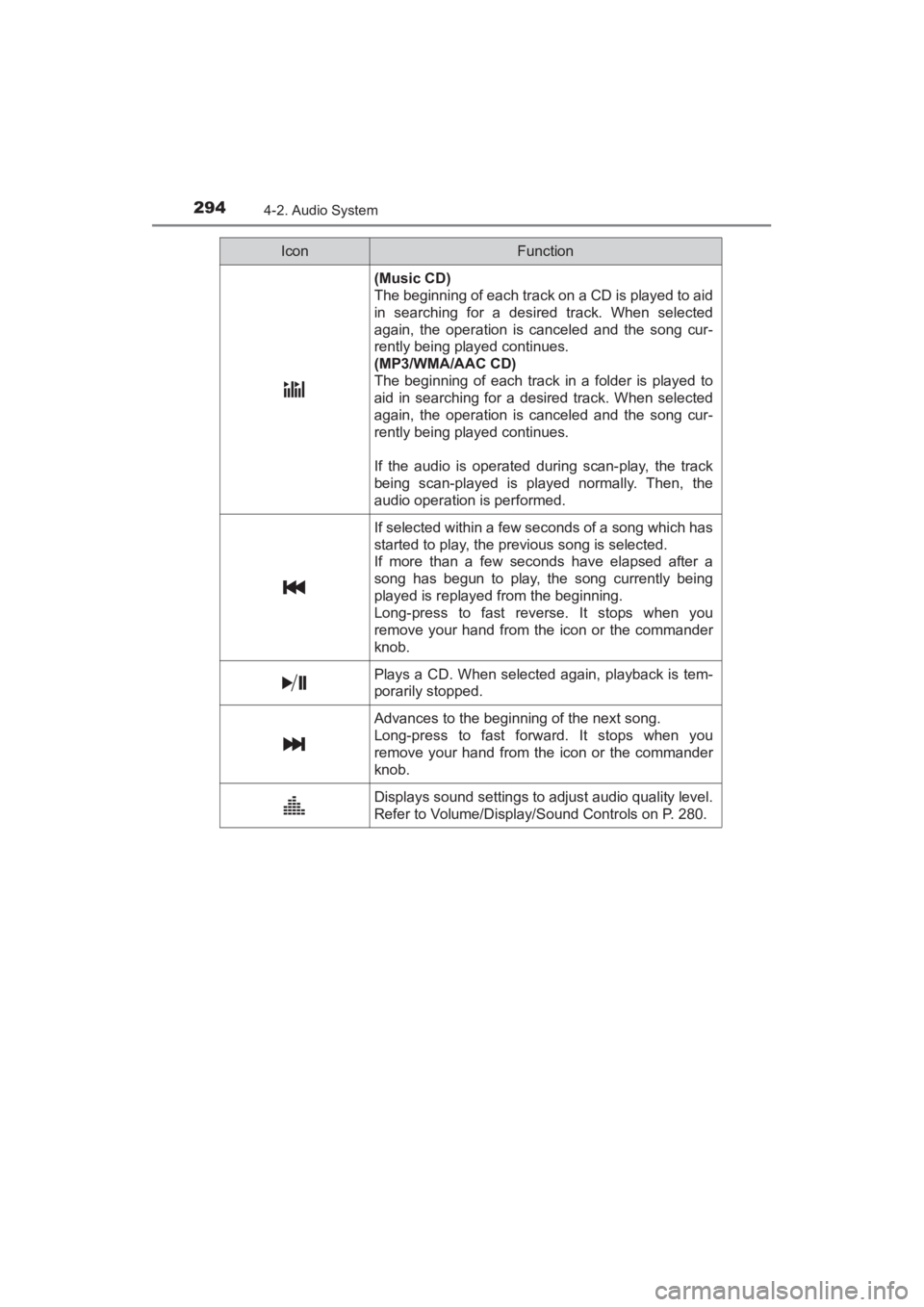
(Music CD)
The beginning of each track on a CD is played to aid
in searching for a desired track. When selected
again, the operation is canceled and the song cur-
rently being played continues.
(MP3/WMA/AAC CD)
The beginning of each track in a folder is played to
aid in searching for a desired track. When selected
again, the operation is canceled and the song cur-
rently being played continues.
If the audio is operated during scan-play, the track
being scan-played is played normally. Then, the
audio operation is performed.
If selected within a few seconds of a song which has
started to play, the previous song is selected.
If more than a few seconds have elapsed after a
song has begun to play, the song currently being
played is replayed from the beginning.
Long-press to fast reverse. It stops when you
remove your hand from the icon or the commander
knob.
Plays a CD. When selected again, playback is tem-
porarily stopped.
Advances to the beginning of the next song.
Long-press to fast forward. It stops when you
remove your hand from the icon or the commander
knob.
Displays sound settings to adjust audio quality level.
Refer to Volume/Display/Sound Controls on P. 280.
IconFunction
YARIS_SEDAN_OM_OM99M18z_(U).book Page 294 Monday, June 1, 2015 9:22 PM
Page 297 of 592
YARIS_SEDAN_OM_OM99M18z_(U)
2954-2. Audio System
4
Interior Features
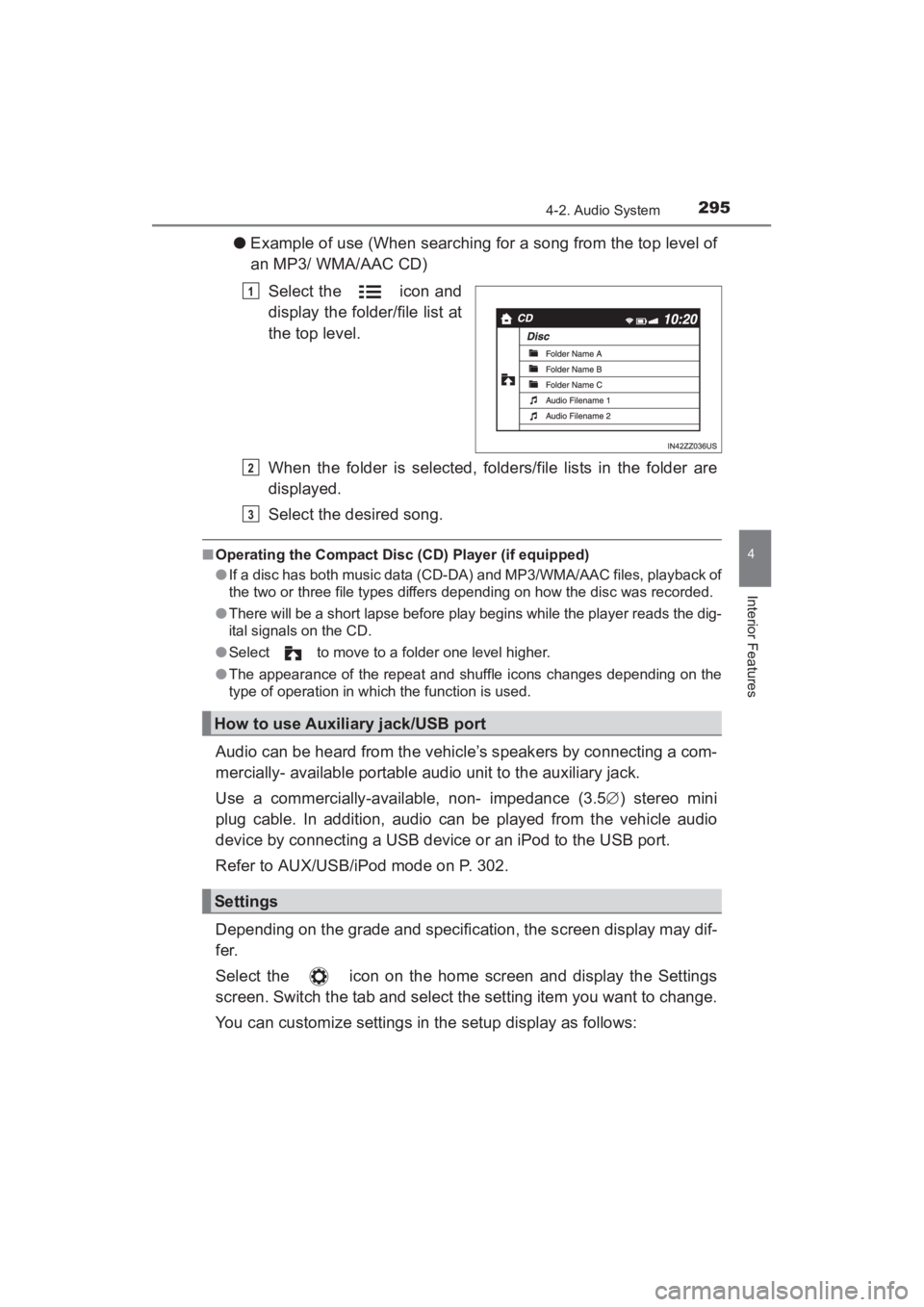
●Example of use (When searching for a song from the top level of
an MP3/ WMA/AAC CD)
Select the icon and
display the folder/file list at
the top level.
When the folder is selected, folders/file lists in the folder are
displayed.
Select the desired song.
■Operating the Compact Disc (CD) Player (if equipped)
●If a disc has both music data (CD-DA) and MP3/WMA/AAC files, playback of
the two or three file types differs depending on how the disc was recorded.
● There will be a short lapse before play begins while the player reads the dig-
ital signals on the CD.
● Select to move to a folder one level higher.
● The appearance of the repeat and shuffle icons changes depending on the
type of operation in which the function is used.
Audio can be heard from the vehicle’s speakers by connecting a com-
mercially- available portable audio unit to the auxiliary jack.
Use a commercially-available, non- impedance (3.5 ∅) stereo mini
plug cable. In addition, audio can be played from the vehicle audio
device by connecting a USB device or an iPod to the USB port.
Refer to AUX/USB/iPod mode on P. 302.
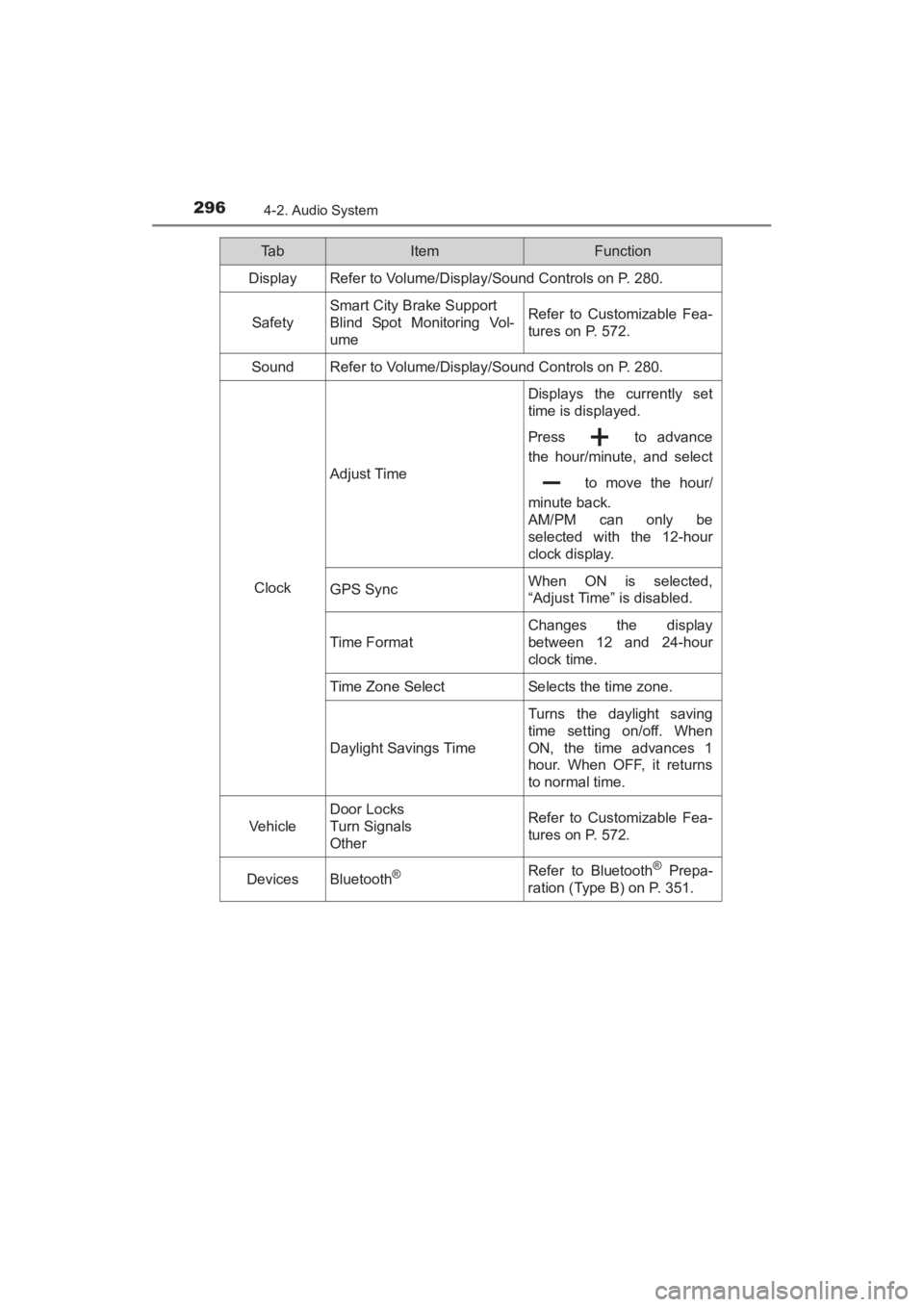
Depending on the grade and specification, the screen display may dif-
fer.
Select the icon on the home screen and display the Settings
screen. Switch the tab and select the setting item you want to change.
You can customize settings in the setup display as follows:
1
How to use Auxiliary jack/USB port
Settings
2
3
YARIS_SEDAN_OM_OM99M18z_(U).book Page 295 Monday, June 1, 2015 9:22 PM
Page 298 of 592
296
YARIS_SEDAN_OM_OM99M18z_(U)
4-2. Audio System
Ta bItemFunction
Display Refer to Volume/Display/Sound Controls on P. 280.
Safety
Smart City Brake Support
Blind Spot Monitoring Vol-
umeRefer to Customizable Fea-
tures on P. 572.
SoundRefer to Volume/Display/Sound Controls on P. 280.
Clock
Adjust Time
Displays the currently set
time is displayed.
Press to advance
the hour/minute, and select to move the hour/
minute back.
AM/PM can only be
selected with the 12-hour
clock display.
GPS SyncWhen ON is selected,
“Adjust Time” is disabled.
Time F ormat
Changes the display
between 12 and 24-hour
clock time.
Time Zone SelectSelects the time zone.
Daylight Savings Time
Turns the daylight saving
time setting on/off. When
ON, the time advances 1
hour. When OFF, it returns
to normal time.
Vehicle
Door Locks
Turn Signals
OtherRefer to Customizable Fea-
tures on P. 572.
DevicesBluetooth®Refer to Bluetooth® Prepa-
ration (Type B) on P. 351.
YARIS_SEDAN_OM_OM99M18z_(U).book Page 296 Monday, June 1, 2015 9:22 PM
Page 300 of 592
298
YARIS_SEDAN_OM_OM99M18z_(U)
4-2. Audio System
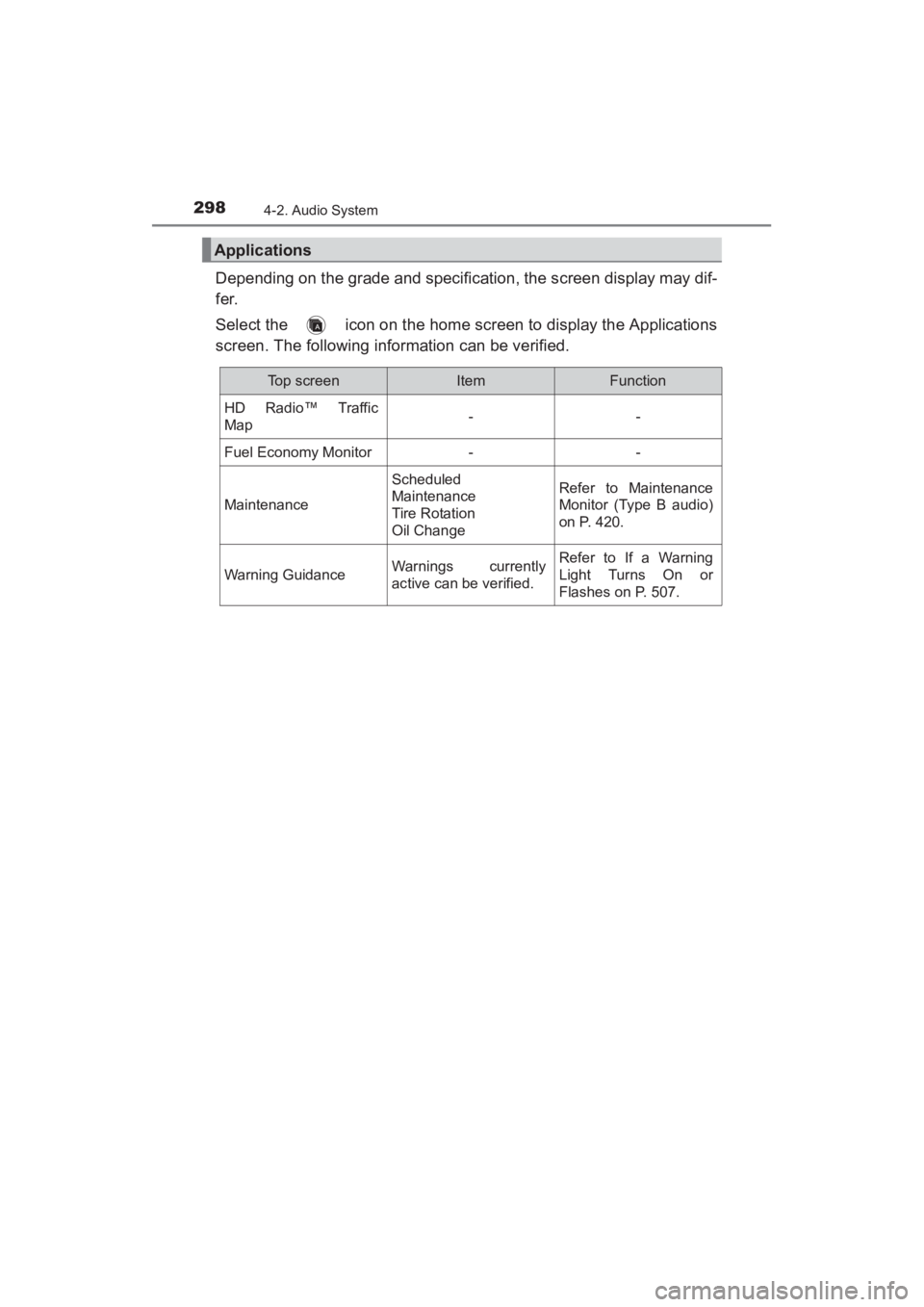
Depending on the grade and specification, the screen display may dif-
fer.
Select the icon on the home screen to display the Applications
screen. The following information can be verified.
Applications
Top screenItemFunction
HD Radio™ Traffic
Map--
Fuel Economy Monitor--
Maintenance
Scheduled
Maintenance
Tire Rotation
Oil ChangeRefer to Maintenance
Monitor (Type B audio)
on P. 420.
Warning GuidanceWarnings currently
active can be verified.Refer to If a Warning
Light Turns On or
Flashes on P. 507.
YARIS_SEDAN_OM_OM99M18z_(U).book Page 298 Monday, June 1, 2015 9:22 PM
Page 308 of 592
306
YARIS_SEDAN_OM_OM99M18z_(U)
4-2. Audio System
This unit does not support a USB 3.0 device. In addition, other
devices may not be supported depending on the model or OS version.
■PlaybackSwitch the ignition to ACC or ON.
Press the power/volume dial to turn the audio system on.
Press the media button ( ) to switch to the USB mode and
start playback.
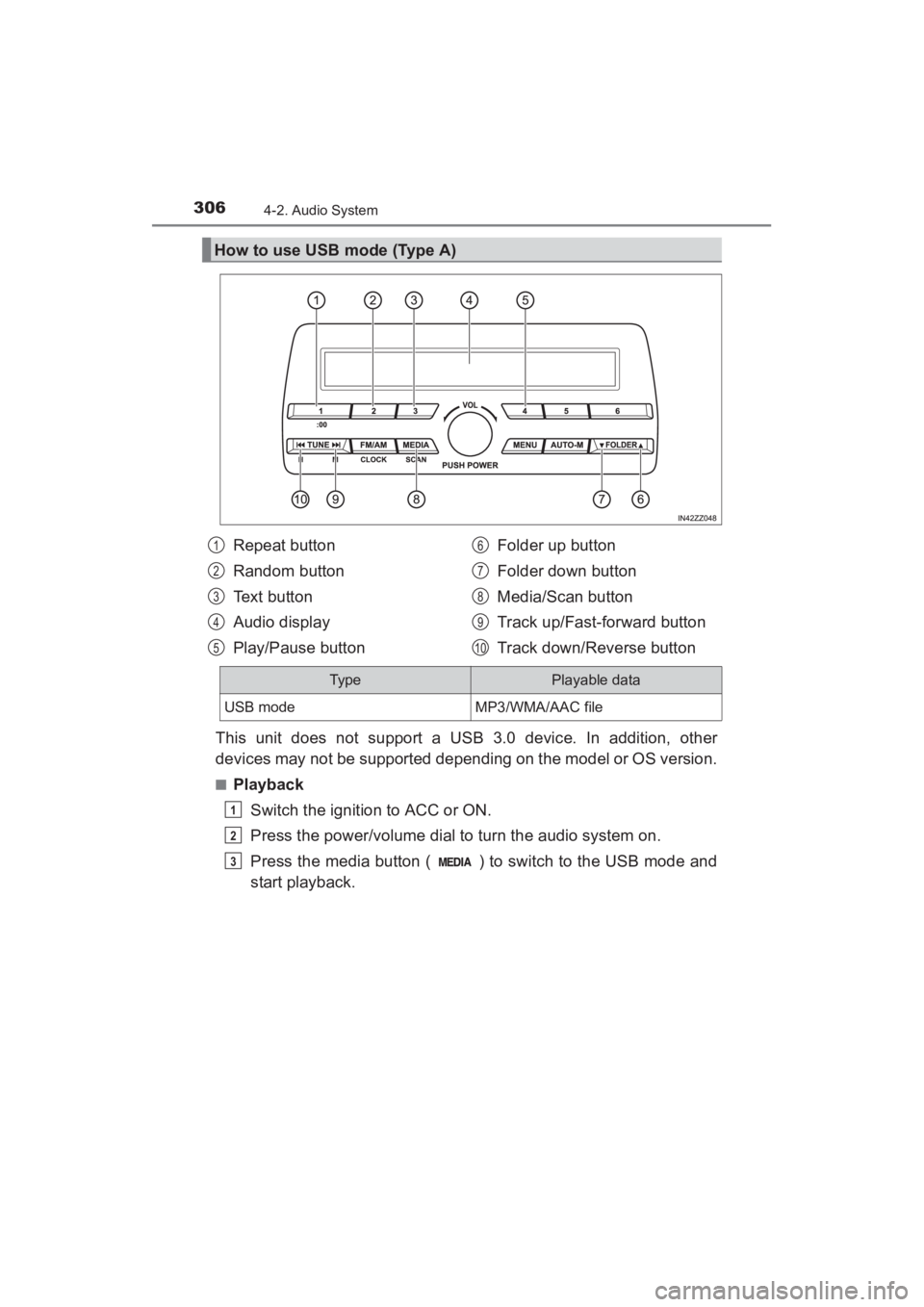
How to use USB mode (Type A)
Repeat button
Random button
Text button
Audio display
Play/Pause button Folder up button
Folder down button
Media/Scan button
Track up/Fast-forward button
Track down/Reverse button1
2
3
4
5
6
7
8
9
10
Typ ePlayable data
USB modeMP3/WMA/AAC file
1
2
3
YARIS_SEDAN_OM_OM99M18z_(U).book Page 306 Monday, June 1, 2015 9:22 PM
Page 310 of 592
308
YARIS_SEDAN_OM_OM99M18z_(U)
4-2. Audio System
■Repeat playback
●Track repeat
Press the repeat button (1) during playback to play the current
track repeatedly. “TRACK RPT” is displayed ( is dis-
played next to RPT at the bottom of the display area).
To cancel the repeat playback, press the button again after 3
seconds.
● Folder repeat
Press the repeat button (1) during playback, and then press
the button again within 3 seconds to play the tracks in the cur-
rent folder repeatedly. “FOLDER RPT” is displayed ( is
displayed next to RPT at the bottom of the display area).
Press the button again to cancel the repeat playback.
■Random playback
Tracks are randomly selected and played.
●Folder random
Press the random button (2) during playback to play the tracks
in the folder randomly. “FOLDER RDM” is displayed ( is
displayed next to RDM at the bottom of the display area).
To cancel the random playback, press the button again after 3
seconds.
● All random
Press the random button (2) during playback, and then press
the button again within 3 seconds to play the tracks in the USB
device randomly. “ALL RDM” is displayed ( is displayed
next to RDM at the bottom of the display area).
Press the button again to cancel the random playback.
1
2
1
2
1
2
1
2
YARIS_SEDAN_OM_OM99M18z_(U).book Page 308 Monday, June 1, 2015 9:22 PM
Page 311 of 592
YARIS_SEDAN_OM_OM99M18z_(U)
3094-2. Audio System
4
Interior Features
■Switching the display
The information displayed on the audio display changes as follows
each time the text button (3) is pressed during playback.
■Display scroll
Only 13 characters can be displayed at one time. To display the rest
of the characters of a long title, press and hold the text button (3).
The display scrolls the next 13 characters. Press and hold the text
button (3) again after the last 13 characters have been displayed to
return to the beginning of the title.
■Error Messages
When the message “CHECK USB” is displayed, it indicates that
there is some error in the USB device. Verify that the content
recorded in the USB device has MP3/WMA/AAC files and re-con-
nect correctly. If the message reappears, have the unit checked by
your Toyota dealer.
ButtonInformation displayed on audio display
File number/Elapsed time
Folder number/File number
File name
Folder name
Album name
Song name
Artist name
YARIS_SEDAN_OM_OM99M18z_(U).book Page 309 Monday, June 1, 2015 9:22 PM