transmission TOYOTA YARIS 2019 Owners Manual (in English)
[x] Cancel search | Manufacturer: TOYOTA, Model Year: 2019, Model line: YARIS, Model: TOYOTA YARIS 2019Pages: 600, PDF Size: 6.11 MB
Page 278 of 600

278
YARIS SEDAN_OM_OM99S50z_(U)
4-2. Audio System
●ALC (Automatic v olume adjustment)
The automatic level control (ALC) changes the audio volume auto -
matically according to the vehicle speed. The faster the vehicl e
speed, the higher the volume increases. ALC has ALC OFF and
ALC LEVEL 1 to 7 modes. At ALC LEVEL 7, the amount that the
volume can increase is at the maximum. Select the mode accordin g
to the driving conditions.
● BEEP (Audio operation sound)
The setting for the operation sound when pressing and holding a
button can be changed. The initial setting is ON. Set to OFF to
mute the operation sound.
● BT SETUP mode (if equipped)
Music and other audio such as voice data recorded on portable
audio devices and mobile phones available on the market which
are equipped with the Bluetooth
® transmission function can be lis-
tened to via wireless transmission over the vehicle’s speakers.
Using the BT SETUP mode, these devices can be programmed to
the Bluetooth
® unit or changed ( P. 3 4 1 ) .
● 12Hr< >24Hr (12 Hr/ 24 Hr time adjustment)
Rotating the audio control dial switches the display between 12 and
24-hour clock time ( P. 279).
If not operated for several seconds, the display returns to the previous dis-
play. To reset bass, treble, fade, and balance, press the menu button ( )
for 2 seconds. The unit will beep and “CLEAR” will be displayed .
Page 338 of 600

338
YARIS SEDAN_OM_OM99S50z_(U)
4-3. Bluetooth®
Bluetooth®
■Bluetooth® Hands-Free outline
When a Bluetooth
® device (mobile phone) is connected to the vehi-
cle’s Bluetooth® unit via radio wave transmission, a call can be
made or received by pressing the talk button, pickup button, or
hang-up button on the audio remote control switch, or by operat ing
the center display. For example, even if a device (mobile phone) is
in your coat pocket, a call c an be made without taking the devi ce
(mobile phone) out and operating it directly.
■Bluetooth® audio outline
When a portable audio unit equipped with the Bluetooth
® communi-
cation function is paired to the vehicle, you can listen to mus ic
stored on the paired portable audio device from the vehicle’s s peak-
ers. It is not necessary to c onnect the portable audio device t o the
vehicle’s external input terminal. After programming, operate t he
vehicle audio control panel to play/stop the audio.
■Applicable Bluetooth® specification (Recommended)
Type A: Ver. 2.0
Type B: Ver. 1.1/1.2/2.0 + EDR/2.1 + EDR/3.0 (conformity)
● For your safety, a device can be paired only when the vehicle i s parked. If
the vehicle starts to move, the pairing procedure will end. Par k the vehicle in
a safe place before pairing.
● The communication range of a Bluetooth
® equipped device is about 32 ft.
(10 m) or less.
● Basic audio operation is available using voice commands even if Bluetooth
®
is not connected.
● For safety reasons, operation of the center display is disabled while the
vehicle is being driven. However, items not displayed in gray can be oper-
ated using the commander switch while the vehicle is being driv en.
Page 383 of 600
![TOYOTA YARIS 2019 Owners Manual (in English) YARIS SEDAN_OM_OM99S50z_(U)
3834-3. Bluetooth®
4
Interior Features
■Making calls using the phonebookPress the talk button with a short press.
Say: [Beep] “Call”
Prompt: “Name please.”
Say:](/img/14/43146/w960_43146-382.png "TOYOTA YARIS 2019 Owners Manual (in English) YARIS SEDAN_OM_OM99S50z_(U)
3834-3. Bluetooth®
4
Interior Features
■Making calls using the phonebookPress the talk button with a short press.
Say: [Beep] “Call”
Prompt: “Name please.”
Say:")
YARIS SEDAN_OM_OM99S50z_(U)
3834-3. Bluetooth®
4
Interior Features
■Making calls using the phonebookPress the talk button with a short press.
Say: [Beep] “Call”
Prompt: “Name please.”
Say: [Beep] “XXXXX... (Ex. “John’s phone”)” (Say a voice tag
registered in the phonebook.)
Prompt: “Calling XXXXX... (Ex . “John’s phone”) XXXX (Ex. “at
home”). Is this correct?” (Voice tag and phone number location
registered in phonebook).
Say: [Beep] “Yes”
Prompt: “Dialing”
■Redialing function
Press the talk button with a short press.
Say: [Beep] “Redial”
Prompt: “Dialing”
■Ending the current call
Press the hang-up button during the call.
This function is used when transmitting DTMF via the user’s voi ce.
The receiver of a DTMF transmission is generally a home telepho ne
answering machine or a company’s automated guidance call center
(When you send tone signals back according to the voice guidance
recording).
Press the talk button with a short press.
Say: [Beep] “X XXX... send” (Sa y DTMF code)
Prompt: “Sending XXXX... (DTMF code)”
DTMF (Dual Tone Multi-Fre quency Signal) Transmission
1
2
3
4
5
6
7
1
2
3
1
2
3
Page 391 of 600
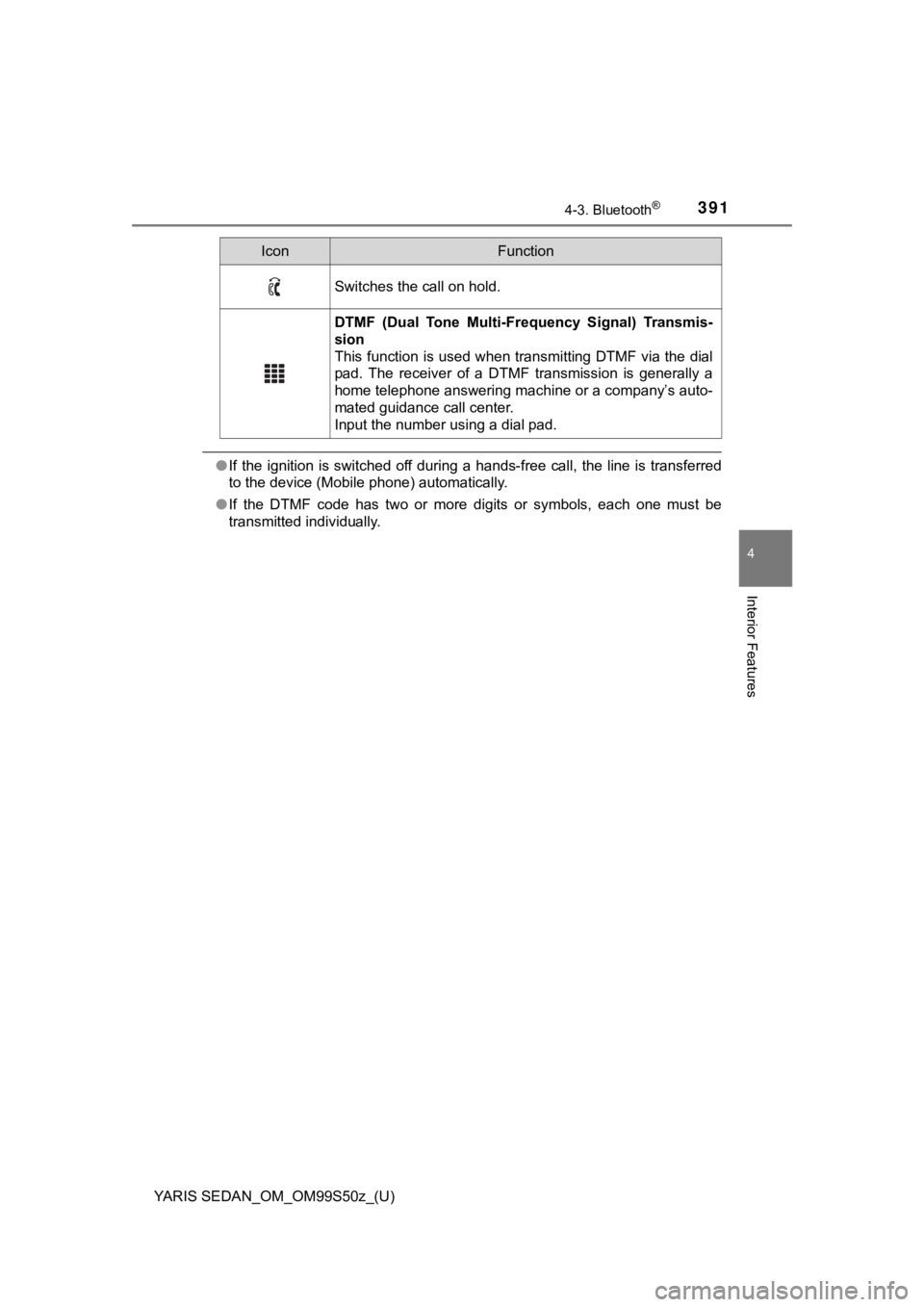
YARIS SEDAN_OM_OM99S50z_(U)
3914-3. Bluetooth®
4
Interior Features
●If the ignition is switched off during a hands-free call, the l ine is transferred
to the device (Mobile phone) automatically.
● If the DTMF code has two or more digits or symbols, each one must be
transmitted individually.
Switches the call on hold.
DTMF (Dual Tone Multi-Frequency Signal) Transmis-
sion
This function is used when transmitting DTMF via the dial
pad. The receiver of a DTMF transmission is generally a
home telephone answering machine or a company’s auto-
mated guidance call center.
Input the number using a dial pad.
IconFunction
Page 570 of 600

570
YARIS SEDAN_OM_OM99S50z_(U)
7-7. Tire Information (U.S.A.)
GCWR (Gross Combination Weight Rating) is the maximum allowable
weight of the vehicle - including all cargo and passengers - that the
vehicle can handle without risk ing damage. The GCW must never
exceed the GCWR.
WARNING
■Do not tow a trailer with this vehicle
Towing a trailer with this vehicle is dangerous because it has not been
designed to tow a trailer and do ing so will affect the drive system which
could result in vehicle damage.
■Overloaded Vehicle
Overloading a vehicle is dangerous. The results of overloading can
have serious consequences in terms of passenger safety. Too muc h
weight on a vehicle’s suspensi on system can cause spring or sho ck
absorber failure, brake failure, handling or steering problems, irregular
tire wear, tire failu re or other damage.
Overloading makes a vehicle harder to drive and control. It als o
increases the distance required for stopping. In cases of serio us over-
loading, brakes can fail completely, particularly on steep grad es. The
load a tire will carry safely is a combination of the size of t he tire, its load
range, and corresponding inflation pressure.
Never overload the vehicle and always observe the vehicle’s wei ght rat-
ings from the vehicle’s Safety C ertification and Tire and Load Informa-
tion labels.
■Never Exceed Axle Weight Rating Limits
Exceeding the Safety Certification Label axle weight rating lim its is dan-
gerous and could result in death or serious injury as a result of substan-
dard vehicle handling, performance, engine, transmission and/or
structural damage, serious damage to the vehicle, or loss of control.
Always keep the vehicle within the axle weight rating limits.
■Never Exceed GVWR or GAWR Specifications
Exceeding the GVWR or the GAWR specified on the certification l abel is
dangerous. Exceeding any vehicle rating limitation could result in a seri-
ous accident, injury, or damage to the vehicle.
Do not use replacement tires with lower load carrying capacities than
the originals because they may lower the vehicle’s GVWR and GAW R
limitations. Replacement tires with a higher limit than the ori ginals do
not increase the GVWR and GAWR limitations. Never exceed the
GVWR or the GAWR specified on the certification label.