mirror TOYOTA YARIS 2021 Owner's Manual
[x] Cancel search | Manufacturer: TOYOTA, Model Year: 2021, Model line: YARIS, Model: TOYOTA YARIS 2021Pages: 568, PDF Size: 110.34 MB
Page 190 of 568
190
YARIS(HB) Owner's Manual_Europe_MK0001_en
4-5. Using the driving support systems
WARNING
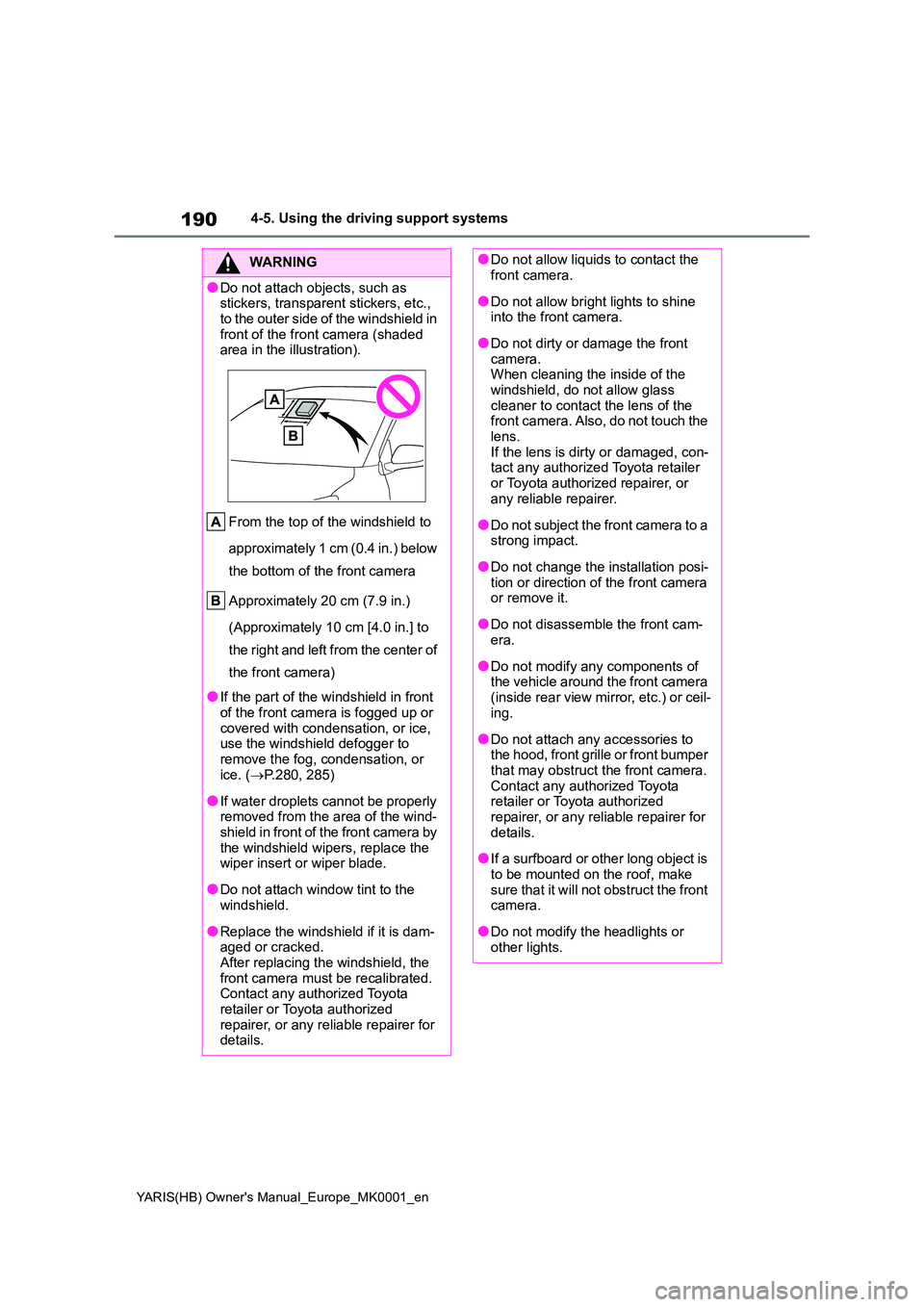
●Do not attach objects, such as stickers, transparent stickers, etc.,
to the outer side of the windshield in front of the front camera (shaded area in the illustration).
From the top of the windshield to
approximately 1 cm (0.4 in.) below
the bottom of the front camera
Approximately 20 cm (7.9 in.)
(Approximately 10 cm [4.0 in.] to
the right and left from the center of
the front camera)
●If the part of the windshield in front
of the front camera is fogged up or covered with condensation, or ice, use the windshield defogger to
remove the fog, condensation, or ice. ( →P.280, 285)
●If water droplets cannot be properly removed from the area of the wind-shield in front of the front camera by
the windshield wipers, replace the wiper insert or wiper blade.
●Do not attach window tint to the windshield.
●Replace the windshield if it is dam-aged or cracked.After replacing the windshield, the
front camera must be recalibrated. Contact any authorized Toyota retailer or Toyota authorized
repairer, or any reliable repairer for details.
●Do not allow liquids to contact the front camera.
●Do not allow bright lights to shine into the front camera.
●Do not dirty or damage the front camera.When cleaning the inside of the
windshield, do not allow glass cleaner to contact the lens of the front camera. Also, do not touch the
lens. If the lens is dirty or damaged, con-tact any authorized Toyota retailer
or Toyota authorized repairer, or any reliable repairer.
●Do not subject the front camera to a strong impact.
●Do not change the installation posi-tion or direction of the front camera or remove it.
●Do not disassemble the front cam-era.
●Do not modify any components of the vehicle around the front camera
(inside rear view mirror, etc.) or ceil- ing.
●Do not attach any accessories to the hood, front grille or front bumper that may obstruct the front camera.
Contact any authorized Toyota retailer or Toyota authorized repairer, or any reliable repairer for
details.
●If a surfboard or other long object is
to be mounted on the roof, make sure that it will not obstruct the front camera.
●Do not modify the headlights or other lights.
Page 237 of 568
237
4
YARIS(HB) Owner's Manual_Europe_MK0001_en
4-5. Using the driving support systems
Driving
*: If equipped
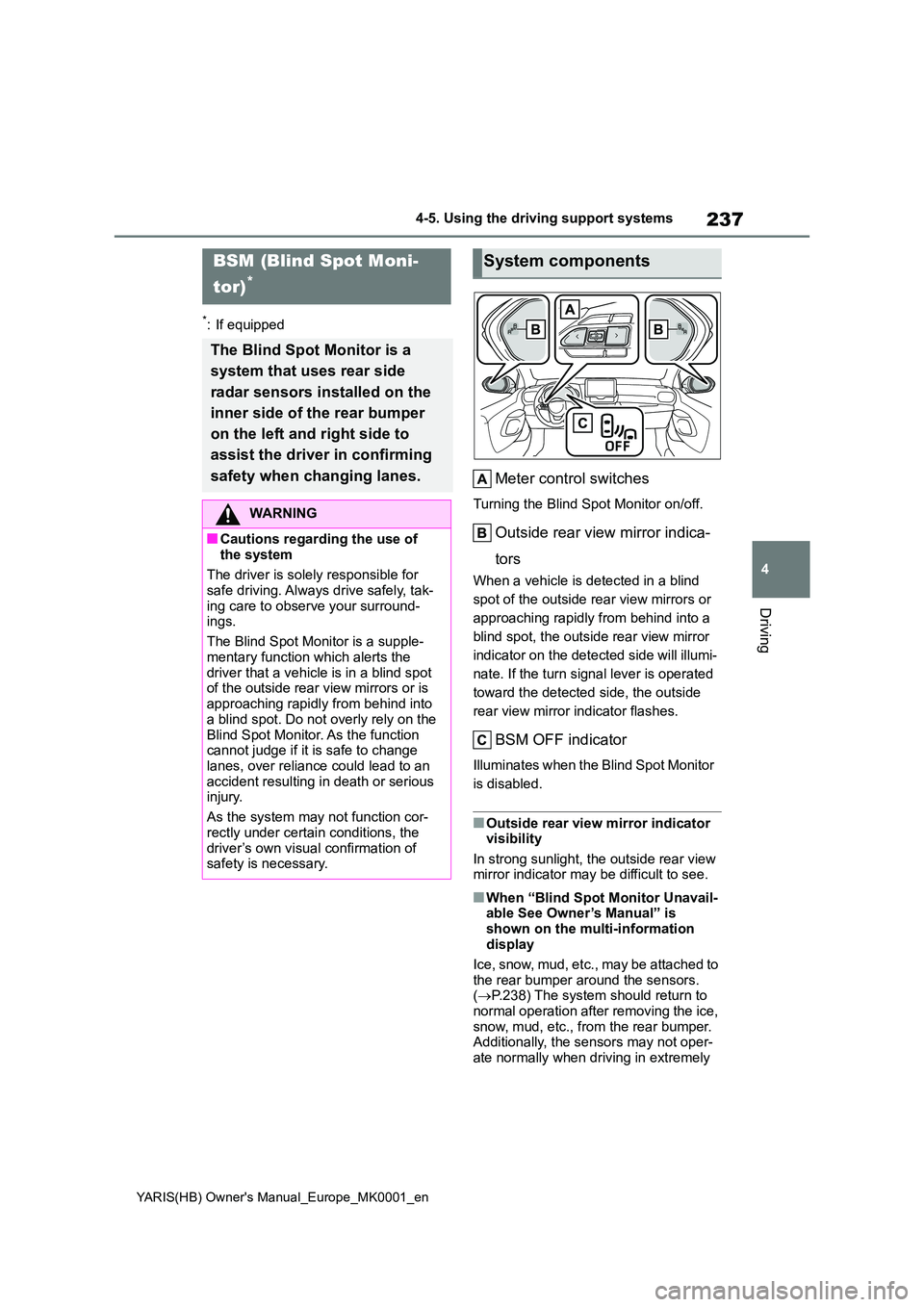
Meter control switches
Turning the Blind Spot Monitor on/off.
Outside rear view mirror indica-
tors
When a vehicle is detected in a blind
spot of the outside rear view mirrors or
approaching rapidly from behind into a
blind spot, the outside rear view mirror
indicator on the detected side will illumi-
nate. If the turn signal lever is operated
toward the detected side, the outside
rear view mirror indicator flashes.
BSM OFF indicator
Illuminates when the Blind Spot Monitor
is disabled.
■Outside rear view mirror indicator visibility
In strong sunlight, the outside rear view mirror indicator may be difficult to see.
■When “Blind Spot Monitor Unavail-able See Owner’s Manual” is
shown on the multi-information display
Ice, snow, mud, etc., may be attached to
the rear bumper around the sensors. ( →P.238) The system should return to normal operation after removing the ice,
snow, mud, etc., from the rear bumper. Additionally, the sensors may not oper-ate normally when driving in extremely
BSM (Blind Spot Moni-
tor)*
The Blind Spot Monitor is a
system that uses rear side
radar sensors installed on the
inner side of the rear bumper
on the left and right side to
assist the driver in confirming
safety when changing lanes.
WARNING
■Cautions regarding the use of
the system
The driver is solely responsible for safe driving. Always drive safely, tak-
ing care to observe your surround- ings.
The Blind Spot Monitor is a supple-
mentary function which alerts the driver that a vehicle is in a blind spot of the outside rear view mirrors or is
approaching rapidly from behind into a blind spot. Do not overly rely on the
Blind Spot Monitor. As the function cannot judge if it is safe to change lanes, over reliance could lead to an
accident resulting in death or serious injury.
As the system may not function cor-
rectly under certain conditions, the driver’s own visual confirmation of safety is necessary.
System components
Page 239 of 568
239
4
YARIS(HB) Owner's Manual_Europe_MK0001_en
4-5. Using the driving support systems
Driving
Use the meter control switches to
turn on/off the function.
1 Press / (vertical display)
or / (horizontal display)
of the meter control switch to
select .
2 Press / (vertical display)
or / (horizontal display)
of the meter control switch to
select and then press .
■Vehicles that can be detected by the Blind Spot Monitor
The Blind Spot Monitor uses rear side radar sensors to detect the following
vehicles traveling in adjacent lanes and advises the driver of the presence
of such vehicles via the indicators on the outside rear view mirrors.
WARNING
●Do not subject a sensor or its sur- rounding area on the rear bumper
to a strong impact. If a sensor is moved even slightly off position, the system may mal-
function and vehicles may not be detected correctly.In the following situations, have
your vehicle inspected by any authorized Toyota retailer or Toyota authorized repairer, or any reliable
repairer.
• A sensor or its surrounding area is subject to a strong impact.
• If the surrounding area of a sensor is scratched or dented, or part of them has become disconnected.
●Do not disassemble the sensor.
●Do not modify the sensor or sur-rounding area on the rear bumper.
●If a sensor or the rear bumper needs to be removed/installed or replaced, contact any authorized
Toyota retailer or Toyota authorized repairer, or any reliable repairer.
●Do not paint the rear bumper any color other than an official Toyota color.
Turning the Blind Spot Moni-
tor on/off
Blind Spot Monitor operation
Page 240 of 568
240
YARIS(HB) Owner's Manual_Europe_MK0001_en
4-5. Using the driving support systems
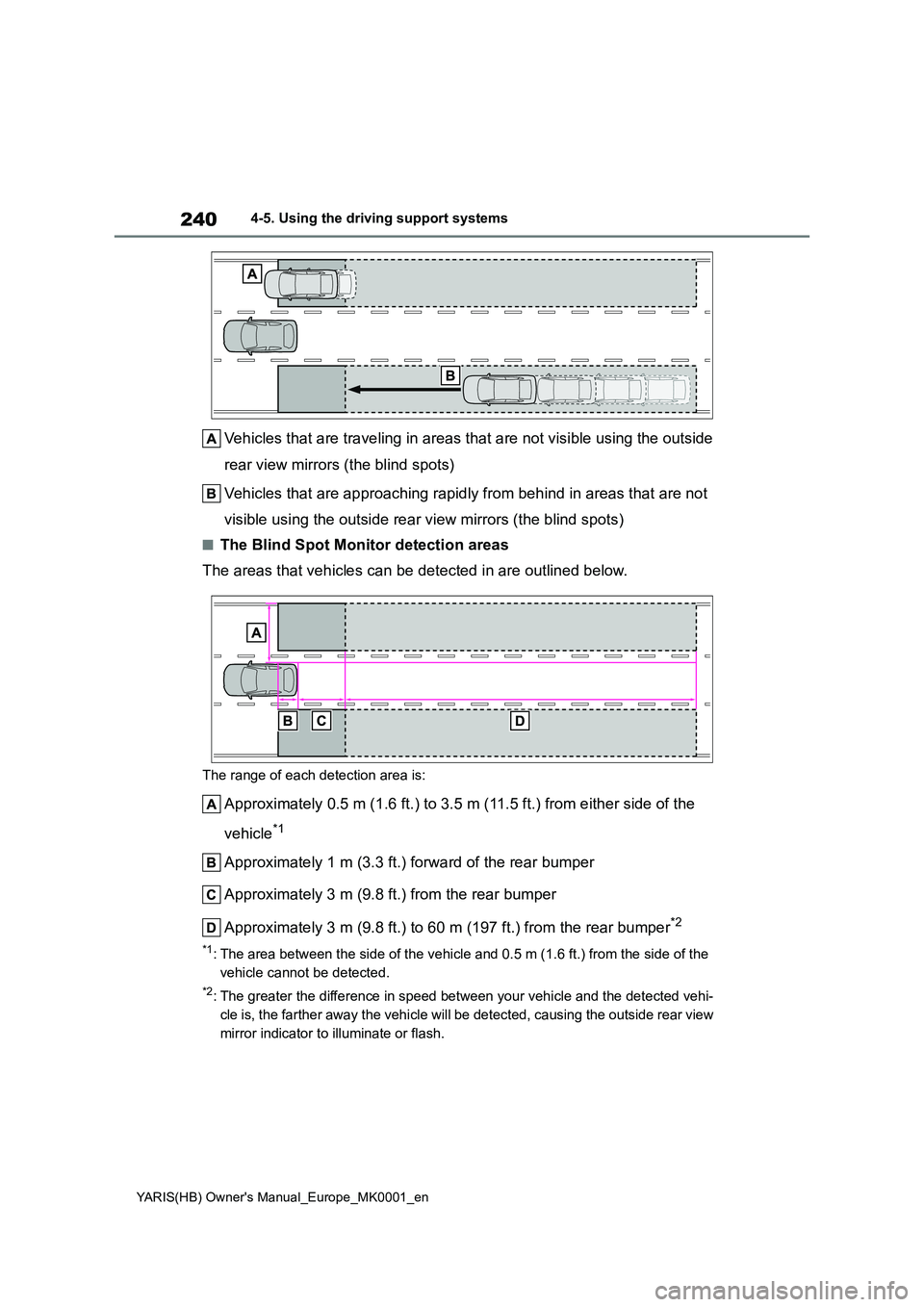
Vehicles that are traveling in areas that are not visible using the outside
rear view mirrors (the blind spots)
Vehicles that are approaching rapidly from behind in areas that are not
visible using the outside rear view mirrors (the blind spots)
■The Blind Spot Monitor detection areas
The areas that vehicles can be detected in are outlined below.
The range of each detection area is:
Approximately 0.5 m (1.6 ft.) to 3.5 m (11.5 ft.) from either side of the
vehicle*1
Approximately 1 m (3.3 ft.) forward of the rear bumper
Approximately 3 m (9.8 ft.) from the rear bumper
Approximately 3 m (9.8 ft.) to 60 m (197 ft.) from the rear bumper*2
*1: The area between the side of the vehicle and 0.5 m (1.6 ft.) from the side of the
vehicle cannot be detected.
*2: The greater the difference in speed between your vehicle and the detected vehi-
cle is, the farther away the vehicle will be detected, causing the outside rear view
mirror indicator to illuminate or flash.
Page 248 of 568
248
YARIS(HB) Owner's Manual_Europe_MK0001_en
4-5. Using the driving support systems
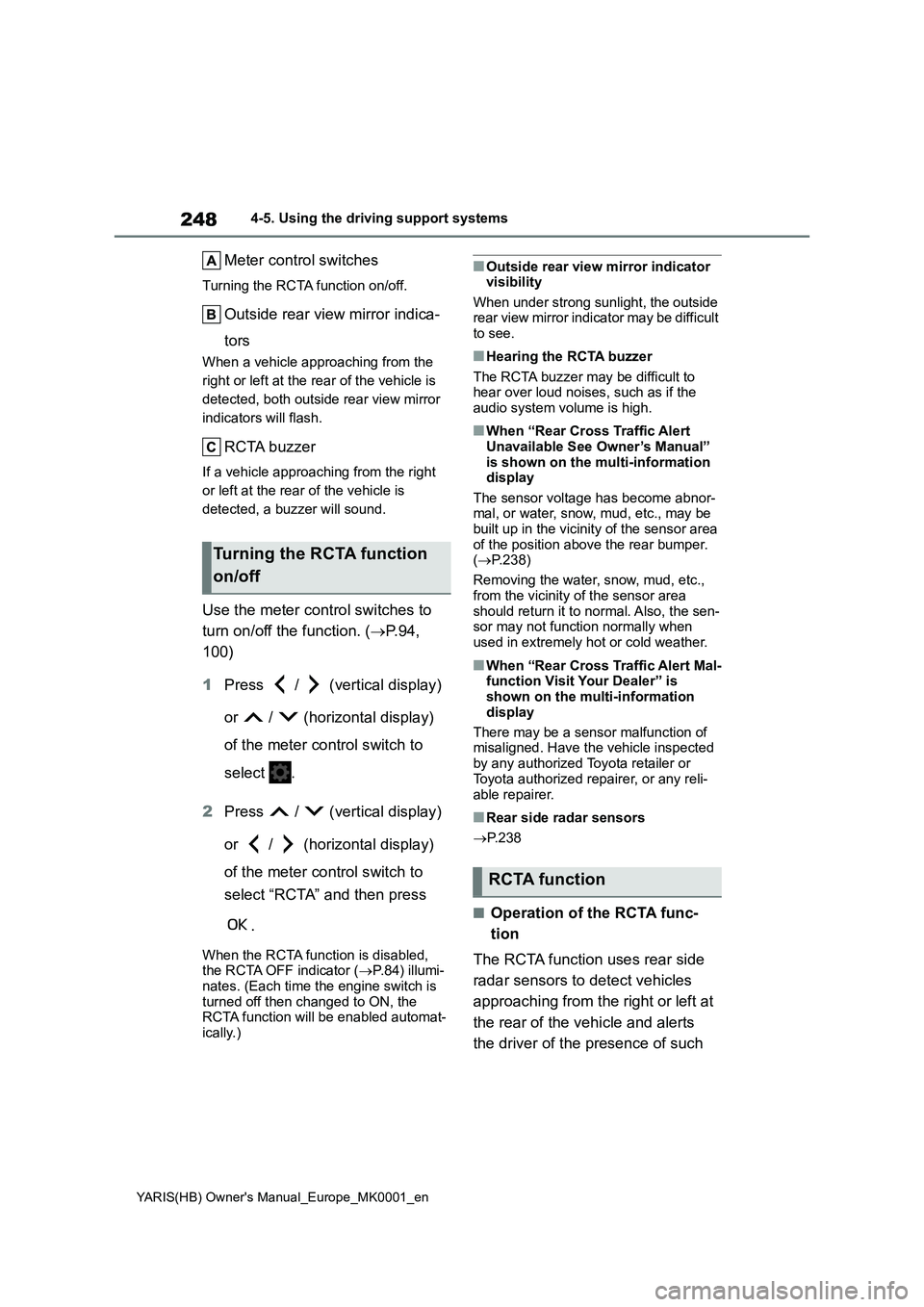
Meter control switches
Turning the RCTA function on/off.
Outside rear view mirror indica-
tors
When a vehicle approaching from the
right or left at the rear of the vehicle is
detected, both outside rear view mirror
indicators will flash.
RCTA buzzer
If a vehicle approaching from the right
or left at the rear of the vehicle is
detected, a buzzer will sound.
Use the meter control switches to
turn on/off the function. (→P.94,
100)
1Press / (vertical display)
or / (horizontal display)
of the meter control switch to
select .
2Press / (vertical display)
or / (horizontal display)
of the meter control switch to
select “RCTA” and then press
.
When the RCTA function is disabled,
the RCTA OFF indicator (→P.84) illumi-
nates. (Each time the engine switch is
turned off then changed to ON, the
RCTA function will be enabled automat-
ically.)
■Outside rear view mirror indicator
visibility
When under strong sunlight, the outside
rear view mirror indicator may be difficult
to see.
■Hearing the RCTA buzzer
The RCTA buzzer may be difficult to
hear over loud noises, such as if the
audio system volume is high.
■When “Rear Cross Traffic Alert
Unavailable See Owner’s Manual”
is shown on the multi-information
display
The sensor voltage has become abnor-
mal, or water, snow, mud, etc., may be
built up in the vicinity of the sensor area
of the position above the rear bumper.
(→P.238)
Removing the water, snow, mud, etc.,
from the vicinity of the sensor area
should return it to normal. Also, the sen-
sor may not function normally when
used in extremely hot or cold weather.
■When “Rear Cross Traffic Alert Mal-
function Visit Your Dealer” is
shown on the multi-information
display
There may be a sensor malfunction of
misaligned. Have the vehicle inspected
by any authorized Toyota retailer or
Toyota authorized repairer, or any reli-
able repairer.
■Rear side radar sensors
→P. 2 3 8
■Operation of the RCTA func-
tion
The RCTA function uses rear side
radar sensors to detect vehicles
approaching from the right or left at
the rear of the vehicle and alerts
the driver of the presence of such
Turning the RCTA function
on/off
RCTA function
Page 249 of 568
249
4
YARIS(HB) Owner's Manual_Europe_MK0001_en
4-5. Using the driving support systems
Driving
vehicles by flashing the outside
rear view mirror indicators and
sounding a buzzer.
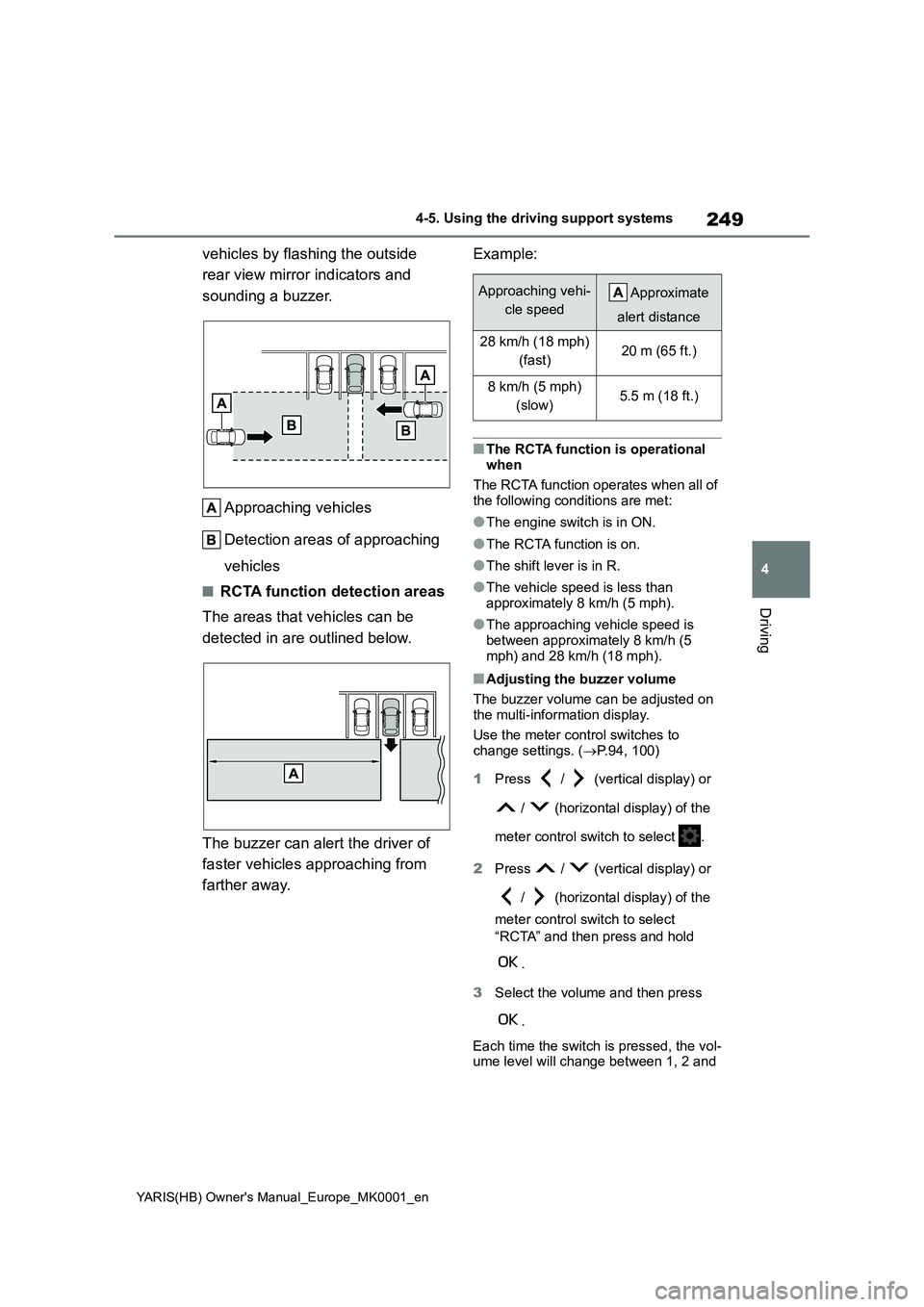
Approaching vehicles
Detection areas of approaching
vehicles
■RCTA function detection areas
The areas that vehicles can be
detected in are outlined below.
The buzzer can alert the driver of
faster vehicles approaching from
farther away.
Example:
■The RCTA function is operational
when
The RCTA function operates when all of the following conditions are met:
●The engine switch is in ON.
●The RCTA function is on.
●The shift lever is in R.
●The vehicle speed is less than approximately 8 km/h (5 mph).
●The approaching vehicle speed is between approximately 8 km/h (5
mph) and 28 km/h (18 mph).
■Adjusting the buzzer volume
The buzzer volume can be adjusted on the multi-information display.
Use the meter control switches to change settings. ( →P.94, 100)
1 Press / (vertical display) or
/ (horizontal display) of the
meter control switch to select .
2 Press / (vertical display) or
/ (horizontal display) of the
meter control switch to select
“RCTA” and then press and hold
.
3 Select the volume and then press
.
Each time the switch is pressed, the vol- ume level will change between 1, 2 and
Approaching vehi-
cle speed
Approximate
alert distance
28 km/h (18 mph)
(fast)20 m (65 ft.)
8 km/h (5 mph)
(slow)5.5 m (18 ft.)
Page 278 of 568
278
YARIS(HB) Owner's Manual_Europe_MK0001_en
5-1. Using the air conditioning system and defogger
5-1.Using the a ir c onditioning sys te m and de fog ger
*: If equipped
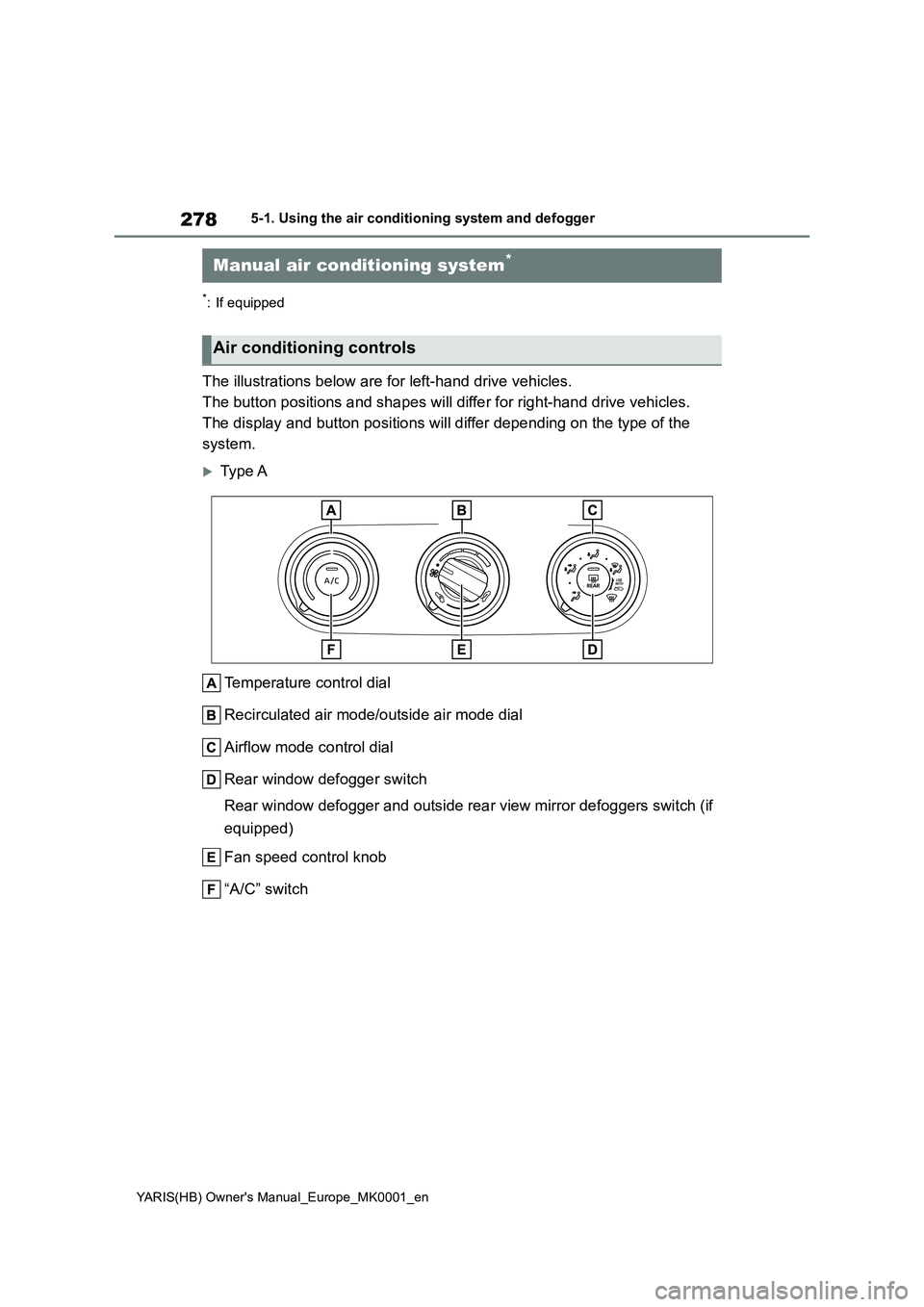
The illustrations below are for left-hand drive vehicles.
The button positions and shapes will differ for right-hand drive vehicles.
The display and button positions will differ depending on the type of the
system.
Type A
Temperature control dial
Recirculated air mode/outside air mode dial
Airflow mode control dial
Rear window defogger switch
Rear window defogger and outside rear view mirror defoggers switch (if
equipped)
Fan speed control knob
“A/C” switch
Manual air conditioning system*
Air conditioning controls
Page 279 of 568
279
5
YARIS(HB) Owner's Manual_Europe_MK0001_en
5-1. Using the air conditioning system and defogger
Interior features
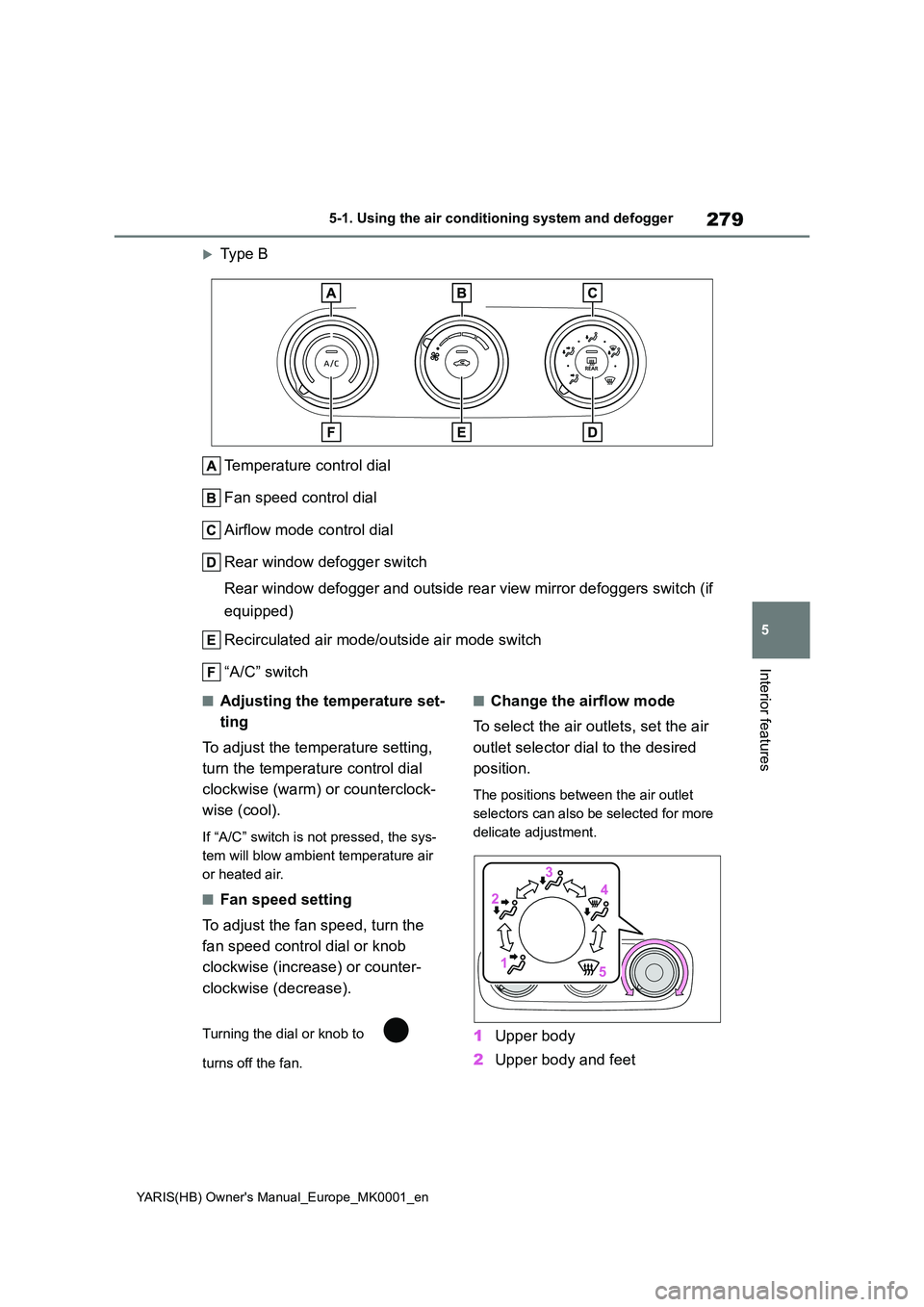
Type B
Temperature control dial
Fan speed control dial
Airflow mode control dial
Rear window defogger switch
Rear window defogger and outside rear view mirror defoggers switch (if
equipped)
Recirculated air mode/outside air mode switch
“A/C” switch
■Adjusting the temperature set-
ting
To adjust the temperature setting,
turn the temperature control dial
clockwise (warm) or counterclock-
wise (cool).
If “A/C” switch is not pressed, the sys-
tem will blow ambient temperature air
or heated air.
■Fan speed setting
To adjust the fan speed, turn the
fan speed control dial or knob
clockwise (increase) or counter-
clockwise (decrease).
Turning the dial or knob to
turns off the fan.
■Change the airflow mode
To select the air outlets, set the air
outlet selector dial to the desired
position.
The positions between the air outlet
selectors can also be selected for more
delicate adjustment.
1 Upper body
2 Upper body and feet
Page 280 of 568
280
YARIS(HB) Owner's Manual_Europe_MK0001_en
5-1. Using the air conditioning system and defogger
3Feet
4 Feet and the windshield defog-
ger operates
5 The windshield defogger oper-
ates
■Switching between outside air
and recirculated air modes
Type A
z To change to recirculated air
mode, turn the outside/recircu-
lated air mode dial to .
z To change to outside air mode,
turn the outside/recirculated air
mode dial to .
Type B
Press the outside/recirculated air
mode switch.
The mode switches between outside air
mode and recirculated air mode modes
each time the switch is operated.
When recirculated air mode is selected,
the indicator illuminates on the out-
side/recirculated air mode switch.
■Set cooling and dehumidifica-
tion function
Press the “A/C” switch.
When the function is on, the indicator
illuminates on the “A/C” switch.
■Defogging the windshield
Defoggers are used to defog the
windshield and front side windows.
Set the outside/recirculated air mode
dial to .
Perform the following operations
accordingly:
z To adjust the fan speed, turn the
fan speed control dial.
z To adjust the temperature set-
ting, turn the temperature control
dial.
z If the dehumidification function is
not operating, press “A/C” switch
to operate the dehumidification
function.
To defog the windshield and the side
windows early, turn the air flow and
temperature up.
■Defogging the rear window
and outside rear view mirrors
(if equipped)
Vehicles without outside rear
view mirror defoggers
A defogger is used to defog the
rear window.
Press the rear window defogger
switch.
The defogger will automatically turn off
after a while.
When the rear window defogger switch
is on, the indicator illuminates on the
rear window defogger switch.
Vehicles with outside rear view
mirror defoggers
Defoggers are used to defog the
rear window, and to remove rain-
drops, dew and frost from the out-
side rear view mirrors.
Page 281 of 568
281
5
YARIS(HB) Owner's Manual_Europe_MK0001_en
5-1. Using the air conditioning system and defogger
Interior features
Press the rear window and outside
rear view mirror defoggers switch.
The defoggers will automatically turn off
after a while.
When the rear window and outside rear
view mirror defoggers switch is on, the
indicator illuminates on the rear window
and outside rear view mirror defoggers
switch.
■Fogging up of the windows
●The windows will easily fog up when the humidity in the vehicle is high.
Turning “A/C” switch is on will dehu- midify the air from the outlets and defog the windshield effectively.
●If you turn “A/C” switch is off, the win-dows may fog up more easily.
●The windows may fog up if the recir-culated air mode is used.
■When driving on dusty roads
Close all windows. If dust thrown up by the vehicle is still drawn into the vehicle after closing the windows, it is recom-
mended that the air intake mode be set to outside air mode and the fan speed to any setting except off.
■Outside/recirculated air mode
●Setting to the recirculated air mode
temporarily is recommended in pre- venting dirty air from entering the vehicle interior and helping to cool the
vehicle when the outside air tempera- ture is high.
●During cooling operation, setting the recirculated air mode will also cool the vehicle interior effectively.
■When the outside temperature falls
to nearly 0°C (32°F)
The dehumidification function may not operate even when “A/C” switch is
pressed.
■Ventilation and air conditioning
odors
●To let fresh air in, set the air condition-
ing system to the outside air mode.
●During use, various odors from inside
and outside the vehicle may enter into and accumulate in the air conditioning system. This may then cause odor to
be emitted from the vents.
●It is recommended that the air condi-
tioning system be set to outside air mode prior to turning the vehicle off.
■Air conditioning filter
→ P. 3 4 3
■Location of air outlets
The air outlets and air volume
WARNING
■To prevent the windshield from fogging up
Do not use the windshield defogger
switch during cool air operation in extremely humid weather. The differ-ence between the temperature of the
outside air and that of the windshield can cause the outer surface of the windshield to fog up, blocking your
vision.
■When the outside rear view mir-
ror defoggers are operating (if equipped)
Do not touch the outside rear view
mirror surfaces, as they can become very hot and burn you.
NOTICE
■To prevent battery discharge
Do not leave the air conditioning sys-
tem on longer than necessary when the engine is off.
Air outlet layout and opera-
tions